> For the complete documentation index, see [llms.txt](https://docs.scraperapi.com/llms.txt). Markdown versions of documentation pages are available by appending `.md` to page URLs; this page is available as [Markdown](https://docs.scraperapi.com/integrations/llm-integrations/langchain-integration/ai-agent-integration.md).
# AI Agent Integration
Now that we've covered the basics, let's move forward to building a **real AI Agent**, one that combines ScraperAPI's powerful tools with LangChain's capabilities. In the following example, we'll take things to the next level by integrating an LLM (OpenAI) into the mix, enchancing the LangChain + ScraperAPI integration with real-time web data processing.
### What you'll need:
* A `ScraperAPI` Key (you can grab it from your [Dashboard](https://dashboard.scraperapi.com/home)).
* A `OpenAI API` Key (generate one from [here](https://platform.openai.com/api-keys)). *Note: you'll have to top-up your OpenAI account before you can use their API Key.*
In addition to the `langchain-scraperapi` package, we have to install the core `LangChain` and `OpenAI` packages, which enable the integration of LLMs and agent functionality:
```python
pip install -U openai langchain_openai langchain
```
To make things easier, we recommend you set your API credentials as environment variables in your terminal (*these will only last for your current terminal session*):
```bash
export SCRAPERAPI_API_KEY="YOUR_SCRAPERAPI_API_KEY"
export OPENAI_API_KEY="YOUR_OPENAI_API_KEY"
```
*(If you’re using Windows CMD, use `set SCRAPERAPI_API_KEY="YOUR_SCRAPERAPI_API_KEY"` instead.)*
***
Okay, all necessary packages are installed, and you’ve set your API credentials as environment variables in the terminal.
Now, all that’s left is to run the following example Python script and see your **AI agent** in action, pulling live data from the web with the help of `ScraperAPI` and `LangChain`.
```python
from langchain_openai import ChatOpenAI
from langchain.agents import AgentExecutor, create_tool_calling_agent
from langchain_core.prompts import ChatPromptTemplate, MessagesPlaceholder
from langchain_scraperapi.tools import ScraperAPITool
# Set up tools and LLM
tools = [ScraperAPITool()]
llm = ChatOpenAI(model_name="gpt-4o", temperature=0)
# Create prompt
prompt = ChatPromptTemplate.from_messages([
("system", "You are a helpful assistant that can browse websites. Use ScraperAPITool to access web content."),
("human", "{input}"),
MessagesPlaceholder(variable_name="agent_scratchpad"),
])
# Create and run agent
agent = create_tool_calling_agent(llm, tools, prompt)
agent_executor = AgentExecutor(agent=agent, tools=tools, verbose=True)
response = agent_executor.invoke({
"input": "Browse hackernews and summarize the top story"
})
```
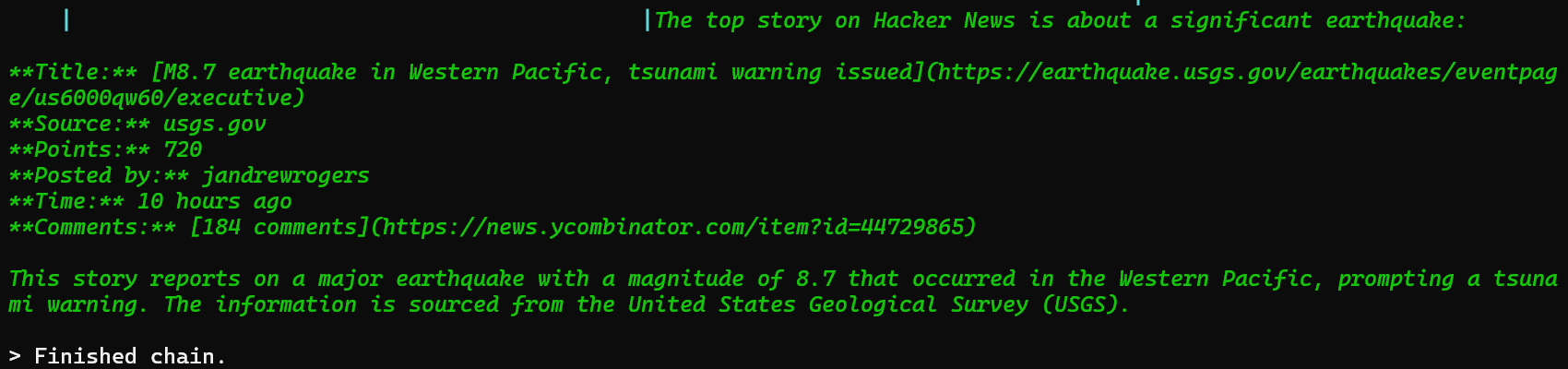
If everything is set up correctly, you should see the following once you run the script:
At the very end of the response, you can see that `OpenAI` extracted the top news story, parsed it and generated a human-readable summary by using data **retrieved** and **formatted** by `ScraperAPI`.
## Summary
While `OpenAI` handled the reasoning and summarized the contents, the real **MVP** here is `ScraperAPI`. Without reliable, uninterrupted access to the web, even the smartest LLMs are flying blind.
### We took care of:
* Navigating to the page selected by the LLM and bypassed any bot protection in place.
* Extracting the HTML from the target page.
* Converting the data in a clean, LLM-friendly format (Markdown).
This integration proves that LLMs are **only as good as the data they’re fed**, and `ScraperAPI` ensures your AI agents are fed accurate, correctly formatted and complete data.
## Additional Resources
* [Full Integration Tutorial with addtional examples and tips](https://www.scraperapi.com/integration-tutorials/langchain/)
* [GitHub Repository: `langchain-scraperapi`](https://github.com/scraperapi/langchain-scraperapi)
---
# Agent Instructions
This documentation is published with GitBook. GitBook is the documentation platform designed so that both humans and AI agents can read, navigate, and reason over technical content effectively. Learn more at gitbook.com.
## Querying This Documentation
If you need additional information that is not directly available in this page, you can query the documentation by asking a question.
Perform an HTTP GET request on the following URL with the `ask` and `goal` query parameters:
```
GET https://docs.scraperapi.com/integrations/llm-integrations/langchain-integration/ai-agent-integration.md?ask=&goal=
```
`ask` is the immediate question: it should be specific, self-contained, and written in natural language.
`goal` is what the user is ultimately trying to achieve, the reason they need the answer. Sharing it helps GitBook give you a better, more relevant answer. A goal is most helpful when it describes the outcome the user wants rather than restating the question. For example, with `ask=how do I create an API token`, a goal like `automate deployments from our CI pipeline` lets GitBook tailor the answer to that use case.
The response will contain a direct answer to the question and relevant excerpts and sources from the documentation.
Use this mechanism when the answer is not explicitly present in the current page, you need clarification or additional context, or you want to retrieve related documentation sections.