# Welcome

Using ScraperAPI is easy. Just send the URL you’d like to scrape to one of our APIs, along with your API key and we will return the HTML of that page right back to you.

All ScraperAPI requests must be authenticated with an API Key. Sign up to get one and include your unique API key with each request that you send to us.

{% hint style="info" %}
If you haven’t signed up for an account yet, then [**sign up for a free trial here with 5,000 free API credits**](https://dashboard.scraperapi.com/signup)!
{% endhint %}

You can use ScraperAPI to scrape web pages, API endpoints, images, documents, PDFs, or other files just as you would any other URL. **Note:** *there is a 50MB request size limit.*

There are **six ways** you can send requests (GET,POST) to ScraperAPI:

* Via our API endpoint `https://api.scraperapi.com`
* Via our Async API endpoint `https://async.scraperapi.com`
* Via our proxy port `http://scraperapi:APIKEY@proxy-server.scraperapi.com:8001`
* Via our Structured Data Endpoints `https://api.scraperapi.com/structured/`
* Via our DataPipeline service `https://datapipeline.scraperapi.com/api/projects`
* Via one of our [SDKs](/resources/sdks) *(only available for some programming languages)*
* Via our MCP Server - enable prompt-driven scraping by routing requests through [ScraperAPI’s MCP Server](/integrations/llm-integrations/mcp-server).

Choose the API that best fits your scraping needs.

{% hint style="warning" %}
**Important note:** regardless of how you invoke the service, we highly recommend you set a 70 seconds timeout in your application to get the best possible success rates, especially for some hard-to-scrape domains.
{% endhint %}

***

In addition to our scraping APIs, we provide scalable solutions like [DataPipeline](/data-pipeline/what-is-datapipeline) for managing bulk jobs and scheduled tasks. Our [Crawler](/scraperapi-crawler-v2.0/introduction) makes it easy to extract, follow and scrape URLs across a target domain and our [MCP Server](/integrations/llm-integrations/mcp-server) allows you to plug ScraperAPI directly into your LLM, making scraping as easy as writing a promt.

Speaking of LLMs, we also [integrate with LangChain](/integrations/llm-integrations/langchain-integration), giving AI agents the ability to browse web pages or pull Google and Amazon search results with just a few lines of code. For no-code and low-code workflows, you can also use our [community n8n node](/integrations/automation-and-workflow-integrations/n8n-integration) to connect ScraperAPI directly into your automations. Our [AI Parser](https://scraperapi.gitbook.io/ai-parser-closed-beta/) allows you to extract structured data from virtually any website using flexible, schema- based definitions.

These tools give you everything you need to scrape, scale and power your projects with reliable data.


# Overview

### Quick Links

[Sync APIs](/synchronous-apis/overview)

[Async API](/asynchronous-api/overview)

[SDKs](/resources/sdks)

[Control & Optimization](/control-and-optimization/supported-parameters)

[Responses & Formats](/responses-and-formats/api-status-codes)

[JavaScript Rendering](/javascript-rendering/overview)

[Structured Data Endpoint APIs](/structured-data-endpoints/overview)

[AI Parser](/ai-parser/overview-and-quickstart)

[DataPipeline](/data-pipeline/what-is-datapipeline)

[ScraperAPI Crawler](/scraperapi-crawler-v2.0/introduction)

[Integrations](/integrations/llm-integrations)

[Account Management](/account-management/dashboard-and-billing)

[Resources](/resources/sdks)

### Join Our Community

<table data-view="cards"><thead><tr><th align="center"></th><th data-hidden data-card-cover data-type="image">Cover image</th><th data-hidden data-card-target data-type="content-ref"></th></tr></thead><tbody><tr><td align="center">Reddit</td><td data-object-fit="contain"><a href="https://921583510-files.gitbook.io/~/files/v0/b/gitbook-x-prod.appspot.com/o/spaces%2FXJv4kz1e8RdAq9HrFwyo%2Fuploads%2FOOnZVHi3X8oPXEVSGqf1%2Fredditlogo2.png?alt=media&amp;token=93beb2ef-6933-4211-91db-307e33ac846b">redditlogo2.png</a></td><td><a href="https://www.reddit.com/user/ScraperAPI/">https://www.reddit.com/user/ScraperAPI/</a></td></tr><tr><td align="center">Discord</td><td data-object-fit="contain"><a href="https://921583510-files.gitbook.io/~/files/v0/b/gitbook-x-prod.appspot.com/o/spaces%2FXJv4kz1e8RdAq9HrFwyo%2Fuploads%2FyO72tlQxfoOSozG9kzo9%2Fdiscordlogo.png?alt=media&amp;token=379dcc30-f04d-4ddb-9e17-b04d308b1447">discordlogo.png</a></td><td><a href="https://scraperapi.com/discord">https://scraperapi.com/discord</a></td></tr><tr><td align="center">LinkedIn</td><td data-object-fit="contain"><a href="https://921583510-files.gitbook.io/~/files/v0/b/gitbook-x-prod.appspot.com/o/spaces%2FXJv4kz1e8RdAq9HrFwyo%2Fuploads%2FShK7mzTrkM1ytLzdpXX7%2FLinkedInlogo2.png?alt=media&amp;token=0ca1c20c-d6c1-4670-a281-e529ab855b83">LinkedInlogo2.png</a></td><td><a href="https://www.linkedin.com/company/scraperapi/">https://www.linkedin.com/company/scraperapi/</a></td></tr></tbody></table>

### Reach out to us

<table data-card-size="large" data-view="cards"><thead><tr><th></th><th></th><th data-hidden data-card-cover data-type="image">Cover image</th><th data-hidden data-card-target data-type="content-ref"></th></tr></thead><tbody><tr><td><strong>Contact Support</strong></td><td>Got a question, issue or just need help with your account? Reach out to us- we're here to help you every step of the way!</td><td data-object-fit="contain"><a href="https://921583510-files.gitbook.io/~/files/v0/b/gitbook-x-prod.appspot.com/o/spaces%2FXJv4kz1e8RdAq9HrFwyo%2Fuploads%2FxcuYJESOPJfYKowyWjWm%2Fsupportlogo.png?alt=media&amp;token=f7f3e75f-e521-43f2-8378-1538dcd2ccda">supportlogo.png</a></td><td><a href="https://dashboard.scraperapi.com/contact-support">https://dashboard.scraperapi.com/contact-support</a></td></tr><tr><td><strong>Contact Sales</strong></td><td>Have a question about the price or need a custom plan? Contact our sales to get more information.</td><td data-object-fit="contain"><a href="https://921583510-files.gitbook.io/~/files/v0/b/gitbook-x-prod.appspot.com/o/spaces%2FXJv4kz1e8RdAq9HrFwyo%2Fuploads%2FLhmgGmkwqp1S97gdG6Zs%2Fsaleslogo2.png?alt=media&amp;token=bf9f390b-a961-4114-8587-c0049d6d69a0">saleslogo2.png</a></td><td><a href="https://www.scraperapi.com/contact-sales/">https://www.scraperapi.com/contact-sales/</a></td></tr><tr><td><strong>Give us your Feedback</strong></td><td>Didn't find the answer you need? Let us know what you’d like us to cover. We’d love to hear your feedback on how we can get better.</td><td data-object-fit="contain"><a href="https://921583510-files.gitbook.io/~/files/v0/b/gitbook-x-prod.appspot.com/o/spaces%2FXJv4kz1e8RdAq9HrFwyo%2Fuploads%2Fr26FIGjSfpFeTP8KL5Lq%2Ffeedbacklogo2.png?alt=media&amp;token=d9d1a06b-9d11-4313-99c2-a671f1e5bfdb">feedbacklogo2.png</a></td><td><a href="https://dashboard.scraperapi.com/contact-support">https://dashboard.scraperapi.com/contact-support</a></td></tr></tbody></table>


# Quick Start

Get up and running with ScraperAPI in just a few minutes. Start by grabbing your API Key, then send your first request to begin scraping. Learn how requests consume credits, so you can plan your usage effectively.


# Grab your API Key

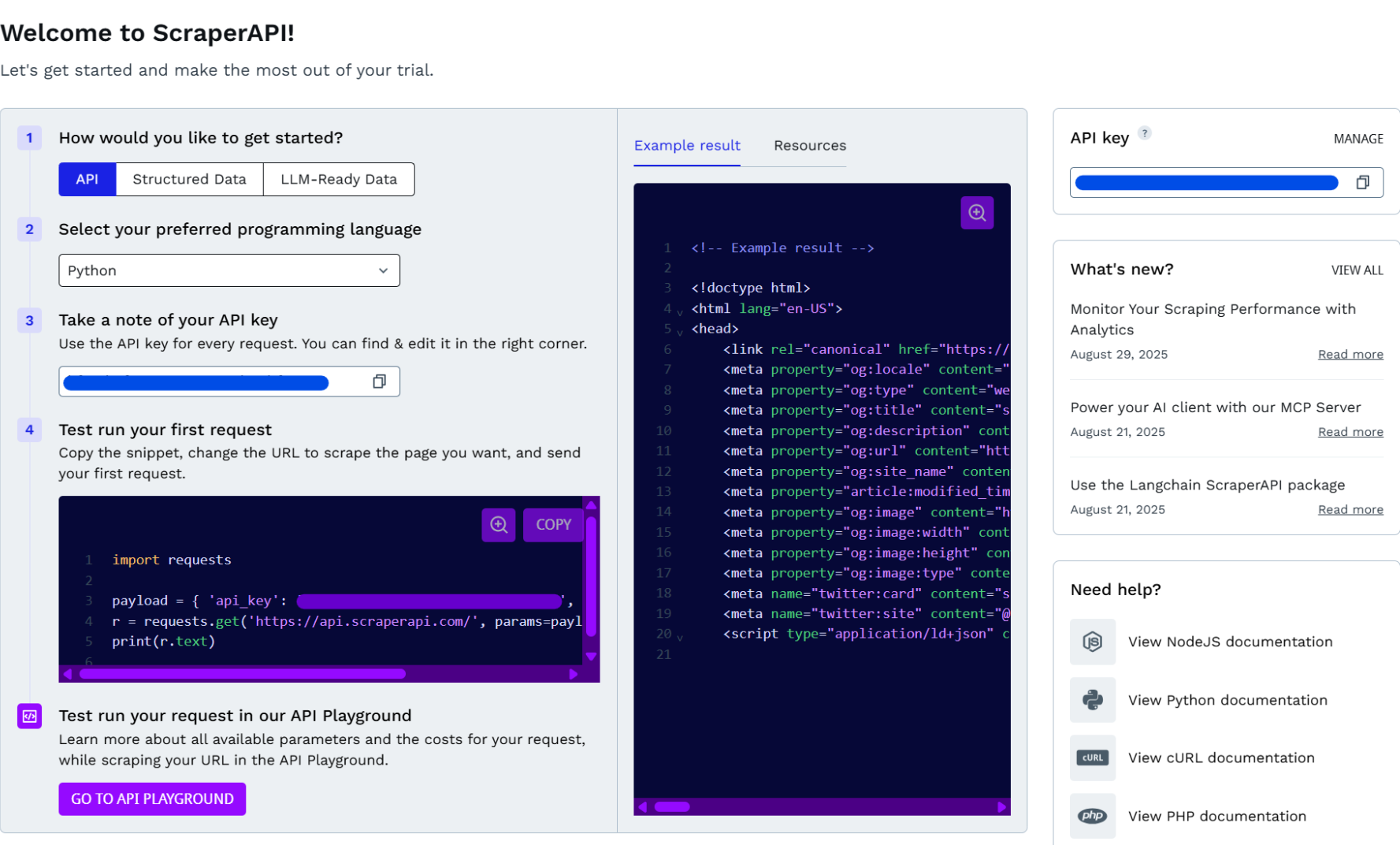
Once you register an account with us, head over to your Dashboard area, where you can grab your API Key from. You can find it in multiple places for easy access.

<figure><img src="https://921583510-files.gitbook.io/~/files/v0/b/gitbook-x-prod.appspot.com/o/spaces%2FXJv4kz1e8RdAq9HrFwyo%2Fuploads%2F43I6YKfecdJgs1aD2wQe%2Fimage.png?alt=media&amp;token=98354183-5ecd-487e-9dbe-12fa6baf6b01" alt=""><figcaption></figcaption></figure>

{% hint style="info" %}
If you haven’t signed up for an account yet, then [**sign up for a free trial here with 5,000 free API credits!**](https://dashboard.scraperapi.com/signup)
{% endhint %}

*We advise you keep your API key private and not share it publicly. If you suspect it's been compromised, you can regenerate it from the Dashboard area.*


# Send your First Request

Now that you've got your API Key, you are ready to start sending requests. Let's start off by sending a `GET` request to `https://api.scraperapi.com` with the following mandatory parameters:

* `api_key` - your API Key
* `url` - target URL

{% tabs %}
{% tab title="cURL" %}

```bash
curl --request GET \
--url 'https://api.scraperapi.com?api_key=API_KEY&url=https://www.example.com'
```

{% endtab %}

{% tab title="Python" %}

```python
import requests

#Target URL
target_url = 'https://www.example.com'
# ScraperAPI API Key
api_key = 'API_KEY'

request_url = f'https://api.scraperapi.com?api_key={api_key}&url={target_url}'
response = requests.get(request_url)

print(response.text)
```

{% endtab %}

{% tab title="NodeJS" %}

```javascript
import request from 'node-fetch';

//Replace the value for api_key with your actual API Key
const url = 'http://api.scraperapi.com/?api_key=API_KEY&url=https://example.com/';

request(url)
  .then(response => {
    console.log(response);
  })
  .catch(error => {
    console.error(error);
  });
```

{% endtab %}

{% tab title="PHP" %}

```php
<?php

//Replace the value for api_key with your actual API Key
$url = "http://api.scraperapi.com?api_key=API_KEY&url=https://example.com/";

$ch = curl_init();
curl_setopt($ch, CURLOPT_URL, $url);
curl_setopt($ch, CURLOPT_RETURNTRANSFER, true);
curl_setopt($ch, CURLOPT_HEADER, false);

$response = curl_exec($ch);

if (curl_errno($ch)) {
    echo 'Curl error: ' . curl_error($ch);
} else {
    print_r($response);
}

curl_close($ch);
```

{% endtab %}

{% tab title="Ruby" %}

```ruby
require 'net/http'
require 'json'

#Replace the value for api_key with your actual API Key
params = {
  api_key: "API_KEY",
  url: "https://www.example.com/"
}

uri = URI('https://api.scraperapi.com/')
uri.query = URI.encode_www_form(params)

website_content = Net::HTTP.get(uri)
print website_content
```

{% endtab %}

{% tab title="Java" %}

```java
import java.net.URI;
import java.net.http.HttpClient;
import java.net.http.HttpRequest;
import java.net.http.HttpResponse;

public class Main {
    public static void main(String[] args) throws Exception {
        //Replace the value for api_key with your actual API Key
        String apiKey = "API_KEY";
        String targetUrl = "https://www.example.com/";

        String scraperApiUrl = "https://api.scraperapi.com?api_key=" + apiKey + "&url=" + targetUrl;

        HttpClient client = HttpClient.newHttpClient();
        HttpRequest request = HttpRequest.newBuilder()
                .uri(URI.create(scraperApiUrl))
                .GET()
                .build();

        HttpResponse<String> response = client.send(request, HttpResponse.BodyHandlers.ofString());

        System.out.println(response.body());
    }
}
```

{% endtab %}
{% endtabs %}

After the API processes the request, it will return the HTML response for the target URL that you specify.

```json
<!doctype html>
<html>
<head>
//<---truncated for better readability--->
</head>
<body>
<div>
    <h1>Example Domain</h1>
    <p>This domain is for use in illustrative examples in documents. You may use this
    domain in literature without prior coordination or asking for permission.</p>
    <p><a href="https://www.iana.org/domains/example">More information...</a></p>
</div>
</body>
</html>
```

The example above demonstrates a basic request and just scratches the surface. ScraperAPI supports a list of parameters, that allow you to customize your requests: enable JS rendering, set geolocation, enable premium proxies and more. Refer to [this](/control-and-optimization/supported-parameters) section to find out more.


# Credits and Requests costs

Every time you make a request through ScraperAPI, you consume API Credits. The credits you have available are defined by the plan you are subscribed to. The amount of API Credits you consume depends on the domain and parameters used with your request.

### Domains

Some domains are more complex, so we’ve built custom scraping logic for them. Scraping these domains will incur a higher credit cost.

<table><thead><tr><th width="360">Category</th><th>Credit Cost per Request</th></tr></thead><tbody><tr><td><strong>Normal (flat) Requests</strong></td><td><code>1</code></td></tr><tr><td><strong>E-Commerce</strong><br>Amazon, Walmart, eBay</td><td><code>5</code></td></tr><tr><td><strong>SERP</strong><br>Google, Bing - (applies to all subdomains)</td><td><code>25</code></td></tr><tr><td><strong>Social Media</strong><br>LinkedIn</td><td><code>30</code></td></tr></tbody></table>

{% hint style="warning" %}
**Not sure what the scraping cost is? Use the** [**Domain Multiplier**](https://dashboard.scraperapi.com/home/domain-multiplier) **in your dashboard to look up the credit cost for any URL before you start scraping. We also recommend using our** [**API Playground**](https://dashboard.scraperapi.com/apiplayground) **to test your target URLs before running jobs at scale. It lets you verify the results and understand the actual credit usage for each request.**
{% endhint %}

If you are not a fan of **GUI**, you can call this API endpoint: <https://api.scraperapi.com/account/urlcost>

```bash
https://api.scraperapi.com/account/urlcost?api_key=API_KEY&url=https://www.wikipedia.org/&render=true
```

All ScraperAPI [parameters](/control-and-optimization/supported-parameters) are supported by the cost API endpoint, making it easy to understand the exact cost before applying them to your requests.

***

### Bot-Protected Domains

Scraping domains that have anti-bot protection systems in place requires the activation of a bypass mechanism, which is resource-intensive and increases the cost per scrape.

| Protection                      | Cost per Scrape |
| ------------------------------- | --------------- |
| **Cloudflare Bypass**           | `10`            |
| **Cloudflare Turnstile Bypass** | `10`            |
| **Datadome Bypass**             | `10`            |
| **PerimeterX/Human Bypass**     | `10`            |

{% hint style="info" %}
**We highly recommend using our** [**API Playground**](https://dashboard.scraperapi.com/apiplayground) **before scraping to understand what the cost per request will be - as domains may switch protection measures. You can also set limits on your API credit expenditure. To find out more, please visit** [**this**](/control-and-optimization/cost-control) **page.**
{% endhint %}

### Response Headers

The Response Headers returned for each request will contain the **`sa-credit-cost`** response header, which shows the API Credit cost of that request.

### Parameters

There are plenty of ScraperAPI parameters that you may have to use, depending on your use-case. Here's how they affect credit cost:\
\
**Extra Cost:**

* `premium=true` - 10 API Credits/req
* `render=true` - 10 API Credits/req
* `scrensshot=true` - 10 API Credits/req
* `ultra_premium=true` - 30 API Credits/req\*
* `premium=true + render=true` - 25 API Credits/req
* `ultra_premium=true + render=true` - 75 API Credits/req\*

**No Extra Cost:**

* `wait_for_selector=x`
* `country_code=x`
* `session_number=x`
* `device_type=x`
* `output_format=x`
* `keep_headers=true`
* `autoparse=true`

{% hint style="warning" %}
We only charge for successful requests (`200` and `404` status codes) and for requests that have been cancelled from your side before giving us enough time to finish them (70 seconds).
{% endhint %}

***Note:***

*- Items marked with asterisk (\*) are only available with our* [*Paid Plans*](https://www.scraperapi.com/pricing/)*.*

*- Accounts that have custom deal with discounted pricing, will have a higher credit cost per request for our Ultra Premium domains to meet our minimum pricing of $3 per one thousand requests without rendering and $7 with rendered pages.*


# Tutorials

Step-by-step guides for common scraping use cases. Each tutorial walks you through a real task end to end, from building the request to handling the results.

Choose a path:

* [**API Tutorials**](/getting-started/tutorials/api-tutorials) - build and run requests directly against the ScraperAPI endpoint, with copy-paste code in your language of choice.
* [**No-Code Tutorials**](/getting-started/tutorials/no-code-tutorials) - set up the same use cases visually with DataPipeline, no code required.


# API Tutorials


# Scrape Any URL

API Playground is ScraperAPI's request builder for testing and configuring scraping requests. In this tutorial, you will use the API Playground to scrape any URL. By the end, you will have working request code, with proxies and anti-bot challenges handled, so you can integrate web data into your application without building scraping infrastructure.

***

## Step 1: Build the request

Open the [**API Playground**](https://dashboard.scraperapi.com/apiplayground) from the left sidebar.

1. Select scraping method: **API**.
2. In the URL field, enter `https://quotes.toscrape.com/`.
3. Review the Summary panel on the right to understand the cost of the job before you run it.
4. Scroll down to the generated code and click **Try it**.

The Playground runs the request and shows the raw HTML response inline.

{% hint style="info" %}
Use the language dropdown to switch to Python, Node.js, PHP, Ruby, or Java. Click **Copy to clipboard** to run the request in your own terminal instead.
{% endhint %}

## Step 2: Additional options and filters

Use **Additional options & filters** to fine-tune your request. The Playground adds the relevant parameters to the generated code automatically.

* **Premium residential and mobile IPs** adds `premium=true`. Higher success rate on difficult sites, at a higher credit cost.
* **Advanced bypass mechanism** adds `ultra_premium=true`. For the most aggressively protected sites.
* **Javascript rendering** adds `render=true`. Use for pages that load content dynamically.
* **Country code** adds `country_code`. Targets a specific country's proxies so the response reflects what a local user would see.
* **Device type** adds `device_type=mobile` or `device_type=desktop`. Use mobile to receive the mobile version of a page.
* **Max Cost** sets a credit ceiling per request. The request fails rather than exceeding the limit you set.

{% hint style="info" %}
Some parameters increase the cost per request. Check the Summary panel before committing to a configuration at scale.
{% endhint %}

## Step 3: Submit a batch of URLs

For large URL lists, switch the scraping method to **Async** in the Playground. Instead of a single URL field, you get a text area that accepts multiple URLs, one per line. The generated request changes from a synchronous GET to an async batch job submission. Each URL in the batch gets its own job, and the response returns a `statusUrl` per job that you use to check progress.

Paste these URLs to try it:

```
https://quotes.toscrape.com/page/1/
https://quotes.toscrape.com/page/2/
https://quotes.toscrape.com/page/3/
```

## Step 4: Poll for results

Async jobs run in the background. Use the `statusUrl` from the batch response to check progress. When `status` is `finished`, the `response.body` field contains your scraped data.

***

{% hint style="info" %}
Prefer a no-code setup? [Scrape any URL with DataPipeline instead](/getting-started/tutorials/no-code-tutorials/any-url-no-code).
{% endhint %}

## More API tutorials

* [Track prices across Amazon and Walmart](/getting-started/tutorials/api-tutorials/track-prices-api)
* [Monitor unauthorized sellers and MAP violations](/getting-started/tutorials/api-tutorials/monitor-sellers-api)
* [Track daily keyword rankings](/getting-started/tutorials/api-tutorials/keyword-rankings-api)
* [Monitor Google Shopping prices](/getting-started/tutorials/api-tutorials/google-shopping-api)


# Track Prices

API Playground is ScraperAPI's request builder for testing and configuring scraping requests. In this tutorial, you will use the API Playground to monitor prices across Amazon and Walmart. By the end, you will have a scheduled batch job that returns structured JSON with pricing and availability for every product you monitor, so you can detect price changes and stock issues before they affect your margins.

***

## Step 1: Configure the Amazon product endpoint

Open the [**API Playground**](https://dashboard.scraperapi.com/apiplayground) from the left sidebar.

1. Select scraping method: **Structured Data Endpoints**.
2. In the endpoint dropdown, select **Amazon Product**.
3. Enter ASIN `B0BFC7WQ6R`. Set **Country code** to `us`.
4. Review the Summary panel on the right to understand the cost of the job before you run it.
5. Scroll down to the generated code and click **Try it**.

The Playground runs the request and shows the full structured response inline. Key fields include `name`, `pricing`, `list_price`, `availability_status`, `average_rating`, `total_reviews`, `feature_bullets`, `images`, `sold_by`, and per-star rating percentages.

{% hint style="info" %}
Use the language dropdown to switch to Python, Node.js, PHP, Ruby, or Java. Click **Copy to clipboard** to run the request in your own terminal instead.
{% endhint %}

## Step 2: Additional options and filters

Use **Additional options & filters** to fine-tune your request. The Playground adds the relevant parameters to the generated code automatically.

* **Country code** adds `country_code`. Targets a specific country's Amazon or Walmart results.
* **Domain** adds `domain`. Sets the Amazon domain (e.g. `co.uk`, `com.au`).
* **Output format** adds `output_format`. Returns results as `json` (default) or `csv`.
* **Activate retrying 404 responses** adds `retry_404`. Retries requests that return a 404 instead of treating them as final.

{% hint style="info" %}
Some parameters increase the cost per request. Check the Summary panel before committing to a configuration at scale.
{% endhint %}

## Step 3: Add Walmart

1. Back in the Playground, switch the endpoint dropdown to **Walmart product**.
2. Enter a Walmart product ID — for example `946796118`.
3. Click **Try it**.

Once you have reviewed both responses, you are ready to batch across your full product list.

## Step 4: Submit a batch

For a full product list across retailers, switch the scraping method to **Async** in the Playground. Paste your ASINs and product IDs as full structured endpoint URLs, one per line:

```
https://api.scraperapi.com/structured/amazon/product?asin=B0BFC7WQ6R&country=us
https://api.scraperapi.com/structured/amazon/product?asin=B09B8V1LZ3&country=us
https://api.scraperapi.com/structured/walmart/product?product_id=946796118
https://api.scraperapi.com/structured/walmart/product?product_id=741412707
```

The response returns an array, one object per URL, each with an `id` and a `statusUrl`.

## Step 5: Poll for results

Async jobs run in the background. Use the `statusUrl` from the batch response to check progress. When `status` is `finished`, the `response.body` field contains your scraped data.

```bash
for STATUS_URL in \
  "https://async.scraperapi.com/jobs/JOB_ID_1" \
  "https://async.scraperapi.com/jobs/JOB_ID_2"; do
  while true; do
    STATUS=$(curl -s "$STATUS_URL" | python3 -c "import sys,json; print(json.load(sys.stdin)['status'])")
    echo "$STATUS_URL: $STATUS"
    if [ "$STATUS" = "finished" ]; then break; fi
    sleep 5
  done
done
```

## Step 6: Deliver to cloud storage and skip polling

Instead of polling, configure a destination in your dashboard under **Destinations** and add a `callback` to your batch request. Results land in your bucket automatically when each job finishes.

```bash
curl -X POST "https://async.scraperapi.com/batchjobs" \
  -H "Content-Type: application/json" \
  -d '{
    "apiKey": "API_KEY",
    "urls": ["..."],
    "callback": {
      "type": "s3",
      "url": "my-destination-name"
    }
  }'
```

## Step 7: Schedule daily runs

To run your batch automatically on a recurring schedule, add it to your crontab. The example below runs every day at 6am.

```bash
0 6 * * * /usr/bin/curl -X POST "https://async.scraperapi.com/batchjobs" \
  -H "Content-Type: application/json" \
  -d '{"apiKey":"API_KEY","urls":[...],"callback":{"type":"s3","url":"my-destination-name"}}'
```

***

{% hint style="info" %}
Prefer a no-code setup? [Track prices with DataPipeline instead](/getting-started/tutorials/no-code-tutorials/track-prices-no-code).
{% endhint %}

## More API tutorials

* [Scrape any URL](/getting-started/tutorials/api-tutorials/any-url-api)
* [Monitor unauthorized sellers and MAP violations](/getting-started/tutorials/api-tutorials/monitor-sellers-api)
* [Track daily keyword rankings](/getting-started/tutorials/api-tutorials/keyword-rankings-api)
* [Monitor Google Shopping prices](/getting-started/tutorials/api-tutorials/google-shopping-api)


# Monitor Sellers

API Playground is ScraperAPI's request builder for testing and configuring scraping requests. In this tutorial, you will use the API Playground to monitor sellers and MAP violations across your Amazon catalog. By the end, you will have a daily batch job that flags unauthorized sellers and price violations across every listing, so you can protect brand pricing without an enforcement team.

***

## Step 1: Configure the Amazon Offers endpoint

Open the [**API Playground**](https://dashboard.scraperapi.com/apiplayground) from the left sidebar.

1. Select scraping method: **Structured Data Endpoints**.
2. In the endpoint dropdown, select **Amazon Offer**.
3. Enter ASIN `B0BFC7WQ6R`. Set **Country** to `us`.
4. Review the Summary panel on the right to understand the cost of the job before you run it.
5. Scroll down to the generated code and click **Try it**.

The Playground runs the request and shows the response inline. Each entry in the `listings` array includes `seller_name`, `price`, `shipping_price`, `condition`, `pinned_offer`, and `fullfilled_by_amazon`.

{% hint style="info" %}
Use the language dropdown to switch to Python, Node.js, PHP, Ruby, or Java. Click **Copy to clipboard** to run the request in your own terminal instead.
{% endhint %}

## Step 2: Additional options and filters

Use **Additional options & filters** to fine-tune your request. The Playground adds the relevant parameters to the generated code automatically.

* **Country code** adds `country_code`. Targets a specific Amazon marketplace — use `gb` for Amazon UK, `de` for Germany, and so on.
* **Domain** adds `domain`. Sets the Amazon domain (e.g. `co.uk`, `com.au`).
* **Output format** adds `output_format`. Returns results as `json` (default) or `csv`.
* **Condition** adds `condition`. Filters offers by item condition (e.g. new, used).
* **Activate retrying 404 responses** adds `retry_404`. Retries requests that return a 404 instead of treating them as final.

{% hint style="info" %}
Some parameters increase the cost per request. Check the Summary panel before committing to a configuration at scale.
{% endhint %}

## Step 3: Prepare your reference files

**authorized\_sellers.txt** — one seller name per line:

```
Official Brand Store
Authorized Distributor West
Brand Direct
```

**map\_prices.csv** — ASIN and minimum advertised price:

```
B0BFC7WQ6R,24.99
B08KHL5KKL,49.99
B086B88TGR,14.99
```

## Step 4: Submit a batch across your catalog

Switch the scraping method to **Async** in the Playground and paste your ASINs as full structured endpoint URLs, one per line:

```
https://api.scraperapi.com/structured/amazon/offers?asin=B0BFC7WQ6R&country=us
https://api.scraperapi.com/structured/amazon/offers?asin=B08KHL5KKL&country=us
https://api.scraperapi.com/structured/amazon/offers?asin=B086B88TGR&country=us
```

## Step 5: Poll for results

Async jobs run in the background. Use the `statusUrl` from the batch response to check progress. When `status` is `finished`, read `response.body` from each job result. Compare `seller_name` against `authorized_sellers.txt` and `price` against `map_prices.csv`. Flag any seller not on the allowlist, and any price below the MAP threshold.

```bash
STATUS_URL="https://async.scraperapi.com/jobs/YOUR_JOB_ID"

while true; do
  STATUS=$(curl -s "$STATUS_URL" | python3 -c "import sys,json; print(json.load(sys.stdin)['status'])")
  echo "Status: $STATUS"
  if [ "$STATUS" = "finished" ]; then break; fi
  sleep 10
done
```

## Step 6: Deliver to cloud storage and skip polling

Instead of polling, configure a destination in your dashboard under **Destinations** and add a `callback` to your batch request. Results land in your bucket automatically when each job finishes — ready for your violation check script to process.

```bash
curl -X POST "https://async.scraperapi.com/batchjobs" \
  -H "Content-Type: application/json" \
  -d '{
    "apiKey": "API_KEY",
    "urls": ["..."],
    "callback": {
      "type": "s3",
      "url": "my-destination-name"
    }
  }'
```

## Step 7: Schedule daily

To run your batch automatically on a recurring schedule, add it to your crontab. The example below runs every day at 6am.

```bash
0 6 * * * /usr/bin/bash /path/to/monitor_sellers.sh >> /var/log/seller_monitor.log 2>&1
```

***

{% hint style="info" %}
Prefer a no-code setup? [Monitor sellers with DataPipeline instead](/getting-started/tutorials/no-code-tutorials/monitor-sellers-no-code).
{% endhint %}

## More API tutorials

* [Scrape any URL](/getting-started/tutorials/api-tutorials/any-url-api)
* [Track prices across Amazon and Walmart](/getting-started/tutorials/api-tutorials/track-prices-api)
* [Track daily keyword rankings](/getting-started/tutorials/api-tutorials/keyword-rankings-api)
* [Monitor Google Shopping prices](/getting-started/tutorials/api-tutorials/google-shopping-api)


# Keyword Rankings

API Playground is ScraperAPI's request builder for testing and configuring scraping requests. In this tutorial, you will use the API Playground to track Google Search rankings for any keyword list. By the end, you will have daily SERP snapshots with rank, SERP features, and metadata for every keyword you monitor, so you can catch rank drops and competitor moves in your own data pipeline.

***

## Step 1: Configure the Google Search endpoint

Open the [**API Playground**](https://dashboard.scraperapi.com/apiplayground) from the left sidebar.

1. Select scraping method: **Structured Data Endpoints**.
2. In the endpoint dropdown, select **Google Search**.
3. Enter query `best running shoes`. Set **Country code** to `us`.
4. Review the Summary panel on the right to understand the cost of the job before you run it.
5. Scroll down to the generated code and click **Try it**.

The Playground runs the request and shows the response inline. Each entry in `organic_results` includes `position`, `title`, `link`, `snippet`, and `displayed_link`. The response also includes `related_questions`, `related_searches`, and `pagination` for deeper keyword analysis.

{% hint style="info" %}
Use the language dropdown to switch to Python, Node.js, PHP, Ruby, or Java. Click **Copy to clipboard** to run the request in your own terminal instead.
{% endhint %}

## Step 2: Additional options and filters

Use **Additional options & filters** to fine-tune your request. The Playground adds the relevant parameters to the generated code automatically.

* **Country code** adds `country_code`. Targets a specific country's Google Search results.
* **Domain** adds `domain`. Sets the Google domain to search (e.g. `co.uk`, `com.au`).
* **Time based search** adds `time_period`. Filters results by recency — past 24 hours, past week, past month, or past year.
* **Output format** adds `output_format`. Returns results as `json` (default) or `markdown` for LLM pipelines.
* **UULE** adds `uule`. Encodes a specific city for local search results. Generate a UULE value using a UULE encoder tool.
* **Number of results** adds `num`. Sets how many organic results to return per page.
* **Additional parameters** adds any other supported ScraperAPI parameters, separated by `&`.

{% hint style="info" %}
Some parameters increase the cost per request. Check the Summary panel before committing to a configuration at scale.
{% endhint %}

## Step 3: Save snapshots with date prefixes

To track rankings over time, save each response as a dated file. This lets you load any two dates and diff the `organic_results` array by `position`.

```bash
curl "https://api.scraperapi.com/structured/google/search?api_key=API_KEY&query=best+running+shoes&country_code=us" \
  -o "snapshots/$(date +%Y-%m-%d)_best-running-shoes_us.json"
```

## Step 4: Batch across keywords and locations

Switch the scraping method to **Async** in the Playground and paste your queries as full structured endpoint URLs, one per line:

```
https://api.scraperapi.com/structured/google/search?query=best+running+shoes&country_code=us
https://api.scraperapi.com/structured/google/search?query=best+running+shoes&country_code=gb
https://api.scraperapi.com/structured/google/search?query=keyword+research+tool&country_code=us
https://api.scraperapi.com/structured/google/search?query=keyword+research+tool&country_code=au
```

The response returns a `statusUrl` per job that you can use to track progress.

## Step 5: Schedule daily snapshots

To run your batch automatically on a recurring schedule, add it to your crontab. The example below runs every day at 6am.

```bash
0 6 * * * /usr/bin/bash /path/to/submit_serp_batch.sh >> /var/log/serp_tracker.log 2>&1
```

***

{% hint style="info" %}
Prefer a no-code setup? [Track keyword rankings with DataPipeline instead](/getting-started/tutorials/no-code-tutorials/keyword-rankings-no-code).
{% endhint %}

## More API tutorials

* [Scrape any URL](/getting-started/tutorials/api-tutorials/any-url-api)
* [Track prices across Amazon and Walmart](/getting-started/tutorials/api-tutorials/track-prices-api)
* [Monitor unauthorized sellers and MAP violations](/getting-started/tutorials/api-tutorials/monitor-sellers-api)
* [Monitor Google Shopping prices](/getting-started/tutorials/api-tutorials/google-shopping-api)


# Google Shopping

API Playground is ScraperAPI's request builder for testing and configuring scraping requests. In this tutorial, you will use the API Playground to monitor Google Shopping prices for any query list. By the end, you will have shopping results with price, retailer, and delivery options for every query you track, so you can spot pricing shifts and new entrants before they affect your positioning.

***

## Step 1: Configure the Google Shopping endpoint

Open the [**API Playground**](https://dashboard.scraperapi.com/apiplayground) from the left sidebar.

1. Select scraping method: **Structured Data Endpoints**.
2. In the endpoint dropdown, select **Google Shopping**.
3. Enter query `running shoes`. Set **Country code** to `us`.
4. Review the Summary panel on the right to understand the cost of the job before you run it.
5. Scroll down to the generated code and click **Try it**.

The Playground runs the request and shows the response inline. Each entry in `shopping_results` includes `position`, `title`, `price`, `extracted_price`, `source`, and `delivery_options`. Use `extracted_price` for numeric comparisons — `price` is a formatted string.

{% hint style="info" %}
Use the language dropdown to switch to Python, Node.js, PHP, Ruby, or Java. Click **Copy to clipboard** to run the request in your own terminal instead.
{% endhint %}

## Step 2: Additional options and filters

Use **Additional options & filters** to fine-tune your request. The Playground adds the relevant parameters to the generated code automatically.

* **Country code** adds `country_code`. Targets a specific country's Google Shopping results.
* **Domain** adds `domain`. Sets the Google domain to search (e.g. `co.uk`, `com.au`).
* **Output format** adds `output_format`. Returns results as `json` (default) or `csv`.
* **UULE** adds `uule`. Encodes a specific city for local search results. Generate a UULE value using a UULE encoder tool.
* **Number of results** adds `num`. Sets how many shopping results to return per page.

{% hint style="info" %}
Some parameters increase the cost per request. Check the Summary panel before committing to a configuration at scale.
{% endhint %}

## Step 3: Batch across queries and markets

Switch the scraping method to **Async** in the Playground and paste your queries as full structured endpoint URLs, one per line:

```
https://api.scraperapi.com/structured/google/shopping?query=running+shoes&country_code=us
https://api.scraperapi.com/structured/google/shopping?query=running+shoes&country_code=gb
https://api.scraperapi.com/structured/google/shopping?query=trail+running+shoes&country_code=us
https://api.scraperapi.com/structured/google/shopping?query=trail+running+shoes&country_code=gb
```

The response returns a `statusUrl` per job that you can use to track progress.

## Step 4: Poll for results

Async jobs run in the background. Use the `statusUrl` from the batch response to check progress. When `status` is `finished`, the `response.body` field contains your scraped data.

```bash
for STATUS_URL in \
  "https://async.scraperapi.com/jobs/JOB_ID_1" \
  "https://async.scraperapi.com/jobs/JOB_ID_2"; do
  while true; do
    STATUS=$(curl -s "$STATUS_URL" | python3 -c "import sys,json; print(json.load(sys.stdin)['status'])")
    echo "$STATUS_URL: $STATUS"
    if [ "$STATUS" = "finished" ]; then break; fi
    sleep 5
  done
done
```

## Step 5: Schedule daily runs

To run your batch automatically on a recurring schedule, add it to your crontab. The example below runs every day at 6am.

```bash
0 6 * * * /usr/bin/bash /path/to/submit_shopping_batch.sh >> /var/log/shopping_monitor.log 2>&1
```

***

{% hint style="info" %}
Prefer a no-code setup? [Monitor Google Shopping prices with DataPipeline instead](/getting-started/tutorials/no-code-tutorials/google-shopping-no-code).
{% endhint %}

## More API tutorials

* [Scrape any URL](/getting-started/tutorials/api-tutorials/any-url-api)
* [Track prices across Amazon and Walmart](/getting-started/tutorials/api-tutorials/track-prices-api)
* [Monitor unauthorized sellers and MAP violations](/getting-started/tutorials/api-tutorials/monitor-sellers-api)
* [Track daily keyword rankings](/getting-started/tutorials/api-tutorials/keyword-rankings-api)


# No-Code Tutorials


# Scrape Any URL

DataPipeline is ScraperAPI's no-code dashboard for scheduled scraping. In this tutorial, you will use DataPipeline to scrape any URL list on a recurring schedule. By the end, you will have a working scraper for any URL list, with proxies and anti-bot challenges handled automatically, so you can ship data features instead of writing maintenance code.

***

## Step 1: Create the project

Click [**DataPipeline**](https://dashboard.scraperapi.com/projects) in the left sidebar.

1. Select **New project**.
2. Select **Extract data from arbitrary websites** at the top of the tile grid.

## Step 2: Configure input settings

Under **Input settings**, choose **List** and enter your URLs, one per line:

```
https://quotes.toscrape.com/page/1/
https://quotes.toscrape.com/page/2/
https://quotes.toscrape.com/page/3/
```

For larger URL lists, switch to **Upload file** and upload a `.txt` or `.csv` file with one URL per row (up to 100,000).

## Step 3: Configure output settings

Under **Output settings**, choose **Download**. Results will be available in the dashboard when the job completes. For larger setups, you can enter a **Webhook URL** to have results posted to your server automatically.

## Step 4: Set scraping frequency

Under **Scraping frequency**, select **Just scrape once**. To run on a recurring schedule, switch this to **Daily**, **Weekly**, or another interval. Recurring schedules require a paid plan.

## Step 5: Review and start

Click **Review & start scraping**. The Job summary panel shows the estimated credit cost before you confirm.

## Step 6: Review results

Click into the project after the run completes and click **Download results**. Results are retained for 30 days.

***

## Additional options

Under **Additional options & filters** you can fine-tune your requests:

* **Activate premium residential and mobile IPs**: routes requests through residential or mobile proxies to reduce blocks on harder targets.
* **Activate advanced bypass mechanism**: enables additional anti-bot evasion for sites with aggressive detection.
* **Disable follow redirects**: stops the scraper from following HTTP redirects, returning the redirect response directly.
* **Activate javascript rendering**: runs the page in a full browser to capture content loaded dynamically by JavaScript.
* **Generate screenshot**: captures a screenshot of the rendered page alongside the HTML response.
* **Activate retrying 404 responses**: retries requests that return a 404 instead of treating them as final.
* **Country code**: targets a specific country's proxies so the response reflects what a local user would see.
* **Device type**: returns the desktop or mobile version of the page.

{% hint style="info" %}
Some parameters increase the cost per request. Check the Cost per Job panel before committing to a configuration at scale.
{% endhint %}

***

{% hint style="info" %}
Prefer to set this up in your own codebase? [Try the API playground instead](/getting-started/tutorials/api-tutorials/any-url-api).
{% endhint %}

## More tutorials

* [Track prices across Amazon and Walmart](/getting-started/tutorials/no-code-tutorials/track-prices-no-code)
* [Monitor unauthorized sellers and MAP violations](/getting-started/tutorials/no-code-tutorials/monitor-sellers-no-code)
* [Track daily keyword rankings](/getting-started/tutorials/no-code-tutorials/keyword-rankings-no-code)
* [Monitor Google Shopping prices](/getting-started/tutorials/no-code-tutorials/google-shopping-no-code)


# Track Prices

DataPipeline is ScraperAPI's no-code dashboard for scheduled scraping. In this tutorial, you will use DataPipeline to monitor prices across Amazon and Walmart on a recurring schedule. By the end, you will have structured JSON with pricing, availability, and offers for every product you monitor, refreshed on your schedule, so you can spot price changes and stock issues before they hit your margins.

***

## Step 1: Create the Amazon project

Click [**DataPipeline**](https://dashboard.scraperapi.com/projects) in the left sidebar.

1. Select **New project**.
2. Select **Amazon product pages**.

## Step 2: Configure input settings

Under **Input settings**, choose **List** and enter your ASINs, one per line:

```
B0BFC7WQ6R
B09B8V1LZ3
```

For larger catalogs, switch to **Upload file** and upload a CSV with one ASIN per row.

## Step 3: Configure output settings

Under **Output settings**, choose **Download**. Results will be available in the dashboard when the job completes. For larger setups, you can enter a **Webhook URL** to have results posted to your server automatically.

## Step 4: Set scraping frequency

Under **Scraping frequency**, select **Just scrape once**. To monitor prices on a recurring basis, switch this to **Daily**, **Weekly**, or another interval. Recurring schedules require a paid plan.

## Step 5: Review and start

Click **Review & start scraping**. The Job summary panel shows the estimated credit cost before you confirm.

## Step 6: Create the Walmart project

Repeat the same steps for Walmart:

1. Click **New project** and select **Walmart product**.
2. Under **Input settings**, choose **List** and enter your Walmart product IDs, one per line:

   ```
   946796118
   741412707
   ```
3. Under **Output settings**, choose **Download**.
4. Under **Scraping frequency**, select **Just scrape once**.
5. Click **Review & start scraping**.

## Step 7: Review results

Click into each project after the run completes and click **Download results**. Results are retained for 30 days.

Compare against your price thresholds to flag changes.

***

## Additional options

Under **Additional options & filters** you can fine-tune your requests:

* **Country code**: targets a specific country's Amazon or Walmart results.
* **Domain**: sets the Amazon domain to search (e.g. `co.uk`, `com.au`).
* **Activate retrying 404 responses**: retries requests that return a 404 instead of treating them as final.

{% hint style="info" %}
Some parameters increase the cost per request. Check the Cost per Job panel before committing to a configuration at scale.
{% endhint %}

***

{% hint style="info" %}
Prefer to set this up in your own codebase? [Try the API playground instead](/getting-started/tutorials/api-tutorials/track-prices-api).
{% endhint %}

## More tutorials

* [Scrape any URL](/getting-started/tutorials/no-code-tutorials/any-url-no-code)
* [Monitor unauthorized sellers and MAP violations](/getting-started/tutorials/no-code-tutorials/monitor-sellers-no-code)
* [Track daily keyword rankings](/getting-started/tutorials/no-code-tutorials/keyword-rankings-no-code)
* [Monitor Google Shopping prices](/getting-started/tutorials/no-code-tutorials/google-shopping-no-code)


# Monitor Sellers

DataPipeline is ScraperAPI's no-code dashboard for scheduled scraping. In this tutorial, you will use DataPipeline to track seller activity and MAP violations across your Amazon catalog. By the end, you will have a daily feed of every seller on every listing, so you can identify unauthorized sellers and price violations before they affect your margins.

***

## Step 1: Create the project

Click [**DataPipeline**](https://dashboard.scraperapi.com/projects) in the left sidebar.

1. Select **New Project.**
2. Select **Amazon offers**.

## Step 2: Configure input settings

Under **Input settings**, choose **List** and enter your ASINs, one per line:

```
B0BFC7WQ6R
B08KHL5KKL
B086B88TGR
```

For larger catalogs, switch to **Upload file** and upload a CSV with one ASIN per row.

## Step 3: Configure output settings

Under **Output settings**, choose **Download**. Results will be available in the dashboard when the job completes. For automated violation detection, enter a **Webhook URL** instead so results are posted to your server as they arrive.

## Step 4: Set scraping frequency

Under **Scraping frequency**, select **Just scrape once**. To monitor sellers on a recurring basis, switch this to **Daily**, **Weekly**, or another interval. Recurring schedules require a paid plan.

## Step 5: Review and start

Click **Review & start scraping**. The Job summary panel shows the estimated credit cost before you confirm.

## Step 6: Review results

Click into the project after the run completes and click **Download results**. Results are retained for 30 days.

Compare `seller_name` against your authorized-sellers list and `price` against your MAP thresholds to flag violations.

{% hint style="info" %}
Amazon offers and Amazon product pages are separate project types. If you want both offer-level and product-level data, create two separate projects and correlate them by ASIN.
{% endhint %}

***

## Additional options

Under **Additional options & filters** you can fine-tune your requests:

* **Country code**: targets a specific country's Amazon marketplace.
* **Domain**: sets the Amazon domain to search (e.g. `co.uk`, `com.au`).
* **Condition**: filters offers by item condition (e.g. new, used).
* **Activate retrying 404 responses**: retries requests that return a 404 instead of treating them as final.

{% hint style="info" %}
Some parameters increase the cost per request. Check the Cost per Job panel before committing to a configuration at scale.
{% endhint %}

***

{% hint style="info" %}
Prefer to set this up in your own codebase? [Try the API playground instead](/getting-started/tutorials/api-tutorials/monitor-sellers-api).
{% endhint %}

## More tutorials

* [Scrape any URL](/getting-started/tutorials/no-code-tutorials/any-url-no-code)
* [Track prices across Amazon and Walmart](/getting-started/tutorials/no-code-tutorials/track-prices-no-code)
* [Track daily keyword rankings](/getting-started/tutorials/no-code-tutorials/keyword-rankings-no-code)
* [Monitor Google Shopping prices](/getting-started/tutorials/no-code-tutorials/google-shopping-no-code)


# Keyword Rankings

DataPipeline is ScraperAPI's no-code dashboard for scheduled scraping. In this tutorial, you will use DataPipeline to track Google Search rankings for any keyword list. By the end, you will have daily SERP snapshots with rank, SERP features, and metadata for every keyword you monitor, so you can catch rank drops and competitor moves without juggling tools or flaky scrapers.

***

## Step 1: Create the project

Click [**DataPipeline**](https://dashboard.scraperapi.com/projects) in the left sidebar.

1. Select **New project**.
2. Select the **Google search** tile.

## Step 2: Configure input settings

Under **Input settings**, choose **List** and enter your keywords, one per line:

```
best running shoes
best running shoes for beginners
best running shoes men
best running shoes women
```

For larger keyword lists, switch to **Upload file** and upload a CSV with one keyword per row.

## Step 3: Configure output settings

Under **Output settings**, choose **Download**. Results will be available in the dashboard when the job completes. For automated pipelines, enter a **Webhook URL** instead so results are posted to your server as they arrive.

JSON gives you the full structured response including all SERP features. CSV flattens each result to a row — `position`, `title`, `link`, and `snippet` become columns, and nested fields like `related_questions` are retained as JSON-encoded strings in their own column.

## Step 4: Set scraping frequency

Under **Scraping frequency**, select **Just scrape once**. To track rankings on a recurring basis, switch this to **Daily**, **Weekly**, or another interval. Recurring schedules require a paid plan.

## Step 5: Review and start

Click **Review & start scraping**. The Job summary panel shows the estimated credit cost before you confirm.

## Step 6: Review results

Click into the project after the run completes and click **Download results**. Results are retained for 30 days.

Each keyword produces a set of rows with `position`, `title`, `link`, and `snippet`. Compare result sets across dates to spot ranking changes.

## Additional options

Under **Additional options & filters** you can fine-tune your requests:

* **Country code**: targets a specific country's Google Search results.
* **Domain**: sets the Google domain to search (e.g. `co.uk`, `com.au`).
* **Time based search**: filters results by recency — past 24 hours, past week, past month, or past year.
* **UULE**: encodes a specific city for local search results.
* **Number of results**: sets how many organic results to return per page.
* **Additional parameters**: pass any additional supported ScraperAPI parameters, separated by `&`.

{% hint style="info" %}
Some parameters increase the cost per request. Check the Cost per Job panel before committing to a configuration at scale.
{% endhint %}

***

{% hint style="info" %}
Prefer to set this up in your own codebase? [Try the API playground instead](/getting-started/tutorials/api-tutorials/keyword-rankings-api).
{% endhint %}

## More tutorials

* [Scrape any URL](/getting-started/tutorials/no-code-tutorials/any-url-no-code)
* [Track prices across Amazon and Walmart](/getting-started/tutorials/no-code-tutorials/track-prices-no-code)
* [Monitor unauthorized sellers and MAP violations](/getting-started/tutorials/no-code-tutorials/monitor-sellers-no-code)
* [Monitor Google Shopping prices](/getting-started/tutorials/no-code-tutorials/google-shopping-no-code)


# Google Shopping

DataPipeline is ScraperAPI's no-code dashboard for scheduled scraping. In this tutorial, you will use DataPipeline to monitor Google Shopping prices for any query list. By the end, you will have shopping results with price, retailer, and delivery options for every query you track, refreshed on your schedule, so you can spot pricing shifts and new entrants before they affect your positioning.

***

## Step 1: Create the project

Click [**DataPipeline**](https://dashboard.scraperapi.com/projects) in the left sidebar.

1. Select **New project**.
2. Select the **Google shopping** tile.

## Step 2: Configure input settings

Under **Input settings**, choose **List** and enter your search queries, one per line:

```
running shoes
running shoes men
running shoes women
trail running shoes
```

For larger query lists, switch to **Upload file** and upload a CSV with one query per row.

## Step 3: Configure output settings

Under **Output settings**, choose **Download**. Results will be available in the dashboard when the job completes. For automated pipelines, enter a **Webhook URL** instead so results are posted to your server as they arrive.

JSON gives you the full structured response including delivery options and badges. CSV flattens each result to a row — `position`, `title`, `price`, `source`, and `extracted_price` become columns.

## Step 4: Set scraping frequency

Under **Scraping frequency**, select **Just scrape once**. To monitor prices on a recurring basis, switch this to **Daily**, **Weekly**, or another interval. Recurring schedules require a paid plan.

## Step 5: Review and start

Click **Review & start scraping**. The Job summary panel shows the estimated credit cost before you confirm.

## Step 6: Review results

Click into the project after the run completes and click **Download results**. Results are retained for 30 days.

Each query produces a set of rows with `position`, `title`, `price`, `extracted_price`, and `source`. Compare `extracted_price` across runs to spot price movements by retailer.

***

## Additional options

Under **Additional options & filters** you can fine-tune your requests:

* **Country code**: targets a specific country's Google Shopping results.
* **Domain**: sets the Google domain to search (e.g. `co.uk`, `com.au`).
* **UULE**: encodes a specific city for local search results.
* **Number of results**: sets how many shopping results to return per page.

{% hint style="info" %}
Some parameters increase the cost per request. Check the Cost per Job panel before committing to a configuration at scale.
{% endhint %}

***

{% hint style="info" %}
Prefer to set this up in your own codebase? [Try the API playground instead](/getting-started/tutorials/api-tutorials/google-shopping-api).
{% endhint %}

## More tutorials

* [Scrape any URL](/getting-started/tutorials/no-code-tutorials/any-url-no-code)
* [Track prices across Amazon and Walmart](/getting-started/tutorials/no-code-tutorials/track-prices-no-code)
* [Monitor unauthorized sellers and MAP violations](/getting-started/tutorials/no-code-tutorials/monitor-sellers-no-code)
* [Track daily keyword rankings](/getting-started/tutorials/no-code-tutorials/keyword-rankings-no-code)


# Overview

When you route requests through our Synchronous API `https://api.scraperapi.com` we will return the raw HTML output of the target URL. This method is **simple**, **fast** and works seamlessly with any HTTP client.

### Highlights

* **Quick response** - results are typically returned within seconds, but complex domains can take as long as **60 seconds**.
* **Seamless integration** - works with any HTTP client or library.
* **Workflow friendly** – fits naturally into pipelines or apps where data is consumed in real time.
* **Easy to debug** - test and adjust parameters within seconds.

### Constraints

* 50MB max response size.
* 70-second recommended timeout.

### Costs

* Normal (flat) requests typically cost 1 API credit. Additional costs may apply in some cases, such as when extra parameters are enabled or certain domains are scraped. You can learn more about costs [here](/getting-started/quick-start/credits-and-requests-costs).
* **Cost Control** - You can use the `max_cost` parameter to cap how many API Credits a request may consume. If the cost exceeds the specified limit, the API will return a `403 error`.


# Using the API Endpoint

Making a request to the **Sync API** is straightforward. You send a request, and we take care of proxies, browsers, CAPTCHAs, and protections in the background.

{% stepper %}
{% step %}

### Base URL

```bash
https://api.scraperapi.com
```

{% endstep %}

{% step %}

### Required query parameters

* `api_key` - your API Key
* `url` - target URL
  {% endstep %}

{% step %}

### Sample Request

{% tabs %}
{% tab title="cURL" %}

```bash
curl --request GET \
--url 'https://api.scraperapi.com?api_key=API_KEY&url=https://www.example.com'
```

{% endtab %}

{% tab title="Python" %}

```python
import requests

#Target URL
target_url = 'https://www.example.com'
# ScraperAPI API Key
api_key = 'API_KEY'

request_url = f'https://api.scraperapi.com?api_key={api_key}&url={target_url}'
response = requests.get(request_url)

print(response.text)
```

{% endtab %}

{% tab title="NodeJS" %}

```javascript
import request from 'node-fetch';

//Replace the value for api_key with your actual API Key
const url = 'http://api.scraperapi.com/?api_key=API_KEY&url=https://example.com/';

request(url)
  .then(response => {
    console.log(response);
  })
  .catch(error => {
    console.error(error);
  });
```

{% endtab %}

{% tab title="PHP" %}

```php
<?php

//Replace the value for api_key with your actual API Key
$url = "http://api.scraperapi.com?api_key=API_KEY&url=https://example.com/";

$ch = curl_init();
curl_setopt($ch, CURLOPT_URL, $url);
curl_setopt($ch, CURLOPT_RETURNTRANSFER, true);
curl_setopt($ch, CURLOPT_HEADER, false);

$response = curl_exec($ch);

if (curl_errno($ch)) {
    echo 'Curl error: ' . curl_error($ch);
} else {
    print_r($response);
}

curl_close($ch);
```

{% endtab %}

{% tab title="Ruby" %}

```ruby
require 'net/http'

#Replace the value for api_key with your actual API Key
params = {
  api_key: "API_KEY",
  url: "https://www.example.com/"
}

uri = URI('https://api.scraperapi.com/')
uri.query = URI.encode_www_form(params)

website_content = Net::HTTP.get(uri)
puts website_content
```

{% endtab %}

{% tab title="Java" %}

```java
import java.net.URI;
import java.net.http.HttpClient;
import java.net.http.HttpRequest;
import java.net.http.HttpResponse;

public class Main {
    public static void main(String[] args) throws Exception {
        //Replace the value for api_key with your actual API Key
        String apiKey = "API_KEY";
        String targetUrl = "https://www.example.com/";

        String scraperApiUrl = "https://api.scraperapi.com?api_key=" + apiKey + "&url=" + targetUrl;

        HttpClient client = HttpClient.newHttpClient();
        HttpRequest request = HttpRequest.newBuilder()
                .uri(URI.create(scraperApiUrl))
                .GET()
                .build();

        HttpResponse<String> response = client.send(request, HttpResponse.BodyHandlers.ofString());

        System.out.println(response.body());
    }
}
```

{% endtab %}
{% endtabs %}
{% endstep %}
{% endstepper %}

### Optional Parameters

Sometimes sending normal (flat) requests is not enough, either because the domain is geo-locked to a specific region, it requires JavaScript rendering or it employs stronger bot protection. In those cases, you can add extra ScraperAPI parameters to your requests to ensure you get the data you need. Here are some common examples:

* `render=true` - enables JavaScript Rendering with the request.
* `country_code=us` - get results from a specific region. For the complete list of supported countries, visit [this](/control-and-optimization/geotargeting/standard-geo) page.
* `premium=true` - instructs the API to use high-quality residential proxies.
* `session_number=123` - keep reusing the same IP across multiple requests. Sessions expire 15 minutes after the last usage.

Here's an example request with JavaScript Rendering enabled

{% tabs %}
{% tab title="cURL" %}

```bash
curl --request GET \
--url 'https://api.scraperapi.com?api_key=API_KEY&render=true&url=https://www.example.com'
```

{% endtab %}

{% tab title="Python" %}

```python
import requests

target_url = 'https://www.example.com'
# Replace the value for api_key with your actual API Key.
api_key = 'API_KEY'

request_url = f'https://api.scraperapi.com?api_key={api_key}&render=true&url={target_url}'
response = requests.get(request_url)

print(response.text)
```

{% endtab %}

{% tab title="NodeJS" %}

```javascript
import request from 'request-promise';

//Replace the value for api_key with your actual API Key.
const url = 'https://api.scraperapi.com/?api_key=API_KEY&render=true&url=https://example.com/';

request(url)
  .then(response => {
    console.log(response);
  })
  .catch(error => {
    console.error(error);
  });
```

{% endtab %}

{% tab title="PHP" %}

```php
<?php

//Replace the value for api_key with your actual API Key.
$url = "https://api.scraperapi.com?api_key=API_KEY&render=true&url=https://example.com/";

$ch = curl_init();
curl_setopt($ch, CURLOPT_URL, $url);
curl_setopt($ch, CURLOPT_RETURNTRANSFER, true);
curl_setopt($ch, CURLOPT_HEADER, false);

$response = curl_exec($ch);

if (curl_errno($ch)) {
    echo 'Curl error: ' . curl_error($ch);
} else {
    print_r($response);
}

curl_close($ch);
```

{% endtab %}

{% tab title="Ruby" %}

```ruby
require 'net/http'
require 'json'


params = {
  # Replace the value for api_key with your actual API Key.
  api_key: "API_KEY",
  render: "true",
  url: "https://www.example.com/"
}

uri = URI('https://api.scraperapi.com/')
uri.query = URI.encode_www_form(params)

website_content = Net::HTTP.get(uri)
print website_content
```

{% endtab %}

{% tab title="Java" %}

```java
import java.net.URI;
import java.net.http.HttpClient;
import java.net.http.HttpRequest;
import java.net.http.HttpResponse;

public class Main {
    public static void main(String[] args) throws Exception {
        //Replace the value for api_key with your actual API Key.
        String apiKey = "API_KEY";
        String targetUrl = "https://www.example.com/";

        String scraperApiUrl = "https://api.scraperapi.com?api_key=" + apiKey + "render=true" + "&url=" + targetUrl;

        HttpClient client = HttpClient.newHttpClient();
        HttpRequest request = HttpRequest.newBuilder()
                .uri(URI.create(scraperApiUrl))
                .GET()
                .build();

        HttpResponse<String> response = client.send(request, HttpResponse.BodyHandlers.ofString());

        System.out.println(response.body());
    }
}
```

{% endtab %}
{% endtabs %}

{% hint style="warning" %}
**Note:** *Ensure that all ScraperAPI parameters are listed **before** the url parameter, to avoid conflicts with paramters that may already exist in the target URL.*
{% endhint %}

### Related Sections

[Supported Geolocations.](/control-and-optimization/geotargeting)

[Full list of supported parameters.](/control-and-optimization/supported-parameters)


# Proxy Port Method

To simplify implementation for users with existing proxy pools, we offer a proxy front-end to the API. The proxy takes your requests, forwards them to ScraperAPI and handles proxy rotation, CAPTCHAs and retries automatically. It provides the same features and performance as the API endpoint.

The `username` for the proxy is **scraperapi** and the `password` is your **API key**.

{% tabs %}
{% tab title="cURL" %}

```bash
curl --proxy 'http://scraperapi:API_KEY@proxy-server.scraperapi.com:8001' \
  -k \
  'https://www.example.com'
```

{% endtab %}

{% tab title="Python" %}

```python
import requests

#Replace the value for api_key with your actual API Key
proxies = {
"http": "http://scraperapi:API_KEY@proxy-server.scraperapi.com:8001"
}

r = requests.get('https://www.example.com', proxies=proxies, verify=False)
print(r.text)
```

{% endtab %}

{% tab title="NodeJS" %}

```javascript
import axios from 'axios';

axios.get('https://www.example.com', {
  method: 'GET',
  proxy: {
    host: 'proxy-server.scraperapi.com',
    port: 8001,
    auth: {
      username: 'scraperapi',
      //Replace the value for password with your actual API Key
      password: 'API_KEY'  
    },
    protocol: 'http'
  }
})
  .then(response => {
    console.log(response)
  })
  .catch(error => {
    console.log(error)
  });
```

{% endtab %}

{% tab title="PHP" %}

```php
<?php

$ch = curl_init();  curl_setopt($ch, CURLOPT_URL,
"https://www.example.com");  curl_setopt($ch, CURLOPT_PROXY,
//Replace the value for api_key with your actual API Key
"http://scraperapi:API_KEY@proxy-server.scraperapi.com:8001");  

curl_setopt($ch, CURLOPT_RETURNTRANSFER,TRUE);
curl_setopt($ch, CURLOPT_HEADER,FALSE);
curl_setopt($ch, CURLOPT_SSL_VERIFYHOST,0);
curl_setopt($ch, CURLOPT_SSL_VERIFYPEER,0);

$response = curl_exec($ch);  curl_close($ch);  var_dump($response);
```

{% endtab %}

{% tab title="Ruby" %}

```ruby
require 'httparty'

HTTParty::Basement.default_options.update(verify: false)

response = HTTParty.get('https://www.example.com', {
http_proxyaddr: "proxy-server.scraperapi.com",
http_proxyport: "8001",
http_proxyuser: "scraperapi",
#Replace the value for api_key with your actual API Key
http_proxypass: "API_KEY"
})

results = response.body
puts results 
```

{% endtab %}

{% tab title="Java" %}

```java
import java.io.*;
import java.net.*;
import javax.net.ssl.*;

public class Main {
    public static void main(String[] args) {
        try {
            SSLContext sc = SSLContext.getInstance("TLS");
            sc.init(null, new TrustManager[]{(X509TrustManager) new X509TrustManager() {
                public java.security.cert.X509Certificate[] getAcceptedIssuers() { return null; }
                public void checkClientTrusted(java.security.cert.X509Certificate[] c, String a) {}
                public void checkServerTrusted(java.security.cert.X509Certificate[] c, String a) {}
            }}, new java.security.SecureRandom());
            HttpsURLConnection.setDefaultSSLSocketFactory(sc.getSocketFactory());
            HttpsURLConnection.setDefaultHostnameVerifier((h, s) -> true);

            String apiKey = "API_KEY"; //Replace the value for api_key with your actual API Key
            Authenticator.setDefault(new Authenticator() {
                protected PasswordAuthentication getPasswordAuthentication() {
                    return new PasswordAuthentication("scraperapi", apiKey.toCharArray());
                }
            });

            System.setProperty("jdk.http.auth.tunneling.disabledSchemes", "");
            System.setProperty("https.proxyHost", "proxy-server.scraperapi.com");
            System.setProperty("https.proxyPort", "8001");

            BufferedReader in = new BufferedReader(new InputStreamReader(
                new URL("https://example.com").openConnection().getInputStream()
            ));
            StringBuilder resp = new StringBuilder();
            for (String line; (line = in.readLine()) != null; ) resp.append(line).append("\n");
            in.close();
            System.out.println(resp);
        } catch (Exception e) { e.printStackTrace(); }
    }
}

```

{% endtab %}
{% endtabs %}

***Note:** So that we can properly direct your requests through the API, your code must be configured to not verify SSL certificates.*

To enable extra functionality whilst using the API in proxy mode, you can pass parameters to the API by adding them to the `username`, separated by dots. For example, if you want to enable Javascript Rendering to a request, the username would be `scraperapi.render=true`. You can add multiple parameters at a time.

{% tabs %}
{% tab title="cURL" %}

```bash
curl --proxy 'http://scraperapi.render=true.country_code=us:API_KEY@proxy-server.scraperapi.com:8001' \
  -k \
  'https://www.example.com'
```

{% endtab %}

{% tab title="Python" %}

```python
import requests

#Replace the value for api_key with your actual API Key
proxies = {
"http": "http://scraperapi.render=true.country_code=us:API_KEY@proxy-server.scraperapi.com:8001"
}

r = requests.get('https://www.example.com', proxies=proxies, verify=False)
print(r.text)
```

{% endtab %}

{% tab title="NodeJS" %}

```javascript
import axios from 'axios';

axios.get('https://www.example.com', {
  method: 'GET',
  proxy: {
    host: 'proxy-server.scraperapi.com',
    port: 8001,
    auth: {
      username: 'scraperapi.render=true.country_code=us',
      //Replace the value for password with your actual API Key
      password: 'API_KEY'  
    },
    protocol: 'http'
  }
})
  .then(response => {
    console.log(response)
  })
  .catch(error => {
    console.log(error)
  });
```

{% endtab %}

{% tab title="PHP" %}

```php
<?php

$ch = curl_init();  curl_setopt($ch, CURLOPT_URL,
"https://www.example.com");  curl_setopt($ch, CURLOPT_PROXY,
//Replace the value for api_key with your actual API Key
"http://scraperapi.render=true.country_code=us:API_KEY@proxy-server.scraperapi.com:8001");  

curl_setopt($ch, CURLOPT_RETURNTRANSFER,TRUE);
curl_setopt($ch, CURLOPT_HEADER,FALSE);
curl_setopt($ch, CURLOPT_SSL_VERIFYHOST,0);
curl_setopt($ch, CURLOPT_SSL_VERIFYPEER,0);

$response = curl_exec($ch);  curl_close($ch);  var_dump($response);
```

{% endtab %}

{% tab title="Ruby" %}

```ruby
require 'httparty'

HTTParty::Basement.default_options.update(verify: false)

response = HTTParty.get('https://www.example.com', {
http_proxyaddr: "proxy-server.scraperapi.com",
http_proxyport: "8001",
http_proxyuser: "scraperapi.render=true.country_code=us",
#Replace the value for api_key with your actual API Key
http_proxypass: "API_KEY"
})

results = response.body
puts results 
```

{% endtab %}

{% tab title="Java" %}

```java
import java.io.*;
import java.net.*;
import javax.net.ssl.*;

public class Main {
    public static void main(String[] args) {
        try {
            SSLContext sc = SSLContext.getInstance("TLS");
            sc.init(null, new TrustManager[]{(X509TrustManager) new X509TrustManager() {
                public java.security.cert.X509Certificate[] getAcceptedIssuers() { return null; }
                public void checkClientTrusted(java.security.cert.X509Certificate[] c, String a) {}
                public void checkServerTrusted(java.security.cert.X509Certificate[] c, String a) {}
            }}, new java.security.SecureRandom());
            HttpsURLConnection.setDefaultSSLSocketFactory(sc.getSocketFactory());
            HttpsURLConnection.setDefaultHostnameVerifier((h, s) -> true);

            String apiKey = "API_KEY"; //Replace the value for api_key with your actual API Ke
            Authenticator.setDefault(new Authenticator() {
                protected PasswordAuthentication getPasswordAuthentication() {
                    return new PasswordAuthentication("scraperapi.render=true.country_code=us", apiKey.toCharArray());
                }
            });

            System.setProperty("jdk.http.auth.tunneling.disabledSchemes", "");
            System.setProperty("https.proxyHost", "proxy-server.scraperapi.com");
            System.setProperty("https.proxyPort", "8001");

            BufferedReader in = new BufferedReader(new InputStreamReader(
                new URL("https://example.com").openConnection().getInputStream()
            ));
            StringBuilder resp = new StringBuilder();
            for (String line; (line = in.readLine()) != null; ) resp.append(line).append("\n");
            in.close();
            System.out.println(resp);
        } catch (Exception e) { e.printStackTrace(); }
    }
}

```

{% endtab %}
{% endtabs %}

### Proxy Mode with SSL Verification

If you would like to send SSL verified requests to our Proxy API, you can manually trust our certificate by following these steps:

{% stepper %}
{% step %}
**Download Our Proxy CA Certificate**

Follow [this](https://api.scraperapi.com/proxyca.pem) link to download our proxy CA certificate.
{% endstep %}

{% step %}
**Manually trust it on your device**

Once you've downloaded the certificate, manually trust it in your scraping tool or library settings. This step may vary depending on the tool or library you're using, but typically involves importing the certificate into your trusted root store or by configuring SSL/TLS settings. Depending on your operating system, follow the instructions below to install the ScraperAPI CA Certificate.
{% endstep %}
{% endstepper %}

#### Windows 10/11 <a href="#windows-10-11" id="windows-10-11"></a>

1. Press the **`Win key + R`** hotkey and input **`mmc`** in Run to open the Microsoft Management Console window.
2. Click **`File`** and select **`Add/Remove Snap-ins`**.
3. In the opened window select **`Certificates`** and press the **`Add >`** button.
4. In the Certificates Snap-in window select **`Computer account > Local Account`**, and press the **`Finish`** button to close the window.
5. Press the **`OK`** button in the Add or Remove Snap-in window.
6. Back in the Microsoft Management Console window, select **`Certificates`** under Console Root and right-click **`Trusted Root Certification Authorities`**
7. From the context menu select **`All Tasks > Import`** to open the Certificate Import Wizard window from which you can add the Scraper API certificate.

More details can be found [here](https://windowsreport.com/install-windows-10-root-certificates/).

{% hint style="warning" %}
If you encounter any Certificate Revocation List (CRL) Distribution Points (DPs) related errors, please configure your SSL context to ignore certificate revocation checks.
{% endhint %}

#### macOS <a href="#macos" id="macos"></a>

1. Open Keychain Access window (**`Launchpad > Other > Keychain Access`**).
2. Select **`System`** tab under Keychains, drag and drop the downloaded certificate file (or select File > **`Import Items...`** and navigate to the file).
3. Enter the administrator password to modify the keychain.
4. Double-click the **`ScraperAPI CA`** certificate entry, expand Trust, next to When using this certificate: select **`Always Trust`**.
5. Close the window and enter the administrator password again to update the settings.

#### Linux <a href="#linux" id="linux"></a>

1. Install the downloaded ScraperAPI proxyca.pem file:

```
sudo cp proxyca.pem /usr/local/share/ca-certificates/proxyca.pem
```

2. Update stored Certificate Authority files:

```
sudo update-ca-certificates
```

If you have any questions or need further assistance regarding web scraping or certificate management, don't hesitate to reach out to the [support team](https://dashboard.scraperapi.com/contact-support).


# Making POST/PUT Requests

In addition to standard **GET** requests, ScraperAPI lets you send **POST/PUT** requests as well. This makes it possible to scrape APIs, submit forms and send data to endpoints that require more than just a URL.

* **API REQUEST**

{% tabs %}
{% tab title="cURL" %}

```bash
# Replace POST with PUT to send a PUT request instead
curl -d 'foo=bar' \
-X POST \
"http://api.scraperapi.com/?api_key=API_KEY&url=https://postman-echo.com/post"

# For form data
curl -H 'Content-Type: application/x-www-form-urlencoded' \
-F 'foo=bar' \
-X POST \
"http://api.scraperapi.com/?api_key=API_KEY&url=https://postman-echo.com/post"
```

{% endtab %}

{% tab title="Python" %}

```python
import requests
payload = {'api_key': 'API_KEY', 'url': 'https://postman-echo.com/post'}

r = requests.post('http://api.scraperapi.com', params=payload, data={'foo': 'bar'})
print(r.text)
```

{% endtab %}

{% tab title="NodeJS" %}

```javascript
import fetch from 'node-fetch';

const url = 'http://api.scraperapi.com/?api_key=API_KEY&url=https://postman-echo.com/post';

const options = {
  method: 'POST',
  body: JSON.stringify({ foo: 'bar' }),
  headers: {
    'Content-Type': 'application/json',
  },
};

fetch(url, options)
  .then(response => response.json())
  .then(data => {
    console.log(data);
  })
  .catch(error => {
    console.error('Error:', error);
  });
```

{% endtab %}

{% tab title="PHP" %}

```php
<?php
$url = "http://api.scraperapi.com?api_key=API_KEY&url=https://postman-echo.com/post";

# POST/PUT Request
$postData = ["foo" =>"bar"]; 
$postData = json_encode($postData);
$headers = [
    "Content-Type: application/json"
];  
$ch = curl_init();
curl_setopt($ch, CURLOPT_URL, $url);
curl_setopt($ch, CURLOPT_POST,1);
curl_setopt($ch, CURLOPT_POSTFIELDS, $postData);

curl_setopt($ch, CURLOPT_RETURNTRANSFER, true);
curl_setopt($ch, CURLOPT_HTTPHEADER, $headers);
$response = curl_exec($ch);
curl_close($ch);
print_r($response);
```

{% endtab %}

{% tab title="Ruby" %}

```ruby
require 'net/http'
require 'json'

## Replace POST with PUT to send a PUT request instead
params = {
:api_key => "API_KEY",
:url => "https://postman-echo.com/post"
}

uri = URI('http://api.scraperapi.com/')
uri.query = URI.encode_www_form(params)

website_content = Net::HTTP.post(uri, { "foo" => "bar"}.to_json, "Content-Type" => "application/json")
print(website_content.body)
```

{% endtab %}

{% tab title="Java" %}

```java
import java.io.OutputStream;
import java.io.BufferedReader;
import java.io.InputStreamReader;
import java.net.HttpURLConnection;
import java.net.URL;

public class Main {
    public static void main(String[] args) {
        try {
            String apiKey = "API_KEY";
            String urlStr = "https://api.scraperapi.com/?api_key=" + apiKey + "&url=https://postman-echo.com/post";
            URL url = new URL(urlStr);
            HttpURLConnection conn = (HttpURLConnection) url.openConnection();
            conn.setRequestMethod("POST");
            conn.setDoOutput(true);
            conn.setRequestProperty("Content-Type", "application/json");

            String jsonInput = "{\"foo\":\"bar\"}";
            try (OutputStream os = conn.getOutputStream()) {
                os.write(jsonInput.getBytes());
                os.flush();
            }

            int responseCode = conn.getResponseCode();
            if (responseCode == HttpURLConnection.HTTP_OK) {
                BufferedReader in = new BufferedReader(new InputStreamReader(conn.getInputStream()));
                StringBuilder response = new StringBuilder();
                String line;
                while ((line = in.readLine()) != null) {
                    response.append(line);
                }
                in.close();
                System.out.println(response.toString());
            } else {
                System.out.println("Error in API Call: " + responseCode);
            }
        } catch (Exception ex) {
            ex.printStackTrace();
        }
    }
}
```

{% endtab %}
{% endtabs %}

* **PROXY MODE**

{% tabs %}
{% tab title="cURL" %}

```bash
# Replace POST with PUT to send a PUT request instead
curl -d 'foo=bar' \
-X POST \
-x "http://scraperapi:API_KEY@proxy-server.scraperapi.com:8001" -k "https://postman-echo.com/post"

# For form data
curl -H 'Content-Type: application/x-www-form-urlencoded' \
-F 'foo=bar' \
-X POST \
-x "http://scraperapi:API_KEY@proxy-server.scraperapi.com:8001" -k "https://postman-echo.com/post"
```

{% endtab %}

{% tab title="Python" %}

```python
import requests
proxies = {
  "http": "http://scraperapi:API_KEY@proxy-server.scraperapi.com:8001"
}

r = requests.post('https://postman-echo.com/post', proxies=proxies, data={'foo': 'bar'}, verify=False)
print(r.text)
```

{% endtab %}

{% tab title="NodeJS" %}

```javascript
import axios from 'axios';

axios.post(
  'https://postman-echo.com/post',
  { foo: 'bar' },
  {
    headers: {
      'Content-Type': 'application/json',
    },
    proxy: {
      host: 'proxy-server.scraperapi.com',
      port: 8001,
      auth: {
        username: 'scraperapi',
        password: 'API_KEY',
      },
      protocol: 'http',
    },
  }
)
  .then(response => {
    console.log(response.data);
  })
  .catch(error => {
    console.error('Error:', error.message);
  });
```

{% endtab %}

{% tab title="PHP" %}

```php
<?php
$postData = ["foo"=>"bar"];
$postData = json_encode($postData);
$headers = [
  "Content-Type: application/json"
];

# POST/PUT Request
$ch = curl_init();
curl_setopt($ch, CURLOPT_URL, "https://postman-echo.com/post");
curl_setopt($ch, CURLOPT_PROXY, "http://scraperapi:API_KEY@proxy-server.scraperapi.com:8001");
curl_setopt($ch, CURLOPT_POST, 1);
curl_setopt($ch, CURLOPT_POSTFIELDS, $postData); 
curl_setopt($ch, CURLOPT_RETURNTRANSFER, true);
curl_setopt($ch, CURLOPT_HTTPHEADER, $headers);
curl_setopt($ch, CURLOPT_SSL_VERIFYPEER, false);
curl_setopt($ch, CURLOPT_SSL_VERIFYHOST, false);

$response = curl_exec($ch);
curl_close($ch);

echo $response;
```

{% endtab %}

{% tab title="Ruby" %}

```ruby
require 'httparty'
HTTParty::Basement.default_options.update(verify: false)
query = {'foo': 'bar'}

## POST/PUT Request
headers = {'Accept':'application/json', 'Content-Type':'application/json'}

response = HTTParty.post('https://postman-echo.com/post', {
  http_proxyaddr: "proxy-server.scraperapi.com",
  http_proxyport: "8001",
  http_proxyuser: "scraperapi",
  http_proxypass: "API_KEY",
  body: query.to_json,
  headers: headers
}, )
results = response.body
puts results
```

{% endtab %}

{% tab title="Java" %}

```java
import java.io.*;
import java.net.*;
import javax.net.ssl.*;
import javax.net.ssl.X509TrustManager;

public class Main {
    public static void main(String[] args) {
        try {
            SSLContext sc = SSLContext.getInstance("TLS");
            sc.init(null, new TrustManager[]{new X509TrustManager() {
                public java.security.cert.X509Certificate[] getAcceptedIssuers() { return null; }
                public void checkClientTrusted(java.security.cert.X509Certificate[] c, String a) {}
                public void checkServerTrusted(java.security.cert.X509Certificate[] c, String a) {}
            }}, new java.security.SecureRandom());
            HttpsURLConnection.setDefaultSSLSocketFactory(sc.getSocketFactory());
            HttpsURLConnection.setDefaultHostnameVerifier((h, s) -> true);

            String apiKey = "API_KEY"; // Replace with your actual API Key
            Authenticator.setDefault(new Authenticator() {
                protected PasswordAuthentication getPasswordAuthentication() {
                    return new PasswordAuthentication("scraperapi", apiKey.toCharArray());
                }
            });

            System.setProperty("jdk.http.auth.tunneling.disabledSchemes", "");
            System.setProperty("https.proxyHost", "proxy-server.scraperapi.com");
            System.setProperty("https.proxyPort", "8001");

            URL url = new URL("https://postman-echo.com/post");
            HttpsURLConnection conn = (HttpsURLConnection) url.openConnection();
            conn.setRequestMethod("POST");
            conn.setDoOutput(true);
            conn.setRequestProperty("Content-Type", "application/json");

            String jsonInput = "{\"foo\":\"bar\"}";
            try (OutputStream os = conn.getOutputStream()) {
                os.write(jsonInput.getBytes());
            }

            try (BufferedReader in = new BufferedReader(new InputStreamReader(conn.getInputStream()))) {
                StringBuilder resp = new StringBuilder();
                for (String line; (line = in.readLine()) != null; ) resp.append(line).append("\n");
                System.out.println(resp.toString());
            }

        } catch (Exception e) {
            e.printStackTrace();
        }
    }
}
```

{% endtab %}
{% endtabs %}


# Overview

We've designed our Async API with high-reliability in mind. It allows you to submit a job (or a batch of jobs) that runs in the background until the requested pages are successfully scraped or for up to **24 hours**. You can retrieve the results either from the **status endpoint** or have them delivered *directly* to a **webhook**.

We recommend using our **Async API** when success rate matters more than response time (ideal for recurring or scheduled data collection).

### Highlights

* **Resilient** - The Async API keeps retrying the job until the requested pages return a successful response (100 % success rate when possible), making it ideal for scraping pages with heavy protection.
* **Flexible** - Serves results via a status URL or streams them directly to a webhook endpoint. Webhook callbacks remove the need to poll and can report on both successful and failed jobs.
* **Batch Jobs Submission** - You can submit up to **50 000 URLs** per batch job, making it easy to handle large scraping projects with one request.

### Constraints

* **Data Retention** - Each job runs until it succeeds or until 24 hours have passed. Results are stored for up to **72 hours** (*24 hours guaranteed*). If not retrieved in time, the data is deleted and you’ll need to resubmit.
* **Batch Size** - A single batch job can include up to 50 000 URLs. While this is already a large volume that should cover most use cases, it is also the **maximum** allowed per job and cannot be exceeded. This limit helps ensure stability, reliability, and efficient processing. If your workload requires more than 50 000 URLs, we recommend splitting them into multiple batches.

### Costs

* **Credit Per Request** - Normal (flat) requests typically cost 1 API credit. Additional costs may apply in some cases, such as when extra parameters are enabled or certain domains are scraped. You can learn more about costs [here](/getting-started/quick-start/credits-and-requests-costs).
* **Cost Control** - You can set a `max_cost` parameter inside `apiParams` to cap how many credits a job may consume. If the cost exceeds the specified limit, the job will return a `403 error`.


# Job Handling

### Submitting a Job

Using the **Async API** is easy. Submit a scraping job and receive a status URL, where you can monitor the job and collect the results once it's finished.

{% stepper %}
{% step %}

### Base URL

```bash
https://async.scraperapi.com/jobs
```

{% endstep %}

{% step %}

### Required query parameters

* `api_key` - your API Key
* `url` - target URL
  {% endstep %}

{% step %}

### Sample Request

{% tabs %}
{% tab title="cURL" %}

```bash
curl --request POST \
  --url "https://async.scraperapi.com/jobs" \
  --header "Content-Type: application/json" \
  --data '{
    "apiKey": "API_KEY",
    "url": "https://example.com"
  }'
```

{% endtab %}

{% tab title="Python" %}

```python
import requests

r = requests.post(url = 'https://async.scraperapi.com/jobs',
json={ 'apiKey': 'API_KEY', 'url': 'https://example.com' })

print(r.text)
```

{% endtab %}

{% tab title="NodeJS" %}

```javascript
import axios from 'axios';

(async () => {
  const { data } = await axios({
    method: 'POST',
    url: 'https://async.scraperapi.com/jobs',
    headers: { 'Content-Type': 'application/json' },
    data: {
      apiKey: 'API_KEY',
      url: 'https://example.com'
    }
  });

  console.log(data);
})();
```

{% endtab %}

{% tab title="PHP" %}

```php
<?php
$payload = json_encode([
    "apiKey" => "API_KEY",
    "url"    => "https://example.com"
]);

$ch = curl_init("https://async.scraperapi.com/jobs");

curl_setopt($ch, CURLOPT_POST, true);
curl_setopt($ch, CURLOPT_POSTFIELDS, $payload);
curl_setopt($ch, CURLOPT_HTTPHEADER, ["Content-Type: application/json"]);
curl_setopt($ch, CURLOPT_RETURNTRANSFER, true);

$response = curl_exec($ch);
curl_close($ch);

print_r($response);
```

{% endtab %}

{% tab title="Ruby" %}

```ruby
require 'net/http'
require 'json'

uri = URI('https://async.scraperapi.com/jobs')

website_content = Net::HTTP.post(uri, { "apiKey" => "API_KEY", "url" => "https://example.com"}.to_json, "Content-Type" => "application/json")

print(website_content.body)
```

{% endtab %}

{% tab title="Java" %}

```java
import java.io.*;
import java.net.*;
import java.nio.charset.StandardCharsets;

public class Main {
    public static void main(String[] args) {
        try {
            URL url = new URL("https://async.scraperapi.com/jobs");
            HttpURLConnection conn = (HttpURLConnection) url.openConnection();
            conn.setRequestMethod("POST");
            conn.setRequestProperty("Content-Type", "application/json");
            conn.setDoOutput(true);

            String payload = "{\"apiKey\": \"API_KEY\", \"url\": \"https://example.com\"}";
            try (OutputStream os = conn.getOutputStream()) {
                os.write(payload.getBytes(StandardCharsets.UTF_8));
            }

            try (BufferedReader in = new BufferedReader(new InputStreamReader(
                    conn.getResponseCode() == 200 ? conn.getInputStream() : conn.getErrorStream()
            ))) {
                StringBuilder response = new StringBuilder();
                String line;
                while ((line = in.readLine()) != null) response.append(line);
                System.out.println(response);
            }
        } catch (Exception e) {
            e.printStackTrace();
        }
    }
}
```

{% endtab %}
{% endtabs %}
{% endstep %}
{% endstepper %}

**Response:**

```json
}
"id":"0962a8e0-5f1a-4e14-bf8c-5efcc18f0953",
"status":"running",
"statusUrl":"https://async.scraperapi.com/jobs/0962a8e0-5f1a-4e14-bf8c-5efcc18f0953",
"url":"https://example.com"
}
```

Sending a `POST` request to the Async API is done by using `"method": "POST"` inside the payload. Here is an example:

{% tabs %}
{% tab title="cURL" %}

```bash
curl --request POST \
  --url "https://async.scraperapi.com/jobs" \
  --header "Content-Type: application/json" \
  --data '{
    "apiKey": "API_KEY",
    "url": "https://postman-echo.com/post",
    "method": "POST",
    "headers": {
      "content-type": "application/x-www-form-urlencoded"
    },
    "body": "foo=bar"
  }'
```

{% endtab %}

{% tab title="Python" %}

```python
import requests

body = {'apiKey': 'API_KEY', 'url': 'https://postman-echo.com/post', 'method': 'POST', 'headers': {"content-type": "application/x-www-form-urlencoded"},  'body': 'foo=bar'}

r = requests.post('https://async.scraperapi.com/jobs', headers={"Content-Type": "application/json"},  json=body)
print(r.text)
```

{% endtab %}

{% tab title="NodeJS" %}

```javascript
const url = 'https://async.scraperapi.com/jobs';

const body = {
  apiKey: 'API_KEY',
  url: 'https://postman-echo.com/post',
  method: 'POST',
  headers: { "content-type": "application/x-www-form-urlencoded" },
  body: "foo=bar"
};

(async () => {
  try {
    const res = await fetch(url, {
      method: 'POST',
      headers: { 'Content-Type': 'application/json' },
      body: JSON.stringify(body)
    });
    const data = await res.json();
    console.log(data);
  } catch (err) {
    console.error(err);
  }
})();
```

{% endtab %}

{% tab title="PHP" %}

```php
<?php
$url = "https://async.scraperapi.com/jobs";

$postData = json_encode([
    "url" => "https://postman-echo.com/post",
    "apiKey" => "API_KEY",
    "method" => "POST",
    "headers" => [ "Content-Type" => "application/x-www-form-urlencoded" ],
    "body" => "foo=bar"
]);

$headers = [ "Content-Type: application/json" ];

$ch = curl_init();
curl_setopt($ch, CURLOPT_URL, $url);
curl_setopt($ch, CURLOPT_POST, true);
curl_setopt($ch, CURLOPT_POSTFIELDS, $postData);
curl_setopt($ch, CURLOPT_RETURNTRANSFER, true);
curl_setopt($ch, CURLOPT_HTTPHEADER, $headers);

$response = curl_exec($ch);
curl_close($ch);

print_r($response);
```

{% endtab %}

{% tab title="Ruby" %}

```ruby
require 'net/http'
require 'json'


uri = URI('https://async.scraperapi.com/jobs')
body = {
 "apiKey" => "API_KEY",
 "url" => "https://postman-echo.com/post",
 "method" =>  "POST",
 "headers" => {"content-type" => "application/x-www-form-urlencoded"} ,
 "body" => "foo=bar"
}

response = Net::HTTP.post(uri, body.to_json, "Content-Type" => "application/json")
print(response.body)
```

{% endtab %}

{% tab title="Java" %}

```java
import java.io.*;
import java.net.*;
import java.nio.charset.StandardCharsets;

public class Main {
    public static void main(String[] args) {
        try {
            HttpURLConnection conn = (HttpURLConnection) new URL("https://async.scraperapi.com/jobs").openConnection();
            conn.setRequestMethod("POST");
            conn.setRequestProperty("Content-Type", "application/json");
            conn.setDoOutput(true);
            conn.getOutputStream().write("{\"apiKey\":\"API_KEY\",\"url\":\"https://postman-echo.com/post\",\"method\":\"POST\",\"headers\":{\"content-type\":\"text/plain\"},\"body\":\"foo=bar\"}".getBytes(StandardCharsets.UTF_8));

            BufferedReader in = new BufferedReader(new InputStreamReader(
                    conn.getResponseCode() == 200 ? conn.getInputStream() : conn.getErrorStream()
            ));
            StringBuilder res = new StringBuilder(); String line;
            while ((line = in.readLine()) != null) res.append(line);
            System.out.println(res);
        } catch (Exception e) { e.printStackTrace(); }
    }
}
```

{% endtab %}
{% endtabs %}

{% hint style="warning" %}
Should you wish, you can include **`meta`** object in your request to store custom data (your own request ID for example), which will be returned in the response as well.
{% endhint %}

### Job Status

The `statusUrl` is a unique job URL, used to retrieve the status and results of the scraping job. Invoking that endpoint provides you with the job status (while it is still running)

{% tabs %}
{% tab title="cURL" %}

```bash
curl "https://async.scraperapi.com/jobs/0962a8e0-5f1a-4e14-bf8c-5efcc18f0953"
```

{% endtab %}

{% tab title="Python" %}

```python
import requests

r = requests.get(url = 'https://async.scraperapi.com/jobs/0962a8e0-5f1a-4e14-bf8c-5efcc18f0953')
print(r.text)
```

{% endtab %}

{% tab title="NodeJS" %}

```javascript
const url = 'https://async.scraperapi.com/jobs/0962a8e0-5f1a-4e14-bf8c-5efcc18f0953';

fetch(url)
  .then(res => res.text())
  .then(text => console.log(text))
  .catch(err => console.error(err));
```

{% endtab %}

{% tab title="PHP" %}

```php
<?php
$ch = curl_init(); curl_setopt( $ch, CURLOPT_URL,
"https://async.scraperapi.com/jobs/0962a8e0-5f1a-4e14-bf8c-5efcc18f0953"
); 
curl_setopt( $ch, CURLOPT_RETURNTRANSFER,TRUE); 

$response = curl_exec( $ch ); 
curl_close( $ch ); 

print_r( $response );
```

{% endtab %}

{% tab title="Ruby" %}

```ruby
require 'net/http'
require 'json'

uri = URI('https://async.scraperapi.com/jobs/0962a8e0-5f1a-4e14-bf8c-5efcc18f0953')

website_content = Net::HTTP.get(uri)
print(website_content)
```

{% endtab %}

{% tab title="Java" %}

```java
import java.io.BufferedReader;
import java.io.InputStreamReader;
import java.net.HttpURLConnection;
import java.net.URL;

public class Main {
    public static void main(String[] args) {
        try {
            URL asyncApiUrl = new URL("https://async.scraperapi.com/jobs/0962a8e0-5f1a-4e14-bf8c-5efcc18f0953");
            HttpURLConnection connection = (HttpURLConnection) asyncApiUrl.openConnection();
            connection.setRequestMethod("GET");

            int responseCode = connection.getResponseCode();

            try (BufferedReader in = new BufferedReader(new InputStreamReader(
                    responseCode == HttpURLConnection.HTTP_OK ? connection.getInputStream() : connection.getErrorStream()
            ))) {
                StringBuilder response = new StringBuilder();
                String line;
                while ((line = in.readLine()) != null) {
                    response.append(line);
                }
                System.out.println(response);
            }
        } catch (Exception ex) {
            ex.printStackTrace();
        }
    }
}

```

{% endtab %}
{% endtabs %}

Once your job is finished, the response from the `statusURL` will this time contain the results of your scraping job:

```json
{
"id":"0962a8e0-5f1a-4e14-bf8c-5efcc18f0953",
"status":"finished",
"statusUrl":"https://async.scraperapi.com/jobs/0962a8e0-5f1a-4e14-bf8c-5efcc18f0953",
"url":"https://example.com",
"response":{
"headers":{
"date":"Thu, 14 Apr 2022 11:10:44 GMT",
"content-type":"text/html; charset=utf-8",
"content-length":"1256",
"connection":"close",
"x-powered-by":"Express",
"access-control-allow-origin":"undefined","access-control-allow-headers":"Origin, X-Requested-With, Content-Type, Accept",
"access-control-allow-methods":"HEAD,GET,POST,DELETE,OPTIONS,PUT",
"access-control-allow-credentials":"true",
"x-robots-tag":"none",
"sa-final-url":"https://example.com/",
"sa-statuscode":"200",
"etag":"W/\"4e8-Sjzo7hHgkd15I/TYxuW15B7HwEc\"",
"vary":"Accept-Encoding"
},
"body":"<!doctype html>\n<html>\n<head>\n	<title>Example Domain</title>\n\n	<meta charset=\"utf-8\" />\n	<meta http-equiv=\"Content-type\" content=\"text/html; charset=utf-8\" />\n	<meta name=\"viewport\" content=\"width=device-width, initial-scale=1\" />\n	<style type=\"text/css\">\n	body {\n		background-color: #f0f0f2;\n		margin: 0;\n		padding: 0;\n		font-family: -apple-system, system-ui, BlinkMacSystemFont, \"Segoe UI\", \"Open Sans\", \"Helvetica Neue\", Helvetica, Arial, sans-serif;\n		\n	}\n	div {\n		width: 600px;\n		margin: 5em auto;\n		padding: 2em;\n		background-color: #fdfdff;\n		border-radius: 0.5em;\n		box-shadow: 2px 3px 7px 2px rgba(0,0,0,0.02);\n	}\n	a:link, a:visited {\n		color: #38488f;\n		text-decoration: none;\n	}\n	@media (max-width: 700px) {\n		div {\n			margin: 0 auto;\n			width: auto;\n		}\n	}\n	</style>	\n</head>\n\n<body>\n<div>\n	<h1>Example Domain</h1>\n	<p>This domain is for use in illustrative examples in documents. You may use this\n	domain in literature without prior coordination or asking for permission.</p>\n	<p><a href=\"https://www.iana.org/domains/example\">More information...</a></p>\n</div>\n</body>\n</html>\n",
"statusCode":200
}
}
```

{% hint style="warning" %}
Please note that the response for an Async job is stored for **up to 72 hours** (24hrs guaranteed) or until you retrieve the results, whichever comes first. If you do not get the response in due time, it will be deleted from our side and you will have to send another request for the same job.
{% endhint %}

### Cancelling a Job

Should you wish to cancel a running job, you can do so by sending a `DELETE` request to the job endpoint using the job ID:

```bash
curl -X DELETE https://async.scraperapi.com/jobs/<jobId>
```


# Batch Requests

To avoid the overhead of multiple calls, leverage our Async batch processing endpoint `https://async.scraperapi.com/batchjobs`. Instead of sending a single URL, pass an array of URL strings when calling `/batchjobs`.

{% tabs %}
{% tab title="cURL" %}

```bash
curl --request POST \
  --url "https://async.scraperapi.com/batchjobs" \
  --header "Content-Type: application/json" \
  --data '{
    "apiKey": "API_KEY", 
    "urls": [
      "https://wikipedia.org/wiki/Cowboy_boot",
      "https://wikipedia.org/wiki/Web_scraping"
    ]
  }'
```

{% endtab %}

{% tab title="Python" %}

```python
import requests

r = requests.post(url='https://async.scraperapi.com/batchjobs',
json={'apiKey': 'API_KEY', # Replace the value for api_key with your actual API Key.
'urls': [
     'https://wikipedia.org/wiki/Cowboy_boot',
     'https://wikipedia.org/wiki/Web_scraping'
        ]
  }
)

print(r.text)
```

{% endtab %}

{% tab title="NodeJS" %}

```javascript
import axios from 'axios';

(async () => {
  const { data } = await axios({
    method: 'POST',
    url: 'https://async.scraperapi.com/batchjobs',
    headers: { 'Content-Type': 'application/json' },
    data: {
      apiKey: 'API_KEY', // Replace API_KEY with your actual API Key.
      urls: [
        'https://wikipedia.org/wiki/Cowboy_boot',
        'https://wikipedia.org/wiki/Web_scraping'
      ]
    }
  });

  console.log(data);
})();
```

{% endtab %}

{% tab title="PHP" %}

```php
<?php
$payload = json_encode([
    "apiKey" => "API_KEY", # Replace API_KEY with your actual API Key.
    "urls"   => [
        "https://wikipedia.org/wiki/Cowboy_boot",
        "https://wikipedia.org/wiki/Web_scraping"
    ]
]);

$ch = curl_init("https://async.scraperapi.com/batchjobs");

curl_setopt($ch, CURLOPT_POST, true);
curl_setopt($ch, CURLOPT_POSTFIELDS, $payload);
curl_setopt($ch, CURLOPT_HTTPHEADER, ["Content-Type: application/json"]);
curl_setopt($ch, CURLOPT_RETURNTRANSFER, true);

$response = curl_exec($ch);
curl_close($ch);

print_r($response);
```

{% endtab %}

{% tab title="Ruby" %}

```ruby
require 'net/http'
require 'json'

uri = URI('https://async.scraperapi.com/batchjobs')

website_content = Net::HTTP.post(uri, {
  "apiKey" => "API_KEY", # Replace API_KEY with your actual API Key.
  "urls" => [
    "https://wikipedia.org/wiki/Cowboy_boot",
    "https://wikipedia.org/wiki/Web_scraping"
  ]
}.to_json, "Content-Type" => "application/json")

print(website_content.body)
```

{% endtab %}

{% tab title="Java" %}

```java
import java.io.*;
import java.net.*;
import java.nio.charset.StandardCharsets;

public class Main {
    public static void main(String[] args) {
        try {
            URL url = new URL("https://async.scraperapi.com/batchjobs");
            HttpURLConnection conn = (HttpURLConnection) url.openConnection();
            conn.setRequestMethod("POST");
            conn.setRequestProperty("Content-Type", "application/json");
            conn.setDoOutput(true);
            
            String payload = "{"
                    // Replace API_Key with your actual API Key.
                    + "\"apiKey\": \"API_KEY","
                    + "\"urls\": ["
                    + "\"https://wikipedia.org/wiki/Cowboy_boot\","
                    + "\"https://wikipedia.org/wiki/Web_scraping\""
                    + "]"
                    + "}";

            try (OutputStream os = conn.getOutputStream()) {
                os.write(payload.getBytes(StandardCharsets.UTF_8));
            }

            try (BufferedReader in = new BufferedReader(new InputStreamReader(
                    conn.getResponseCode() == 200 ? conn.getInputStream() : conn.getErrorStream()
            ))) {
                StringBuilder response = new StringBuilder();
                String line;
                while ((line = in.readLine()) != null) response.append(line);
                System.out.println(response);
            }
        } catch (Exception e) {
            e.printStackTrace();
        }
    }
}
```

{% endtab %}
{% endtabs %}

The response returns one job entry per URL, including its ID and status.

```json
[
  {
    id: '04888c53-e322-4976-969d-8f8b39f016da',
    attempts: 0,
    status: 'running',
    statusUrl: 'https://async.scraperapi.com/jobs/04888c53-e322-4976-969d-8f8b39f016da',
    url: 'https://wikipedia.org/wiki/Cowboy_boot'
  },
  {
    id: '946ada9c-2f57-490b-900a-fa14193ae029',
    attempts: 0,
    status: 'running',
    statusUrl: 'https://async.scraperapi.com/jobs/946ada9c-2f57-490b-900a-fa14193ae029',
    url: 'https://wikipedia.org/wiki/Web_scraping'
  }
]
```

A single batch job can include up to 50 000 URLs. While this is already a large volume that should cover most use cases, it is also the **maximum** allowed per job and cannot be exceeded. This limit helps ensure stability, reliability, and efficient processing. If your workload requires more than 50 000 URLs, we recommend splitting them into multiple batches.


# Callbacks & API Params

### Callbacks

Using the `statusURL` is a convenient way to test the API or get started quickly. For environments that require more robust or automated response handling, **callbacks** are are available for streamlined and efficient response handling. Currently, only `webhook` callbacks are supported but we are planning to expand this in the future (e.g. direct database callbacks, AWS S3, etc).

***Hint:*** [*Webhook.site*](https://webhook.site/) *is a free online service to test webhooks without requiring you to build a complex infrastructure.*

When using a **callback,** you don’t need to call the `statusURL` (although you still can) to fetch the status and results of the job. Once the job is complete, our system will call the webhook URL you provide and send the response data.

An example of using a webhook callback:

{% tabs %}
{% tab title="cURL" %}

```bash
curl --request POST \
  --url "https://async.scraperapi.com/jobs" \
  --header "Content-Type: application/json" \
  --data '{
    "apiKey": "API_KEY",
    "url": "https://example.com",
    "callback": {
      "type": "webhook",
      "url": "YYYYY"
    }
  }'
```

{% endtab %}

{% tab title="Python" %}

```python
import requests

r = requests.post(
    url='https://async.scraperapi.com/jobs',
    json={
        #Replace with your actual API Key.
        "apiKey": "API_KEY",
        "url": "https://example.com",
        "callback": {
            "type": "webhook",
            #Replace with your actual Webhook URL.
            "url": "YYYYY"
        }
    }
)

print(r.text)
```

{% endtab %}

{% tab title="NodeJS" %}

```javascript
import axios from 'axios';

(async () => {
  const { data } = await axios({
    data: {
      //Replace with your actual API Key.
      apiKey: 'API_KEY',
      callback: {
        type: 'webhook',
        //Replace with your actual Webhook URL.
        url: 'YYYYY'
      },
      url: 'https://example.com'
    },
    headers: { 'Content-Type': 'application/json' },
    method: 'POST',
    url: 'https://async.scraperapi.com/jobs'
  });

  console.log(data);
})();
```

{% endtab %}

{% tab title="PHP" %}

```php
<?php
$payload = json_encode([
    #Replace with your actual API Key.
    "apiKey" => "API_KEY",
    "url"    => "https://example.com",
    "callback" => [
        "type" => "webhook",
        #Replace with your actual Webhook URL.
        "url"  => "YYYYY"
    ]
]);

$ch = curl_init("https://async.scraperapi.com/jobs");

curl_setopt($ch, CURLOPT_POST, true);
curl_setopt($ch, CURLOPT_POSTFIELDS, $payload);
curl_setopt($ch, CURLOPT_HTTPHEADER, ["Content-Type: application/json"]);
curl_setopt($ch, CURLOPT_RETURNTRANSFER, true);

$response = curl_exec($ch);
curl_close($ch);

print_r($response);
```

{% endtab %}

{% tab title="Ruby" %}

```ruby
require 'net/http'
require 'json'

uri = URI('https://async.scraperapi.com/jobs')

website_content = Net::HTTP.post(uri, {
#Replace with your actual API Key.
"apiKey" => "API_KEY",
"callback" => {
#Replace with your actual Webhook URL.
"type" => "webhook",
"url" => "YYYYY"
},
"url" => "https://example.com"
}.to_json, "Content-Type" => "application/json")
print(website_content.body)
```

{% endtab %}

{% tab title="Java" %}

```java
import java.io.*;
import java.net.*;
import java.nio.charset.StandardCharsets;

public class Main {
    public static void main(String[] args) {
        try {
            URL url = new URL("https://async.scraperapi.com/jobs");
            HttpURLConnection conn = (HttpURLConnection) url.openConnection();
            conn.setRequestMethod("POST");
            conn.setRequestProperty("Content-Type", "application/json");
            conn.setDoOutput(true);

            String payload = "{"
                    //Replace with your actual API Key.
                    + "\"apiKey\": \"API_KEY\","
                    + "\"url\": \"https://example.com\","
                    + "\"callback\": {"
                    +     "\"type\": \"webhook\","
                    //Replace with your actual Webhook URL.
                    +     "\"url\": \"YYYYY\""
                    + "}"
                    + "}";

            try (OutputStream os = conn.getOutputStream()) {
                os.write(payload.getBytes(StandardCharsets.UTF_8));
            }

            try (BufferedReader in = new BufferedReader(new InputStreamReader(
                    conn.getResponseCode() == 200 ? conn.getInputStream() : conn.getErrorStream()
            ))) {
                StringBuilder response = new StringBuilder();
                String line;
                while ((line = in.readLine()) != null) response.append(line);
                System.out.println(response);
            }
        } catch (Exception e) {
            e.printStackTrace();
        }
    }
}
```

{% endtab %}
{% endtabs %}

{% hint style="warning" %}
By default, we'll call the webhook URL you provide for successful requests only. If you'd like to receive data on failed attempts too, you will have to include the **`expectsUnsuccessReport: true`** parameter in your request structure, **as part of the payload**.
{% endhint %}

Example callback response for a failed request:

```json5
{
  id: 'db726d84-2609-4709-93cb-88c4a9fa4288',
  attempts: 50,
  status: 'failed',
  statusUrl: 'https://async.scraperapi.com/jobs/db726d84-2609-4709-93cb-88c4a9fa4288',
  failReason: 'failed_due_to_timeout',
  url: 'https://example.com'
}
```

***Note:** The system will try to invoke the webhook URL 3 times, then it cancels the job. So please make sure that the webhook URL is available through the public internet and will be capable of handling the traffic that you need.*

### API Params

You can use the standard API parameters the same way you’d use them with our synchronous API. These parameters should go into an `apiParams` object inside the POST data:

```json5
{
"apiKey": "API_KEY",
"apiParams": {
"autoparse": false, // boolean
"country_code": "us", // string, see: https://api.scraperapi.com/geo
"keep_headers": true, // boolean
"device_type": "desktop", // desktop | mobile
"follow_redirect": false, // boolean, true by default
"premium": true, // boolean
"ultra_premium": true, // boolean
"render": false, // boolean
"wait_for_selector": "#replace-with-selector", // works in combination with render=true
"screenshot": true, // boolean
"retry_404": false, // boolean
"output_format": "text" // text | markdown. Default is HTML.
},
"url": "https://example.com",
"expectUnsuccessReport": true, // boolean, returns data for failed jobs
"timeoutSec": "value", // number of seconds for the timeout. timeoutSec=600 --> 600 seconds.
"meta": "value" // Object. User-defined metadata returned unchanged in callbacks and responses. Useful for request correlation and tracking.
}

// Note: expectUnsuccessReport, timeoutSec and meta are exclusive to the Async API
```


# Decoding

The responses returned by the Async API for binary requests require you to decode the data as they are encoded using `Base64` encoding. This allows the binary data to be sent as a text string, which can then be decoded back into its original form when you want to use it.

**Example Request:**

{% tabs %}
{% tab title="cURL" %}

```bash
curl --request POST \
  --url "https://async.scraperapi.com/jobs" \
  --header "Content-Type: application/json" \
  --data '{
    "apiKey": "API_KEY",
    "url": "https://pdfobject.com/pdf/sample.pdf"
  }'
```

{% endtab %}

{% tab title="Python" %}

```python
import requests

r = requests.post(
    url='https://async.scraperapi.com/jobs',
    json={
        "apiKey": "API_KEY",
        "url": "https://pdfobject.com/pdf/sample.pdf"
    }
)

print(r.text)
```

{% endtab %}

{% tab title="NodeJS" %}

```javascript
import axios from 'axios';

(async () => {
  const { data } = await axios.post(
    'https://async.scraperapi.com/jobs',
    {
      apiKey: 'API_KEY',
      url: 'https://pdfobject.com/pdf/sample.pdf'
    },
    {
      headers: { 'Content-Type': 'application/json' }
    }
  );

  console.log(data);
})();
```

{% endtab %}

{% tab title="PHP" %}

```php
<?php
$payload = json_encode(array(
"apiKey" => "API_KEY",
"url" => "https://pdfobject.com/pdf/sample.pdf"
));
$ch = curl_init();
curl_setopt($ch, CURLOPT_URL, "https://async.scraperapi.com/jobs");
curl_setopt($ch, CURLOPT_POST, 1);
curl_setopt($ch, CURLOPT_POSTFIELDS, $payload);
curl_setopt($ch, CURLOPT_HTTPHEADER, array("Content-Type: application/json"));
curl_setopt($ch, CURLOPT_RETURNTRANSFER, true);

$response = curl_exec($ch);
if (curl_errno($ch)) {
echo 'Curl error: ' . curl_error($ch);
} else {
echo $response;
}
curl_close($ch);
?>
```

{% endtab %}

{% tab title="Ruby" %}

```ruby
require 'net/http'
require 'json'

uri = URI('https://async.scraperapi.com/jobs')

response = Net::HTTP.post(uri, {
"apiKey" => "API_KEY",
"url" => "https://pdfobject.com/pdf/sample.pdf"
}.to_json, "Content-Type" => "application/json")

print(response.body)
```

{% endtab %}

{% tab title="Java" %}

```java
import java.io.*;
import java.net.*;

public class Main {
    public static void main(String[] args) {
        try {
            String apiKey = "API_KEY";
            String urlString = "https://async.scraperapi.com/jobs";
            String jsonInputString = "{\"apiKey\": \"" + apiKey + "\", \"url\": \"https://pdfobject.com/pdf/sample.pdf\"}";

            URL url = new URL(urlString);
            HttpURLConnection connection = (HttpURLConnection) url.openConnection();
            connection.setRequestMethod("POST");
            connection.setRequestProperty("Content-Type", "application/json");
            connection.setDoOutput(true);

            try (OutputStream os = connection.getOutputStream()) {
                byte[] input = jsonInputString.getBytes("utf-8");
                os.write(input, 0, input.length);
            }

            int responseCode = connection.getResponseCode();
            BufferedReader in = new BufferedReader(new InputStreamReader(connection.getInputStream()));
            String inputLine;
            StringBuilder response = new StringBuilder();
            while ((inputLine = in.readLine()) != null) {
                response.append(inputLine);
            }
            in.close();

            System.out.println("Response Code: " + responseCode);
            System.out.println("Response: " + response.toString());
        } catch (Exception e) {
            e.printStackTrace();
        }
    }
}
```

{% endtab %}
{% endtabs %}

**Decode the response** - Use the job ID from your response in place of \<JOB\_ID> to decode that specific result:

{% tabs %}
{% tab title="cURL" %}

```bash
curl https://async.scraperapi.com/jobs/<JOB_ID> \
  | jq -r '.response.base64EncodedBody' \
  | base64 -d > name.pdf
```

{% endtab %}

{% tab title="Python" %}

```python
import requests
import base64

r = requests.get('https://async.scraperapi.com/jobs/<JOB_ID>')
base64_encoded_body = r.json()['response']['base64EncodedBody']
pdf_data = base64.b64decode(base64_encoded_body)

with open('name.pdf', 'wb') as f:
    f.write(pdf_data)
```

{% endtab %}

{% tab title="NodeJS" %}

```javascript
import axios from 'axios';
import fs from 'fs';

(async () => {
  const response = await axios.get('https://async.scraperapi.com/jobs/<JOB_ID>');
  const base64EncodedBody = response.data.response.base64EncodedBody;
  const pdfData = Buffer.from(base64EncodedBody, 'base64');
  
  fs.writeFileSync('name.pdf', pdfData);
})();
```

{% endtab %}

{% tab title="PHP" %}

```php
<?php
$ch = curl_init();
curl_setopt($ch, CURLOPT_URL, "https://async.scraperapi.com/jobs/<JOB_ID>");
curl_setopt($ch, CURLOPT_RETURNTRANSFER, true);
$response = curl_exec($ch);
if (curl_errno($ch)) {
echo 'Curl error: ' . curl_error($ch);
curl_close($ch);
exit;
}
$data = json_decode($response, true);
if (isset($data['response']['base64EncodedBody'])) {
$base64EncodedBody = $data['response']['base64EncodedBody'];
$pdfData = base64_decode($base64EncodedBody);
file_put_contents('name.pdf', $pdfData);
echo "PDF saved as name.pdf\n";
} else {
echo "Error: base64EncodedBody not found in the response.\n";
}
curl_close($ch);
```

{% endtab %}

{% tab title="Ruby" %}

```ruby
require 'net/http'
require 'json'
require 'base64'

uri = URI('https://async.scraperapi.com/jobs/<JOB_ID>')

response = Net::HTTP.get(uri)
json_response = JSON.parse(response)
base64_encoded_body = json_response['response']['base64EncodedBody']
pdf_data = Base64.decode64(base64_encoded_body)

File.open('name.pdf', 'wb') { |file| file.write(pdf_data) }
```

{% endtab %}

{% tab title="Java" %}

```java
import java.io.*;
import java.net.*;
import java.util.Base64;

public class Main {
    public static void main(String[] args) {
        try {
            URL url = new URL("https://async.scraperapi.com/jobs/<JOB_ID>");
            HttpURLConnection connection = (HttpURLConnection) url.openConnection();
            connection.setRequestMethod("GET");
            connection.setRequestProperty("Accept", "application/json");

            BufferedReader in = new BufferedReader(new InputStreamReader(connection.getInputStream()));
            String response = in.readLine();
            in.close();

            String base64EncodedBody = response.split("\"base64EncodedBody\":\"")[1].split("\"}")[0];
            base64EncodedBody = base64EncodedBody.replaceAll("[^A-Za-z0-9+/=]", "");

            try (FileOutputStream fos = new FileOutputStream("name.pdf")) {
                fos.write(Base64.getDecoder().decode(base64EncodedBody));
            }

            System.out.println("PDF saved as name.pdf");
        } catch (Exception e) {
            e.printStackTrace();
        }
    }
}
```

{% endtab %}
{% endtabs %}


# Supported Parameters

We support a range of parameters, that allow you to fine-tune request behavior by enabling JS Rendering, geotargeting, sending custom headers, using sticky IPs, device emulation, residential proxies, advanced unblocking mechanisms and more. These help you scrape domains with stricter protection.

| Parameter           | Description                                                                                                                                                                                                                                                                                                                                              |
| ------------------- | -------------------------------------------------------------------------------------------------------------------------------------------------------------------------------------------------------------------------------------------------------------------------------------------------------------------------------------------------------- |
| `render`            | <p>Activate JavaScript rendering by setting <code>render=true</code> in your request. The API will automatically render the JavaScript on the page and return the HTML response after the JS content has been rendered.</p><p>Requests using this parameter cost 10 API credits, or 75 if used in combination with <code>ultra\_premium=true</code>.</p> |
| `wait_for_selector` | The `wait_for_selector` parameter instructs the API to wait until a specific element appears on the page before returning the response. This parameter **must be used** in combination with `render=true` and will not work if specified on its own.                                                                                                     |
| `screenshot`        | **`screenshot=true` -** Gives you the ability to take a screenshot of the target page. This parameter automatically enables JS rendering to get the full page content, before a screenshot is taken.                                                                                                                                                     |
| `country_code`      | Activate country geotargeting. For example setting `country_code=us` will instruct the API to use US proxies. You can find list of supported countries [here](/control-and-optimization/geotargeting). This parameter does not increase the cost of the API request.                                                                                     |
| `premium`           | Activate residential and mobile IPs by setting `premium=true`. Using premium proxies costs 10 API credits, or 25 API credits if used in combination with JavaScript rendering `render=true`. **(Can not be combined with** `ultra_premium`**)**.                                                                                                         |
| `ultra_premium`     | <p>Activate our advanced bypass mechanisms by setting <code>ultra\_premium=true</code>.</p><p>Requests using this parameter cost 30 API credits, or 75 if used in combination with JavaScript rendering. <strong>(Can not be combined with</strong> <code>premium</code><strong>)</strong>.</p>                                                          |
| `session_number`    | <p>Reuse the same proxy by setting <code>session\_number=123</code> for example.</p><p>This parameter does not increase the cost of the API request. <strong>(Can not be combined with</strong> <code>premium/ultra\_premium</code><strong>)</strong>.</p>                                                                                               |
| `keep_headers`      | <p>Tell the API to use your custom headers with the request by setting <code>keep\_headers=true</code> .</p><p>This parameter does not increase the cost of the API request.</p>                                                                                                                                                                         |
| `device_type`       | <p>Set your requests to use mobile or desktop User Agent by setting <code>device\_type=desktop</code> (default) or <code>device\_type=mobile</code>.</p><p>This parameter does not increase the cost of the API request.</p>                                                                                                                             |
| `autoparse`         | <p>Activate auto parsing for <a href="/structured-data-endpoints/overview">selected</a> websites by setting <code>autoparse=true</code>. The API will parse the data on the page and return it in JSON format.</p><p>This parameter does not increase the cost of the API request.</p>                                                                   |
| `output_format`     | <p>The <code>output\_format</code> parameter allows you to instruct the API on what the response file type should be. Valid options:</p><ul><li>markdown</li><li>text</li></ul><p><a href="/structured-data-endpoints/overview">SDEs</a> valid options:</p><ul><li>json</li><li>csv</li><li>markdown</li><li>text</li></ul>                              |
| `follow_redirect`   | This parameter tells our API if you want to follow a redirect that a website might respond with. Default value is `true`. This parameter does not increase the cost of the API request.                                                                                                                                                                  |


# Premium Residential/Mobile Proxy Pools

Our standard proxy pools include millions of proxies from over a dozen ISPs and should be sufficient for the vast majority of scraping jobs. However, for the difficult-to-scrape sites, we also maintain a private internal pool of residential and mobile IPs. This pool is available to all paid users.

Requests through our premium residential and mobile pool are charged at 10 times the normal rate (every successful request will count as 10 API credits against your monthly limit). Each request that uses both javascript rendering and our premium proxy pools will be charged at 25 times the normal rate (every successful request will count as 25 API credits against your monthly limit). To send a request through our premium proxy pool, enable the `premium=true` parameter with your requests.

We also have a higher premium level that can be used on really tough target websites. These pools can be accessed by adding the `ultra_premium=true` parameter. Requests will use 30 API credits against your monthly limit, or 75 if used together with JS Rendering (`render=true`). Please note, this is **only available with our paid plans**. Requests with the `ultra_premium=true` parameter are cached (by default) to enhance performance and efficiency. For detailed information about how caching works and its benefits, please refer to our [Cached Responses](/control-and-optimization/cached-responses) page.

{% hint style="success" %}
These two parameters are mutually exclusive, so they cannot be used at the same time.
{% endhint %}

{% hint style="danger" %}
Cutom Headers **cannot be used** together with `ultra_premium=true`. If `ultra_premium=true` is set, we discard all custom headers even if the `keep_headers=true` parameter is part of the request.
{% endhint %}

* **API REQUEST**

{% tabs %}
{% tab title="cURL" %}

```bash
curl --request GET \
  --url 'https://api.scraperapi.com?api_key=API_KEY&premium=true&url=https://example.com/'
```

{% endtab %}

{% tab title="Python" %}

```python
import requests

target_url = 'https://example.com/'
# Replace the value for api_key with your actual API Key.
api_key = 'API_KEY'

request_url = (
    f'https://api.scraperapi.com?'
    f'api_key={api_key}'
    f'&premium=true'
    f'&url={target_url}'
)

response = requests.get(request_url)
print(response.text)
```

{% endtab %}

{% tab title="NodeJS" %}

```javascript
import request from 'node-fetch';

// Replace the value for api_key with your actual API Key
const url = 'https://api.scraperapi.com/?api_key=API_KEY&premium=true&url=https://example.com/';

request(url)
  .then(response => {
    console.log(response);
  })
  .catch(error => {
    console.error(error);
  });
```

{% endtab %}

{% tab title="PHP" %}

```php
<?php

// Replace the value for api_key with your actual API Key
$url = "https://api.scraperapi.com?api_key=API_KEY&premium=true&url=https://example.com";

$ch = curl_init();
curl_setopt($ch, CURLOPT_URL, $url);
curl_setopt($ch, CURLOPT_RETURNTRANSFER, true);
curl_setopt($ch, CURLOPT_HEADER, false);

$response = curl_exec($ch);

if (curl_errno($ch)) {
    echo 'Curl error: ' . curl_error($ch);
} else {
    print_r($response);
}

curl_close($ch);
```

{% endtab %}

{% tab title="Ruby" %}

```ruby
require 'net/http'

# Replace the value for api_key with your actual API Key
params = {
  api_key: "API_KEY",
  premium: "true",
  url: "https://example.com/"
}

uri = URI('https://api.scraperapi.com/')
uri.query = URI.encode_www_form(params)

website_content = Net::HTTP.get(uri)
puts website_content
```

{% endtab %}

{% tab title="Java" %}

```java
import java.net.URI;
import java.net.http.HttpClient;
import java.net.http.HttpRequest;
import java.net.http.HttpResponse;

public class Main {
    public static void main(String[] args) throws Exception {
        // Replace the value for api_key with your actual API Key
        String apiKey = "API_KEY";
        String targetUrl = "https://example.com/";

        String scraperApiUrl =
                "https://api.scraperapi.com?api_key=" + apiKey
                + "&premium=true"
                + "&url=" + targetUrl;

        HttpClient client = HttpClient.newHttpClient();
        HttpRequest request = HttpRequest.newBuilder()
                .uri(URI.create(scraperApiUrl))
                .GET()
                .build();

        HttpResponse<String> response =
                client.send(request, HttpResponse.BodyHandlers.ofString());

        System.out.println(response.body());
    }
}
```

{% endtab %}
{% endtabs %}

* **ASYNC REQUEST**

{% tabs %}
{% tab title="cURL" %}

```bash
curl -X POST \
  -H "Content-Type: application/json" \
  -d '{
        "apiKey": "API_KEY",
        "url": "https://example.com/",
        "apiParams": {
          "premium": "true"
        }
      }' \
  "https://async.scraperapi.com/jobs"
```

{% endtab %}

{% tab title="Python" %}

```python
import requests

r = requests.post(
    url='https://async.scraperapi.com/jobs',
    json={
        # Replace the value for api_key with your actual API Key.
        'apiKey': 'API_KEY',
        'premium': 'true',
        'url': 'https://example.com/'
    }
)

print(r.text)
```

{% endtab %}

{% tab title="NodeJS" %}

```javascript
import axios from 'axios';

(async () => {
  try {
    const { data } = await axios({
      method: 'POST',
      url: 'https://async.scraperapi.com/jobs',
      headers: { 'Content-Type': 'application/json' },
      data: {
        // Replace the value for api_key with your actual API Key.
        apiKey: 'API_KEY',
        url: 'https://example.com',
        apiParams: {
          premium: 'true'
        }
      }
    });

    console.log(data);
  } catch (error) {
    console.error(error);
  }
})();
```

{% endtab %}

{% tab title="PHP" %}

```php
<?php
$payload = json_encode([
    // Replace the value for api_key with your actual API Key.
    "apiKey" => "API_KEY",
    "url"    => "https://example.com",
    "apiParams" => [
        "premium"  => "true"
    ]
]);

$ch = curl_init("https://async.scraperapi.com/jobs");

curl_setopt($ch, CURLOPT_POST, true);
curl_setopt($ch, CURLOPT_POSTFIELDS, $payload);
curl_setopt($ch, CURLOPT_HTTPHEADER, ["Content-Type: application/json"]);
curl_setopt($ch, CURLOPT_RETURNTRANSFER, true);

$response = curl_exec($ch);
curl_close($ch);

print_r($response);
?>
```

{% endtab %}

{% tab title="Ruby" %}

```ruby
require 'net/http'
require 'json'

uri = URI('https://async.scraperapi.com/jobs')

payload = {
  # Replace the value for api_key with your actual API Key
  "apiKey" => "API_KEY",
  "url" => "https://example.com",
  "apiParams" => {
    "premium" => "true"
  }
}

response = Net::HTTP.post(uri, payload.to_json, "Content-Type" => "application/json")
puts response.body
```

{% endtab %}

{% tab title="Java" %}

```java
import java.io.*;
import java.net.*;
import java.nio.charset.StandardCharsets;

public class Main {
    public static void main(String[] args) {
        try {
            URL url = new URL("https://async.scraperapi.com/jobs");
            HttpURLConnection conn = (HttpURLConnection) url.openConnection();
            conn.setRequestMethod("POST");
            conn.setRequestProperty("Content-Type", "application/json");
            conn.setDoOutput(true);

            String payload = "{"
                    // Replace the value for api_key with your actual API Key.
                    + "\"apiKey\": \"API_KEY\","
                    + "\"url\": \"https://example.com\","
                    + "\"apiParams\": {"
                    + "\"premium\": \"true\""
                    + "}"
                    + "}";

            try (OutputStream os = conn.getOutputStream()) {
                os.write(payload.getBytes(StandardCharsets.UTF_8));
            }

            try (BufferedReader in = new BufferedReader(new InputStreamReader(
                    conn.getResponseCode() == 200 ? conn.getInputStream() : conn.getErrorStream()
            ))) {
                StringBuilder response = new StringBuilder();
                String line;
                while ((line = in.readLine()) != null) response.append(line);
                System.out.println(response);
            }
        } catch (Exception e) {
            e.printStackTrace();
        }
    }
}
```

{% endtab %}
{% endtabs %}

* **PROXY MODE**

{% tabs %}
{% tab title="cURL" %}

```bash
curl --proxy 'http://scraperapi.premium=true:API_KEY@proxy-server.scraperapi.com:8001' \
  -k \
  'https://example.com/'
```

{% endtab %}

{% tab title="Python" %}

```python
import requests

# Replace the value for api_key with your actual API Key.
proxies = {
    "http": "http://scraperapi.premium=true:API_KEY@proxy-server.scraperapi.com:8001"
}

r = requests.get('http://example.com/', proxies=proxies, verify=False)
print(r.text)
```

{% endtab %}

{% tab title="NodeJS" %}

```javascript
import axios from 'axios';

axios.get('http://example.com/', {
  method: 'GET',
  proxy: {
    host: 'proxy-server.scraperapi.com',
    port: 8001,
    auth: {
      username: 'scraperapi.premium=true',
      // Replace the value for password with your actual API Key.
      password: 'API_KEY'
    },
    protocol: 'http'
  }
})
  .then(response => {
    console.log(response.data);
  })
  .catch(error => {
    console.log(error);
  });
```

{% endtab %}

{% tab title="PHP" %}

```php
<?php

$ch = curl_init();
curl_setopt($ch, CURLOPT_URL, "http://example.com/");
curl_setopt($ch, CURLOPT_PROXY, 
    // Replace the value for api_key with your actual API Key.
    "http://scraperapi.premium=true:API_KEY@proxy-server.scraperapi.com:8001"
);

curl_setopt($ch, CURLOPT_RETURNTRANSFER, true);
curl_setopt($ch, CURLOPT_HEADER, false);

$response = curl_exec($ch);
curl_close($ch);
var_dump($response);
```

{% endtab %}

{% tab title="Ruby" %}

```ruby
require 'httparty'

HTTParty::Basement.default_options.update(verify: false)

response = HTTParty.get('http://example.com/', {
  http_proxyaddr: "proxy-server.scraperapi.com",
  http_proxyport: 8001,
  http_proxyuser: "scraperapi.premium=true",
  # Replace the value for http_proxypass with your actual API Key.
  http_proxypass: "API_KEY"
})

results = response.body
puts results
```

{% endtab %}

{% tab title="Java" %}

```java
import java.io.*;
import java.net.*;
import javax.net.ssl.*;
import java.security.cert.X509Certificate;

public class Main {
    public static void main(String[] args) {
        try {
            SSLContext sc = SSLContext.getInstance("TLS");
            sc.init(null, new TrustManager[]{
                new X509TrustManager() {
                    public X509Certificate[] getAcceptedIssuers() { return null; }
                    public void checkClientTrusted(X509Certificate[] certs, String authType) {}
                    public void checkServerTrusted(X509Certificate[] certs, String authType) {}
                }
            }, new java.security.SecureRandom());
            HttpsURLConnection.setDefaultSSLSocketFactory(sc.getSocketFactory());
            HttpsURLConnection.setDefaultHostnameVerifier((hostname, session) -> true);

            String apiKey = "API_KEY"; // Replace with your actual API Key
            Authenticator.setDefault(new Authenticator() {
                protected PasswordAuthentication getPasswordAuthentication() {
                    return new PasswordAuthentication(
                        "scraperapi.premium=true", apiKey.toCharArray()
                    );
                }
            });

            System.setProperty("jdk.http.auth.tunneling.disabledSchemes", "");
            System.setProperty("https.proxyHost", "proxy-server.scraperapi.com");
            System.setProperty("https.proxyPort", "8001");

            HttpsURLConnection conn = (HttpsURLConnection) new URL("https://example.com/").openConnection();
            conn.setRequestMethod("GET");

            BufferedReader in;
            if (conn.getResponseCode() >= 400) {
                in = new BufferedReader(new InputStreamReader(conn.getErrorStream()));
            } else {
                in = new BufferedReader(new InputStreamReader(conn.getInputStream()));
            }

            StringBuilder resp = new StringBuilder();
            String line;
            while ((line = in.readLine()) != null) {
                resp.append(line).append("\n");
            }
            in.close();

            System.out.println(resp);
        } catch (Exception e) {
            e.printStackTrace();
        }
    }
}
```

{% endtab %}
{% endtabs %}


# Geotargeting

Certain websites (typically **e-commerce** platforms and search engines) return different content based on the geolocation of the IP used to make the request to the website. In such cases, you can geotarget your requests by instructing the API to route traffic through proxies from the required country.

To control the geolocation of the IP used for a request, set the `country_code` parameter to the desired country, and the API will automatically route the request through an IP from that location.

**For example:** to ensure your requests come from the United States, set the `country_code` parameter to `country_code=us`.


# Standard Geo

Business, Scaling and Enterprise plan users can geotarget their requests to the following countries, by using the **`country_code`** parameter with their request.

{% hint style="danger" %}
**Hobby** and **Startup** plans support only **US** and **EU** regional-based geotargeting *(individual country codes are not supported)*.
{% endhint %}

| :flag\_us: **us**: United States        | Hobby Plan and higher    |
| --------------------------------------- | ------------------------ |
| :flag\_eu: **eu**: Europe (general)     | Hobby Plan and higher    |
| :flag\_au: **au**: Australia            | Business Plan and higher |
| :flag\_ae: **ae**: United Arab Emirates | Business Plan and higher |
| :flag\_ar: **ar**: Argentina            | Business Plan and higher |
| :flag\_at: **at**: Austria              | Business Plan and higher |
| :flag\_bd: **bd**: Bangladesh           | Business Plan and higher |
| :flag\_be: **be**: Belgium              | Business Plan and higher |
| :flag\_bg: **bg**: Bulgaria             | Business Plan and higher |
| :flag\_br: **br**: Brazil               | Business Plan and higher |
| :flag\_ca: **ca**: Canada               | Business Plan and higher |
| :flag\_ch: **ch**: Switzerland          | Business Plan and higher |
| :flag\_cl: **cl**: Chile                | Business Plan and higher |
| :flag\_cn: **cn**: China                | Business Plan and higher |
| :flag\_co: **co**: Colombia             | Business Plan and higher |
| :flag\_cy: **cy**: Cyprus               | Business Plan and higher |
| :flag\_cz: **cz**: Czechia              | Business Plan and higher |
| :flag\_de: **de**: Germany              | Business Plan and higher |
| :flag\_dk: **dk**: Denmark              | Business Plan and higher |
| :flag\_ec: **ec**: Ecuador              | Business Plan and higher |
| :flag\_ee: **ee**: Estonia              | Business Plan and higher |
| :flag\_eg: **eg**: Egypt                | Business Plan and higher |
| :flag\_es: **es**: Spain                | Business Plan and higher |
| :flag\_fi: **fi**: Finland              | Business Plan and higher |
| :flag\_fr: **fr**: France               | Business Plan and higher |
| :flag\_gr: **gr**: Greece               | Business Plan and higher |
| :flag\_hk: **hk**: Hong Kong            | Business Plan and higher |
| :flag\_hr: **hr**: Croatia              | Business Plan and higher |
| :flag\_hu: **hu**: Hungary              | Business Plan and higher |
| :flag\_id: **id**: Indonesia            | Business Plan and higher |
| :flag\_ie: **ie**: Ireland              | Business Plan and higher |
| :flag\_il: **il**: Israel               | Business Plan and higher |
| :flag\_in: **in**: India                | Business Plan and higher |
| :flag\_is: **is**: Iceland              | Business Plan and higher |
| :flag\_it: **it**: Italy                | Business Plan and higher |
| :flag\_jo: **jo**: Jordan               | Business Plan and higher |
| :flag\_jp: **jp**: Japan                | Business Plan and higher |
| :flag\_ke: **ke**: Kenya                | Business Plan and higher |
| :flag\_kr: **kr**: South Korea          | Business Plan and higher |
| :flag\_li: **li**: Liechtenstein        | Business Plan and higher |
| :flag\_lt: **lt**: Lithuania            | Business Plan and higher |
| :flag\_lv: **lv**: Latvia               | Business Plan and higher |
| :flag\_mt: **mt**: Malta                | Business Plan and higher |
| :flag\_mx: **mx**: Mexico               | Business Plan and higher |
| :flag\_my: **my**: Malaysia             | Business Plan and higher |
| :flag\_ng: **ng**: Nigeria              | Business Plan and higher |
| :flag\_nl: **nl**: Netherlands          | Business Plan and higher |
| :flag\_no: **no**: Norway               | Business Plan and higher |
| :flag\_nz: **nz**: New Zealand          | Business Plan and higher |
| :flag\_pa: **pa**: Panama               | Business Plan and higher |
| :flag\_pe: **pe**: Peru                 | Business Plan and higher |
| :flag\_ph: **ph**: Phillipines          | Business Plan and higher |
| :flag\_pk: **pk**: Pakistan             | Business Plan and higher |
| :flag\_pl: **pl**: Poland               | Business Plan and higher |
| :flag\_pt: **pt**: Portugal             | Business Plan and higher |
| :flag\_ro: **ro**: Romania              | Business Plan and higher |
| :flag\_ru: **ru**: Russia               | Business Plan and higher |
| :flag\_sa: **sa**: Saudi Arabia         | Business Plan and higher |
| :flag\_se: **se**: Sweden               | Business Plan and higher |
| :flag\_sg: **sg**: Singapore            | Business Plan and higher |
| :flag\_si: **si**: Slovenia             | Business Plan and higher |
| :flag\_sk: **sk**: Slovakia             | Business Plan and higher |
| :flag\_th: **th**: Thailand             | Business Plan and higher |
| :flag\_tr: **tr**: Turkey               | Business Plan and higher |
| :flag\_tw: **tw**: Taiwan               | Business Plan and higher |
| :flag\_ua: **ua**: Ukraine              | Business Plan and higher |
| :flag\_gb: **uk**: United Kingdom       | Business Plan and higher |
| :flag\_ve: **ve**: Venezuela            | Business Plan and higher |
| :flag\_vn: **vn**: Vietnam              | Business Plan and higher |
| :flag\_za: **za**: South Africa         | Business Plan and higher |

Other countries are available to Enterprise customers upon [request](https://www.scraperapi.com/support/).

ZIP Code Geo targeting is currently supported for the Amazon(US) domain. To find out more, please visit [this](/control-and-optimization/geotargeting/amazon-zip-code-targeting) link.

* **API REQUEST**

{% tabs %}
{% tab title="cURL" %}

```bash
curl --request GET \
  --url 'https://api.scraperapi.com?api_key=API_KEY&country_code=us&url=https://example.com/'
```

{% endtab %}

{% tab title="Python" %}

```python
import requests

target_url = 'https://example.com/'
# Replace the value for api_key with your actual API Key.
api_key = 'API_KEY'

request_url = (
    f'https://api.scraperapi.com?'
    f'api_key={api_key}'
    f'&country_code=us'
    f'&url={target_url}'
)

response = requests.get(request_url)
print(response.text)
```

{% endtab %}

{% tab title="NodeJS" %}

```javascript
import request from 'node-fetch';

// Replace the value for api_key with your actual API Key.
const url = 'https://api.scraperapi.com/?api_key=API_KEY&country_code=us&url=https://example.com/';

request(url)
  .then(response => {
    console.log(response);
  })
  .catch(error => {
    console.error(error);
  });
```

{% endtab %}

{% tab title="PHP" %}

```php
<?php

// Replace the value for api_key with your actual API Key.
$url = "https://api.scraperapi.com?api_key=API_KEY&country_code=us&url=https://example.com";

$ch = curl_init();
curl_setopt($ch, CURLOPT_URL, $url);
curl_setopt($ch, CURLOPT_RETURNTRANSFER, true);
curl_setopt($ch, CURLOPT_HEADER, false);

$response = curl_exec($ch);

if (curl_errno($ch)) {
    echo 'Curl error: ' . curl_error($ch);
} else {
    print_r($response);
}

curl_close($ch);
```

{% endtab %}

{% tab title="Ruby" %}

```ruby
require 'net/http'

# Replace the value for api_key with your actual API Key.
params = {
  api_key: "API_KEY",
  country_code: "us",
  url: "https://example.com/"
}

uri = URI('https://api.scraperapi.com/')
uri.query = URI.encode_www_form(params)

website_content = Net::HTTP.get(uri)
puts website_content
```

{% endtab %}

{% tab title="Java" %}

```java
import java.net.URI;
import java.net.http.HttpClient;
import java.net.http.HttpRequest;
import java.net.http.HttpResponse;

public class Main {
    public static void main(String[] args) throws Exception {
        // Replace the value for api_key with your actual API Key.
        String apiKey = "API_KEY";
        String targetUrl = "https://example.com/";

        String scraperApiUrl =
                "https://api.scraperapi.com?api_key=" + apiKey
                + "&country_code=us"
                + "&url=" + targetUrl;

        HttpClient client = HttpClient.newHttpClient();
        HttpRequest request = HttpRequest.newBuilder()
                .uri(URI.create(scraperApiUrl))
                .GET()
                .build();

        HttpResponse<String> response =
                client.send(request, HttpResponse.BodyHandlers.ofString());

        System.out.println(response.body());
    }
}
```

{% endtab %}
{% endtabs %}

* **ASYNC REQUEST**

{% tabs %}
{% tab title="cURL" %}

```bash
curl -X POST \
  -H "Content-Type: application/json" \
  -d '{
        "apiKey": "API_KEY",
        "url": "https://example.com/",
        "apiParams": {
          "country_code": "us"
        }
      }' \
  "https://async.scraperapi.com/jobs"
```

{% endtab %}

{% tab title="Python" %}

```python
import requests

r = requests.post(
    url='https://async.scraperapi.com/jobs',
    json={
        # Replace the value for api_key with your actual API Key.
        'apiKey': 'API_KEY',
        'country_code': 'us',
        'url': 'https://example.com/'
    }
)

print(r.text)
```

{% endtab %}

{% tab title="NodeJS" %}

```javascript
import axios from 'axios';

(async () => {
  try {
    const { data } = await axios({
      method: 'POST',
      url: 'https://async.scraperapi.com/jobs',
      headers: { 'Content-Type': 'application/json' },
      data: {
        // Replace the value for api_key with your actual API Key.
        apiKey: 'API_KEY',
        url: 'https://example.com',
        apiParams: {
          country_code: 'us'
        }
      }
    });

    console.log(data);
  } catch (error) {
    console.error(error);
  }
})();
```

{% endtab %}

{% tab title="PHP" %}

```php
<?php
$payload = json_encode([
    // Replace the value for api_key with your actual API Key.
    "apiKey" => "API_KEY",
    "url"    => "https://example.com",
    "apiParams" => [
        "country_code"  => "us"
    ]
]);

$ch = curl_init("https://async.scraperapi.com/jobs");

curl_setopt($ch, CURLOPT_POST, true);
curl_setopt($ch, CURLOPT_POSTFIELDS, $payload);
curl_setopt($ch, CURLOPT_HTTPHEADER, ["Content-Type: application/json"]);
curl_setopt($ch, CURLOPT_RETURNTRANSFER, true);

$response = curl_exec($ch);
curl_close($ch);

print_r($response);
?>
```

{% endtab %}

{% tab title="Ruby" %}

```ruby
require 'net/http'
require 'json'

uri = URI('https://async.scraperapi.com/jobs')

payload = {
  # Replace the value for api_key with your actual API Key.
  "apiKey" => "API_KEY",
  "url" => "https://example.com",
  "apiParams" => {
    "country_code" => "us"
  }
}

response = Net::HTTP.post(uri, payload.to_json, "Content-Type" => "application/json")
puts response.body
```

{% endtab %}

{% tab title="Java" %}

```java
import java.io.*;
import java.net.*;
import java.nio.charset.StandardCharsets;

public class Main {
    public static void main(String[] args) {
        try {
            URL url = new URL("https://async.scraperapi.com/jobs");
            HttpURLConnection conn = (HttpURLConnection) url.openConnection();
            conn.setRequestMethod("POST");
            conn.setRequestProperty("Content-Type", "application/json");
            conn.setDoOutput(true);

            String payload = "{"
                    // Replace the value for api_key with your actual API Key.
                    + "\"apiKey\": \"API_KEY\","
                    + "\"url\": \"https://example.com\","
                    + "\"apiParams\": {"
                    + "\"country_code\": \"us\""
                    + "}"
                    + "}";

            try (OutputStream os = conn.getOutputStream()) {
                os.write(payload.getBytes(StandardCharsets.UTF_8));
            }

            try (BufferedReader in = new BufferedReader(new InputStreamReader(
                    conn.getResponseCode() == 200 ? conn.getInputStream() : conn.getErrorStream()
            ))) {
                StringBuilder response = new StringBuilder();
                String line;
                while ((line = in.readLine()) != null) response.append(line);
                System.out.println(response);
            }
        } catch (Exception e) {
            e.printStackTrace();
        }
    }
}
```

{% endtab %}
{% endtabs %}

* **PROXY MODE**

{% tabs %}
{% tab title="cURL" %}

```bash
curl --proxy 'http://scraperapi.country_code=us:API_KEY@proxy-server.scraperapi.com:8001' \
  -k \
  'https://example.com/'
```

{% endtab %}

{% tab title="Python" %}

```python
import requests

# Replace the value for api_key with your actual API Key.
proxies = {
    "http": "http://scraperapi.country_code=us:API_KEY@proxy-server.scraperapi.com:8001"
}

r = requests.get('http://example.com/', proxies=proxies, verify=False)
print(r.text)
```

{% endtab %}

{% tab title="NodeJS" %}

```javascript
import axios from 'axios';

axios.get('http://example.com/', {
  method: 'GET',
  proxy: {
    host: 'proxy-server.scraperapi.com',
    port: 8001,
    auth: {
      username: 'scraperapi.country_code=us',
      // Replace the value for password with your actual API Key.
      password: 'API_KEY'
    },
    protocol: 'http'
  }
})
  .then(response => {
    console.log(response.data);
  })
  .catch(error => {
    console.log(error);
  });
```

{% endtab %}

{% tab title="PHP" %}

```php
<?php

$ch = curl_init();
curl_setopt($ch, CURLOPT_URL, "http://example.com/");
curl_setopt($ch, CURLOPT_PROXY, 
    // Replace the value for api_key with your actual API Key.
    "http://scraperapi.country_code=us:API_KEY@proxy-server.scraperapi.com:8001"
);

curl_setopt($ch, CURLOPT_RETURNTRANSFER, true);
curl_setopt($ch, CURLOPT_HEADER, false);
curl_setopt($ch, CURLOPT_SSL_VERIFYHOST, 0);
curl_setopt($ch, CURLOPT_SSL_VERIFYPEER, 0);

$response = curl_exec($ch);
curl_close($ch);
var_dump($response);
```

{% endtab %}

{% tab title="Ruby" %}

```ruby
require 'httparty'

HTTParty::Basement.default_options.update(verify: false)

response = HTTParty.get('http://example.com/', {
  http_proxyaddr: "proxy-server.scraperapi.com",
  http_proxyport: 8001,
  http_proxyuser: "scraperapi.country_code=us",
  # Replace the value for http_proxypass with your actual API Key.
  http_proxypass: "API_KEY"
})

results = response.body
puts results
```

{% endtab %}

{% tab title="Java" %}

```java
import java.io.*;
import java.net.*;
import javax.net.ssl.*;
import java.security.cert.X509Certificate;

public class Main {
    public static void main(String[] args) {
        try {
            SSLContext sc = SSLContext.getInstance("TLS");
            sc.init(null, new TrustManager[]{
                new X509TrustManager() {
                    public X509Certificate[] getAcceptedIssuers() { return null; }
                    public void checkClientTrusted(X509Certificate[] certs, String authType) {}
                    public void checkServerTrusted(X509Certificate[] certs, String authType) {}
                }
            }, new java.security.SecureRandom());
            HttpsURLConnection.setDefaultSSLSocketFactory(sc.getSocketFactory());
            HttpsURLConnection.setDefaultHostnameVerifier((hostname, session) -> true);

            String apiKey = "API_KEY"; // Replace with your actual API Key.
            Authenticator.setDefault(new Authenticator() {
                protected PasswordAuthentication getPasswordAuthentication() {
                    return new PasswordAuthentication(
                        "scraperapi.country_code=us", apiKey.toCharArray()
                    );
                }
            });

            System.setProperty("jdk.http.auth.tunneling.disabledSchemes", "");
            System.setProperty("https.proxyHost", "proxy-server.scraperapi.com");
            System.setProperty("https.proxyPort", "8001");

            HttpsURLConnection conn = (HttpsURLConnection) new URL("https://example.com/").openConnection();
            conn.setRequestMethod("GET");

            BufferedReader in;
            if (conn.getResponseCode() >= 400) {
                in = new BufferedReader(new InputStreamReader(conn.getErrorStream()));
            } else {
                in = new BufferedReader(new InputStreamReader(conn.getInputStream()));
            }

            StringBuilder resp = new StringBuilder();
            String line;
            while ((line = in.readLine()) != null) {
                resp.append(line).append("\n");
            }
            in.close();

            System.out.println(resp);
        } catch (Exception e) {
            e.printStackTrace();
        }
    }
}
```

{% endtab %}
{% endtabs %}


# Premium Geo

Our Premium Geotargeting service extends the [Standard Geo](/control-and-optimization/geotargeting/standard-geo) list, by providing access to Residential and Mobile proxies from less commonly available locations.

| :flag\_ad: **ad**: Andorra                          | Business Plan and higher |
| --------------------------------------------------- | ------------------------ |
| :flag\_af: **af**: Afghanistan                      | Business Plan and higher |
| :flag\_ag: **ag**: Antigua and Barbuda              | Business Plan and higher |
| :flag\_ai: **ai**: Anguilla                         | Business Plan and higher |
| :flag\_al: **al**: Albania                          | Business Plan and higher |
| :flag\_am: **am**: Armenia                          | Business Plan and higher |
| :flag\_ao: **ao**: Angola                           | Business Plan and higher |
| :flag\_as: **as**: American Samoa                   | Business Plan and higher |
| :flag\_aw: **aw**: Aruba                            | Business Plan and higher |
| :flag\_ax: **ax**: Åland Islands                    | Business Plan and higher |
| :flag\_az: **az**: Azerbaijan                       | Business Plan and higher |
| :flag\_ba: **ba**: Bosnia and Herzegovina           | Business Plan and higher |
| :flag\_bb: **bb**: Barbados                         | Business Plan and higher |
| :flag\_bf: **bf**: Burkina Faso                     | Business Plan and higher |
| :flag\_bh: **bh**: Bahrain                          | Business Plan and higher |
| :flag\_bi: **bi**: Burundi                          | Business Plan and higher |
| :flag\_bj: **bj**: Benin                            | Business Plan and higher |
| :flag\_bl: **bl**: St. Barthélemy                   | Business Plan and higher |
| :flag\_bm: **bm**: Bermuda                          | Business Plan and higher |
| :flag\_bn: **bn**: Brunei                           | Business Plan and higher |
| :flag\_bo: **bo**: Bolivia                          | Business Plan and higher |
| :flag\_bq: **bq**: Bonaire, Sint Eustatius and Saba | Business Plan and higher |
| :flag\_bs: **bs**: Bahamas                          | Business Plan and higher |
| :flag\_bt: **bt**: Bhutan                           | Business Plan and higher |
| :flag\_bw: **bw**: Botswana                         | Business Plan and higher |
| :flag\_by: **by**: Belarus                          | Business Plan and higher |
| :flag\_bz: **bz**: Belize                           | Business Plan and higher |
| :flag\_cd: **cd**: Democratic Republic of the Congo | Business Plan and higher |
| :flag\_cf: **cf**: Central African Republic         | Business Plan and higher |
| :flag\_cg: **cg**: Republic of the Congo            | Business Plan and higher |
| :flag\_ci: **ci**: Côte d'Ivoire (Ivory Coast)      | Business Plan and higher |
| :flag\_ck: **ck**: Cook Islands                     | Business Plan and higher |
| :flag\_cm: **cm**: Cameroon                         | Business Plan and higher |
| :flag\_cr: **cr**: Costa Rica                       | Business Plan and higher |
| :flag\_cu: **cu**: Cuba                             | Business Plan and higher |
| :flag\_cv: **cv**: Cape Verde                       | Business Plan and higher |
| :flag\_cw: **cw**: Curaçao                          | Business Plan and higher |
| :flag\_dj: **dj**: Djibouti                         | Business Plan and higher |
| :flag\_dm: **dm**: Dominica                         | Business Plan and higher |
| :flag\_do: **do**: Dominican Republic               | Business Plan and higher |
| :flag\_dz: **dz**: Algeria                          | Business Plan and higher |
| :flag\_er: **er**: Eritrea                          | Business Plan and higher |
| :flag\_et: **et**: Ethiopia                         | Business Plan and higher |
| :flag\_fj: **fj**: Fiji                             | Business Plan and higher |
| :flag\_fk: **fk**: Falkland Islands                 | Business Plan and higher |
| :flag\_fm: **fm**: Micronesia                       | Business Plan and higher |
| :flag\_fo: **fo**: Faroe Islands                    | Business Plan and higher |
| :flag\_ga: **ga**: Gabon                            | Business Plan and higher |
| :flag\_gd: **gd**: Grenada                          | Business Plan and higher |
| :flag\_ge: **ge**: Georgia                          | Business Plan and higher |
| :flag\_gf: **gf**: French Guiana                    | Business Plan and higher |
| :flag\_gg: **gg**: Guernsey                         | Business Plan and higher |
| :flag\_gh: **gh**: Ghana                            | Business Plan and higher |
| :flag\_gi: **gi**: Gibraltar                        | Business Plan and higher |
| :flag\_gl: **gl**: Greenland                        | Business Plan and higher |
| :flag\_gm: **gm**: The Gambia                       | Business Plan and higher |
| :flag\_gn: **gn**: Guinea                           | Business Plan and higher |
| :flag\_gp: **gp**: Guadeloupe                       | Business Plan and higher |
| :flag\_gq: **gq**: Equatorial Guinea                | Business Plan and higher |
| :flag\_gt: **gt**: Guatemala                        | Business Plan and higher |
| :flag\_gu: **gu**: Guam                             | Business Plan and higher |
| :flag\_gw: **gw**: Guinea-Bissau                    | Business Plan and higher |
| :flag\_gy: **gy**: Guyana                           | Business Plan and higher |
| :flag\_hn: **hn**: Honduras                         | Business Plan and higher |
| :flag\_ht: **ht**: Haiti                            | Business Plan and higher |
| :flag\_im: **im**: Isle of Man                      | Business Plan and higher |
| :flag\_io: **io**: British Indian Ocean Territory   | Business Plan and higher |
| :flag\_je: **je**: Jersey                           | Business Plan and higher |
| :flag\_jm: **jm**: Jamaica                          | Business Plan and higher |
| :flag\_kg: **kg**: Kyrgyzstan                       | Business Plan and higher |
| :flag\_kh: **kh**: Cambodia                         | Business Plan and higher |
| :flag\_km: **km**: Comoros                          | Business Plan and higher |
| :flag\_kn: **kn**: Saint Kitts and Nevis            | Business Plan and higher |
| :flag\_kw: **kw**: Kuwait                           | Business Plan and higher |
| :flag\_ky: **ky**: Cayman Islands                   | Business Plan and higher |
| :flag\_kz: **kz**: Kazakhstan                       | Business Plan and higher |
| :flag\_la: **la**: Laos                             | Business Plan and higher |
| :flag\_lc: **lc**: Saint Lucia                      | Business Plan and higher |
| :flag\_lk: **lk**: Sri Lanka                        | Business Plan and higher |
| :flag\_lr: **lr**: Liberia                          | Business Plan and higher |
| :flag\_ls: **ls**: Lesotho                          | Business Plan and higher |
| :flag\_lu: **lu**: Luxembourg                       | Business Plan and higher |
| :flag\_ly: **ly**: Libya                            | Business Plan and higher |
| :flag\_ma: **ma**: Morocco                          | Business Plan and higher |
| :flag\_mc: **mc**: Monaco                           | Business Plan and higher |
| :flag\_md: **md**: Moldova                          | Business Plan and higher |
| :flag\_me: **me**: Montenegro                       | Business Plan and higher |
| :flag\_mf: **mf**: Saint Martin                     | Business Plan and higher |
| :flag\_mg: **mg**: Madagascar                       | Business Plan and higher |
| :flag\_mh: **mh**: Marshall Islands                 | Business Plan and higher |
| :flag\_mk: **mk**: North Macedonia                  | Business Plan and higher |
| :flag\_ml: **ml**: Mali                             | Business Plan and higher |
| :flag\_mm: **mm**: Myanmar                          | Business Plan and higher |
| :flag\_mn: **mn**: Mongolia                         | Business Plan and higher |
| :flag\_mo: **mo**: Macau                            | Business Plan and higher |
| :flag\_mp: **mp**: Northern Mariana Islands         | Business Plan and higher |
| :flag\_mq: **mq**: Martinique                       | Business Plan and higher |
| :flag\_mr: **mr**: Mauritania                       | Business Plan and higher |
| :flag\_ms: **ms**: Montserrat                       | Business Plan and higher |
| :flag\_mu: **mu**: Mauritius                        | Business Plan and higher |
| :flag\_mv: **mv**: Maldives                         | Business Plan and higher |
| :flag\_mw: **mw**: Malawi                           | Business Plan and higher |
| :flag\_mz: **mz**: Mozambique                       | Business Plan and higher |
| :flag\_na: **na**: Namibia                          | Business Plan and higher |
| :flag\_nc: **nc**: New Caledonia                    | Business Plan and higher |
| :flag\_ne: **ne**: Niger                            | Business Plan and higher |
| :flag\_ni: **ni**: Nicaragua                        | Business Plan and higher |
| :flag\_np: **np**: Nepal                            | Business Plan and higher |
| :flag\_pf: **pf**: French Polynesia                 | Business Plan and higher |
| :flag\_pg: **pg**: Papua New Guinea                 | Business Plan and higher |
| :flag\_pm: **pm**: Saint Pierre and Miquelon        | Business Plan and higher |
| :flag\_pr: **pr**: Puerto Rico                      | Business Plan and higher |
| :flag\_ps: **ps**: Palestine                        | Business Plan and higher |
| :flag\_pw: **pw**: Palau                            | Business Plan and higher |
| :flag\_py: **py**: Paraguay                         | Business Plan and higher |
| :flag\_qa: **qa**: Qatar                            | Business Plan and higher |
| :flag\_re: **re**: Réunion                          | Business Plan and higher |
| :flag\_rw: **rw**: Rwanda                           | Business Plan and higher |
| :flag\_sb: **sb**: Solomon Islands                  | Business Plan and higher |
| :flag\_sc: **sc**: Seychelles                       | Business Plan and higher |
| :flag\_sd: **sd**: Sudan                            | Business Plan and higher |
| :flag\_sh: **sh**: Saint Helena                     | Business Plan and higher |
| :flag\_sj: **sj**: Svalbard and Jan Mayen           | Business Plan and higher |
| :flag\_sl: **sl**: Sierra Leone                     | Business Plan and higher |
| :flag\_sm: **sm**: San Marino                       | Business Plan and higher |
| :flag\_sn: **sn**: Senegal                          | Business Plan and higher |
| :flag\_so: **so**: Somalia                          | Business Plan and higher |
| :flag\_sr: **sr**: Suriname                         | Business Plan and higher |
| :flag\_ss: **ss**: South Sudan                      | Business Plan and higher |
| :flag\_st: **st**: São Tomé and Príncipe            | Business Plan and higher |
| :flag\_sv: **sv**: El Salvador                      | Business Plan and higher |
| :flag\_sx: **sx**: Sint Maarten                     | Business Plan and higher |
| :flag\_sz: **sz**: Eswatini                         | Business Plan and higher |
| :flag\_tc: **tc**: Turks and Caicos Islands         | Business Plan and higher |
| :flag\_td: **td**: Chad                             | Business Plan and higher |
| :flag\_tj: **tj**: Tajikistan                       | Business Plan and higher |
| :flag\_tl: **tl**: Timor-Leste                      | Business Plan and higher |
| :flag\_tm: **tm**: Turkmenistan                     | Business Plan and higher |
| :flag\_tn: **tn**: Tunisia                          | Business Plan and higher |
| :flag\_tv: **tv**: Tuvalu                           | Business Plan and higher |
| :flag\_tz: **tz**: Tanzania                         | Business Plan and higher |
| :flag\_ug: **ug**: Uganda                           | Business Plan and higher |
| :flag\_uy: **uy**: Uruguay                          | Business Plan and higher |
| :flag\_uz: **uz**: Uzbekistan                       | Business Plan and higher |
| :flag\_va: **va**: Vatican City                     | Business Plan and higher |
| :flag\_vc: **vc**: Saint Vincent and the Grenadines | Business Plan and higher |
| :flag\_vg: **vg**: British Virgin Islands           | Business Plan and higher |
| :flag\_vi: **vi**: U.S. Virgin Islands              | Business Plan and higher |
| :flag\_vu: **vu**: Vanuatu                          | Business Plan and higher |
| :flag\_wf: **wf**: Wallis and Futuna                | Business Plan and higher |
| :flag\_ws: **ws**: Samoa                            | Business Plan and higher |
| :flag\_ye: **ye**: Yemen                            | Business Plan and higher |
| :flag\_yt: **yt**: Mayotte                          | Business Plan and higher |
| :flag\_zm: **zm**: Zambia                           | Business Plan and higher |
| :flag\_zw: **zw**: Zimbabwe                         | Business Plan and higher |

To target Premium Geo countries, use `premium=true` together with the `country_code` parameter.

* **API REQUEST**

{% tabs %}
{% tab title="cURL" %}

```bash
curl --request GET \
  --url 'https://api.scraperapi.com?api_key=API_KEY&country_code=lk&premium=true&url=https://example.com/'
```

{% endtab %}

{% tab title="Python" %}

```python
import requests

target_url = 'https://example.com/'
# Replace the value for api_key with your actual API Key.
api_key = 'API_KEY'

request_url = (
    f'https://api.scraperapi.com?'
    f'api_key={api_key}'
    f'&country_code=lk'
    f'&premium=true'
    f'&url={target_url}'
)

response = requests.get(request_url)
print(response.text)
```

{% endtab %}

{% tab title="NodeJS" %}

```javascript
import request from 'node-fetch';

// Replace the value for api_key with your actual API Key.
const url = 'http://api.scraperapi.com/?api_key=API_KEY&country_code=lk&premium=true&url=https://example.com/';

request(url)
  .then(response => {
    console.log(response);
  })
  .catch(error => {
    console.error(error);
  });
```

{% endtab %}

{% tab title="PHP" %}

```php
<?php

// Replace the value for api_key with your actual API Key.
$url = "https://api.scraperapi.com?api_key=API_KEY&country_code=lk&premium=true&url=https://example.com";

$ch = curl_init();
curl_setopt($ch, CURLOPT_URL, $url);
curl_setopt($ch, CURLOPT_RETURNTRANSFER, true);
curl_setopt($ch, CURLOPT_HEADER, false);

$response = curl_exec($ch);

if (curl_errno($ch)) {
    echo 'Curl error: ' . curl_error($ch);
} else {
    print_r($response);
}

curl_close($ch);
```

{% endtab %}

{% tab title="Ruby" %}

```ruby
require 'net/http'

# Replace the value for api_key with your actual API Key.
params = {
  api_key: "API_KEY",
  country_code: "lk",
  premium: "true",
  url: "https://example.com/"
}

uri = URI('https://api.scraperapi.com/')
uri.query = URI.encode_www_form(params)

website_content = Net::HTTP.get(uri)
puts website_content
```

{% endtab %}

{% tab title="Java" %}

```java
import java.net.URI;
import java.net.http.HttpClient;
import java.net.http.HttpRequest;
import java.net.http.HttpResponse;

public class Main {
    public static void main(String[] args) throws Exception {
        // Replace the value for api_key with your actual API Key.
        String apiKey = "API_KEY";
        String targetUrl = "https://example.com/";

        String scraperApiUrl =
                "https://api.scraperapi.com?api_key=" + apiKey
                + "&country_code=lk"
                + "&premium=true"
                + "&url=" + targetUrl;

        HttpClient client = HttpClient.newHttpClient();
        HttpRequest request = HttpRequest.newBuilder()
                .uri(URI.create(scraperApiUrl))
                .GET()
                .build();

        HttpResponse<String> response =
                client.send(request, HttpResponse.BodyHandlers.ofString());

        System.out.println(response.body());
    }
}
```

{% endtab %}
{% endtabs %}

* **ASYNC REQUEST**

{% tabs %}
{% tab title="cURL" %}

```bash
curl -X POST \
  -H "Content-Type: application/json" \
  -d '{
        "apiKey": "API_KEY",
        "url": "https://example.com/",
        "apiParams": {
          "country_code": "lk",
          "premium": "true"
        }
      }' \
  "https://async.scraperapi.com/jobs"
```

{% endtab %}

{% tab title="Python" %}

```python
import requests

r = requests.post(
    url='https://async.scraperapi.com/jobs',
    json={
        # Replace the value for api_key with your actual API Key.
        'apiKey': 'API_KEY',
        'country_code': 'lk',
        'premium': 'true',
        'url': 'https://example.com/'
    }
)

print(r.text)
```

{% endtab %}

{% tab title="NodeJS" %}

```javascript
import axios from 'axios';

(async () => {
  try {
    const { data } = await axios({
      method: 'POST',
      url: 'https://async.scraperapi.com/jobs',
      headers: { 'Content-Type': 'application/json' },
      data: {
        // Replace the value for api_key with your actual API Key.
        apiKey: 'API_KEY',
        url: 'https://example.com',
        apiParams: {
          country_code: 'lk',
          premium: 'true'
        }
      }
    });

    console.log(data);
  } catch (error) {
    console.error(error);
  }
})();
```

{% endtab %}

{% tab title="PHP" %}

```php
<?php
$payload = json_encode([
    # Replace the value for api_key with your actual API Key.
    "apiKey" => "API_KEY",
    "url"    => "https://example.com",
    "apiParams" => [
        "country_code"  => "lk",
        "premium"  => "true"
    ]
]);

$ch = curl_init("https://async.scraperapi.com/jobs");

curl_setopt($ch, CURLOPT_POST, true);
curl_setopt($ch, CURLOPT_POSTFIELDS, $payload);
curl_setopt($ch, CURLOPT_HTTPHEADER, ["Content-Type: application/json"]);
curl_setopt($ch, CURLOPT_RETURNTRANSFER, true);

$response = curl_exec($ch);
curl_close($ch);

print_r($response);
?>
```

{% endtab %}

{% tab title="Ruby" %}

```ruby
require 'net/http'
require 'json'

uri = URI('https://async.scraperapi.com/jobs')
payload = {
  # Replace the value for api_key with your actual API Key.
  "apiKey" => "API_KEY",
  "url" => "https://example.com",
  "apiParams" => {
    "country_code" => "lk",
    "premium" => "true"
  }
}

response = Net::HTTP.post(uri, payload.to_json, "Content-Type" => "application/json")
puts response.body
```

{% endtab %}

{% tab title="Java" %}

```java
import java.io.*;
import java.net.*;
import java.nio.charset.StandardCharsets;

public class Main {
    public static void main(String[] args) {
        try {
            URL url = new URL("https://async.scraperapi.com/jobs");
            HttpURLConnection conn = (HttpURLConnection) url.openConnection();
            conn.setRequestMethod("POST");
            conn.setRequestProperty("Content-Type", "application/json");
            conn.setDoOutput(true);

            String payload = "{"
                    // Replace the value for api_key with your actual API Key.
                    + "\"apiKey\": \"API_KEY\","
                    + "\"url\": \"https://example.com\","
                    + "\"apiParams\": {"
                    + "\"country_code\": \"lk\","
                    + "\"premium\": \"true\""
                    + "}"
                    + "}";

            try (OutputStream os = conn.getOutputStream()) {
                os.write(payload.getBytes(StandardCharsets.UTF_8));
            }

            try (BufferedReader in = new BufferedReader(new InputStreamReader(
                    conn.getResponseCode() == 200 ? conn.getInputStream() : conn.getErrorStream()
            ))) {
                StringBuilder response = new StringBuilder();
                String line;
                while ((line = in.readLine()) != null) response.append(line);
                System.out.println(response);
            }
        } catch (Exception e) {
            e.printStackTrace();
        }
    }
}
```

{% endtab %}
{% endtabs %}

* **PROXY MODE**

{% tabs %}
{% tab title="cURL" %}

```bash
curl --proxy 'http://scraperapi.country_code=lk.premium=true:API_KEY@proxy-server.scraperapi.com:8001' \
  -k \
  'https://example.com/'
```

{% endtab %}

{% tab title="Python" %}

```python
import requests

# Replace the value for api_key with your actual API Key.
proxies = {
    "http": "http://scraperapi.country_code=lk.premium=true:API_KEY@proxy-server.scraperapi.com:8001"
}

r = requests.get('http://example.com/', proxies=proxies, verify=False)
print(r.text)
```

{% endtab %}

{% tab title="NodeJS" %}

```javascript
import axios from 'axios';

axios.get('http://example.com/', {
  method: 'GET',
  proxy: {
    host: 'proxy-server.scraperapi.com',
    port: 8001,
    auth: {
      username: 'scraperapi.country_code=lk.premium=true',
      // Replace the value for password with your actual API Key.
      password: 'API_KEY'
    },
    protocol: 'http'
  }
})
  .then(response => {
    console.log(response.data);
  })
  .catch(error => {
    console.log(error);
  });
```

{% endtab %}

{% tab title="PHP" %}

```php
<?php

$ch = curl_init();
curl_setopt($ch, CURLOPT_URL, "http://example.com/");
curl_setopt($ch, CURLOPT_PROXY, 
    // Replace the value for api_key with your actual API Key.
    "http://scraperapi.country_code=lk.premium=true:API_KEY@proxy-server.scraperapi.com:8001"
);

curl_setopt($ch, CURLOPT_RETURNTRANSFER, true);
curl_setopt($ch, CURLOPT_HEADER, false);
curl_setopt($ch, CURLOPT_SSL_VERIFYHOST, 0);
curl_setopt($ch, CURLOPT_SSL_VERIFYPEER, 0);

$response = curl_exec($ch);
curl_close($ch);
var_dump($response);
```

{% endtab %}

{% tab title="Ruby" %}

```ruby
require 'httparty'

HTTParty::Basement.default_options.update(verify: false)

response = HTTParty.get('http://example.com/', {
  http_proxyaddr: "proxy-server.scraperapi.com",
  http_proxyport: 8001,
  http_proxyuser: "scraperapi.country_code=lk.premium=true",
  # Replace the value for http_proxypass with your actual API Key.
  http_proxypass: "API_KEY"
})

results = response.body
puts results
```

{% endtab %}

{% tab title="Java" %}

```java
import java.io.*;
import java.net.*;
import javax.net.ssl.*;
import java.security.cert.X509Certificate;

public class Main {
    public static void main(String[] args) {
        try {
            SSLContext sc = SSLContext.getInstance("TLS");
            sc.init(null, new TrustManager[]{
                new X509TrustManager() {
                    public X509Certificate[] getAcceptedIssuers() { return null; }
                    public void checkClientTrusted(X509Certificate[] certs, String authType) {}
                    public void checkServerTrusted(X509Certificate[] certs, String authType) {}
                }
            }, new java.security.SecureRandom());
            HttpsURLConnection.setDefaultSSLSocketFactory(sc.getSocketFactory());
            HttpsURLConnection.setDefaultHostnameVerifier((hostname, session) -> true);

            String apiKey = "API_KEY"; // Replace with your actual API Key.
            Authenticator.setDefault(new Authenticator() {
                protected PasswordAuthentication getPasswordAuthentication() {
                    return new PasswordAuthentication(
                        "scraperapi.country_code=lk.premium=true", apiKey.toCharArray()
                    );
                }
            });

            System.setProperty("jdk.http.auth.tunneling.disabledSchemes", "");
            System.setProperty("https.proxyHost", "proxy-server.scraperapi.com");
            System.setProperty("https.proxyPort", "8001");

            HttpsURLConnection conn = (HttpsURLConnection) new URL("https://example.com/").openConnection();
            conn.setRequestMethod("GET");

            BufferedReader in;
            if (conn.getResponseCode() >= 400) {
                in = new BufferedReader(new InputStreamReader(conn.getErrorStream()));
            } else {
                in = new BufferedReader(new InputStreamReader(conn.getInputStream()));
            }

            StringBuilder resp = new StringBuilder();
            String line;
            while ((line = in.readLine()) != null) {
                resp.append(line).append("\n");
            }
            in.close();

            System.out.println(resp);
        } catch (Exception e) {
            e.printStackTrace();
        }
    }
}
```

{% endtab %}
{% endtabs %}


# Amazon ZIP Code Targeting

{% hint style="warning" %}
Our current support is **limited to US** ZIP Codes exclusively
{% endhint %}

Use the `zip` parameter to target specific US ZIP Codes when scraping Amazon product listings, offers, search queries and more. This allows you to gather insights for market research, competitor analysis and pricing optimization.

Here are some supported ZIP Codes:

| ZIP Code      |                  |              |                 |
| ------------- | ---------------- | ------------ | --------------- |
| 33837         | 62864            | 92223        | 92392           |
| Davenport, FL | Mount Vernon, VA | Beaumont, TX | Victorville, CA |

Setting `zip=92223` for example, will instruct the API to return results specific to **Beaumont, TX**.

* **API REQUEST**

{% tabs %}
{% tab title="cURL" %}

```bash
curl --request GET \
--url 'https://api.scraperapi.com?api_key=API_KEY&zip=92223&url=https://www.amazon.com/dp/B00939I7EK'
```

{% endtab %}

{% tab title="Python" %}

```python
import requests

target_url = 'https://www.amazon.com/dp/B00939I7EK'
# Replace the value for api_key with your actual API Key.
api_key = 'API_KEY'
zip_code = '92223'

request_url = f'https://api.scraperapi.com?api_key={api_key}&zip={zip_code}&url={target_url}'
response = requests.get(request_url)

print(response.text)
```

{% endtab %}

{% tab title="NodeJS" %}

```javascript
import request from 'node-fetch';

//Replace the value for api_key with your actual API Key.
const url = 'http://api.scraperapi.com/?api_key=API_KEY&zip=92223&url=https://www.amazon.com/dp/B00939I7EK';

request(url)
  .then(response => {
    console.log(response);
  })
  .catch(error => {
    console.error(error);
  });
```

{% endtab %}

{% tab title="PHP" %}

```php
<?php

//Replace the value for api_key with your actual API Key.
$url = "http://api.scraperapi.com?api_key=API_KEY&zip=92223&url=https://www.amazon.com/dp/B00939I7EK";

$ch = curl_init();
curl_setopt($ch, CURLOPT_URL, $url);
curl_setopt($ch, CURLOPT_RETURNTRANSFER, true);
curl_setopt($ch, CURLOPT_HEADER, false);

$response = curl_exec($ch);

if (curl_errno($ch)) {
    echo 'Curl error: ' . curl_error($ch);
} else {
    print_r($response);
}

curl_close($ch);
```

{% endtab %}

{% tab title="Ruby" %}

```ruby
require 'net/http'

params = {
  #Replace the value for api_key with your actual API Key.
  api_key: "API_KEY",
  url: "https://www.amazon.com/dp/B00939I7EK",
  zip: '92223'
}

uri = URI('https://api.scraperapi.com/')
uri.query = URI.encode_www_form(params)

website_content = Net::HTTP.get(uri)
puts website_content
```

{% endtab %}

{% tab title="Java" %}

```java
import java.net.URI;
import java.net.http.HttpClient;
import java.net.http.HttpRequest;
import java.net.http.HttpResponse;

public class Main {
    public static void main(String[] args) throws Exception {
        //Replace the value for api_key with your actual API Key.
        String apiKey = "API_KEY";
        String targetUrl = "https://www.amazon.com/dp/B00939I7EK";
        String zip_code = "92223";

        String scraperApiUrl = "https://api.scraperapi.com?api_key=" + apiKey + "&zip=" + zip_code + "&url=" + targetUrl;

        HttpClient client = HttpClient.newHttpClient();
        HttpRequest request = HttpRequest.newBuilder()
                .uri(URI.create(scraperApiUrl))
                .GET()
                .build();

        HttpResponse<String> response = client.send(request, HttpResponse.BodyHandlers.ofString());

        System.out.println(response.body());
    }
}
```

{% endtab %}
{% endtabs %}

* **PROXY MODE**

{% tabs %}
{% tab title="cURL" %}

```bash
curl --proxy 'http://scraperapi.zip=92223:API_KEY@proxy-server.scraperapi.com:8001' \
  -k \
  'https://www.amazon.com/dp/B00939I7EK'
```

{% endtab %}

{% tab title="Python" %}

```python
import requests

#Replace the value for api_key with your actual API Key.
proxies = {
"http": "http://scraperapi.zip=92223:API_KEY@proxy-server.scraperapi.com:8001"
}

r = requests.get('https://www.amazon.com/dp/B00939I7EK', proxies=proxies, verify=False)
print(r.text)
```

{% endtab %}

{% tab title="NodeJS" %}

```javascript
import axios from 'axios';

axios.get('https://www.amazon.com/dp/B00939I7EK', {
  method: 'GET',
  proxy: {
    host: 'proxy-server.scraperapi.com',
    port: 8001,
    auth: {
      username: 'scraperapi.zip=92223',
      //Replace the value for password with your actual API Key.
      password: 'API_KEY'  
    },
    protocol: 'http'
  }
})
  .then(response => {
    console.log(response)
  })
  .catch(error => {
    console.log(error)
  });
```

{% endtab %}

{% tab title="PHP" %}

```php
<?php

$ch = curl_init();  curl_setopt($ch, CURLOPT_URL,
"https://www.amazon.com/dp/B00939I7EK");  curl_setopt($ch, CURLOPT_PROXY,
//Replace the value for api_key with your actual API Key.
"http://scraperapi.zip=92223:API_KEY@proxy-server.scraperapi.com:8001");  

curl_setopt($ch, CURLOPT_RETURNTRANSFER,TRUE);
curl_setopt($ch, CURLOPT_HEADER,FALSE);
curl_setopt($ch, CURLOPT_SSL_VERIFYHOST,0);
curl_setopt($ch, CURLOPT_SSL_VERIFYPEER,0);

$response = curl_exec($ch);  curl_close($ch);  var_dump($response);
```

{% endtab %}

{% tab title="Ruby" %}

```ruby
require 'httparty'

HTTParty::Basement.default_options.update(verify: false)

response = HTTParty.get('https://www.amazon.com/dp/B00939I7EK', {
http_proxyaddr: "proxy-server.scraperapi.com",
http_proxyport: "8001",
http_proxyuser: "scraperapi.zip=92223",
#Replace the value for http_proxypass with your actual API Key.
http_proxypass: "API_KEY"
})

results = response.body
puts results 
```

{% endtab %}

{% tab title="Java" %}

```java
import java.io.*;
import java.net.*;
import javax.net.ssl.*;

public class Main {
    public static void main(String[] args) {
        try {
            SSLContext sc = SSLContext.getInstance("TLS");
            sc.init(null, new TrustManager[]{(X509TrustManager) new X509TrustManager() {
                public java.security.cert.X509Certificate[] getAcceptedIssuers() { return null; }
                public void checkClientTrusted(java.security.cert.X509Certificate[] c, String a) {}
                public void checkServerTrusted(java.security.cert.X509Certificate[] c, String a) {}
            }}, new java.security.SecureRandom());
            HttpsURLConnection.setDefaultSSLSocketFactory(sc.getSocketFactory());
            HttpsURLConnection.setDefaultHostnameVerifier((h, s) -> true);

            String apiKey = "API_KEY"; //Replace the value for api_key with your actual API Key.
            Authenticator.setDefault(new Authenticator() {
                protected PasswordAuthentication getPasswordAuthentication() {
                    return new PasswordAuthentication("scraperapi.zip=92223", apiKey.toCharArray());
                }
            });

            System.setProperty("jdk.http.auth.tunneling.disabledSchemes", "");
            System.setProperty("https.proxyHost", "proxy-server.scraperapi.com");
            System.setProperty("https.proxyPort", "8001");

            BufferedReader in = new BufferedReader(new InputStreamReader(
                new URL("https://www.amazon.com/dp/B00939I7EK").openConnection().getInputStream()
            ));
            StringBuilder resp = new StringBuilder();
            for (String line; (line = in.readLine()) != null; ) resp.append(line).append("\n");
            in.close();
            System.out.println(resp);
        } catch (Exception e) { e.printStackTrace(); }
    }
}

```

{% endtab %}
{% endtabs %}

* **SDE METHOD**

{% tabs %}
{% tab title="cURL" %}

```bash
curl --request GET \
--url 'https://api.scraperapi.com/structured/amazon/product?api_key=API_KEY&zip=92223&asin=B00939I7EK'
```

{% endtab %}

{% tab title="Python" %}

```python
import requests

#Amazon ASIN
ASIN = 'B00939I7EK'
# ScraperAPI API Key
api_key = 'API_KEY'
zip_code = '92223'

request_url = f'https://api.scraperapi.com/structured/amazon/product?api_key={api_key}&zip={zip_code}&asin={ASIN}'
response = requests.get(request_url)

print(response.text)
```

{% endtab %}

{% tab title="NodeJS" %}

```javascript
import request from 'request-promise';

//Replace the value for api_key with your actual API Key
const url = 'https://api.scraperapi.com/structured/amazon/product?api_key=API_KEY&zip=92223&asin=B00939I7EK';

request(url)
  .then(response => {
    console.log(response);
  })
  .catch(error => {
    console.error(error);
  });
```

{% endtab %}

{% tab title="PHP" %}

```php
<?php

//Replace the value for api_key with your actual API Key
$url = "https://api.scraperapi.com/structured/amazon/product?api_key=API_KEY&zip=92223&asin=B00939I7EK";

$ch = curl_init();
curl_setopt($ch, CURLOPT_URL, $url);
curl_setopt($ch, CURLOPT_RETURNTRANSFER, true);
curl_setopt($ch, CURLOPT_HEADER, false);

$response = curl_exec($ch);

if (curl_errno($ch)) {
    echo 'Curl error: ' . curl_error($ch);
} else {
    print_r($response);
}

curl_close($ch);
```

{% endtab %}

{% tab title="Ruby" %}

```ruby
require 'net/http'

#Replace the value for api_key with your actual API Key
params = {
  api_key: "API_KEY",
  asin: "B00939I7EK",
  zip: "92223"
}

uri = URI('https://api.scraperapi.com/structured/amazon/product')
uri.query = URI.encode_www_form(params)

website_content = Net::HTTP.get(uri)
puts website_content
```

{% endtab %}

{% tab title="Java" %}

```java
import java.net.URI;
import java.net.http.HttpClient;
import java.net.http.HttpRequest;
import java.net.http.HttpResponse;

public class Main {
    public static void main(String[] args) throws Exception {
        //Replace the value for api_key with your actual API Key
        String apiKey = "API_KEY";
        String ASIN = "B00939I7EK";
        String zip_code = "92223";

        String scraperApiUrl = "https://api.scraperapi.com/structured/amazon/product?api_key=" + apiKey + "&zip=" + zip_code + "&asin=" + ASIN;

        HttpClient client = HttpClient.newHttpClient();
        HttpRequest request = HttpRequest.newBuilder()
                .uri(URI.create(scraperApiUrl))
                .GET()
                .build();

        HttpResponse<String> response = client.send(request, HttpResponse.BodyHandlers.ofString());

        System.out.println(response.body());
    }
}
```

{% endtab %}
{% endtabs %}

We encourage you to explore the ZIP code targeting feature to see how it can enhance your data collection. Try various ZIP codes to get a feel for how the targeted information changes and tailor your requests to suit your needs. If certain ZIP codes are not working or are not accepted during your testing, please contact [our support team](https://dashboard.scraperapi.com/contact-support) for assistance.


# Sending Custom Headers

{% hint style="danger" %}
**IMPORTANT**\
\
**Only use this feature if you need to send custom headers to retrieve specific results from the target website. Within the API, we have a sophisticated header management system designed to increase success rates and performance on difficult sites. When you send your own custom headers you override our header system, which oftentimes lowers your success rates. Unless you absolutely need to send custom headers to get the data you need, we advise that you don’t use this functionality.**

**Custom headers are not supported when `ultra_premium=true` is enabled. Even if `keep_headers=true` is specified, all custom headers will be discarded for ultra-premium-enabled requests.**
{% endhint %}

You can send custom headers (User Agent, Referer, Cookies, etc.) when making a request through our API. By addin the **`keep_headers=true`** parameter, the API will forward these headers to the target website.

* **API REQUEST**

{% tabs %}
{% tab title="cURL" %}

```bash
curl --request GET \
  --header "X-MyHeader: 123" \
  --url 'http://api.scraperapi.com/?api_key=API_KEY&keep_headers=true&url=http://example.com' 
```

{% endtab %}

{% tab title="Python" %}

```python
import requests

target_url = 'https://example.com'
# Replace the value for api_key with your actual API Key.
api_key = 'API_KEY'
headers = {
    'X-MyHeader': '123'
}

request_url = (
    f'http://api.scraperapi.com?'
    f'api_key={api_key}'
    f'&url={target_url}'
    f'&keep_headers=true'
)

response = requests.get(request_url, headers=headers)
print(response.text)
```

{% endtab %}

{% tab title="NodeJS" %}

```javascript
import fetch from 'node-fetch';

const targetUrl = 'https://www.example.com';
const apiKey = 'API_KEY';

const requestUrl =
  `http://api.scraperapi.com?` +
  // Replace the value for api_key with your actual API Key.
  `api_key=${apiKey}` +
  `&url=${encodeURIComponent(targetUrl)}` +
  `&keep_headers=true`;

const headers = {
  'X-MyHeader': '123'
};

const response = await fetch(requestUrl, { method: 'GET', headers });
console.log(await response.text());
```

{% endtab %}

{% tab title="PHP" %}

```php
<?php
# Replace the value for api_key with your actual API Key.
$url = "http://api.scraperapi.com?api_key=API_KEY&url=https://www.example.com&keep_headers=true";
$headers = [
    "X-MyHeader: 123"
];
$ch = curl_init();

curl_setopt($ch, CURLOPT_URL, $url);
curl_setopt($ch, CURLOPT_HTTPHEADER, $headers);
curl_setopt($ch, CURLOPT_RETURNTRANSFER, true);

$response = curl_exec($ch);

curl_close($ch);
echo $response;
?>
```

{% endtab %}

{% tab title="Ruby" %}

```ruby
require 'net/http'

params = {
  # Replace the value for api_key with your actual API Key.
  api_key: 'API_KEY',
  url: 'https://example.com/',
  keep_headers: 'true'
}

uri = URI('https://api.scraperapi.com/')
uri.query = URI.encode_www_form(params)

req = Net::HTTP::Get.new(uri)
req['X-MyHeader'] = '123'

website_content = Net::HTTP.start(uri.hostname, uri.port, use_ssl: true) do |http|
  http.request(req).body
end

puts website_content
```

{% endtab %}

{% tab title="Java" %}

```java
import java.net.URI;
import java.net.http.HttpClient;
import java.net.http.HttpRequest;
import java.net.http.HttpResponse;

public class Main {
    public static void main(String[] args) throws Exception {
        String apiKey = "API_KEY";
        String targetUrl = "https://www.example.com";

        String scraperApiUrl =
                "https://api.scraperapi.com?"
                // Replace the value for api_key with your actual API Key.
                + "api_key=" + apiKey
                + "&url=" + targetUrl
                + "&keep_headers=true";

        HttpClient client = HttpClient.newHttpClient();

        HttpRequest request = HttpRequest.newBuilder()
                .uri(URI.create(scraperApiUrl))
                .header("X-MyHeader", "123")
                .GET()
                .build();

        HttpResponse<String> response =
                client.send(request, HttpResponse.BodyHandlers.ofString());

        System.out.println(response.body());
    }
}
```

{% endtab %}
{% endtabs %}

* **PROXY MODE**

{% tabs %}
{% tab title="cURL" %}

```bash
curl --request GET \
  --header "X-MyHeader: 123" \
  --proxy "http://scraperapi.keep_headers=true:API_KEY@proxy-server.scraperapi.com:8001" \ 
  --insecure \
  "http://example.com"
```

{% endtab %}

{% tab title="Python" %}

```python
import requests

target_url = 'https://example.com'
# Replace the value for api_key with your actual API Key.
api_key = 'API_KEY'

headers = {
    'X-MyHeader': '123'
}

proxies = {
    'http': f'http://scraperapi.keep_headers=true:{api_key}@proxy-server.scraperapi.com:8001'
}

response = requests.get(
    target_url,
    headers=headers,
    proxies=proxies,
    verify=False
)

print(response.text)
```

{% endtab %}

{% tab title="NodeJS" %}

```javascript
import axios from 'axios';

axios.get('https://www.example.com', {
  headers: {
    'X-MyHeader': '123'
  },
  proxy: {
    host: 'proxy-server.scraperapi.com',
    port: 8001,
    auth: {
      username: 'scraperapi.keep_headers=true',
      //Replace the value for password with your actual API Key.
      password: 'API_KEY'
    },
    protocol: 'http'
  }
})
  .then(response => {
    console.log(response.data);
  })
  .catch(error => {
    console.log(error);
  });
```

{% endtab %}

{% tab title="PHP" %}

```php
<?php
$headers = [
    "X-MyHeader: 123"
];
$ch = curl_init();

curl_setopt($ch, CURLOPT_URL, "https://www.example.com");

curl_setopt(
    $ch,
    CURLOPT_PROXY,
    //Replace the value for api_key with your actual API Key.
    "http://scraperapi.keep_headers=true:API_KEY@proxy-server.scraperapi.com:8001"
);

curl_setopt($ch, CURLOPT_HTTPHEADER, $headers);
curl_setopt($ch, CURLOPT_RETURNTRANSFER, true);
curl_setopt($ch, CURLOPT_SSL_VERIFYHOST, 0);
curl_setopt($ch, CURLOPT_SSL_VERIFYPEER, 0);

$response = curl_exec($ch);
curl_close($ch);

echo $response;
```

{% endtab %}

{% tab title="Ruby" %}

```ruby
require 'httparty'

HTTParty::Basement.default_options.update(verify: false)

headers = {
  'X-MyHeader' => '123'
}

response = HTTParty.get(
  'https://www.example.com',
  http_proxyaddr: 'proxy-server.scraperapi.com',
  http_proxyport: 8001,
  http_proxyuser: 'scraperapi.keep_headers=true',
  # Replace the value for http_proxypass with your actual API Key.
  http_proxypass: 'API_KEY',
  headers: headers
)

puts response.body
```

{% endtab %}

{% tab title="Java" %}

```java
import java.io.*;
import java.net.*;
import javax.net.ssl.*;
import java.security.cert.X509Certificate;

public class Main {
    public static void main(String[] args) {
        try {
            SSLContext sc = SSLContext.getInstance("TLS");
            sc.init(null, new TrustManager[]{
                new X509TrustManager() {
                    public X509Certificate[] getAcceptedIssuers() { return null; }
                    public void checkClientTrusted(X509Certificate[] certs, String authType) {}
                    public void checkServerTrusted(X509Certificate[] certs, String authType) {}
                }
            }, new java.security.SecureRandom());
            HttpsURLConnection.setDefaultSSLSocketFactory(sc.getSocketFactory());
            HttpsURLConnection.setDefaultHostnameVerifier((hostname, session) -> true);

            String apiKey = "API_KEY"; //Replace the value for api_key with your actual API Key.

            Authenticator.setDefault(new Authenticator() {
                protected PasswordAuthentication getPasswordAuthentication() {
                    return new PasswordAuthentication(
                        "scraperapi.keep_headers=true",
                        apiKey.toCharArray()
                    );
                }
            });

            System.setProperty("jdk.http.auth.tunneling.disabledSchemes", "");
            System.setProperty("https.proxyHost", "proxy-server.scraperapi.com");
            System.setProperty("https.proxyPort", "8001");

            HttpsURLConnection conn =
                (HttpsURLConnection) new URL("https://www.example.com").openConnection();

            conn.setRequestMethod("GET");
            conn.setRequestProperty("X-MyHeader", "123");

            BufferedReader in;
            if (conn.getResponseCode() >= 400) {
                in = new BufferedReader(new InputStreamReader(conn.getErrorStream()));
            } else {
                in = new BufferedReader(new InputStreamReader(conn.getInputStream()));
            }

            StringBuilder response = new StringBuilder();
            String line;
            while ((line = in.readLine()) != null) {
                response.append(line).append("\n");
            }
            in.close();

            System.out.println(response.toString());

        } catch (Exception e) {
            e.printStackTrace();
        }
    }
}
```

{% endtab %}
{% endtabs %}

{% hint style="success" %}
***PRO TIP:***\
*If you want to get mobile results, you can use the `device_type=mobile` parameter to set a Mobile User-Agent header for your request, instead of setting it manually yourself.*
{% endhint %}


# Passing API Parameters as Headers

Along with the "traditional" means of passing API parameters, they can be passed as part of the request headers as well. For example: `api_key`, `render`, `ultra_premium` and `instruction_set`.

{% hint style="success" %}
Please note that the '<mark style="background-color:red;">x-sapi-</mark>' prefix is used on each header to avoid collisions with headers used by target sites. We support all standard parameters available with the API. The `instruction_set` parameter is specifically supported only through headers.
{% endhint %}

* **API REQUEST (URL Parameters)**

{% tabs %}
{% tab title="cURL" %}

```bash
curl --request GET \
  --url 'https://api.scraperapi.com?api_key=API_KEY&render=true&url=https://example.com/'
```

{% endtab %}

{% tab title="Python" %}

```python
import requests

target_url = 'https://example.com/'
# Replace the value for api_key with your actual API Key.
api_key = 'API_KEY'

request_url = (
    f'https://api.scraperapi.com?'
    f'api_key={api_key}'
    f'&render=true'
    f'&url={target_url}'
)

response = requests.get(request_url)
print(response.text)
```

{% endtab %}

{% tab title="NodeJS" %}

```javascript
import request from 'node-fetch';

// Replace the value for api_key with your actual API Key.
const url = 'http://api.scraperapi.com/?api_key=API_KEY&render=true&url=https://example.com/';

request(url)
  .then(response => {
    console.log(response);
  })
  .catch(error => {
    console.error(error);
  });
```

{% endtab %}

{% tab title="PHP" %}

```php
<?php

// Replace the value for api_key with your actual API Key.
$url = "https://api.scraperapi.com?api_key=API_KEY&render=true&url=https://example.com";

$ch = curl_init();
curl_setopt($ch, CURLOPT_URL, $url);
curl_setopt($ch, CURLOPT_RETURNTRANSFER, true);
curl_setopt($ch, CURLOPT_HEADER, false);

$response = curl_exec($ch);

if (curl_errno($ch)) {
    echo 'Curl error: ' . curl_error($ch);
} else {
    print_r($response);
}

curl_close($ch);
```

{% endtab %}

{% tab title="Ruby" %}

```ruby
require 'net/http'

# Replace the value for api_key with your actual API Key.
params = {
  api_key: "API_KEY",
  render: "true",
  url: "https://example.com/"
}

uri = URI('https://api.scraperapi.com/')
uri.query = URI.encode_www_form(params)

website_content = Net::HTTP.get(uri)
puts website_content
```

{% endtab %}

{% tab title="Java" %}

```java
import java.net.URI;
import java.net.http.HttpClient;
import java.net.http.HttpRequest;
import java.net.http.HttpResponse;

public class Main {
    public static void main(String[] args) throws Exception {
        // Replace the value for api_key with your actual API Key.
        String apiKey = "API_KEY";
        String targetUrl = "https://example.com/";

        String scraperApiUrl =
                "https://api.scraperapi.com?api_key=" + apiKey
                + "&render=true"
                + "&url=" + targetUrl;

        HttpClient client = HttpClient.newHttpClient();
        HttpRequest request = HttpRequest.newBuilder()
                .uri(URI.create(scraperApiUrl))
                .GET()
                .build();

        HttpResponse<String> response =
                client.send(request, HttpResponse.BodyHandlers.ofString());

        System.out.println(response.body());
    }
}
```

{% endtab %}
{% endtabs %}

* **API REQUEST (Headers Parameters)**

{% tabs %}
{% tab title="cURL" %}

```bash
 curl --request GET \
  --url 'https://api.scraperapi.com?url=https://www.example.com' \
  --header 'x-sapi-api_key: API_KEY' \
  --header 'x-sapi-render: true'
```

{% endtab %}

{% tab title="Python" %}

```python
import requests

url = "https://api.scraperapi.com"
params = {
    "url": "https://www.example.com"
}

headers = {
    # Replace the value for api_key with your actual API Key.
    "x-sapi-api_key": "API_KEY",
    "x-sapi-render": "true"
}

response = requests.get(url, params=params, headers=headers)
print(response.text)
```

{% endtab %}

{% tab title="NodeJS" %}

```javascript
import fetch from "node-fetch";

const url = new URL("https://api.scraperapi.com");
url.searchParams.append("url", "https://www.example.com");

const response = await fetch(url, {
  method: "GET",
  headers: {
    "x-sapi-api_key": "API_KEY",
    "x-sapi-render": "true",
  },
});

const body = await response.text();
console.log(body);
```

{% endtab %}

{% tab title="PHP" %}

```php
<?php
$url = "https://api.scraperapi.com?url=https://www.example.com";
$ch = curl_init();

$headers = array(
    // Replace the value for api_key with your actual API Key.
    'x-sapi-api_key: API_KEY',
    'x-sapi-render: true'
);

curl_setopt($ch, CURLOPT_URL, $url);
curl_setopt($ch, CURLOPT_HTTPHEADER, $headers);
curl_setopt($ch, CURLOPT_RETURNTRANSFER, TRUE);
curl_setopt($ch, CURLOPT_HEADER, FALSE);

$response = curl_exec($ch);

curl_close($ch);

print_r($response);
?>
```

{% endtab %}

{% tab title="Ruby" %}

```ruby
require 'net/http'
require 'json'

params = {
  url: "https://www.example.com"
}

uri = URI('https://api.scraperapi.com')
uri.query = URI.encode_www_form(params)

req = Net::HTTP::Get.new(uri)
# Replace the value for api_key with your actual API Key.
req['x-sapi-api_key'] = 'API_KEY'
req['x-sapi-render'] = 'true'

http = Net::HTTP.new(uri.hostname, uri.port)
http.use_ssl = true
http.verify_mode = OpenSSL::SSL::VERIFY_PEER

website_content = http.request(req)
puts website_content.body
```

{% endtab %}

{% tab title="Java" %}

```java
import java.net.URI;
import java.net.http.HttpClient;
import java.net.http.HttpRequest;
import java.net.http.HttpResponse;

public class Main {
    public static void main(String[] args) throws Exception {
        // Replace the value for api_key with your actual API Key.
        String apiKey = "API_KEY";
        String targetUrl = "https://www.example.com/";

        String scraperApiUrl = "https://api.scraperapi.com?url=" + targetUrl;

        HttpClient client = HttpClient.newHttpClient();
        HttpRequest request = HttpRequest.newBuilder()
                .uri(URI.create(scraperApiUrl))
                .GET()
                .header("x-sapi-api_key", apiKey)
                .header("x-sapi-render", "true")
                .build();

        HttpResponse<String> response =
                client.send(request, HttpResponse.BodyHandlers.ofString());

        System.out.println(response.body());
    }
}
```

{% endtab %}
{% endtabs %}

* PROXY MODE

{% tabs %}
{% tab title="cURL" %}

```bash
curl --request GET \
  --url 'https://www.example.com' \
  --proxy 'http://scraperapi:API_KEY@proxy-server.scraperapi.com:8001' \
  --header 'x-sapi-render: true' \
  -k
```

{% endtab %}

{% tab title="Python" %}

```python
import requests

url = "https://www.example.com"
# Replace the value for api_key with your actual API Key.
proxy = "http://scraperapi:API_KEY@proxy-server.scraperapi.com:8001"

proxies = {
    "http": proxy,
    "https": proxy,
}

headers = {
    "x-sapi-render": "true"
}

response = requests.get(url, headers=headers, proxies=proxies, verify=False)
print(response.text)
```

{% endtab %}

{% tab title="NodeJS" %}

```javascript
import axios from 'axios';
import https from 'https';

const url = 'https://www.example.com';
const agent = new https.Agent({ rejectUnauthorized: false });

axios.get(url, {
  headers: {
    'x-sapi-render': 'true'
  },
  proxy: {
    host: 'proxy-server.scraperapi.com',
    port: 8001,
    auth: {
      username: 'scraperapi',
      // Replace the value for password with your actual API Key.
      password: 'API_KEY'
    },
    protocol: 'http'
  },
  httpsAgent: agent
})
.then(response => {
  console.log(response.data);
})
.catch(error => {
  console.error(error);
});
```

{% endtab %}

{% tab title="PHP" %}

```php
<?php

$ch = curl_init();
curl_setopt($ch, CURLOPT_URL, "https://www.example.com");
curl_setopt($ch, CURLOPT_PROXY,
    // Replace the value for api_key with your actual API Key.
    "http://scraperapi:API_KEY@proxy-server.scraperapi.com:8001"
);
curl_setopt($ch, CURLOPT_RETURNTRANSFER, true);
curl_setopt($ch, CURLOPT_HEADER, false);
curl_setopt($ch, CURLOPT_SSL_VERIFYHOST, 0);
curl_setopt($ch, CURLOPT_SSL_VERIFYPEER, 0);
curl_setopt($ch, CURLOPT_HTTPHEADER, [
    "x-sapi-render: true"
]);

$response = curl_exec($ch);

if(curl_errno($ch)) {
    echo 'Curl error: ' . curl_error($ch);
} else {
    var_dump($response);
}

curl_close($ch);
```

{% endtab %}

{% tab title="Ruby" %}

```ruby
require 'httparty'

HTTParty::Basement.default_options.update(verify: false)

response = HTTParty.get('https://www.example.com', {
  http_proxyaddr: "proxy-server.scraperapi.com",
  http_proxyport: 8001,
  http_proxyuser: "scraperapi",
  # Replace the value for http_proxypass with your actual API Key.
  http_proxypass: "API_KEY",
  headers: {
    "x-sapi-render" => "true"
  }
})

results = response.body
puts results
```

{% endtab %}

{% tab title="Java" %}

```java
import java.io.*;
import java.net.*;
import javax.net.ssl.*;
import java.security.cert.X509Certificate;

public class Main {
    public static void main(String[] args) {
        try {
            SSLContext sc = SSLContext.getInstance("TLS");
            sc.init(null, new TrustManager[]{
                new X509TrustManager() {
                    public X509Certificate[] getAcceptedIssuers() { return null; }
                    public void checkClientTrusted(X509Certificate[] certs, String authType) {}
                    public void checkServerTrusted(X509Certificate[] certs, String authType) {}
                }
            }, new java.security.SecureRandom());
            HttpsURLConnection.setDefaultSSLSocketFactory(sc.getSocketFactory());
            HttpsURLConnection.setDefaultHostnameVerifier((hostname, session) -> true);

            String apiKey = "API_KEY"; // Replace the value for api_key with your actual API Key.
            Authenticator.setDefault(new Authenticator() {
                protected PasswordAuthentication getPasswordAuthentication() {
                    return new PasswordAuthentication(
                        "scraperapi", apiKey.toCharArray()
                    );
                }
            });

            System.setProperty("jdk.http.auth.tunneling.disabledSchemes", "");
            System.setProperty("https.proxyHost", "proxy-server.scraperapi.com");
            System.setProperty("https.proxyPort", "8001");

            HttpsURLConnection conn = (HttpsURLConnection) new URL("https://www.example.com/").openConnection();
            conn.setRequestMethod("GET");

            conn.setRequestProperty("x-sapi-render", "true");

            BufferedReader in;
            if (conn.getResponseCode() >= 400) {
                in = new BufferedReader(new InputStreamReader(conn.getErrorStream()));
            } else {
                in = new BufferedReader(new InputStreamReader(conn.getInputStream()));
            }

            StringBuilder resp = new StringBuilder();
            String line;
            while ((line = in.readLine()) != null) {
                resp.append(line).append("\n");
            }
            in.close();

            System.out.println(resp);
        } catch (Exception e) {
            e.printStackTrace();
        }
    }
}
```

{% endtab %}
{% endtabs %}

{% hint style="danger" %}
Credentials must still be passed to the proxy API using the standard method, not as headers.
{% endhint %}


# Device Type

If your use case requires you to exclusively use either Desktop or Mobile User Agents in the headers it sends to the target website, then you can use the **`device_type`** parameter to specify whether a Desktop or Mobile client is emulated.

* Set **`device_type=desktop`** to have the API set a desktop (e.g. iOS, Windows, or Linux) User Agent. ***Note:** This is the default behavior. Not setting the parameter will have the same effect.*
* Set **`device_type=mobile`** to have the API set a mobile (e.g. iPhone or Android) User Agent.

***Note:** The device type you set will be overridden if you use `keep_headers=true` and send your own User Agent in the request headers.*

* **API REQUEST**

{% tabs %}
{% tab title="cURL" %}

```bash
curl --request GET \
  --url 'https://api.scraperapi.com?api_key=API_KEY&device_type=mobile&url=https://example.com/'
```

{% endtab %}

{% tab title="Python" %}

```python
import requests

target_url = 'https://example.com/'
# Replace the value for api_key with your actual API Key.
api_key = 'API_KEY'

request_url = (
    f'https://api.scraperapi.com?'
    f'api_key={api_key}'
    f'&device_type=mobile'
    f'&url={target_url}'
)

response = requests.get(request_url)
print(response.text)
```

{% endtab %}

{% tab title="NodeJS" %}

```javascript
import request from 'node-fetch';

// Replace the value for api_key with your actual API Key.
const url = 'http://api.scraperapi.com/?api_key=API_KEY&device_type=mobile&url=https://example.com/';

request(url)
  .then(response => {
    console.log(response);
  })
  .catch(error => {
    console.error(error);
  });
```

{% endtab %}

{% tab title="PHP" %}

```php
<?php

// Replace the value for api_key with your actual API Key.
$url = "https://api.scraperapi.com?api_key=API_KEY&device_type=mobile&url=https://example.com";

$ch = curl_init();
curl_setopt($ch, CURLOPT_URL, $url);
curl_setopt($ch, CURLOPT_RETURNTRANSFER, true);
curl_setopt($ch, CURLOPT_HEADER, false);

$response = curl_exec($ch);

if (curl_errno($ch)) {
    echo 'Curl error: ' . curl_error($ch);
} else {
    print_r($response);
}

curl_close($ch);
```

{% endtab %}

{% tab title="Ruby" %}

```ruby
require 'net/http'

params = {
  # Replace the value for api_key with your actual API Key.
  api_key: "API_KEY",
  device_type: "mobile",
  url: "https://example.com/"
}

uri = URI('https://api.scraperapi.com/')
uri.query = URI.encode_www_form(params)

website_content = Net::HTTP.get(uri)
puts website_content
```

{% endtab %}

{% tab title="Java" %}

```java
import java.net.URI;
import java.net.http.HttpClient;
import java.net.http.HttpRequest;
import java.net.http.HttpResponse;

public class Main {
    public static void main(String[] args) throws Exception {
        // Replace the value for api_key with your actual API Key.
        String apiKey = "API_KEY";
        String targetUrl = "https://example.com/";

        String scraperApiUrl =
                "https://api.scraperapi.com?api_key=" + apiKey
                + "&device_type=mobile"
                + "&url=" + targetUrl;

        HttpClient client = HttpClient.newHttpClient();
        HttpRequest request = HttpRequest.newBuilder()
                .uri(URI.create(scraperApiUrl))
                .GET()
                .build();

        HttpResponse<String> response =
                client.send(request, HttpResponse.BodyHandlers.ofString());

        System.out.println(response.body());
    }
}
```

{% endtab %}
{% endtabs %}

* **ASYNC REQUEST**

{% tabs %}
{% tab title="cURL" %}

```bash
curl -X POST \
  -H "Content-Type: application/json" \
  -d '{
        "apiKey": "API_KEY",
        "url": "https://example.com/",
        "apiParams": {
          "device_type": "mobile"
        }
      }' \
  "https://async.scraperapi.com/jobs"
```

{% endtab %}

{% tab title="Python" %}

```python
import requests

r = requests.post(
    url='https://async.scraperapi.com/jobs',
    json={
        # Replace the value for api_key with your actual API Key.
        'apiKey': 'API_KEY',
        'device_type': 'mobile',
        'url': 'https://example.com/'
    }
)

print(r.text)
```

{% endtab %}

{% tab title="NodeJS" %}

```javascript
import axios from 'axios';

(async () => {
  try {
    const { data } = await axios({
      method: 'POST',
      url: 'https://async.scraperapi.com/jobs',
      headers: { 'Content-Type': 'application/json' },
      data: {
        // Replace the value for api_key with your actual API Key.
        apiKey: 'API_KEY',
        url: 'https://example.com',
        apiParams: {
          device_type: 'mobile'
        }
      }
    });

    console.log(data);
  } catch (error) {
    console.error(error);
  }
})();
```

{% endtab %}

{% tab title="PHP" %}

```php
<?php
$payload = json_encode([
    // Replace the value for api_key with your actual API Key.
    "apiKey" => "API_KEY",
    "url"    => "https://example.com",
    "apiParams" => [
        "device_type"  => "mobile"
    ]
]);

$ch = curl_init("https://async.scraperapi.com/jobs");

curl_setopt($ch, CURLOPT_POST, true);
curl_setopt($ch, CURLOPT_POSTFIELDS, $payload);
curl_setopt($ch, CURLOPT_HTTPHEADER, ["Content-Type: application/json"]);
curl_setopt($ch, CURLOPT_RETURNTRANSFER, true);

$response = curl_exec($ch);
curl_close($ch);

print_r($response);
?>
```

{% endtab %}

{% tab title="Ruby" %}

```ruby
require 'net/http'
require 'json'

uri = URI('https://async.scraperapi.com/jobs')
payload = {
  # Replace the value for api_key with your actual API Key.
  "apiKey" => "API_KEY",
  "url" => "https://example.com",
  "apiParams" => {
    "device_type" => "mobile"
  }
}

response = Net::HTTP.post(uri, payload.to_json, "Content-Type" => "application/json")
puts response.body
```

{% endtab %}

{% tab title="Java" %}

```java
import java.io.*;
import java.net.*;
import java.nio.charset.StandardCharsets;

public class Main {
    public static void main(String[] args) {
        try {
            URL url = new URL("https://async.scraperapi.com/jobs");
            HttpURLConnection conn = (HttpURLConnection) url.openConnection();
            conn.setRequestMethod("POST");
            conn.setRequestProperty("Content-Type", "application/json");
            conn.setDoOutput(true);

            // Payload including apiParams
            String payload = "{"
                    // Replace the value for api_key with your actual API Key.
                    + "\"apiKey\": \"API_KEY\","
                    + "\"url\": \"https://example.com\","
                    + "\"apiParams\": {"
                    + "\"device_type\": \"mobile\""
                    + "}"
                    + "}";

            try (OutputStream os = conn.getOutputStream()) {
                os.write(payload.getBytes(StandardCharsets.UTF_8));
            }

            try (BufferedReader in = new BufferedReader(new InputStreamReader(
                    conn.getResponseCode() == 200 ? conn.getInputStream() : conn.getErrorStream()
            ))) {
                StringBuilder response = new StringBuilder();
                String line;
                while ((line = in.readLine()) != null) response.append(line);
                System.out.println(response);
            }
        } catch (Exception e) {
            e.printStackTrace();
        }
    }
}
```

{% endtab %}
{% endtabs %}

* **PROXY MODE**

{% tabs %}
{% tab title="cURL" %}

```bash
curl --proxy 'http://scraperapi.device_type=mobile:API_KEY@proxy-server.scraperapi.com:8001' \
  -k \
  'https://example.com/'
```

{% endtab %}

{% tab title="Python" %}

```python
import requests

# Replace the value for api_key with your actual API Key.
proxies = {
    "http": "http://scraperapi.device_type=mobile:API_KEY@proxy-server.scraperapi.com:8001"
}

r = requests.get('http://example.com/', proxies=proxies, verify=False)
print(r.text)
```

{% endtab %}

{% tab title="NodeJS" %}

```javascript
import axios from 'axios';

axios.get('http://example.com/', {
  method: 'GET',
  proxy: {
    host: 'proxy-server.scraperapi.com',
    port: 8001,
    auth: {
      username: 'scraperapi.device_type=mobile',
      // Replace the value for password with your actual API Key.
      password: 'API_KEY'
    },
    protocol: 'http'
  }
})
  .then(response => {
    console.log(response.data);
  })
  .catch(error => {
    console.log(error);
  });
```

{% endtab %}

{% tab title="PHP" %}

```php
<?php

$ch = curl_init();
curl_setopt($ch, CURLOPT_URL, "http://example.com/");
curl_setopt($ch, CURLOPT_PROXY, 
    // Replace the value for api_key with your actual API Key.
    "http://scraperapi.device_type=mobile:API_KEY@proxy-server.scraperapi.com:8001"
);

curl_setopt($ch, CURLOPT_RETURNTRANSFER, true);
curl_setopt($ch, CURLOPT_HEADER, false);
curl_setopt($ch, CURLOPT_SSL_VERIFYHOST, 0);
curl_setopt($ch, CURLOPT_SSL_VERIFYPEER, 0);

$response = curl_exec($ch);
curl_close($ch);
var_dump($response);
```

{% endtab %}

{% tab title="Ruby" %}

```ruby
require 'httparty'

HTTParty::Basement.default_options.update(verify: false)

response = HTTParty.get('http://example.com/', {
  http_proxyaddr: "proxy-server.scraperapi.com",
  http_proxyport: 8001,
  http_proxyuser: "scraperapi.device_type=mobile",
  # Replace the value for http_proxypass with your actual API Key.
  http_proxypass: "API_KEY"
})

results = response.body
puts results
```

{% endtab %}

{% tab title="Java" %}

```java
import java.io.*;
import java.net.*;
import javax.net.ssl.*;
import java.security.cert.X509Certificate;

public class Main {
    public static void main(String[] args) {
        try {
            SSLContext sc = SSLContext.getInstance("TLS");
            sc.init(null, new TrustManager[]{
                new X509TrustManager() {
                    public X509Certificate[] getAcceptedIssuers() { return null; }
                    public void checkClientTrusted(X509Certificate[] certs, String authType) {}
                    public void checkServerTrusted(X509Certificate[] certs, String authType) {}
                }
            }, new java.security.SecureRandom());
            HttpsURLConnection.setDefaultSSLSocketFactory(sc.getSocketFactory());
            HttpsURLConnection.setDefaultHostnameVerifier((hostname, session) -> true);

            String apiKey = "API_KEY"; // Replace with your actual API Key.
            Authenticator.setDefault(new Authenticator() {
                protected PasswordAuthentication getPasswordAuthentication() {
                    return new PasswordAuthentication(
                        "scraperapi.device_type=mobile", apiKey.toCharArray()
                    );
                }
            });

            System.setProperty("jdk.http.auth.tunneling.disabledSchemes", "");
            System.setProperty("https.proxyHost", "proxy-server.scraperapi.com");
            System.setProperty("https.proxyPort", "8001");

            HttpsURLConnection conn = (HttpsURLConnection) new URL("https://example.com/").openConnection();
            conn.setRequestMethod("GET");

            BufferedReader in;
            if (conn.getResponseCode() >= 400) {
                in = new BufferedReader(new InputStreamReader(conn.getErrorStream()));
            } else {
                in = new BufferedReader(new InputStreamReader(conn.getInputStream()));
            }

            StringBuilder resp = new StringBuilder();
            String line;
            while ((line = in.readLine()) != null) {
                resp.append(line).append("\n");
            }
            in.close();

            System.out.println(resp);
        } catch (Exception e) {
            e.printStackTrace();
        }
    }
}
```

{% endtab %}
{% endtabs %}


# Cached Responses

To improve performance and reliability, cached responses are served whenever available. If a requested page exists in cache, the data is returned immediately with a 100% Success Rate, bypassing common issues such as network delays, timeouts, and blocking.

{% hint style="success" %}
This feature applies **`only`** to requests that include the `ultra_premium=true` parameter and is enabled by default.
{% endhint %}

### Why is this good? <a href="#why-is-this-good" id="why-is-this-good"></a>

* **Difficult Pages**: Perfect for pages that are challenging to scrape.
* **10-Minute Updates**: No older than 10 minutes cached value.
* **Guaranteed Success**: 100% success rate for cached results.
* **Faster Response Times**: Retrieve data quicker from cached results.
* **Fewer Retries**: Reduced number of retries needed to serve back the response.

### What's in it for you?

* ��**`Increased Efficiency:`** Save time and resources by reducing the need to scrape the same page multiple times.
* ✅**`Improved Reliability:`** Enhance the reliability of your scraping tasks with consistent and timely data retrieval.

### Advanced Use-Case Scenario

For cases where real-time data is required, you can ensure the API serves uncached data by adding the parameter `cache_control=no-cache` to the URL, as shown below:

```bash
https://api.scraperapi.com/?api_key=APIKEY&ultra_premium=true&cache_control=no-cache&url=https://example.com/
```

We tag cached responses with the `sa-from-cache: 1` response header, making it easy to distinguish between a cached and non-cached response.


# Cost Control

Cost limits can be configured using the `max_cost` parameter, which allows you to define the maximum number of API credits used per scrape. This ensures that each request stays within your defined budget and avoids unexpected usage.

{% hint style="warning" %}
If the scrape cost exceeds your limit, a **`403`** status code will be returned for the request, with the following error message:

***"This request exceeds your max\_cost. You can view the cost per request in your response header or in the API Playground on the dashboard."***
{% endhint %}

* **API REQUEST**

{% tabs %}
{% tab title="cURL" %}

```bash
curl --request GET \
  --url 'https://api.scraperapi.com?api_key=API_KEY&premium=true&max_cost=5&url=https://example.com/'
```

{% endtab %}

{% tab title="Python" %}

```python
import requests

target_url = 'https://example.com/'
# Replace the value for api_key with your actual API Key.
api_key = 'API_KEY'

request_url = (
    f'https://api.scraperapi.com?'
    f'api_key={api_key}'
    f'&premium=true'
    f'&max_cost=5'
    f'&url={target_url}'
)

response = requests.get(request_url)
print(response.text)
```

{% endtab %}

{% tab title="NodeJS" %}

```javascript
import request from 'node-fetch';

// Replace the value for api_key with your actual API Key.
const url = 'http://api.scraperapi.com/?api_key=API_KEY&premium=true&max_cost=5&url=https://example.com/';

request(url)
  .then(response => {
    console.log(response);
  })
  .catch(error => {
    console.error(error);
  });
```

{% endtab %}

{% tab title="PHP" %}

```php
<?php

// Replace the value for api_key with your actual API Key.
$url = "https://api.scraperapi.com?api_key=API_KEY&premium=true&max_cost=5&url=https://example.com";

$ch = curl_init();
curl_setopt($ch, CURLOPT_URL, $url);
curl_setopt($ch, CURLOPT_RETURNTRANSFER, true);
curl_setopt($ch, CURLOPT_HEADER, false);

$response = curl_exec($ch);

if (curl_errno($ch)) {
    echo 'Curl error: ' . curl_error($ch);
} else {
    print_r($response);
}

curl_close($ch);
```

{% endtab %}

{% tab title="Ruby" %}

```ruby
require 'net/http'

params = {
  # Replace the value for api_key with your actual API Key.
  api_key: "API_KEY",
  premium: "true",
  max_cost: "5",
  url: "https://example.com/"
}

uri = URI('https://api.scraperapi.com/')
uri.query = URI.encode_www_form(params)

website_content = Net::HTTP.get(uri)
puts website_content
```

{% endtab %}

{% tab title="Java" %}

```java
import java.net.URI;
import java.net.http.HttpClient;
import java.net.http.HttpRequest;
import java.net.http.HttpResponse;

public class Main {
    public static void main(String[] args) throws Exception {
        // Replace the value for api_key with your actual API Key.
        String apiKey = "API_KEY";
        String targetUrl = "https://example.com/";

        String scraperApiUrl =
                "https://api.scraperapi.com?api_key=" + apiKey
                + "&premium=true"
                + "&max_cost=5"
                + "&url=" + targetUrl;

        HttpClient client = HttpClient.newHttpClient();
        HttpRequest request = HttpRequest.newBuilder()
                .uri(URI.create(scraperApiUrl))
                .GET()
                .build();

        HttpResponse<String> response =
                client.send(request, HttpResponse.BodyHandlers.ofString());

        System.out.println(response.body());
    }
}
```

{% endtab %}
{% endtabs %}

* **ASYNC REQUEST**

{% tabs %}
{% tab title="cURL" %}

```bash
curl -X POST \
  -H "Content-Type: application/json" \
  -d '{
        "apiKey": "API_KEY",
        "url": "https://example.com/",
        "apiParams": {
          "premium": "true",
          "max_cost": "5"
        }
      }' \
  "https://async.scraperapi.com/jobs"
```

{% endtab %}

{% tab title="Python" %}

```python
import requests

r = requests.post(
    url='https://async.scraperapi.com/jobs',
    json={
        # Replace the value for api_key with your actual API Key.
        'apiKey': 'API_KEY',
        'premium': 'true',
        'maxCost': '5',
        'url': 'https://example.com/'
    }
)

print(r.text)
```

{% endtab %}

{% tab title="NodeJS" %}

```javascript
import axios from 'axios';

(async () => {
  try {
    const { data } = await axios({
      method: 'POST',
      url: 'https://async.scraperapi.com/jobs',
      headers: { 'Content-Type': 'application/json' },
      data: {
        // Replace the value for api_key with your actual API Key.
        apiKey: 'API_KEY',
        url: 'https://example.com',
        apiParams: {
          premium: 'true',
          max_cost: '5'
        }
      }
    });

    console.log(data);
  } catch (error) {
    console.error(error);
  }
})();
```

{% endtab %}

{% tab title="PHP" %}

```php
<?php
$payload = json_encode([
    // Replace the value for api_key with your actual API Key.
    "apiKey" => "API_KEY",
    "url"    => "https://example.com",
    "apiParams" => [
        "premium"  => "true",
        "max_cost" => 5
    ]
]);

$ch = curl_init("https://async.scraperapi.com/jobs");

curl_setopt($ch, CURLOPT_POST, true);
curl_setopt($ch, CURLOPT_POSTFIELDS, $payload);
curl_setopt($ch, CURLOPT_HTTPHEADER, ["Content-Type: application/json"]);
curl_setopt($ch, CURLOPT_RETURNTRANSFER, true);

$response = curl_exec($ch);
curl_close($ch);

print_r($response);
?>
```

{% endtab %}

{% tab title="Ruby" %}

```ruby
require 'net/http'
require 'json'

uri = URI('https://async.scraperapi.com/jobs')
payload = {
  # Replace the value for api_key with your actual API Key.
  "apiKey" => "API_KEY",
  "url" => "https://example.com",
  "apiParams" => {
    "render" => true,
    "max_cost" => 5
  }
}

response = Net::HTTP.post(uri, payload.to_json, "Content-Type" => "application/json")
puts response.body
```

{% endtab %}

{% tab title="Java" %}

```java
import java.io.*;
import java.net.*;
import java.nio.charset.StandardCharsets;

public class Main {
    public static void main(String[] args) {
        try {
            URL url = new URL("https://async.scraperapi.com/jobs");
            HttpURLConnection conn = (HttpURLConnection) url.openConnection();
            conn.setRequestMethod("POST");
            conn.setRequestProperty("Content-Type", "application/json");
            conn.setDoOutput(true);

            String payload = "{"
                    // Replace the value for api_key with your actual API Key.
                    + "\"apiKey\": \"API_KEY\","
                    + "\"url\": \"https://example.com\","
                    + "\"apiParams\": {"
                    + "\"premium\": \"true\","
                    + "\"max_cost\": 5"
                    + "}"
                    + "}";

            try (OutputStream os = conn.getOutputStream()) {
                os.write(payload.getBytes(StandardCharsets.UTF_8));
            }

            try (BufferedReader in = new BufferedReader(new InputStreamReader(
                    conn.getResponseCode() == 200 ? conn.getInputStream() : conn.getErrorStream()
            ))) {
                StringBuilder response = new StringBuilder();
                String line;
                while ((line = in.readLine()) != null) response.append(line);
                System.out.println(response);
            }
        } catch (Exception e) {
            e.printStackTrace();
        }
    }
}
```

{% endtab %}
{% endtabs %}

* **PROXY MODE**

{% tabs %}
{% tab title="cURL" %}

```bash
curl --proxy 'http://scraperapi.premium=true.max_cost=5:API_KEY@proxy-server.scraperapi.com:8001' \
  -k \
  'https://example.com/'
```

{% endtab %}

{% tab title="Python" %}

```python
import requests

# Replace the value for api_key with your actual API Key.
proxies = {
    "http": "http://scraperapi.premium=true.max_cost=5:API_KEY@proxy-server.scraperapi.com:8001"
}

r = requests.get('http://example.com/', proxies=proxies, verify=False)
print(r.text)
```

{% endtab %}

{% tab title="NodeJS" %}

```javascript
import axios from 'axios';

axios.get('http://example.com/', {
  method: 'GET',
  proxy: {
    host: 'proxy-server.scraperapi.com',
    port: 8001,
    auth: {
      username: 'scraperapi.premium=true.max_cost=5',
      // Replace the value for password with your actual API Key.
      password: 'API_KEY'
    },
    protocol: 'http'
  }
})
  .then(response => {
    console.log(response.data);
  })
  .catch(error => {
    console.log(error);
  });
```

{% endtab %}

{% tab title="PHP" %}

```php
<?php

$ch = curl_init();
curl_setopt($ch, CURLOPT_URL, "http://example.com/");
curl_setopt($ch, CURLOPT_PROXY, 
    // Replace the value for api_key with your actual API Key.
    "http://scraperapi.premium=true.max_cost=5:API_KEY@proxy-server.scraperapi.com:8001"
);

curl_setopt($ch, CURLOPT_RETURNTRANSFER, true);
curl_setopt($ch, CURLOPT_HEADER, false);
curl_setopt($ch, CURLOPT_SSL_VERIFYHOST, 0);
curl_setopt($ch, CURLOPT_SSL_VERIFYPEER, 0);

$response = curl_exec($ch);
curl_close($ch);
var_dump($response);
```

{% endtab %}

{% tab title="Ruby" %}

```ruby
require 'httparty'

HTTParty::Basement.default_options.update(verify: false)

response = HTTParty.get('http://example.com/', {
  http_proxyaddr: "proxy-server.scraperapi.com",
  http_proxyport: 8001,
  http_proxyuser: "scraperapi.premium=true.max_cost=5",
  # Replace the value for http_proxypass with your actual API Key.
  http_proxypass: "API_KEY"
})

results = response.body
puts results
```

{% endtab %}

{% tab title="Java" %}

```java
import java.io.*;
import java.net.*;
import javax.net.ssl.*;
import java.security.cert.X509Certificate;

public class Main {
    public static void main(String[] args) {
        try {
            SSLContext sc = SSLContext.getInstance("TLS");
            sc.init(null, new TrustManager[]{
                new X509TrustManager() {
                    public X509Certificate[] getAcceptedIssuers() { return null; }
                    public void checkClientTrusted(X509Certificate[] certs, String authType) {}
                    public void checkServerTrusted(X509Certificate[] certs, String authType) {}
                }
            }, new java.security.SecureRandom());
            HttpsURLConnection.setDefaultSSLSocketFactory(sc.getSocketFactory());
            HttpsURLConnection.setDefaultHostnameVerifier((hostname, session) -> true);

            String apiKey = "API_KEY"; // Replace with your actual API Key.
            Authenticator.setDefault(new Authenticator() {
                protected PasswordAuthentication getPasswordAuthentication() {
                    return new PasswordAuthentication(
                        "scraperapi.premium=true.max_cost=5", apiKey.toCharArray()
                    );
                }
            });

            System.setProperty("jdk.http.auth.tunneling.disabledSchemes", "");
            System.setProperty("https.proxyHost", "proxy-server.scraperapi.com");
            System.setProperty("https.proxyPort", "8001");

            HttpsURLConnection conn = (HttpsURLConnection) new URL("https://example.com/").openConnection();
            conn.setRequestMethod("GET");

            BufferedReader in;
            if (conn.getResponseCode() >= 400) {
                in = new BufferedReader(new InputStreamReader(conn.getErrorStream()));
            } else {
                in = new BufferedReader(new InputStreamReader(conn.getInputStream()));
            }

            StringBuilder resp = new StringBuilder();
            String line;
            while ((line = in.readLine()) != null) {
                resp.append(line).append("\n");
            }
            in.close();

            System.out.println(resp);
        } catch (Exception e) {
            e.printStackTrace();
        }
    }
}
```

{% endtab %}
{% endtabs %}


# Sticky Sessions

To reuse the same proxy across multiple requests, use the `session_number` parameter by setting it equal to a unique integer for every session you want to maintain (e.g. `session_number=123`). Requests that share the same session number will continue using the same proxy. To create a new session, simply set the `session_number` parameter with a new integer to the API. The session value can be any integer. Sessions expire 15 minutes after the last usage.

* **API REQUEST**

{% tabs %}
{% tab title="cURL" %}

```bash
curl --request GET \
  --url 'https://api.scraperapi.com?api_key=API_KEY&session_number=123&url=https://example.com/'
```

{% endtab %}

{% tab title="Python" %}

```python
import requests

target_url = 'https://example.com/'
# Replace the value for api_key with your actual API Key.
api_key = 'API_KEY'

request_url = (
    f'https://api.scraperapi.com?'
    f'api_key={api_key}'
    f'&session_number=123'
    f'&url={target_url}'
)

response = requests.get(request_url)
print(response.text)
```

{% endtab %}

{% tab title="NodeJS" %}

```javascript
import request from 'node-fetch';

// Replace the value for api_key with your actual API Key.
const url = 'http://api.scraperapi.com/?api_key=API_KEY&session_number=123&url=https://example.com/';

request(url)
  .then(response => {
    console.log(response);
  })
  .catch(error => {
    console.error(error);
  });
```

{% endtab %}

{% tab title="PHP" %}

```php
<?php

// Replace the value for api_key with your actual API Key.
$url = "https://api.scraperapi.com?api_key=API_KEY&session_number=123&url=https://example.com";

$ch = curl_init();
curl_setopt($ch, CURLOPT_URL, $url);
curl_setopt($ch, CURLOPT_RETURNTRANSFER, true);
curl_setopt($ch, CURLOPT_HEADER, false);

$response = curl_exec($ch);

if (curl_errno($ch)) {
    echo 'Curl error: ' . curl_error($ch);
} else {
    print_r($response);
}

curl_close($ch);
```

{% endtab %}

{% tab title="Ruby" %}

```ruby
require 'net/http'

params = {
  # Replace the value for api_key with your actual API Key.
  api_key: "API_KEY",
  session_number: "123",
  url: "https://example.com/"
}

uri = URI('https://api.scraperapi.com/')
uri.query = URI.encode_www_form(params)

website_content = Net::HTTP.get(uri)
puts website_content
```

{% endtab %}

{% tab title="Java" %}

```java
import java.net.URI;
import java.net.http.HttpClient;
import java.net.http.HttpRequest;
import java.net.http.HttpResponse;

public class Main {
    public static void main(String[] args) throws Exception {
        // Replace the value for api_key with your actual API Key.
        String apiKey = "API_KEY";
        String targetUrl = "https://example.com/";

        String scraperApiUrl =
                "https://api.scraperapi.com?api_key=" + apiKey
                + "&session_number=123"
                + "&url=" + targetUrl;

        HttpClient client = HttpClient.newHttpClient();
        HttpRequest request = HttpRequest.newBuilder()
                .uri(URI.create(scraperApiUrl))
                .GET()
                .build();

        HttpResponse<String> response =
                client.send(request, HttpResponse.BodyHandlers.ofString());

        System.out.println(response.body());
    }
}
```

{% endtab %}
{% endtabs %}

* **ASYNC REQUEST**

{% tabs %}
{% tab title="cURL" %}

```bash
curl -X POST \
  -H "Content-Type: application/json" \
  -d '{
        "apiKey": "API_KEY",
        "url": "https://example.com/",
        "apiParams": {
          "session_number": "123"
        }
      }' \
  "https://async.scraperapi.com/jobs"
```

{% endtab %}

{% tab title="Python" %}

```python
import requests

r = requests.post(
    url='https://async.scraperapi.com/jobs',
    json={
        # Replace the value for api_key with your actual API Key.
        'apiKey': 'API_KEY',
        'session_number': '123',
        'url': 'https://example.com/'
    }
)

print(r.text)
```

{% endtab %}

{% tab title="NodeJS" %}

```javascript
import axios from 'axios';

(async () => {
  try {
    const { data } = await axios({
      method: 'POST',
      url: 'https://async.scraperapi.com/jobs',
      headers: { 'Content-Type': 'application/json' },
      data: {
        // Replace the value for api_key with your actual API Key.
        apiKey: 'API_KEY',
        url: 'https://example.com',
        apiParams: {
          session_number: '123'
        }
      }
    });

    console.log(data);
  } catch (error) {
    console.error(error);
  }
})();
```

{% endtab %}

{% tab title="PHP" %}

```php
<?php
$payload = json_encode([
    // Replace the value for api_key with your actual API Key.
    "apiKey" => "API_KEY",
    "url"    => "https://example.com",
    "apiParams" => [
        "session_number"  => "123"
    ]
]);

$ch = curl_init("https://async.scraperapi.com/jobs");

curl_setopt($ch, CURLOPT_POST, true);
curl_setopt($ch, CURLOPT_POSTFIELDS, $payload);
curl_setopt($ch, CURLOPT_HTTPHEADER, ["Content-Type: application/json"]);
curl_setopt($ch, CURLOPT_RETURNTRANSFER, true);

$response = curl_exec($ch);
curl_close($ch);

print_r($response);
?>
```

{% endtab %}

{% tab title="Ruby" %}

```ruby
require 'net/http'
require 'json'

uri = URI('https://async.scraperapi.com/jobs')
payload = {
  # Replace the value for api_key with your actual API Key.
  "apiKey" => "API_KEY",
  "url" => "https://example.com",
  "apiParams" => {
    "session_number" => "123"
  }
}

response = Net::HTTP.post(uri, payload.to_json, "Content-Type" => "application/json")
puts response.body
```

{% endtab %}

{% tab title="Java" %}

```java
import java.io.*;
import java.net.*;
import java.nio.charset.StandardCharsets;

public class Main {
    public static void main(String[] args) {
        try {
            URL url = new URL("https://async.scraperapi.com/jobs");
            HttpURLConnection conn = (HttpURLConnection) url.openConnection();
            conn.setRequestMethod("POST");
            conn.setRequestProperty("Content-Type", "application/json");
            conn.setDoOutput(true);

            String payload = "{"
                    // Replace the value for api_key with your actual API Key.
                    + "\"apiKey\": \"API_KEY\","
                    + "\"url\": \"https://example.com\","
                    + "\"apiParams\": {"
                    + "\"session_number\": \"123\""
                    + "}"
                    + "}";

            try (OutputStream os = conn.getOutputStream()) {
                os.write(payload.getBytes(StandardCharsets.UTF_8));
            }

            try (BufferedReader in = new BufferedReader(new InputStreamReader(
                    conn.getResponseCode() == 200 ? conn.getInputStream() : conn.getErrorStream()
            ))) {
                StringBuilder response = new StringBuilder();
                String line;
                while ((line = in.readLine()) != null) response.append(line);
                System.out.println(response);
            }
        } catch (Exception e) {
            e.printStackTrace();
        }
    }
}
```

{% endtab %}
{% endtabs %}

* **PROXY MODE**

{% tabs %}
{% tab title="cURL" %}

```bash
curl --proxy 'http://scraperapi.session_number=123:API_KEY@proxy-server.scraperapi.com:8001' \
  -k \
  'https://example.com/'
```

{% endtab %}

{% tab title="Python" %}

```python
import requests

# Replace the value for api_key with your actual API Key.
proxies = {
    "http": "http://scraperapi.session_number=123:API_KEY@proxy-server.scraperapi.com:8001"
}

r = requests.get('http://example.com/', proxies=proxies, verify=False)
print(r.text)
```

{% endtab %}

{% tab title="NodeJS" %}

```javascript
import axios from 'axios';

axios.get('http://example.com/', {
  method: 'GET',
  proxy: {
    host: 'proxy-server.scraperapi.com',
    port: 8001,
    auth: {
      username: 'scraperapi.session_number=123',
      // Replace the value for password with your actual API Key.
      password: 'API_KEY'
    },
    protocol: 'http'
  }
})
  .then(response => {
    console.log(response.data);
  })
  .catch(error => {
    console.log(error);
  });
```

{% endtab %}

{% tab title="PHP" %}

```php
<?php

$ch = curl_init();
curl_setopt($ch, CURLOPT_URL, "http://example.com/");
curl_setopt($ch, CURLOPT_PROXY, 
    // Replace the value for api_key with your actual API Key.
    "http://scraperapi.session_number=123:API_KEY@proxy-server.scraperapi.com:8001"
);

curl_setopt($ch, CURLOPT_RETURNTRANSFER, true);
curl_setopt($ch, CURLOPT_HEADER, false);
curl_setopt($ch, CURLOPT_SSL_VERIFYHOST, 0);
curl_setopt($ch, CURLOPT_SSL_VERIFYPEER, 0);

$response = curl_exec($ch);
curl_close($ch);
var_dump($response);
```

{% endtab %}

{% tab title="Ruby" %}

```ruby
require 'httparty'

HTTParty::Basement.default_options.update(verify: false)

response = HTTParty.get('http://example.com/', {
  http_proxyaddr: "proxy-server.scraperapi.com",
  http_proxyport: 8001,
  http_proxyuser: "scraperapi.session_number=123",
  # Replace the value for http_proxypass with your actual API Key.
  http_proxypass: "API_KEY"
})

results = response.body
puts results
```

{% endtab %}

{% tab title="Java" %}

```java
import java.io.*;
import java.net.*;
import javax.net.ssl.*;
import java.security.cert.X509Certificate;

public class Main {
    public static void main(String[] args) {
        try {
            SSLContext sc = SSLContext.getInstance("TLS");
            sc.init(null, new TrustManager[]{
                new X509TrustManager() {
                    public X509Certificate[] getAcceptedIssuers() { return null; }
                    public void checkClientTrusted(X509Certificate[] certs, String authType) {}
                    public void checkServerTrusted(X509Certificate[] certs, String authType) {}
                }
            }, new java.security.SecureRandom());
            HttpsURLConnection.setDefaultSSLSocketFactory(sc.getSocketFactory());
            HttpsURLConnection.setDefaultHostnameVerifier((hostname, session) -> true);

            String apiKey = "API_KEY"; // Replace with your actual API Key.
            Authenticator.setDefault(new Authenticator() {
                protected PasswordAuthentication getPasswordAuthentication() {
                    return new PasswordAuthentication(
                        "scraperapi.session_number=123", apiKey.toCharArray()
                    );
                }
            });

            System.setProperty("jdk.http.auth.tunneling.disabledSchemes", "");
            System.setProperty("https.proxyHost", "proxy-server.scraperapi.com");
            System.setProperty("https.proxyPort", "8001");

            HttpsURLConnection conn = (HttpsURLConnection) new URL("https://example.com/").openConnection();
            conn.setRequestMethod("GET");

            BufferedReader in;
            if (conn.getResponseCode() >= 400) {
                in = new BufferedReader(new InputStreamReader(conn.getErrorStream()));
            } else {
                in = new BufferedReader(new InputStreamReader(conn.getInputStream()));
            }

            StringBuilder resp = new StringBuilder();
            String line;
            while ((line = in.readLine()) != null) {
                resp.append(line).append("\n");
            }
            in.close();

            System.out.println(resp);
        } catch (Exception e) {
            e.printStackTrace();
        }
    }
}
```

{% endtab %}
{% endtabs %}


# API Status Codes

The API will return a specific status code after every request depending on whether the request was successful, failed or some other error occurred. ScraperAPI will retry failed requests for up to 7**0 seconds** to try and get a successful response from the target URL before responding with a `500` error indicating a failed request.

{% hint style="danger" %}
***Note:** To avoid timing out your request before the API has had a chance to complete all retries, remember to set your timeout to 7**0 seconds**.*
{% endhint %}

If a request fails after **70 seconds** of retrying, you will not be charged for it (you are only charged for successful requests, `200` and `404` status codes).

Errors can occasionally occur, so it's important to ensure your code handles them appropriately. Configuring your system to retry failed requests often leads to success. If you find that a request is persistently failing, double-check your request configuration to ensure it’s correct. If you’re repeatedly encountering anti-bot bans, please [contact our support team](https://dashboard.scraperapi.com/contact-support) and they will try to find a solution to bypass the restrictions.

If you receive a successful `200` status code response from the API but the response contains a CAPTCHA, please [contact our support team](https://dashboard.scraperapi.com/contact-support) and they will add it to our CAPTCHA detection database. Once included in our CAPTCHA database, the API will treat it as a ban in the future and will automatically retry the request.

Below are some of the possible status codes you are likely to encounter:

{% tabs %}
{% tab title="200" %}
{% hint style="success" %}
Successful Response
{% endhint %}
{% endtab %}

{% tab title="500" %}
{% hint style="danger" %}
*Request failed. You will not be charged for this request. Please make sure your URL is correct and try again. Protected domains may require adding premium=true OR ultra\_premium=true parameter to your request.*
{% endhint %}
{% endtab %}

{% tab title="404" %}
{% hint style="danger" %}
Requested page does not exist.
{% endhint %}
{% endtab %}

{% tab title="429" %}
{% hint style="warning" %}
*You are sending too many simultaneous requests. Ensure your concurrency rate is according to the limit of your scraping plan and try again.*
{% endhint %}
{% endtab %}

{% tab title="400" %}
{% hint style="warning" %}
*Error, malformed request. Make sure your URL is typed correctly. If you believe you are receiving this message in error, please try the request again or contact <support@scraperapi.com>.*
{% endhint %}
{% endtab %}

{% tab title="403" %}
{% hint style="warning" %}
*You have exhausted the API Credits available in this monthly cycle. You can upgrade your subscription or enable overages from your dashboard (<https://dashboard.scraperapi.com/billing>). For custom plan upgrades, please contact support (<https://www.scraperapi.com/support/>).*
{% endhint %}
{% endtab %}

{% tab title="401" %}
{% hint style="warning" %}
*Unauthorized request, please make sure your API key is valid.*
{% endhint %}
{% endtab %}
{% endtabs %}


# Output Formats

If you have specific project needs, that require you to parse the data you get back from us or transform it into a more r**eadable or structured format**, you are in the right place.

The portfolio of output formarts that our product supports is growing, as we aim to ensure we meet your diverse project requirements and the evolving industry standards. The subpages below go into detail about our existing output formats, where they apply, and which ones are best suited for your needs.

#### **Autoparse Parameter**

👉 Simply parse your data with one parameter - `autoparse=true`.

👉 Get your parsed results in structured `JSON` or `CSV` for a list of domains by setting `output_format=json` or `output_format=csv`.

Read more about available domains [here](/responses-and-formats/output-formats/json-response-autoparse).

#### **Available Output Formats**

👉 Get response in LLM friendly structure with the output formats `markdown` or `text` for every URL on the web.

Read more [here](/responses-and-formats/output-formats/llm-output-formats).


# JSON Response - Autoparse

For a list of domains, we offer a parameter that parses the data and returns structured JSON format instead of raw HTML.\
You enable the parsing simply by adding `autoparse=true` to your request.

{% hint style="info" %}
We recommend using our **Structured Data Endpoints** instead of the autoparse parameter.

You can find **all available endpoints** [**here**](/structured-data-endpoints/overview)**.**
{% endhint %}

**Supported domains and pages:**

| Amazon            | Ebay              | Walmart           | Google              | Redfin                  |
| ----------------- | ----------------- | ----------------- | ------------------- | ----------------------- |
| Product page data | Product page data | Product page data | Search page results | Single listing for sale |
| Search results    | Search results    | Category Pages    | News results        | Single listing for rent |
| Offers            |                   | Search Results    | Job results         | Listing search results  |
|                   |                   | Reviews           | Shopping data       | Agent Details           |
|                   |                   |                   | Maps search results |                         |

* **API REQUEST**

{% tabs %}
{% tab title="cURL" %}

```bash
curl --request GET \
  --url 'https://api.scraperapi.com?api_key=API_KEY&autoparse=true&url=https://www.amazon.com/dp/B07V1PHM66'
```

{% endtab %}

{% tab title="Python" %}

```python
import requests

target_url = 'https://www.amazon.com/dp/B07V1PHM66'
# Replace the value for api_key with your actual API Key.
api_key = 'API_KEY'

request_url = (
    f'https://api.scraperapi.com?'
    f'api_key={api_key}'
    f'&autoparse=true'
    f'&url={target_url}'
)

response = requests.get(request_url)
print(response.text)
```

{% endtab %}

{% tab title="NodeJS" %}

```javascript
import request from 'node-fetch';

// Replace the value for api_key with your actual API Key.
const url = 'http://api.scraperapi.com/?api_key=API_KEY&autoparse=true&url=https://www.amazon.com/dp/B07V1PHM66';

request(url)
  .then(response => {
    console.log(response);
  })
  .catch(error => {
    console.error(error);
  });
```

{% endtab %}

{% tab title="PHP" %}

```php
<?php

// Replace the value for api_key with your actual API Key.
$url = "https://api.scraperapi.com?api_key=API_KEY&autoparse=true&url=https://www.amazon.com/dp/B07V1PHM66";

$ch = curl_init();
curl_setopt($ch, CURLOPT_URL, $url);
curl_setopt($ch, CURLOPT_RETURNTRANSFER, true);
curl_setopt($ch, CURLOPT_HEADER, false);

$response = curl_exec($ch);

if (curl_errno($ch)) {
    echo 'Curl error: ' . curl_error($ch);
} else {
    print_r($response);
}

curl_close($ch);
```

{% endtab %}

{% tab title="Ruby" %}

```ruby
require 'net/http'

params = {
  # Replace the value for api_key with your actual API Key.
  api_key: "API_KEY",
  autoparse: "true",
  url: "https://www.amazon.com/dp/B07V1PHM66"
}

uri = URI('https://api.scraperapi.com/')
uri.query = URI.encode_www_form(params)

website_content = Net::HTTP.get(uri)
puts website_content
```

{% endtab %}

{% tab title="Java" %}

```java
import java.net.URI;
import java.net.http.HttpClient;
import java.net.http.HttpRequest;
import java.net.http.HttpResponse;

public class Main {
    public static void main(String[] args) throws Exception {
        // Replace the value for api_key with your actual API Key.
        String apiKey = "API_KEY";
        String targetUrl = "https://www.amazon.com/dp/B07V1PHM66";

        String scraperApiUrl =
                "https://api.scraperapi.com?api_key=" + apiKey
                + "&autoparse=true"
                + "&url=" + targetUrl;

        HttpClient client = HttpClient.newHttpClient();
        HttpRequest request = HttpRequest.newBuilder()
                .uri(URI.create(scraperApiUrl))
                .GET()
                .build();

        HttpResponse<String> response =
                client.send(request, HttpResponse.BodyHandlers.ofString());

        System.out.println(response.body());
    }
}
```

{% endtab %}
{% endtabs %}

* **ASYNC REQUEST**

{% tabs %}
{% tab title="cURL" %}

```bash
curl -X POST \
  -H "Content-Type: application/json" \
  -d '{
        "apiKey": "API_KEY",
        "url": "https://www.amazon.com/dp/B07V1PHM66",
        "apiParams": {
          "autoparse": "true"
        }
      }' \
  "https://async.scraperapi.com/jobs"
```

{% endtab %}

{% tab title="Python" %}

```python
import requests

r = requests.post(
    url='https://async.scraperapi.com/jobs',
    json={
        # Replace the value for api_key with your actual API Key.
        'apiKey': 'API_KEY',
        'autoparse': 'true',
        'url': 'https://www.amazon.com/dp/B07V1PHM66'
    }
)

print(r.text)
```

{% endtab %}

{% tab title="NodeJS" %}

```javascript
import axios from 'axios';

(async () => {
  try {
    const { data } = await axios({
      method: 'POST',
      url: 'https://async.scraperapi.com/jobs',
      headers: { 'Content-Type': 'application/json' },
      data: {
        // Replace the value for api_key with your actual API Key.
        apiKey: 'API_KEY',
        url: 'https://www.amazon.com/dp/B07V1PHM66',
        apiParams: {
          autoparse: 'true'
        }
      }
    });

    console.log(data);
  } catch (error) {
    console.error(error);
  }
})();
```

{% endtab %}

{% tab title="PHP" %}

```php
<?php
$payload = json_encode([
    // Replace the value for api_key with your actual API Key.
    "apiKey" => "API_KEY",
    "url"    => "https://www.amazon.com/dp/B07V1PHM66",
    "apiParams" => [
        "autoparse"  => "true"
    ]
]);

$ch = curl_init("https://async.scraperapi.com/jobs");

curl_setopt($ch, CURLOPT_POST, true);
curl_setopt($ch, CURLOPT_POSTFIELDS, $payload);
curl_setopt($ch, CURLOPT_HTTPHEADER, ["Content-Type: application/json"]);
curl_setopt($ch, CURLOPT_RETURNTRANSFER, true);

$response = curl_exec($ch);
curl_close($ch);

print_r($response);
```

{% endtab %}

{% tab title="Ruby" %}

```ruby
require 'net/http'
require 'json'

uri = URI('https://async.scraperapi.com/jobs')
payload = {
  # Replace the value for api_key with your actual API Key.
  "apiKey" => "API_KEY",
  "url" => "https://www.amazon.com/dp/B07V1PHM66",
  "apiParams" => {
    "autoparse" => "true"
  }
}

response = Net::HTTP.post(uri, payload.to_json, "Content-Type" => "application/json")
puts response.body
```

{% endtab %}

{% tab title="Java" %}

```java
import java.io.*;
import java.net.*;
import java.nio.charset.StandardCharsets;

public class Main {
    public static void main(String[] args) {
        try {
            URL url = new URL("https://async.scraperapi.com/jobs");
            HttpURLConnection conn = (HttpURLConnection) url.openConnection();
            conn.setRequestMethod("POST");
            conn.setRequestProperty("Content-Type", "application/json");
            conn.setDoOutput(true);

            String payload = "{"
                    // Replace the value for api_key with your actual API Key.
                    + "\"apiKey\": \"API_KEY\","
                    + "\"url\": \"https://www.amazon.com/dp/B07V1PHM66\","
                    + "\"apiParams\": {"
                    + "\"autoparse\": \"true\""
                    + "}"
                    + "}";

            try (OutputStream os = conn.getOutputStream()) {
                os.write(payload.getBytes(StandardCharsets.UTF_8));
            }

            try (BufferedReader in = new BufferedReader(new InputStreamReader(
                    conn.getResponseCode() == 200 ? conn.getInputStream() : conn.getErrorStream()
            ))) {
                StringBuilder response = new StringBuilder();
                String line;
                while ((line = in.readLine()) != null) response.append(line);
                System.out.println(response);
            }
        } catch (Exception e) {
            e.printStackTrace();
        }
    }
}
```

{% endtab %}
{% endtabs %}

* **PROXY MODE**

{% tabs %}
{% tab title="cURL" %}

```bash
curl --proxy 'http://scraperapi.autoparse=true:API_KEY@proxy-server.scraperapi.com:8001' \
  -k \
  'https://www.amazon.com/dp/B07V1PHM66'
```

{% endtab %}

{% tab title="Python" %}

```python
import requests

# Replace the value for api_key with your actual API Key.
proxies = {
    "http": "http://scraperapi.autoparse=true:API_KEY@proxy-server.scraperapi.com:8001"
}

r = requests.get('https://www.amazon.com/dp/B07V1PHM66', proxies=proxies, verify=False)
print(r.text)
```

{% endtab %}

{% tab title="NodeJS" %}

```javascript
import axios from 'axios';

axios.get('https://www.amazon.com/dp/B07V1PHM66', {
  method: 'GET',
  proxy: {
    host: 'proxy-server.scraperapi.com',
    port: 8001,
    auth: {
      username: 'scraperapi.autoparse=true',
      // Replace the value for password with your actual API Key.
      password: 'API_KEY'
    },
    protocol: 'http'
  }
})
  .then(response => {
    console.log(response.data);
  })
  .catch(error => {
    console.log(error);
  });
```

{% endtab %}

{% tab title="PHP" %}

```php
<?php

$ch = curl_init();
curl_setopt($ch, CURLOPT_URL, "https://www.amazon.com/dp/B07V1PHM66");
curl_setopt($ch, CURLOPT_PROXY, 
    // Replace the value for api_key with your actual API Key.
    "http://scraperapi.autoparse=true:API_KEY@proxy-server.scraperapi.com:8001"
);

curl_setopt($ch, CURLOPT_RETURNTRANSFER, true);
curl_setopt($ch, CURLOPT_HEADER, false);
curl_setopt($ch, CURLOPT_SSL_VERIFYHOST, 0);
curl_setopt($ch, CURLOPT_SSL_VERIFYPEER, 0);

$response = curl_exec($ch);
curl_close($ch);
var_dump($response);
```

{% endtab %}

{% tab title="Ruby" %}

```ruby
require 'httparty'

HTTParty::Basement.default_options.update(verify: false)

response = HTTParty.get('https://www.amazon.com/dp/B07V1PHM66', {
  http_proxyaddr: "proxy-server.scraperapi.com",
  http_proxyport: 8001,
  http_proxyuser: "scraperapi.autoparse=true",
  # Replace the value for http_proxypass with your actual API Key.
  http_proxypass: "API_KEY"
})

results = response.body
puts results
```

{% endtab %}

{% tab title="Java" %}

```java
import java.io.*;
import java.net.*;
import javax.net.ssl.*;
import java.security.cert.X509Certificate;

public class Main {
    public static void main(String[] args) {
        try {
            SSLContext sc = SSLContext.getInstance("TLS");
            sc.init(null, new TrustManager[]{
                new X509TrustManager() {
                    public X509Certificate[] getAcceptedIssuers() { return null; }
                    public void checkClientTrusted(X509Certificate[] certs, String authType) {}
                    public void checkServerTrusted(X509Certificate[] certs, String authType) {}
                }
            }, new java.security.SecureRandom());
            HttpsURLConnection.setDefaultSSLSocketFactory(sc.getSocketFactory());
            HttpsURLConnection.setDefaultHostnameVerifier((hostname, session) -> true);

            String apiKey = "API_KEY"; // Replace with your actual API Key.
            Authenticator.setDefault(new Authenticator() {
                protected PasswordAuthentication getPasswordAuthentication() {
                    return new PasswordAuthentication(
                        "scraperapi.autoparse=true", apiKey.toCharArray()
                    );
                }
            });

            System.setProperty("jdk.http.auth.tunneling.disabledSchemes", "");
            System.setProperty("https.proxyHost", "proxy-server.scraperapi.com");
            System.setProperty("https.proxyPort", "8001");

            HttpsURLConnection conn = (HttpsURLConnection) new URL("https://www.amazon.com/dp/B07V1PHM66").openConnection();
            conn.setRequestMethod("GET");

            BufferedReader in;
            if (conn.getResponseCode() >= 400) {
                in = new BufferedReader(new InputStreamReader(conn.getErrorStream()));
            } else {
                in = new BufferedReader(new InputStreamReader(conn.getInputStream()));
            }

            StringBuilder resp = new StringBuilder();
            String line;
            while ((line = in.readLine()) != null) {
                resp.append(line).append("\n");
            }
            in.close();

            System.out.println(resp);
        } catch (Exception e) {
            e.printStackTrace();
        }
    }
}
```

{% endtab %}
{% endtabs %}

## Output Format

In addition to parsing the data, you can choose between two different formats how you want to receive your structured response.

`output_format=json`

`output_format=csv`

Both options are available for the listed results above and can be used with the API in combination with `autoparse=true` parameter or with the [Structured Data Endpoints](/structured-data-endpoints/overview).

#### <mark style="background-color:blue;">Example JSON response</mark>

<details>

<summary>Response.json</summary>

```json
{
	"name": "Apple MacBook Air (13-inch, 8GB RAM, 128GB Storage, 1.6GHz Intel Core i5) - Gold (Previous Model)",
	"product_information": {
		"product_dimensions": "8.36 x 11.97 x 0.61 inches",
		"item_weight": "5.24 pounds",
		"manufacturer": "Apple",
		"asin": "B07V1PHM66",
		"item_model_number": "MVFM2LL/A",
		"batteries": "1 Lithium Polymer batteries required. (included)",
		"date_first_available": "July 9, 2019"
	},
	"brand": "Visit the Apple Store",
	"brand_url": "https://www.amazon.com/stores/Apple/page/77D9E1F7-0337-4282-9DB6-B6B8FB2DC98D?lp_asin=B07V1PHM66&ref_=ast_bln",
	"availability_status": "Currently unavailable.                                  We don't know when or if this item will be back in stock.",
	"is_coupon_exists": false,
	"images": [
		"https://m.media-amazon.com/images/I/41Kp8-ILkYL._AC_.jpg",
		"https://m.media-amazon.com/images/I/41mb7IKbevL._AC_.jpg",
		"https://m.media-amazon.com/images/I/41ylYkx8lJL._AC_.jpg",
		"https://m.media-amazon.com/images/I/21NSNFwRHaL._AC_.jpg",
		"https://m.media-amazon.com/images/I/21crc7La49L._AC_.jpg",
		"https://m.media-amazon.com/images/I/31VGv0DOdbL._AC_.jpg"
	],
	"high_res_images": [
		"https://m.media-amazon.com/images/I/71thf1SYnGL._AC_SL1500_.jpg",
		"https://m.media-amazon.com/images/I/81e1YAr8YlL._AC_SL1500_.jpg",
		"https://m.media-amazon.com/images/I/91hZ-+9pqjL._AC_SL1500_.jpg",
		"https://m.media-amazon.com/images/I/61FqAww3phL._AC_SL1500_.jpg",
		"https://m.media-amazon.com/images/I/71fe7xzEI3L._AC_SL1500_.jpg",
		"https://m.media-amazon.com/images/I/71p1u5qhgmL._AC_SL1500_.jpg"
	],
	"product_category": "",
	"average_rating": 4.7,
	"feature_bullets": [
		"Stunning 13.3-Inch Retina Display with True Tone",
		"Touch ID",
		"Dual-core 8th-Generation Intel Core i5 Processor",
		"Intel UHD Graphics 617",
		"Fast SSD Storage",
		"8GB memory",
		"Stereo speakers with wider Stereo sound",
		"Two Thunderbolt 3 (USB-C) ports"
	],
	"total_reviews": 2587,
	"model": "MVFM2LL/A",
	"aplus_present": false,
	"total_ratings": 2587,
	"5_star_percentage": 85,
	"4_star_percentage": 8,
	"3_star_percentage": 3,
	"2_star_percentage": 1,
	"1_star_percentage": 3,
	"reviews": [
		{
			"stars": 5,
			"date": "Reviewed in the United States on March 15, 2020",
			"verified_purchase": false,
			"manufacturer_replied": false,
			"username": "M. K. Sherwood",
			"user_url": "https://www.amazon.com/gp/profile/amzn1.account.AEESINTUZUHXFMXNHJFA4GM6HTWQ/ref=cm_cr_dp_d_gw_tr?ie=UTF8",
			"title": "5.0 out of 5 stars\n\n\n\n\n\n\n\n  \n  \n    Pleasantly surprised...then blown away",
			"review": "My last MacBook Pro was purchased in 2009 and is still working albeit very slowly as compared to the speed of this miracle book! I was very careful to read the reviews and listen to other's comments before pulling the trigger on this one. I have retired since my last purchase so my needs changed and that is why I went with the Air version. I am very glad I did. It is very robust, very fast, lightweight, runs cool and can be set up with the user's needs in mind (I pulled several of the native apps off to make room for grandkid photos, travel data, iPhone contacts and to install 2019 Office for Mac).You can buy a lot of lightweight tablets but I prefer a true OS and the installed Catalina 10.15.3 is a great choice. The 256GB SSI drive is my first and I am blown away by the speed. The Pro Air runs cool and quiet and ALL DAY on a single charge.When it arrived it asked to be placed on the same wifi as my 2009 model and I gave it permission to harvest the passwords, login info, iCloud downloads, photos, etc. Seamlessly it was completed in 1 hour. Imagine my delight to not have to go to every favorite site and log in again and install my info. Did I say blown away?I bought the USB/HDMI/USB C conversion pigtail so that I could continue to use my 1TB external hard drive and attach to multi media output. It is something you need to consider. Well worth the modest price.I am happy to recommend this awesome laptop. No out-of-the-box flaws were experienced. Nothing but seamless, quiet, very fast, and dependable operation. I would give it 6 stars if I could...\n  \nRead more",
			"review_url": "https://www.amazon.com/gp/customer-reviews/RGSAQAJX8OOQ/ref=cm_cr_dp_d_rvw_ttl?ie=UTF8",
			"total_found_helpful": 1,
			"images": [],
			"variation": {}
		},
		{
			"stars": 5,
			"date": "Reviewed in the United States on December 2, 2019",
			"verified_purchase": false,
			"manufacturer_replied": false,
			"username": "Paul",
			"user_url": "https://www.amazon.com/gp/profile/amzn1.account.AH5D3F5Z46AAXL3TS7LEAQ5MA6VA/ref=cm_cr_dp_d_gw_tr?ie=UTF8",
			"title": "5.0 out of 5 stars\n\n\n\n\n\n\n\n  \n  \n    Fantastic system",
			"review": "This is my third macbook and my second macbook air over 15 years. I love it. Light weight, fast and beautiful in space grey, which looks like gunmetal. Migrating from my old one, which I had for over 8 years, was painless and only required setting the old and new systems next to each other and entering a passcode. The only thing I need to get used to is the keyboard travel is less than my old system and is slightly nosier. My son has been using my original macbook for the past few years, He took it off to college giving me an excuse to buy my first macbook air and it is still running, I did do some upgrades, memory and SSD. The only failure I have ever had on any of the 3 systems has been the power cord breaking after years of use. Three times. In the same timeframe my wife has gone through at least 5 PC laptops from Dell, Lenovo and Asus. All died! I use Parallels virtualization to run MS office and other apps on the macbook air and they run fine. My last macbook air is still in use in my home office but it is becoming resource limited with the newer software, 4GB of RAM is no longer enough.. I am a committed mac laptop user, although I normally use my Intel NUC for my daily work flow. The macbook air is my mobile work station. The lack of ports isn't a problem for me. I use a small USB hub when I need more than 2 ports which is pretty rare. These 3 systems are the best and most reliable laptops I have ever had.\n  \nRead more",
			"review_url": "https://www.amazon.com/gp/customer-reviews/R1TBRTW7A28IG0/ref=cm_cr_dp_d_rvw_ttl?ie=UTF8",
			"total_found_helpful": 5,
			"images": [],
			"variation": {}
		},
		{
			"stars": 5,
			"date": "Reviewed in the United States on March 18, 2025",
			"verified_purchase": false,
			"manufacturer_replied": false,
			"username": "Christina Gutierrez",
			"user_url": "https://www.amazon.com/gp/profile/amzn1.account.AFJNTNWK4OLUI44U2VY2HWIESHJA/ref=cm_cr_dp_d_gw_tr?ie=UTF8",
			"title": "5.0 out of 5 stars\n\n\n\n\n\n\n\n  \n  \n    Great laptop for the price and quality",
			"review": "I love this laptop.  It is lightweight and very easy to handle.  It has great features.  It was a great value.  I have had no issues with it.\n  \nRead more",
			"review_url": "https://www.amazon.com/gp/customer-reviews/R3JMP4GX0FF7LW/ref=cm_cr_dp_d_rvw_ttl?ie=UTF8",
			"images": [],
			"variation": {}
		},
		{
			"stars": 5,
			"date": "Reviewed in the United States on November 21, 2019",
			"verified_purchase": false,
			"manufacturer_replied": false,
			"username": "Hannah3",
			"user_url": "https://www.amazon.com/gp/profile/amzn1.account.AHMI3TTEBEYHDETWDZQB343ZUEUQ/ref=cm_cr_dp_d_gw_tr?ie=UTF8",
			"title": "5.0 out of 5 stars\n\n\n\n\n\n\n\n  \n  \n    LOVE the laptop!",
			"review": "I bought this laptop back in September and it is absolutely amazing and I felt like I had to speak up because of the comments people have been saying about this laptop. Some people might just love the old laptop and don't like change. I had the old MacBook air and while it may be nice with USB ports and I don't know how long ago you had a laptop with a CD drive in it, but it doesn't need it, because hate to break it to you guys, but no one uses CDs anymore. If you want the CD portion, just buy the add on. The new ports make charging your phone and your laptop much faster and if you really want those USB ports back, just buy a 10$ extender port for your USB ports(which I did). If you don't like the USB ports not being there why would you buy the laptop. And this laptop is totally portable and is extremely light! S I get this laptop is expensive(which is why I bought it with payments) but I think it was totally worth it! I needed a good laptop that I could rely on with school. You can never really have a perfect laptop, but I am telling you I really like this one and it is the best one that I have bought.\n  \nRead more",
			"review_url": "https://www.amazon.com/gp/customer-reviews/R1J4BV7ZNMW9O5/ref=cm_cr_dp_d_rvw_ttl?ie=UTF8",
			"total_found_helpful": 6,
			"images": [],
			"variation": {}
		},
		{
			"stars": 5,
			"date": "Reviewed in Canada on January 9, 2020",
			"verified_purchase": false,
			"manufacturer_replied": false,
			"username": "Grimhammer",
			"title": "light an d beautiful.",
			"review": "great purchase\n  \nRead more",
			"total_found_helpful": 10,
			"images": [],
			"variation": {}
		},
		{
			"stars": 1,
			"date": "Reviewed in Mexico on May 29, 2020",
			"verified_purchase": false,
			"manufacturer_replied": false,
			"username": "Victoria Castaqsn G.",
			"title": "Me siguen cobrando algo que ya entregue",
			"review": "Venía golpeada la computadora\n  \n  \nRead more",
			"images": [],
			"variation": {}
		},
		{
			"stars": 5,
			"date": "Reviewed in Brazil on March 26, 2021",
			"verified_purchase": false,
			"manufacturer_replied": false,
			"username": "Bruno Noronha Ribeiro Martini Vieira",
			"title": "Produto espetacular",
			"review": "Original, lavrador, vendedor honesto e pontual.\n  \n  \nRead more",
			"images": [],
			"variation": {}
		},
		{
			"stars": 5,
			"date": "Reviewed in the United Arab Emirates on June 9, 2020",
			"verified_purchase": false,
			"manufacturer_replied": false,
			"username": "Nitin girish",
			"title": "A no compromise laptop",
			"review": "I think it has got a neat configuration and fits the requirements of a day to day user..\n  \nRead more",
			"images": [],
			"variation": {}
		},
		{
			"stars": 4,
			"date": "Reviewed in the United Arab Emirates on June 24, 2020",
			"verified_purchase": false,
			"manufacturer_replied": false,
			"username": "rey",
			"title": "Excellent product, I liked.",
			"review": "Product was delivered in expected spec.Performanace is in acceptable level with 8 GB ram. Great product.\n  \nRead more",
			"images": [],
			"variation": {}
		}
	]
}
```

</details>

#### <mark style="background-color:blue;">Example CSV response</mark>

```csv
name	product_information	dimensions	item_weight	brand	brand_url	full_description	pricing	variants	list_price	prime_price	shipping_price	availability_quantity	availability_status	is_coupon_exists	coupon_text	images	product_category	average_rating	small_description	feature_bullets	total_reviews	reviews	total_answered_questions	model	customization_options	seller_id	seller_name	ships_from	sold_by	sold_by_link	fulfilled_by_amazon	fast_track_message	aplus_present	customers_say
Apple MacBook Air (13-inch, 8GB RAM, 128GB Storage, 1.6GHz Intel Core i5) - Gold (Previous Model)	{"Product Dimensions":"8.36 x 11.97 x 0.61 inches","Item Weight":"5.24 pounds","Manufacturer":"Apple","ASIN":"B07V1PHM66","Item model number":"MVFM2LL/A","Batteries":"1 Lithium Polymer batteries required. (included)","Date First Available":"July 9, 2019"}			Visit the Apple Store	https://www.amazon.com/stores/Apple/page/77D9E1F7-0337-4282-9DB6-B6B8FB2DC98D?lp_asin=B07V1PHM66&ref_=ast_bln								Currently unavailable. We don't know when or if this item will be back in stock.			["https://m.media-amazon.com/images/I/41Kp8-ILkYL._AC_.jpg","https://m.media-amazon.com/images/I/41mb7IKbevL._AC_.jpg","https://m.media-amazon.com/images/I/41ylYkx8lJL._AC_.jpg","https://m.media-amazon.com/images/I/21NSNFwRHaL._AC_.jpg","https://m.media-amazon.com/images/I/21crc7La49L._AC_.jpg","https://m.media-amazon.com/images/I/31VGv0DOdbL._AC_.jpg"]		4.7		["Stunning 13.3-Inch Retina Display with True Tone","Touch ID","Dual-core 8th-Generation Intel Core i5 Processor","Intel UHD Graphics 617","Fast SSD Storage","8GB memory","Stereo speakers with wider Stereo sound","Two Thunderbolt 3 (USB-C) ports"]	2587	[{"stars":5,"date":"Reviewed in the United States on March 15, 2020","verified_purchase":false,"manufacturer_replied":false,"username":"M. K. Sherwood","userUrl":"https://www.amazon.com/gp/profile/amzn1.account.AEESINTUZUHXFMXNHJFA4GM6HTWQ/ref=cm_cr_dp_d_gw_tr?ie=UTF8","title":"5.0 out of 5 stars\n\n\n\n\n\n\n\n \n \n Pleasantly surprised...then blown away","review":"My last MacBook Pro was purchased in 2009 and is still working albeit very slowly as compared to the speed of this miracle book! I was very careful to read the reviews and listen to other's comments before pulling the trigger on this one. I have retired since my last purchase so my needs changed and that is why I went with the Air version. I am very glad I did. It is very robust, very fast, lightweight, runs cool and can be set up with the user's needs in mind (I pulled several of the native apps off to make room for grandkid photos, travel data, iPhone contacts and to install 2019 Office for Mac).You can buy a lot of lightweight tablets but I prefer a true OS and the installed Catalina 10.15.3 is a great choice. The 256GB SSI drive is my first and I am blown away by the speed. The Pro Air runs cool and quiet and ALL DAY on a single charge.When it arrived it asked to be placed on the same wifi as my 2009 model and I gave it permission to harvest the passwords, login info, iCloud downloads, photos, etc. Seamlessly it was completed in 1 hour. Imagine my delight to not have to go to every favorite site and log in again and install my info. Did I say blown away?I bought the USB/HDMI/USB C conversion pigtail so that I could continue to use my 1TB external hard drive and attach to multi media output. It is something you need to consider. Well worth the modest price.I am happy to recommend this awesome laptop. No out-of-the-box flaws were experienced. Nothing but seamless, quiet, very fast, and dependable operation. I would give it 6 stars if I could...\n \nRead more","reviewUrl":"https://www.amazon.com/gp/customer-reviews/RGSAQAJX8OOQ/ref=cm_cr_dp_d_rvw_ttl?ie=UTF8","total_found_helpful":1,"images":[],"variation":{}},{"stars":5,"date":"Reviewed in the United States on December 2, 2019","verified_purchase":false,"manufacturer_replied":false,"username":"Paul","userUrl":"https://www.amazon.com/gp/profile/amzn1.account.AH5D3F5Z46AAXL3TS7LEAQ5MA6VA/ref=cm_cr_dp_d_gw_tr?ie=UTF8","title":"5.0 out of 5 stars\n\n\n\n\n\n\n\n \n \n Fantastic system","review":"This is my third macbook and my second macbook air over 15 years. I love it. Light weight, fast and beautiful in space grey, which looks like gunmetal. Migrating from my old one, which I had for over 8 years, was painless and only required setting the old and new systems next to each other and entering a passcode. The only thing I need to get used to is the keyboard travel is less than my old system and is slightly nosier. My son has been using my original macbook for the past few years, He took it off to college giving me an excuse to buy my first macbook air and it is still running, I did do some upgrades, memory and SSD. The only failure I have ever had on any of the 3 systems has been the power cord breaking after years of use. Three times. In the same timeframe my wife has gone through at least 5 PC laptops from Dell, Lenovo and Asus. All died! I use Parallels virtualization to run MS office and other apps on the macbook air and they run fine. My last macbook air is still in use in my home office but it is becoming resource limited with the newer software, 4GB of RAM is no longer enough.. I am a committed mac laptop user, although I normally use my Intel NUC for my daily work flow. The macbook air is my mobile work station. The lack of ports isn't a problem for me. I use a small USB hub when I need more than 2 ports which is pretty rare. These 3 systems are the best and most reliable laptops I have ever had.\n \nRead more","reviewUrl":"https://www.amazon.com/gp/customer-reviews/R1TBRTW7A28IG0/ref=cm_cr_dp_d_rvw_ttl?ie=UTF8","total_found_helpful":5,"images":[],"variation":{}},{"stars":5,"date":"Reviewed in the United States on March 18, 2025","verified_purchase":false,"manufacturer_replied":false,"username":"Christina Gutierrez","userUrl":"https://www.amazon.com/gp/profile/amzn1.account.AFJNTNWK4OLUI44U2VY2HWIESHJA/ref=cm_cr_dp_d_gw_tr?ie=UTF8","title":"5.0 out of 5 stars\n\n\n\n\n\n\n\n \n \n Great laptop for the price and quality","review":"I love this laptop. It is lightweight and very easy to handle. It has great features. It was a great value. I have had no issues with it.\n \nRead more","reviewUrl":"https://www.amazon.com/gp/customer-reviews/R3JMP4GX0FF7LW/ref=cm_cr_dp_d_rvw_ttl?ie=UTF8","images":[],"variation":{}},{"stars":5,"date":"Reviewed in the United States on November 21, 2019","verified_purchase":false,"manufacturer_replied":false,"username":"Hannah3","userUrl":"https://www.amazon.com/gp/profile/amzn1.account.AHMI3TTEBEYHDETWDZQB343ZUEUQ/ref=cm_cr_dp_d_gw_tr?ie=UTF8","title":"5.0 out of 5 stars\n\n\n\n\n\n\n\n \n \n LOVE the laptop!","review":"I bought this laptop back in September and it is absolutely amazing and I felt like I had to speak up because of the comments people have been saying about this laptop. Some people might just love the old laptop and don't like change. I had the old MacBook air and while it may be nice with USB ports and I don't know how long ago you had a laptop with a CD drive in it, but it doesn't need it, because hate to break it to you guys, but no one uses CDs anymore. If you want the CD portion, just buy the add on. The new ports make charging your phone and your laptop much faster and if you really want those USB ports back, just buy a 10$ extender port for your USB ports(which I did). If you don't like the USB ports not being there why would you buy the laptop. And this laptop is totally portable and is extremely light! S I get this laptop is expensive(which is why I bought it with payments) but I think it was totally worth it! I needed a good laptop that I could rely on with school. You can never really have a perfect laptop, but I am telling you I really like this one and it is the best one that I have bought.\n \nRead more","reviewUrl":"https://www.amazon.com/gp/customer-reviews/R1J4BV7ZNMW9O5/ref=cm_cr_dp_d_rvw_ttl?ie=UTF8","total_found_helpful":6,"images":[],"variation":{}},{"stars":5,"date":"Reviewed in Canada on January 9, 2020","verified_purchase":false,"manufacturer_replied":false,"username":"Grimhammer","title":"light an d beautiful.","review":"great purchase\n \nRead more","total_found_helpful":10,"images":[],"variation":{}},{"stars":1,"date":"Reviewed in Mexico on May 29, 2020","verified_purchase":false,"manufacturer_replied":false,"username":"Victoria Castaqsn G.","title":"Me siguen cobrando algo que ya entregue","review":"Venía golpeada la computadora\n \n \nRead more","images":[],"variation":{}},{"stars":5,"date":"Reviewed in Brazil on March 26, 2021","verified_purchase":false,"manufacturer_replied":false,"username":"Bruno Noronha Ribeiro Martini Vieira","title":"Produto espetacular","review":"Original, lavrador, vendedor honesto e pontual.\n \n \nRead more","images":[],"variation":{}},{"stars":5,"date":"Reviewed in the United Arab Emirates on June 9, 2020","verified_purchase":false,"manufacturer_replied":false,"username":"Nitin girish","title":"A no compromise laptop","review":"I think it has got a neat configuration and fits the requirements of a day to day user..\n \nRead more","images":[],"variation":{}},{"stars":4,"date":"Reviewed in the United Arab Emirates on June 24, 2020","verified_purchase":false,"manufacturer_replied":false,"username":"rey","title":"Excellent product, I liked.","review":"Product was delivered in expected spec.Performanace is in acceptable level with 8 GB ram. Great product.\n \nRead more","images":[],"variation":{}}]		"MVFM2LL/A"										


Preferences
online
Made withby Kong
```

{% file src="/files/GPzz6kTxTTjFHG4l7ADP" %}


# LLM Output Formats

To properly train LLMs, a lot of high quality unbiased data is needed. There is a lot of public data that is relevant for LLMs, but at times, that data can be too noisy and too large. Luckily, we have a **solution**. One that gathers `large-scale` data and cleans it by removing irrelevant or duplicate content. The result - structured format responses, that can be used to train LLMs effectively. Simply add the parameter `output_format=text` or `output_format=markdown` to your request structure. Here are some examples:

* **API REQUEST**

{% tabs %}
{% tab title="cURL" %}

```bash
curl --request GET \
  --url 'https://api.scraperapi.com?api_key=API_KEY&output_format=OUTPUT_FORMAT&url=https://www.amazon.com/dp/B07V1PHM66'
```

{% endtab %}

{% tab title="Python" %}

```python
import requests

target_url = 'https://www.amazon.com/dp/B07V1PHM66'
# Replace the value for api_key with your actual API Key.
api_key = 'API_KEY'

request_url = (
    f'https://api.scraperapi.com?'
    f'api_key={api_key}'
    f'&output_format=OUTPUT_FORMAT'
    f'&url={target_url}'
)

response = requests.get(request_url)
print(response.text)
```

{% endtab %}

{% tab title="NodeJS" %}

```javascript
import request from 'node-fetch';

// Replace the value for api_key with your actual API Key.
const url = 'http://api.scraperapi.com/?api_key=API_KEY&output_format=OUTPUT_FORMAT&url=https://www.amazon.com/dp/B07V1PHM66';

request(url)
  .then(response => {
    console.log(response);
  })
  .catch(error => {
    console.error(error);
  });
```

{% endtab %}

{% tab title="PHP" %}

```php
<?php

// Replace the value for api_key with your actual API Key.
$url = "https://api.scraperapi.com?api_key=API_KEY&output_format=OUTPUT_FORMAT&url=https://www.amazon.com/dp/B07V1PHM66";

$ch = curl_init();
curl_setopt($ch, CURLOPT_URL, $url);
curl_setopt($ch, CURLOPT_RETURNTRANSFER, true);
curl_setopt($ch, CURLOPT_HEADER, false);

$response = curl_exec($ch);

if (curl_errno($ch)) {
    echo 'Curl error: ' . curl_error($ch);
} else {
    print_r($response);
}

curl_close($ch);
```

{% endtab %}

{% tab title="Ruby" %}

```ruby
require 'net/http'

params = {
  # Replace the value for api_key with your actual API Key.
  api_key: "API_KEY",
  output_format: "OUTPUT_FORMAT",
  url: "https://www.amazon.com/dp/B07V1PHM66"
}

uri = URI('https://api.scraperapi.com/')
uri.query = URI.encode_www_form(params)

website_content = Net::HTTP.get(uri)
puts website_content
```

{% endtab %}

{% tab title="Java" %}

```java
import java.net.URI;
import java.net.http.HttpClient;
import java.net.http.HttpRequest;
import java.net.http.HttpResponse;

public class Main {
    public static void main(String[] args) throws Exception {
        // Replace the value for api_key with your actual API Key.
        String apiKey = "API_KEY";
        String targetUrl = "https://www.amazon.com/dp/B07V1PHM66";

        String scraperApiUrl =
                "https://api.scraperapi.com?api_key=" + apiKey
                + "&output_format=OUTPUT_FORMAT"
                + "&url=" + targetUrl;

        HttpClient client = HttpClient.newHttpClient();
        HttpRequest request = HttpRequest.newBuilder()
                .uri(URI.create(scraperApiUrl))
                .GET()
                .build();

        HttpResponse<String> response =
                client.send(request, HttpResponse.BodyHandlers.ofString());

        System.out.println(response.body());
    }
}
```

{% endtab %}
{% endtabs %}

* **ASYNC REQUEST**

{% tabs %}
{% tab title="cURL" %}

```bash
curl -X POST \
  -H "Content-Type: application/json" \
  -d '{
        "apiKey": "API_KEY",
        "url": "https://www.amazon.com/dp/B07V1PHM66",
        "apiParams": {
          "output_format": "OUTPUT_FORMAT"
        }
      }' \
  "https://async.scraperapi.com/jobs"
```

{% endtab %}

{% tab title="Python" %}

```python
import requests

r = requests.post(
    url='https://async.scraperapi.com/jobs',
    json={
        # Replace the value for api_key with your actual API Key.
        'apiKey': 'API_KEY',
        'output_format': 'OUTPUT_FORMAT',
        'url': 'https://www.amazon.com/dp/B07V1PHM66'
    }
)

print(r.text)
```

{% endtab %}

{% tab title="NodeJS" %}

```javascript
import axios from 'axios';

(async () => {
  try {
    const { data } = await axios({
      method: 'POST',
      url: 'https://async.scraperapi.com/jobs',
      headers: { 'Content-Type': 'application/json' },
      data: {
        // Replace the value for api_key with your actual API Key.
        apiKey: 'API_KEY',
        url: 'https://www.amazon.com/dp/B07V1PHM66',
        apiParams: {
          output_format: 'OUTPUT_FORMAT'
        }
      }
    });

    console.log(data);
  } catch (error) {
    console.error(error);
  }
})();
```

{% endtab %}

{% tab title="PHP" %}

```php
<?php
$payload = json_encode([
    // Replace the value for api_key with your actual API Key.
    "apiKey" => "API_KEY",
    "url"    => "https://www.amazon.com/dp/B07V1PHM66",
    "apiParams" => [
        "output_format"  => "OUTPUT_FORMAT"
    ]
]);

$ch = curl_init("https://async.scraperapi.com/jobs");

curl_setopt($ch, CURLOPT_POST, true);
curl_setopt($ch, CURLOPT_POSTFIELDS, $payload);
curl_setopt($ch, CURLOPT_HTTPHEADER, ["Content-Type: application/json"]);
curl_setopt($ch, CURLOPT_RETURNTRANSFER, true);

$response = curl_exec($ch);
curl_close($ch);

print_r($response);
?>
```

{% endtab %}

{% tab title="Ruby" %}

```ruby
require 'net/http'
require 'json'

uri = URI('https://async.scraperapi.com/jobs')

payload = {
  # Replace the value for api_key with your actual API Key.
  "apiKey" => "API_KEY",
  "url" => "https://www.amazon.com/dp/B07V1PHM66",
  "apiParams" => {
    "output_format" => "OUTPUT_FORMAT"
  }
}

response = Net::HTTP.post(uri, payload.to_json, "Content-Type" => "application/json")
puts response.body
```

{% endtab %}

{% tab title="Java" %}

```java
import java.io.*;
import java.net.*;
import java.nio.charset.StandardCharsets;

public class Main {
    public static void main(String[] args) {
        try {
            URL url = new URL("https://async.scraperapi.com/jobs");
            HttpURLConnection conn = (HttpURLConnection) url.openConnection();
            conn.setRequestMethod("POST");
            conn.setRequestProperty("Content-Type", "application/json");
            conn.setDoOutput(true);

            String payload = "{"
                    // Replace the value for api_key with your actual API Key.
                    + "\"apiKey\": \"API_KEY\","
                    + "\"url\": \"https://www.amazon.com/dp/B07V1PHM66\","
                    + "\"apiParams\": {"
                    + "\"output_format\": \"OUTPUT_FORMAT\""
                    + "}"
                    + "}";

            try (OutputStream os = conn.getOutputStream()) {
                os.write(payload.getBytes(StandardCharsets.UTF_8));
            }

            try (BufferedReader in = new BufferedReader(new InputStreamReader(
                    conn.getResponseCode() == 200 ? conn.getInputStream() : conn.getErrorStream()
            ))) {
                StringBuilder response = new StringBuilder();
                String line;
                while ((line = in.readLine()) != null) response.append(line);
                System.out.println(response);
            }
        } catch (Exception e) {
            e.printStackTrace();
        }
    }
}
```

{% endtab %}
{% endtabs %}

* **PROXY MODE - COMING SOON!**

## Sample Response

<details>

<summary>Markdown</summary>

```markdown
![](//fls-na.amazon.com/1/batch/1/OP/ATVPDKIKX0DER:147-9718997-6251731:3D4VP6VH6SE23GB1Z2S5$uedata=s:%2Frd%2Fuedata%3Fstaticb%26id%3D3D4VP6VH6SE23GB1Z2S5:0) ![](https://m.media-amazon.com/images/G/01/gno/sprites/nav-sprite-global-1x-reorg-privacy._CB779528203_.png) 

## Skip to

* [ Main content](#skippedLink)
* [ About this item](#featurebullets%5Ffeature%5Fdiv)
* [ About this item](#nic-po-expander-heading)
* [ About this item](#productFactsDesktopExpander)
* [ Buying options](#buybox)
* [ Compare with similar items](#product-comparison%5Ffeature%5Fdiv)
* [ Videos](#va-related-videos-widget%5Ffeature%5Fdiv)
* [ Reviews](#customerReviews)

---

##  Keyboard shortcuts

* [ Search opt + / ](javascript:void%280%29)
* [ Cart shift + opt + C ](javascript:void%280%29)
* [ Home shift + opt + H ](javascript:void%280%29)
* [ Orders shift + opt + O ](javascript:void%280%29)
* Add to cart  
shift + opt + K
* Show/Hide shortcuts  
shift + opt + Z

To move between items, use your keyboard's up or down arrows. 

[ .us ](/ref=nav%5Flogo) 

 Delivering to Buffalo 14201  Update location 

All 

Select the department you want to search in All Departments Alexa Skills Amazon Autos Amazon Devices Amazon Global Store Amazon Haul Amazon One Medical Amazon Pharmacy Amazon Resale Appliances Apps & Games Arts, Crafts & Sewing Audible Books & Originals Automotive Parts & Accessories Baby Beauty & Personal Care Books CDs & Vinyl Cell Phones & Accessories Clothing, Shoes & Jewelry Women's Clothing, Shoes & Jewelry Men's Clothing, Shoes & Jewelry Girl's Clothing, Shoes & Jewelry Boy's Clothing, Shoes & Jewelry Baby Clothing, Shoes & Jewelry Collectibles & Fine Art Computers Credit and Payment Cards Digital Music Electronics Garden & Outdoor Gift Cards Grocery & Gourmet Food Handmade Health, Household & Baby Care Home & Business Services Home & Kitchen Industrial & Scientific Just for Prime Kindle Store Luggage & Travel Gear Luxury Stores Magazine Subscriptions Movies & TV Musical Instruments Office Products Pet Supplies Premium Beauty Prime Video Same-Day Store Smart Home Software Sports & Outdoors Subscribe & Save Subscription Boxes Tools & Home Improvement Toys & Games Under $10 Video Games Whole Foods Market 

Search Amazon 

[ EN ](/customer-preferences/edit?ie=UTF8&preferencesReturnUrl=%2F&ref%5F=topnav%5Flang) 

[ Hello, sign in Account & Lists ](https://www.amazon.com/ap/signin?openid.pape.max%5Fauth%5Fage=0&openid.return%5Fto=https%3A%2F%2Fwww.amazon.com%2Fdp%2FB07V1PHM66%2F%3F%5Fencoding%3DUTF8%26ref%5F%3Dnav%5Fya%5Fsignin&openid.identity=http%3A%2F%2Fspecs.openid.net%2Fauth%2F2.0%2Fidentifier%5Fselect&openid.assoc%5Fhandle=usflex&openid.mode=checkid%5Fsetup&openid.claimed%5Fid=http%3A%2F%2Fspecs.openid.net%2Fauth%2F2.0%2Fidentifier%5Fselect&openid.ns=http%3A%2F%2Fspecs.openid.net%2Fauth%2F2.0) 

[ Returns & Orders ](/gp/css/order-history?ref%5F=nav%5Forders%5Ffirst) [ 0  Cart ](/gp/cart/view.html?ref%5F=nav%5Fcart) 

[ All ](/gp/site-directory?ref%5F=nav%5Fem%5Fjs%5Fdisabled) 

* [Amazon Haul](/haul/store?ref%5F=nav%5Fcs%5Fhul%5Fdisb)
* [Medical Care ](https://health.amazon.com/prime?ref%5F=nav%5Fcs%5Fall%5Fhealth%5Fingress%5Fonem%5Fh)
* [Amazon Basics](/Amazon%5FBasics?channel=discovbar&field-lbr%5Fbrands%5Fbrowse-bin=AmazonBasics&ref%5F=nav%5Fcs%5Famazonbasics)
* [Best Sellers](/gp/bestsellers/?ref%5F=nav%5Fcs%5Fbestsellers)
* [Books](/books-used-books-textbooks/b/?ie=UTF8&node=283155&ref%5F=nav%5Fcs%5Fbooks)
* [Registry](/gp/browse.html?node=16115931011&ref%5F=nav%5Fcs%5Fregistry)
* [Today's Deals](/deals?ref%5F=nav%5Fcs%5Fgb)
* [New Releases](/gp/new-releases/?ref%5F=nav%5Fcs%5Fnewreleases)
* [Gift Cards ](/gift-cards/b/?ie=UTF8&node=2238192011&ref%5F=nav%5Fcs%5Fgc)
* [Smart Home](/Smart-Home/b/?ie=UTF8&node=6563140011&ref%5F=nav%5Fcs%5Fsmart%5Fhome)
* [Groceries ](/fmc/learn-more?ref%5F=nav%5Fcs%5Fgroceries)
* [Prime ](/prime?ref%5F=nav%5Fcs%5Fprimelink%5Fnonmember)
* [Pharmacy](https://pharmacy.amazon.com/?nodl=0&ref%5F=nav%5Fcs%5Fpharmacy)
* [Customer Service](/gp/help/customer/display.html?nodeId=508510&ref%5F=nav%5Fcs%5Ffs%5Fhub%5Fnavbar%5Fc)
* [Music](/music/player?ref%5F=nav%5Fcs%5Fmusic)
* [Amazon Home](/home-garden-kitchen-furniture-bedding/b/?ie=UTF8&node=1055398&ref%5F=nav%5Fcs%5Fhome)
* [Fashion](/amazon-fashion/b/?ie=UTF8&node=7141123011&ref%5F=nav%5Fcs%5Ffashion)
* [Toys & Games](/toys/b/?ie=UTF8&node=165793011&ref%5F=nav%5Fcs%5Ftoys)
* [Automotive](/automotive-auto-truck-replacements-parts/b/?ie=UTF8&node=15684181&ref%5F=nav%5Fcs%5Fautomotive)
* [Sports & Outdoors](/sports-outdoors/b/?ie=UTF8&node=3375251&ref%5F=nav%5Fcs%5Fsports)
* [Kindle Books](/Kindle-eBooks/b/?ie=UTF8&node=154606011&ref%5F=nav%5Fcs%5Fkindle%5Fbooks)
* [Beauty & Personal Care](/Beauty-Makeup-Skin-Hair-Products/b/?ie=UTF8&node=3760911&ref%5F=nav%5Fcs%5Fbeauty)
* [Home Improvement](/Tools-and-Home-Improvement/b/?ie=UTF8&node=228013&ref%5F=nav%5Fcs%5Fhi)
* [Sell](/b/?%5Fencoding=UTF8&ld=AZUSSOA-sell&node=12766669011&ref%5F=nav%5Fcs%5Fsell)
* [Computers](/computer-pc-hardware-accessories-add-ons/b/?ie=UTF8&node=541966&ref%5F=nav%5Fcs%5Fpc)

[  Apple Products ](/apple/?%5Fencoding=UTF8&ref%5F=topnav%5Fstoretab%5Fappledevicessubnav) [  iPad ](/stores/page/45E1434A-FD58-40A7-BC14-A698CD36DF7C/?%5Fencoding=UTF8&ingress=0&visitId=25ef97e2-a084-4a27-85e5-5cd30cb617ac&ref%5F=sv%5Fappledevicessubnav%5F1) [  Apple Watch ](/stores/page/47259FD7-DAA2-4BD0-8CDF-BB87B8981EB6/?%5Fencoding=UTF8&ingress=0&visitId=25ef97e2-a084-4a27-85e5-5cd30cb617ac&ref%5F=sv%5Fappledevicessubnav%5F2) [  AirPods ](/stores/page/C3EB9F5A-8F98-416D-A27B-CD9BD42605D9/?%5Fencoding=UTF8&ref%5F=sv%5Fappledevicessubnav%5F3) [  Mac laptops ](/stores/page/C565BEA8-F3D9-4C1B-8372-85D2A87F2F60/?%5Fencoding=UTF8&ingress=0&visitId=25ef97e2-a084-4a27-85e5-5cd30cb617ac&ref%5F=sv%5Fappledevicessubnav%5F4) [  Mac desktops ](/stores/page/A29243E5-37F0-4858-ADDB-40E17FD781B7/?%5Fencoding=UTF8&ingress=0&visitId=25ef97e2-a084-4a27-85e5-5cd30cb617ac&ref%5F=sv%5Fappledevicessubnav%5F5) [  Apple TV ](/stores/page/03FBA0C9-3C2C-444A-A8F4-59721F37EAF8/?%5Fencoding=UTF8&ingress=0&visitId=25ef97e2-a084-4a27-85e5-5cd30cb617ac&ref%5F=sv%5Fappledevicessubnav%5F6) [  Accessories ](/stores/page/69C8BCF4-E586-4AB2-93E5-6CABD15D5959/?%5Fencoding=UTF8&ingress=0&visitId=25ef97e2-a084-4a27-85e5-5cd30cb617ac&ref%5F=sv%5Fappledevicessubnav%5F7) [  Beats by Dr. Dre ](/beats/?%5Fencoding=UTF8&ref%5F=sv%5Fappledevicessubnav%5F8) 

[](javascript:void%280%29 "Share") 

Currently unavailable.   
We don't know when or if this item will be back in stock. [ Delivering to Buffalo 14201 - Update location ](#) 

---

[ Add to List ](https://www.amazon.com/ap/signin?openid.return%5Fto=https%3A%2F%2Fwww.amazon.com%2Fgp%2Faw%2Fd%2FB07V1PHM66&openid.identity=http%3A%2F%2Fspecs.openid.net%2Fauth%2F2.0%2Fidentifier%5Fselect&openid.assoc%5Fhandle=usflex&openid.mode=checkid%5Fsetup&openid.claimed%5Fid=http%3A%2F%2Fspecs.openid.net%2Fauth%2F2.0%2Fidentifier%5Fselect&openid.ns=http%3A%2F%2Fspecs.openid.net%2Fauth%2F2.0& "Add to List") 

 Added to 

[ ](/gp/registry/wishlist/) 

 Unable to add item to List. Please try again. 

###  Sorry, there was a problem. 

 There was an error retrieving your Wish Lists. Please try again. 

###  Sorry, there was a problem. 

 List unavailable. 

* ![](https://m.media-amazon.com/images/I/41Kp8-ILkYL._AC_SR38,50_.jpg)
* ![](https://m.media-amazon.com/images/I/41mb7IKbevL._AC_SR38,50_.jpg)
* ![](https://m.media-amazon.com/images/I/41ylYkx8lJL._AC_SR38,50_.jpg)
* ![](https://m.media-amazon.com/images/I/21NSNFwRHaL._AC_SR38,50_.jpg)
* ![](https://m.media-amazon.com/images/I/21crc7La49L._AC_SR38,50_.jpg)
* ![](https://m.media-amazon.com/images/I/31VGv0DOdbL._AC_SR38,50_.jpg)
* ![](https://m.media-amazon.com/images/I/61clBfNguyL._SX35_SY46._CR0,0,35,46_BG85,85,85_BR-120_PKdp-play-icon-overlay__.png)  VIDEO
* ![](https://images-na.ssl-images-amazon.com/images/G/01/x-locale/common/transparent-pixel._V192234675_.gif)

![](https://images-na.ssl-images-amazon.com/images/G/01/x-locale/common/grey-pixel.gif)

Apple MacBook AirApple, Inc.

#### Image Unavailable

 Image not available for  
Color: 

* ![Apple MacBook Air (13-inch, 8GB RAM, 128GB Storage, 1.6GHz Intel Core i5) - Gold (Previous Model)](https://m.media-amazon.com/images/I/71thf1SYnGL._AC_SX342_SY445_QL70_ML2_.jpg)
* To view this video download [ Flash Player ](https://get.adobe.com/flashplayer)

* [ VIDEOS ](#)
* [ 360° VIEW ](#)
* [ IMAGES ](#)
* [ ](#)

![](https://m.media-amazon.com/images/S/sash//pLB3SkYb3bHZzHQ.svg) 

![](https://m.media-amazon.com/images/S/sash//swRPyHOrgnz358_.svg) 

#  Apple MacBook Air (13-inch, 8GB RAM, 128GB Storage, 1.6GHz Intel Core i5) - Gold (Previous Model) 

[Visit the Apple Store](/stores/Apple/page/77D9E1F7-0337-4282-9DB6-B6B8FB2DC98D?lp%5Fasin=B07V1PHM66&ref%5F=ast%5Fbln) 

[  4.7 _4.7 out of 5 stars_ ](javascript:void%280%29) [ (2,587) ](#averageCustomerReviewsAnchor) 

[ ![](https://m.media-amazon.com/images/I/01GK70BG4uL.svg)  1 sustainability feature ](javascript:void%280%29) 

##  Sustainability features 

 This product has sustainability features recognized by trusted certifications. 

[  Energy efficiency ](javascript:void%280%29) 

 Conserves energy compared to similar products. 

 As certified by 

[   EPEAT ](javascript:void%280%29) 

##  EPEAT 

---

EPEAT certifies electronic products based on sustainability impacts across their life cycle including requirements for energy efficiency and end-of-life management. An EPEAT registered product can also meet optional more ambitious criteria including reduction of fluorinated greenhouse gases (F-GHGs). Products meeting 50% - 74% optional criteria are 'Silver' and those meeting 75% or more are 'Gold'.

[Learn more about this certification](https://globalelectronicscouncil.org/ecolabels/)

---

###  Certification Level 

 GOLD 

[ ![Climate Pledge Friendly](https://images-na.ssl-images-amazon.com/images/G/01/x-locale/common/grey-pixel.gif) Discover more products with sustainability features. Learn more ](/climatepledgefriendly) 

---

 Currently unavailable.   
We don't know when or if this item will be back in stock. 

[Sign in to continue](#)

| Brand                     | Apple                  |
| ------------------------- | ---------------------- |
| Model Name                | 13-Inch MacBook Air    |
| Screen Size               | 13 Inches              |
| Color                     | Gold                   |
| Hard Disk Size            | 128 GB                 |
| CPU Model                 | Core i5                |
| Ram Memory Installed Size | 8 GB                   |
| Operating System          | Mac OS                 |
| Special Feature           | Stereo Speakers        |
| Graphics Card Description | Intel UHD Graphics 617 |

[See more](javascript:void%280%29)

---

#  About this item 

* Stunning 13.3-Inch Retina Display with True Tone
* Touch ID
* Dual-core 8th-Generation Intel Core i5 Processor
* Intel UHD Graphics 617
* Fast SSD Storage
* 8GB memory
* Stereo speakers with wider Stereo sound
* Two Thunderbolt 3 (USB-C) ports

› [ See more product details ](#productDetails) 

[Report an issue with this product or seller](#)

**Jump to**: [Compare devices](#compare) | [Technical details](#tech)

---

![](https://images-na.ssl-images-amazon.com/images/G/01/x-locale/common/grey-pixel.gif) 

##  Sustainability features 

 This product has sustainability features recognized by trusted certifications. 

 Energy efficiency 

 Conserves energy compared to similar products. 

 As certified by 

[ ![](https://images-na.ssl-images-amazon.com/images/G/01/x-locale/common/grey-pixel.gif)  EPEAT ](javascript:void%280%29) 

[ ![Climate Pledge Friendly](https://images-na.ssl-images-amazon.com/images/G/01/x-locale/common/grey-pixel.gif) Discover more products with sustainability features. Learn more ](/climatepledgefriendly) 

---

##  Top Brand: Apple 

Highly Rated 

100K+ customers rate items from this brand highly 

Trending 

100K+ orders for this brand in past 3 months 

Low Returns 

Customers usually keep items from this brand 

##  Compare Apple Mac products

| [ ![MacBook Air 13-inch](https://m.media-amazon.com/images/G/01/appcore/laptop/MBA-Compare._CB447525602_.png) ](/dp/B07V7HC65W?ref=amzdv%5Fucc%5Fdp%5Flod%5FB07V1PHM66%5FB07V7HC65W "MacBook Air 13-inch") | [ ![MacBook Air 13-inch (Previous Version)](https://m.media-amazon.com/images/G/01/img15/brawner/MacBook_air_13_retina._CB454063298_.png) ](/dp/B07RQMXK69?ref=amzdv%5Fucc%5Fdp%5Flod%5FB07V1PHM66%5FB07RQMXK69 "MacBook Air 13-inch (Previous Version)") | [ ![MacBook Pro 13-inch with 2 Thunderbolt Ports (Latest Model)](https://m.media-amazon.com/images/G/01/appcore/laptop/MBP-13-2Thunder-Compare._CB447525602_.png) ](/dp/B07V49KGVQ?ref=amzdv%5Fucc%5Fdp%5Flod%5FB07V1PHM66%5FB07V49KGVQ "MacBook Pro 13-inch with 2 Thunderbolt Ports (Latest Model)") |                                                                                                                                                                                                     |
| ---------------------------------------------------------------------------------------------------------------------------------------------------------------------------------------------------------- | --------------------------------------------------------------------------------------------------------------------------------------------------------------------------------------------------------------------------------------------------------- | ------------------------------------------------------------------------------------------------------------------------------------------------------------------------------------------------------------------------------------------------------------------------------------------------------ | --------------------------------------------------------------------------------------------------------------------------------------------------------------------------------------------------- |
| DEVICE                                                                                                                                                                                                     | [  MacBook Air 13-inch ](/dp/B07V7HC65W?ref=amzdv%5Fucc%5Fdp%5Flod%5FB07V1PHM66%5FB07V7HC65W "MacBook Air 13-inch")                                                                                                                                       | [  MacBook Air 13-inch (Previous Version) ](/dp/B07RQMXK69?ref=amzdv%5Fucc%5Fdp%5Flod%5FB07V1PHM66%5FB07RQMXK69 "MacBook Air 13-inch (Previous Version)")                                                                                                                                              | [  MacBook Pro 13-inch with 2 Thunderbolt Ports (Latest Model) ](/dp/B07V49KGVQ?ref=amzdv%5Fucc%5Fdp%5Flod%5FB07V1PHM66%5FB07V49KGVQ "MacBook Pro 13-inch with 2 Thunderbolt Ports (Latest Model)") |
| PRICE                                                                                                                                                                                                      | \-                                                                                                                                                                                                                                                        | \-                                                                                                                                                                                                                                                                                                     | \-                                                                                                                                                                                                  |
| RATINGS                                                                                                                                                                                                    | 4.7 _4.7 out of 5 stars_ [ (2,587)](/product-reviews/B07V7HC65W?ref=amzdv%5Fucc%5Fdp%5Frvw%5FB07V1PHM66%5FB07V7HC65W)                                                                                                                                     | 4.6 _4.6 out of 5 stars_ [ (1,253)](/product-reviews/B07RQMXK69?ref=amzdv%5Fucc%5Fdp%5Frvw%5FB07V1PHM66%5FB07RQMXK69)                                                                                                                                                                                  | 4.6 _4.6 out of 5 stars_ [ (1,768)](/product-reviews/B07V49KGVQ?ref=amzdv%5Fucc%5Fdp%5Frvw%5FB07V1PHM66%5FB07V49KGVQ)                                                                               |
| DISPLAY                                                                                                                                                                                                    | 13-inch Retina Display with True Tone                                                                                                                                                                                                                     | 13-inch Retina Display                                                                                                                                                                                                                                                                                 | 13-inch Retina Display with True Tone                                                                                                                                                               |
| PROCESSOR                                                                                                                                                                                                  | 1.6GHz dual-core 8th-generation Intel Core i5 processor                                                                                                                                                                                                   | 1.6GHz dual-core 8th-generation Intel Core i5 processor with Turbo Boost up to 3.6GHz                                                                                                                                                                                                                  | 1.4GHz quad-core Intel Core i5 with Turbo Boost up to 3.9GHz                                                                                                                                        |
| BATTERY                                                                                                                                                                                                    | Up to 12 hours wireless web                                                                                                                                                                                                                               | Up to 12 hours wireless web                                                                                                                                                                                                                                                                            | Up to 10 hours wireless web                                                                                                                                                                         |
| TOUCH BAR/ID                                                                                                                                                                                               | Touch ID                                                                                                                                                                                                                                                  | Touch ID                                                                                                                                                                                                                                                                                               | Touch Bar and Touch ID                                                                                                                                                                              |
| STORAGE                                                                                                                                                                                                    | 128GB or 256GB SSD                                                                                                                                                                                                                                        | 128GB or 256GB SSD                                                                                                                                                                                                                                                                                     | 128GB or 256GB SSD                                                                                                                                                                                  |
| WEIGHT                                                                                                                                                                                                     | 2.75 pounds (1.25 kg)                                                                                                                                                                                                                                     | 2.75 pounds (1.25 kg)                                                                                                                                                                                                                                                                                  | 3.02 pounds (1.37 kg)                                                                                                                                                                               |

## Technical Details

### MacBook Air 13-inch with Retina with True Tone (Latest Model)

| **Display**                    | 13.3-inch (diagonal) LED-backlit display with IPS technology; 2560-by-1600 native resolution at 227 pixels per inch with support for millions of colors; True Tone technology |
| ------------------------------ | ----------------------------------------------------------------------------------------------------------------------------------------------------------------------------- |
| **Processor**                  | 1.6GHz dual-core Intel Core i5, Turbo Boost up to 3.6GHz, with 4MB L3 cache                                                                                                   |
| **Graphics and Video Support** | Intel UHD Graphics 617, support for Thunderbolt 3–enabled external graphics processors (eGPUs)                                                                                |
| **Charging and Expansion**     | Two Thunderbolt 3 (USB-C) ports with support for:, Charging, DisplayPort, Thunderbolt (up to 40 Gbps), USB-C 3.1 Gen 2 (up to 10 Gbps)                                        |
| **Wireless**                   | 802.11ac Wi-Fi wireless networking; IEEE 802.11a/b/g/n compatible. Bluetooth 4.2 wireless technology                                                                          |
| **In the Box**                 | 13-inch MacBook Air, 30W USB-C Power Adapter, USB-C Charge Cable (2 m)                                                                                                        |

| **Height**       | .61 inch (1.56 cm)      |
| ---------------- | ----------------------- |
| **Width**        | 11.97 inches (30.41 cm) |
| **Depth**        | 8.36 inches (21.24 cm)  |
| **Weight**       | 2.75 pounds (1.25 kg)   |
| **Release Date** | 7/9/2019                |

---

## Product information

# Technical Details

| Product Dimensions   | ‎8.36 x 11.97 x 0.61 inches                       |
| -------------------- | ------------------------------------------------- |
| Item Weight          | ‎5.24 pounds                                      |
| Manufacturer         | ‎Apple                                            |
| ASIN                 | ‎B07V1PHM66                                       |
| Item model number    | ‎MVFM2LL/A                                        |
| Batteries            | ‎1 Lithium Polymer batteries required. (included) |
| Date First Available | ‎July 9, 2019                                     |

# Additional Information

---

##  What's in the box 

* 13-inch MacBook Air USB-C Charge Cable (2 m)
* 30W USB-C Power Adapter

---

## Customer reviews

_4.7 out of 5 stars_

4.7 out of 5

2,587 global ratings

* [5 star4 star3 star2 star1 star5 star85%8%3%1%3%85%](/product-reviews/B07V1PHM66/ref=acr%5Fdp%5Fhist%5F5?ie=UTF8&filterByStar=five%5Fstar&reviewerType=all%5Freviews#reviews-filter-bar)
* [5 star4 star3 star2 star1 star4 star85%8%3%1%3%8%](/product-reviews/B07V1PHM66/ref=acr%5Fdp%5Fhist%5F4?ie=UTF8&filterByStar=four%5Fstar&reviewerType=all%5Freviews#reviews-filter-bar)
* [5 star4 star3 star2 star1 star3 star85%8%3%1%3%3%](/product-reviews/B07V1PHM66/ref=acr%5Fdp%5Fhist%5F3?ie=UTF8&filterByStar=three%5Fstar&reviewerType=all%5Freviews#reviews-filter-bar)
* [5 star4 star3 star2 star1 star2 star85%8%3%1%3%1%](/product-reviews/B07V1PHM66/ref=acr%5Fdp%5Fhist%5F2?ie=UTF8&filterByStar=two%5Fstar&reviewerType=all%5Freviews#reviews-filter-bar)
* [5 star4 star3 star2 star1 star1 star85%8%3%1%3%3%](/product-reviews/B07V1PHM66/ref=acr%5Fdp%5Fhist%5F1?ie=UTF8&filterByStar=one%5Fstar&reviewerType=all%5Freviews#reviews-filter-bar)

[How customer reviews and ratings work](javascript:void%280%29)

Customer Reviews, including Product Star Ratings help customers to learn more about the product and decide whether it is the right product for them.

To calculate the overall star rating and percentage breakdown by star, we don’t use a simple average. Instead, our system considers things like how recent a review is and if the reviewer bought the item on Amazon. It also analyzed reviews to verify trustworthiness.

[Learn more how customers reviews work on Amazon](/gp/help/customer/display.html/ref=cm%5Fcr%5Fdp%5Fd%5Fomni%5Flm%5Fbtn?nodeId=G8UYX7LALQC8V9KA)

---

---

### Customers say

Customers find this MacBook Air to be a high-quality, lightweight laptop that offers good value for money and features amazing battery life that charges fast. They appreciate its user-friendly interface and responsive performance, with one customer noting it runs like a well-oiled machine. The color receives positive feedback, with one customer describing it as gunmetal-like. While some customers report the laptop performs well from the box, others mention it stopped working for no reason.

AI Generated from the text of customer reviews![](https://m.media-amazon.com/images/G/01/cf-at-glance/pi_ai_branding.png) Generated from the text of customer reviews

#### Select to learn more

![](https://m.media-amazon.com/images/G/01/cf-at-glance/pi_aspect_positive.png)

Quality(136)

![](https://m.media-amazon.com/images/G/01/cf-at-glance/pi_aspect_positive.png)

Lightweight(73)

![](https://m.media-amazon.com/images/G/01/cf-at-glance/pi_aspect_positive.png)

Value for money(71)

![](https://m.media-amazon.com/images/G/01/cf-at-glance/pi_aspect_positive.png)

Battery life(59)

![](https://m.media-amazon.com/images/G/01/cf-at-glance/pi_aspect_positive.png)

Color(40)

![](https://m.media-amazon.com/images/G/01/cf-at-glance/pi_aspect_positive.png)

Speed(36)

![](https://m.media-amazon.com/images/G/01/cf-at-glance/pi_aspect_positive.png)

Ease of use(35)

![](https://m.media-amazon.com/images/G/01/cf-at-glance/pi_aspect_mixed.png)

Functionality(75)

136 customers mention quality, 126 positive, 10 negative136 customers mention "Quality"126 positive10 negative

![](https://m.media-amazon.com/images/G/01/cf-at-glance/pi_button_close.png)

Customers are extremely pleased with the MacBook Air, describing it as a high-quality laptop.

"Great laptop, really good bandwidth (I easily get over 300 mbps download). The battery lasts fairly long, but only takes like half an hour to charge...." [Read more](/gp/customer-reviews/RRB69R3OHBS8B)

"Love my MacBook Air.... Great Product" [Read more](/gp/customer-reviews/R1OUSN9SW43BPA)

"...It was a great computer, lasted me 4 years of college plus a year. Very sturdy computer, I had even dropped it and it continued to work...." [Read more](/gp/customer-reviews/R3HDWY5OGAHORT)

"Perfect!!" [Read more](/gp/customer-reviews/RJYC3EUJ7M3Y4)

73 customers mention lightweight, 70 positive, 3 negative73 customers mention "Lightweight"70 positive3 negative

![](https://m.media-amazon.com/images/G/01/cf-at-glance/pi_button_close.png)

Customers appreciate the MacBook Air's lightweight design.

"I’m an Apple devotee and I love this new version of MacBookAir. It’s lightweight, has amazing battery life, was easy to set up and does everything I..." [Read more](/gp/customer-reviews/R1H39NR0FTWIQ0)

"...Battery lasts all day and the Air itself is light and slim. Initial set-up and putting in my backed up data was unbelievably easy...." [Read more](/gp/customer-reviews/R1LHUHQLO1KE67)

"...is simply the best, most usable, convenient, wonderfully balanced, light weight, good looking, secure, reliable computer I've ever owned...." [Read more](/gp/customer-reviews/R2B2WBIJ93HMCZ)

"...It’s very lightweight and since I don’t necessarily use it everyday, my battery will last over a week before needing to be recharged...." [Read more](/gp/customer-reviews/R3UJGJWOQJJYWV)

71 customers mention value for money, 56 positive, 15 negative71 customers mention "Value for money"56 positive15 negative

![](https://m.media-amazon.com/images/G/01/cf-at-glance/pi_button_close.png)

Customers find the MacBook Air to be a good value for the money.

"System seems to be in good shape. Got a great price and used some AMEX points for an extra discount. My daughter needed a new laptop for school." [Read more](/gp/customer-reviews/R28SUK99F67T4L)

"...I think I'd be thrilled if it were only half as fast. Great value. Love the payment option with Christmas around the corner." [Read more](/gp/customer-reviews/R2Y43348M374F3)

"Beautiful product good quality worth every penny!" [Read more](/gp/customer-reviews/R3RZH5Y722G8MM)

"...system and the computer has proven to be a total piece of crap and waste of money." [Read more](/gp/customer-reviews/R3HNQKQT3IALWN)

59 customers mention battery life, 45 positive, 14 negative59 customers mention "Battery life"45 positive14 negative

![](https://m.media-amazon.com/images/G/01/cf-at-glance/pi_button_close.png)

Customers are satisfied with the battery life of the MacBook Air, noting that it charges quickly and performs well.

"...It’s lightweight, feels durable, snappy, and has a great battery life. I would recommend getting a case and a screen protector for it though...." [Read more](/gp/customer-reviews/R2W6SYA3O1KC3R)

"This MacBook is perfect if you’re a student. It has amazing battery life, is very lightweight and I barely notice the weight in my bag...." [Read more](/gp/customer-reviews/R2D2U54PVYLOHV)

"...So far no issues with turning in papers or projects, battery life is amazing, screen is great, I use it for everything." [Read more](/gp/customer-reviews/RP7MCQGPG1MWH)

"...The only failure I have ever had on any of the 3 systems has been the power cord breaking after years of use. Three times...." [Read more](/gp/customer-reviews/R1TBRTW7A28IG0)

40 customers mention color, 40 positive, 0 negative40 customers mention "Color"40 positive0 negative

![](https://m.media-amazon.com/images/G/01/cf-at-glance/pi_button_close.png)

Customers like the color of the MacBook Air, describing it as nice looking, with one customer noting it resembles gunmetal.

"...Sleek and pretty, and works seamlessly with my IPhone. I like that I can text and call from this computer without having to download any apps...." [Read more](/gp/customer-reviews/R2PGYLUJO8Y1U2)

"My new version of the Gold MacBook Air is beautiful. Very light weight. Smaller than my other one. Easy to maneuver and just beautiful!" [Read more](/gp/customer-reviews/R1BPF2G9D4UXZ2)

"...how to use it is a process and I'm still learning, the display is beautiful and for those who want to know it is indeed the 2019 version." [Read more](/gp/customer-reviews/R1NHC33EF6VKEN)

"...I wish I knew before purchase. Its pretty though." [Read more](/gp/customer-reviews/R1IVH0BH9DO36V)

36 customers mention speed, 30 positive, 6 negative36 customers mention "Speed"30 positive6 negative

![](https://m.media-amazon.com/images/G/01/cf-at-glance/pi_button_close.png)

Customers find the MacBook Air fast and responsive, with one customer noting it runs like a well-oiled machine.

"...The Touch ID is also a nice feature, and it is fast. I can also unlock my Mac with my Apple Watch which saves even more time...." [Read more](/gp/customer-reviews/R10OPHCEDVPYKP)

"...I am very glad I did. It is very robust, very fast, lightweight, runs cool and can be set up with the user's needs in mind..." [Read more](/gp/customer-reviews/RGSAQAJX8OOQ)

"The battery actually lasts all day! The laptop is fast and and great for travelling from place to place. Would definitely recommend!" [Read more](/gp/customer-reviews/R3RYCFY8ZQXYDQ)

"...I love the new speakers and the Touch ID. The speed is great as well. I definitely endorse purchasing one." [Read more](/gp/customer-reviews/R1LB27CUERN8CY)

35 customers mention ease of use, 33 positive, 2 negative35 customers mention "Ease of use"33 positive2 negative

![](https://m.media-amazon.com/images/G/01/cf-at-glance/pi_button_close.png)

Customers find the MacBook Air user-friendly and convenient, with one customer mentioning it makes their work life easier, while another notes it's particularly helpful for school work.

"So tiny and lightweight! Easy to use, what's not to love? And buying used from Amazon, the customer service is excellent...." [Read more](/gp/customer-reviews/R3BW4VY80JXPWV)

"...It's very convenient though as I didn't have to open a credit card to make payments." [Read more](/gp/customer-reviews/R1LMHNO8IML1RS)

"Fast, simple, light and elegant..." [Read more](/gp/customer-reviews/RJFFGT3ZNKJG1)

"...a PC for many years there was a bit of a learning curve, but the OS is intuitive and help is ever-present...." [Read more](/gp/customer-reviews/R34D2OSB78XZW0)

75 customers mention functionality, 48 positive, 27 negative75 customers mention "Functionality"48 positive27 negative

![](https://m.media-amazon.com/images/G/01/cf-at-glance/pi_button_close.png)

Customers have mixed experiences with the laptop's functionality: while some report it works flawlessly out of the box, others mention it stopped working for no reason or wouldn't turn on at all.

"My daughter is extremely happy with this gift! Works great! Can’t beat Apple or the price!" [Read more](/gp/customer-reviews/R10Q1472BXFZYR)

"...She is in Canada so I UPS there and all excited BUT the computer would not work. Go to log in and it powers off...." [Read more](/gp/customer-reviews/R13NS3GOVWYTIW)

"...It is stable and reliable...." [Read more](/gp/customer-reviews/RJFFGT3ZNKJG1)

"...She just wanted a small, light weight, reliable laptop she could use everyday. This was indeed the one." [Read more](/gp/customer-reviews/R2M6G04M5E72FS)

[  View Image Gallery ](javascript:toggleSeeAllRankingView%28%29) 

![Customer image](https://images-na.ssl-images-amazon.com/images/G/01/x-locale/common/transparent-pixel._V192234675_.gif) 

[![](https://images-na.ssl-images-amazon.com/images/G/01/x-locale/common/grey-pixel.gif)Amazon Customer](javascript:void%280%29) 

_5.0 out of 5 stars_ 

##### 

  
######  Images in this review

### Reviews with images

[See all photos](javascript:void%280%29)

[_Previous slide_](#)

1. ![Customer Image, click to open customer review](https://m.media-amazon.com/images/I/71MXTyV3bWL._AC_UC154,154_CACC,154,154_QL85_.jpg?aicid=community-reviews)
2. ![Customer Image, click to open customer review](https://m.media-amazon.com/images/I/718m+YRfZeL._AC_UC154,154_CACC,154,154_QL85_.jpg?aicid=community-reviews)
3. ![Customer Image, click to open customer review](https://m.media-amazon.com/images/I/71CKfVwJSDL._AC_UC154,154_CACC,154,154_QL85_.jpg?aicid=community-reviews)
4. ![Customer Image, click to open customer review](https://m.media-amazon.com/images/I/71uF4e7uPCL._AC_UC154,154_CACC,154,154_QL85_.jpg?aicid=community-reviews)
5. ![Customer Image, click to open customer review](https://m.media-amazon.com/images/I/71qjM7hal+L._AC_UC154,154_CACC,154,154_QL85_.jpg?aicid=community-reviews)
6. ![Customer Image, click to open customer review](https://m.media-amazon.com/images/I/71qABK6XNSL._AC_UC154,154_CACC,154,154_QL85_.jpg?aicid=community-reviews)
7. ![Customer Image, click to open customer review](https://m.media-amazon.com/images/I/71J3-+y8a7L._AC_UC154,154_CACC,154,154_QL85_.jpg?aicid=community-reviews)
8. ![Customer Image, click to open customer review](https://m.media-amazon.com/images/I/51ZCMWA-tCL._AC_UC154,154_CACC,154,154_QL85_.jpg?aicid=community-reviews)
9. ![Customer Image, click to open customer review](https://m.media-amazon.com/images/I/51kG3MH0BkL._AC_UC154,154_CACC,154,154_QL85_.jpg?aicid=community-reviews)
10. ![Customer Image, click to open customer review](https://m.media-amazon.com/images/I/71uP5LJXM4L._AC_UC154,154_CACC,154,154_QL85_.jpg?aicid=community-reviews)
11. ![Customer Image, click to open customer review](https://m.media-amazon.com/images/I/810PzoPGi8L._AC_UC154,154_CACC,154,154_QL85_.jpg?aicid=community-reviews)
12. ![Customer Image, click to open customer review](https://m.media-amazon.com/images/I/61Frl2zCs4L._AC_UC154,154_CACC,154,154_QL85_.jpg?aicid=community-reviews)

[_Next slide_](#)

---

![](https://m.media-amazon.com/images/S/sash//CMYhpeaIeR9vguf.svg)All photos

![](https://m.media-amazon.com/images/S/sash//23pID5Mp1WTA-31.svg)

![Decided to upgrade from my MacBook Pro... Very glad I chose this!](https://images-na.ssl-images-amazon.com/images/G/01/x-locale/common/transparent-pixel._V192234675_.gif)

![](https://m.media-amazon.com/images/S/sash//7D8iRtQ0DrKAF4O.svg)

[![](https://images-na.ssl-images-amazon.com/images/G/01/x-locale/common/grey-pixel.gif)Amazon Customer](javascript:void%280%29)

_5 out of 5 stars_

##### Decided to upgrade from my MacBook Pro... Very glad I chose this!

This laptop was heavily discounted on cyber Monday and I scooped it up without thinking twice. I’m so glad I did (A brand new, 2019 Macbook was almost 300 dollars cheaper here than from Apple, thanks Amazon!) I have owned lots of Apple products and this laptop is my newest addition. As a MacBook Pro user previously, I was afraid I would miss all of the ports, SD card slot, etc. The thunderbolt ports on this help keep it thin and very lightweight, and it SO easy to hold without sacrificing screen size. I travel next week for the holidays and I’m sure my back will thank me for not lugging around a heavy laptop anymore. Let’s talk about features. Coming from a 10 year old MacBook Pro that I also really loved, I am enjoying the new butterfly keyboard as well as the retina screen. The display is beautiful and makes watching videos or even just browsing a wonderful experience. I would imagine photo editing or video editing is also improved although I rarely do those things. I had a MagSafe charger on my old Mac that I loved and while I admit I do kind of miss that, I understand that to keep the profile thin, Apple had to go with a smaller USB-C charging port. The Touch ID is also a nice feature, and it is fast. I can also unlock my Mac with my Apple Watch which saves even more time. Not necessary, but definitely a convenient feature. I also appreciate the color choices; I went for gold to match my phone and watch and all of them are just beautiful. I enjoy that it stands out from the traditional black or silver laptops you see everywhere else. Battery life is awesome. I’m getting 12 hours on one charge with heavy use. The computer is fast and responsive, and really just a huge upgrade from what I was using. This makes my old MacBook Pro feel like a dinosaur :) Overall, I feel that at Amazon’s price point I got an excellent deal on this laptop. It is perfect for my needs and would be great for a student, someone who travels often, etc. I would recommend if the lack of ports really bother you, there are several dongles here on Amazon for \~$10-$15 that have all the ports you need. I would much rather do that than carry around a heavy laptop 24/7, but I know that is a personal preference. Would I buy this laptop full price from Apple? Probably not, which is why I stuck with my old laptop for the last 10 years. But if you can catch a good deal here, this device is well worth the price and a wonderful upgrade.

[More](javascript:void%280%29)[Hide](javascript:void%280%29)

* ![Customer Image](https://m.media-amazon.com/images/I/71MXTyV3bWL.jpg)

Thank you for your feedback

Close

Sorry, there was an error

Close

Sorry we couldn't load the review

Try again

###  Top reviews from the United States

#### There was a problem filtering reviews. Please reload the page.

* [![](https://images-na.ssl-images-amazon.com/images/G/01/x-locale/common/grey-pixel.gif)M. K. Sherwood](/gp/profile/amzn1.account.AEESINTUZUHXFMXNHJFA4GM6HTWQ/ref=cm%5Fcr%5Fdp%5Fd%5Fgw%5Ftr?ie=UTF8)  
##### [_5.0 out of 5 stars_ Pleasantly surprised...then blown away ](/gp/customer-reviews/RGSAQAJX8OOQ/ref=cm%5Fcr%5Fdp%5Fd%5Frvw%5Fttl?ie=UTF8)  
Reviewed in the United States on March 15, 2020  
[Verified Purchase](/gp/help/customer/display.html/ref=cm%5Fcr%5Fdp%5Fd%5Frvw%5Favp?nodeId=G8UYX7LALQC8V9KA)  
My last MacBook Pro was purchased in 2009 and is still working albeit very slowly as compared to the speed of this miracle book! I was very careful to read the reviews and listen to other's comments before pulling the trigger on this one. I have retired since my last purchase so my needs changed and that is why I went with the Air version. I am very glad I did. It is very robust, very fast, lightweight, runs cool and can be set up with the user's needs in mind (I pulled several of the native apps off to make room for grandkid photos, travel data, iPhone contacts and to install 2019 Office for Mac).  
    
You can buy a lot of lightweight tablets but I prefer a true OS and the installed Catalina 10.15.3 is a great choice. The 256GB SSI drive is my first and I am blown away by the speed. The Pro Air runs cool and quiet and ALL DAY on a single charge.  
    
When it arrived it asked to be placed on the same wifi as my 2009 model and I gave it permission to harvest the passwords, login info, iCloud downloads, photos, etc. Seamlessly it was completed in 1 hour. Imagine my delight to not have to go to every favorite site and log in again and install my info. Did I say blown away?  
    
I bought the USB/HDMI/USB C conversion pigtail so that I could continue to use my 1TB external hard drive and attach to multi media output. It is something you need to consider. Well worth the modest price.  
    
I am happy to recommend this awesome laptop. No out-of-the-box flaws were experienced. Nothing but seamless, quiet, very fast, and dependable operation. I would give it 6 stars if I could...  
[Read more](javascript:void%280%29)  
One person found this helpful  
[ Helpful ](https://www.amazon.com/ap/signin?openid.return%5Fto=https%3A%2F%2Fwww.amazon.com%2Fdp%2FB07V1PHM66%2Fref%3Dcm%5Fcr%5Fdp%5Fd%5Fvote%5Flft%3Fie%3DUTF8%26csrfT%3DhMwY4phbKfrYBpaE1y5ifgZ3qPemuZN1j8qvwLhZbF%252ByAAAAAGllEr4AAAAB%26reviewId%3DRGSAQAJX8OOQ%23RGSAQAJX8OOQ&openid.identity=http%3A%2F%2Fspecs.openid.net%2Fauth%2F2.0%2Fidentifier%5Fselect&openid.assoc%5Fhandle=usflex&openid.mode=checkid%5Fsetup&marketPlaceId=ATVPDKIKX0DER&language=en&openid.claimed%5Fid=http%3A%2F%2Fspecs.openid.net%2Fauth%2F2.0%2Fidentifier%5Fselect&openid.ns=http%3A%2F%2Fspecs.openid.net%2Fauth%2F2.0)  
[Report](/hz/reviews-render/report-review?ie=UTF8&ref=cm%5Fcr%5Fdp%5Fd%5Freport&csrfT=hMwY4phbKfrYBpaE1y5ifgZ3qPemuZN1j8qvwLhZbF%2ByAAAAAGllEr4AAAAB&reviewId=RGSAQAJX8OOQ)
* [![](https://images-na.ssl-images-amazon.com/images/G/01/x-locale/common/grey-pixel.gif)Paul](/gp/profile/amzn1.account.AH5D3F5Z46AAXL3TS7LEAQ5MA6VA/ref=cm%5Fcr%5Fdp%5Fd%5Fgw%5Ftr?ie=UTF8)  
##### [_5.0 out of 5 stars_ Fantastic system ](/gp/customer-reviews/R1TBRTW7A28IG0/ref=cm%5Fcr%5Fdp%5Fd%5Frvw%5Fttl?ie=UTF8)  
Reviewed in the United States on December 2, 2019  
[Verified Purchase](/gp/help/customer/display.html/ref=cm%5Fcr%5Fdp%5Fd%5Frvw%5Favp?nodeId=G8UYX7LALQC8V9KA)  
This is my third macbook and my second macbook air over 15 years. I love it. Light weight, fast and beautiful in space grey, which looks like gunmetal. Migrating from my old one, which I had for over 8 years, was painless and only required setting the old and new systems next to each other and entering a passcode. The only thing I need to get used to is the keyboard travel is less than my old system and is slightly nosier. My son has been using my original macbook for the past few years, He took it off to college giving me an excuse to buy my first macbook air and it is still running, I did do some upgrades, memory and SSD. The only failure I have ever had on any of the 3 systems has been the power cord breaking after years of use. Three times. In the same timeframe my wife has gone through at least 5 PC laptops from Dell, Lenovo and Asus. All died! I use Parallels virtualization to run MS office and other apps on the macbook air and they run fine. My last macbook air is still in use in my home office but it is becoming resource limited with the newer software, 4GB of RAM is no longer enough.. I am a committed mac laptop user, although I normally use my Intel NUC for my daily work flow. The macbook air is my mobile work station. The lack of ports isn't a problem for me. I use a small USB hub when I need more than 2 ports which is pretty rare. These 3 systems are the best and most reliable laptops I have ever had.  
[Read more](javascript:void%280%29)  
5 people found this helpful  
[ Helpful ](https://www.amazon.com/ap/signin?openid.return%5Fto=https%3A%2F%2Fwww.amazon.com%2Fdp%2FB07V1PHM66%2Fref%3Dcm%5Fcr%5Fdp%5Fd%5Fvote%5Flft%3Fie%3DUTF8%26csrfT%3DhGVvyOrocVQNo%252FpYcG9Fja4ylV4aFvFfFo%252FvvyJwjIDnAAAAAGllEr4AAAAB%26reviewId%3DR1TBRTW7A28IG0%23R1TBRTW7A28IG0&openid.identity=http%3A%2F%2Fspecs.openid.net%2Fauth%2F2.0%2Fidentifier%5Fselect&openid.assoc%5Fhandle=usflex&openid.mode=checkid%5Fsetup&marketPlaceId=ATVPDKIKX0DER&language=en&openid.claimed%5Fid=http%3A%2F%2Fspecs.openid.net%2Fauth%2F2.0%2Fidentifier%5Fselect&openid.ns=http%3A%2F%2Fspecs.openid.net%2Fauth%2F2.0)  
[Report](/hz/reviews-render/report-review?ie=UTF8&ref=cm%5Fcr%5Fdp%5Fd%5Freport&csrfT=hGVvyOrocVQNo%2FpYcG9Fja4ylV4aFvFfFo%2FvvyJwjIDnAAAAAGllEr4AAAAB&reviewId=R1TBRTW7A28IG0)
* [![](https://images-na.ssl-images-amazon.com/images/G/01/x-locale/common/grey-pixel.gif)Christina Gutierrez](/gp/profile/amzn1.account.AFJNTNWK4OLUI44U2VY2HWIESHJA/ref=cm%5Fcr%5Fdp%5Fd%5Fgw%5Ftr?ie=UTF8)  
##### [_5.0 out of 5 stars_ Great laptop for the price and quality ](/gp/customer-reviews/R3JMP4GX0FF7LW/ref=cm%5Fcr%5Fdp%5Fd%5Frvw%5Fttl?ie=UTF8)  
Reviewed in the United States on March 18, 2025  
[Verified Purchase](/gp/help/customer/display.html/ref=cm%5Fcr%5Fdp%5Fd%5Frvw%5Favp?nodeId=G8UYX7LALQC8V9KA)  
I love this laptop. It is lightweight and very easy to handle. It has great features. It was a great value. I have had no issues with it.  
[Read more](javascript:void%280%29)  
[ Helpful ](https://www.amazon.com/ap/signin?openid.return%5Fto=https%3A%2F%2Fwww.amazon.com%2Fdp%2FB07V1PHM66%2Fref%3Dcm%5Fcr%5Fdp%5Fd%5Fvote%5Flft%3Fie%3DUTF8%26csrfT%3DhKDudhLKIB1%252FHX3wI4eFE9qIJ9TUFVTU%252F%252BOPvHakt4b%252BAAAAAGllEr4AAAAB%26reviewId%3DR3JMP4GX0FF7LW%23R3JMP4GX0FF7LW&openid.identity=http%3A%2F%2Fspecs.openid.net%2Fauth%2F2.0%2Fidentifier%5Fselect&openid.assoc%5Fhandle=usflex&openid.mode=checkid%5Fsetup&marketPlaceId=ATVPDKIKX0DER&language=en&openid.claimed%5Fid=http%3A%2F%2Fspecs.openid.net%2Fauth%2F2.0%2Fidentifier%5Fselect&openid.ns=http%3A%2F%2Fspecs.openid.net%2Fauth%2F2.0)  
[Report](/hz/reviews-render/report-review?ie=UTF8&ref=cm%5Fcr%5Fdp%5Fd%5Freport&csrfT=hKDudhLKIB1%2FHX3wI4eFE9qIJ9TUFVTU%2F%2BOPvHakt4b%2BAAAAAGllEr4AAAAB&reviewId=R3JMP4GX0FF7LW)
* [![](https://images-na.ssl-images-amazon.com/images/G/01/x-locale/common/grey-pixel.gif)Hannah3](/gp/profile/amzn1.account.AHMI3TTEBEYHDETWDZQB343ZUEUQ/ref=cm%5Fcr%5Fdp%5Fd%5Fgw%5Ftr?ie=UTF8)  
##### [_5.0 out of 5 stars_ LOVE the laptop! ](/gp/customer-reviews/R1J4BV7ZNMW9O5/ref=cm%5Fcr%5Fdp%5Fd%5Frvw%5Fttl?ie=UTF8)  
Reviewed in the United States on November 21, 2019  
[Verified Purchase](/gp/help/customer/display.html/ref=cm%5Fcr%5Fdp%5Fd%5Frvw%5Favp?nodeId=G8UYX7LALQC8V9KA)  
I bought this laptop back in September and it is absolutely amazing and I felt like I had to speak up because of the comments people have been saying about this laptop. Some people might just love the old laptop and don't like change. I had the old MacBook air and while it may be nice with USB ports and I don't know how long ago you had a laptop with a CD drive in it, but it doesn't need it, because hate to break it to you guys, but no one uses CDs anymore. If you want the CD portion, just buy the add on. The new ports make charging your phone and your laptop much faster and if you really want those USB ports back, just buy a 10$ extender port for your USB ports(which I did). If you don't like the USB ports not being there why would you buy the laptop. And this laptop is totally portable and is extremely light! S I get this laptop is expensive(which is why I bought it with payments) but I think it was totally worth it! I needed a good laptop that I could rely on with school. You can never really have a perfect laptop, but I am telling you I really like this one and it is the best one that I have bought.  
[Read more](javascript:void%280%29)  
6 people found this helpful  
[ Helpful ](https://www.amazon.com/ap/signin?openid.return%5Fto=https%3A%2F%2Fwww.amazon.com%2Fdp%2FB07V1PHM66%2Fref%3Dcm%5Fcr%5Fdp%5Fd%5Fvote%5Flft%3Fie%3DUTF8%26csrfT%3DhMVXYTi2f6dbUY4vX0uWoHGwWahplVpq8Jsdxw5T5IgiAAAAAGllEr4AAAAB%26reviewId%3DR1J4BV7ZNMW9O5%23R1J4BV7ZNMW9O5&openid.identity=http%3A%2F%2Fspecs.openid.net%2Fauth%2F2.0%2Fidentifier%5Fselect&openid.assoc%5Fhandle=usflex&openid.mode=checkid%5Fsetup&marketPlaceId=ATVPDKIKX0DER&language=en&openid.claimed%5Fid=http%3A%2F%2Fspecs.openid.net%2Fauth%2F2.0%2Fidentifier%5Fselect&openid.ns=http%3A%2F%2Fspecs.openid.net%2Fauth%2F2.0)  
[Report](/hz/reviews-render/report-review?ie=UTF8&ref=cm%5Fcr%5Fdp%5Fd%5Freport&csrfT=hMVXYTi2f6dbUY4vX0uWoHGwWahplVpq8Jsdxw5T5IgiAAAAAGllEr4AAAAB&reviewId=R1J4BV7ZNMW9O5)

---

[See more reviews](/product-reviews/B07V1PHM66/ref=cm%5Fcr%5Fdp%5Fd%5Fshow%5Fall%5Fbtm?ie=UTF8&reviewerType=all%5Freviews)

###  Top reviews from other countries

[Translate all reviews to English](#customerReviews) 

* ![](https://images-na.ssl-images-amazon.com/images/G/01/x-locale/common/grey-pixel.gif)  
Grimhammer  
##### _5.0 out of 5 stars_ light an d beautiful.  
Reviewed in Canada on January 9, 2020  
[Verified Purchase](/gp/help/customer/display.html/ref=cm%5Fcr%5Fdp%5Fd%5Frvw%5Favp?nodeId=G8UYX7LALQC8V9KA)  
great purchase  
[Read more](javascript:void%280%29)  
10 people found this helpful  
[Report](/hz/reviews-render/report-review?ie=UTF8&ref=cm%5Fcr%5Fdp%5Fd%5Ffreport&csrfT=hAJbeX6LjdrTGdSe8NZLSaNjn6AxuUXHmb5MXDqArPQEAAAAAGllEr4AAAAB&reviewId=R10QAFI7X4LB8Q)
* ![](https://images-na.ssl-images-amazon.com/images/G/01/x-locale/common/grey-pixel.gif)  
Victoria Castaqsn G.  
##### _1.0 out of 5 stars_ Me siguen cobrando algo que ya entregue  
Reviewed in Mexico on May 29, 2020  
[Verified Purchase](/gp/help/customer/display.html/ref=cm%5Fcr%5Fdp%5Fd%5Frvw%5Favp?nodeId=G8UYX7LALQC8V9KA)  
Venía golpeada la computadora  
[Read more](javascript:void%280%29)  
[Report](/hz/reviews-render/report-review?ie=UTF8&ref=cm%5Fcr%5Fdp%5Fd%5Ffreport&csrfT=hA1YoL4kMVT%2FVNf10gW4F8Mj5g7cfdCu76qqvVIzHS6zAAAAAGllEr4AAAAB&reviewId=R3SGEZR4TELZ53)  
[Translate review to English](#customerReviews)
* ![](https://images-na.ssl-images-amazon.com/images/G/01/x-locale/common/grey-pixel.gif)  
Bruno Noronha Ribeiro Martini Vieira  
##### _5.0 out of 5 stars_ Produto espetacular  
Reviewed in Brazil on March 26, 2021  
[Verified Purchase](/gp/help/customer/display.html/ref=cm%5Fcr%5Fdp%5Fd%5Frvw%5Favp?nodeId=G8UYX7LALQC8V9KA)  
Original, lavrador, vendedor honesto e pontual.  
[Read more](javascript:void%280%29)  
[Report](/hz/reviews-render/report-review?ie=UTF8&ref=cm%5Fcr%5Fdp%5Fd%5Ffreport&csrfT=hDrvblb%2FKZWARx8GPOm10bSCSfaiE6ge40tY1dzMBWL0AAAAAGllEr4AAAAB&reviewId=RTPLQ4IVFXR55)  
[Translate review to English](#customerReviews)
* ![](https://images-na.ssl-images-amazon.com/images/G/01/x-locale/common/grey-pixel.gif)  
Nitin girish  
##### _5.0 out of 5 stars_ A no compromise laptop  
Reviewed in the United Arab Emirates on June 9, 2020  
[Verified Purchase](/gp/help/customer/display.html/ref=cm%5Fcr%5Fdp%5Fd%5Frvw%5Favp?nodeId=G8UYX7LALQC8V9KA)  
I think it has got a neat configuration and fits the requirements of a day to day user..  
[Read more](javascript:void%280%29)  
[Report](/hz/reviews-render/report-review?ie=UTF8&ref=cm%5Fcr%5Fdp%5Fd%5Ffreport&csrfT=hIvQ5WjFciGNtrf471vWeKco2Q4EYkX18pmJL6gUt03xAAAAAGllEr4AAAAB&reviewId=RWX11HXD8XRTE)
* ![](https://images-na.ssl-images-amazon.com/images/G/01/x-locale/common/grey-pixel.gif)  
rey  
##### _4.0 out of 5 stars_ Excellent product, I liked.  
Reviewed in the United Arab Emirates on June 24, 2020  
[Verified Purchase](/gp/help/customer/display.html/ref=cm%5Fcr%5Fdp%5Fd%5Frvw%5Favp?nodeId=G8UYX7LALQC8V9KA)  
Product was delivered in expected spec.  
Performanace is in acceptable level with 8 GB ram. Great product.  
[Read more](javascript:void%280%29)  
[Report](/hz/reviews-render/report-review?ie=UTF8&ref=cm%5Fcr%5Fdp%5Fd%5Ffreport&csrfT=hJJDvU%2B69zdeXRXPzTuUw%2BQoBZ%2Fp728TVM2qK7d6kvyEAAAAAGllEr4AAAAB&reviewId=R2PJZ2ICM787H4)

---

[See more reviews](/product-reviews/B07V1PHM66/ref=cm%5Fcr%5Fdp%5Fd%5Fshow%5Fall%5Fbtm?ie=UTF8&reviewerType=all%5Freviews)

[ ![](https://m.media-amazon.com/images/S/sash//eve1bZY0MgtnzFB.svg) Top ](#) [ About this item ](#) [ From the Brand ](#) [ From the Author ](#) [ Similar ](#) [ Product information ](#) [ Questions ](#) [ Reviews ](#) 

[ ![Apple MacBook Air (13-inch, 8GB RAM, 128GB Storage, 1.6GHz Intel Core i5) - Gold (Previous Model)](https://m.media-amazon.com/images/I/41Kp8-ILkYL._AC_.jpg) ](#) [ ](#) 

  
| ![](https://m.media-amazon.com/images/G/01/personalization/ybh/loading-4x-gray._CB485916920_.gif) |
| ------------------------------------------------------------------------------------------------- |

 Your recently viewed items and featured recommendations 

 › 

[ View or edit your browsing history ](/gp/history) 

 After viewing product detail pages, look here to find an easy way to navigate back to pages you are interested in. 

  
Back to top

Get to Know Us

* [Careers](https://www.amazon.jobs)
* [Amazon Newsletter](https://email.aboutamazon.com/l/637851/2020-10-29/pd87g?utm%5Fsource=gateway&utm%5Fmedium=amazonfooters&utm%5Fcampaign=newslettersubscribers&utm%5Fcontent=amazonnewssignup)
* [About Amazon](https://www.aboutamazon.com/?utm%5Fsource=gateway&utm%5Fmedium=footer&token=about)
* [Accessibility](https://www.amazon.com/b?node=15701038011&ie=UTF8)
* [Sustainability](https://sustainability.aboutamazon.com/?utm%5Fsource=gateway&utm%5Fmedium=footer&ref%5F=susty%5Ffooter)
* [Press Center](https://www.amazon.com/pr)
* [Investor Relations](https://www.amazon.com/ir)
* [Amazon Devices](/gp/browse.html?node=2102313011&ref%5F=footer%5Fdevices)
* [Amazon Science](https://www.amazon.science)

Make Money with Us

* [Sell on Amazon](https://sell.amazon.com/?ld=AZFSSOA%5FFTSELL-C&ref%5F=footer%5Fsoa)
* [Sell apps on Amazon](https://developer.amazon.com)
* [Supply to Amazon](https://supply.amazon.com)
* [Protect & Build Your Brand](https://sell.amazon.com/brand-registry?ld=AZUSSOA%5FABR-FT)
* [Become an Affiliate](https://affiliate-program.amazon.com/)
* [Become a Delivery Driver](https://dspjobhub.com/)
* [Start a Package Delivery Business](https://logistics.amazon.com/marketing?utm%5Fsource=amzn&utm%5Fmedium=footer&utm%5Fcampaign=home)
* [Advertise Your Products](https://advertising.amazon.com/?ref=ext%5Famzn%5Fftr)
* [Self-Publish with Us](/gp/seller-account/mm-summary-page.html?ld=AZFooterSelfPublish&topic=200260520&ref%5F=footer%5Fpublishing)
* [Become an Amazon Hub Partner](https://www.amazon.com/b/?node=120788043011)
* ›[See More Ways to Make Money](/b/?node=18190131011&ld=AZUSSOA-seemore&ref%5F=footer%5Fseemore)

Amazon Payment Products

* [Amazon Visa](/iss/credit/rewardscardmember?plattr=CBFOOT&ref%5F=footer%5Fcbcc)
* [Amazon Store Card](/credit/storecard/member?plattr=PLCCFOOT&ref%5F=footer%5Fplcc)
* [Amazon Secured Card](/dp/product/B084KP3NG6?plattr=SCFOOT&ref%5F=footer%5FACB)
* [Amazon Business Card](/dp/B07984JN3L?plattr=ACOMFO&ie=UTF-8)
* [Shop with Points](https://www.amazon.com/hp/shopwithpoints/servicing)
* [Credit Card Marketplace](/gp/browse.html?node=3561432011&ref%5F=footer%5Fccmp)
* [Reload Your Balance](/gp/browse.html?node=10232440011&ref%5F=footer%5Freload%5Fus)
* [Gift Cards](https://www.amazon.com/b/?node=2238192011&ref=shop%5Ffooter%5Fpayments%5Fgc%5Fdesktop)
* [Amazon Currency Converter](/gp/browse.html?node=388305011&ref%5F=footer%5Ftfx)

Let Us Help You

* [Your Account](https://www.amazon.com/gp/css/homepage.html?ref%5F=footer%5Fya)
* [Your Orders](https://www.amazon.com/gp/css/order-history?ref%5F=footer%5Fyo)
* [Shipping Rates & Policies](/gp/help/customer/display.html?nodeId=468520&ref%5F=footer%5Fshiprates)
* [Amazon Prime](/gp/prime?ref%5F=footer%5Fprime)
* [Returns & Replacements](/gp/css/returns/homepage.html?ref%5F=footer%5Fhy%5Ff%5F4)
* [Manage Your Content and Devices](/hz/mycd/myx?ref%5F=footer%5Fmyk)
* [Recalls and Product Safety Alerts](https://www.amazon.com/product-safety-alerts?ref%5F=footer%5Fbsx%5Fypsa)
* [Information about the FTC Prime settlement](https://www.subscriptionmembershipsettlement.com/)
* [Registry & Gift List](/registries?ref%5F=nav%5Ffooter%5Fregistry%5Fgiftlist%5Fdesktop)
* [Help](/gp/help/customer/display.html?nodeId=508510&ref%5F=footer%5Fgw%5Fm%5Fb%5Fhe)

[ ](/?ref%5F=footer%5Flogo) 

[ English ](/customer-preferences/edit?ie=UTF8&preferencesReturnUrl=%2F&ref%5F=footer%5Flang) 

[ United States ](/customer-preferences/country?ie=UTF8&preferencesReturnUrl=%2F&ref%5F=footer%5Ficp%5Fcp) 

* [Amazon MusicStream millions of songs](https://music.amazon.com?ref=dm%5Faff%5Famz%5Fcom)
* [Amazon AdsReach customers wherever they spend their time](https://advertising.amazon.com/?ref=footer%5Fadvtsing%5Famzn%5Fcom)
* [6pmScore deals on fashion brands](https://www.6pm.com)
* [AbeBooksBooks, art & collectibles](https://www.abebooks.com)
* [ACX Audiobook Publishing Made Easy](https://www.acx.com/)
* [Sell on AmazonStart a Selling Account](https://sell.amazon.com/?ld=AZUSSOA-footer-aff&ref%5F=footer%5Fsell)
* [VeeqoShipping Software Inventory Management](https://www.veeqo.com/?utm%5Fsource=amazon&utm%5Fmedium=website&utm%5Fcampaign=footer)
* [Amazon BusinessEverything For Your Business](/business?ref%5F=footer%5Fretail%5Fb2b)
* [Amazon FreshGroceries & More Right To Your Door](/alm/storefront?almBrandId=QW1hem9uIEZyZXNo&ref%5F=footer%5Faff%5Ffresh)
* [AmazonGlobalShip Orders Internationally](/gp/browse.html?node=230659011&ref%5F=footer%5Famazonglobal)
* [Home ServicesExperienced Pros Happiness Guarantee](/services?ref%5F=footer%5Fservices)
* [Amazon Web ServicesScalable Cloud Computing Services](https://aws.amazon.com/what-is-cloud-computing/?sc%5Fchannel=EL&sc%5Fcampaign=amazonfooter)
* [AudibleListen to Books & Original Audio Performances](https://www.audible.com)
* [Box Office MojoFind Movie Box Office Data](https://www.boxofficemojo.com/?ref%5F=amzn%5Fnav%5Fftr)
* [GoodreadsBook reviews & recommendations](https://www.goodreads.com)
* [IMDbMovies, TV & Celebrities](https://www.imdb.com)
* [IMDbProGet Info Entertainment Professionals Need](https://pro.imdb.com?ref%5F=amzn%5Fnav%5Fftr)
* [Kindle Direct PublishingIndie Digital & Print Publishing Made Easy](https://kdp.amazon.com)
* [Amazon PhotosUnlimited Photo Storage Free With Prime](/gp/browse.html?node=13234696011&ref%5F=%5Fgno%5Fp%5Ffoot)
* [Prime Video DirectVideo Distribution Made Easy](https://videodirect.amazon.com/home/landing)
* [ShopbopDesigner Fashion Brands](https://www.shopbop.com)
* [Amazon ResaleGreat Deals on Quality Used Products ](/gp/browse.html?node=10158976011&ref%5F=footer%5Fwrhsdls)
* [Whole Foods MarketAmerica’s Healthiest Grocery Store](https://www.wholefoodsmarket.com)
* [Woot!Deals and  Shenanigans](https://www.woot.com/)
* [ZapposShoes & Clothing](https://www.zappos.com)
* [RingSmart Home Security Systems](https://ring.com)
* [eero WiFiStream 4K Video in Every Room](https://eero.com/)
* [BlinkSmart Security for Every Home](https://blinkforhome.com/?ref=nav%5Ffooter)
* [Neighbors App  Real-Time Crime & Safety Alerts](https://shop.ring.com/pages/neighbors-app)
* [Amazon Subscription BoxesTop subscription boxes – right to your door](/gp/browse.html?node=14498690011&ref%5F=amzn%5Fnav%5Fftr%5Fswa)
* [PillPackPharmacy Simplified](https://www.pillpack.com)
* [Amazon RenewedRefurbished tech you can trust](/gp/browse.html?node=12653393011&ref%5F=footer%5Fusrenew)

* [Conditions of Use](/gp/help/customer/display.html?nodeId=508088&ref%5F=footer%5Fcou)
* [Privacy Notice](/gp/help/customer/display.html?nodeId=468496&ref%5F=footer%5Fprivacy)
* [Consumer Health Data Privacy Disclosure](/gp/help/customer/display.html?ie=UTF8&nodeId=TnACMrGVghHocjL8KB&ref%5F=footer%5Fconsumer%5Fhealth%5Fdata%5Fprivacy)
* [Your Ads Privacy Choices](/privacyprefs?ref%5F=footer%5Fiba)
© 1996-2025, Amazon.com, Inc. or its affiliates 
```

</details>

<details>

<summary>Text</summary>

```
[//fls-na.amazon.com/1/batch/1/OP/ATVPDKIKX0DER:134-1925619-1176236:EZNPXYD223A4MQNX54WQ$uedata=s:%2Frd%2Fuedata%3Fstaticb%26id%3DEZNPXYD223A4MQNX54WQ:0] [https://m.media-amazon.com/images/G/01/gno/sprites/nav-sprite-global-1x-reorg-privacy._CB779528203_.png]


SKIP TO

 * Main content
 * About this item
 * About this item
 * About this item
 * Buying options
 * Compare with similar items
 * Videos
 * Reviews

----------------------------------------


KEYBOARD SHORTCUTS

 * Search
   opt + /
   [javascript:void(0)]
 * Cart
   shift + opt + C
   [javascript:void(0)]
 * Home
   shift + opt + H
   [javascript:void(0)]
 * Orders
   shift + opt + O
   [javascript:void(0)]
 * Add to cart
   shift + opt + K
 * Show/Hide shortcuts
   shift + opt + Z

To move between items, use your keyboard's up or down arrows.
.us [/ref=nav_logo]
Delivering to Miami 33132 Update location

All
Select the department you want to search in All Departments Alexa Skills Amazon Autos Amazon Devices Amazon Fresh Amazon Global Store Amazon Haul Amazon One Medical Amazon Pharmacy Amazon Resale Appliances Apps & Games Arts, Crafts & Sewing Audible Books & Originals Automotive Parts & Accessories Baby Beauty & Personal Care Books CDs & Vinyl Cell Phones & Accessories Clothing, Shoes & Jewelry Women's Clothing, Shoes & Jewelry Men's Clothing, Shoes & Jewelry Girl's Clothing, Shoes & Jewelry Boy's Clothing, Shoes & Jewelry Baby Clothing, Shoes & Jewelry Collectibles & Fine Art Computers Credit and Payment Cards Digital Music Electronics Garden & Outdoor Gift Cards Grocery & Gourmet Food Handmade Health, Household & Baby Care Home & Business Services Home & Kitchen Industrial & Scientific Just for Prime Kindle Store Luggage & Travel Gear Luxury Stores Magazine Subscriptions Movies & TV Musical Instruments Office Products Pet Supplies Premium Beauty Prime Video Same-Day Store Smart Home Software Sports & Outdoors Subscribe & Save Subscription Boxes Tools & Home Improvement Toys & Games Under $10 Video Games Whole Foods Market
Search Amazon


EN
[/customer-preferences/edit?ie=UTF8&preferencesReturnUrl=%2F&ref_=topnav_lang]
Hello, sign in
Account & Lists [https://www.amazon.com/ap/signin?openid.pape.max_auth_age=0&openid.return_to=https%3A%2F%2Fwww.amazon.com%2Fdp%2FB07V1PHM66%2F%3F_encoding%3DUTF8%26ref_%3Dnav_ya_signin&openid.identity=http%3A%2F%2Fspecs.openid.net%2Fauth%2F2.0%2Fidentifier_select&openid.assoc_handle=usflex&openid.mode=checkid_setup&openid.claimed_id=http%3A%2F%2Fspecs.openid.net%2Fauth%2F2.0%2Fidentifier_select&openid.ns=http%3A%2F%2Fspecs.openid.net%2Fauth%2F2.0]
Returns & Orders [/gp/css/order-history?ref_=nav_orders_first]
0
Cart
[/gp/cart/view.html?ref_=nav_cart]

All [/gp/site-directory?ref_=nav_em_js_disabled]
 * Amazon Haul [/haul/store?ref_=nav_cs_hul_disb]
 * Medical Care [https://health.amazon.com/prime?ref_=nav_cs_all_health_ingress_onem_h]
 * Amazon Basics [/Amazon_Basics?channel=discovbar&field-lbr_brands_browse-bin=AmazonBasics&ref_=nav_cs_amazonbasics]
 * Best Sellers [/gp/bestsellers/?ref_=nav_cs_bestsellers]
 * Books [/books-used-books-textbooks/b/?ie=UTF8&node=283155&ref_=nav_cs_books]
 * Registry [/gp/browse.html?node=16115931011&ref_=nav_cs_registry]
 * Today's Deals [/deals?ref_=nav_cs_gb]
 * New Releases [/gp/new-releases/?ref_=nav_cs_newreleases]
 * Gift Cards [/gift-cards/b/?ie=UTF8&node=2238192011&ref_=nav_cs_gc]
 * Smart Home [/Smart-Home/b/?ie=UTF8&node=6563140011&ref_=nav_cs_smart_home]
 * Groceries [/fmc/learn-more?ref_=nav_cs_groceries]
 * Prime [/prime?ref_=nav_cs_primelink_nonmember]
 * Pharmacy [https://pharmacy.amazon.com/?nodl=0&ref_=nav_cs_pharmacy]
 * Customer Service [/gp/help/customer/display.html?nodeId=508510&ref_=nav_cs_fs_hub_navbar_c]
 * Music [/music/player?ref_=nav_cs_music]
 * Amazon Home [/home-garden-kitchen-furniture-bedding/b/?ie=UTF8&node=1055398&ref_=nav_cs_home]
 * Fashion [/amazon-fashion/b/?ie=UTF8&node=7141123011&ref_=nav_cs_fashion]
 * Toys & Games [/toys/b/?ie=UTF8&node=165793011&ref_=nav_cs_toys]
 * Automotive [/automotive-auto-truck-replacements-parts/b/?ie=UTF8&node=15684181&ref_=nav_cs_automotive]
 * Sports & Outdoors [/sports-outdoors/b/?ie=UTF8&node=3375251&ref_=nav_cs_sports]
 * Kindle Books [/Kindle-eBooks/b/?ie=UTF8&node=154606011&ref_=nav_cs_kindle_books]
 * Beauty & Personal Care [/Beauty-Makeup-Skin-Hair-Products/b/?ie=UTF8&node=3760911&ref_=nav_cs_beauty]
 * Home Improvement [/Tools-and-Home-Improvement/b/?ie=UTF8&node=228013&ref_=nav_cs_hi]
 * Sell [/b/?_encoding=UTF8&ld=AZUSSOA-sell&node=12766669011&ref_=nav_cs_sell]
 * Computers [/computer-pc-hardware-accessories-add-ons/b/?ie=UTF8&node=541966&ref_=nav_cs_pc]


Apple Products [/apple/?_encoding=UTF8&ref_=topnav_storetab_appledevicessubnav] iPad [/stores/page/45E1434A-FD58-40A7-BC14-A698CD36DF7C/?_encoding=UTF8&ingress=0&visitId=25ef97e2-a084-4a27-85e5-5cd30cb617ac&ref_=sv_appledevicessubnav_1] Apple Watch [/stores/page/47259FD7-DAA2-4BD0-8CDF-BB87B8981EB6/?_encoding=UTF8&ingress=0&visitId=25ef97e2-a084-4a27-85e5-5cd30cb617ac&ref_=sv_appledevicessubnav_2] AirPods [/stores/page/C3EB9F5A-8F98-416D-A27B-CD9BD42605D9/?_encoding=UTF8&ref_=sv_appledevicessubnav_3] Mac laptops [/stores/page/C565BEA8-F3D9-4C1B-8372-85D2A87F2F60/?_encoding=UTF8&ingress=0&visitId=25ef97e2-a084-4a27-85e5-5cd30cb617ac&ref_=sv_appledevicessubnav_4] Mac desktops [/stores/page/A29243E5-37F0-4858-ADDB-40E17FD781B7/?_encoding=UTF8&ingress=0&visitId=25ef97e2-a084-4a27-85e5-5cd30cb617ac&ref_=sv_appledevicessubnav_5] Apple TV [/stores/page/03FBA0C9-3C2C-444A-A8F4-59721F37EAF8/?_encoding=UTF8&ingress=0&visitId=25ef97e2-a084-4a27-85e5-5cd30cb617ac&ref_=sv_appledevicessubnav_6] Accessories [/stores/page/69C8BCF4-E586-4AB2-93E5-6CABD15D5959/?_encoding=UTF8&ingress=0&visitId=25ef97e2-a084-4a27-85e5-5cd30cb617ac&ref_=sv_appledevicessubnav_7] Beats by Dr. Dre [/beats/?_encoding=UTF8&ref_=sv_appledevicessubnav_8]

javascript:void(0)


Currently unavailable.
We don't know when or if this item will be back in stock.
Delivering to Miami 33132 - Update location

----------------------------------------

Add to List [https://www.amazon.com/ap/signin?openid.return_to=https%3A%2F%2Fwww.amazon.com%2Fgp%2Faw%2Fd%2FB07V1PHM66&openid.identity=http%3A%2F%2Fspecs.openid.net%2Fauth%2F2.0%2Fidentifier_select&openid.assoc_handle=usflex&openid.mode=checkid_setup&openid.claimed_id=http%3A%2F%2Fspecs.openid.net%2Fauth%2F2.0%2Fidentifier_select&openid.ns=http%3A%2F%2Fspecs.openid.net%2Fauth%2F2.0&]

Added to
/gp/registry/wishlist/
Unable to add item to List. Please try again.


SORRY, THERE WAS A PROBLEM.

There was an error retrieving your Wish Lists. Please try again.


SORRY, THERE WAS A PROBLEM.

List unavailable.


 * [https://m.media-amazon.com/images/I/41Kp8-ILkYL._AC_SR38,50_.jpg]
 * [https://m.media-amazon.com/images/I/41mb7IKbevL._AC_SR38,50_.jpg]
 * [https://m.media-amazon.com/images/I/41ylYkx8lJL._AC_SR38,50_.jpg]
 * [https://m.media-amazon.com/images/I/21NSNFwRHaL._AC_SR38,50_.jpg]
 * [https://m.media-amazon.com/images/I/21crc7La49L._AC_SR38,50_.jpg]
 * [https://m.media-amazon.com/images/I/31VGv0DOdbL._AC_SR38,50_.jpg]
 * [https://m.media-amazon.com/images/I/61clBfNguyL._SX35_SY46._CR0,0,35,46_BG85,85,85_BR-120_PKdp-play-icon-overlay__.png] VIDEO
 * 
 * [https://images-na.ssl-images-amazon.com/images/G/01/x-locale/common/transparent-pixel._V192234675_.gif]
 * 

[https://images-na.ssl-images-amazon.com/images/G/01/x-locale/common/grey-pixel.gif]
Apple MacBook AirApple, Inc.


IMAGE UNAVAILABLE

Image not available for
Color:
 * Apple MacBook Air (13-inch, 8GB RAM, 128GB Storage, 1.6GHz Intel Core i5) - Gold (Previous Model) [https://m.media-amazon.com/images/I/71thf1SYnGL._AC_SX342_SY445_QL70_FMwebp_.jpg]
 * 
 * 
 * To view this video download Flash Player [https://get.adobe.com/flashplayer]


 * VIDEOS
 * 360° VIEW
 * IMAGES
 * 


[https://m.media-amazon.com/images/S/sash//pLB3SkYb3bHZzHQ.svg]
[https://m.media-amazon.com/images/S/sash//swRPyHOrgnz358_.svg]


APPLE MACBOOK AIR (13-INCH, 8GB RAM, 128GB STORAGE, 1.6GHZ INTEL CORE I5) - GOLD (PREVIOUS MODEL)


Visit the Apple Store [/stores/Apple/page/77D9E1F7-0337-4282-9DB6-B6B8FB2DC98D?lp_asin=B07V1PHM66&ref_=ast_bln]
4.7 4.7 out of 5 stars [javascript:void(0)] (2,587)


[https://m.media-amazon.com/images/I/01GK70BG4uL.svg] 1 sustainability feature [javascript:void(0)]


SUSTAINABILITY FEATURES

This product has sustainability features recognized by trusted certifications.
Energy efficiency [javascript:void(0)]
Conserves energy compared to similar products.
As certified by
EPEAT
[javascript:void(0)]


EPEAT

----------------------------------------

EPEAT certifies electronic products based on sustainability impacts across their life cycle including requirements for energy efficiency and end-of-life management. An EPEAT registered product can also meet optional more ambitious criteria including reduction of fluorinated greenhouse gases (F-GHGs). Products meeting 50% - 74% optional criteria are 'Silver' and those meeting 75% or more are 'Gold'.

Learn more about this certification [https://globalelectronicscouncil.org/ecolabels/]

----------------------------------------


CERTIFICATION LEVEL

GOLD


Climate Pledge Friendly [https://images-na.ssl-images-amazon.com/images/G/01/x-locale/common/grey-pixel.gif]Climate Pledge Friendly [https://m.media-amazon.com/images/I/21AGu0JFvKL.svg]

Discover more products with sustainability features. Learn more
[/climatepledgefriendly]


----------------------------------------


Currently unavailable.
We don't know when or if this item will be back in stock.


Sign in to continue


Brand                       Apple
Model Name                  13-Inch MacBook Air
Screen Size                 13 Inches
Color                       Gold
Hard Disk Size              128 GB
CPU Model                   Core i5
Ram Memory Installed Size   8 GB
Operating System            Mac OS
Special Feature             Stereo Speakers
Graphics Card Description   Intel UHD Graphics 617


See more [javascript:void(0)]

----------------------------------------


ABOUT THIS ITEM

 * Stunning 13.3-Inch Retina Display with True Tone
 * Touch ID
 * Dual-core 8th-Generation Intel Core i5 Processor
 * Intel UHD Graphics 617
 * Fast SSD Storage
 * 8GB memory
 * Stereo speakers with wider Stereo sound
 * Two Thunderbolt 3 (USB-C) ports

› See more product details
Report an issue with this product or seller


Jump to: Compare devices | Technical details


----------------------------------------

[https://images-na.ssl-images-amazon.com/images/G/01/x-locale/common/grey-pixel.gif][https://m.media-amazon.com/images/I/019h+CPo68L.svg]


SUSTAINABILITY FEATURES

This product has sustainability features recognized by trusted certifications.

Energy efficiency

Conserves energy compared to similar products.

As certified by
[https://images-na.ssl-images-amazon.com/images/G/01/x-locale/common/grey-pixel.gif][https://m.media-amazon.com/images/I/21OXy0oJ8VL._SS128_.png]
EPEAT
[javascript:void(0)]


Climate Pledge Friendly [https://images-na.ssl-images-amazon.com/images/G/01/x-locale/common/grey-pixel.gif]Climate Pledge Friendly [https://m.media-amazon.com/images/I/21AGu0JFvKL.svg]

Discover more products with sustainability features. Learn more
[/climatepledgefriendly]


----------------------------------------


TOP BRAND: APPLE

Highly Rated
100K+ customers rate items from this brand highly
Trending
100K+ orders for this brand in past 3 months
Low Returns
Customers usually keep items from this brand


image 1 [data:image/svg+xml;utf8,<svg viewBox='0 0 1500 1449' xmlns='[http://www.w3.org/2000/svg'><rect] fill='whitesmoke' width='100%' height='100%' /></svg>]
image 1 [data:image/svg+xml;utf8,<svg viewBox='0 0 1500 1450' xmlns='[http://www.w3.org/2000/svg'><rect] fill='whitesmoke' width='100%' height='100%' /></svg>]
image 1 [data:image/svg+xml;utf8,<svg viewBox='0 0 1500 1449' xmlns='[http://www.w3.org/2000/svg'><rect] fill='whitesmoke' width='100%' height='100%' /></svg>]
image 1 [data:image/svg+xml;utf8,<svg viewBox='0 0 1500 1450' xmlns='[http://www.w3.org/2000/svg'><rect] fill='whitesmoke' width='100%' height='100%' /></svg>]
image 1 [data:image/svg+xml;utf8,<svg viewBox='0 0 1500 1449' xmlns='[http://www.w3.org/2000/svg'><rect] fill='whitesmoke' width='100%' height='100%' /></svg>]
image 1 [data:image/svg+xml;utf8,<svg viewBox='0 0 1500 1450' xmlns='[http://www.w3.org/2000/svg'><rect] fill='whitesmoke' width='100%' height='100%' /></svg>]
image 1 [data:image/svg+xml;utf8,<svg viewBox='0 0 1500 1449' xmlns='[http://www.w3.org/2000/svg'><rect] fill='whitesmoke' width='100%' height='100%' /></svg>]
image 1 [data:image/svg+xml;utf8,<svg viewBox='0 0 1500 1450' xmlns='[http://www.w3.org/2000/svg'><rect] fill='whitesmoke' width='100%' height='100%' /></svg>]
image 1 [data:image/svg+xml;utf8,<svg viewBox='0 0 1500 1449' xmlns='[http://www.w3.org/2000/svg'><rect] fill='whitesmoke' width='100%' height='100%' /></svg>]
image 1 [data:image/svg+xml;utf8,<svg viewBox='0 0 1500 40' xmlns='[http://www.w3.org/2000/svg'><rect] fill='whitesmoke' width='100%' height='100%' /></svg>]


COMPARE APPLE MAC PRODUCTS

               MacBook Air 13-inch                                                                     MacBook Air 13-inch (Previous Version)                                                           MacBook Pro 13-inch with 2 Thunderbolt Ports (Latest Model)
               [https://m.media-amazon.com/images/G/01/appcore/laptop/MBA-Compare._CB447525602_.png]   [https://m.media-amazon.com/images/G/01/img15/brawner/MacBook_air_13_retina._CB454063298_.png]   [https://m.media-amazon.com/images/G/01/appcore/laptop/MBP-13-2Thunder-Compare._CB447525602_.png]
               /dp/B07V7HC65W?ref=amzdv_ucc_dp_lod_B07V1PHM66_B07V7HC65W                               /dp/B07RQMXK69?ref=amzdv_ucc_dp_lod_B07V1PHM66_B07RQMXK69                                        /dp/B07V49KGVQ?ref=amzdv_ucc_dp_lod_B07V1PHM66_B07V49KGVQ
DEVICE         MACBOOK AIR 13-INCH                                                                     MACBOOK AIR 13-INCH (PREVIOUS VERSION)                                                           MACBOOK PRO 13-INCH WITH 2 THUNDERBOLT PORTS (LATEST MODEL)
               [/dp/B07V7HC65W?ref=amzdv_ucc_dp_lod_B07V1PHM66_B07V7HC65W]                             [/dp/B07RQMXK69?ref=amzdv_ucc_dp_lod_B07V1PHM66_B07RQMXK69]                                      [/dp/B07V49KGVQ?ref=amzdv_ucc_dp_lod_B07V1PHM66_B07V49KGVQ]
PRICE          -                                                                                       -                                                                                                -
RATINGS        4.7 4.7 out of 5 stars (2,587)                                                          4.6 4.6 out of 5 stars (1,253)                                                                   4.6 4.6 out of 5 stars (1,768)
               [/product-reviews/B07V7HC65W?ref=amzdv_ucc_dp_rvw_B07V1PHM66_B07V7HC65W]                [/product-reviews/B07RQMXK69?ref=amzdv_ucc_dp_rvw_B07V1PHM66_B07RQMXK69]                         [/product-reviews/B07V49KGVQ?ref=amzdv_ucc_dp_rvw_B07V1PHM66_B07V49KGVQ]
DISPLAY        13-inch Retina Display with True Tone                                                   13-inch Retina Display                                                                           13-inch Retina Display with True Tone
PROCESSOR      1.6GHz dual-core 8th-generation Intel Core i5 processor                                 1.6GHz dual-core 8th-generation Intel Core i5 processor with                                     1.4GHz quad-core Intel Core i5 with Turbo Boost up to 3.9GHz
                                                                                                       Turbo Boost up to 3.6GHz
BATTERY        Up to 12 hours wireless web                                                             Up to 12 hours wireless web                                                                      Up to 10 hours wireless web
TOUCH BAR/ID   Touch ID                                                                                Touch ID                                                                                         Touch Bar and Touch ID
STORAGE        128GB or 256GB SSD                                                                      128GB or 256GB SSD                                                                               128GB or 256GB SSD
WEIGHT         2.75 pounds (1.25 kg)                                                                   2.75 pounds (1.25 kg)                                                                            3.02 pounds (1.37 kg)


TECHNICAL DETAILS


MACBOOK AIR 13-INCH WITH RETINA WITH TRUE TONE (LATEST MODEL)

Display                      13.3-inch (diagonal) LED-backlit display with IPS
                             technology; 2560-by-1600 native resolution at 227 pixels per
                             inch with support for millions of colors; True Tone
                             technology
Processor                    1.6GHz dual-core Intel Core i5, Turbo Boost up to 3.6GHz,
                             with 4MB L3 cache
Graphics and Video Support   Intel UHD Graphics 617, support for Thunderbolt 3–enabled
                             external graphics processors (eGPUs)
Charging and Expansion       Two Thunderbolt 3 (USB-C) ports with support for:, Charging,
                             DisplayPort, Thunderbolt (up to 40 Gbps), USB-C 3.1 Gen 2
                             (up to 10 Gbps)
Wireless                     802.11ac Wi-Fi wireless networking; IEEE 802.11a/b/g/n
                             compatible. Bluetooth 4.2 wireless technology
In the Box                   13-inch MacBook Air, 30W USB-C Power Adapter, USB-C Charge
                             Cable (2 m)

Height         .61 inch (1.56 cm)
Width          11.97 inches (30.41 cm)
Depth          8.36 inches (21.24 cm)
Weight         2.75 pounds (1.25 kg)
Release Date   7/9/2019


----------------------------------------


PRODUCT INFORMATION


TECHNICAL DETAILS

PRODUCT DIMENSIONS     ‎8.36 x 11.97 x 0.61 inches
ITEM WEIGHT            ‎5.24 pounds
MANUFACTURER           ‎Apple
ASIN                   ‎B07V1PHM66
ITEM MODEL NUMBER      ‎MVFM2LL/A
BATTERIES              ‎1 Lithium Polymer batteries required. (included)
DATE FIRST AVAILABLE   ‎July 9, 2019


ADDITIONAL INFORMATION


----------------------------------------


WHAT'S IN THE BOX

13-inch MacBook Air USB-C Charge Cable (2 m) 30W USB-C Power Adapter


----------------------------------------


CUSTOMER REVIEWS

4.7 out of 5 stars
4.7 out of 5
2,587 global ratings
 * 5 star4 star3 star2 star1 star5 star
   
   85%8%3%1%3%85%
   [/product-reviews/B07V1PHM66/ref=acr_dp_hist_5?ie=UTF8&filterByStar=five_star&reviewerType=all_reviews#reviews-filter-bar]
 * 5 star4 star3 star2 star1 star4 star
   
   85%8%3%1%3%8%
   [/product-reviews/B07V1PHM66/ref=acr_dp_hist_4?ie=UTF8&filterByStar=four_star&reviewerType=all_reviews#reviews-filter-bar]
 * 5 star4 star3 star2 star1 star3 star
   
   85%8%3%1%3%3%
   [/product-reviews/B07V1PHM66/ref=acr_dp_hist_3?ie=UTF8&filterByStar=three_star&reviewerType=all_reviews#reviews-filter-bar]
 * 5 star4 star3 star2 star1 star2 star
   
   85%8%3%1%3%1%
   [/product-reviews/B07V1PHM66/ref=acr_dp_hist_2?ie=UTF8&filterByStar=two_star&reviewerType=all_reviews#reviews-filter-bar]
 * 5 star4 star3 star2 star1 star1 star
   
   85%8%3%1%3%3%
   [/product-reviews/B07V1PHM66/ref=acr_dp_hist_1?ie=UTF8&filterByStar=one_star&reviewerType=all_reviews#reviews-filter-bar]

How customer reviews and ratings work [javascript:void(0)]

Customer Reviews, including Product Star Ratings help customers to learn more about the product and decide whether it is the right product for them.

To calculate the overall star rating and percentage breakdown by star, we don’t use a simple average. Instead, our system considers things like how recent a review is and if the reviewer bought the item on Amazon. It also analyzed reviews to verify trustworthiness.

Learn more how customers reviews work on Amazon [/gp/help/customer/display.html/ref=cm_cr_dp_d_omni_lm_btn?nodeId=G8UYX7LALQC8V9KA]

----------------------------------------

----------------------------------------


CUSTOMERS SAY

Customers find this MacBook Air to be a high-quality, lightweight laptop that offers good value for money and features amazing battery life that charges fast. They appreciate its user-friendly interface and responsive performance, with one customer noting it runs like a well-oiled machine. The color receives positive feedback, with one customer describing it as gunmetal-like. While some customers report the laptop performs well from the box, others mention it stopped working for no reason.
AI Generated from the text of customer reviews[https://m.media-amazon.com/images/G/01/cf-at-glance/pi_ai_branding.png] Generated from the text of customer reviews

SELECT TO LEARN MORE

[https://m.media-amazon.com/images/G/01/cf-at-glance/pi_aspect_positive.png]
Quality(136)

[https://m.media-amazon.com/images/G/01/cf-at-glance/pi_aspect_positive.png]
Lightweight(73)

[https://m.media-amazon.com/images/G/01/cf-at-glance/pi_aspect_positive.png]
Value for money(71)

[https://m.media-amazon.com/images/G/01/cf-at-glance/pi_aspect_positive.png]
Battery life(59)

[https://m.media-amazon.com/images/G/01/cf-at-glance/pi_aspect_positive.png]
Color(40)

[https://m.media-amazon.com/images/G/01/cf-at-glance/pi_aspect_positive.png]
Speed(36)

[https://m.media-amazon.com/images/G/01/cf-at-glance/pi_aspect_positive.png]
Ease of use(35)

[https://m.media-amazon.com/images/G/01/cf-at-glance/pi_aspect_mixed.png]
Functionality(75)
136 customers mention quality, 126 positive, 10 negative136 customers mention "Quality"126 positive10 negative
[https://m.media-amazon.com/images/G/01/cf-at-glance/pi_button_close.png]
Customers are extremely pleased with the MacBook Air, describing it as a high-quality laptop.
"Great laptop, really good bandwidth (I easily get over 300 mbps download). The battery lasts fairly long, but only takes like half an hour to charge...." Read more

[/gp/customer-reviews/RRB69R3OHBS8B]
"Love my MacBook Air.... Great Product" Read more

[/gp/customer-reviews/R1OUSN9SW43BPA]
"...It was a great computer, lasted me 4 years of college plus a year. Very sturdy computer, I had even dropped it and it continued to work...." Read more

[/gp/customer-reviews/R3HDWY5OGAHORT]
"Perfect!!" Read more

[/gp/customer-reviews/RJYC3EUJ7M3Y4]
73 customers mention lightweight, 70 positive, 3 negative73 customers mention "Lightweight"70 positive3 negative
[https://m.media-amazon.com/images/G/01/cf-at-glance/pi_button_close.png]
Customers appreciate the MacBook Air's lightweight design.
"I’m an Apple devotee and I love this new version of MacBookAir. It’s lightweight, has amazing battery life, was easy to set up and does everything I..." Read more

[/gp/customer-reviews/R1H39NR0FTWIQ0]
"...Battery lasts all day and the Air itself is light and slim. Initial set-up and putting in my backed up data was unbelievably easy...." Read more

[/gp/customer-reviews/R1LHUHQLO1KE67]
"...is simply the best, most usable, convenient, wonderfully balanced, light weight, good looking, secure, reliable computer I've ever owned...." Read more

[/gp/customer-reviews/R2B2WBIJ93HMCZ]
"...It’s very lightweight and since I don’t necessarily use it everyday, my battery will last over a week before needing to be recharged...." Read more

[/gp/customer-reviews/R3UJGJWOQJJYWV]
71 customers mention value for money, 56 positive, 15 negative71 customers mention "Value for money"56 positive15 negative
[https://m.media-amazon.com/images/G/01/cf-at-glance/pi_button_close.png]
Customers find the MacBook Air to be a good value for the money.
"System seems to be in good shape. Got a great price and used some AMEX points for an extra discount. My daughter needed a new laptop for school." Read more

[/gp/customer-reviews/R28SUK99F67T4L]
"...I think I'd be thrilled if it were only half as fast. Great value. Love the payment option with Christmas around the corner." Read more

[/gp/customer-reviews/R2Y43348M374F3]
"Beautiful product good quality worth every penny!" Read more

[/gp/customer-reviews/R3RZH5Y722G8MM]
"...system and the computer has proven to be a total piece of crap and waste of money." Read more

[/gp/customer-reviews/R3HNQKQT3IALWN]
59 customers mention battery life, 45 positive, 14 negative59 customers mention "Battery life"45 positive14 negative
[https://m.media-amazon.com/images/G/01/cf-at-glance/pi_button_close.png]
Customers are satisfied with the battery life of the MacBook Air, noting that it charges quickly and performs well.
"...It’s lightweight, feels durable, snappy, and has a great battery life. I would recommend getting a case and a screen protector for it though...." Read more

[/gp/customer-reviews/R2W6SYA3O1KC3R]
"This MacBook is perfect if you’re a student. It has amazing battery life, is very lightweight and I barely notice the weight in my bag...." Read more

[/gp/customer-reviews/R2D2U54PVYLOHV]
"...So far no issues with turning in papers or projects, battery life is amazing, screen is great, I use it for everything." Read more

[/gp/customer-reviews/RP7MCQGPG1MWH]
"...The only failure I have ever had on any of the 3 systems has been the power cord breaking after years of use. Three times...." Read more

[/gp/customer-reviews/R1TBRTW7A28IG0]
40 customers mention color, 40 positive, 0 negative40 customers mention "Color"40 positive0 negative
[https://m.media-amazon.com/images/G/01/cf-at-glance/pi_button_close.png]
Customers like the color of the MacBook Air, describing it as nice looking, with one customer noting it resembles gunmetal.
"...Sleek and pretty, and works seamlessly with my IPhone. I like that I can text and call from this computer without having to download any apps...." Read more

[/gp/customer-reviews/R2PGYLUJO8Y1U2]
"My new version of the Gold MacBook Air is beautiful. Very light weight. Smaller than my other one. Easy to maneuver and just beautiful!" Read more

[/gp/customer-reviews/R1BPF2G9D4UXZ2]
"...how to use it is a process and I'm still learning, the display is beautiful and for those who want to know it is indeed the 2019 version." Read more

[/gp/customer-reviews/R1NHC33EF6VKEN]
"...I wish I knew before purchase. Its pretty though." Read more

[/gp/customer-reviews/R1IVH0BH9DO36V]
36 customers mention speed, 30 positive, 6 negative36 customers mention "Speed"30 positive6 negative
[https://m.media-amazon.com/images/G/01/cf-at-glance/pi_button_close.png]
Customers find the MacBook Air fast and responsive, with one customer noting it runs like a well-oiled machine.
"...The Touch ID is also a nice feature, and it is fast. I can also unlock my Mac with my Apple Watch which saves even more time...." Read more

[/gp/customer-reviews/R10OPHCEDVPYKP]
"...I am very glad I did. It is very robust, very fast, lightweight, runs cool and can be set up with the user's needs in mind..." Read more

[/gp/customer-reviews/RGSAQAJX8OOQ]
"The battery actually lasts all day! The laptop is fast and and great for travelling from place to place. Would definitely recommend!" Read more

[/gp/customer-reviews/R3RYCFY8ZQXYDQ]
"...I love the new speakers and the Touch ID. The speed is great as well. I definitely endorse purchasing one." Read more

[/gp/customer-reviews/R1LB27CUERN8CY]
35 customers mention ease of use, 33 positive, 2 negative35 customers mention "Ease of use"33 positive2 negative
[https://m.media-amazon.com/images/G/01/cf-at-glance/pi_button_close.png]
Customers find the MacBook Air user-friendly and convenient, with one customer mentioning it makes their work life easier, while another notes it's particularly helpful for school work.
"So tiny and lightweight! Easy to use, what's not to love? And buying used from Amazon, the customer service is excellent...." Read more

[/gp/customer-reviews/R3BW4VY80JXPWV]
"...It's very convenient though as I didn't have to open a credit card to make payments." Read more

[/gp/customer-reviews/R1LMHNO8IML1RS]
"Fast, simple, light and elegant..." Read more

[/gp/customer-reviews/RJFFGT3ZNKJG1]
"...a PC for many years there was a bit of a learning curve, but the OS is intuitive and help is ever-present...." Read more

[/gp/customer-reviews/R34D2OSB78XZW0]
75 customers mention functionality, 48 positive, 27 negative75 customers mention "Functionality"48 positive27 negative
[https://m.media-amazon.com/images/G/01/cf-at-glance/pi_button_close.png]
Customers have mixed experiences with the laptop's functionality: while some report it works flawlessly out of the box, others mention it stopped working for no reason or wouldn't turn on at all.
"My daughter is extremely happy with this gift! Works great! Can’t beat Apple or the price!" Read more

[/gp/customer-reviews/R10Q1472BXFZYR]
"...She is in Canada so I UPS there and all excited BUT the computer would not work. Go to log in and it powers off...." Read more

[/gp/customer-reviews/R13NS3GOVWYTIW]
"...It is stable and reliable...." Read more

[/gp/customer-reviews/RJFFGT3ZNKJG1]
"...She just wanted a small, light weight, reliable laptop she could use everyday. This was indeed the one." Read more

[/gp/customer-reviews/R2M6G04M5E72FS]


View Image Gallery [javascript:toggleSeeAllRankingView()]
Customer image [https://images-na.ssl-images-amazon.com/images/G/01/x-locale/common/transparent-pixel._V192234675_.gif]
[https://images-na.ssl-images-amazon.com/images/G/01/x-locale/common/grey-pixel.gif]
Amazon Customer
[javascript:void(0)]
5.0 out of 5 stars


IMAGES IN THIS REVIEW


REVIEWS WITH IMAGES

See all photos [javascript:void(0)]
Previous slide
 1.  Customer Image, click to open customer review [https://m.media-amazon.com/images/I/71MXTyV3bWL._AC_UC154,154_CACC,154,154_QL85_.jpg?aicid=community-reviews]
     
 2.  Customer Image, click to open customer review [https://m.media-amazon.com/images/I/718m+YRfZeL._AC_UC154,154_CACC,154,154_QL85_.jpg?aicid=community-reviews]
     
 3.  Customer Image, click to open customer review [https://m.media-amazon.com/images/I/71CKfVwJSDL._AC_UC154,154_CACC,154,154_QL85_.jpg?aicid=community-reviews]
     
 4.  Customer Image, click to open customer review [https://m.media-amazon.com/images/I/71uF4e7uPCL._AC_UC154,154_CACC,154,154_QL85_.jpg?aicid=community-reviews]
     
 5.  Customer Image, click to open customer review [https://m.media-amazon.com/images/I/71qjM7hal+L._AC_UC154,154_CACC,154,154_QL85_.jpg?aicid=community-reviews]
     
 6.  Customer Image, click to open customer review [https://m.media-amazon.com/images/I/71qABK6XNSL._AC_UC154,154_CACC,154,154_QL85_.jpg?aicid=community-reviews]
     
 7.  Customer Image, click to open customer review [https://m.media-amazon.com/images/I/71J3-+y8a7L._AC_UC154,154_CACC,154,154_QL85_.jpg?aicid=community-reviews]
     
 8.  Customer Image, click to open customer review [https://m.media-amazon.com/images/I/51ZCMWA-tCL._AC_UC154,154_CACC,154,154_QL85_.jpg?aicid=community-reviews]
     
 9.  Customer Image, click to open customer review [https://m.media-amazon.com/images/I/51kG3MH0BkL._AC_UC154,154_CACC,154,154_QL85_.jpg?aicid=community-reviews]
     
 10. Customer Image, click to open customer review [https://m.media-amazon.com/images/I/71uP5LJXM4L._AC_UC154,154_CACC,154,154_QL85_.jpg?aicid=community-reviews]
     
 11. Customer Image, click to open customer review [https://m.media-amazon.com/images/I/810PzoPGi8L._AC_UC154,154_CACC,154,154_QL85_.jpg?aicid=community-reviews]
     
 12. Customer Image, click to open customer review [https://m.media-amazon.com/images/I/61Frl2zCs4L._AC_UC154,154_CACC,154,154_QL85_.jpg?aicid=community-reviews]
     

Next slide

----------------------------------------

[https://m.media-amazon.com/images/S/sash//CMYhpeaIeR9vguf.svg]All photos

[https://m.media-amazon.com/images/S/sash//23pID5Mp1WTA-31.svg]
Decided to upgrade from my MacBook Pro... Very glad I chose this! [https://images-na.ssl-images-amazon.com/images/G/01/x-locale/common/transparent-pixel._V192234675_.gif]
[https://m.media-amazon.com/images/S/sash//7D8iRtQ0DrKAF4O.svg]
[https://images-na.ssl-images-amazon.com/images/G/01/x-locale/common/grey-pixel.gif]
Amazon Customer
[javascript:void(0)]
5 out of 5 stars


DECIDED TO UPGRADE FROM MY MACBOOK PRO... VERY GLAD I CHOSE THIS!

This laptop was heavily discounted on cyber Monday and I scooped it up without thinking twice. I’m so glad I did (A brand new, 2019 Macbook was almost 300 dollars cheaper here than from Apple, thanks Amazon!) I have owned lots of Apple products and this laptop is my newest addition. As a MacBook Pro user previously, I was afraid I would miss all of the ports, SD card slot, etc. The thunderbolt ports on this help keep it thin and very lightweight, and it SO easy to hold without sacrificing screen size. I travel next week for the holidays and I’m sure my back will thank me for not lugging around a heavy laptop anymore. Let’s talk about features. Coming from a 10 year old MacBook Pro that I also really loved, I am enjoying the new butterfly keyboard as well as the retina screen. The display is beautiful and makes watching videos or even just browsing a wonderful experience. I would imagine photo editing or video editing is also improved although I rarely do those things. I had a MagSafe charger on my old Mac that I loved and while I admit I do kind of miss that, I understand that to keep the profile thin, Apple had to go with a smaller USB-C charging port. The Touch ID is also a nice feature, and it is fast. I can also unlock my Mac with my Apple Watch which saves even more time. Not necessary, but definitely a convenient feature. I also appreciate the color choices; I went for gold to match my phone and watch and all of them are just beautiful. I enjoy that it stands out from the traditional black or silver laptops you see everywhere else. Battery life is awesome. I’m getting 12 hours on one charge with heavy use. The computer is fast and responsive, and really just a huge upgrade from what I was using. This makes my old MacBook Pro feel like a dinosaur :) Overall, I feel that at Amazon’s price point I got an excellent deal on this laptop. It is perfect for my needs and would be great for a student, someone who travels often, etc. I would recommend if the lack of ports really bother you, there are several dongles here on Amazon for ~$10-$15 that have all the ports you need. I would much rather do that than carry around a heavy laptop 24/7, but I know that is a personal preference. Would I buy this laptop full price from Apple? Probably not, which is why I stuck with my old laptop for the last 10 years. But if you can catch a good deal here, this device is well worth the price and a wonderful upgrade.

More [javascript:void(0)]Hide [javascript:void(0)]
 * Customer Image [https://m.media-amazon.com/images/I/71MXTyV3bWL.jpg]

Thank you for your feedback
Close
Sorry, there was an error
Close
Sorry we couldn't load the review
Try again


TOP REVIEWS FROM THE UNITED STATES


THERE WAS A PROBLEM FILTERING REVIEWS. PLEASE RELOAD THE PAGE.


 * [https://images-na.ssl-images-amazon.com/images/G/01/x-locale/common/grey-pixel.gif][https://m.media-amazon.com/images/S/amazon-avatars-global/e7ddddbf-7fc3-4c39-9a4d-f3127633917a._CR50%2C0%2C300%2C300_UX460_.jpg]
   M. K. Sherwood
   [/gp/profile/amzn1.account.AEESINTUZUHXFMXNHJFA4GM6HTWQ/ref=cm_cr_dp_d_gw_tr?ie=UTF8]
   
   5.0 OUT OF 5 STARS PLEASANTLY SURPRISED...THEN BLOWN AWAY [/gp/customer-reviews/RGSAQAJX8OOQ/ref=cm_cr_dp_d_rvw_ttl?ie=UTF8]
   
   Reviewed in the United States on March 15, 2020
   Verified Purchase [/gp/help/customer/display.html/ref=cm_cr_dp_d_rvw_avp?nodeId=G8UYX7LALQC8V9KA]
   My last MacBook Pro was purchased in 2009 and is still working albeit very slowly as compared to the speed of this miracle book! I was very careful to read the reviews and listen to other's comments before pulling the trigger on this one. I have retired since my last purchase so my needs changed and that is why I went with the Air version. I am very glad I did. It is very robust, very fast, lightweight, runs cool and can be set up with the user's needs in mind (I pulled several of the native apps off to make room for grandkid photos, travel data, iPhone contacts and to install 2019 Office for Mac).
   
   You can buy a lot of lightweight tablets but I prefer a true OS and the installed Catalina 10.15.3 is a great choice. The 256GB SSI drive is my first and I am blown away by the speed. The Pro Air runs cool and quiet and ALL DAY on a single charge.
   
   When it arrived it asked to be placed on the same wifi as my 2009 model and I gave it permission to harvest the passwords, login info, iCloud downloads, photos, etc. Seamlessly it was completed in 1 hour. Imagine my delight to not have to go to every favorite site and log in again and install my info. Did I say blown away?
   
   I bought the USB/HDMI/USB C conversion pigtail so that I could continue to use my 1TB external hard drive and attach to multi media output. It is something you need to consider. Well worth the modest price.
   
   I am happy to recommend this awesome laptop. No out-of-the-box flaws were experienced. Nothing but seamless, quiet, very fast, and dependable operation. I would give it 6 stars if I could...
   
   
   Read more [javascript:void(0)]
   One person found this helpful
   Helpful
   [https://www.amazon.com/ap/signin?openid.return_to=https%3A%2F%2Fwww.amazon.com%2Fdp%2FB07V1PHM66%2Fref%3Dcm_cr_dp_d_vote_lft%3Fie%3DUTF8%26csrfT%3DhJFlaLX1N9heHPC7xPjY9DQOyiisGeOWVJ4h39QaEoBhAAAAAGllE0sAAAAB%26reviewId%3DRGSAQAJX8OOQ%23RGSAQAJX8OOQ&openid.identity=http%3A%2F%2Fspecs.openid.net%2Fauth%2F2.0%2Fidentifier_select&openid.assoc_handle=usflex&openid.mode=checkid_setup&marketPlaceId=ATVPDKIKX0DER&language=en&openid.claimed_id=http%3A%2F%2Fspecs.openid.net%2Fauth%2F2.0%2Fidentifier_select&openid.ns=http%3A%2F%2Fspecs.openid.net%2Fauth%2F2.0]
   Report [/hz/reviews-render/report-review?ie=UTF8&ref=cm_cr_dp_d_report&csrfT=hJFlaLX1N9heHPC7xPjY9DQOyiisGeOWVJ4h39QaEoBhAAAAAGllE0sAAAAB&reviewId=RGSAQAJX8OOQ]
 * [https://images-na.ssl-images-amazon.com/images/G/01/x-locale/common/grey-pixel.gif][https://m.media-amazon.com/images/S/amazon-avatars-global/default.png]
   Paul
   [/gp/profile/amzn1.account.AH5D3F5Z46AAXL3TS7LEAQ5MA6VA/ref=cm_cr_dp_d_gw_tr?ie=UTF8]
   
   5.0 OUT OF 5 STARS FANTASTIC SYSTEM [/gp/customer-reviews/R1TBRTW7A28IG0/ref=cm_cr_dp_d_rvw_ttl?ie=UTF8]
   
   Reviewed in the United States on December 2, 2019
   Verified Purchase [/gp/help/customer/display.html/ref=cm_cr_dp_d_rvw_avp?nodeId=G8UYX7LALQC8V9KA]
   This is my third macbook and my second macbook air over 15 years. I love it. Light weight, fast and beautiful in space grey, which looks like gunmetal. Migrating from my old one, which I had for over 8 years, was painless and only required setting the old and new systems next to each other and entering a passcode. The only thing I need to get used to is the keyboard travel is less than my old system and is slightly nosier. My son has been using my original macbook for the past few years, He took it off to college giving me an excuse to buy my first macbook air and it is still running, I did do some upgrades, memory and SSD. The only failure I have ever had on any of the 3 systems has been the power cord breaking after years of use. Three times. In the same timeframe my wife has gone through at least 5 PC laptops from Dell, Lenovo and Asus. All died! I use Parallels virtualization to run MS office and other apps on the macbook air and they run fine. My last macbook air is still in use in my home office but it is becoming resource limited with the newer software, 4GB of RAM is no longer enough.. I am a committed mac laptop user, although I normally use my Intel NUC for my daily work flow. The macbook air is my mobile work station. The lack of ports isn't a problem for me. I use a small USB hub when I need more than 2 ports which is pretty rare. These 3 systems are the best and most reliable laptops I have ever had.
   
   
   Read more [javascript:void(0)]
   5 people found this helpful
   Helpful
   [https://www.amazon.com/ap/signin?openid.return_to=https%3A%2F%2Fwww.amazon.com%2Fdp%2FB07V1PHM66%2Fref%3Dcm_cr_dp_d_vote_lft%3Fie%3DUTF8%26csrfT%3DhCKjnS%252B4mpgqZgV0iPsX5YNYX1V74s1Af2TUNxv84P6tAAAAAGllE0sAAAAB%26reviewId%3DR1TBRTW7A28IG0%23R1TBRTW7A28IG0&openid.identity=http%3A%2F%2Fspecs.openid.net%2Fauth%2F2.0%2Fidentifier_select&openid.assoc_handle=usflex&openid.mode=checkid_setup&marketPlaceId=ATVPDKIKX0DER&language=en&openid.claimed_id=http%3A%2F%2Fspecs.openid.net%2Fauth%2F2.0%2Fidentifier_select&openid.ns=http%3A%2F%2Fspecs.openid.net%2Fauth%2F2.0]
   Report [/hz/reviews-render/report-review?ie=UTF8&ref=cm_cr_dp_d_report&csrfT=hCKjnS%2B4mpgqZgV0iPsX5YNYX1V74s1Af2TUNxv84P6tAAAAAGllE0sAAAAB&reviewId=R1TBRTW7A28IG0]
 * [https://images-na.ssl-images-amazon.com/images/G/01/x-locale/common/grey-pixel.gif][https://m.media-amazon.com/images/S/amazon-avatars-global/default.png]
   Christina Gutierrez
   [/gp/profile/amzn1.account.AFJNTNWK4OLUI44U2VY2HWIESHJA/ref=cm_cr_dp_d_gw_tr?ie=UTF8]
   
   5.0 OUT OF 5 STARS GREAT LAPTOP FOR THE PRICE AND QUALITY [/gp/customer-reviews/R3JMP4GX0FF7LW/ref=cm_cr_dp_d_rvw_ttl?ie=UTF8]
   
   Reviewed in the United States on March 18, 2025
   Verified Purchase [/gp/help/customer/display.html/ref=cm_cr_dp_d_rvw_avp?nodeId=G8UYX7LALQC8V9KA]
   I love this laptop. It is lightweight and very easy to handle. It has great features. It was a great value. I have had no issues with it.
   
   
   Read more [javascript:void(0)]
   Helpful
   [https://www.amazon.com/ap/signin?openid.return_to=https%3A%2F%2Fwww.amazon.com%2Fdp%2FB07V1PHM66%2Fref%3Dcm_cr_dp_d_vote_lft%3Fie%3DUTF8%26csrfT%3DhOsU%252BTG0E%252B6oP2xaGGcw5RkY%252B0PIk9ZTnWy6qvS6yXmQAAAAAGllE0sAAAAB%26reviewId%3DR3JMP4GX0FF7LW%23R3JMP4GX0FF7LW&openid.identity=http%3A%2F%2Fspecs.openid.net%2Fauth%2F2.0%2Fidentifier_select&openid.assoc_handle=usflex&openid.mode=checkid_setup&marketPlaceId=ATVPDKIKX0DER&language=en&openid.claimed_id=http%3A%2F%2Fspecs.openid.net%2Fauth%2F2.0%2Fidentifier_select&openid.ns=http%3A%2F%2Fspecs.openid.net%2Fauth%2F2.0]
   Report [/hz/reviews-render/report-review?ie=UTF8&ref=cm_cr_dp_d_report&csrfT=hOsU%2BTG0E%2B6oP2xaGGcw5RkY%2B0PIk9ZTnWy6qvS6yXmQAAAAAGllE0sAAAAB&reviewId=R3JMP4GX0FF7LW]
 * [https://images-na.ssl-images-amazon.com/images/G/01/x-locale/common/grey-pixel.gif][https://m.media-amazon.com/images/S/amazon-avatars-global/default.png]
   Hannah3
   [/gp/profile/amzn1.account.AHMI3TTEBEYHDETWDZQB343ZUEUQ/ref=cm_cr_dp_d_gw_tr?ie=UTF8]
   
   5.0 OUT OF 5 STARS LOVE THE LAPTOP! [/gp/customer-reviews/R1J4BV7ZNMW9O5/ref=cm_cr_dp_d_rvw_ttl?ie=UTF8]
   
   Reviewed in the United States on November 21, 2019
   Verified Purchase [/gp/help/customer/display.html/ref=cm_cr_dp_d_rvw_avp?nodeId=G8UYX7LALQC8V9KA]
   I bought this laptop back in September and it is absolutely amazing and I felt like I had to speak up because of the comments people have been saying about this laptop. Some people might just love the old laptop and don't like change. I had the old MacBook air and while it may be nice with USB ports and I don't know how long ago you had a laptop with a CD drive in it, but it doesn't need it, because hate to break it to you guys, but no one uses CDs anymore. If you want the CD portion, just buy the add on. The new ports make charging your phone and your laptop much faster and if you really want those USB ports back, just buy a 10$ extender port for your USB ports(which I did). If you don't like the USB ports not being there why would you buy the laptop. And this laptop is totally portable and is extremely light! S I get this laptop is expensive(which is why I bought it with payments) but I think it was totally worth it! I needed a good laptop that I could rely on with school. You can never really have a perfect laptop, but I am telling you I really like this one and it is the best one that I have bought.
   
   
   Read more [javascript:void(0)]
   6 people found this helpful
   Helpful
   [https://www.amazon.com/ap/signin?openid.return_to=https%3A%2F%2Fwww.amazon.com%2Fdp%2FB07V1PHM66%2Fref%3Dcm_cr_dp_d_vote_lft%3Fie%3DUTF8%26csrfT%3DhOAL5qDYoNuG0%252FNsUbBNBeggU4eqczLIyNUf7uNoFejkAAAAAGllE0sAAAAB%26reviewId%3DR1J4BV7ZNMW9O5%23R1J4BV7ZNMW9O5&openid.identity=http%3A%2F%2Fspecs.openid.net%2Fauth%2F2.0%2Fidentifier_select&openid.assoc_handle=usflex&openid.mode=checkid_setup&marketPlaceId=ATVPDKIKX0DER&language=en&openid.claimed_id=http%3A%2F%2Fspecs.openid.net%2Fauth%2F2.0%2Fidentifier_select&openid.ns=http%3A%2F%2Fspecs.openid.net%2Fauth%2F2.0]
   Report [/hz/reviews-render/report-review?ie=UTF8&ref=cm_cr_dp_d_report&csrfT=hOAL5qDYoNuG0%2FNsUbBNBeggU4eqczLIyNUf7uNoFejkAAAAAGllE0sAAAAB&reviewId=R1J4BV7ZNMW9O5]

----------------------------------------

See more reviews [/product-reviews/B07V1PHM66/ref=cm_cr_dp_d_show_all_btm?ie=UTF8&reviewerType=all_reviews]


TOP REVIEWS FROM OTHER COUNTRIES


Translate all reviews to English
   
 * [https://images-na.ssl-images-amazon.com/images/G/01/x-locale/common/grey-pixel.gif][https://m.media-amazon.com/images/S/amazon-avatars-global/default.png]
   Grimhammer
   
   5.0 OUT OF 5 STARS LIGHT AN D BEAUTIFUL.
   
   Reviewed in Canada on January 9, 2020
   Verified Purchase [/gp/help/customer/display.html/ref=cm_cr_dp_d_rvw_avp?nodeId=G8UYX7LALQC8V9KA]
   great purchase
   
   
   Read more [javascript:void(0)]
   10 people found this helpful
   Report [/hz/reviews-render/report-review?ie=UTF8&ref=cm_cr_dp_d_freport&csrfT=hEzBoOH7qkCLiz%2BPk5HXRwOgHEQ23w6jpL8N2Hi0NB4TAAAAAGllE0sAAAAB&reviewId=R10QAFI7X4LB8Q]
 * [https://images-na.ssl-images-amazon.com/images/G/01/x-locale/common/grey-pixel.gif][https://m.media-amazon.com/images/S/amazon-avatars-global/default.png]
   Victoria Castaqsn G.
   
   1.0 OUT OF 5 STARS ME SIGUEN COBRANDO ALGO QUE YA ENTREGUE
   
   Reviewed in Mexico on May 29, 2020
   Verified Purchase [/gp/help/customer/display.html/ref=cm_cr_dp_d_rvw_avp?nodeId=G8UYX7LALQC8V9KA]
   Venía golpeada la computadora
   
   
   Read more [javascript:void(0)]
   Report [/hz/reviews-render/report-review?ie=UTF8&ref=cm_cr_dp_d_freport&csrfT=hHgNWH6McRmFD9JobGp35bMsY8sdcB4cIPreY20RQCwbAAAAAGllE0sAAAAB&reviewId=R3SGEZR4TELZ53]
   Translate review to English
 * [https://images-na.ssl-images-amazon.com/images/G/01/x-locale/common/grey-pixel.gif][https://m.media-amazon.com/images/S/amazon-avatars-global/default.png]
   Bruno Noronha Ribeiro Martini Vieira
   
   5.0 OUT OF 5 STARS PRODUTO ESPETACULAR
   
   Reviewed in Brazil on March 26, 2021
   Verified Purchase [/gp/help/customer/display.html/ref=cm_cr_dp_d_rvw_avp?nodeId=G8UYX7LALQC8V9KA]
   Original, lavrador, vendedor honesto e pontual.
   
   
   Read more [javascript:void(0)]
   Report [/hz/reviews-render/report-review?ie=UTF8&ref=cm_cr_dp_d_freport&csrfT=hGNjgbqnWtRe7WvD5AjzqvlTfDx%2FTg30v%2BFpZCJiKJn5AAAAAGllE0sAAAAB&reviewId=RTPLQ4IVFXR55]
   Translate review to English
 * [https://images-na.ssl-images-amazon.com/images/G/01/x-locale/common/grey-pixel.gif][https://m.media-amazon.com/images/S/amazon-avatars-global/default.png]
   Nitin girish
   
   5.0 OUT OF 5 STARS A NO COMPROMISE LAPTOP
   
   Reviewed in the United Arab Emirates on June 9, 2020
   Verified Purchase [/gp/help/customer/display.html/ref=cm_cr_dp_d_rvw_avp?nodeId=G8UYX7LALQC8V9KA]
   I think it has got a neat configuration and fits the requirements of a day to day user..
   
   
   Read more [javascript:void(0)]
   Report [/hz/reviews-render/report-review?ie=UTF8&ref=cm_cr_dp_d_freport&csrfT=hChTjMGj7YvC3YU0ZxcgCK8SlROyfYw9ehrb2svKOBO%2FAAAAAGllE0sAAAAB&reviewId=RWX11HXD8XRTE]
 * [https://images-na.ssl-images-amazon.com/images/G/01/x-locale/common/grey-pixel.gif][https://m.media-amazon.com/images/S/amazon-avatars-global/default.png]
   rey
   
   4.0 OUT OF 5 STARS EXCELLENT PRODUCT, I LIKED.
   
   Reviewed in the United Arab Emirates on June 24, 2020
   Verified Purchase [/gp/help/customer/display.html/ref=cm_cr_dp_d_rvw_avp?nodeId=G8UYX7LALQC8V9KA]
   Product was delivered in expected spec.
   Performanace is in acceptable level with 8 GB ram. Great product.
   
   
   Read more [javascript:void(0)]
   Report [/hz/reviews-render/report-review?ie=UTF8&ref=cm_cr_dp_d_freport&csrfT=hJf260pBQOK9JTtZWyJRPrhmnlbalBFi3v4u93bnXIjkAAAAAGllE0sAAAAB&reviewId=R2PJZ2ICM787H4]

   ----------------------------------------
   
   See more reviews [/product-reviews/B07V1PHM66/ref=cm_cr_dp_d_show_all_btm?ie=UTF8&reviewerType=all_reviews]


[https://m.media-amazon.com/images/S/sash//eve1bZY0MgtnzFB.svg]
Top
About this item
From the Brand
From the Author
Similar
Product information
Questions
Reviews
Apple MacBook Air (13-inch, 8GB RAM, 128GB Storage, 1.6GHz Intel Core i5) - Gold (Previous Model) [https://m.media-amazon.com/images/I/41Kp8-ILkYL._AC_.jpg]


[https://m.media-amazon.com/images/G/01/personalization/ybh/loading-4x-gray._CB485916920_.gif]


Your recently viewed items and featured recommendations
›
View or edit your browsing history [/gp/history]
After viewing product detail pages, look here to find an easy way to navigate back to pages you are interested in.
Your recently viewed items and featured recommendations
›
View or edit your browsing history [/gp/history]
After viewing product detail pages, look here to find an easy way to navigate back to pages you are interested in.

Back to top
Get to Know Us
 * Careers [https://www.amazon.jobs]
 * Amazon Newsletter [https://email.aboutamazon.com/l/637851/2020-10-29/pd87g?utm_source=gateway&utm_medium=amazonfooters&utm_campaign=newslettersubscribers&utm_content=amazonnewssignup]
 * About Amazon [https://www.aboutamazon.com/?utm_source=gateway&utm_medium=footer&token=about]
 * Accessibility [https://www.amazon.com/b?node=15701038011&ie=UTF8]
 * Sustainability [https://sustainability.aboutamazon.com/?utm_source=gateway&utm_medium=footer&ref_=susty_footer]
 * Press Center [https://www.amazon.com/pr]
 * Investor Relations [https://www.amazon.com/ir]
 * Amazon Devices [/gp/browse.html?node=2102313011&ref_=footer_devices]
 * Amazon Science [https://www.amazon.science]


Make Money with Us
 * Sell on Amazon [https://sell.amazon.com/?ld=AZFSSOA_FTSELL-C&ref_=footer_soa]
 * Sell apps on Amazon [https://developer.amazon.com]
 * Supply to Amazon [https://supply.amazon.com]
 * Protect & Build Your Brand [https://sell.amazon.com/brand-registry?ld=AZUSSOA_ABR-FT]
 * Become an Affiliate [https://affiliate-program.amazon.com/]
 * Become a Delivery Driver [https://dspjobhub.com/]
 * Start a Package Delivery Business [https://logistics.amazon.com/marketing?utm_source=amzn&utm_medium=footer&utm_campaign=home]
 * Advertise Your Products [https://advertising.amazon.com/?ref=ext_amzn_ftr]
 * Self-Publish with Us [/gp/seller-account/mm-summary-page.html?ld=AZFooterSelfPublish&topic=200260520&ref_=footer_publishing]
 * Become an Amazon Hub Partner [https://www.amazon.com/b/?node=120788043011]
 * ›See More Ways to Make Money [/b/?node=18190131011&ld=AZUSSOA-seemore&ref_=footer_seemore]


Amazon Payment Products
 * Amazon Visa [/iss/credit/rewardscardmember?plattr=CBFOOT&ref_=footer_cbcc]
 * Amazon Store Card [/credit/storecard/member?plattr=PLCCFOOT&ref_=footer_plcc]
 * Amazon Secured Card [/dp/product/B084KP3NG6?plattr=SCFOOT&ref_=footer_ACB]
 * Amazon Business Card [/dp/B07984JN3L?plattr=ACOMFO&ie=UTF-8]
 * Shop with Points [https://www.amazon.com/hp/shopwithpoints/servicing]
 * Credit Card Marketplace [/gp/browse.html?node=3561432011&ref_=footer_ccmp]
 * Reload Your Balance [/gp/browse.html?node=10232440011&ref_=footer_reload_us]
 * Gift Cards [https://www.amazon.com/b/?node=2238192011&ref=shop_footer_payments_gc_desktop]
 * Amazon Currency Converter [/gp/browse.html?node=388305011&ref_=footer_tfx]


Let Us Help You
 * Your Account [https://www.amazon.com/gp/css/homepage.html?ref_=footer_ya]
 * Your Orders [https://www.amazon.com/gp/css/order-history?ref_=footer_yo]
 * Shipping Rates & Policies [/gp/help/customer/display.html?nodeId=468520&ref_=footer_shiprates]
 * Amazon Prime [/gp/prime?ref_=footer_prime]
 * Returns & Replacements [/gp/css/returns/homepage.html?ref_=footer_hy_f_4]
 * Manage Your Content and Devices [/hz/mycd/myx?ref_=footer_myk]
 * Recalls and Product Safety Alerts [https://www.amazon.com/product-safety-alerts?ref_=footer_bsx_ypsa]
 * Information about the FTC Prime settlement [https://www.subscriptionmembershipsettlement.com/]
 * Registry & Gift List [/registries?ref_=nav_footer_registry_giftlist_desktop]
 * Help [/gp/help/customer/display.html?nodeId=508510&ref_=footer_gw_m_b_he]


/?ref_=footer_logo

English [/customer-preferences/edit?ie=UTF8&preferencesReturnUrl=%2F&ref_=footer_lang]
United States [/customer-preferences/country?ie=UTF8&preferencesReturnUrl=%2F&ref_=footer_icp_cp]

 * AMAZON MUSIC
   
   Stream millions
   of songs [https://music.amazon.com?ref=dm_aff_amz_com]
 * 

 * AMAZON ADS
   
   Reach customers
   wherever they
   spend their time [https://advertising.amazon.com/?ref=footer_advtsing_amzn_com]
 * 

 * 6PM
   
   Score deals
   on fashion brands [https://www.6pm.com]
 * 

 * ABEBOOKS
   
   Books, art
   & collectibles [https://www.abebooks.com]
 * 

 * ACX
   
   Audiobook Publishing
   Made Easy [https://www.acx.com/]
 * 

 * SELL ON AMAZON
   
   Start a Selling Account [https://sell.amazon.com/?ld=AZUSSOA-footer-aff&ref_=footer_sell]
 * 

 * VEEQO
   
   Shipping Software
   Inventory Management [https://www.veeqo.com/?utm_source=amazon&utm_medium=website&utm_campaign=footer]

 * AMAZON BUSINESS
   
   Everything For
   Your Business [/business?ref_=footer_retail_b2b]
 * 

 * AMAZON FRESH
   
   Groceries & More
   Right To Your Door [/alm/storefront?almBrandId=QW1hem9uIEZyZXNo&ref_=footer_aff_fresh]
 * 

 * AMAZONGLOBAL
   
   Ship Orders
   Internationally [/gp/browse.html?node=230659011&ref_=footer_amazonglobal]
 * 

 * HOME SERVICES
   
   Experienced Pros
   Happiness Guarantee [/services?ref_=footer_services]
 * 

 * AMAZON WEB SERVICES
   
   Scalable Cloud
   Computing Services [https://aws.amazon.com/what-is-cloud-computing/?sc_channel=EL&sc_campaign=amazonfooter]
 * 

 * AUDIBLE
   
   Listen to Books & Original
   Audio Performances [https://www.audible.com]
 * 

 * BOX OFFICE MOJO
   
   Find Movie
   Box Office Data [https://www.boxofficemojo.com/?ref_=amzn_nav_ftr]

 * GOODREADS
   
   Book reviews
   & recommendations [https://www.goodreads.com]
 * 

 * IMDB
   
   Movies, TV
   & Celebrities [https://www.imdb.com]
 * 

 * IMDBPRO
   
   Get Info Entertainment
   Professionals Need [https://pro.imdb.com?ref_=amzn_nav_ftr]
 * 

 * KINDLE DIRECT PUBLISHING
   
   Indie Digital & Print Publishing
   Made Easy [https://kdp.amazon.com]
 * 

 * AMAZON PHOTOS
   
   Unlimited Photo Storage
   Free With Prime [/gp/browse.html?node=13234696011&ref_=_gno_p_foot]
 * 

 * PRIME VIDEO DIRECT
   
   Video Distribution
   Made Easy [https://videodirect.amazon.com/home/landing]
 * 

 * SHOPBOP
   
   Designer
   Fashion Brands [https://www.shopbop.com]

 * AMAZON RESALE
   
   Great Deals on
   Quality Used Products [/gp/browse.html?node=10158976011&ref_=footer_wrhsdls]
 * 

 * WHOLE FOODS MARKET
   
   America’s Healthiest
   Grocery Store [https://www.wholefoodsmarket.com]
 * 

 * WOOT!
   
   Deals and
   Shenanigans [https://www.woot.com/]
 * 

 * ZAPPOS
   
   Shoes &
   Clothing [https://www.zappos.com]
 * 

 * RING
   
   Smart Home
   Security Systems [https://ring.com]
 * 

 * EERO WIFI
   
   Stream 4K Video
   in Every Room [https://eero.com/]
 * 

 * BLINK
   
   Smart Security
   for Every Home [https://blinkforhome.com/?ref=nav_footer]

 *  
 * 

 * NEIGHBORS APP
   
   Real-Time Crime
   & Safety Alerts [https://shop.ring.com/pages/neighbors-app]
 * 

 * AMAZON SUBSCRIPTION BOXES
   
   Top subscription boxes – right to your door [/gp/browse.html?node=14498690011&ref_=amzn_nav_ftr_swa]
 * 

 * PILLPACK
   
   Pharmacy Simplified [https://www.pillpack.com]
 * 

 * AMAZON RENEWED
   
   Refurbished tech
   you can trust [/gp/browse.html?node=12653393011&ref_=footer_usrenew]
 * 
 *  
 * 
 *  

 * Conditions of Use [/gp/help/customer/display.html?nodeId=508088&ref_=footer_cou]
 * Privacy Notice [/gp/help/customer/display.html?nodeId=468496&ref_=footer_privacy]
 * Consumer Health Data Privacy Disclosure [/gp/help/customer/display.html?ie=UTF8&nodeId=TnACMrGVghHocjL8KB&ref_=footer_consumer_health_data_privacy]
 * Your Ads Privacy Choices [/privacyprefs?ref_=footer_iba]
 * 

© 1996-2025, Amazon.com, Inc. or its affiliates


[//fls-na.amazon.com/1/batch/1/OP/ATVPDKIKX0DER:134-1925619-1176236:EZNPXYD223A4MQNX54WQ$uedata=s:%2Frd%2Fuedata%3Fnoscript%26id%3DEZNPXYD223A4MQNX54WQ:0]
```

</details>


# Response Encoding and Content-Type

Regardless of any tags in the HTML response body that might specify a different encoding (for example ISO-8859-2), ScraperAPI processes and delivers all content in UTF-8 encoding. This standardization offers several key advantages:

* ��**`Uniform Data Handling:`** UTF-8 encoding avoids issues related to special characters and symbols, making data processing smoother and reducing errors.
* ��**`Compatibility Across Systems:`** UTF-8 is widely supported across various platforms and programming languages, ensuring compatibility and reducing integration challenges.
* 🛠&#xFE0F;**`Easier Debugging:`** Consistent encoding simplifies troubleshooting and debugging, as you can expect uniform data format in all your responses.
* ⚡**`Streamlined Development:`** Developers can work with a single encoding format, reducing the need for additional encoding/decoding steps and simplifying the development process.

You only need to refer to the **Content-Type** header in the response to verify this:

**Content-type:** text/html; charset=`utf-8`


# Overview

Some pages require JavaScript rendering to fully load the contents. Our Rendering service spawns headless browsers to execute those page scripts before returning the response.

To enable JS Rendering, include the `render=true` parameter with your requests. The API will fetch the page using a headless browser instance. **This feature is available on all plans.**

In addition to JS rendering, you can use the `wait_for_selector` parameter to instruct the API to wait for a specific element to appear on the page, before returning the response. This is useful for pages where content appears with a higher delay. This parameter must be used in combination with `render=true` and will not work if specified on its own.

### Passing JS Rendering as part of the URL

* **API REQUEST**

{% tabs %}
{% tab title="cURL" %}

```bash
curl --request GET \
  --url 'https://api.scraperapi.com?api_key=API_KEY&render=true&url=https://example.com/'
```

{% endtab %}

{% tab title="Python" %}

```python
import requests

target_url = 'https://example.com/'
# Replace the value for api_key with your actual API Key.
api_key = 'API_KEY'

request_url = (
    f'https://api.scraperapi.com?'
    f'api_key={api_key}'
    f'&render=true'
    f'&url={target_url}'
)

response = requests.get(request_url)
print(response.text)
```

{% endtab %}

{% tab title="NodeJS" %}

```javascript
import request from 'node-fetch';

// Replace the value for api_key with your actual API Key.
const url = 'http://api.scraperapi.com/?api_key=API_KEY&render=true&url=https://example.com/';

request(url)
  .then(response => {
    console.log(response);
  })
  .catch(error => {
    console.error(error);
  });
```

{% endtab %}

{% tab title="PHP" %}

```php
<?php

// Replace the value for api_key with your actual API Key.
$url = "https://api.scraperapi.com?api_key=API_KEY&render=true&url=https://example.com";

$ch = curl_init();
curl_setopt($ch, CURLOPT_URL, $url);
curl_setopt($ch, CURLOPT_RETURNTRANSFER, true);
curl_setopt($ch, CURLOPT_HEADER, false);

$response = curl_exec($ch);

if (curl_errno($ch)) {
    echo 'Curl error: ' . curl_error($ch);
} else {
    print_r($response);
}

curl_close($ch);
```

{% endtab %}

{% tab title="Ruby" %}

```ruby
require 'net/http'

params = {
  # Replace the value for api_key with your actual API Key.
  api_key: "API_KEY",
  render: "true",
  url: "https://example.com/"
}

uri = URI('https://api.scraperapi.com/')
uri.query = URI.encode_www_form(params)

website_content = Net::HTTP.get(uri)
puts website_content
```

{% endtab %}

{% tab title="Java" %}

```java
import java.net.URI;
import java.net.http.HttpClient;
import java.net.http.HttpRequest;
import java.net.http.HttpResponse;

public class Main {
    public static void main(String[] args) throws Exception {
        // Replace the value for api_key with your actual API Key.
        String apiKey = "API_KEY";
        String targetUrl = "https://example.com/";

        String scraperApiUrl =
                "https://api.scraperapi.com?api_key=" + apiKey
                + "&render=true"
                + "&url=" + targetUrl;

        HttpClient client = HttpClient.newHttpClient();
        HttpRequest request = HttpRequest.newBuilder()
                .uri(URI.create(scraperApiUrl))
                .GET()
                .build();

        HttpResponse<String> response =
                client.send(request, HttpResponse.BodyHandlers.ofString());

        System.out.println(response.body());
    }
}
```

{% endtab %}
{% endtabs %}

* **ASYNC REQUEST**

{% tabs %}
{% tab title="cURL" %}

```bash
curl -X POST \
  -H "Content-Type: application/json" \
  -d '{
        "apiKey": "API_KEY",
        "url": "https://example.com/",
        "apiParams": {
          "render": "true"
        }
      }' \
  "https://async.scraperapi.com/jobs"
```

{% endtab %}

{% tab title="Python" %}

```python
import requests

r = requests.post(
    url='https://async.scraperapi.com/jobs',
    json={
        # Replace the value for api_key with your actual API Key.
        'apiKey': 'API_KEY',
        'render': 'true',
        'url': 'https://example.com/'
    }
)

print(r.text)
```

{% endtab %}

{% tab title="NodeJS" %}

```javascript
import axios from 'axios';

(async () => {
  try {
    const { data } = await axios({
      method: 'POST',
      url: 'https://async.scraperapi.com/jobs',
      headers: { 'Content-Type': 'application/json' },
      data: {
        // Replace the value for api_key with your actual API Key.
        apiKey: 'API_KEY',
        url: 'https://example.com',
        apiParams: {
          render: 'true'
        }
      }
    });

    console.log(data);
  } catch (error) {
    console.error(error);
  }
})();
```

{% endtab %}

{% tab title="PHP" %}

```php
<?php
$payload = json_encode([
    // Replace the value for api_key with your actual API Key.
    "apiKey" => "API_KEY",
    "url"    => "https://example.com",
    "apiParams" => [
        "render"  => "true"
    ]
]);

$ch = curl_init("https://async.scraperapi.com/jobs");

curl_setopt($ch, CURLOPT_POST, true);
curl_setopt($ch, CURLOPT_POSTFIELDS, $payload);
curl_setopt($ch, CURLOPT_HTTPHEADER, ["Content-Type: application/json"]);
curl_setopt($ch, CURLOPT_RETURNTRANSFER, true);

$response = curl_exec($ch);
curl_close($ch);

print_r($response);
?>
```

{% endtab %}

{% tab title="Ruby" %}

```ruby
require 'net/http'
require 'json'

uri = URI('https://async.scraperapi.com/jobs')

payload = {
  # Replace the value for api_key with your actual API Key.
  "apiKey" => "API_KEY",
  "url" => "https://example.com",
  "apiParams" => {
    "render" => "true"
  }
}

response = Net::HTTP.post(uri, payload.to_json, "Content-Type" => "application/json")
puts response.body
```

{% endtab %}

{% tab title="Java" %}

```java
import java.io.*;
import java.net.*;
import java.nio.charset.StandardCharsets;

public class Main {
    public static void main(String[] args) {
        try {
            URL url = new URL("https://async.scraperapi.com/jobs");
            HttpURLConnection conn = (HttpURLConnection) url.openConnection();
            conn.setRequestMethod("POST");
            conn.setRequestProperty("Content-Type", "application/json");
            conn.setDoOutput(true);

            String payload = "{"
                    // Replace the value for api_key with your actual API Key.
                    + "\"apiKey\": \"API_KEY\","
                    + "\"url\": \"https://example.com\","
                    + "\"apiParams\": {"
                    + "\"render\": \"true\""
                    + "}"
                    + "}";

            try (OutputStream os = conn.getOutputStream()) {
                os.write(payload.getBytes(StandardCharsets.UTF_8));
            }

            try (BufferedReader in = new BufferedReader(new InputStreamReader(
                    conn.getResponseCode() == 200 ? conn.getInputStream() : conn.getErrorStream()
            ))) {
                StringBuilder response = new StringBuilder();
                String line;
                while ((line = in.readLine()) != null) response.append(line);
                System.out.println(response);
            }
        } catch (Exception e) {
            e.printStackTrace();
        }
    }
}
```

{% endtab %}
{% endtabs %}

* **PROXY MODE**

{% tabs %}
{% tab title="cURL" %}

```bash
curl --proxy 'http://scraperapi.render=true:API_KEY@proxy-server.scraperapi.com:8001' \
  -k \
  'https://example.com/'
```

{% endtab %}

{% tab title="Python" %}

```python
import requests

# Replace the value for api_key with your actual API Key.
proxies = {
    "http": "http://scraperapi.render=true:API_KEY@proxy-server.scraperapi.com:8001"
}

r = requests.get('http://example.com/', proxies=proxies, verify=False)
print(r.text)
```

{% endtab %}

{% tab title="NodeJS" %}

```javascript
import axios from 'axios';

axios.get('http://example.com/', {
  method: 'GET',
  proxy: {
    host: 'proxy-server.scraperapi.com',
    port: 8001,
    auth: {
      username: 'scraperapi.render=true',
      // Replace the value for password with your actual API Key.
      password: 'API_KEY'
    },
    protocol: 'http'
  }
})
  .then(response => {
    console.log(response.data);
  })
  .catch(error => {
    console.log(error);
  });
```

{% endtab %}

{% tab title="PHP" %}

```php
<?php

$ch = curl_init();
curl_setopt($ch, CURLOPT_URL, "http://example.com/");
curl_setopt($ch, CURLOPT_PROXY, 
    // Replace the value for api_key with your actual API Key.
    "http://scraperapi.render=true:API_KEY@proxy-server.scraperapi.com:8001"
);

curl_setopt($ch, CURLOPT_RETURNTRANSFER, true);
curl_setopt($ch, CURLOPT_HEADER, false);
curl_setopt($ch, CURLOPT_SSL_VERIFYHOST, 0);
curl_setopt($ch, CURLOPT_SSL_VERIFYPEER, 0);

$response = curl_exec($ch);
curl_close($ch);
var_dump($response);
```

{% endtab %}

{% tab title="Ruby" %}

```ruby
require 'httparty'

HTTParty::Basement.default_options.update(verify: false)

response = HTTParty.get('http://example.com/', {
  http_proxyaddr: "proxy-server.scraperapi.com",
  http_proxyport: 8001,
  http_proxyuser: "scraperapi.render=true",
  # Replace the value for http_proxypass with your actual API Key.
  http_proxypass: "API_KEY"
})

results = response.body
puts results
```

{% endtab %}

{% tab title="Java" %}

```java
import java.io.*;
import java.net.*;
import javax.net.ssl.*;
import java.security.cert.X509Certificate;

public class Main {
    public static void main(String[] args) {
        try {
            SSLContext sc = SSLContext.getInstance("TLS");
            sc.init(null, new TrustManager[]{
                new X509TrustManager() {
                    public X509Certificate[] getAcceptedIssuers() { return null; }
                    public void checkClientTrusted(X509Certificate[] certs, String authType) {}
                    public void checkServerTrusted(X509Certificate[] certs, String authType) {}
                }
            }, new java.security.SecureRandom());
            HttpsURLConnection.setDefaultSSLSocketFactory(sc.getSocketFactory());
            HttpsURLConnection.setDefaultHostnameVerifier((hostname, session) -> true);

            String apiKey = "API_KEY"; // Replace with your actual API Key.
            Authenticator.setDefault(new Authenticator() {
                protected PasswordAuthentication getPasswordAuthentication() {
                    return new PasswordAuthentication(
                        "scraperapi.render=true", apiKey.toCharArray()
                    );
                }
            });

            System.setProperty("jdk.http.auth.tunneling.disabledSchemes", "");
            System.setProperty("https.proxyHost", "proxy-server.scraperapi.com");
            System.setProperty("https.proxyPort", "8001");

            HttpsURLConnection conn = (HttpsURLConnection) new URL("https://example.com/").openConnection();
            conn.setRequestMethod("GET");

            BufferedReader in;
            if (conn.getResponseCode() >= 400) {
                in = new BufferedReader(new InputStreamReader(conn.getErrorStream()));
            } else {
                in = new BufferedReader(new InputStreamReader(conn.getInputStream()));
            }

            StringBuilder resp = new StringBuilder();
            String line;
            while ((line = in.readLine()) != null) {
                resp.append(line).append("\n");
            }
            in.close();

            System.out.println(resp);
        } catch (Exception e) {
            e.printStackTrace();
        }
    }
}
```

{% endtab %}
{% endtabs %}

### Passing JS Rendering as part of the headers

* **API REQUEST**

{% tabs %}
{% tab title="cURL" %}

```bash
 curl --request GET \
  --url 'https://api.scraperapi.com?url=https://www.example.com' \
  --header 'x-sapi-api_key: API_KEY' \
  --header 'x-sapi-render: true'
```

{% endtab %}

{% tab title="Python" %}

```python
import requests

url = "https://api.scraperapi.com"
params = {
    "url": "https://www.example.com"
}

headers = {
    # Replace the value for api_key with your actual API Key.
    "x-sapi-api_key": "API_KEY",
    "x-sapi-render": "true"
}

response = requests.get(url, params=params, headers=headers)
print(response.text)
```

{% endtab %}

{% tab title="NodeJS" %}

```javascript
import fetch from "node-fetch";

const url = new URL("https://api.scraperapi.com");
url.searchParams.append("url", "https://www.example.com");

const response = await fetch(url, {
  method: "GET",
  headers: {
    // Replace the value for api_key with your actual API Key.
    "x-sapi-api_key": "API_KEY",
    "x-sapi-render": "true",
  },
});

const body = await response.text();
console.log(body);
```

{% endtab %}

{% tab title="PHP" %}

```php
<?php
$url = "https://api.scraperapi.com?url=https://www.example.com";
$ch = curl_init();

$headers = array(
    // Replace the value for api_key with your actual API Key.
    'x-sapi-api_key: API_KEY',
    'x-sapi-render: true'
);

curl_setopt($ch, CURLOPT_URL, $url);
curl_setopt($ch, CURLOPT_HTTPHEADER, $headers);
curl_setopt($ch, CURLOPT_RETURNTRANSFER, TRUE);
curl_setopt($ch, CURLOPT_HEADER, FALSE);

$response = curl_exec($ch);

curl_close($ch);

print_r($response);
?>
```

{% endtab %}

{% tab title="Ruby" %}

```ruby
require 'net/http'
require 'json'

params = {
  url: "https://www.example.com"
}

uri = URI('https://api.scraperapi.com')
uri.query = URI.encode_www_form(params)

req = Net::HTTP::Get.new(uri)

# Replace the value for api_key with your actual API Key.
req['x-sapi-api_key'] = 'API_KEY'
req['x-sapi-render'] = 'true'

http = Net::HTTP.new(uri.hostname, uri.port)
http.use_ssl = true
http.verify_mode = OpenSSL::SSL::VERIFY_PEER

website_content = http.request(req)
puts website_content.body
```

{% endtab %}

{% tab title="Java" %}

```java
import java.net.URI;
import java.net.http.HttpClient;
import java.net.http.HttpRequest;
import java.net.http.HttpResponse;

public class Main {
    public static void main(String[] args) throws Exception {
        // Replace the value for api_key with your actual API Key.
        String apiKey = "API_KEY";
        String targetUrl = "https://www.example.com/";

        String scraperApiUrl = "https://api.scraperapi.com?url=" + targetUrl;

        HttpClient client = HttpClient.newHttpClient();
        HttpRequest request = HttpRequest.newBuilder()
                .uri(URI.create(scraperApiUrl))
                .GET()
                .header("x-sapi-api_key", apiKey)
                .header("x-sapi-render", "true")
                .build();

        HttpResponse<String> response =
                client.send(request, HttpResponse.BodyHandlers.ofString());

        System.out.println(response.body());
    }
}
```

{% endtab %}
{% endtabs %}

* **ASYNC REQUEST**

{% tabs %}
{% tab title="cURL" %}

```bash
curl -X POST https://async.scraperapi.com/jobs \
  -H "Content-Type: application/json" \
  -d '{
    "apiKey": "API_KEY",
    "url": "https://www.example.com", 
    "headers": {
      "x-sapi-render": "true", 
    }
  }'
```

{% endtab %}

{% tab title="Python" %}

```python
import requests

url = "https://async.scraperapi.com/jobs"

payload = {
    # Replace the value for api_key with your actual API Key.
    "apiKey": "API_KEY",
    "url": "https://www.example.com",
    "headers": {
        "x-sapi-render": "true"
    }
}

response = requests.post(url, json=payload)
print(response.text)
```

{% endtab %}

{% tab title="NodeJS" %}

```javascript
import axios from "axios";

const url = "https://async.scraperapi.com/jobs";

const payload = {
  // Replace the value for api_key with your actual API Key.
  apiKey: "API_KEY",
  url: "https://www.example.com",
  headers: {
    "x-sapi-render": "true"
  }
};

axios.post(url, payload, {
  headers: {
    "Content-Type": "application/json"
  }
})
.then(response => {
  console.log(response.data);
})
.catch(error => {
  console.error(error.response?.data || error.message);
});
```

{% endtab %}

{% tab title="PHP" %}

```php
<?php
$payload = json_encode([
    // Replace the value for api_key with your actual API Key.
    "apiKey" => "API_KEY",
    "url"    => "https://example.com",
    "headers" => [
        "x-sapi-render" => "true"
    ]
]);

$ch = curl_init("https://async.scraperapi.com/jobs");

curl_setopt($ch, CURLOPT_POST, true);
curl_setopt($ch, CURLOPT_POSTFIELDS, $payload);
curl_setopt($ch, CURLOPT_HTTPHEADER, ["Content-Type: application/json"]);
curl_setopt($ch, CURLOPT_RETURNTRANSFER, true);

$response = curl_exec($ch);
curl_close($ch);

print_r($response);
?>
```

{% endtab %}

{% tab title="Ruby" %}

```ruby
require 'net/http'
require 'json'

uri = URI('https://async.scraperapi.com/jobs')

payload = {
  # Replace the value for api_key with your actual API Key.
  "apiKey" => "API_KEY",
  "url" => "https://example.com",
  "headers" => {
    "x-sapi-render" => "true"
  }
}

response = Net::HTTP.post(
  uri,
  payload.to_json,
  "Content-Type" => "application/json"
)

puts response.body
```

{% endtab %}

{% tab title="Java" %}

```java
import java.io.*;
import java.net.*;
import java.nio.charset.StandardCharsets;

public class Main {
    public static void main(String[] args) {
        try {
            URL url = new URL("https://async.scraperapi.com/jobs");
            HttpURLConnection conn = (HttpURLConnection) url.openConnection();
            conn.setRequestMethod("POST");
            conn.setRequestProperty("Content-Type", "application/json");
            conn.setDoOutput(true);

            String payload = "{"
                    // Replace the value for api_key with your actual API Key.
                    + "\"apiKey\": \"API_KEY\","
                    + "\"url\": \"https://example.com\","
                    + "\"headers\": {"
                    + "\"x-sapi-render\": \"true\""
                    + "}"
                    + "}";

            try (OutputStream os = conn.getOutputStream()) {
                os.write(payload.getBytes(StandardCharsets.UTF_8));
            }

            try (BufferedReader in = new BufferedReader(new InputStreamReader(
                    conn.getResponseCode() == 200 ? conn.getInputStream() : conn.getErrorStream()
            ))) {
                StringBuilder response = new StringBuilder();
                String line;
                while ((line = in.readLine()) != null) {
                    response.append(line);
                }
                System.out.println(response.toString());
            }
        } catch (Exception e) {
            e.printStackTrace();
        }
    }
}
```

{% endtab %}
{% endtabs %}

* **PROXY MODE**

{% tabs %}
{% tab title="cURL" %}

```bash
curl --request GET \
  --url 'https://www.example.com' \
  --proxy 'http://scraperapi:API_KEY@proxy-server.scraperapi.com:8001' \
  --header 'x-sapi-render: true' \
  -k
```

{% endtab %}

{% tab title="Python" %}

```python
import requests

url = "https://www.example.com"
# Replace the value for api_key with your actual API Key.
proxy = "http://scraperapi:API_KEY@proxy-server.scraperapi.com:8001"

proxies = {
    "http": proxy,
    "https": proxy,
}

headers = {
    "x-sapi-render": "true"
}

response = requests.get(url, headers=headers, proxies=proxies, verify=False)
print(response.text)
```

{% endtab %}

{% tab title="NodeJS" %}

```javascript
import axios from 'axios';
import https from 'https';

const url = 'https://www.example.com';
const agent = new https.Agent({ rejectUnauthorized: false });

axios.get(url, {
  headers: {
    'x-sapi-render': 'true'
  },
  proxy: {
    host: 'proxy-server.scraperapi.com',
    port: 8001,
    auth: {
      username: 'scraperapi',
      // Replace the value for password with your actual API Key.
      password: 'API_KEY'
    },
    protocol: 'http'
  },
  httpsAgent: agent
})
.then(response => {
  console.log(response.data);
})
.catch(error => {
  console.error(error);
});
```

{% endtab %}

{% tab title="PHP" %}

```php
<?php

$ch = curl_init();
curl_setopt($ch, CURLOPT_URL, "https://www.example.com");
curl_setopt($ch, CURLOPT_PROXY,
    // Replace the value for api_key with your actual API Key.
    "http://scraperapi:API_KEY@proxy-server.scraperapi.com:8001"
);
curl_setopt($ch, CURLOPT_RETURNTRANSFER, true);
curl_setopt($ch, CURLOPT_HEADER, false);
curl_setopt($ch, CURLOPT_SSL_VERIFYHOST, 0);
curl_setopt($ch, CURLOPT_SSL_VERIFYPEER, 0);
curl_setopt($ch, CURLOPT_HTTPHEADER, [
    "x-sapi-render: true"
]);

$response = curl_exec($ch);

if(curl_errno($ch)) {
    echo 'Curl error: ' . curl_error($ch);
} else {
    var_dump($response);
}

curl_close($ch);
```

{% endtab %}

{% tab title="Ruby" %}

```ruby
require 'httparty'

HTTParty::Basement.default_options.update(verify: false)

response = HTTParty.get('https://www.example.com', {
  http_proxyaddr: "proxy-server.scraperapi.com",
  http_proxyport: 8001,
  http_proxyuser: "scraperapi",
  # Replace the value for http_proxypass with your actual API Key.
  http_proxypass: "API_KEY",
  headers: {
    "x-sapi-render" => "true"
  }
})

results = response.body
puts results
```

{% endtab %}

{% tab title="Java" %}

```java
import java.io.*;
import java.net.*;
import javax.net.ssl.*;
import java.security.cert.X509Certificate;

public class Main {
    public static void main(String[] args) {
        try {
            SSLContext sc = SSLContext.getInstance("TLS");
            sc.init(null, new TrustManager[]{
                new X509TrustManager() {
                    public X509Certificate[] getAcceptedIssuers() { return null; }
                    public void checkClientTrusted(X509Certificate[] certs, String authType) {}
                    public void checkServerTrusted(X509Certificate[] certs, String authType) {}
                }
            }, new java.security.SecureRandom());
            HttpsURLConnection.setDefaultSSLSocketFactory(sc.getSocketFactory());
            HttpsURLConnection.setDefaultHostnameVerifier((hostname, session) -> true);

            String apiKey = "API_KEY"; // Replace the value for api_key with your actual API Key.
            Authenticator.setDefault(new Authenticator() {
                protected PasswordAuthentication getPasswordAuthentication() {
                    return new PasswordAuthentication(
                        "scraperapi", apiKey.toCharArray()
                    );
                }
            });

            System.setProperty("jdk.http.auth.tunneling.disabledSchemes", "");
            System.setProperty("https.proxyHost", "proxy-server.scraperapi.com");
            System.setProperty("https.proxyPort", "8001");

            HttpsURLConnection conn = (HttpsURLConnection) new URL("https://www.example.com/").openConnection();
            conn.setRequestMethod("GET");

            conn.setRequestProperty("x-sapi-render", "true");

            BufferedReader in;
            if (conn.getResponseCode() >= 400) {
                in = new BufferedReader(new InputStreamReader(conn.getErrorStream()));
            } else {
                in = new BufferedReader(new InputStreamReader(conn.getInputStream()));
            }

            StringBuilder resp = new StringBuilder();
            String line;
            while ((line = in.readLine()) != null) {
                resp.append(line).append("\n");
            }
            in.close();

            System.out.println(resp);
        } catch (Exception e) {
            e.printStackTrace();
        }
    }
}
```

{% endtab %}
{% endtabs %}


# Rendering Instruction Set

The Render Instruction Set is a set of instructions that can be used to instruct the browser to execute specific actions during page rendering. By combining these instructions, you can execute complex operations such as <mark style="background-color:green;">completing a search form</mark> or <mark style="background-color:orange;">scrolling through an endlessly scrolling page</mark>. This capability enables efficient automation of dynamic web content interactions.

### How to use

To send an instruction set to the browser, you send a JSON object to the API <mark style="background-color:red;">as a header</mark>, along with any other necessary parameters, including the "render=true" parameter.

In the following example, we enter a search term into a form, click the search icon, and then wait for the search results to load.

<div data-full-width="false"><figure><img src="https://921583510-files.gitbook.io/~/files/v0/b/gitbook-x-prod.appspot.com/o/spaces%2FXJv4kz1e8RdAq9HrFwyo%2Fuploads%2FCBoTeo0qN1cAqkjeW2Qs%2Fimage.png?alt=media&amp;token=61a2e816-0a0f-4a34-aeb6-5e9d66fadccd" alt=""><figcaption></figcaption></figure></div>

```json
[
  {
    "type": "input",
    "selector": { "type": "css", "value": "#searchInput" },
    "value": "cowboy boots"
  },
  {
    "type": "click",
    "selector": {
      "type": "css",
      "value": "#search-form button[type=\"submit\"]"
    }
  },
  {
    "type": "wait_for_selector",
    "selector": { "type": "css", "value": "#content" }
  }
]
```

To send the above instruction set to our API endpoint, it must be formatted as a single string and passed <mark style="background-color:red;">as a header</mark>.

{% hint style="success" %}
Reducing the number of actions you instruct the API to perform gives you a higher chance of getting a successful response. Clicking through multiple pages adds to the total latency of the request, which can lead to timeouts. For best performance, limit the instruction set down to 3-4 actions.
{% endhint %}

{% hint style="danger" %}
Please note that the "<mark style="background-color:red;">x-sapi-</mark>" prefix should be used on each header to prevent collisions with headers used by target sites.
{% endhint %}

* **API REQUEST**

{% tabs %}
{% tab title="cURL" %}

```bash
curl --request GET \
  --url 'https://api.scraperapi.com?url=https://www.wikipedia.org' \
  --header 'x-sapi-api_key: API_KEY' \
  --header 'x-sapi-render: true' \
  --header 'x-sapi-instruction_set: [{"type":"input","selector":{"type":"css","value":"#searchInput"},"value":"cowboy boots"},{"type":"click","selector":{"type":"css","value":"#search-form button[type=\"submit\"]"}},{"type":"wait_for_selector","selector":{"type":"css","value":"#content"}}]'
```

{% endtab %}

{% tab title="Python" %}

```python
import requests

url = "https://api.scraperapi.com"

params = {
    "url": "https://www.wikipedia.org"
}

headers = {
    # Replace the value for api_key with your actual API Key.
    "x-sapi-api_key": "API_KEY",
    "x-sapi-render": "true",
    "x-sapi-instruction_set": (
        '[{"type":"input","selector":{"type":"css","value":"#searchInput"},"value":"cowboy boots"},'
        '{"type":"click","selector":{"type":"css","value":"#search-form button[type=\\"submit\\"]"}},'
        '{"type":"wait_for_selector","selector":{"type":"css","value":"#content"}}]'
    )
}
response = requests.get(url, params=params, headers=headers)
print(response.text)
```

{% endtab %}

{% tab title="NodeJS" %}

```javascript
import fetch from "node-fetch";

const url = new URL("https://api.scraperapi.com");
url.searchParams.append("url", "https://www.wikipedia.org");

const instructionSet = [
  {
    type: "input",
    selector: { type: "css", value: "#searchInput" },
    value: "cowboy boots"
  },
  {
    type: "click",
    selector: { type: "css", value: "#search-form button[type=\"submit\"]" }
  },
  {
    type: "wait_for_selector",
    selector: { type: "css", value: "#content" }
  }
];

const response = await fetch(url, {
  method: "GET",
  headers: {
    // Replace the value for api_key with your actual API Key.
    "x-sapi-api_key": "API_KEY",
    "x-sapi-render": "true",
    "x-sapi-instruction_set": JSON.stringify(instructionSet)
  }
});

const body = await response.text();
console.log(body);
```

{% endtab %}

{% tab title="PHP" %}

```php
<?php

$url = "https://api.scraperapi.com?url=https://www.wikipedia.org";

$instructionSet = json_encode([
    [
        "type" => "input",
        "selector" => [
            "type" => "css",
            "value" => "#searchInput"
        ],
        "value" => "cowboy boots"
    ],
    [
        "type" => "click",
        "selector" => [
            "type" => "css",
            "value" => "#search-form button[type=\"submit\"]"
        ]
    ],
    [
        "type" => "wait_for_selector",
        "selector" => [
            "type" => "css",
            "value" => "#content"
        ]
    ]
]);

$headers = [
    // Replace the value for api_key with your actual API Key.
    "x-sapi-api_key: API_KEY",
    "x-sapi-render: true",
    "x-sapi-instruction_set: " . $instructionSet
];

$ch = curl_init();

curl_setopt($ch, CURLOPT_URL, $url);
curl_setopt($ch, CURLOPT_HTTPHEADER, $headers);
curl_setopt($ch, CURLOPT_RETURNTRANSFER, true);
curl_setopt($ch, CURLOPT_HEADER, false);

$response = curl_exec($ch);

curl_close($ch);

echo $response;
```

{% endtab %}

{% tab title="Ruby" %}

```ruby
require 'net/http'
require 'json'

params = {
  url: "https://www.wikipedia.org"
}

uri = URI("https://api.scraperapi.com")
uri.query = URI.encode_www_form(params)

instruction_set = [
  {
    type: "input",
    selector: { type: "css", value: "#searchInput" },
    value: "cowboy boots"
  },
  {
    type: "click",
    selector: { type: "css", value: "#search-form button[type=\"submit\"]" }
  },
  {
    type: "wait_for_selector",
    selector: { type: "css", value: "#content" }
  }
]

req = Net::HTTP::Get.new(uri)
# Replace the value for api_key with your actual API Key.
req["x-sapi-api_key"] = "API_KEY"
req["x-sapi-render"] = "true"
req["x-sapi-instruction_set"] = instruction_set.to_json

http = Net::HTTP.new(uri.hostname, uri.port)
http.use_ssl = true
http.verify_mode = OpenSSL::SSL::VERIFY_PEER

response = http.request(req)
puts response.body
```

{% endtab %}

{% tab title="Java" %}

```java
import java.net.URI;
import java.net.URLEncoder;
import java.net.http.HttpClient;
import java.net.http.HttpRequest;
import java.net.http.HttpResponse;
import java.nio.charset.StandardCharsets;

public class Main {
    public static void main(String[] args) throws Exception {
        // Replace the value for api_key with your actual API Key.
        String apiKey = "API_KEY";
        String targetUrl = "https://www.wikipedia.org";

        String instructionSet =
            "[{\"type\":\"input\",\"selector\":{\"type\":\"css\",\"value\":\"#searchInput\"},\"value\":\"cowboy boots\"}," +
            "{\"type\":\"click\",\"selector\":{\"type\":\"css\",\"value\":\"#search-form button[type=\\\"submit\\\"]\"}}," +
            "{\"type\":\"wait_for_selector\",\"selector\":{\"type\":\"css\",\"value\":\"#content\"}}]";

        String scraperApiUrl =
            "https://api.scraperapi.com?url=" +
            URLEncoder.encode(targetUrl, StandardCharsets.UTF_8);

        HttpClient client = HttpClient.newHttpClient();

        HttpRequest request = HttpRequest.newBuilder()
                .uri(URI.create(scraperApiUrl))
                .GET()
                .header("x-sapi-api_key", apiKey)
                .header("x-sapi-render", "true")
                .header("x-sapi-instruction_set", instructionSet)
                .build();

        HttpResponse<String> response =
                client.send(request, HttpResponse.BodyHandlers.ofString());

        System.out.println(response.body());
    }
}
```

{% endtab %}
{% endtabs %}

* **ASYNC REQUEST**

{% tabs %}
{% tab title="cURL" %}

```bash
curl -X POST \
  --url 'https://async.scraperapi.com/jobs' \
  -H 'Content-Type: application/json' \
  -d '{
    "apiKey": "API_KEY",
    "url": "https://www.wikipedia.org",
    "headers": {
      "x-sapi-render": "true",
      "x-sapi-instruction_set": "[{\"type\":\"input\",\"selector\":{\"type\":\"css\",\"value\":\"#searchInput\"},\"value\":\"cowboy boots\"},{\"type\":\"click\",\"selector\":{\"type\":\"css\",\"value\":\"#search-form button[type=\\\"submit\\\"]\"}},{\"type\":\"wait_for_selector\",\"selector\":{\"type\":\"css\",\"value\":\"#content\"}}]"
    }
  }'
```

{% endtab %}

{% tab title="Python" %}

```python
import requests
import json

url = "https://async.scraperapi.com/jobs"

payload = {
    # Replace the value for api_key with your actual API Key.
    "apiKey": "API_KEY",
    "url": "https://www.wikipedia.org",
    "headers": {
        "x-sapi-render": "true",
        "x-sapi-instruction_set": json.dumps([
            {
                "type": "input",
                "selector": {"type": "css", "value": "#searchInput"},
                "value": "cowboy boots"
            },
            {
                "type": "click",
                "selector": {
                    "type": "css",
                    "value": "#search-form button[type=\"submit\"]"
                }
            },
            {
                "type": "wait_for_selector",
                "selector": {"type": "css", "value": "#content"}
            }
        ])
    }
}

response = requests.post(url, json=payload)
print(response.text)
```

{% endtab %}

{% tab title="NodeJS" %}

```javascript
import axios from "axios";

const url = "https://async.scraperapi.com/jobs";

const payload = {
  // Replace the value for api_key with your actual API Key.
  apiKey: "API_KEY",
  url: "https://www.wikipedia.org",
  headers: {
    "x-sapi-render": "true",
    "x-sapi-instruction_set": JSON.stringify([
      {
        type: "input",
        selector: { type: "css", value: "#searchInput" },
        value: "cowboy boots"
      },
      {
        type: "click",
        selector: {
          type: "css",
          value: "#search-form button[type=\"submit\"]"
        }
      },
      {
        type: "wait_for_selector",
        selector: { type: "css", value: "#content" }
      }
    ])
  }
};

axios.post(url, payload, {
  headers: {
    "Content-Type": "application/json"
  }
})
.then(response => {
  console.log(response.data);
})
.catch(error => {
  console.error(error.response?.data || error.message);
});
```

{% endtab %}

{% tab title="PHP" %}

```php
<?php

$payload = json_encode([
    // Replace the value for api_key with your actual API Key.
    "apiKey" => "API_KEY",
    "url"    => "https://www.wikipedia.org",
    "headers" => [
        "x-sapi-render" => "true",
        "x-sapi-instruction_set" => json_encode([
            [
                "type" => "input",
                "selector" => [
                    "type" => "css",
                    "value" => "#searchInput"
                ],
                "value" => "cowboy boots"
            ],
            [
                "type" => "click",
                "selector" => [
                    "type" => "css",
                    "value" => "#search-form button[type=\"submit\"]"
                ]
            ],
            [
                "type" => "wait_for_selector",
                "selector" => [
                    "type" => "css",
                    "value" => "#content"
                ]
            ]
        ])
    ]
]);

$ch = curl_init("https://async.scraperapi.com/jobs");

curl_setopt($ch, CURLOPT_POST, true);
curl_setopt($ch, CURLOPT_POSTFIELDS, $payload);
curl_setopt($ch, CURLOPT_HTTPHEADER, ["Content-Type: application/json"]);
curl_setopt($ch, CURLOPT_RETURNTRANSFER, true);

$response = curl_exec($ch);
curl_close($ch);

echo $response;
```

{% endtab %}

{% tab title="Ruby" %}

```ruby
require 'net/http'
require 'json'

uri = URI('https://async.scraperapi.com/jobs')

payload = {
  # Replace the value for api_key with your actual API Key.
  "apiKey" => "API_KEY",
  "url" => "https://www.wikipedia.org",
  "headers" => {
    "x-sapi-render" => "true",
    "x-sapi-instruction_set" => [
      {
        "type" => "input",
        "selector" => { "type" => "css", "value" => "#searchInput" },
        "value" => "cowboy boots"
      },
      {
        "type" => "click",
        "selector" => {
          "type" => "css",
          "value" => "#search-form button[type=\"submit\"]"
        }
      },
      {
        "type" => "wait_for_selector",
        "selector" => { "type" => "css", "value" => "#content" }
      }
    ].to_json
  }
}

response = Net::HTTP.post(
  uri,
  payload.to_json,
  "Content-Type" => "application/json"
)

puts response.body
```

{% endtab %}

{% tab title="Java" %}

```java
import java.io.*;
import java.net.*;
import java.nio.charset.StandardCharsets;

public class Main {
    public static void main(String[] args) {
        try {
            URL url = new URL("https://async.scraperapi.com/jobs");
            HttpURLConnection conn = (HttpURLConnection) url.openConnection();
            conn.setRequestMethod("POST");
            conn.setRequestProperty("Content-Type", "application/json");
            conn.setDoOutput(true);

            String payload =
                "{"
              // Replace the value for api_key with your actual API Key.
              + "\"apiKey\":\"API_KEY\","
              + "\"url\":\"https://www.wikipedia.org\","
              + "\"headers\":{"
              +   "\"x-sapi-render\":\"true\","
              +   "\"x-sapi-instruction_set\":\""
              +     "[{\\\"type\\\":\\\"input\\\",\\\"selector\\\":{\\\"type\\\":\\\"css\\\",\\\"value\\\":\\\"#searchInput\\\"},\\\"value\\\":\\\"cowboy boots\\\"},"
              +     "{\\\"type\\\":\\\"click\\\",\\\"selector\\\":{\\\"type\\\":\\\"css\\\",\\\"value\\\":\\\"#search-form button[type=\\\\\\\"submit\\\\\\\"]\\\"}},"
              +     "{\\\"type\\\":\\\"wait_for_selector\\\",\\\"selector\\\":{\\\"type\\\":\\\"css\\\",\\\"value\\\":\\\"#content\\\"}}]"
              +   "\""
              + "}"
              + "}";

            try (OutputStream os = conn.getOutputStream()) {
                os.write(payload.getBytes(StandardCharsets.UTF_8));
            }

            try (BufferedReader in = new BufferedReader(
                    new InputStreamReader(
                        conn.getResponseCode() >= 200 && conn.getResponseCode() < 300
                            ? conn.getInputStream()
                            : conn.getErrorStream()
                    )
            )) {
                StringBuilder response = new StringBuilder();
                String line;
                while ((line = in.readLine()) != null) {
                    response.append(line);
                }
                System.out.println(response.toString());
            }

        } catch (Exception e) {
            e.printStackTrace();
        }
    }
}
```

{% endtab %}
{% endtabs %}

* **PROXY MODE**

{% tabs %}
{% tab title="cURL" %}

```bash
curl \
  --url 'https://www.wikipedia.org' \
  --proxy 'http://scraperapi:API_KEY@proxy-server.scraperapi.com:8001' \
  --header 'x-sapi-render: true' \
  --header 'x-sapi-instruction_set: [{"type":"input","selector":{"type":"css","value":"#searchInput"},"value":"cowboy boots"},{"type":"click","selector":{"type":"css","value":"#search-form button[type=\"submit\"]"}},{"type":"wait_for_selector","selector":{"type":"css","value":"#content"}}]' \
  -k
```

{% endtab %}

{% tab title="Python" %}

```python
import requests
import json

url = "https://www.wikipedia.org"
# Replace the value for api_key with your actual API Key.
proxy = "http://scraperapi:API_KEY@proxy-server.scraperapi.com:8001"

proxies = {
    "http": proxy,
    "https": proxy,
}

headers = {
    "x-sapi-render": "true",
    "x-sapi-instruction_set": json.dumps([
        {
            "type": "input",
            "selector": {"type": "css", "value": "#searchInput"},
            "value": "cowboy boots"
        },
        {
            "type": "click",
            "selector": {
                "type": "css",
                "value": "#search-form button[type=\"submit\"]"
            }
        },
        {
            "type": "wait_for_selector",
            "selector": {"type": "css", "value": "#content"}
        }
    ])
}

response = requests.get(
    url,
    headers=headers,
    proxies=proxies,
    verify=False
)

print(response.text)
```

{% endtab %}

{% tab title="NodeJS" %}

```javascript
import axios from 'axios';
import https from 'https';

const url = 'https://www.wikipedia.org';
const agent = new https.Agent({ rejectUnauthorized: false });

axios.get(url, {
  headers: {
    'x-sapi-render': 'true',
    'x-sapi-instruction_set': JSON.stringify([
      {
        type: 'input',
        selector: { type: 'css', value: '#searchInput' },
        value: 'cowboy boots'
      },
      {
        type: 'click',
        selector: {
          type: 'css',
          value: '#search-form button[type="submit"]'
        }
      },
      {
        type: 'wait_for_selector',
        selector: { type: 'css', value: '#content' }
      }
    ])
  },
  proxy: {
    host: 'proxy-server.scraperapi.com',
    port: 8001,
    auth: {
      username: 'scraperapi',
      // Replace the value for password with your actual API Key.
      password: 'API_KEY'
    },
    protocol: 'http'
  },
  httpsAgent: agent
})
.then(response => {
  console.log(response.data);
})
.catch(error => {
  console.error(error.response?.data || error.message);
});
```

{% endtab %}

{% tab title="PHP" %}

```php
<?php

$instructionSet = json_encode([
    [
        "type" => "input",
        "selector" => [
            "type" => "css",
            "value" => "#searchInput"
        ],
        "value" => "cowboy boots"
    ],
    [
        "type" => "click",
        "selector" => [
            "type" => "css",
            "value" => "#search-form button[type=\"submit\"]"
        ]
    ],
    [
        "type" => "wait_for_selector",
        "selector" => [
            "type" => "css",
            "value" => "#content"
        ]
    ]
]);

$ch = curl_init();

curl_setopt($ch, CURLOPT_URL, "https://www.wikipedia.org");
curl_setopt(
    $ch,
    CURLOPT_PROXY,
    // Replace the value for api_key with your actual API Key.
    "http://scraperapi:API_KEY@proxy-server.scraperapi.com:8001"
);
curl_setopt($ch, CURLOPT_RETURNTRANSFER, true);
curl_setopt($ch, CURLOPT_HEADER, false);
curl_setopt($ch, CURLOPT_SSL_VERIFYHOST, 0);
curl_setopt($ch, CURLOPT_SSL_VERIFYPEER, 0);
curl_setopt($ch, CURLOPT_HTTPHEADER, [
    "x-sapi-render: true",
    "x-sapi-instruction_set: " . $instructionSet
]);

$response = curl_exec($ch);

if (curl_errno($ch)) {
    echo "Curl error: " . curl_error($ch);
} else {
    echo $response;
}

curl_close($ch);
```

{% endtab %}

{% tab title="Ruby" %}

```ruby
require 'httparty'
require 'json'

HTTParty::Basement.default_options.update(verify: false)

instruction_set = [
  {
    "type" => "input",
    "selector" => { "type" => "css", "value" => "#searchInput" },
    "value" => "cowboy boots"
  },
  {
    "type" => "click",
    "selector" => {
      "type" => "css",
      "value" => "#search-form button[type=\"submit\"]"
    }
  },
  {
    "type" => "wait_for_selector",
    "selector" => { "type" => "css", "value" => "#content" }
  }
].to_json

response = HTTParty.get('https://www.wikipedia.org', {
  http_proxyaddr: "proxy-server.scraperapi.com",
  http_proxyport: 8001,
  http_proxyuser: "scraperapi",
  # Replace the value for http_proxypass with your actual API Key.
  http_proxypass: "API_KEY",
  headers: {
    "x-sapi-render" => "true",
    "x-sapi-instruction_set" => instruction_set
  }
})

puts response.body
```

{% endtab %}

{% tab title="Java" %}

```java
import java.io.*;
import java.net.*;
import javax.net.ssl.*;
import java.security.cert.X509Certificate;

public class Main {
    public static void main(String[] args) {
        try {
            SSLContext sc = SSLContext.getInstance("TLS");
            sc.init(null, new TrustManager[]{
                new X509TrustManager() {
                    public X509Certificate[] getAcceptedIssuers() { return null; }
                    public void checkClientTrusted(X509Certificate[] certs, String authType) {}
                    public void checkServerTrusted(X509Certificate[] certs, String authType) {}
                }
            }, new java.security.SecureRandom());
            HttpsURLConnection.setDefaultSSLSocketFactory(sc.getSocketFactory());
            HttpsURLConnection.setDefaultHostnameVerifier((hostname, session) -> true);

            String apiKey = "API_KEY"; // Replace the value for api_key with your actual API Key.
            Authenticator.setDefault(new Authenticator() {
                protected PasswordAuthentication getPasswordAuthentication() {
                    return new PasswordAuthentication(
                        "scraperapi", apiKey.toCharArray()
                    );
                }
            });

            System.setProperty("jdk.http.auth.tunneling.disabledSchemes", "");
            System.setProperty("https.proxyHost", "proxy-server.scraperapi.com");
            System.setProperty("https.proxyPort", "8001");
            
            String instructionSet =
                "[{\"type\":\"input\",\"selector\":{\"type\":\"css\",\"value\":\"#searchInput\"},\"value\":\"cowboy boots\"}," +
                "{\"type\":\"click\",\"selector\":{\"type\":\"css\",\"value\":\"#search-form button[type=\\\"submit\\\"]\"}}," +
                "{\"type\":\"wait_for_selector\",\"selector\":{\"type\":\"css\",\"value\":\"#content\"}}]";

            HttpsURLConnection conn =
                (HttpsURLConnection) new URL("https://www.wikipedia.org/").openConnection();
            conn.setRequestMethod("GET");
            conn.setRequestProperty("x-sapi-render", "true");
            conn.setRequestProperty("x-sapi-instruction_set", instructionSet);

            BufferedReader in;
            if (conn.getResponseCode() >= 400) {
                in = new BufferedReader(new InputStreamReader(conn.getErrorStream()));
            } else {
                in = new BufferedReader(new InputStreamReader(conn.getInputStream()));
            }

            StringBuilder resp = new StringBuilder();
            String line;
            while ((line = in.readLine()) != null) {
                resp.append(line).append("\n");
            }
            in.close();

            System.out.println(resp.toString());

        } catch (Exception e) {
            e.printStackTrace();
        }
    }
}
```

{% endtab %}
{% endtabs %}

### Supported Instructions

Browser instructions are organized as an array of objects within the instruction set, each with a specific structure. Below are the various instructions and the corresponding data they require

<table data-card-size="large" data-view="cards"><thead><tr><th></th><th data-hidden data-card-cover data-type="image">Cover image</th><th data-hidden data-card-target data-type="content-ref"></th></tr></thead><tbody><tr><td>Click</td><td></td><td><a href="#click">#click</a></td></tr><tr><td>Input</td><td></td><td><a href="#input">#input</a></td></tr><tr><td>Loop</td><td></td><td><a href="#loop">#loop</a></td></tr><tr><td>Scroll</td><td></td><td><a href="#scroll">#scroll</a></td></tr><tr><td>Wait</td><td></td><td><a href="#wait">#wait</a></td></tr><tr><td>Wait for Event</td><td></td><td><a href="#wait_for_event">#wait_for_event</a></td></tr><tr><td>Wait for Selector</td><td></td><td><a href="#wait_for_selector">#wait_for_selector</a></td></tr></tbody></table>

#### <mark style="background-color:orange;">Click</mark>

Click on an element on the page.

|           |                                                                                                                                   |
| --------- | --------------------------------------------------------------------------------------------------------------------------------- |
| `Args`    | <p>type: str = "click"<br>selector: dict<br>type: Enum\["xpath", "css", "text"]<br>value: str<br>timeout: int (optional)</p>      |
| `Example` | <p>\[{</p><p>"type": "click",<br>"selector": {<br>"type": "css",<br>"value": "#search-form button\[type="submit"]"<br>}<br>}]</p> |

#### <mark style="background-color:orange;">Input</mark>

Enter a value into an input field on the page.

|           |                                                                                                                                            |
| --------- | ------------------------------------------------------------------------------------------------------------------------------------------ |
| `Args`    | <p>type: str = "input"<br>selector: dict<br>type: Enum\["xpath", "css", "text"]<br>value: str<br>value: str<br>timeout: int (optional)</p> |
| `Example` | <p>\[{</p><p>"type": "input",<br>"selector": {<br>"type": "css",<br>"value": "#searchInput"<br>},<br>"value": "cowboy boots"<br>}]</p>     |

#### <mark style="background-color:orange;">Loop</mark>

Execute a set of instructions in a loop a specified number of times by using the loop instruction with a sequence of standard instructions in the “instructions” argument.

Note that nesting loops isn't supported, so you can't create a “loop” instruction inside another “loop” instruction. This method is effective for automating actions on web pages with infinitely scrolling content, such as loading multiple pages of results by scrolling to the bottom of the page and waiting for additional content to load.

|           |                                                                                                                                                                                                     |
| --------- | --------------------------------------------------------------------------------------------------------------------------------------------------------------------------------------------------- |
| `Args`    | <p>type: str="loop"<br>for: int<br>instructions: array</p>                                                                                                                                          |
| `Example` | <p>\[{</p><p>"type": "loop",<br>"for": 3,<br>"instructions": \[<br>{<br>"type": "scroll",<br>"direction": "y",<br>"value": "bottom"<br>},<br>{<br>"type": "wait",<br>"value": 5<br>}<br>]<br>}]</p> |

#### <mark style="background-color:orange;">Scroll</mark>

Scroll the page in the **X (horizontal)** or **Y (vertical)** direction, by a given number of pixels or to the top or bottom of the page. You can also scroll to a given element by adding a selector.

|           |                                                                                                                                                                                                                           |
| --------- | ------------------------------------------------------------------------------------------------------------------------------------------------------------------------------------------------------------------------- |
| `Args`    | <p>type: str = "scroll"</p><p>direction: Enum\["x", "y"]</p><p>value: int or<br>Enum\["bottom", "top"]</p><p>selector: dict<br>type: Enum\["xpath", "css", "text"]<br>value: str<br></p>                                  |
| `Example` | <p>\[{<br>"type": "scroll",<br>"direction": "y",<br>"value": "bottom"<br>}]<br></p><p><br><br>\[{</p><p>"type": "scroll",</p><p>"selector": {</p><p>"type":"css",</p><p>"value":"#payment-container"</p><p>}</p><p>}]</p> |

#### <mark style="background-color:orange;">Wait</mark>

Waits for a given number of seconds to elapse.

| Description |                                                    |
| ----------- | -------------------------------------------------- |
| `Args`      | <p>type: str = "wait"<br>value: int<br></p>        |
| `Example`   | <p>\[{<br>"type": "wait",<br>"value": 10<br>}]</p> |

#### <mark style="background-color:orange;">Wait\_for\_event</mark>

Waits for an event to occur within the browser.

|           |                                                                                                                                                                                                                                                                                                                                                          |
| --------- | -------------------------------------------------------------------------------------------------------------------------------------------------------------------------------------------------------------------------------------------------------------------------------------------------------------------------------------------------------- |
| `Args`    | <p>type: str = "wait\_for\_event"<br>event: Enum\["domcontentloaded", "load", "navigation", "networkidle", "stabilize"]<br></p><p>timeout: int (in seconds, optional)<br>seconds:int (in seconds, optional in combination with stabilize event)</p>                                                                                                      |
| `Example` | <p>\[{<br>"type": "wait\_for\_event",<br>"event": "networkidle",<br>"timeout": 10<br>}]</p><p>\[{<br>"type": "wait\_for\_event",<br>"event": "stabilize",<br>"seconds": 10<br>}]</p>                                                                                                                                                                     |
| `Values`  | <ul><li><strong>domcontentloaded</strong> = initial HTML loaded</li><li><strong>load</strong> = full page load</li><li><strong>navigation</strong> = page navigation</li><li><strong>networkidle</strong> = network requests stopped</li><li><strong>stabilize</strong> = page reaches steady state (default is 5 seconds, max. is 30 seconds)</li></ul> |

#### <mark style="background-color:orange;">Wait\_for\_selector</mark>

Waits for an element to appear on the page. Takes a 'value' argument that instructs the rendering engine to wait for a specified number of seconds for the element to appear.

|           |                                                                                                                                                |
| --------- | ---------------------------------------------------------------------------------------------------------------------------------------------- |
| `Args`    | <p>type: str = "wait\_for\_selector"<br>selector: dict<br>type: Enum\["xpath", "css", "text"]<br>value: str<br>timeout: int (optional)<br></p> |
| `Example` | <p>\[{<br>"type": "wait\_for\_selector",<br>"selector": {<br>"type": "css",<br>"value": "#content"</p><p>},<br>"timeout": 5<br>}]</p>          |


# Screenshot Capture

Our Java Script solution gives you the ability to take a screenshot of the target page through the use of the parameter **`screenshot=true`**. This parameter automatically enables JS rendering to get the full page content, before taking a screenshot.

After the API returns the response, you can find the screenshot URL in the `sa-screenshot` **response header.** The screenshot format is `PNG`.

<figure><img src="https://921583510-files.gitbook.io/~/files/v0/b/gitbook-x-prod.appspot.com/o/spaces%2FXJv4kz1e8RdAq9HrFwyo%2Fuploads%2Ft3cfrx7xoWcQEQvh86ve%2Fimage.png?alt=media&amp;token=5bad2ea1-6738-47a3-9a4a-a6e3f48bb501" alt=""><figcaption></figcaption></figure>

* **API REQUEST**

{% tabs %}
{% tab title="cURL" %}

```bash
curl -i --request GET \
  --url 'https://api.scraperapi.com?api_key=API_KEY&screenshot=true&url=https://example.com/'
```

{% endtab %}

{% tab title="Python" %}

```python
import requests

target_url = 'https://example.com/'
# Replace the value for api_key with your actual API Key.
api_key = 'API_KEY'

request_url = (
    f'https://api.scraperapi.com?'
    f'api_key={api_key}'
    f'&screenshot=true'
    f'&url={target_url}'
)

response = requests.get(request_url)

# Print response headers
print("Response headers:")
for k, v in response.headers.items():
    print(f"{k}: {v}")

print("\nResponse body:")
print(response.text)
```

{% endtab %}

{% tab title="NodeJS" %}

```javascript
import request from 'node-fetch';

// Replace the value for api_key with your actual API Key.
const url = 'http://api.scraperapi.com/?api_key=API_KEY&screenshot=true&url=https://example.com/';

request(url)
  .then(response => {
    // Print response headers
    console.log('Response headers:');
    response.headers.forEach((value, key) => {
      console.log(`${key}: ${value}`);
    });

    // Existing behavior
    console.log(response);
  })
  .catch(error => {
    console.error(error);
  });
```

{% endtab %}

{% tab title="PHP" %}

```php
<?php

// Replace the value for api_key with your actual API Key.
$url = "https://api.scraperapi.com?api_key=API_KEY&screenshot=true&url=https://example.com";

$ch = curl_init();
curl_setopt($ch, CURLOPT_URL, $url);
curl_setopt($ch, CURLOPT_RETURNTRANSFER, true);
// Print response headers
curl_setopt($ch, CURLOPT_HEADER, true);

$response = curl_exec($ch);

if (curl_errno($ch)) {
    echo 'Curl error: ' . curl_error($ch);
} else {
    print_r($response);
}

curl_close($ch);
?>
```

{% endtab %}

{% tab title="Ruby" %}

```ruby
require 'net/http'

params = {
  # Replace the value for api_key with your actual API Key.
  api_key: "API_KEY",
  screenshot: "true",
  url: "https://example.com/"
}

uri = URI('https://api.scraperapi.com/')
uri.query = URI.encode_www_form(params)

res = Net::HTTP.get_response(uri)
# Print response headers
puts res.to_hash
puts res.body
```

{% endtab %}

{% tab title="Java" %}

```java
import java.net.URI;
import java.net.http.HttpClient;
import java.net.http.HttpRequest;
import java.net.http.HttpResponse;

public class Main {
    public static void main(String[] args) throws Exception {
        // Replace the value for api_key with your actual API Key.
        String apiKey = "API_KEY";
        String targetUrl = "https://example.com/";

        String scraperApiUrl =
                "https://api.scraperapi.com?api_key=" + apiKey
                + "&screenshot=true"
                + "&url=" + targetUrl;

        HttpClient client = HttpClient.newHttpClient();
        HttpRequest request = HttpRequest.newBuilder()
                .uri(URI.create(scraperApiUrl))
                .GET()
                .build();

        HttpResponse<String> response =
                client.send(request, HttpResponse.BodyHandlers.ofString());
        // Print response headers
        System.out.println(response.headers().map());
        System.out.println(response.body());
    }
}
```

{% endtab %}
{% endtabs %}

* **ASYNC REQUEST**

{% tabs %}
{% tab title="cURL" %}

```bash
curl -X POST \
  -H "Content-Type: application/json" \
  -d '{
        "apiKey": "API_KEY",
        "url": "https://example.com/",
        "apiParams": {
          "screenshot": "true"
        }
      }' \
  "https://async.scraperapi.com/jobs"
```

{% endtab %}

{% tab title="Python" %}

```python
import requests

r = requests.post(
    url='https://async.scraperapi.com/jobs',
    json={
        # Replace the value for api_key with your actual API Key.
        'apiKey': 'API_KEY',
        'screenshot': 'true',
        'url': 'https://example.com/'
    }
)

print(r.text)
```

{% endtab %}

{% tab title="NodeJS" %}

```javascript
import axios from 'axios';

(async () => {
  try {
    const { data } = await axios({
      method: 'POST',
      url: 'https://async.scraperapi.com/jobs',
      headers: { 'Content-Type': 'application/json' },
      data: {
        // Replace the value for api_key with your actual API Key.
        apiKey: 'API_KEY',
        url: 'https://example.com',
        apiParams: {
          screenshot: 'true'
        }
      }
    });

    console.log(data);
  } catch (error) {
    console.error(error);
  }
})();
```

{% endtab %}

{% tab title="PHP" %}

```php
<?php
$payload = json_encode([
    // Replace the value for api_key with your actual API Key.
    "apiKey" => "API_KEY",
    "url"    => "https://example.com",
    "apiParams" => [
        "screenshot"  => "true"
    ]
]);

$ch = curl_init("https://async.scraperapi.com/jobs");

curl_setopt($ch, CURLOPT_POST, true);
curl_setopt($ch, CURLOPT_POSTFIELDS, $payload);
curl_setopt($ch, CURLOPT_HTTPHEADER, ["Content-Type: application/json"]);
curl_setopt($ch, CURLOPT_RETURNTRANSFER, true);

$response = curl_exec($ch);
curl_close($ch);

print_r($response);
?>
```

{% endtab %}

{% tab title="Ruby" %}

```ruby
require 'net/http'
require 'json'

uri = URI('https://async.scraperapi.com/jobs')
payload = {
  # Replace the value for api_key with your actual API Key.
  "apiKey" => "API_KEY",
  "url" => "https://example.com",
  "apiParams" => {
    "screenshot" => "true"
  }
}

response = Net::HTTP.post(uri, payload.to_json, "Content-Type" => "application/json")
puts response.body
```

{% endtab %}

{% tab title="Java" %}

```java
import java.io.*;
import java.net.*;
import java.nio.charset.StandardCharsets;

public class Main {
    public static void main(String[] args) {
        try {
            URL url = new URL("https://async.scraperapi.com/jobs");
            HttpURLConnection conn = (HttpURLConnection) url.openConnection();
            conn.setRequestMethod("POST");
            conn.setRequestProperty("Content-Type", "application/json");
            conn.setDoOutput(true);

            String payload = "{"
                    // Replace the value for api_key with your actual API Key.
                    + "\"apiKey\": \"API_KEY\","
                    + "\"url\": \"https://example.com\","
                    + "\"apiParams\": {"
                    + "\"screenshot\": \"true\""
                    + "}"
                    + "}";

            try (OutputStream os = conn.getOutputStream()) {
                os.write(payload.getBytes(StandardCharsets.UTF_8));
            }

            try (BufferedReader in = new BufferedReader(new InputStreamReader(
                    conn.getResponseCode() == 200 ? conn.getInputStream() : conn.getErrorStream()
            ))) {
                StringBuilder response = new StringBuilder();
                String line;
                while ((line = in.readLine()) != null) response.append(line);
                System.out.println(response);
            }
        } catch (Exception e) {
            e.printStackTrace();
        }
    }
}
```

{% endtab %}
{% endtabs %}

* **PROXY MODE**

{% tabs %}
{% tab title="cURL" %}

```bash
curl -i --proxy 'http://scraperapi.screenshot=true:API_KEY@proxy-server.scraperapi.com:8001' \
  -k \
  'https://example.com/'
```

{% endtab %}

{% tab title="Python" %}

```python
import requests

# Replace the value for api_key with your actual API Key.
proxies = {
    "http": "http://scraperapi.screenshot=true:API_KEY@proxy-server.scraperapi.com:8001"
}

r = requests.get('http://example.com/', proxies=proxies, verify=False)

# Print response headers
print(r.headers)
print(r.text)
```

{% endtab %}

{% tab title="NodeJS" %}

```javascript
import axios from 'axios';

axios.get('http://example.com/', {
  method: 'GET',
  proxy: {
    host: 'proxy-server.scraperapi.com',
    port: 8001,
    auth: {
      username: 'scraperapi.screenshot=true',
      // Replace the value for password with your actual API Key.
      password: 'API_KEY'
    },
    protocol: 'http'
  }
})
  .then(response => {
    // Print response headers
    console.log(response.headers)
    console.log(response.data);
  })
  .catch(error => {
    console.log(error);
  });
```

{% endtab %}

{% tab title="PHP" %}

```php
<?php

$ch = curl_init();
curl_setopt($ch, CURLOPT_URL, "http://example.com/");
curl_setopt($ch, CURLOPT_PROXY, 
    // Replace the value for api_key with your actual API Key.
    "http://scraperapi.screenshot=true:API_KEY@proxy-server.scraperapi.com:8001"
);

curl_setopt($ch, CURLOPT_RETURNTRANSFER, true);
curl_setopt($ch, CURLOPT_HEADER, true);

$response = curl_exec($ch);
curl_close($ch);
var_dump($response);
?>
```

{% endtab %}

{% tab title="Ruby" %}

```ruby
require 'httparty'

HTTParty::Basement.default_options.update(verify: false)

response = HTTParty.get('http://example.com/', {
  http_proxyaddr: "proxy-server.scraperapi.com",
  http_proxyport: 8001,
  http_proxyuser: "scraperapi.screenshot=true",
  # Replace the value for http_proxypass with your actual API Key.
  http_proxypass: "API_KEY"
})

# Print response headers
puts response.headers
results = response.body
puts results
```

{% endtab %}

{% tab title="Java" %}

```java
import java.io.*;
import java.net.*;
import javax.net.ssl.*;
import java.security.cert.X509Certificate;

public class Main {
    public static void main(String[] args) {
        try {
            SSLContext sc = SSLContext.getInstance("TLS");
            sc.init(null, new TrustManager[]{
                new X509TrustManager() {
                    public X509Certificate[] getAcceptedIssuers() { return null; }
                    public void checkClientTrusted(X509Certificate[] certs, String authType) {}
                    public void checkServerTrusted(X509Certificate[] certs, String authType) {}
                }
            }, new java.security.SecureRandom());
            HttpsURLConnection.setDefaultSSLSocketFactory(sc.getSocketFactory());
            HttpsURLConnection.setDefaultHostnameVerifier((hostname, session) -> true);

            String apiKey = "API_KEY"; // Replace with your actual API Key.
            Authenticator.setDefault(new Authenticator() {
                protected PasswordAuthentication getPasswordAuthentication() {
                    return new PasswordAuthentication(
                        "scraperapi.screenshot=true", apiKey.toCharArray()
                    );
                }
            });

            System.setProperty("jdk.http.auth.tunneling.disabledSchemes", "");
            System.setProperty("https.proxyHost", "proxy-server.scraperapi.com");
            System.setProperty("https.proxyPort", "8001");

            HttpsURLConnection conn = (HttpsURLConnection) new URL("https://example.com/").openConnection();
            conn.setRequestMethod("GET");

            BufferedReader in;
            if (conn.getResponseCode() >= 400) {
                in = new BufferedReader(new InputStreamReader(conn.getErrorStream()));
            } else {
                in = new BufferedReader(new InputStreamReader(conn.getInputStream()));
            }

            StringBuilder resp = new StringBuilder();
            String line;
            while ((line = in.readLine()) != null) {
                resp.append(line).append("\n");
            }
            in.close();
            // Print response headers
            System.out.println(conn.getHeaderFields());
            System.out.println(resp);
        } catch (Exception e) {
            e.printStackTrace();
        }
    }
}
```

{% endtab %}
{% endtabs %}


# Overview

To make it even easier to get structured content, we created custom endpoints within our API that provide a shorthand method of retrieving content from a list of supported domains. This is ideal for users who need structured results in JSON or CSV format, but don't want to deal with building or maintaining custom parsers.\
\
Our Structured Data APIs automatically extract, clean and format the data for you. Each endpoint is tailored to its respective website, providing reliable and consistent structured output. **These endpoints are supported by both the Sync and Async APIs**.


# E-commerce


# Amazon


# Amazon Product API

The `Amazon Product API` endpoint will retrieve product data from an Amazon product page and transform it into usable JSON. It also includes variant details for the product, such as size, color, and other available options (if applicable).

{% hint style="success" %}
The Amazon Product API endpoint also returns **all publicly available** reviews for an Amazon product page (ASIN).
{% endhint %}

{% tabs %}
{% tab title="cURL" %}

```bash
curl --request GET \
--url "https://api.scraperapi.com/structured/amazon/product?api_key=API_KEY&\
asin=ASIN&country_code=COUNTRY_CODE&tld=TLD"
```

{% endtab %}

{% tab title="Python" %}

```python
import requests

payload = {
    # Replace the value for api_key with your actual API Key.
    'api_key': 'API_KEY',
    'asin': 'ASIN',
    'country_code': 'COUNTRY_CODE',
    'tld': 'TLD'
}

r = requests.get('https://api.scraperapi.com/structured/amazon/product',params=payload)

print(r.text)
```

{% endtab %}

{% tab title="NodeJS" %}

```javascript
import fetch from 'node-fetch';

fetch(
  // Replace the value for api_key with your actual API Key.
  'https://api.scraperapi.com/structured/amazon/product?api_key=API_KEY&ASIN=ASIN&country_code=COUNTRY_CODE&tld=TLD'
)
  .then(response => response.json()) 
  .then(data => {
    console.log(data);
  })
  .catch(error => {
    console.error(error);
  });
```

{% endtab %}

{% tab title="PHP" %}

```php
<?php
// Replace the value for api_key with your actual API Key.
$url = "https://api.scraperapi.com/structured/amazon/product?api_key=API_KEY&asin=ASIN&country_code=COUNTRY_CODE&tld=TLD";

$ch = curl_init();

curl_setopt($ch, CURLOPT_URL, $url);
curl_setopt($ch, CURLOPT_RETURNTRANSFER, TRUE);
curl_setopt($ch, CURLOPT_HEADER, FALSE);

$response = curl_exec($ch);
curl_close($ch);

print_r($response);
```

{% endtab %}

{% tab title="Ruby" %}

```ruby
require 'net/http'
require 'json'

params = {
  # Replace the value for api_key with your actual API Key.
  :api_key => "API_KEY",
  :asin => "ASIN",
  :country_code => "COUNTRY_CODE",
  :tld => "TLD"
}

uri = URI('https://api.scraperapi.com/structured/amazon/product')
uri.query = URI.encode_www_form(params)

website_content = Net::HTTP.get(uri)
print(website_content)
```

{% endtab %}

{% tab title="Java" %}

```java
import java.io.BufferedReader;
import java.io.InputStreamReader;
import java.net.HttpURLConnection;
import java.net.URL;

public class Main {
    public static void main(String[] args) {
        try {
            // Replace the value for api_key with your actual API Key.
            String apiKey = "API_KEY";
            String asin = "ASIN";
            String country_code = "COUNTRY_CODE";
            String tld = "TLD";

            String urlStr = "https://api.scraperapi.com/structured/amazon/product?api_key=" 
                            + apiKey + "&asin=" + asin + "&country_code=" + country_code + "&tld=" + tld;

            URL url = new URL(urlStr);
            HttpURLConnection conn = (HttpURLConnection) url.openConnection();
            conn.setRequestMethod("GET");

            int responseCode = conn.getResponseCode();
            if (responseCode == HttpURLConnection.HTTP_OK) {
                BufferedReader in = new BufferedReader(new InputStreamReader(conn.getInputStream()));
                StringBuilder response = new StringBuilder();
                String line;
                while ((line = in.readLine()) != null) {
                    response.append(line);
                }
                in.close();
                System.out.println(response.toString());
            } else {
                System.out.println("Error in API Call. Response code: " + responseCode);
            }

        } catch (Exception ex) {
            ex.printStackTrace();
        }
    }
}
```

{% endtab %}
{% endtabs %}

**Supported Parameters**

<table><thead><tr><th width="246">Parameters</th><th>Details</th></tr></thead><tbody><tr><td><code>API_KEY</code> (required)</td><td>Your API Key.</td></tr><tr><td><code>ASIN</code> (required)</td><td><code>ASIN</code> - <strong>Amazon Standard Identification Number</strong>. Please note, that ASIN's are market specific (TLD specific). You can usually find the ASINs in the URL of an Amazon product (example: B07FTKQ97Q)</td></tr><tr><td><code>TLD</code></td><td><p>Amazon market to be scraped.</p><p>Valid values include:</p><p><strong>com</strong> (amazon.com)</p><p><strong>co.uk</strong> (amazon.co.uk)</p><p><strong>ca</strong> (amazon.ca)</p><p><strong>de</strong> (amazon.de)</p><p><strong>es</strong> (amazon.es)</p><p><strong>fr</strong> (amazon.fr)</p><p><strong>ie</strong> (amazon.ie)</p><p><strong>it</strong> (amazon.it)</p><p><strong>co.jp</strong> (amazon.co.jp)</p><p><strong>co.za</strong> (amazon.co.za)</p><p><strong>in</strong> (amazon.in)</p><p><strong>cn</strong> (amazon.cn)</p><p><strong>com.sg</strong> (amazon.com.sg)</p><p><strong>com.mx</strong> (amazon.com.mx)</p><p><strong>ae</strong> (amazon.ae)</p><p><strong>com.br</strong> (amazon.com.br)</p><p><strong>nl</strong> (amazon.nl)</p><p><strong>com.au</strong> (amazon.com.au)</p><p><strong>com.tr</strong> (amazon.com.tr)</p><p><strong>sa</strong> (amazon.sa)</p><p><strong>se</strong> (amazon.se)</p><p><strong>pl</strong> (amazon.pl)</p></td></tr><tr><td><code>COUNTRY_CODE</code></td><td><p>Valid values are two letter country codes for which we offer Geo Targeting (e.g. “<strong>au</strong>”, “<strong>es</strong>”, “<strong>it</strong>”, etc.).</p><p>Where an amazon domain needs to be scraped from another country (e.g. scraping amazon.com from Canada to get Canadian shipping information), <strong>both TLD and COUNTRY parameters must be specified.</strong></p></td></tr><tr><td><code>OUTPUT_FORMAT</code></td><td><p>For SDEs, we offer CSV and JSON output. JSON is default if parameter is not added. Options:</p><ul><li>csv</li><li>json (default)</li></ul></td></tr><tr><td>ZIP Code Targeting</td><td>To find out more about ZIP Code targeting, please follow <a href="/control-and-optimization/geotargeting/amazon-zip-code-targeting">this</a> link.</td></tr></tbody></table>

### Sample Response

```json
{
  "name": "CUCKOO Twin Pressure Rice Cooker 6-Cup Uncooked / 12-Cup Cooked with Nonstick Inner Pot, Versatile Rice Maker & Warmer with 16 Menu Options, Open Cooking Mode, Voice Guide, White (CRP-ST0609FW)",
  "product_information": {
     "brand": "CUCKOO",
     "capacity": "3 Quarts",
     "product_dimensions": "13.5\"D x 9.5\"W x 9.25\"H",
     "power_source": "Corded Electric",
     "product_care_instructions": "Hand Wash",
     "color": "White",
     "special_feature": "Advanced Fuzzy Logic, Non-Stick, Steam Vent",
     "material": "Stainless Steel",
     "lid_material": "Stainless Steel",
     "item_weight": "12.76 pounds",
     "wattage": "880 watts",
     "included_components": "Rice cooker, spatula, user manual",
     "voltage": "120 Volts",
     "model_name": "CRP-ST0609FW",
     "manufacturer": "CUCKOO",
     "asin": "B0B44XTV71",
     "item_model_number": "CRP-ST0609FW",
     "best_sellers_rank": [
        "#14,536 in Kitchen & Dining (See Top 100 in Kitchen & Dining)",
        "#49 in Rice Cookers"
     ],
     "date_first_available": "June 15, 2022"
     },
  "brand": "Visit the CUCKOO Store",
  "brand_url": "https://www.amazon.com/stores/CUCKOOElectronicsAmerica/page/58EB7A82-96F8-46A2-9A49-432EC143DEFB?is_byline_deeplink=true&deeplink=074043BC-1C38-45E7-8F81-F0BE1F1D4A6F&redirect_store_id=58EB7A82-96F8-46A2-9A49-432EC143DEFB&lp_asin=B0B44XTV71&ref_=ast_bln&store_ref=bl_ast_dp_brandLogo_sto",
  "full_description": "From the brand Previous page Cooking Appliances         Visit the Store Air Purifiers         Visit the Store Consumer Electronics         Visit the Store Next page Product description Previous page                                                                                                                     Next page 1 Turbo Rice Mode 2 Smart Fuzzy Logic Tech Previous page                                                                                                                                                                    Next page 1 Non-Stick Inner Pot 2 Dual-Layer Sealing 3 High-Pressure Cooking Previous page                                                                                                                                                                    Next page 1 Detachable Inner Cover 2 Water Condensation Dish 3 Self-Cleaning Mode Designed for Convenience                                                                                       Multi-Language Voice Guide                                          Easily follow instructions with a built-in voice guide available in English, Chinese, and Korean—making setup and use simple for everyone in your home.                                                                                       Smart Locking Lid                                          Designed for safety and convenience, the smart locking lid automatically seals during cooking to prevent spills and retain pressure, then unlocks only when it’s safe to open.",
  "is_coupon_exists": false,
	"images": [
		"https://m.media-amazon.com/images/I/31636S-6Z3L.jpg",
		"https://m.media-amazon.com/images/I/41prYuemLZL.jpg",
		"https://m.media-amazon.com/images/I/41spK66ESJL.jpg",
		"https://m.media-amazon.com/images/I/41UU8rfsa4L.jpg",
		"https://m.media-amazon.com/images/I/41SRjNt6uOL.jpg",
		"https://m.media-amazon.com/images/I/41OI6bVN3hL.jpg"
	],
  "product_category": "Home & Kitchen›Kitchen & Dining›Small Appliances›Rice Cookers",
  "feature_bullets": [
      "16 Versatile Modes: With 16 menu options including GABA/brown rice, glutinous/white rice, stored rice, high-pressure, or non-pressure steam",
      "Mid to Large Capacity: The 6-cup (12 cups cooked) rice cooker provides the perfect serving amount for small gatherings or small to medium sized families",
      "Safe Steam Release: Automatically releases pressure softly and quietly for a safe and convenient cooking experience",
      "Dual Cooking Pressure Selections: Choose between high-pressure and non-pressure cooking for sticky or fluffy rice",
      "Included Accessories: Comes with a product manual, rice spatula, and rice measuring cup"
  ],
  "model": "CRP-ST0609FW",
  "ships_from": "Amazon.com \n                                                              Amazon.com            Ships from       Amazon.com",
  "sold_by": "Amazon.com",
  "aplus_present": true,
  "reviews": []
}
```


# Amazon Product API (Async)

The `Amazon Product API` endpoint will retrieve product data from an Amazon product page and transform it into usable JSON. It also includes variant details for the product, such as size, color, and other available options (if applicable).

{% hint style="success" %}
The Amazon Product API endpoint also returns **all publicly available** reviews for an Amazon product page (ASIN).
{% endhint %}

**Single ASIN Request**

{% tabs %}
{% tab title="cURL" %}

```bash
curl -X POST \
	-H "Content-Type: application/json" \
	-d '{
			"apiKey": "API_KEY",
			"asin": "ASIN",
			"country_code": "COUNTRY_CODE",
			"tld": "TLD",
			"callback": {
				"type": "webhook",
				"url": "YYYYY"
			}
		}' \
"https://async.scraperapi.com/structured/amazon/product"
```

{% endtab %}

{% tab title="Python" %}

```python
import requests

url = "https://async.scraperapi.com/structured/amazon/product"
headers = {
    "Content-Type": "application/json"
}
data = {
    "apiKey": "API_KEY",
    "asin": "ASIN",
    "country_code": "COUNTRY_CODE",
    "tld" : "TLD",
    "callback": {
        "type": "webhook",
        "url": "YYYYY"
    }
}

response = requests.post(url, json=data, headers=headers)
print(response.text)
```

{% endtab %}

{% tab title="NodeJS" %}

```javascript
import fetch from 'node-fetch';
const options = {
  method: 'POST',
  body: JSON.stringify({
    apiKey: 'API_KEY',
    asin: 'ASIN',
    country_code: 'COUNTRY_CODE',
    tld: 'TLD',
    callback: {
            type: 'webhook',
            url: 'YYYYY' }}),
  headers: {
    'Content-Type': 'application/json',
  },
}

fetch('https://async.scraperapi.com/structured/amazon/product', options)
  .then(response => {
    response.text().then(text => console.log(text));
  })
  .catch(error => {
    console.log(error)
  })
```

{% endtab %}

{% tab title="PHP" %}

```php
<?php
$curl = curl_init();
$data = json_encode(array(
    'apiKey' => 'API_KEY',
    'asin' => 'ASIN',
    'country_code' => 'COUNTRY_CODE',
    'tld' => 'TLD',
    'callback' => array(
        'type' => 'webhook',
        'url' => 'YYYYY'
    )
));
curl_setopt_array($curl, array(
  CURLOPT_URL => 'https://async.scraperapi.com/structured/amazon/product',
  CURLOPT_RETURNTRANSFER => true,
  CURLOPT_ENCODING => '',
  CURLOPT_MAXREDIRS => 10,
  CURLOPT_TIMEOUT => 0,
  CURLOPT_FOLLOWLOCATION => true,
  CURLOPT_HTTP_VERSION => CURL_HTTP_VERSION_1_1,
  CURLOPT_CUSTOMREQUEST => 'POST',
  CURLOPT_POSTFIELDS => $data,
  CURLOPT_HTTPHEADER => array(
    'Content-Type: application/json'
  ),
));
$response = curl_exec($curl);
if (curl_errno($curl)) {
    echo 'Error:' . curl_error($curl);
} else {
    echo $response;
}
curl_close($curl);
?>
```

{% endtab %}

{% tab title="Ruby" %}

```ruby
require 'net/http'
require 'json'
require 'uri'
uri = URI('https://async.scraperapi.com/structured/amazon/product')
request = Net::HTTP::Post.new(uri, 'Content-Type' => 'application/json')
request.body = {
  apiKey: 'API_KEY',
  asin: 'ASIN',
  country_code: 'COUNTRY_CODE',
  tld: 'TLD',
  callback: {
    type: 'webhook',
    url: 'YYYYY'
  }
}.to_json
begin
  response = Net::HTTP.start(uri.hostname, uri.port, use_ssl: true) do |http|
    http.request(request)
  end
  puts response.body
rescue => e
  puts "Error: #{e.message}"
end
```

{% endtab %}

{% tab title="Java" %}

```java
import java.io.BufferedReader;
import java.io.InputStreamReader;
import java.io.OutputStream;
import java.net.HttpURLConnection;
import javax.net.ssl.HttpsURLConnection;
import java.net.URL;
import java.nio.charset.StandardCharsets;
public class Main {
    public static void main(String[] args) {
        try {
            String apiKey = "API_KEY";
            String jsonInputString = "{"
                + "\"apiKey\": \"" + apiKey + "\", "
                + "\"asin\": \"ASIN\", "
                + "\"country_code\": \"COUNTRY_CODE\", "
                + "\"tld\": \"TLD\", "
                + "\"callback\": {"
                + "    \"type\": \"webhook\", "
                + "    \"url\": \"YYYYY\""
                + "}}";

            URL url = new URL("https://async.scraperapi.com/structured/amazon/product");
            HttpsURLConnection connection = (HttpsURLConnection) url.openConnection();
            connection.setRequestMethod("POST");
            connection.setRequestProperty("Content-Type", "application/json");
            connection.setRequestProperty("Accept", "*/*");
            connection.setDoOutput(true);
            try (OutputStream os = connection.getOutputStream()) {
                byte[] input = jsonInputString.getBytes(StandardCharsets.UTF_8);
                os.write(input, 0, input.length);
            }
            int responseCode = connection.getResponseCode();
            StringBuilder response = new StringBuilder();
            BufferedReader in = new BufferedReader(new InputStreamReader(connection.getInputStream()));
            String readLine;
            while ((readLine = in.readLine()) != null) {
                response.append(readLine);
            }
            in.close();
            if (responseCode == HttpURLConnection.HTTP_OK) {
                System.out.println("Response: " + response.toString());
            } else {
                throw new Exception("Error in API Call: Response code " + responseCode + "\nbody: " + response.toString());
            }
        } catch (Exception ex) {
            ex.printStackTrace();
        }
    }
```

{% endtab %}
{% endtabs %}

**Multiple ASINs Request**

{% tabs %}
{% tab title="cURL" %}

```bash
curl -X POST \
	-H "Content-Type: application/json" \
	-d '{
			"apiKey": "API_KEY",
			"asins": ["ASIN1", "ASIN2],
			"country_code": "COUNTRY_CODE",
			"tld": "TLD",
			"callback": {
				"type": "webhook",
				"url": "YYYYY"
			}
		}' \
"https://async.scraperapi.com/structured/amazon/product"
```

{% endtab %}

{% tab title="Python" %}

```python
import requests

url = "https://async.scraperapi.com/structured/amazon/product"
headers = {
    "Content-Type": "application/json"
}
data = {
    "apiKey": "API_KEY",
    "asins": ["ASIN1", "ASIN2"],
    "country_code": "COUNTRY_CODE",
    "tld" : "TLD",
    "callback": {
        "type": "webhook",
        "url": "YYYYY"
    }
}

response = requests.post(url, json=data, headers=headers)
print(response.text)
```

{% endtab %}

{% tab title="NodeJS" %}

```javascript
import fetch from 'node-fetch';
const options = {
  method: 'POST',
  body: JSON.stringify({
    apiKey: 'API_KEY',
    asins: ['ASIN1','ASIN2'],
    country_code: 'COUNTRY_CODE',
    tld: 'TLD',
    callback: {
            type: 'webhook',
            url: 'YYYYY' }}),
  headers: {
    'Content-Type': 'application/json',
  },
}

fetch('https://async.scraperapi.com/structured/amazon/product', options)
  .then(response => {
    response.text().then(text => console.log(text));
  })
  .catch(error => {
    console.log(error)
  })
```

{% endtab %}

{% tab title="PHP" %}

```php
<?php
$curl = curl_init();
$data = json_encode(array(
    'apiKey' => 'API_KEY',
    'asins' => ['ASIN1','ASIN2'],
    'country_code' => 'COUNTRY_CODE',
    'tld' => 'TLD',
    'callback' => array(
        'type' => 'webhook',
        'url' => 'YYYYY'
    )
));
curl_setopt_array($curl, array(
  CURLOPT_URL => 'https://async.scraperapi.com/structured/amazon/product',
  CURLOPT_RETURNTRANSFER => true,
  CURLOPT_ENCODING => '',
  CURLOPT_MAXREDIRS => 10,
  CURLOPT_TIMEOUT => 0,
  CURLOPT_FOLLOWLOCATION => true,
  CURLOPT_HTTP_VERSION => CURL_HTTP_VERSION_1_1,
  CURLOPT_CUSTOMREQUEST => 'POST',
  CURLOPT_POSTFIELDS => $data,
  CURLOPT_HTTPHEADER => array(
    'Content-Type: application/json'
  ),
));
$response = curl_exec($curl);
if (curl_errno($curl)) {
    echo 'Error:' . curl_error($curl);
} else {
    echo $response;
}
curl_close($curl);
?>
```

{% endtab %}

{% tab title="Ruby" %}

```ruby
require 'net/http'
require 'json'
require 'uri'
uri = URI('https://async.scraperapi.com/structured/amazon/product')
request = Net::HTTP::Post.new(uri, 'Content-Type' => 'application/json')
request.body = {
  apiKey: 'API_KEY',
  asin: ['ASIN1','ASIN2'],
  country_code: 'COUNTRY_CODE',
  tld: 'TLD',
  callback: {
    type: 'webhook',
    url: 'YYYYY'
  }
}.to_json
begin
  response = Net::HTTP.start(uri.hostname, uri.port, use_ssl: true) do |http|
    http.request(request)
  end
  puts response.body
rescue => e
  puts "Error: #{e.message}"
end
```

{% endtab %}

{% tab title="Java" %}

```java
import java.io.BufferedReader;
import java.io.InputStreamReader;
import java.io.OutputStream;
import java.net.HttpURLConnection;
import javax.net.ssl.HttpsURLConnection;
import java.net.URL;
import java.nio.charset.StandardCharsets;
public class Main {
    public static void main(String[] args) {
        try {
            String apiKey = "API_KEY";
            String jsonInputString = "{"
                + "\"apiKey\": \"" + apiKey + "\", "
                + "\"asins\": [\"ASIN1\", \"ASIN2\"], "
                + "\"country_code\": \"COUNTRY_CODE\", "
                + "\"tld\": \"TLD\", "
                + "\"callback\": {"
                + "    \"type\": \"webhook\", "
                + "    \"url\": \"YYYYY\""
                + "}}";

            URL url = new URL("https://async.scraperapi.com/structured/amazon/product");
            HttpsURLConnection connection = (HttpsURLConnection) url.openConnection();
            connection.setRequestMethod("POST");
            connection.setRequestProperty("Content-Type", "application/json");
            connection.setRequestProperty("Accept", "*/*");
            connection.setDoOutput(true);
            try (OutputStream os = connection.getOutputStream()) {
                byte[] input = jsonInputString.getBytes(StandardCharsets.UTF_8);
                os.write(input, 0, input.length);
            }
            int responseCode = connection.getResponseCode();
            StringBuilder response = new StringBuilder();
            BufferedReader in = new BufferedReader(new InputStreamReader(connection.getInputStream()));
            String readLine;
            while ((readLine = in.readLine()) != null) {
                response.append(readLine);
            }
            in.close();
            if (responseCode == HttpURLConnection.HTTP_OK) {
                System.out.println("Response: " + response.toString());
            } else {
                throw new Exception("Error in API Call: Response code " + responseCode + "\nbody: " + response.toString());
            }
        } catch (Exception ex) {
            ex.printStackTrace();
        }
    }
```

{% endtab %}
{% endtabs %}

**Supported Parameters**

<table><thead><tr><th width="246">Parameters</th><th>Details</th></tr></thead><tbody><tr><td><code>API_KEY</code> (required)</td><td>Your API Key.</td></tr><tr><td><code>ASIN</code> (required)</td><td><code>ASIN</code> - <strong>Amazon Standard Identification Number</strong>. Please note, that ASIN's are market specific (TLD specific). You can usually find the ASINs in the URL of an Amazon product (example: B07FTKQ97Q)</td></tr><tr><td><code>TLD</code></td><td><p>Amazon market to be scraped.</p><p>Valid values include:</p><p><strong>com</strong> (amazon.com)</p><p><strong>co.uk</strong> (amazon.co.uk)</p><p><strong>ca</strong> (amazon.ca)</p><p><strong>de</strong> (amazon.de)</p><p><strong>es</strong> (amazon.es)</p><p><strong>fr</strong> (amazon.fr)</p><p><strong>ie</strong> (amazon.ie)</p><p><strong>it</strong> (amazon.it)</p><p><strong>co.jp</strong> (amazon.co.jp)</p><p><strong>co.za</strong> (amazon.co.za)</p><p><strong>in</strong> (amazon.in)</p><p><strong>cn</strong> (amazon.cn)</p><p><strong>com.sg</strong> (amazon.com.sg)</p><p><strong>com.mx</strong> (amazon.com.mx)</p><p><strong>ae</strong> (amazon.ae)</p><p><strong>com.br</strong> (amazon.com.br)</p><p><strong>nl</strong> (amazon.nl)</p><p><strong>com.au</strong> (amazon.com.au)</p><p><strong>com.tr</strong> (amazon.com.tr)</p><p><strong>sa</strong> (amazon.sa)</p><p><strong>se</strong> (amazon.se)</p><p><strong>pl</strong> (amazon.pl)</p></td></tr><tr><td><code>COUNTRY_CODE</code></td><td><p>Valid values are two letter country codes for which we offer Geo Targeting (e.g. “<strong>au</strong>”, “<strong>es</strong>”, “<strong>it</strong>”, etc.).</p><p>Where an amazon domain needs to be scraped from another country (e.g. scraping amazon.com from Canada to get Canadian shipping information), <strong>both TLD and COUNTRY parameters must be specified.</strong></p></td></tr><tr><td><code>OUTPUT_FORMAT</code></td><td><p>For SDEs, we offer CSV and JSON output. JSON is default if parameter is not added. Options:</p><ul><li>csv</li><li>json (default)</li></ul></td></tr><tr><td>ZIP Code Targeting</td><td>To find out more about ZIP Code targeting, please follow <a href="/control-and-optimization/geotargeting/amazon-zip-code-targeting">this</a> link</td></tr></tbody></table>

### Sample Response

Single ASIN Request

```json
{
	"id": "f9c41146-ecd3-415c-ae0a-461de670e2e8",
	"status": "running",
	"statusUrl": "http://async.scraperapi.com/jobs/f9c41146-ecd3-415c-ae0a-461de670e2e8",
	"asin": "B079BLHH67"
	"tld": ".com"
}
```

Multiple ASINs Request

```json
[
	{
		"id": "5b0c838a-d0eb-46c3-ad9a-e82e398d56a5",
		"status": "running",
		"statusUrl": "http://async.scraperapi.com/structured/amazon/product/5b0c838a-d0eb-46c3-ad9a-e82e398d56a5",
		"asin": "B079BLHH67"
		"tld": ".com"
	},
	{
		"id": "df83b9e1-be25-40de-8702-4e934f057867",
		"status": "running",
		"statusUrl": "http://async.scraperapi.com/structured/amazon/product/df83b9e1-be25-40de-8702-4e934f057867",
		"asin": "B07G98GG51"
		"tld": ".com"
	}
]
```

After the job(s) finish, you will find the result under the <mark style="color:red;">response</mark> key in the response JSON object. The structure is the same as in the corresponding SYNC data endpoint.


# Amazon Search API

This endpoint will retrieve products for a specified search term from Amazon search page and transform it into usable JSON.

{% tabs %}
{% tab title="cURL" %}

```bash
curl --request GET \
--url "https://api.scraperapi.com/structured/amazon/search?api_key=API_KEY&\
query=QUERY&country_code=COUNTRY_CODE&tld=TLD"
```

{% endtab %}

{% tab title="Python" %}

```python
import requests

payload = {
    'api_key': 'API_KEY',
    'query': 'QUERY',
    'country_code': 'COUNTRY_CODE',
    'tld': 'TLD'
}

r = requests.get('https://api.scraperapi.com/structured/amazon/search',params=payload)

print(r.text)
```

{% endtab %}

{% tab title="NodeJS" %}

```javascript
import fetch from 'node-fetch';

fetch(
  'https://api.scraperapi.com/structured/amazon/search?api_key=API_KEY&query=QUERY&country_code=COUNTRY_CODE&tld=TLD'
)
  .then(response => response.json()) 
  .then(data => {
    console.log(data);
  })
  .catch(error => {
    console.error(error);
  });
```

{% endtab %}

{% tab title="PHP" %}

```php
<?php
$url = "https://api.scraperapi.com/structured/amazon/search?api_key=API_KEY&query=QUERY&country_code=COUNTRY_CODE&tld=TLD";

$ch = curl_init();

curl_setopt($ch, CURLOPT_URL, $url);
curl_setopt($ch, CURLOPT_RETURNTRANSFER, TRUE);
curl_setopt($ch, CURLOPT_HEADER, FALSE);

$response = curl_exec($ch);
curl_close($ch);

print_r($response);
```

{% endtab %}

{% tab title="Ruby" %}

```ruby
require 'net/http'
require 'json'

params = {
  :api_key => "API_KEY",
  :query => "QUERY",
  :country_code => "COUNTRY_CODE",
  :tld => "TLD"
}

uri = URI('https://api.scraperapi.com/structured/amazon/search')
uri.query = URI.encode_www_form(params)

website_content = Net::HTTP.get(uri)
print(website_content)
```

{% endtab %}

{% tab title="Java" %}

```java
import java.io.BufferedReader;
import java.io.InputStreamReader;
import java.net.HttpURLConnection;
import java.net.URL;

public class Main {
    public static void main(String[] args) {
        try {
            String apiKey = "API_KEY";
            String query = "QUERY";
            String country_code = "COUNTRY_CODE";
            String tld = "TLD";

            String urlStr = "https://api.scraperapi.com/structured/amazon/search?api_key=" 
                            + apiKey + "&query=" + query + "&country_code=" + country_code + "&tld=" + tld;

            URL url = new URL(urlStr);
            HttpURLConnection conn = (HttpURLConnection) url.openConnection();
            conn.setRequestMethod("GET");

            int responseCode = conn.getResponseCode();
            if (responseCode == HttpURLConnection.HTTP_OK) {
                BufferedReader in = new BufferedReader(new InputStreamReader(conn.getInputStream()));
                StringBuilder response = new StringBuilder();
                String line;
                while ((line = in.readLine()) != null) {
                    response.append(line);
                }
                in.close();
                System.out.println(response.toString());
            } else {
                System.out.println("Error in API Call. Response code: " + responseCode);
            }

        } catch (Exception ex) {
            ex.printStackTrace();
        }
    }
}
```

{% endtab %}
{% endtabs %}

**Supported Parameters**

<table><thead><tr><th width="230">Parameters</th><th>Details</th></tr></thead><tbody><tr><td><code>API_KEY</code> (required)</td><td>Your API Key.</td></tr><tr><td><code>QUERY</code> (required)</td><td>Amazon Search query string</td></tr><tr><td><code>TLD</code></td><td><p>Amazon market to be scraped.</p><p>Valid values include:</p><p><strong>com</strong> (amazon.com)</p><p><strong>co.uk</strong> (amazon.co.uk)</p><p><strong>ca</strong> (amazon.ca)</p><p><strong>de</strong> (amazon.de)</p><p><strong>es</strong> (amazon.es)</p><p><strong>fr</strong> (amazon.fr)<br><strong>ie</strong> (amazon.ie)</p><p><strong>it</strong> (amazon.it)</p><p><strong>co.jp</strong> (amazon.co.jp)<br><strong>co.za</strong> (amazon.co.za)</p><p><strong>in</strong> (amazon.in)</p><p><strong>cn</strong> (amazon.cn)</p><p><strong>com.sg</strong> (amazon.com.sg)</p><p><strong>com.mx</strong> (amazon.com.mx)</p><p><strong>ae</strong> (amazon.ae)</p><p><strong>com.br</strong> (amazon.com.br)</p><p><strong>nl</strong> (amazon.nl)</p><p><strong>com.au</strong> (amazon.com.au)</p><p><strong>com.tr</strong> (amazon.com.tr)</p><p><strong>sa</strong> (amazon.sa)</p><p><strong>se</strong> (amazon.se)</p><p><strong>pl</strong> (amazon.pl)</p></td></tr><tr><td><code>COUNTRY_CODE</code></td><td><p>Valid values are two letter country codes for which we offer Geo Targeting (e.g. “<strong>au</strong>”, “<strong>es</strong>”, “<strong>it</strong>”, etc.).</p><p>Where an Amazon domain needs to be scraped from another country (e.g. scraping amazon.com from Canada to get Canadian shipping information), <strong>both TLD and COUNTRY parameters must be specified.</strong></p></td></tr><tr><td><code>OUTPUT_FORMAT</code></td><td><p>For structured data methods we offer CSV and JSON output. JSON is default if parameter is not added. Options:</p><ul><li>csv</li><li>json (default)</li></ul></td></tr><tr><td><code>PAGE</code></td><td>Paginating the result. For example: <code>1</code></td></tr><tr><td><code>REF</code></td><td>A reference string used by amazon. For example: <code>olp_f_usedAcceptable</code></td></tr><tr><td><code>S</code></td><td>Change sorting. For example: <code>price-desc-rank</code></td></tr><tr><td><code>I</code></td><td>Refine the search to a specific category. For example: <code>electronics</code></td></tr><tr><td>ZIP Code Targeting</td><td>To find out more about ZIP Code targeting, please follow this <a href="/control-and-optimization/geotargeting/amazon-zip-code-targeting">link</a></td></tr><tr><td></td><td></td></tr></tbody></table>

### Sample Response

```json
{
	"results": [
		{
			"type": "search_product",
			"position": 1,
			"asin": "B0H5W39V6T",
			"name": "HAOYUYAN Wireless Earbuds, Sports Bluetooth Headphones, 80Hrs Playtime Ear Buds with LED Power Display, Noise Canceling Headset, IPX7 Waterproof Earphones for Workout/Running (Black)",
			"image": "https://m.media-amazon.com/images/I/71cmAChhQKL.jpg",
			"has_prime": false,
			"is_best_seller": false,
			"is_amazon_choice": false,
			"is_limited_deal": false,
			"stars": 4.7,
			"total_reviews": 306,
			"url": "https://www.amazon.com/HAOYUYAN-Bluetooth-Headphones-Canceling-Waterproof/dp/B0H5W39V6T/ref=sr_1_1?dib=eyJ2IjoiMSJ9.G6arXQFhMBWfluhtwwnE-kGmxvPn-IEwlP3-k3huu--8Mwl9bv3JxORC5chaX4FuKLV8QNHpk32YFhtd8xtvVmeIjcc1nLDX0Q_Vh3UubdItuNyvOOJdOio-A0qRQric-pOTZXr6FehfPAHLTwEAFn812t8qIwQNlx4uYENwWUyFQEj2KrwdzuyU4bFOOXfHAhbXxnMSjf6dDEdv2VTCpZ_LoRGkFkmtbTOYedZ9yMM.TXZIGD2mcjTHmWJGzTDX72wixzaMouREwXnaSwjdg_8&dib_tag=se&keywords=wireless+earbuds&qid=1786710310&sr=8-1",
			"spec": {},
			"price_string": "$23.98",
			"price_symbol": "$",
			"price": 23.98,
			"original_price": {
				"price_string": "$299.99",
				"price_symbol": "$",
				"price": 299.99
			}
		},
		{
			"type": "search_product",
			"position": 2,
			"asin": "B0H718C1NK",
			"name": "Wireless Earbuds, Bluetooth 5.3 Headphones HiFi Stereo 50H Playback LED Digital Display Ear Buds with ENC Noise Canceling Headset, IPX7 Waterproof Earphones for Gym/Running/Work（White）",
			"image": "https://m.media-amazon.com/images/I/61P4QAI28CL.jpg",
			"has_prime": false,
			"is_best_seller": false,
			"is_amazon_choice": false,
			"is_limited_deal": false,
			"purchase_history_message": "6K+ bought in past month",
			"stars": 4.7,
			"total_reviews": 426,
			"url": "https://www.amazon.com/Fhumsh-Bluetooth-Headphones-Waterproof-Work%EF%BC%88White%EF%BC%89/dp/B0H718C1NK/ref=sr_1_2?dib=eyJ2IjoiMSJ9.G6arXQFhMBWfluhtwwnE-kGmxvPn-IEwlP3-k3huu--8Mwl9bv3JxORC5chaX4FuKLV8QNHpk32YFhtd8xtvVmeIjcc1nLDX0Q_Vh3UubdItuNyvOOJdOio-A0qRQric-pOTZXr6FehfPAHLTwEAFn812t8qIwQNlx4uYENwWUyFQEj2KrwdzuyU4bFOOXfHAhbXxnMSjf6dDEdv2VTCpZ_LoRGkFkmtbTOYedZ9yMM.TXZIGD2mcjTHmWJGzTDX72wixzaMouREwXnaSwjdg_8&dib_tag=se&keywords=wireless+earbuds&qid=1786710310&sr=8-2",
			"spec": {},
			"price_string": "$19.97",
			"price_symbol": "$",
			"price": 19.97,
			"original_price": {
				"price_string": "$249.99",
				"price_symbol": "$",
				"price": 249.99
			}
		},
		{
			"type": "search_product",
			"position": 3,
			"asin": "B0H7B89GR7",
			"name": "Open Ear Headphones, Bluetooth 6.1 Wireless Air Conduction Headphones Sport Earbuds,IPX6 Waterproof,Clear Call,Lightweight Earphones for Running Cycling Workouts (White)",
			"image": "https://m.media-amazon.com/images/I/61RbUp29TSL.jpg",
			"has_prime": false,
			"is_best_seller": false,
			"is_amazon_choice": false,
			"is_limited_deal": false,
			"stars": 3.9,
			"total_reviews": 14,
			"url": "https://www.amazon.com/Acjohtin-Headphones-Conduction-Waterproof-Lightweight/dp/B0H7B89GR7/ref=sr_1_3?dib=eyJ2IjoiMSJ9.G6arXQFhMBWfluhtwwnE-kGmxvPn-IEwlP3-k3huu--8Mwl9bv3JxORC5chaX4FuKLV8QNHpk32YFhtd8xtvVmeIjcc1nLDX0Q_Vh3UubdItuNyvOOJdOio-A0qRQric-pOTZXr6FehfPAHLTwEAFn812t8qIwQNlx4uYENwWUyFQEj2KrwdzuyU4bFOOXfHAhbXxnMSjf6dDEdv2VTCpZ_LoRGkFkmtbTOYedZ9yMM.TXZIGD2mcjTHmWJGzTDX72wixzaMouREwXnaSwjdg_8&dib_tag=se&keywords=wireless+earbuds&qid=1786710310&sr=8-3",
			"spec": {},
			"price_string": "$20.99",
			"price_symbol": "$",
			"price": 20.99,
			"original_price": {
				"price_string": "$99.00",
				"price_symbol": "$",
				"price": 99
			}
		},
		{
			"type": "search_product",
			"position": 4,
			"asin": "B0BTYCRJSS",
			"name": "Soundcore by Anker P20i True Wireless Earbuds, with Big Bass, 30H Playtime | Bluetooth 5.3, Water-Resistant, 2 Mics for AI Clear Calls, 22 Preset EQs, Customization via App ClimatePartner certified",
			"image": "https://m.media-amazon.com/images/I/51Yya2WtvkL.jpg",
			"has_prime": false,
			"is_best_seller": false,
			"is_amazon_choice": false,
			"is_limited_deal": true,
			"purchase_history_message": "10K+ bought in past month",
			"stars": 4.4,
			"total_reviews": 112977,
			"url": "https://www.amazon.com/Soundcore-Wireless-Bluetooth-Water-Resistant-Customization/dp/B0BTYCRJSS/ref=sr_1_4?dib=eyJ2IjoiMSJ9.G6arXQFhMBWfluhtwwnE-kGmxvPn-IEwlP3-k3huu--8Mwl9bv3JxORC5chaX4FuKLV8QNHpk32YFhtd8xtvVmeIjcc1nLDX0Q_Vh3UubdItuNyvOOJdOio-A0qRQric-pOTZXr6FehfPAHLTwEAFn812t8qIwQNlx4uYENwWUyFQEj2KrwdzuyU4bFOOXfHAhbXxnMSjf6dDEdv2VTCpZ_LoRGkFkmtbTOYedZ9yMM.TXZIGD2mcjTHmWJGzTDX72wixzaMouREwXnaSwjdg_8&dib_tag=se&keywords=wireless+earbuds&qid=1786710310&sr=8-4",
			"spec": {},
			"price_string": "$19.98",
			"price_symbol": "$",
			"price": 19.98,
			"original_price": {
				"price_string": "$39.99",
				"price_symbol": "$",
				"price": 39.99
			}
		},
		{
			"type": "search_product",
			"position": 5,
			"asin": "B0FQFB8FMG",
			"name": "Apple AirPods Pro 3 Wireless Earbuds, Active Noise Cancellation, Live Translation, Heart Rate Sensing, Hearing Aid Feature, Bluetooth Headphones, Spatial Audio, High-Fidelity Sound, USB-C Charging",
			"image": "https://m.media-amazon.com/images/I/61solmQSSlL.jpg",
			"has_prime": false,
			"is_best_seller": false,
			"is_amazon_choice": false,
			"is_limited_deal": false,
			"purchase_history_message": "10K+ bought in past month",
			"stars": 4.5,
			"total_reviews": 13613,
			"url": "https://www.amazon.com/Apple-Cancellation-Translation-Headphones-High-Fidelity/dp/B0FQFB8FMG/ref=sr_1_5?dib=eyJ2IjoiMSJ9.G6arXQFhMBWfluhtwwnE-kGmxvPn-IEwlP3-k3huu--8Mwl9bv3JxORC5chaX4FuKLV8QNHpk32YFhtd8xtvVmeIjcc1nLDX0Q_Vh3UubdItuNyvOOJdOio-A0qRQric-pOTZXr6FehfPAHLTwEAFn812t8qIwQNlx4uYENwWUyFQEj2KrwdzuyU4bFOOXfHAhbXxnMSjf6dDEdv2VTCpZ_LoRGkFkmtbTOYedZ9yMM.TXZIGD2mcjTHmWJGzTDX72wixzaMouREwXnaSwjdg_8&dib_tag=se&keywords=wireless+earbuds&qid=1786710310&sr=8-5",
			"spec": {},
			"price_string": "$189.99",
			"price_symbol": "$",
			"price": 189.99,
			"original_price": {
				"price_string": "$249.00",
				"price_symbol": "$",
				"price": 249
			}
		},
		{
			"type": "search_product",
			"position": 6,
			"asin": "B0DGHMNQ5Z",
			"name": "Apple AirPods 4 Wireless Earbuds, Bluetooth Headphones, Personalized Spatial Audio, Sweat and Water Resistant, USB-C Charging Case, H2 Chip, Up to 30 Hours of Battery Life, Effortless Setup for iPhone",
			"image": "https://m.media-amazon.com/images/I/61iBtxCUabL.jpg",
			"has_prime": false,
			"is_best_seller": true,
			"is_amazon_choice": false,
			"is_limited_deal": false,
			"purchase_history_message": "10K+ bought in past month",
			"stars": 4.5,
			"total_reviews": 33511,
			"url": "https://www.amazon.com/Apple-Bluetooth-Headphones-Personalized-Effortless/dp/B0DGHMNQ5Z/ref=sr_1_6?dib=eyJ2IjoiMSJ9.G6arXQFhMBWfluhtwwnE-kGmxvPn-IEwlP3-k3huu--8Mwl9bv3JxORC5chaX4FuKLV8QNHpk32YFhtd8xtvVmeIjcc1nLDX0Q_Vh3UubdItuNyvOOJdOio-A0qRQric-pOTZXr6FehfPAHLTwEAFn812t8qIwQNlx4uYENwWUyFQEj2KrwdzuyU4bFOOXfHAhbXxnMSjf6dDEdv2VTCpZ_LoRGkFkmtbTOYedZ9yMM.TXZIGD2mcjTHmWJGzTDX72wixzaMouREwXnaSwjdg_8&dib_tag=se&keywords=wireless+earbuds&qid=1786710310&sr=8-6",
			"spec": {},
			"price_string": "$99.00",
			"price_symbol": "$",
			"price": 99,
			"original_price": {
				"price_string": "$129.00",
				"price_symbol": "$",
				"price": 129
			}
		},
		{
			"type": "search_product",
			"position": 7,
			"asin": "B0H8LXS411",
			"name": "Aesthetic Upgraded Wireless Earbuds 2-in-1 with Day & Night Modes, Bluetooth 6.0 Ultra-Mini Headphones, Built in Mics & HiFi Stereo Earphones, IPX5 Waterproof All in Comfortable Ear Buds（Black）",
			"image": "https://m.media-amazon.com/images/I/61ThUN3OYpL.jpg",
			"has_prime": false,
			"is_best_seller": false,
			"is_amazon_choice": false,
			"is_limited_deal": false,
			"stars": 4.4,
			"total_reviews": 27,
			"url": "https://www.amazon.com/Ultra-Mini-Headphones-Waterproof-Comfortable-Buds%EF%BC%88Black%EF%BC%89/dp/B0H8LXS411/ref=sr_1_7?dib=eyJ2IjoiMSJ9.G6arXQFhMBWfluhtwwnE-kGmxvPn-IEwlP3-k3huu--8Mwl9bv3JxORC5chaX4FuKLV8QNHpk32YFhtd8xtvVmeIjcc1nLDX0Q_Vh3UubdItuNyvOOJdOio-A0qRQric-pOTZXr6FehfPAHLTwEAFn812t8qIwQNlx4uYENwWUyFQEj2KrwdzuyU4bFOOXfHAhbXxnMSjf6dDEdv2VTCpZ_LoRGkFkmtbTOYedZ9yMM.TXZIGD2mcjTHmWJGzTDX72wixzaMouREwXnaSwjdg_8&dib_tag=se&keywords=wireless+earbuds&qid=1786710310&sr=8-7",
			"spec": {},
			"price_string": "$16.99",
			"price_symbol": "$",
			"price": 16.99,
			"original_price": {
				"price_string": "$19.99",
				"price_symbol": "$",
				"price": 19.99
			}
		},
		{
			"type": "search_product",
			"position": 8,
			"asin": "B0HCBSHWVQ",
			"name": "Wireless Earbuds, Smart Touchscreen Ear Buds, ANC Headphones, Bluetooth 5.4 | 48H Playtime, ENC Clear Calls, 13mm Drivers, 5 EQ Modes, Hi-Fi Deep Bass, Lightweight Fit, for iPhone/Android/Pad",
			"image": "https://m.media-amazon.com/images/I/61UhjNWNvbL.jpg",
			"has_prime": false,
			"is_best_seller": false,
			"is_amazon_choice": false,
			"is_limited_deal": false,
			"stars": 4.9,
			"total_reviews": 99,
			"url": "https://www.amazon.com/Wireless-Earbuds-Touchscreen-Headphones-Bluetooth/dp/B0HCBSHWVQ/ref=sr_1_8?dib=eyJ2IjoiMSJ9.G6arXQFhMBWfluhtwwnE-kGmxvPn-IEwlP3-k3huu--8Mwl9bv3JxORC5chaX4FuKLV8QNHpk32YFhtd8xtvVmeIjcc1nLDX0Q_Vh3UubdItuNyvOOJdOio-A0qRQric-pOTZXr6FehfPAHLTwEAFn812t8qIwQNlx4uYENwWUyFQEj2KrwdzuyU4bFOOXfHAhbXxnMSjf6dDEdv2VTCpZ_LoRGkFkmtbTOYedZ9yMM.TXZIGD2mcjTHmWJGzTDX72wixzaMouREwXnaSwjdg_8&dib_tag=se&keywords=wireless+earbuds&qid=1786710310&sr=8-8",
			"spec": {},
			"price_string": "$16.99",
			"price_symbol": "$",
			"price": 16.99,
			"original_price": {
				"price_string": "$169.99",
				"price_symbol": "$",
				"price": 169.99
			}
		},
		{
			"type": "search_product",
			"position": 9,
			"asin": "B0D635YLCT",
			"name": "kurdene Wireless Earbuds Bluetooth 5.3 in Ear Buds Light Weight Headphones,Deep Bass Sound,Built in Mics Headset,Clear Calls Earphones for Sports Workout Black | Premium Sound Bass Ear buds with Charging Case,Smart Touch Control,Built in Mics Headset,Clear Calls for Sports Workout",
			"image": "https://m.media-amazon.com/images/I/715fNrGN+ML.jpg",
			"has_prime": false,
			"is_best_seller": true,
			"is_amazon_choice": false,
			"is_limited_deal": true,
			"purchase_history_message": "10K+ bought in past month",
			"stars": 4.3,
			"total_reviews": 60511,
			"url": "https://www.amazon.com/kurdene-Bluetooth-Light-Weight-Headphones-Earphones/dp/B0D635YLCT/ref=sr_1_9?dib=eyJ2IjoiMSJ9.G6arXQFhMBWfluhtwwnE-kGmxvPn-IEwlP3-k3huu--8Mwl9bv3JxORC5chaX4FuKLV8QNHpk32YFhtd8xtvVmeIjcc1nLDX0Q_Vh3UubdItuNyvOOJdOio-A0qRQric-pOTZXr6FehfPAHLTwEAFn812t8qIwQNlx4uYENwWUyFQEj2KrwdzuyU4bFOOXfHAhbXxnMSjf6dDEdv2VTCpZ_LoRGkFkmtbTOYedZ9yMM.TXZIGD2mcjTHmWJGzTDX72wixzaMouREwXnaSwjdg_8&dib_tag=se&keywords=wireless+earbuds&qid=1786710310&sr=8-9",
			"spec": {},
			"price_string": "$8.99",
			"price_symbol": "$",
			"price": 8.99,
			"original_price": {
				"price_string": "$9.99",
				"price_symbol": "$",
				"price": 9.99
			}
		},
		{
			"type": "search_product",
			"position": 10,
			"asin": "B0H6WWX6YZ",
			"name": "Open Ear Wireless Earbuds Bluetooth Headphones, 80H Playtime Stereo Ear Buds with ENC Noise Cancelling, Fast Charging, IPX7 Waterproof Sports Earphones with Earhook for Running/Workouts (Black)",
			"image": "https://m.media-amazon.com/images/I/711QPgAUfhL.jpg",
			"has_prime": false,
			"is_best_seller": false,
			"is_amazon_choice": false,
			"is_limited_deal": false,
			"purchase_history_message": "2K+ bought in past month",
			"stars": 4.7,
			"total_reviews": 244,
			"url": "https://www.amazon.com/Bluetooth-Headphones-Cancelling-Waterproof-Earphones/dp/B0H6WWX6YZ/ref=sr_1_10?dib=eyJ2IjoiMSJ9.G6arXQFhMBWfluhtwwnE-kGmxvPn-IEwlP3-k3huu--8Mwl9bv3JxORC5chaX4FuKLV8QNHpk32YFhtd8xtvVmeIjcc1nLDX0Q_Vh3UubdItuNyvOOJdOio-A0qRQric-pOTZXr6FehfPAHLTwEAFn812t8qIwQNlx4uYENwWUyFQEj2KrwdzuyU4bFOOXfHAhbXxnMSjf6dDEdv2VTCpZ_LoRGkFkmtbTOYedZ9yMM.TXZIGD2mcjTHmWJGzTDX72wixzaMouREwXnaSwjdg_8&dib_tag=se&keywords=wireless+earbuds&qid=1786710310&sr=8-10",
			"spec": {},
			"price_string": "$25.99",
			"price_symbol": "$",
			"price": 25.99,
			"original_price": {
				"price_string": "$299.99",
				"price_symbol": "$",
				"price": 299.99
			}
		},
		{
			"type": "search_product",
			"position": 11,
			"asin": "B0H9NJWYQ3",
			"name": "Wireless Earbuds with Ear Hooks, Running Headphones, Ear Buds for Sports | 80H Long Playtime, Noise Cancelling, Physical Button Control, LED Display, IPX7 Waterproof Workout Earphones, Black",
			"image": "https://m.media-amazon.com/images/I/61+8-PajyKL.jpg",
			"has_prime": false,
			"is_best_seller": false,
			"is_amazon_choice": false,
			"is_limited_deal": false,
			"stars": 4.7,
			"total_reviews": 64,
			"url": "https://www.amazon.com/Wireless-Earbuds-Running-Headphones-Sports/dp/B0H9NJWYQ3/ref=sr_1_11?dib=eyJ2IjoiMSJ9.G6arXQFhMBWfluhtwwnE-kGmxvPn-IEwlP3-k3huu--8Mwl9bv3JxORC5chaX4FuKLV8QNHpk32YFhtd8xtvVmeIjcc1nLDX0Q_Vh3UubdItuNyvOOJdOio-A0qRQric-pOTZXr6FehfPAHLTwEAFn812t8qIwQNlx4uYENwWUyFQEj2KrwdzuyU4bFOOXfHAhbXxnMSjf6dDEdv2VTCpZ_LoRGkFkmtbTOYedZ9yMM.TXZIGD2mcjTHmWJGzTDX72wixzaMouREwXnaSwjdg_8&dib_tag=se&keywords=wireless+earbuds&qid=1786710310&sr=8-11",
			"spec": {},
			"price_string": "$16.99",
			"price_symbol": "$",
			"price": 16.99,
			"original_price": {
				"price_string": "$159.99",
				"price_symbol": "$",
				"price": 159.99
			}
		},
		{
			"type": "search_product",
			"position": 12,
			"asin": "B0H7S4CH9W",
			"name": "Wireless Earbuds Bluetooth Headphones, 54H Playtime Full Stereo Over Ear Buds with ENC Noise Cancelling, LED Power Display, IPX7 Waterproof Sport Earphones with Earhooks for Running/Workouts Black",
			"image": "https://m.media-amazon.com/images/I/716uLGLoj9L.jpg",
			"has_prime": false,
			"is_best_seller": false,
			"is_amazon_choice": false,
			"is_limited_deal": false,
			"purchase_history_message": "5K+ bought in past month",
			"stars": 4.5,
			"total_reviews": 271,
			"url": "https://www.amazon.com/Bluetooth-Headphones-Cancelling-Waterproof-Earphones/dp/B0H7S4CH9W/ref=sr_1_12?dib=eyJ2IjoiMSJ9.G6arXQFhMBWfluhtwwnE-kGmxvPn-IEwlP3-k3huu--8Mwl9bv3JxORC5chaX4FuKLV8QNHpk32YFhtd8xtvVmeIjcc1nLDX0Q_Vh3UubdItuNyvOOJdOio-A0qRQric-pOTZXr6FehfPAHLTwEAFn812t8qIwQNlx4uYENwWUyFQEj2KrwdzuyU4bFOOXfHAhbXxnMSjf6dDEdv2VTCpZ_LoRGkFkmtbTOYedZ9yMM.TXZIGD2mcjTHmWJGzTDX72wixzaMouREwXnaSwjdg_8&dib_tag=se&keywords=wireless+earbuds&qid=1786710310&sr=8-12",
			"spec": {},
			"price_string": "$19.99",
			"price_symbol": "$",
			"price": 19.99,
			"original_price": {
				"price_string": "$229.99",
				"price_symbol": "$",
				"price": 229.99
			}
		},
		{
			"type": "search_product",
			"position": 13,
			"asin": "B0BQPNMXQV",
			"name": "JBL Vibe Beam - True Wireless Earbuds - Black | JBL Deep Bass Sound, Comfortable fit, Up to 32 8h 24h total hours of battery life with speed charging",
			"image": "https://m.media-amazon.com/images/I/41+1Csr1pSL.jpg",
			"has_prime": false,
			"is_best_seller": false,
			"is_amazon_choice": false,
			"is_limited_deal": false,
			"purchase_history_message": "10K+ bought in past month",
			"stars": 4.2,
			"total_reviews": 40049,
			"url": "https://www.amazon.com/JBL-Vibe-Beam-Wireless-Headphones/dp/B0BQPNMXQV/ref=sr_1_13?dib=eyJ2IjoiMSJ9.G6arXQFhMBWfluhtwwnE-kGmxvPn-IEwlP3-k3huu--8Mwl9bv3JxORC5chaX4FuKLV8QNHpk32YFhtd8xtvVmeIjcc1nLDX0Q_Vh3UubdItuNyvOOJdOio-A0qRQric-pOTZXr6FehfPAHLTwEAFn812t8qIwQNlx4uYENwWUyFQEj2KrwdzuyU4bFOOXfHAhbXxnMSjf6dDEdv2VTCpZ_LoRGkFkmtbTOYedZ9yMM.TXZIGD2mcjTHmWJGzTDX72wixzaMouREwXnaSwjdg_8&dib_tag=se&keywords=wireless+earbuds&qid=1786710310&sr=8-13",
			"spec": {},
			"price_string": "$54.95",
			"price_symbol": "$",
			"price": 54.95
		},
		{
			"type": "search_product",
			"position": 14,
			"asin": "B0H6VZSB53",
			"name": "Active Noise Cancelling Ear Buds Wireless Earbuds 90H Playtime Bluetooth Headphones Stereo Bass Over-Ear Hooks Earphones with Power Display Case IPX7 Waterproof Headset for Workout/Running, Black",
			"image": "https://m.media-amazon.com/images/I/81ppNw5A-UL.jpg",
			"has_prime": false,
			"is_best_seller": false,
			"is_amazon_choice": false,
			"is_limited_deal": true,
			"purchase_history_message": "1K+ bought in past month",
			"stars": 4.4,
			"total_reviews": 5614,
			"url": "https://www.amazon.com/Cancelling-Bluetooth-Headphones-Earphones-Waterproof/dp/B0H6VZSB53/ref=sr_1_14?dib=eyJ2IjoiMSJ9.G6arXQFhMBWfluhtwwnE-kGmxvPn-IEwlP3-k3huu--8Mwl9bv3JxORC5chaX4FuKLV8QNHpk32YFhtd8xtvVmeIjcc1nLDX0Q_Vh3UubdItuNyvOOJdOio-A0qRQric-pOTZXr6FehfPAHLTwEAFn812t8qIwQNlx4uYENwWUyFQEj2KrwdzuyU4bFOOXfHAhbXxnMSjf6dDEdv2VTCpZ_LoRGkFkmtbTOYedZ9yMM.TXZIGD2mcjTHmWJGzTDX72wixzaMouREwXnaSwjdg_8&dib_tag=se&keywords=wireless+earbuds&qid=1786710310&sr=8-14",
			"spec": {},
			"price_string": "$44.79",
			"price_symbol": "$",
			"price": 44.79,
			"original_price": {
				"price_string": "$89.99",
				"price_symbol": "$",
				"price": 89.99
			}
		},
		{
			"type": "search_product",
			"position": 15,
			"asin": "B0DN45YMP6",
			"name": "JBL Vibe Beam 2 - Noise Cancelling Earbuds - Black | JBL Pure Bass sound, Active Noise Cancelling with Smart Ambient, 4 mics for crisp, clear calls, Water and dust resistant",
			"image": "https://m.media-amazon.com/images/I/618f5yBk26L.jpg",
			"has_prime": false,
			"is_best_seller": false,
			"is_amazon_choice": false,
			"is_limited_deal": false,
			"purchase_history_message": "10K+ bought in past month",
			"stars": 4.1,
			"total_reviews": 3910,
			"url": "https://www.amazon.com/JBL-Vibe-Beam-Cancelling-Technology/dp/B0DN45YMP6/ref=sr_1_15?dib=eyJ2IjoiMSJ9.G6arXQFhMBWfluhtwwnE-kGmxvPn-IEwlP3-k3huu--8Mwl9bv3JxORC5chaX4FuKLV8QNHpk32YFhtd8xtvVmeIjcc1nLDX0Q_Vh3UubdItuNyvOOJdOio-A0qRQric-pOTZXr6FehfPAHLTwEAFn812t8qIwQNlx4uYENwWUyFQEj2KrwdzuyU4bFOOXfHAhbXxnMSjf6dDEdv2VTCpZ_LoRGkFkmtbTOYedZ9yMM.TXZIGD2mcjTHmWJGzTDX72wixzaMouREwXnaSwjdg_8&dib_tag=se&keywords=wireless+earbuds&qid=1786710310&sr=8-15",
			"spec": {}
		},
		{
			"type": "search_product",
			"position": 16,
			"asin": "B0H5VN7MDL",
			"name": "HAOYUYAN Sports Bluetooth Headphones, 80Hrs Playtime Wireless Earbuds with LED Power Display, IPX7 Waterproof Earphones for Workout/Running, Noise Canceling Headset Ear Buds",
			"image": "https://m.media-amazon.com/images/I/71ojhWau2HL.jpg",
			"has_prime": false,
			"is_best_seller": false,
			"is_amazon_choice": false,
			"is_limited_deal": false,
			"purchase_history_message": "5K+ bought in past month",
			"stars": 4.3,
			"total_reviews": 2034,
			"url": "https://www.amazon.com/HAOYUYAN-Bluetooth-Headphones-Waterproof-Earphones/dp/B0H5VN7MDL/ref=sr_1_16?dib=eyJ2IjoiMSJ9.G6arXQFhMBWfluhtwwnE-kGmxvPn-IEwlP3-k3huu--8Mwl9bv3JxORC5chaX4FuKLV8QNHpk32YFhtd8xtvVmeIjcc1nLDX0Q_Vh3UubdItuNyvOOJdOio-A0qRQric-pOTZXr6FehfPAHLTwEAFn812t8qIwQNlx4uYENwWUyFQEj2KrwdzuyU4bFOOXfHAhbXxnMSjf6dDEdv2VTCpZ_LoRGkFkmtbTOYedZ9yMM.TXZIGD2mcjTHmWJGzTDX72wixzaMouREwXnaSwjdg_8&dib_tag=se&keywords=wireless+earbuds&qid=1786710310&sr=8-16",
			"spec": {},
			"price_string": "$19.99",
			"price_symbol": "$",
			"price": 19.99,
			"original_price": {
				"price_string": "$23.98",
				"price_symbol": "$",
				"price": 23.98
			}
		}
	],
	"explore_more_items": [],
	"next_pages": [
		"https://www.amazon.com/s?k=wireless+earbuds&page=2&xpid=Wh0oNupojeHfC&qid=1786710310&ref=sr_pg_2",
		"https://www.amazon.com/s?k=wireless+earbuds&page=3&xpid=Wh0oNupojeHfC&qid=1786710310&ref=sr_pg_3",
		"https://www.amazon.com/s?k=wireless+earbuds&page=4&xpid=Wh0oNupojeHfC&qid=1786710310&ref=sr_pg_4",
		"https://www.amazon.com/s?k=wireless+earbuds&page=5&xpid=Wh0oNupojeHfC&qid=1786710310&ref=sr_pg_5",
		"https://www.amazon.com/s?k=wireless+earbuds&page=6&xpid=Wh0oNupojeHfC&qid=1786710310&ref=sr_pg_6",
		"https://www.amazon.com/s?k=wireless+earbuds&page=7&xpid=Wh0oNupojeHfC&qid=1786710310&ref=sr_pg_7",
		"https://www.amazon.com/s?k=wireless+earbuds&page=8&xpid=Wh0oNupojeHfC&qid=1786710310&ref=sr_pg_8",
		"https://www.amazon.com/s?k=wireless+earbuds&page=9&xpid=Wh0oNupojeHfC&qid=1786710310&ref=sr_pg_9",
		"https://www.amazon.com/s?k=wireless+earbuds&page=10&xpid=Wh0oNupojeHfC&qid=1786710310&ref=sr_pg_10",
		"https://www.amazon.com/s?k=wireless+earbuds&page=11&xpid=Wh0oNupojeHfC&qid=1786710310&ref=sr_pg_11",
		"https://www.amazon.com/s?k=wireless+earbuds&page=12&xpid=Wh0oNupojeHfC&qid=1786710310&ref=sr_pg_12",
		"https://www.amazon.com/s?k=wireless+earbuds&page=13&xpid=Wh0oNupojeHfC&qid=1786710310&ref=sr_pg_13",
		"https://www.amazon.com/s?k=wireless+earbuds&page=14&xpid=Wh0oNupojeHfC&qid=1786710310&ref=sr_pg_14",
		"https://www.amazon.com/s?k=wireless+earbuds&page=15&xpid=Wh0oNupojeHfC&qid=1786710310&ref=sr_pg_15",
		"https://www.amazon.com/s?k=wireless+earbuds&page=16&xpid=Wh0oNupojeHfC&qid=1786710310&ref=sr_pg_16",
		"https://www.amazon.com/s?k=wireless+earbuds&page=17&xpid=Wh0oNupojeHfC&qid=1786710310&ref=sr_pg_17",
		"https://www.amazon.com/s?k=wireless+earbuds&page=18&xpid=Wh0oNupojeHfC&qid=1786710310&ref=sr_pg_18",
		"https://www.amazon.com/s?k=wireless+earbuds&page=19&xpid=Wh0oNupojeHfC&qid=1786710310&ref=sr_pg_19",
		"https://www.amazon.com/s?k=wireless+earbuds&page=20&xpid=Wh0oNupojeHfC&qid=1786710310&ref=sr_pg_20"
	]
}
```


# Amazon Search API (Async)

This endpoint will retrieve products for a specified search term from Amazon search page and transform it into usable JSON.

**Single Query Request**

{% tabs %}
{% tab title="cURL" %}

```bash
curl -X POST \
	-H "Content-Type: application/json" \
	-d '{
			"apiKey": "API_KEY",
			"query": "QUERY",
			"country_code": "COUNTRY_CODE",
			"tld": "TLD",
			"callback": {
				"type": "webhook",
				"url": "YYYYY"
			}
		}' \
"https://async.scraperapi.com/structured/amazon/search"
```

{% endtab %}

{% tab title="Python" %}

```python
import requests

url = "https://async.scraperapi.com/structured/amazon/search"
headers = {
    "Content-Type": "application/json"
}
data = {
    "apiKey": "API_KEY",
    "query": "QUERY",
    "country_code": "COUNTRY_CODE",
    "tld" : "TLD",
    "callback": {
        "type": "webhook",
        "url": "YYYYY"
    }
}

response = requests.post(url, json=data, headers=headers)
print(response.text)
```

{% endtab %}

{% tab title="NodeJS" %}

```javascript
import fetch from 'node-fetch';
const options = {
  method: 'POST',
  body: JSON.stringify({
    apiKey: 'API_KEY',
    query: 'QUERY',
    country_code: 'COUNTRY_CODE',
    tld: 'TLD',
    callback: {
            type: 'webhook',
            url: 'YYYYY' }}),
  headers: {
    'Content-Type': 'application/json',
  },
}

fetch('https://async.scraperapi.com/structured/amazon/search', options)
  .then(response => {
    response.text().then(text => console.log(text));
  })
  .catch(error => {
    console.log(error)
  })
```

{% endtab %}

{% tab title="PHP" %}

```php
<?php
$curl = curl_init();
$data = json_encode(array(
    'apiKey' => 'API_KEY',
    'query' => 'QUERY',
    'country_code' => 'COUNTRY_CODE',
    'tld' => 'TLD',
    'callback' => array(
        'type' => 'webhook',
        'url' => 'YYYYY'
    )
));
curl_setopt_array($curl, array(
  CURLOPT_URL => 'https://async.scraperapi.com/structured/amazon/search',
  CURLOPT_RETURNTRANSFER => true,
  CURLOPT_ENCODING => '',
  CURLOPT_MAXREDIRS => 10,
  CURLOPT_TIMEOUT => 0,
  CURLOPT_FOLLOWLOCATION => true,
  CURLOPT_HTTP_VERSION => CURL_HTTP_VERSION_1_1,
  CURLOPT_CUSTOMREQUEST => 'POST',
  CURLOPT_POSTFIELDS => $data,
  CURLOPT_HTTPHEADER => array(
    'Content-Type: application/json'
  ),
));
$response = curl_exec($curl);
if (curl_errno($curl)) {
    echo 'Error:' . curl_error($curl);
} else {
    echo $response;
}
curl_close($curl);
?>
```

{% endtab %}

{% tab title="Ruby" %}

```ruby
require 'net/http'
require 'json'
require 'uri'
uri = URI('https://async.scraperapi.com/structured/amazon/search')
request = Net::HTTP::Post.new(uri, 'Content-Type' => 'application/json')
request.body = {
  apiKey: 'API_KEY',
  query: 'QUERY',
  country_code: 'COUNTRY_CODE',
  tld: 'TLD',
  callback: {
    type: 'webhook',
    url: 'YYYYY'
  }
}.to_json
begin
  response = Net::HTTP.start(uri.hostname, uri.port, use_ssl: true) do |http|
    http.request(request)
  end
  puts response.body
rescue => e
  puts "Error: #{e.message}"
end
```

{% endtab %}

{% tab title="Java" %}

```java
import java.io.BufferedReader;
import java.io.InputStreamReader;
import java.io.OutputStream;
import java.net.HttpURLConnection;
import javax.net.ssl.HttpsURLConnection;
import java.net.URL;
import java.nio.charset.StandardCharsets;
public class Main {
    public static void main(String[] args) {
        try {
            String apiKey = "API_KEY";
            String jsonInputString = "{"
                + "\"apiKey\": \"" + apiKey + "\", "
                + "\"query\": \"QUERY\", "
                + "\"country_code\": \"COUNTRY_CODE\", "
                + "\"tld\": \"TLD\", "
                + "\"callback\": {"
                + "    \"type\": \"webhook\", "
                + "    \"url\": \"YYYYY\""
                + "}}";

            URL url = new URL("https://async.scraperapi.com/structured/amazon/search");
            HttpsURLConnection connection = (HttpsURLConnection) url.openConnection();
            connection.setRequestMethod("POST");
            connection.setRequestProperty("Content-Type", "application/json");
            connection.setRequestProperty("Accept", "*/*");
            connection.setDoOutput(true);
            try (OutputStream os = connection.getOutputStream()) {
                byte[] input = jsonInputString.getBytes(StandardCharsets.UTF_8);
                os.write(input, 0, input.length);
            }
            int responseCode = connection.getResponseCode();
            StringBuilder response = new StringBuilder();
            BufferedReader in = new BufferedReader(new InputStreamReader(connection.getInputStream()));
            String readLine;
            while ((readLine = in.readLine()) != null) {
                response.append(readLine);
            }
            in.close();
            if (responseCode == HttpURLConnection.HTTP_OK) {
                System.out.println("Response: " + response.toString());
            } else {
                throw new Exception("Error in API Call: Response code " + responseCode + "\nbody: " + response.toString());
            }
        } catch (Exception ex) {
            ex.printStackTrace();
        }
    }
```

{% endtab %}
{% endtabs %}

**Multiple Queries Request**

{% tabs %}
{% tab title="cURL" %}

```bash
curl -X POST \
	-H "Content-Type: application/json" \
	-d '{
			"apiKey": "API_KEY",
			"queries": ["QUERY1", "QUERY2],
			"country_code": "COUNTRY_CODE",
			"tld": "TLD",
			"callback": {
				"type": "webhook",
				"url": "YYYYY"
			}
		}' \
"https://async.scraperapi.com/structured/amazon/search"
```

{% endtab %}

{% tab title="Python" %}

```python
import requests

url = "https://async.scraperapi.com/structured/amazon/search"
headers = {
    "Content-Type": "application/json"
}
data = {
    "apiKey": "API_KEY",
    "queries": ["QUERY1", "QUERY2"],
    "country_code": "COUNTRY_CODE",
    "tld" : "TLD",
    "callback": {
        "type": "webhook",
        "url": "YYYYY"
    }
}

response = requests.post(url, json=data, headers=headers)
print(response.text)
```

{% endtab %}

{% tab title="NodeJS" %}

```javascript
import fetch from 'node-fetch';
const options = {
  method: 'POST',
  body: JSON.stringify({
    apiKey: 'API_KEY',
    queries: ['QUERY1','QUERY2'],
    country_code: 'COUNTRY_CODE',
    tld: 'TLD',
    callback: {
            type: 'webhook',
            url: 'YYYYY' }}),
  headers: {
    'Content-Type': 'application/json',
  },
}

fetch('https://async.scraperapi.com/structured/amazon/search', options)
  .then(response => {
    response.text().then(text => console.log(text));
  })
  .catch(error => {
    console.log(error)
  })
```

{% endtab %}

{% tab title="PHP" %}

```php
<?php
$curl = curl_init();
$data = json_encode(array(
    'apiKey' => 'API_KEY',
    'queries' => ['QUERY1','QUERY2'],
    'country_code' => 'COUNTRY_CODE',
    'tld' => 'TLD',
    'callback' => array(
        'type' => 'webhook',
        'url' => 'YYYYY'
    )
));
curl_setopt_array($curl, array(
  CURLOPT_URL => 'https://async.scraperapi.com/structured/amazon/search',
  CURLOPT_RETURNTRANSFER => true,
  CURLOPT_ENCODING => '',
  CURLOPT_MAXREDIRS => 10,
  CURLOPT_TIMEOUT => 0,
  CURLOPT_FOLLOWLOCATION => true,
  CURLOPT_HTTP_VERSION => CURL_HTTP_VERSION_1_1,
  CURLOPT_CUSTOMREQUEST => 'POST',
  CURLOPT_POSTFIELDS => $data,
  CURLOPT_HTTPHEADER => array(
    'Content-Type: application/json'
  ),
));
$response = curl_exec($curl);
if (curl_errno($curl)) {
    echo 'Error:' . curl_error($curl);
} else {
    echo $response;
}
curl_close($curl);
?>
```

{% endtab %}

{% tab title="Ruby" %}

```ruby
require 'net/http'
require 'json'
require 'uri'
uri = URI('https://async.scraperapi.com/structured/amazon/search')
request = Net::HTTP::Post.new(uri, 'Content-Type' => 'application/json')
request.body = {
  apiKey: 'API_KEY',
  queries: ['QUERY1','QUERY2'],
  country_code: 'COUNTRY_CODE',
  tld: 'TLD',
  callback: {
    type: 'webhook',
    url: 'YYYYY'
  }
}.to_json
begin
  response = Net::HTTP.start(uri.hostname, uri.port, use_ssl: true) do |http|
    http.request(request)
  end
  puts response.body
rescue => e
  puts "Error: #{e.message}"
end
```

{% endtab %}

{% tab title="Java" %}

```java
import java.io.BufferedReader;
import java.io.InputStreamReader;
import java.io.OutputStream;
import java.net.HttpURLConnection;
import javax.net.ssl.HttpsURLConnection;
import java.net.URL;
import java.nio.charset.StandardCharsets;
public class Main {
    public static void main(String[] args) {
        try {
            String apiKey = "API_KEY";
            String jsonInputString = "{"
                + "\"apiKey\": \"" + apiKey + "\", "
                + "\"queries\": [\"QUERY1\", \"QUERY2\"], "
                + "\"country_code\": \"COUNTRY_CODE\", "
                + "\"tld\": \"TLD\", "
                + "\"callback\": {"
                + "    \"type\": \"webhook\", "
                + "    \"url\": \"YYYYY\""
                + "}}";

            URL url = new URL("https://async.scraperapi.com/structured/amazon/search");
            HttpsURLConnection connection = (HttpsURLConnection) url.openConnection();
            connection.setRequestMethod("POST");
            connection.setRequestProperty("Content-Type", "application/json");
            connection.setRequestProperty("Accept", "*/*");
            connection.setDoOutput(true);
            try (OutputStream os = connection.getOutputStream()) {
                byte[] input = jsonInputString.getBytes(StandardCharsets.UTF_8);
                os.write(input, 0, input.length);
            }
            int responseCode = connection.getResponseCode();
            StringBuilder response = new StringBuilder();
            BufferedReader in = new BufferedReader(new InputStreamReader(connection.getInputStream()));
            String readLine;
            while ((readLine = in.readLine()) != null) {
                response.append(readLine);
            }
            in.close();
            if (responseCode == HttpURLConnection.HTTP_OK) {
                System.out.println("Response: " + response.toString());
            } else {
                throw new Exception("Error in API Call: Response code " + responseCode + "\nbody: " + response.toString());
            }
        } catch (Exception ex) {
            ex.printStackTrace();
        }
    }
```

{% endtab %}
{% endtabs %}

**Supported Parameters**

<table><thead><tr><th width="230">Parameters</th><th>Details</th></tr></thead><tbody><tr><td><code>API_KEY</code> (required)</td><td>Your API Key.</td></tr><tr><td><code>QUERY</code> (required)</td><td>Amazon Search query string</td></tr><tr><td><code>TLD</code></td><td><p>Amazon market to be scraped.</p><p>Valid values include:</p><p><strong>com</strong> (amazon.com)</p><p><strong>co.uk</strong> (amazon.co.uk)</p><p><strong>ca</strong> (amazon.ca)</p><p><strong>de</strong> (amazon.de)</p><p><strong>es</strong> (amazon.es)</p><p><strong>fr</strong> (amazon.fr)<br><strong>ie</strong> (amazon.ie)</p><p><strong>it</strong> (amazon.it)</p><p><strong>co.jp</strong> (amazon.co.jp)<br><strong>co.za</strong> (amazon.co.za)</p><p><strong>in</strong> (amazon.in)</p><p><strong>cn</strong> (amazon.cn)</p><p><strong>com.sg</strong> (amazon.com.sg)</p><p><strong>com.mx</strong> (amazon.com.mx)</p><p><strong>ae</strong> (amazon.ae)</p><p><strong>com.br</strong> (amazon.com.br)</p><p><strong>nl</strong> (amazon.nl)</p><p><strong>com.au</strong> (amazon.com.au)</p><p><strong>com.tr</strong> (amazon.com.tr)</p><p><strong>sa</strong> (amazon.sa)</p><p><strong>se</strong> (amazon.se)</p><p><strong>pl</strong> (amazon.pl)</p></td></tr><tr><td><code>COUNTRY_CODE</code></td><td><p>Valid values are two letter country codes for which we offer Geo Targeting (e.g. “<strong>au</strong>”, “<strong>es</strong>”, “<strong>it</strong>”, etc.).</p><p>Where an Amazon domain needs to be scraped from another country (e.g. scraping amazon.com from Canada to get Canadian shipping information), <strong>both TLD and COUNTRY parameters must be specified.</strong></p></td></tr><tr><td><code>OUTPUT_FORMAT</code></td><td><p>For structured data methods we offer CSV and JSON output. JSON is default if parameter is not added. Options:</p><ul><li>csv</li><li>json (default)</li></ul></td></tr><tr><td><code>PAGE</code></td><td>Paginating the result. For example: <code>1</code></td></tr><tr><td><code>REF</code></td><td>A reference string used by amazon. For example: <code>olp_f_usedAcceptable</code></td></tr><tr><td><code>S</code></td><td>Change sorting. For example: <code>price-desc-rank</code></td></tr><tr><td><code>I</code></td><td>Refine the search to a specific category. For example: <code>electronics</code></td></tr><tr><td>ZIP Code Targeting</td><td>To find out more about ZIP Code targeting, please follow <a href="/control-and-optimization/geotargeting/amazon-zip-code-targeting">this</a> link</td></tr></tbody></table>

### Sample Response

Single Query Request

```json
{
	"id": "f9c41146-ecd3-415c-ae0a-461de670e2e8",
	"status": "running",
	"statusUrl": "http://async.scraperapi.com/jobs/f9c41146-ecd3-415c-ae0a-461de670e2e8",
	"query": "ball"
}
```

Multiple Queries Request

```json
[
	{
		"id": "5b0c838a-d0eb-46c3-ad9a-e82e398d56a5",
		"status": "running",
		"statusUrl": "http://async.scraperapi.com/structured/amazon/search/5b0c838a-d0eb-46c3-ad9a-e82e398d56a5",
		"query": "ball"
	},
	{
		"id": "df83b9e1-be25-40de-8702-4e934f057867",
		"status": "running",
		"statusUrl": "http://async.scraperapi.com/structured/amazon/search/df83b9e1-be25-40de-8702-4e934f057867",
		"query": "motorbike"
	}
]
```

After the job(s) finish, you will find the result under the <mark style="color:red;">response</mark> key in the response JSON object. The structure is the same as in the corresponding SYNC data endpoint.


# Amazon Offers API

The `Amazon Offers API` endpoint will retrieve offers for a specified product from an Amazon offers page and transform it into usable JSON.

{% tabs %}
{% tab title="cURL" %}

```bash
curl --request GET \
--url "https://api.scraperapi.com/structured/amazon/offers?api_key=API_KEY&\
asin=ASIN&country_code=COUNTRY_CODE&tld=TLD"
```

{% endtab %}

{% tab title="Python" %}

```python
import requests

payload = {
    'api_key': 'API_KEY',
    'asin': 'ASIN',
    'country_code': 'COUNTRY_CODE',
    'tld': 'TLD'
}

r = requests.get('https://api.scraperapi.com/structured/amazon/offers',params=payload)

print(r.text)
```

{% endtab %}

{% tab title="NodeJS" %}

```javascript
import fetch from 'node-fetch';

fetch(
  'https://api.scraperapi.com/structured/amazon/offers?api_key=API_KEY&asin=ASIN&country_code=COUNTRY_CODE&tld=TLD'
)
  .then(response => response.json()) 
  .then(data => {
    console.log(data);
  })
  .catch(error => {
    console.error(error);
  });
```

{% endtab %}

{% tab title="PHP" %}

```php
<?php
$url = "https://api.scraperapi.com/structured/amazon/offers?api_key=API_KEY&asin=ASIN&country_code=COUNTRY_CODE&tld=TLD";

$ch = curl_init();

curl_setopt($ch, CURLOPT_URL, $url);
curl_setopt($ch, CURLOPT_RETURNTRANSFER, TRUE);
curl_setopt($ch, CURLOPT_HEADER, FALSE);

$response = curl_exec($ch);
curl_close($ch);

print_r($response);
```

{% endtab %}

{% tab title="Ruby" %}

```ruby
require 'net/http'
require 'json'

params = {
  :api_key => "API_KEY",
  :asin => "ASIN",
  :country_code => "COUNTRY_CODE",
  :tld => "TLD"
}

uri = URI('https://api.scraperapi.com/structured/amazon/offers')
uri.query = URI.encode_www_form(params)

website_content = Net::HTTP.get(uri)
print(website_content)
```

{% endtab %}

{% tab title="Java" %}

```java
import java.io.BufferedReader;
import java.io.InputStreamReader;
import java.net.HttpURLConnection;
import java.net.URL;

public class Main {
    public static void main(String[] args) {
        try {
            String apiKey = "API_KEY";
            String asin = "ASIN";
            String country_code = "COUNTRY_CODE";
            String tld = "TLD";

            String urlStr = "https://api.scraperapi.com/structured/amazon/offers?api_key=" 
                            + apiKey + "&asin=" + asin + "&country_code=" + country_code + "&tld=" + tld;

            URL url = new URL(urlStr);
            HttpURLConnection conn = (HttpURLConnection) url.openConnection();
            conn.setRequestMethod("GET");

            int responseCode = conn.getResponseCode();
            if (responseCode == HttpURLConnection.HTTP_OK) {
                BufferedReader in = new BufferedReader(new InputStreamReader(conn.getInputStream()));
                StringBuilder response = new StringBuilder();
                String line;
                while ((line = in.readLine()) != null) {
                    response.append(line);
                }
                in.close();
                System.out.println(response.toString());
            } else {
                System.out.println("Error in API Call. Response code: " + responseCode);
            }

        } catch (Exception ex) {
            ex.printStackTrace();
        }
    }
}
```

{% endtab %}
{% endtabs %}

**Supported Parameters**

<table><thead><tr><th width="263">Parameter</th><th>Details</th></tr></thead><tbody><tr><td><code>API_KEY</code>(required)</td><td>Your API Key.</td></tr><tr><td><code>ASIN</code>(required)</td><td>Amazon Standard Identification Number. Please not that ASIN's are market specific (TLD). You can usually find the ASINs in the URL of an Amazon product (example: B07FTKQ97Q)</td></tr><tr><td><code>TLD</code></td><td><p>Amazon market to be scraped.</p><p>Valid values include:</p><p><strong>com</strong> (amazon.com)</p><p><strong>co.uk</strong> (amazon.co.uk)</p><p><strong>ca</strong> (amazon.ca)</p><p><strong>de</strong> (amazon.de)</p><p><strong>es</strong> (amazon.es)</p><p><strong>fr</strong> (amazon.fr)</p><p><strong>ie</strong>(amazon.ie)</p><p><strong>it</strong> (amazon.it)</p><p><strong>co.jp</strong> (amazon.co.jp)</p><p><strong>co.za</strong>(amazon.co.za)</p><p><strong>in</strong> (amazon.in)</p><p><strong>cn</strong> (amazon.cn)</p><p><strong>com.sg</strong> (amazon.com.sg)</p><p><strong>com.mx</strong> (amazon.com.mx)</p><p><strong>ae</strong> (amazon.ae)</p><p><strong>com.br</strong> (amazon.com.br)</p><p><strong>nl</strong> (amazon.nl)</p><p><strong>com.au</strong> (amazon.com.au)</p><p><strong>com.tr</strong> (amazon.com.tr)</p><p><strong>sa</strong> (amazon.sa)</p><p><strong>se</strong> (amazon.se)</p><p><strong>pl</strong> (amazon.pl)</p></td></tr><tr><td><code>COUNTRY_CODE</code></td><td><p>Valid values are two letter country codes for which we offer Geo Targeting (e.g. “<strong>au</strong>”, “<strong>es</strong>”, “<strong>it</strong>”, etc.).</p><p>Where an amazon domain needs to be scraped from another country (e.g. scraping amazon.com from Canada to get Canadian shipping information), <strong>both TLD and COUNTRY parameters must be specified.</strong></p></td></tr><tr><td><code>OUTPUT_FORMAT</code></td><td><p>For structured data methods we offer CSV and JSON output. JSON is default if parameter is not added. Options:</p><ul><li>csv</li><li>json (default)</li></ul></td></tr><tr><td><code>F_NEW</code></td><td>Boolean parameter with a possible value of <code>true</code> or <code>false</code> indicating the condition of the listed items.</td></tr><tr><td><code>F_USED_GOOD</code></td><td>Boolean parameter with a possible value of <code>true</code> or <code>false</code> indicating the condition of the listed items.</td></tr><tr><td><code>F_USED_LIKE_NEW</code></td><td>Boolean parameter with a possible value of <code>true</code> or <code>false</code> indicating the condition of the listed items.</td></tr><tr><td><code>F_USED_VERY_GOOD</code></td><td>Boolean parameter with a possible value of <code>true</code> or <code>false</code> indicating the condition of the listed items.</td></tr><tr><td><code>F_USED_ACCEPTABLE</code></td><td>Boolean parameter with a possible value of <code>true</code> or <code>false</code> indicating the condition of the listed items.</td></tr><tr><td>ZIP Code Targeting</td><td>To find out more about ZIP Code targeting, please follow <a href="/control-and-optimization/geotargeting/amazon-zip-code-targeting">this </a>link</td></tr></tbody></table>

### Sample Response

```json
{
	"item": {
		"name": "Razer Blade 15 Gaming Laptop 2019: Intel Core i7-9750H 6 Core, NVIDIA GeForce RTX 2060, 15.6\" FHD 1080p 144Hz, 16GB RAM, 512GB SSD, CNC Aluminum, Chroma RGB Lighting, Thunderbolt 3",
		"subtitle": "",
		"author": "",
		"brand": "Razer",
		"product_information": {
			"brand": "Razer",
			"series": "Blade 15",
			"screen_size": "15.6 Inches",
			"color": "Classic Black",
			"hard_disk_size": "512 GB",
			"cpu_model": "Core i7 Family",
			"ram_memory_installed_size": "16 GB",
			"operating_system": "Windows 10",
			"card_description": "Dedicated",
			"graphics_coprocessor": "NVIDIA GeForce RTX 2060"
		},
		"listings_link": "https://www.amazon.com/gp/aod/ajax/ref=tmm_pap_used_aod_0?filters=%257B%2522all%2522%253Atrue%252C%2522usedLikeNew%2522%253Atrue%252C%2522usedVeryGood%2522%253Atrue%252C%2522usedGood%2522%253Atrue%257D&condition=used&asin=B07R1P4DQG&pc=dp;",
		"image": "",
		"average_rating": 4.4,
		"total_reviews": 697
	},
	"listings": [
		{
			"price_with_currency": "",
			"price": null,
			"shipping_price": null,
			"has_prime_shipping": false,
			"ships_from": "Amazon.com",
			"sold_by": "Amazon.com",
			"fullfilled_by_amazon": false
		}
	],
	"pagination": []
}
```


# Amazon Offers API (Async)

The `Amazon Offers API` endpoint will retrieve offers for a specified product from an Amazon offers page and transform it into usable JSON.

**Single ASIN Request**

{% tabs %}
{% tab title="cURL" %}

```bash
curl -X POST \
	-H "Content-Type: application/json" \
	-d '{
			"apiKey": "API_KEY",
			"asin": "ASIN",
			"country_code": "COUNTRY_CODE",
			"tld": "TLD",
			"callback": {
				"type": "webhook",
				"url": "YYYYY"
			}
		}' \
"https://async.scraperapi.com/structured/amazon/offers"
```

{% endtab %}

{% tab title="Python" %}

```python
import requests

url = "https://async.scraperapi.com/structured/amazon/offers"
headers = {
    "Content-Type": "application/json"
}
data = {
    "apiKey": "API_KEY",
    "asin": "ASIN",
    "country_code": "COUNTRY_CODE",
    "tld" : "TLD",
    "callback": {
        "type": "webhook",
        "url": "YYYYY"
    }
}

response = requests.post(url, json=data, headers=headers)
print(response.text)
```

{% endtab %}

{% tab title="NodeJS" %}

```javascript
import fetch from 'node-fetch';
const options = {
  method: 'POST',
  body: JSON.stringify({
    apiKey: 'API_KEY',
    asin: 'ASIN',
    country_code: 'COUNTRY_CODE',
    tld: 'TLD',
    callback: {
            type: 'webhook',
            url: 'YYYYY' }}),
  headers: {
    'Content-Type': 'application/json',
  },
}

fetch('https://async.scraperapi.com/structured/amazon/offers', options)
  .then(response => {
    response.text().then(text => console.log(text));
  })
  .catch(error => {
    console.log(error)
  })
```

{% endtab %}

{% tab title="PHP" %}

```php
<?php
$curl = curl_init();
$data = json_encode(array(
    'apiKey' => 'API_KEY',
    'asin' => 'ASIN',
    'country_code' => 'COUNTRY_CODE',
    'tld' => 'TLD',
    'callback' => array(
        'type' => 'webhook',
        'url' => 'YYYYY'
    )
));
curl_setopt_array($curl, array(
  CURLOPT_URL => 'https://async.scraperapi.com/structured/amazon/offers',
  CURLOPT_RETURNTRANSFER => true,
  CURLOPT_ENCODING => '',
  CURLOPT_MAXREDIRS => 10,
  CURLOPT_TIMEOUT => 0,
  CURLOPT_FOLLOWLOCATION => true,
  CURLOPT_HTTP_VERSION => CURL_HTTP_VERSION_1_1,
  CURLOPT_CUSTOMREQUEST => 'POST',
  CURLOPT_POSTFIELDS => $data,
  CURLOPT_HTTPHEADER => array(
    'Content-Type: application/json'
  ),
));
$response = curl_exec($curl);
if (curl_errno($curl)) {
    echo 'Error:' . curl_error($curl);
} else {
    echo $response;
}
curl_close($curl);
?>
```

{% endtab %}

{% tab title="Ruby" %}

```ruby
require 'net/http'
require 'json'
require 'uri'

uri = URI('https://async.scraperapi.com/structured/amazon/offers')
request = Net::HTTP::Post.new(uri, 'Content-Type' => 'application/json')
request.body = {
  apiKey: 'API_KEY',
  asin: 'ASIN',
  country_code: 'COUNTRY_CODE',
  tld: 'TLD',
  callback: {
    type: 'webhook',
    url: 'YYYYY'
  }
}.to_json
begin
  response = Net::HTTP.start(uri.hostname, uri.port, use_ssl: true) do |http|
    http.request(request)
  end
  puts response.body
rescue => e
  puts "Error: #{e.message}"
end
```

{% endtab %}

{% tab title="Java" %}

```java
import java.io.BufferedReader;
import java.io.InputStreamReader;
import java.io.OutputStream;
import java.net.HttpURLConnection;
import javax.net.ssl.HttpsURLConnection;
import java.net.URL;
import java.nio.charset.StandardCharsets;

public class Main {
    public static void main(String[] args) {
        try {
            String apiKey = "API_KEY";
            String jsonInputString = "{"
                + "\"apiKey\": \"" + apiKey + "\", "
                + "\"asin\": \"ASIN\", "
                + "\"country_code\": \"COUNTRY_CODE\", "
                + "\"tld\": \"TLD\", "
                + "\"callback\": {"
                + "    \"type\": \"webhook\", "
                + "    \"url\": \"YYYYY\""
                + "}}";

            URL url = new URL("https://async.scraperapi.com/structured/amazon/offers");
            HttpsURLConnection connection = (HttpsURLConnection) url.openConnection();
            connection.setRequestMethod("POST");
            connection.setRequestProperty("Content-Type", "application/json");
            connection.setRequestProperty("Accept", "*/*");
            connection.setDoOutput(true);
            try (OutputStream os = connection.getOutputStream()) {
                byte[] input = jsonInputString.getBytes(StandardCharsets.UTF_8);
                os.write(input, 0, input.length);
            }
            int responseCode = connection.getResponseCode();
            StringBuilder response = new StringBuilder();
            BufferedReader in = new BufferedReader(new InputStreamReader(connection.getInputStream()));
            String readLine;
            while ((readLine = in.readLine()) != null) {
                response.append(readLine);
            }
            in.close();
            if (responseCode == HttpURLConnection.HTTP_OK) {
                System.out.println("Response: " + response.toString());
            } else {
                throw new Exception("Error in API Call: Response code " + responseCode + "\nbody: " + response.toString());
            }
        } catch (Exception ex) {
            ex.printStackTrace();
        }
    }
```

{% endtab %}
{% endtabs %}

**Multiple ASINs Request**

{% tabs %}
{% tab title="cURL" %}

```bash
curl -X POST \
	-H "Content-Type: application/json" \
	-d '{
			"apiKey": "API_KEY",
			"asins": ["ASIN1", "ASIN2],
			"country_code": "COUNTRY_CODE",
			"tld": "TLD",
			"callback": {
				"type": "webhook",
				"url": "YYYYY"
			}
		}' \
"https://async.scraperapi.com/structured/amazon/offers"
```

{% endtab %}

{% tab title="Python" %}

```python
import requests

url = "https://async.scraperapi.com/structured/amazon/offers"
headers = {
    "Content-Type": "application/json"
}
data = {
    "apiKey": "API_KEY",
    "asins": ["ASIN1", "ASIN2"],
    "country_code": "COUNTRY_CODE",
    "tld" : "TLD",
    "callback": {
        "type": "webhook",
        "url": "YYYYY"
    }
}

response = requests.post(url, json=data, headers=headers)
print(response.text)
```

{% endtab %}

{% tab title="NodeJS" %}

```javascript
import fetch from 'node-fetch';
const options = {
  method: 'POST',
  body: JSON.stringify({
    apiKey: 'API_KEY',
    asins: ['ASIN1','ASIN2'],
    country_code: 'COUNTRY_CODE',
    tld: 'TLD',
    callback: {
            type: 'webhook',
            url: 'YYYYY' }}),
  headers: {
    'Content-Type': 'application/json',
  },
}

fetch('https://async.scraperapi.com/structured/amazon/offers', options)
  .then(response => {
    response.text().then(text => console.log(text));
  })
  .catch(error => {
    console.log(error)
  })
```

{% endtab %}

{% tab title="PHP" %}

```php
<?php
$curl = curl_init();
$data = json_encode(array(
    'apiKey' => 'API_KEY',
    'asins' => ['ASIN1','ASIN2'],
    'country_code' => 'COUNTRY_CODE',
    'tld' => 'TLD',
    'callback' => array(
        'type' => 'webhook',
        'url' => 'YYYYY'
    )
));
curl_setopt_array($curl, array(
  CURLOPT_URL => 'https://async.scraperapi.com/structured/amazon/offers',
  CURLOPT_RETURNTRANSFER => true,
  CURLOPT_ENCODING => '',
  CURLOPT_MAXREDIRS => 10,
  CURLOPT_TIMEOUT => 0,
  CURLOPT_FOLLOWLOCATION => true,
  CURLOPT_HTTP_VERSION => CURL_HTTP_VERSION_1_1,
  CURLOPT_CUSTOMREQUEST => 'POST',
  CURLOPT_POSTFIELDS => $data,
  CURLOPT_HTTPHEADER => array(
    'Content-Type: application/json'
  ),
));
$response = curl_exec($curl);
if (curl_errno($curl)) {
    echo 'Error:' . curl_error($curl);
} else {
    echo $response;
}
curl_close($curl);
?>
```

{% endtab %}

{% tab title="Ruby" %}

```ruby
require 'net/http'
require 'json'
require 'uri'
uri = URI('https://async.scraperapi.com/structured/amazon/offers')
request = Net::HTTP::Post.new(uri, 'Content-Type' => 'application/json')
request.body = {
  apiKey: 'API_KEY',
  asin: ['ASIN1','ASIN2'],
  country_code: 'COUNTRY_CODE',
  tld: 'TLD',
  callback: {
    type: 'webhook',
    url: 'YYYYY'
  }
}.to_json
begin
  response = Net::HTTP.start(uri.hostname, uri.port, use_ssl: true) do |http|
    http.request(request)
  end
  puts response.body
rescue => e
  puts "Error: #{e.message}"
end
```

{% endtab %}

{% tab title="Java" %}

```java
import java.io.BufferedReader;
import java.io.InputStreamReader;
import java.io.OutputStream;
import java.net.HttpURLConnection;
import javax.net.ssl.HttpsURLConnection;
import java.net.URL;
import java.nio.charset.StandardCharsets;

public class Main {
    public static void main(String[] args) {
        try {
            String apiKey = "API_KEY";
            String jsonInputString = "{"
                + "\"apiKey\": \"" + apiKey + "\", "
                + "\"asins\": [\"ASIN1\", \"ASIN2\"], "
                + "\"country_code\": \"COUNTRY_CODE\", "
                + "\"tld\": \"TLD\", "
                + "\"callback\": {"
                + "    \"type\": \"webhook\", "
                + "    \"url\": \"YYYYY\""
                + "}}";

            URL url = new URL("https://async.scraperapi.com/structured/amazon/offers");
            HttpsURLConnection connection = (HttpsURLConnection) url.openConnection();
            connection.setRequestMethod("POST");
            connection.setRequestProperty("Content-Type", "application/json");
            connection.setRequestProperty("Accept", "*/*");
            connection.setDoOutput(true);
            try (OutputStream os = connection.getOutputStream()) {
                byte[] input = jsonInputString.getBytes(StandardCharsets.UTF_8);
                os.write(input, 0, input.length);
            }
            int responseCode = connection.getResponseCode();
            StringBuilder response = new StringBuilder();
            BufferedReader in = new BufferedReader(new InputStreamReader(connection.getInputStream()));
            String readLine;
            while ((readLine = in.readLine()) != null) {
                response.append(readLine);
            }
            in.close();
            if (responseCode == HttpURLConnection.HTTP_OK) {
                System.out.println("Response: " + response.toString());
            } else {
                throw new Exception("Error in API Call: Response code " + responseCode + "\nbody: " + response.toString());
            }
        } catch (Exception ex) {
            ex.printStackTrace();
        }
    }
```

{% endtab %}
{% endtabs %}

**Supported Parameters**

<table><thead><tr><th width="263">Parameter</th><th>Details</th></tr></thead><tbody><tr><td><code>API_KEY</code>(required)</td><td>Your API Key.</td></tr><tr><td><code>ASIN</code>(required)</td><td>Amazon Standard Identification Number. Please not that ASIN's are market specific (TLD). You can usually find the ASINs in the URL of an Amazon product (example: B07FTKQ97Q)</td></tr><tr><td><code>TLD</code></td><td><p>Amazon market to be scraped.</p><p>Valid values include:</p><p><strong>com</strong> (amazon.com)</p><p><strong>co.uk</strong> (amazon.co.uk)</p><p><strong>ca</strong> (amazon.ca)</p><p><strong>de</strong> (amazon.de)</p><p><strong>es</strong> (amazon.es)</p><p><strong>fr</strong> (amazon.fr)</p><p><strong>ie</strong>(amazon.ie)</p><p><strong>it</strong> (amazon.it)</p><p><strong>co.jp</strong> (amazon.co.jp)</p><p><strong>co.za</strong>(amazon.co.za)</p><p><strong>in</strong> (amazon.in)</p><p><strong>cn</strong> (amazon.cn)</p><p><strong>com.sg</strong> (amazon.com.sg)</p><p><strong>com.mx</strong> (amazon.com.mx)</p><p><strong>ae</strong> (amazon.ae)</p><p><strong>com.br</strong> (amazon.com.br)</p><p><strong>nl</strong> (amazon.nl)</p><p><strong>com.au</strong> (amazon.com.au)</p><p><strong>com.tr</strong> (amazon.com.tr)</p><p><strong>sa</strong> (amazon.sa)</p><p><strong>se</strong> (amazon.se)</p><p><strong>pl</strong> (amazon.pl)</p></td></tr><tr><td><code>COUNTRY_CODE</code></td><td><p>Valid values are two letter country codes for which we offer Geo Targeting (e.g. “<strong>au</strong>”, “<strong>es</strong>”, “<strong>it</strong>”, etc.).</p><p>Where an amazon domain needs to be scraped from another country (e.g. scraping amazon.com from Canada to get Canadian shipping information), <strong>both TLD and COUNTRY parameters must be specified.</strong></p></td></tr><tr><td><code>OUTPUT_FORMAT</code></td><td><p>For structured data methods we offer CSV and JSON output. JSON is default if parameter is not added. Options:</p><ul><li>csv</li><li>json (default)</li></ul></td></tr><tr><td><code>REF</code></td><td>A reference string used by amazon. For example: <code>olp_f_usedAcceptable</code></td></tr><tr><td><code>F_NEW</code></td><td>Boolean parameter with a possible value of <code>true</code> or <code>false</code> indicating the condition of the listed items.</td></tr><tr><td><code>F_USED_GOOD</code></td><td>Boolean parameter with a possible value of <code>true</code> or <code>false</code> indicating the condition of the listed items.</td></tr><tr><td><code>F_USED_LIKE_NEW</code></td><td>Boolean parameter with a possible value of <code>true</code> or <code>false</code> indicating the condition of the listed items.</td></tr><tr><td><code>F_USED_VERY_GOOD</code></td><td>Boolean parameter with a possible value of <code>true</code> or <code>false</code> indicating the condition of the listed items.</td></tr><tr><td><code>F_USED_ACCEPTABLE</code></td><td>Boolean parameter with a possible value of <code>true</code> or <code>false</code> indicating the condition of the listed items.</td></tr><tr><td>ZIP Code Targeting</td><td>To find out more about ZIP Code targeting, please follow <a href="/control-and-optimization/geotargeting/amazon-zip-code-targeting">this </a>link.</td></tr></tbody></table>

### Sample Response

Single ASIN Request

```json
{
	"id": "f9c41146-ecd3-415c-ae0a-461de670e2e8",
	"status": "running",
	"statusUrl": "http://async.scraperapi.com/structured/amazon/offers/f9c41146-ecd3-415c-ae0a-461de670e2e8",
	"asin": "B079BLHH67"
}
```

Multiple ASINs Request

```json
[
	{
		"id": "5b0c838a-d0eb-46c3-ad9a-e82e398d56a5",
		"status": "running",
		"statusUrl": "http://async.scraperapi.com/structured/amazon/offers/5b0c838a-d0eb-46c3-ad9a-e82e398d56a5",
		"asin": "B079BLHH67"
	},
	{
		"id": "df83b9e1-be25-40de-8702-4e934f057867",
		"status": "running",
		"statusUrl": "http://async.scraperapi.com/structured/amazon/offers/df83b9e1-be25-40de-8702-4e934f057867",
		"asin": "B07G98GG51"
	}
]
```

After the job(s) finish, you will find the result under the <mark style="color:red;">response</mark> key in the response JSON object. The structure is the same as in the corresponding SYNC data endpoint.


# eBay


# eBay Product API

The `eBay Product Page API` endpoint will retrieve product data from an eBay product page (/itm/) and transform it into usable JSON.

{% tabs %}
{% tab title="cURL" %}

```bash
curl --request GET \
--url "https://api.scraperapi.com/structured/ebay/product?\
api_key=API_KEY&country_code=COUNTRY_CODE&tld=TLD&product_id=PRODUCT_ID"
```

{% endtab %}

{% tab title="Python" %}

```python
import requests

payload = {
    'api_key': 'API_KEY',
    'product_id': 'PRODUCT_ID',
    'country_code': 'COUNTRY_CODE',
    'tld': 'TLD'
}

r = requests.get('https://api.scraperapi.com/structured/ebay/product',params=payload)

print(r.text)
```

{% endtab %}

{% tab title="NodeJS" %}

```javascript
import fetch from 'node-fetch';

fetch(
  'https://api.scraperapi.com/structured/ebay/product?api_key=API_KEY&product_id=PRODUCT_ID&country_code=COUNTRY_CODE&tld=TLD'
)
  .then(response => response.json()) 
  .then(data => {
    console.log(data);
  })
  .catch(error => {
    console.error(error);
  });
```

{% endtab %}

{% tab title="PHP" %}

```php
<?php
$url = "https://api.scraperapi.com/structured/ebay/product?api_key=API_KEY&product_id=PRODUCT_ID&country_code=COUNTRY_CODE&tld=TLD";

$ch = curl_init();

curl_setopt($ch, CURLOPT_URL, $url);
curl_setopt($ch, CURLOPT_RETURNTRANSFER, TRUE);
curl_setopt($ch, CURLOPT_HEADER, FALSE);

$response = curl_exec($ch);
curl_close($ch);

print_r($response);
?>
```

{% endtab %}

{% tab title="Ruby" %}

```ruby
require 'net/http'
require 'json'

params = {
  :api_key => "API_KEY",
  :product_id => "PRODUCT_ID",
  :country_code => "COUNTRY_CODE",
  :tld => "TLD"
}

uri = URI('https://api.scraperapi.com/structured/ebay/product')
uri.query = URI.encode_www_form(params)

website_content = Net::HTTP.get(uri)
print(website_content)
```

{% endtab %}

{% tab title="Java" %}

```java
import java.io.BufferedReader;
import java.io.InputStreamReader;
import java.net.HttpURLConnection;
import java.net.URL;

public class Main {
    public static void main(String[] args) {
        try {
            String apiKey = "API_KEY";
            String product_id   = "PRODUCT_ID";
            String country_code = "COUNTRY_CODE";
            String tld = "TLD";

            String urlStr = "https://api.scraperapi.com/structured/ebay/product?api_key=" 
                            + apiKey + "&product_id=" + product_id + "&country_code=" + country_code + "&tld=" + tld;

            URL url = new URL(urlStr);
            HttpURLConnection conn = (HttpURLConnection) url.openConnection();
            conn.setRequestMethod("GET");

            int responseCode = conn.getResponseCode();
            if (responseCode == HttpURLConnection.HTTP_OK) {
                BufferedReader in = new BufferedReader(new InputStreamReader(conn.getInputStream()));
                StringBuilder response = new StringBuilder();
                String line;
                while ((line = in.readLine()) != null) {
                    response.append(line);
                }
                in.close();
                System.out.println(response.toString());
            } else {
                System.out.println("Error in API Call. Response code: " + responseCode);
            }

        } catch (Exception ex) {
            ex.printStackTrace();
        }
    }
}
```

{% endtab %}
{% endtabs %}

**Supported Parameters**

<table><thead><tr><th width="246">Parameters</th><th>Details</th></tr></thead><tbody><tr><td><code>API_KEY</code> (required)</td><td>Your API Key.</td></tr><tr><td><code>PRODUCT_ID</code> (required)</td><td>ebay product ID. 12 digits. Example: 166619046796</td></tr><tr><td><code>TLD</code></td><td><p>Top-level Ebay domain to scrape. This is an optional argument and defaults to “com” (ebay.com). Valid values include:</p><p><strong>com</strong> (ebay.com)</p><p><strong>co.uk</strong> (ebay.co.uk)</p><p><strong>com.au</strong> (ebay.com.au)</p><p><strong>de</strong> (ebay.de)</p><p><strong>ca</strong> (ebay.ca)</p><p><strong>fr</strong> (ebay.fr)</p><p><strong>it</strong> (ebay.it)</p><p><strong>es</strong> (ebay.es)</p><p><strong>at</strong> (ebay.at)</p><p><strong>ch</strong> (ebay.ch)</p><p><strong>com.sg</strong> (ebay.com.sg)</p><p><strong>com.my</strong> (ebay.com.my)</p><p><strong>ph</strong> (ebay.ph)</p><p><strong>ie</strong> (ebay.ie)</p><p><strong>pl</strong> (ebay.pl)</p><p><strong>nl</strong> (ebay.nl)</p></td></tr><tr><td><code>COUNTRY_CODE</code></td><td><strong><code>country_code</code></strong> influences the language and the currency of the page. The TLD should be set to ‘com’ if you are using languages that are not used by the TLDs listed above.</td></tr><tr><td><code>OUTPUT_FORMAT</code></td><td><p>For structured data methods we offer CSV and JSON output. JSON is default if parameter is not added. Options:</p><ul><li>csv</li><li>json (default)</li></ul></td></tr></tbody></table>

### Sample Response

```json
  "product_id_epid": "166619046796",
  "title": "Apple AirPods Pro 2nd Generation 2023 A2968 Magsafe USB-C Charging - Excellent",
  "seller": {
    "name": "Amazing Wireless",
    "seller_url": "https://www.ebay.com/str/amazingwireless",
    "seller_reviews_count": 141910,
    "seller_review": "99.4% positive",
    "top_rated": true
  },
  "price": {
    "value": 149.99,
    "currency": "USD"
  },
  "images": [
    "https://i.ebayimg.com/images/g/rm4AAOSwPtJljzDc/s-l1600.webp",
    "https://i.ebayimg.com/images/g/WDgAAOSwr3ZljzDb/s-l140.webp",
    "https://i.ebayimg.com/images/g/RfwAAOSwaj5ljzDb/s-l140.webp",
    "https://i.ebayimg.com/images/g/n5wAAOSwIHNmM9iK/s-l140.webp",
    "https://i.ebayimg.com/images/g/BREAAOSw8XxmM9iK/s-l140.webp",
    "https://i.ebayimg.com/images/g/i~kAAOSw9vRmM9iK/s-l140.webp",
    "https://i.ebayimg.com/images/g/d-IAAOSwrrtmM9iK/s-l140.webp",
    "https://i.ebayimg.com/images/g/F9oAAOSwc79mM9iJ/s-l140.webp",
    "https://i.ebayimg.com/images/g/I2QAAOSwCz5mM9iK/s-l140.webp",
    "https://i.ebayimg.com/images/g/w7EAAOSwu~hiKndx/s-l140.webp"
  ],
  "available_quantity": "More than 10 available",
  "sold_items": "1,866 sold",
  "shipping_costs": {
    "value": 0
  },
  "shipping_notes": "Free 2-3 day shipping",
  "return_policy": "60 days returns. Seller pays for return shipping.",
  "condition": "Excellent - Refurbished",
  "year_manufactured": "2023",
  "brand": "Apple",
  "color": "White",
  "model": "Apple AirPods Pro (2nd generation)",
  "item_specifics": [
    {
      "label": "Seller Notes",
      "value": "“85%+ battery life. The Device is in Excellent Cosmetics. Have been Tested, 100% Functionality. Comes with Accessories.” Read Lessabout the seller notes "
    },
    {
      "label": "UPC",
      "value": "0195949052484"
    },
    {
      "label": "Form Factor",
      "value": "In-Ear Only"
    },
    {
      "label": "Type",
      "value": "Canal Earbud (In Ear Canal)"
    },
    {
      "label": "Number of Earpieces",
      "value": "Double"
    },
    {
      "label": "Wireless Technology",
      "value": "Bluetooth"
    },
    {
      "label": "Connectivity",
      "value": "Bluetooth"
    },
    {
      "label": "MPN",
      "value": "MTJV3AM/A"
    },
    {
      "label": "Features",
      "value": "Active Noise Cancellation, Water-Resistant, Sweat-Proof"
    },
    {
      "label": "Microphone Type",
      "value": "Built-In"
    }
  ],
  "item_description_from_seller_url": "https://vi.vipr.ebaydesc.com/itmdesc/166619046796?t=0&category=80077&seller=amazing-wireless&excSoj=1&ver=0&excTrk=1&lsite=0&ittenable=true&domain=ebay.com&descgauge=1&cspheader=1&oneClk=2&secureDesc=1",
  "rating": 4.4,
  "review_count": 71,
  "rating_count_5stars": 55,
  "rating_count_4stars": 2,
  "rating_count_3stars": 6,
  "rating_count_2stars": 2,
  "rating_count_1star": 6,
  "easy_to_use": 84,
  "well_designed": 84,
  "good_value": 76,
  "reviews": [
    {
      "stars": 5,
      "author": " by luczama66",
      "review_date": "May 29, 2024",
      "title": "First time being an eBay buyer and was super sus about buying an airpod replacement on here. Glad i did tho because the airpod works just fine. You ca",
      "content": "First time being an eBay buyer and was super sus about buying an airpod replacement on here. Glad i did tho because the airpod works just fine. You can obviously tell it’s used bc it has small scratches but it isn’t a big deal for me. I liked how it came with written instructions on how to reset it even for different airpod generations! Worth the price too. ",
      "attrs": [
        {
          "label": "Verified purchase",
          "value": "Yes"
        },
        {
          "label": "Condition",
          "value": "Pre-Owned"
        },
        {
          "label": "Sold by",
          "value": "pezzs_inc"
        }
      ]
    },
    {
      "stars": 3,
      "author": " by kz9f424",
      "review_date": "May 05, 2024",
      "title": "They are definitely clones of AirPods Pros 2nd Gen as I noticed a few features are either missing or disabled. That and the name they have when first ",
      "content": "They are definitely clones of AirPods Pros 2nd Gen as I noticed a few features are either missing or disabled. That and the name they have when first pairing is literally “Not Your AirPod Pros”. They do sound good though and I can live without conversation awareness and the inability to turn off charging case sounds for the money I saved buying these instead of shelling out money to buy directly from Apple. ",
      "attrs": [
        {
          "label": "Verified purchase",
          "value": "Yes"
        },
        {
          "label": "Condition",
          "value": "Pre-Owned"
        },
        {
          "label": "Sold by",
          "value": "thunder-6325"
        }
      ]
    },
    {
      "stars": 5,
      "author": " by morr.wayn",
      "review_date": "Apr 29, 2024",
      "title": "Apple AirPods Pro (2nd Generation) Wireless Ear Buds USB-C Charging MTJV3AM/A ",
      "content": "Connect and install on my I Phone was as simple as a couple of clicks, so straight foreword. They fit my ears perfectly out of the box, extra tips are included. The sound is far soupier to the other three brands I have tried. It was nice while waiting at the dentist office, listing to music, seated under the TV that was on, the TV was not noticeable as in blocked completely, very nice. These are also less massive that the Sony buds that died on me. Yes I am pleased.",
      "attrs": [
        {
          "label": "Verified purchase",
          "value": "Yes"
        },
        {
          "label": "Condition",
          "value": "New"
        },
        {
          "label": "Sold by",
          "value": "amazing-wireless"
        }
      ]
    },
    {
      "stars": 5,
      "author": " by rambo-lambo65",
      "review_date": "Mar 08, 2024",
      "title": "Lightweight with great features",
      "content": "A little too expensive but they are fantastic",
      "attrs": [
        {
          "label": "Verified purchase",
          "value": "Yes"
        },
        {
          "label": "Sold by",
          "value": "goldstar_tech"
        }
      ]
    },
    {
      "stars": 5,
      "author": " by rolandk51",
      "review_date": "Mar 03, 2024",
      "title": "Great sounding, great fit, quality build. A good choice ",
      "content": "Great sounding earbuds. Fit very nice charge really well in the case. The Case charges well when resting on charging plate. Highly recommend these sound great.",
      "attrs": [
        {
          "label": "Verified purchase",
          "value": "Yes"
        },
        {
          "label": "Condition",
          "value": "New"
        }
      ]
    }
  ],
  "similar_items": [
    {
      "title": "Apple AirPods Pro 2nd Generation with MagSafe Wireless Charging Case (USB‑C)...",
      "url": "https://www.ebay.com/itm/387434387384",
      "image_url": "https://i.ebayimg.com/thumbs/images/g/yFkAAOSwW5Zm-fel/s-l500.jpg",
      "price": {
        "value": 85,
        "currency": "USD"
      },
      "condition": "Pre-owned",
      "shipping_cost": {
        "value": 7.71,
        "currency": "USD"
      },
      "seller_feedback": "Seller with 100% positive feedback"
    },
    {
      "title": "Apple AirPods Pro 2nd Generation 2023 A2968 Magsafe USB-C Charging - SEALED",
      "url": "https://www.ebay.com/itm/176602653143",
      "image_url": "https://i.ebayimg.com/thumbs/images/g/OCUAAOSwh7Bm-clk/s-l500.jpg",
      "price": {
        "value": 174,
        "currency": "USD"
      },
      "condition": "New",
      "shipping_cost": {
        "value": 0
      },
      "watchers": 5
    },
    {
      "title": "Apple AirPods Pro 2nd Generation with MagSafe Wireless Charging Case (USB‑C)...",
      "url": "https://www.ebay.com/itm/395738824335",
      "image_url": "https://i.ebayimg.com/thumbs/images/g/pBMAAOSwWQ1m-NeG/s-l500.jpg",
      "price": {
        "value": 64.14,
        "currency": "USD"
      },
      "condition": "Pre-owned",
      "shipping_cost": {
        "value": 7.71,
        "currency": "USD"
      },
      "watchers": 11
    },
    {
      "title": "Apple AirPods Pro 2nd Generation 2023 A2968 Magsafe USB-C Charging",
      "url": "https://www.ebay.com/itm/335592547939",
      "image_url": "https://i.ebayimg.com/thumbs/images/g/MvIAAOSwJxxm9Eog/s-l500.jpg",
      "price": {
        "value": 119.99,
        "currency": "USD"
      },
      "condition": "New",
      "shipping_cost": {
        "value": 10.6,
        "currency": "USD"
      },
      "seller_feedback": "Seller with 100% positive feedback"
    }
  ]
}
```


# eBay Product API (Async)

The `eBay Product Page API` endpoint will retrieve product data from an eBay product page (/itm/) and transform it into usable JSON.

**Single Product Request**

{% tabs %}
{% tab title="cURL" %}

```bash
curl -X POST \
	-H "Content-Type: application/json" \
	-d '{
			"apiKey": "API_KEY",
			"productId": "PRODUCTID",
			"country_code": "COUNTRY_CODE",
			"tld": "TLD",
			"callback": {
				"type": "webhook",
				"url": "YYYYY"
			}
		}' \
"https://async.scraperapi.com/structured/ebay/product"
```

{% endtab %}

{% tab title="Python" %}

```python
import requests

url = "https://async.scraperapi.com/structured/ebay/product"
headers = {
    "Content-Type": "application/json"
}
data = {
    "apiKey": "API_KEY",
    "productId": "PRODUCTID",
    "country_code": "COUNTRY_CODE",
    "tld": "TLD",
    "callback": {
        "type": "webhook",
        "url": "YYYYY"
    }
}

response = requests.post(url, json=data, headers=headers)
print(response.text)
```

{% endtab %}

{% tab title="NodeJS" %}

```javascript
import fetch from 'node-fetch';
const options = {
  method: 'POST',
  body: JSON.stringify({
    apiKey: 'API_KEY',
    productId: 'PRODUCTID',
    country_code: 'COUNTRY_CODE',
    tld: 'TLD',
    callback: {
            type: 'webhook',
            url: 'YYYYY' }}),
  headers: {
    'Content-Type': 'application/json',
  },
}

fetch('https://async.scraperapi.com/structured/ebay/product', options)
  .then(response => {
    response.text().then(text => console.log(text));
  })
  .catch(error => {
    console.log(error)
  })
```

{% endtab %}

{% tab title="PHP" %}

```php
<?php
$curl = curl_init();
$data = json_encode(array(
    'apiKey' => 'API_KEY',
    'productId' => 'PRODUCTID',
    'country_code' => 'COUNTRY_CODE',
    'tld' => 'TLD',
    'callback' => array(
        'type' => 'webhook',
        'url' => 'YYYYY'
    )
));
curl_setopt_array($curl, array(
  CURLOPT_URL => 'https://async.scraperapi.com/structured/ebay/product',
  CURLOPT_RETURNTRANSFER => true,
  CURLOPT_ENCODING => '',
  CURLOPT_MAXREDIRS => 10,
  CURLOPT_TIMEOUT => 0,
  CURLOPT_FOLLOWLOCATION => true,
  CURLOPT_HTTP_VERSION => CURL_HTTP_VERSION_1_1,
  CURLOPT_CUSTOMREQUEST => 'POST',
  CURLOPT_POSTFIELDS => $data,
  CURLOPT_HTTPHEADER => array(
    'Content-Type: application/json'
  ),
));
$response = curl_exec($curl);
if (curl_errno($curl)) {
    echo 'Error:' . curl_error($curl);
} else {
    echo $response;
}
curl_close($curl);
?>
```

{% endtab %}

{% tab title="Ruby" %}

```ruby
require 'net/http'
require 'json'
require 'uri'

uri = URI('https://async.scraperapi.com/structured/ebay/product')
request = Net::HTTP::Post.new(uri, 'Content-Type' => 'application/json')
request.body = {
  apiKey: 'API_KEY',
  productId: 'PRODUCTID',
  country_code: 'COUNTRY_CODE',
  tld: 'TLD',
  callback: {
    type: 'webhook',
    url: 'YYYYY'
  }
}.to_json
begin
  response = Net::HTTP.start(uri.hostname, uri.port, use_ssl: true) do |http|
    http.request(request)
  end
  puts response.body
rescue => e
  puts "Error: #{e.message}"
end
```

{% endtab %}

{% tab title="Java" %}

```java
import java.io.BufferedReader;
import java.io.InputStreamReader;
import java.io.OutputStream;
import java.net.HttpURLConnection;
import javax.net.ssl.HttpsURLConnection;
import java.net.URL;
import java.nio.charset.StandardCharsets;

public class Main {
    public static void main(String[] args) {
        try {
            String apiKey = "API_KEY";
            String jsonInputString = "{"
                + "\"apiKey\": \"" + apiKey + "\", "
                + "\"productId\": \"PRODUCTID\", "
                + "\"country_code\": \"COUNTRY_CODE\", "
                + "\"tld\": \"TLD\", "
                + "\"callback\": {"
                + "    \"type\": \"webhook\", "
                + "    \"url\": \"YYYYY\""
                + "}}";

            URL url = new URL("https://async.scraperapi.com/structured/ebay/product");
            HttpsURLConnection connection = (HttpsURLConnection) url.openConnection();
            connection.setRequestMethod("POST");
            connection.setRequestProperty("Content-Type", "application/json");
            connection.setRequestProperty("Accept", "*/*");
            connection.setDoOutput(true);
            try (OutputStream os = connection.getOutputStream()) {
                byte[] input = jsonInputString.getBytes(StandardCharsets.UTF_8);
                os.write(input, 0, input.length);
            }
            int responseCode = connection.getResponseCode();
            StringBuilder response = new StringBuilder();
            BufferedReader in = new BufferedReader(new InputStreamReader(connection.getInputStream()));
            String readLine;
            while ((readLine = in.readLine()) != null) {
                response.append(readLine);
            }
            in.close();
            if (responseCode == HttpURLConnection.HTTP_OK) {
                System.out.println("Response: " + response.toString());
            } else {
                throw new Exception("Error in API Call: Response code " + responseCode + "\nbody: " + response.toString());
            }
        } catch (Exception ex) {
            ex.printStackTrace();
        }
    }
}
```

{% endtab %}
{% endtabs %}

**Multiple Products Request**

{% tabs %}
{% tab title="cURL" %}

```bash
curl -X POST \
	-H "Content-Type: application/json" \
	-d '{
			"apiKey": "API_KEY",
			"productIds": ["PRODUCTID1", "PRODUCTID2"],
			"country_code": "COUNTRY_CODE",
			"tld": "TLD",
			"callback": {
				"type": "webhook",
				"url": "YYYYY"
			}
		}' \
"https://async.scraperapi.com/structured/ebay/product"
```

{% endtab %}

{% tab title="Python" %}

```python
import requests

url = "https://async.scraperapi.com/structured/ebay/product"
headers = {
    "Content-Type": "application/json"
}
data = {
    "apiKey": "API_KEY",
    "productIds": ["PRODUCTID1", "PRODUCTID2"],
    "country_code": "COUNTRY_CODE",
    "tld": "TLD",
    "callback": {
        "type": "webhook",
        "url": "YYYYY"
    }
}

response = requests.post(url, json=data, headers=headers)
print(response.text)
```

{% endtab %}

{% tab title="NodeJS" %}

```javascript
import fetch from 'node-fetch';
const options = {
  method: 'POST',
  body: JSON.stringify({
    apiKey: 'API_KEY',
    productIds: ['PRODUCTID1','PRODUCTID2'],
    country_code: 'COUNTRY_CODE',
    tld: 'TLD',
    callback: {
            type: 'webhook',
            url: 'YYYYY' }}),
  headers: {
    'Content-Type': 'application/json',
  },
}

fetch('https://async.scraperapi.com/structured/ebay/product', options)
  .then(response => {
    response.text().then(text => console.log(text));
  })
  .catch(error => {
    console.log(error)
  })
```

{% endtab %}

{% tab title="PHP" %}

```php
<?php
$curl = curl_init();
$data = json_encode(array(
    'apiKey' => 'API_KEY',
    'productIds' => ['PRODUCTID1', 'PRODUCTID2'],
    'country_code' => 'COUNTRY_CODE',
    'tld' => 'TLD',
    'callback' => array(
        'type' => 'webhook',
        'url' => 'YYYYY'
    )
));
curl_setopt_array($curl, array(
  CURLOPT_URL => 'https://async.scraperapi.com/structured/ebay/product',
  CURLOPT_RETURNTRANSFER => true,
  CURLOPT_ENCODING => '',
  CURLOPT_MAXREDIRS => 10,
  CURLOPT_TIMEOUT => 0,
  CURLOPT_FOLLOWLOCATION => true,
  CURLOPT_HTTP_VERSION => CURL_HTTP_VERSION_1_1,
  CURLOPT_CUSTOMREQUEST => 'POST',
  CURLOPT_POSTFIELDS => $data,
  CURLOPT_HTTPHEADER => array(
    'Content-Type: application/json'
  ),
));
$response = curl_exec($curl);
if (curl_errno($curl)) {
    echo 'Error:' . curl_error($curl);
} else {
    echo $response;
}
curl_close($curl);
?>
```

{% endtab %}

{% tab title="Ruby" %}

```ruby
require 'net/http'
require 'json'
require 'uri'

uri = URI('https://async.scraperapi.com/structured/ebay/product')
request = Net::HTTP::Post.new(uri, 'Content-Type' => 'application/json')
request.body = {
  apiKey: 'API_KEY',
  productIds: ['PRODUCTID1', 'PRODUCTID2'],
  country_code: 'COUNTRY_CODE',
  tld: 'TLD',
  callback: {
    type: 'webhook',
    url: 'YYYYY'
  }
}.to_json
begin
  response = Net::HTTP.start(uri.hostname, uri.port, use_ssl: true) do |http|
    http.request(request)
  end
  puts response.body
rescue => e
  puts "Error: #{e.message}"
end
```

{% endtab %}

{% tab title="Java" %}

```java
import java.io.BufferedReader;
import java.io.InputStreamReader;
import java.io.OutputStream;
import java.net.HttpURLConnection;
import javax.net.ssl.HttpsURLConnection;
import java.net.URL;
import java.nio.charset.StandardCharsets;

public class Main {
    public static void main(String[] args) {
        try {
            String apiKey = "API_KEY";
            String jsonInputString = "{"
                + "\"apiKey\": \"" + apiKey + "\", "
                + "\"productIds\": [\"PRODUCTID1\", \"PRODUCTID2\", "
                + "\"country_code\": \"COUNTRY_CODE\", "
                + "\"tld\": \"TLD\", "
                + "\"callback\": {"
                + "    \"type\": \"webhook\", "
                + "    \"url\": \"YYYYY\""
                + "}}";

            URL url = new URL("https://async.scraperapi.com/structured/ebay/product");
            HttpsURLConnection connection = (HttpsURLConnection) url.openConnection();
            connection.setRequestMethod("POST");
            connection.setRequestProperty("Content-Type", "application/json");
            connection.setRequestProperty("Accept", "*/*");
            connection.setDoOutput(true);
            try (OutputStream os = connection.getOutputStream()) {
                byte[] input = jsonInputString.getBytes(StandardCharsets.UTF_8);
                os.write(input, 0, input.length);
            }
            int responseCode = connection.getResponseCode();
            StringBuilder response = new StringBuilder();
            BufferedReader in = new BufferedReader(new InputStreamReader(connection.getInputStream()));
            String readLine;
            while ((readLine = in.readLine()) != null) {
                response.append(readLine);
            }
            in.close();
            if (responseCode == HttpURLConnection.HTTP_OK) {
                System.out.println("Response: " + response.toString());
            } else {
                throw new Exception("Error in API Call: Response code " + responseCode + "\nbody: " + response.toString());
            }
        } catch (Exception ex) {
            ex.printStackTrace();
        }
    }
}
```

{% endtab %}
{% endtabs %}

**Supported Parameters**

<table><thead><tr><th width="246">Parameters</th><th>Details</th></tr></thead><tbody><tr><td><code>API_KEY</code> (required)</td><td>Your API Key.</td></tr><tr><td><code>PRODUCT_ID</code> (required)</td><td>ebay product ID. 12 digits. Example: 166619046796</td></tr><tr><td><code>TLD</code></td><td><p>Top-level Ebay domain to scrape. This is an optional argument and defaults to “com” (ebay.com). Valid values include:</p><p><strong>com</strong> (ebay.com)</p><p><strong>co.uk</strong> (ebay.co.uk)</p><p><strong>com.au</strong> (ebay.com.au)</p><p><strong>de</strong> (ebay.de)</p><p><strong>ca</strong> (ebay.ca)</p><p><strong>fr</strong> (ebay.fr)</p><p><strong>it</strong> (ebay.it)</p><p><strong>es</strong> (ebay.es)</p><p><strong>at</strong> (ebay.at)</p><p><strong>ch</strong> (ebay.ch)</p><p><strong>com.sg</strong> (ebay.com.sg)</p><p><strong>com.my</strong> (ebay.com.my)</p><p><strong>ph</strong> (ebay.ph)</p><p><strong>ie</strong> (ebay.ie)</p><p><strong>pl</strong> (ebay.pl)</p><p><strong>nl</strong> (ebay.nl)</p></td></tr><tr><td><code>COUNTRY_CODE</code></td><td><strong><code>country_code</code></strong> influences the language and the currency of the page. The TLD should be set to ‘com’ if you are using languages that are not used by the TLDs listed above.</td></tr><tr><td><code>OUTPUT_FORMAT</code></td><td><p>For structured data methods we offer CSV and JSON output. JSON is default if parameter is not added. Options:</p><ul><li>csv</li><li>json (default)</li></ul></td></tr></tbody></table>

### Sample Response

Single Product Request

```json
{
    "id": "ad85f5f5-2e47-4d9b-bf6e-ed1e7e8ac53d",
    "attempts": 0,
    "status": "running",
    "statusUrl": "https://async.scraperapi.com/jobs/ad85f5f5-2e47-4d9b-bf6e-ed1e7e8ac53d",
    "productId": "315668246442",
    "country_code": "us",
    "tld": "com",
    "supposedToRunAt": "2024-11-01T08:00:29.732Z"
}
```

Multiple Products Request

```json
{
    "id": "44a7bf0f-3dfd-46ac-9fbd-b17905cbfa60",
    "attempts": 0,
    "status": "running",
    "statusUrl": "https://async.scraperapi.com/jobs/44a7bf0f-3dfd-46ac-9fbd-b17905cbfa60",
    "productId": "315668246442",
    "country_code": "us",
    "tld": "com"
},

{
    "id": "5af00d62-70a0-40d3-bfd6-f79fa56887ee",
    "attempts": 0,
    "status": "running",
    "statusUrl": "https://async.scraperapi.com/jobs/5af00d62-70a0-40d3-bfd6-f79fa56887ee",
    "productId": "126718182209",
    "country_code": "us",
    "tld": "com"
}
```

After the job(s) finish, you will find the result under the <mark style="color:red;">response</mark> key in the response JSON object. The structure is the same as in the corresponding SYNC data endpoint.


# eBay Search API

The `eBay Search API` endpoint will retrieve products for a specified search term from an eBay search page and transform it into usable JSON.

{% tabs %}
{% tab title="cURL" %}

```bash
curl --request GET \
--url "https://api.scraperapi.com/structured/ebay/search/v2?\
api_key=API_KEY&query=QUERY&country_code=COUNTRY_CODE&tld=TLD"
```

{% endtab %}

{% tab title="Python" %}

```python
import requests

payload = {
    'api_key': 'APIKEY',
    'query': 'QUERY',
    'country_code': 'COUNTRY_CODE',
    'tld': 'TLD'
}

r = requests.get('https://api.scraperapi.com/structured/ebay/search/v2',params=payload)

print(r.text)
```

{% endtab %}

{% tab title="NodeJS" %}

```javascript
import fetch from 'node-fetch';

fetch(`https://api.scraperapi.com/structured/ebay/search/v2?api_key=API_KEY&query=QUERY&country_code=COUNTRY_CODE&tld=TLD`)
  .then(response => response.json())
  .then(data => {
    console.log(data);
  })
  .catch(error => {
    console.error(error);
  });
```

{% endtab %}

{% tab title="PHP" %}

```php
<?php
$url = "https://api.scraperapi.com/structured/ebay/search/v2?api_key=API_KEY&query=QUERY&country_code=COUNTRY_CODE&tld=TLD";

$ch = curl_init();

curl_setopt($ch, CURLOPT_URL, $url);
curl_setopt($ch, CURLOPT_RETURNTRANSFER, TRUE);
curl_setopt($ch, CURLOPT_HEADER, FALSE);

$response = curl_exec($ch);
curl_close($ch);

print_r($response);
```

{% endtab %}

{% tab title="Ruby" %}

```ruby
require 'net/http'
require 'json'

params = {
  :api_key => "API_KEY",
  :query => "QUERY",
  :country_code => "COUNTRY_CODE",
  :tld => "TLD"
}

uri = URI('https://api.scraperapi.com/structured/ebay/search/v2')
uri.query = URI.encode_www_form(params)

website_content = Net::HTTP.get(uri)
print(website_content)
```

{% endtab %}

{% tab title="Java" %}

```java
import java.io.BufferedReader;
import java.io.InputStreamReader;
import java.net.HttpURLConnection;
import java.net.URL;

public class Main {
    public static void main(String[] args) {
        try {
            String apiKey = "API_KEY";
            String query   = "QUERY";
            String country_code = "COUNTRY_CODE";
            String tld = "TLD";

            String urlStr = "https://api.scraperapi.com/structured/ebay/search/v2?api_key=" 
                            + apiKey + "&query=" + query + "&country_code=" + country_code + "&tld=" + tld;

            URL url = new URL(urlStr);
            HttpURLConnection conn = (HttpURLConnection) url.openConnection();
            conn.setRequestMethod("GET");

            int responseCode = conn.getResponseCode();
            if (responseCode == HttpURLConnection.HTTP_OK) {
                BufferedReader in = new BufferedReader(new InputStreamReader(conn.getInputStream()));
                StringBuilder response = new StringBuilder();
                String line;
                while ((line = in.readLine()) != null) {
                    response.append(line);
                }
                in.close();
                System.out.println(response.toString());
            } else {
                System.out.println("Error in API Call. Response code: " + responseCode);
            }

        } catch (Exception ex) {
            ex.printStackTrace();
        }
    }
}
```

{% endtab %}
{% endtabs %}

**Supported Parameters**

<table><thead><tr><th width="376">Parameters</th><th>Details</th></tr></thead><tbody><tr><td><code>API_KEY</code> (required)</td><td>Your API Key.</td></tr><tr><td><code>QUERY</code> (required)</td><td>Search query. Example: <code>iPhone</code></td></tr><tr><td><code>TLD</code></td><td><p>Top-level Ebay domain to scrape. This is an optional argument and defaults to “com” (ebay.com). Valid values include:</p><p><strong>com</strong> (ebay.com)</p><p><strong>co.uk</strong> (ebay.co.uk)</p><p><strong>com.au</strong> (ebay.com.au)</p><p><strong>de</strong> (ebay.de)</p><p><strong>ca</strong> (ebay.ca)</p><p><strong>fr</strong> (ebay.fr)</p><p><strong>it</strong> (ebay.it)</p><p><strong>es</strong> (ebay.es)</p><p><strong>at</strong> (ebay.at)</p><p><strong>ch</strong> (ebay.ch)</p><p><strong>com.sg</strong> (ebay.com.sg)</p><p><strong>com.my</strong> (ebay.com.my)</p><p><strong>ph</strong> (ebay.ph)</p><p><strong>ie</strong> (ebay.ie)</p><p><strong>pl</strong> (ebay.pl)</p><p><strong>nl</strong> (ebay.nl)</p></td></tr><tr><td><code>COUNTRY_CODE</code></td><td><strong><code>country_code</code></strong> influences the language and the currency of the page. The TLD should be set to ‘com’ if you are using languages that are not used by the TLDs listed above.</td></tr><tr><td><code>OUTPUT_FORMAT</code></td><td><p>For structured data methods we offer CSV and JSON output. JSON is default if parameter is not added. Options:</p><ul><li>csv</li><li>json (default)</li></ul></td></tr><tr><td><code>SORT_BY</code></td><td><p>Instructs the API to sort the results. Supported values:</p><p><br>ending_soonest<br>newly_listed<br>price_lowest<br>price_highest<br>distance_nearest<br>best_match</p></td></tr><tr><td><code>PAGE</code></td><td>Page number</td></tr><tr><td><code>ITEMS_PER_PAGE</code></td><td>Number of items returned. Supported values:<br>60, 120, 240<br></td></tr><tr><td><code>SELLER_ID</code></td><td>The ‘name’ of the seller. This is a textual id, for example ‘gadget-solutions’</td></tr><tr><td><strong>Filter options</strong></td><td></td></tr><tr><td><code>CONDITON</code></td><td><p>Condition of the products. Supported values:</p><p><br>'new', 'used', 'open_box', 'refurbished', 'for_parts', 'not_working’<br><br><strong>Note: These categories don’t have the same name for all products.</strong></p><p>For example <code>open_box</code> is sometimes called ‘without tag’ on the eBay results page. Please ensure that you are always using the values from the supported list when sending request to the API.<br><br><strong>Note2:</strong> Multiple options can be used here. So if you want to search for new and open_box products you can use the query param:<br>’used,open_box’ in an URL encoded form like<br>&#x26;condition=used%2Copen_box<br></p></td></tr><tr><td><code>BUYING_FORMAT</code></td><td><p>Buying format. Supported values:</p><p><br>buy_it_now<br>auction<br>accepts_offers<br><br><strong>Note:</strong> You can specify multiple options just as with the <code>condition</code> parameter.</p></td></tr><tr><td><code>SHOW_ONLY</code></td><td><p>Additional filters for search. Supported values:</p><p><br>returns_accepted<br>authorized_seller<br>completed_items<br>sold_items<br>sale_items<br>listed_as_lots<br>search_in_description<br>benefits_charity<br>authenticity_guarantee<br><br><strong>Note:</strong> Multiple options can be used here. So if you want to search for a product where returns are accepted and it’s from an authorized seller the query param:<br>’returns_accepted,authorized_seller’ in an URL encoded form like<br>&#x26;show_only=returns_accepted%2Cauthorized_seller</p></td></tr></tbody></table>

### Sample Response

```json
[
  {
    "product_title": "Apple iPhone SE 2nd Gen (Great Cond) Unlocked AT&T TMobile Verizon 64 128 256 GBOpens in a new window or tab",
    "image": "https://i.ebayimg.com/images/g/GJMAAOSw3bBmaHw2/s-l500.webp",
    "product_url": "https://www.ebay.com/itm/226358814412",
    "condition": "Pre-Owned",
    "item_price": {
      "from": {
        "value": 147.99,
        "currency": "USD"
      },
      "to": {
        "value": 264.99,
        "currency": "USD"
      }
    },
    "extra_info": "Buy It Now",
    "free_returns": "Free returns",
    "watchers": 19,
    "seller_name": "cocosprinkles",
    "seller_rating_count": 32530,
    "seller_rating": 99.8,
    "seller_has_top_rated_plus": true
  },
  {
    "product_title": "Apple iPhone 8 (Great Condition) Unlocked AT&T Verizon T-Mobile 64GB 128GB 256GBOpens in a new window or tab",
    "image": "https://i.ebayimg.com/images/g/NXoAAOSwNIdmZw4e/s-l500.webp",
    "product_url": "https://www.ebay.com/itm/226358808865",
    "condition": "Pre-Owned",
    "item_price": {
      "from": {
        "value": 134.99,
        "currency": "USD"
      },
      "to": {
        "value": 214.99,
        "currency": "USD"
      }
    },
    "extra_info": "Buy It Now",
    "free_returns": "Free returns",
    "items_sold": 59,
    "seller_name": "cocosprinkles",
    "seller_rating_count": 32530,
    "seller_rating": 99.8,
    "seller_has_top_rated_plus": true
  },
  {
    "product_title": "Apple iPhone SE 2nd Gen 2020 64GB Unlocked Verizon At&t T-Mobile Fair ConditionOpens in a new window or tab",
    "image": "https://i.ebayimg.com/images/g/gg4AAOSw735mRYIO/s-l140.webp",
    "product_url": "https://www.ebay.com/itm/226378701013",
    "condition": "Pre-Owned · Apple iPhone SE (2nd Generation) · 64 GB · Unlocked",
    "item_price": {
      "value": 90,
      "currency": "USD"
    },
    "extra_info": "Buy It Now",
    "shipping_cost": "Free shipping",
    "watchers": 10,
    "seller_name": "esupplytech",
    "seller_rating_count": 4156,
    "seller_rating": 97.8
  },
  {
    "product_title": "Apple iPhone XR Black 128GB A1984 MT362LL/A Verizon Clean ESN Good (JF)Opens in a new window or tab",
    "image": "https://i.ebayimg.com/images/g/GAgAAOSwxDRitG-z/s-l140.webp",
    "product_url": "https://www.ebay.com/itm/195161489925",
    "condition": "Good - Refurbished · Apple iPhone XR · 128 GB · Verizon",
    "item_price": {
      "value": 143.96,
      "currency": "USD"
    },
    "extra_info": "Buy It Now",
    "free_returns": "Free returns",
    "seller_name": "auditmacstech",
    "seller_rating_count": 12440,
    "seller_rating": 99.2,
    "seller_has_top_rated_plus": true
  },
 ............................
]
```


# eBay Search API (Async)

The `eBay Search API` endpoint will retrieve products for a specified search term from an eBay search page and transform it into usable JSON.

**Single Query Request**

{% tabs %}
{% tab title="cURL" %}

```bash
curl -X POST \
	-H "Content-Type: application/json" \
	-d '{
			"apiKey": "API_KEY",
			"query": "QUERY",
			"country_code": "COUNTRY_CODE",
			"tld": "TLD",
			"callback": {
				"type": "webhook",
				"url": "YYYYY"
			}
		}' \
"https://async.scraperapi.com/structured/ebay/search/v2"
```

{% endtab %}

{% tab title="Python" %}

```python
import requests

url = "https://async.scraperapi.com/structured/ebay/search/v2"
headers = {
    "Content-Type": "application/json"
}
data = {
    "apiKey": "API_KEY",
    "query": "QUERY",
    "country_code": "COUNTRY_CODE",
    "tld": "TLD",
    "callback": {
        "type": "webhook",
        "url": "YYYYY"
    }
}

response = requests.post(url, json=data, headers=headers)
print(response.text)
```

{% endtab %}

{% tab title="NodeJS" %}

```javascript
import fetch from 'node-fetch';

const options = {
  method: 'POST',
  body: JSON.stringify({
    apiKey: 'API_KEY',
    query: 'QUERY',
    country_code: 'COUNTRY_CODE',
    tld: 'TLD',
    callback: {
            type: 'webhook',
            url: 'YYYYY' }}),
  headers: {
    'Content-Type': 'application/json',
  },
}

fetch('https://async.scraperapi.com/structured/ebay/search/v2', options)
  .then(response => {
    response.text().then(text => console.log(text));
  })
  .catch(error => {
    console.log(error)
  })
```

{% endtab %}

{% tab title="PHP" %}

```php
<?php
$curl = curl_init();
$data = json_encode(array(
    'apiKey' => 'API_KEY',
    'query' => 'QUERY',
    'country_code' => 'COUNTRY_CODE',
    'tld' => 'TLD',
    'callback' => array(
        'type' => 'webhook',
        'url' => 'YYYYY'
    )
));
curl_setopt_array($curl, array(
  CURLOPT_URL => 'https://async.scraperapi.com/structured/ebay/search/v2',
  CURLOPT_RETURNTRANSFER => true,
  CURLOPT_ENCODING => '',
  CURLOPT_MAXREDIRS => 10,
  CURLOPT_TIMEOUT => 0,
  CURLOPT_FOLLOWLOCATION => true,
  CURLOPT_HTTP_VERSION => CURL_HTTP_VERSION_1_1,
  CURLOPT_CUSTOMREQUEST => 'POST',
  CURLOPT_POSTFIELDS => $data,
  CURLOPT_HTTPHEADER => array(
    'Content-Type: application/json'
  ),
));
$response = curl_exec($curl);
if (curl_errno($curl)) {
    echo 'Error:' . curl_error($curl);
} else {
    echo $response;
}
curl_close($curl);
```

{% endtab %}

{% tab title="Ruby" %}

```ruby
require 'net/http'
require 'json'
require 'uri'

uri = URI('https://async.scraperapi.com/structured/ebay/search/v2')
request = Net::HTTP::Post.new(uri, 'Content-Type' => 'application/json')
request.body = {
  apiKey: 'API_KEY',
  query: 'QUERY',
  country_code: 'COUNTRY_CODE',
  tld: 'TLD',
  callback: {
    type: 'webhook',
    url: 'YYYYY'
  }
}.to_json
begin
  response = Net::HTTP.start(uri.hostname, uri.port, use_ssl: true) do |http|
    http.request(request)
  end
  puts response.body
rescue => e
  puts "Error: #{e.message}"
end
```

{% endtab %}

{% tab title="Java" %}

```java
import java.io.BufferedReader;
import java.io.InputStreamReader;
import java.io.OutputStream;
import java.net.HttpURLConnection;
import javax.net.ssl.HttpsURLConnection;
import java.net.URL;
import java.nio.charset.StandardCharsets;

public class Main {
    public static void main(String[] args) {
        try {
            String apiKey = "API_KEY";
            String jsonInputString = "{"
                + "\"apiKey\": \"" + apiKey + "\", "
                + "\"query\": \"QUERY\", "
                + "\"country_code\": \"COUNTRY_CODE\", "
                + "\"tld\": \"TLD\", "
                + "\"callback\": {"
                + "    \"type\": \"webhook\", "
                + "    \"url\": \"YYYYY\""
                + "}}";

            URL url = new URL("https://async.scraperapi.com/structured/ebay/search/v2");
            HttpsURLConnection connection = (HttpsURLConnection) url.openConnection();
            connection.setRequestMethod("POST");
            connection.setRequestProperty("Content-Type", "application/json");
            connection.setRequestProperty("Accept", "*/*");
            connection.setDoOutput(true);
            try (OutputStream os = connection.getOutputStream()) {
                byte[] input = jsonInputString.getBytes(StandardCharsets.UTF_8);
                os.write(input, 0, input.length);
            }
            int responseCode = connection.getResponseCode();
            StringBuilder response = new StringBuilder();
            BufferedReader in = new BufferedReader(new InputStreamReader(connection.getInputStream()));
            String readLine;
            while ((readLine = in.readLine()) != null) {
                response.append(readLine);
            }
            in.close();
            if (responseCode == HttpURLConnection.HTTP_OK) {
                System.out.println("Response: " + response.toString());
            } else {
                throw new Exception("Error in API Call: Response code " + responseCode + "\nbody: " + response.toString());
            }
        } catch (Exception ex) {
            ex.printStackTrace();
        }
    }
}
```

{% endtab %}
{% endtabs %}

**Multiple Queries Request**

{% tabs %}
{% tab title="cURL" %}

```bash
curl -X POST \
	-H "Content-Type: application/json" \
	-d '{
			"apiKey": "API_KEY",
			"queries": ["QUERY1", "QUERY2"],
			"country_code": "COUNTRY_CODE",
			"tld": "TLD",
			"callback": {
				"type": "webhook",
				"url": "YYYYY"
			}
		}' \
"https://async.scraperapi.com/structured/ebay/search/v2"
```

{% endtab %}

{% tab title="Python" %}

```python
import requests

url = "https://async.scraperapi.com/structured/ebay/search/v2"
headers = {
    "Content-Type": "application/json"
}
data = {
    "apiKey": "API_KEY",
    "queries": ["QUERY1", "QUERY2"],
    "country_code": "COUNTRY_CODE",
    "tld": "TLD",
    "callback": {
        "type": "webhook",
        "url": "YYYYY"
    }
}

response = requests.post(url, json=data, headers=headers)
print(response.text)
```

{% endtab %}

{% tab title="NodeJS" %}

```javascript
import fetch from 'node-fetch';

const options = {
  method: 'POST',
  body: JSON.stringify({
    apiKey: 'API_KEY',
    queries: ['QUERY1', 'QUERY2'],
    country_code: 'COUNTRY_CODE',
    tld: 'TLD',
    callback: {
            type: 'webhook',
            url: 'YYYYY' }}),
  headers: {
    'Content-Type': 'application/json',
  },
}

fetch('https://async.scraperapi.com/structured/ebay/search/v2', options)
  .then(response => {
    response.text().then(text => console.log(text));
  })
  .catch(error => {
    console.log(error)
  })
```

{% endtab %}

{% tab title="PHP" %}

```php
<?php
$curl = curl_init();
$data = json_encode(array(
    'apiKey' => 'API_KEY',
    'queries' => ['QUERY1', 'QUERY2'],
    'country_code' => 'COUNTRY_CODE',
    'tld' => 'TLD',
    'callback' => array(
        'type' => 'webhook',
        'url' => 'YYYYY'
    )
));
curl_setopt_array($curl, array(
  CURLOPT_URL => 'https://async.scraperapi.com/structured/ebay/search/v2',
  CURLOPT_RETURNTRANSFER => true,
  CURLOPT_ENCODING => '',
  CURLOPT_MAXREDIRS => 10,
  CURLOPT_TIMEOUT => 0,
  CURLOPT_FOLLOWLOCATION => true,
  CURLOPT_HTTP_VERSION => CURL_HTTP_VERSION_1_1,
  CURLOPT_CUSTOMREQUEST => 'POST',
  CURLOPT_POSTFIELDS => $data,
  CURLOPT_HTTPHEADER => array(
    'Content-Type: application/json'
  ),
));
$response = curl_exec($curl);
if (curl_errno($curl)) {
    echo 'Error:' . curl_error($curl);
} else {
    echo $response;
}
curl_close($curl);
```

{% endtab %}

{% tab title="Ruby" %}

```ruby
require 'net/http'
require 'json'
require 'uri'

uri = URI('https://async.scraperapi.com/structured/ebay/search/v2')
request = Net::HTTP::Post.new(uri, 'Content-Type' => 'application/json')
request.body = {
  apiKey: 'API_KEY',
  queries: ['QUERY1', 'QUERY2'],
  country_code: 'COUNTRY_CODE',
  tld: 'TLD',
  callback: {
    type: 'webhook',
    url: 'YYYYY'
  }
}.to_json
begin
  response = Net::HTTP.start(uri.hostname, uri.port, use_ssl: true) do |http|
    http.request(request)
  end
  puts response.body
rescue => e
  puts "Error: #{e.message}"
end
```

{% endtab %}

{% tab title="Java" %}

```java
import java.io.BufferedReader;
import java.io.InputStreamReader;
import java.io.OutputStream;
import java.net.HttpURLConnection;
import javax.net.ssl.HttpsURLConnection;
import java.net.URL;
import java.nio.charset.StandardCharsets;

public class Main {
    public static void main(String[] args) {
        try {
            String apiKey = "API_KEY";
            String jsonInputString = "{"
                + "\"apiKey\": \"" + apiKey + "\", "
                + "\"queries\": [\"QUERY1\", \"QUERY2\"], "
                + "\"country_code\": \"COUNTRY_CODE\", "
                + "\"tld\": \"TLD\", "
                + "\"callback\": {"
                + "    \"type\": \"webhook\", "
                + "    \"url\": \"YYYYY\""
                + "}}";

            URL url = new URL("https://async.scraperapi.com/structured/ebay/search/v2");
            HttpsURLConnection connection = (HttpsURLConnection) url.openConnection();
            connection.setRequestMethod("POST");
            connection.setRequestProperty("Content-Type", "application/json");
            connection.setRequestProperty("Accept", "*/*");
            connection.setDoOutput(true);
            try (OutputStream os = connection.getOutputStream()) {
                byte[] input = jsonInputString.getBytes(StandardCharsets.UTF_8);
                os.write(input, 0, input.length);
            }
            int responseCode = connection.getResponseCode();
            StringBuilder response = new StringBuilder();
            BufferedReader in = new BufferedReader(new InputStreamReader(connection.getInputStream()));
            String readLine;
            while ((readLine = in.readLine()) != null) {
                response.append(readLine);
            }
            in.close();
            if (responseCode == HttpURLConnection.HTTP_OK) {
                System.out.println("Response: " + response.toString());
            } else {
                throw new Exception("Error in API Call: Response code " + responseCode + "\nbody: " + response.toString());
            }
        } catch (Exception ex) {
            ex.printStackTrace();
        }
    }
}
```

{% endtab %}
{% endtabs %}

**Supported Parameters**

<table><thead><tr><th width="376">Parameters</th><th>Details</th></tr></thead><tbody><tr><td><code>API_KEY</code> (required)</td><td>Your API Key.</td></tr><tr><td><code>QUERY</code> (required)</td><td>Search query. Example: <code>iPhone</code></td></tr><tr><td><code>TLD</code></td><td><p>Top-level Ebay domain to scrape. This is an optional argument and defaults to “com” (ebay.com). Valid values include:</p><p><strong>com</strong> (ebay.com)</p><p><strong>co.uk</strong> (ebay.co.uk)</p><p><strong>com.au</strong> (ebay.com.au)</p><p><strong>de</strong> (ebay.de)</p><p><strong>ca</strong> (ebay.ca)</p><p><strong>fr</strong> (ebay.fr)</p><p><strong>it</strong> (ebay.it)</p><p><strong>es</strong> (ebay.es)</p><p><strong>at</strong> (ebay.at)</p><p><strong>ch</strong> (ebay.ch)</p><p><strong>com.sg</strong> (ebay.com.sg)</p><p><strong>com.my</strong> (ebay.com.my)</p><p><strong>ph</strong> (ebay.ph)</p><p><strong>ie</strong> (ebay.ie)</p><p><strong>pl</strong> (ebay.pl)</p><p><strong>nl</strong> (ebay.nl)</p></td></tr><tr><td><code>COUNTRY_CODE</code></td><td><strong><code>country_code</code></strong> influences the language and the currency of the page. The TLD should be set to ‘com’ if you are using languages that are not used by the TLDs listed above.</td></tr><tr><td><code>OUTPUT_FORMAT</code></td><td><p>For structured data methods we offer CSV and JSON output. JSON is default if parameter is not added. Options:</p><ul><li>csv</li><li>json (default)</li></ul></td></tr><tr><td><code>SORT_BY</code></td><td><p>Instructs the API to sort the results. Supported values:</p><p><br>ending_soonest<br>newly_listed<br>price_lowest<br>price_highest<br>distance_nearest<br>best_match</p></td></tr><tr><td><code>PAGE</code></td><td>Page number</td></tr><tr><td><code>ITEMS_PER_PAGE</code></td><td>Number of items returned. Supported values:<br>60, 120, 240<br></td></tr><tr><td><code>SELLER_ID</code></td><td>The ‘name’ of the seller. This is a textual id, for example ‘gadget-solutions’</td></tr><tr><td><strong>Filter options</strong></td><td></td></tr><tr><td><code>CONDITON</code></td><td><p>Condition of the products. Supported values:</p><p><br>'new', 'used', 'open_box', 'refurbished', 'for_parts', 'not_working’<br><br><strong>Note: These categories don’t have the same name for all products.</strong></p><p>For example <code>open_box</code> is sometimes called ‘without tag’ on the eBay results page. Please ensure that you are always using the values from the supported list when sending request to the API.<br><br><strong>Note2:</strong> Multiple options can be used here. So if you want to search for new and open_box products you can use the query param:<br>’used,open_box’ in an URL encoded form like<br>&#x26;condition=used%2Copen_box<br></p></td></tr><tr><td><code>BUYING_FORMAT</code></td><td><p>Buying format. Supported values:</p><p><br>buy_it_now<br>auction<br>accepts_offers<br><br><strong>Note:</strong> You can specify multiple options just as with the <code>condition</code> parameter.</p></td></tr><tr><td><code>SHOW_ONLY</code></td><td><p>Additional filters for search. Supported values:</p><p><br>returns_accepted<br>authorized_seller<br>completed_items<br>sold_items<br>sale_items<br>listed_as_lots<br>search_in_description<br>benefits_charity<br>authenticity_guarantee<br><br><strong>Note:</strong> Multiple options can be used here. So if you want to search for a product where returns are accepted and it’s from an authorized seller the query param:<br>’returns_accepted,authorized_seller’ in an URL encoded form like<br>&#x26;show_only=returns_accepted%2Cauthorized_seller</p></td></tr></tbody></table>

### Sample Response

Single Query Request

```json
{                          
  "id": "28cd7eb4-b1a1-4f99-b843-c9c8217d8a46",
  "attempts": 0,           
  "status": "running",     
  "statusUrl": "https://async.scraperapi.com/jobs/28cd7eb4-b1a1-4f99-b843-c9c8217d8a46",
  "query": "iphone",    
  "sort_by": "price_lowest",  
  "supposedToRunAt": "2024-11-11T10:18:01.316Z"
}
```

Multiple Queries Request

```json
[                                                                                                                                                                                                                                                                                                                             
  {
    "id": "cb102a9b-d294-4172-b1b2-1c5b9f4b47df",
    "attempts": 0,
    "status": "running",
    "statusUrl": "https://async.scraperapi.com/jobs/cb102a9b-d294-4172-b1b2-1c5b9f4b47df",
    "query": "iphone",
    "sort_by": "price_lowest"
  },
  {
    "id": "e4abe7b8-9f71-4bcd-ae43-f2479aff013a",
    "attempts": 0,
    "status": "running",
    "statusUrl": "https://async.scraperapi.com/jobs/e4abe7b8-9f71-4bcd-ae43-f2479aff013a",
    "query": "android",
    "sort_by": "price_lowest"
  }
]
```

After the job(s) finish, you will find the result under the <mark style="color:red;">response</mark> key in the response JSON object. The structure is the same as in the corresponding SYNC data endpoint.


# Walmart


# Walmart Product API

The `Walmart Product API` endpoint returns detailed information about a Walmart product.

{% tabs %}
{% tab title="cURL" %}

```bash
curl --request GET \
--url "https://api.scraperapi.com/structured/walmart/product?\
api_key=API_KEY&product_id=PRODUCT_ID&country_code=COUNTRY_CODE&tld=TLD"
```

{% endtab %}

{% tab title="Python" %}

```python
import requests

payload = {
    "api_key": "API_KEY",
    "product_id": "PRODUCT_ID",
    "country_code": "COUNTRY_CODE",
    "tld": "TLD"
}

r = requests.get('https://api.scraperapi.com/structured/walmart/product', params=payload)

print(r.text)

```

{% endtab %}

{% tab title="NodeJS" %}

```javascript
import fetch from 'node-fetch';

fetch(
  'https://api.scraperapi.com/structured/walmart/product?api_key=API_KEY&product_id=PRODUCT_ID&country_code=COUNTRY_CODE&tld=TLD'
)
  .then(response => response.json())
  .then(data => {
    console.log(data);
  })
  .catch(error => {
    console.error(error);
  });
```

{% endtab %}

{% tab title="PHP" %}

```php
<?php
$url = "https://api.scraperapi.com/structured/walmart/product?api_key=API_KEY&product_id=PRODUCT_ID&country_code=COUNTRY_CODE&tld=TLD";

$ch = curl_init();

curl_setopt($ch, CURLOPT_URL, $url);
curl_setopt($ch, CURLOPT_RETURNTRANSFER, TRUE);
curl_setopt($ch, CURLOPT_HEADER, FALSE);

$response = curl_exec($ch);
curl_close($ch);

print_r($response);
?>
```

{% endtab %}

{% tab title="Ruby" %}

```ruby
require 'net/http'
require 'json'

params = {
  :api_key => "API_KEY",
  :product_id => "PRODUCT_ID",
  :country_code => "COUNTRY_CODE",
  :tld => "TLD"
}

uri = URI('https://api.scraperapi.com/structured/walmart/product')
uri.query = URI.encode_www_form(params)

website_content = Net::HTTP.get(uri)
print(website_content)
```

{% endtab %}

{% tab title="Java" %}

```java
import java.io.BufferedReader;
import java.io.InputStreamReader;
import java.net.HttpURLConnection;
import java.net.URL;

public class Main {
    public static void main(String[] args) {
        try {
            String apiKey = "API_KEY";
            String product_id   = "PRODUCT_ID";
            String country_code = "COUNTRY_CODE";
            String tld = "TLD";

            String urlStr = "https://api.scraperapi.com/structured/walmart/product?api_key=" 
                            + apiKey + "&product_id=" + product_id + "&country_code=" + country_code + "&tld=" + tld;

            URL url = new URL(urlStr);
            HttpURLConnection conn = (HttpURLConnection) url.openConnection();
            conn.setRequestMethod("GET");

            int responseCode = conn.getResponseCode();
            if (responseCode == HttpURLConnection.HTTP_OK) {
                BufferedReader in = new BufferedReader(new InputStreamReader(conn.getInputStream()));
                StringBuilder response = new StringBuilder();
                String line;
                while ((line = in.readLine()) != null) {
                    response.append(line);
                }
                in.close();
                System.out.println(response.toString());
            } else {
                System.out.println("Error in API Call. Response code: " + responseCode);
            }

        } catch (Exception ex) {
            ex.printStackTrace();
        }
    }
}
```

{% endtab %}
{% endtabs %}

**Supported Parameters**

<table><thead><tr><th width="397">Parameters</th><th>Details</th></tr></thead><tbody><tr><td><code>API_KEY</code> (required)</td><td>Your API Key.</td></tr><tr><td><code>PRODUCT_ID</code> (required)</td><td>Walmart Product id. You can find the product ID in the URL. Example: <code>5253396052 (/ip/5253396052)</code></td></tr><tr><td><code>TLD</code></td><td>Top-level Walmart domain to scrape:<br><strong>com</strong> (walmart.com)<br><strong>ca</strong> (walmart.ca)</td></tr><tr><td><code>COUNTRY_CODE</code></td><td>Valid values are two letter country codes for which we offer Geo Targeting (e.g. “<strong>au</strong>”, “<strong>es</strong>”, “<strong>it</strong>”, etc.). You can find the full list here.</td></tr><tr><td><code>OUTPUT_FORMAT</code></td><td><p>For structured data methods we offer CSV and JSON output. JSON is default if parameter is not added. Options:</p><ul><li>csv</li><li>json (default)</li></ul></td></tr></tbody></table>

### Sample Response

```json
{
  "product_name": "AT&T Samsung Galaxy S24 Ultra Titanium Violet 512GB",
  "product_description": "Do more with the most epic Galaxy yet. Capture every detail of your candlelight meal with impressive Nightography and zoom in to see the live violinist playing across the room.Once you’re back in your hotel, elevate your pics from good to great right on your Galaxy S24 Ultra. You can even use your built in S Pen to add fun doodles before posting. Unleash new ways to create, connect and more with Galaxy S24 Ultra. Epic, just like that.",
  "brand": "SAMSUNG",
  "image": "https://i5.walmartimages.com/seo/AT-T-Samsung-Galaxy-S24-Ultra-Titanium-Violet-512GB_784b47ee-bfb7-4543-af9d-5406c37ffed5.fa51da09222008a396f35c6e245e2e2a.jpeg",
  "offers": [
    {
      "url": "https://www.walmart.com/ip/AT-T-Samsung-Galaxy-S24-Ultra-Titanium-Violet-512GB/5253396052",
      "availability": "InStock",
      "available_delivery_method": "OnSitePickup",
      "item_condition": "NewCondition"
    }
  ]
}
```


# Walmart Product API (Async)

The `Walmart Product API` endpoint returns detailed information about a Walmart product.

**Single Product Request**

{% tabs %}
{% tab title="cURL" %}

```bash
curl -X POST \
	-H "Content-Type: application/json" \
	-d '{
			"apiKey": "API_KEY",
			"productId": "PRODUCTID",
			"country_code": "COUNTRY_CODE",
			"tld": "TLD",
			"callback": {
				"type": "webhook",
				"url": "YYYYY"
			}
		}' \
"https://async.scraperapi.com/structured/walmart/product"
```

{% endtab %}

{% tab title="Python" %}

```python
import requests

url = "https://async.scraperapi.com/structured/walmart/product"
headers = {
    "Content-Type": "application/json"
}
data = {
    "apiKey": "API_KEY",
    "productId": "PRODUCTID",
    "country_code": "COUNTRY_CODE",
    "tld": "TLD",
    "callback": {
        "type": "webhook",
        "url": "YYYYY"
    }
}

response = requests.post(url, json=data, headers=headers)
print(response.text)
```

{% endtab %}

{% tab title="NodeJS" %}

```javascript
import fetch from 'node-fetch';

const options = {
  method: 'POST',
  body: JSON.stringify({
    apiKey: 'API_KEY',
    productId: 'PRODUCTID',
    country_code: 'COUNTRY_CODE',
    tld: 'TLD',
    callback: {
            type: 'webhook',
            url: 'YYYYY' }}),
  headers: {
    'Content-Type': 'application/json',
  },
}

fetch('https://async.scraperapi.com/structured/walmart/product', options)
  .then(response => {
    response.text().then(text => console.log(text));
  })
  .catch(error => {
    console.log(error)
  })
```

{% endtab %}

{% tab title="PHP" %}

```php
<?php
$curl = curl_init();
$data = json_encode(array(
    'apiKey' => 'API_KEY',
    'productId' => 'PRODUCTID',
    'country_code' => 'COUNTRY_CODE',
    'tld' => 'TLD',
    'callback' => array(
        'type' => 'webhook',
        'url' => 'YYYYY'
    )
));
curl_setopt_array($curl, array(
  CURLOPT_URL => 'https://async.scraperapi.com/structured/walmart/product',
  CURLOPT_RETURNTRANSFER => true,
  CURLOPT_ENCODING => '',
  CURLOPT_MAXREDIRS => 10,
  CURLOPT_TIMEOUT => 0,
  CURLOPT_FOLLOWLOCATION => true,
  CURLOPT_HTTP_VERSION => CURL_HTTP_VERSION_1_1,
  CURLOPT_CUSTOMREQUEST => 'POST',
  CURLOPT_POSTFIELDS => $data,
  CURLOPT_HTTPHEADER => array(
    'Content-Type: application/json'
  ),
));
$response = curl_exec($curl);
if (curl_errno($curl)) {
    echo 'Error:' . curl_error($curl);
} else {
    echo $response;
}
curl_close($curl);
```

{% endtab %}

{% tab title="Ruby" %}

```ruby
require 'net/http'
require 'json'
require 'uri'

uri = URI('https://async.scraperapi.com/structured/walmart/product')
request = Net::HTTP::Post.new(uri, 'Content-Type' => 'application/json')
request.body = {
  apiKey: 'API_KEY',
  productId: 'PRODUCTID',
  country_code: 'COUNTRY_CODE',
  tld: 'TLD',
  callback: {
    type: 'webhook',
    url: 'YYYYY'
  }
}.to_json
begin
  response = Net::HTTP.start(uri.hostname, uri.port, use_ssl: true) do |http|
    http.request(request)
  end
  puts response.body
rescue => e
  puts "Error: #{e.message}"
end
```

{% endtab %}

{% tab title="Java" %}

```java
import java.io.BufferedReader;
import java.io.InputStreamReader;
import java.io.OutputStream;
import java.net.HttpURLConnection;
import javax.net.ssl.HttpsURLConnection;
import java.net.URL;
import java.nio.charset.StandardCharsets;

public class Main {
    public static void main(String[] args) {
        try {
            String apiKey = "API_KEY";
            String jsonInputString = "{"
                + "\"apiKey\": \"" + apiKey + "\", "
                + "\"productId\": \"PRODUCTID\", "
                + "\"country_code\": \"COUNTRY_CODE\", "
                + "\"tld\": \"TLD\", "
                + "\"callback\": {"
                + "    \"type\": \"webhook\", "
                + "    \"url\": \"YYYYY\""
                + "}}";

            URL url = new URL("https://async.scraperapi.com/structured/walmart/product");
            HttpsURLConnection connection = (HttpsURLConnection) url.openConnection();
            connection.setRequestMethod("POST");
            connection.setRequestProperty("Content-Type", "application/json");
            connection.setRequestProperty("Accept", "*/*");
            connection.setDoOutput(true);
            try (OutputStream os = connection.getOutputStream()) {
                byte[] input = jsonInputString.getBytes(StandardCharsets.UTF_8);
                os.write(input, 0, input.length);
            }
            int responseCode = connection.getResponseCode();
            StringBuilder response = new StringBuilder();
            BufferedReader in = new BufferedReader(new InputStreamReader(connection.getInputStream()));
            String readLine;
            while ((readLine = in.readLine()) != null) {
                response.append(readLine);
            }
            in.close();
            if (responseCode == HttpURLConnection.HTTP_OK) {
                System.out.println("Response: " + response.toString());
            } else {
                throw new Exception("Error in API Call: Response code " + responseCode + "\nbody: " + response.toString());
            }
        } catch (Exception ex) {
            ex.printStackTrace();
        }
    }
}
```

{% endtab %}
{% endtabs %}

**Multiple Products Request**

{% tabs %}
{% tab title="cURL" %}

```bash
curl -X POST \
	-H "Content-Type: application/json" \
	-d '{
			"apiKey": "API_KEY",
			"productIds": ["PRODUCTID1", "PRODUCTID2"],
			"country_code": "COUNTRY_CODE",
			"tld": "TLD",
			"callback": {
				"type": "webhook",
				"url": "YYYYY"
			}
		}' \
"https://async.scraperapi.com/structured/walmart/product"
```

{% endtab %}

{% tab title="Python" %}

```python
import requests

url = "https://async.scraperapi.com/structured/walmart/product"
headers = {
    "Content-Type": "application/json"
}
data = {
    "apiKey": "API_KEY",
    "productIds": ["PRODUCTID1", "PRODUCTID2"],
    "country_code": "COUNTRY_CODE",
    "tld": "TLD",
    "callback": {
        "type": "webhook",
        "url": "YYYYY"
    }
}

response = requests.post(url, json=data, headers=headers)
print(response.text)
```

{% endtab %}

{% tab title="NodeJS" %}

```javascript
import fetch from 'node-fetch';

const options = {
  method: 'POST',
  body: JSON.stringify({
    apiKey: 'API_KEY',
    productIds: ['PRODUCTID1','PRODUCTID2'],
    country_code: 'COUNTRY_CODE',
    tld: 'TLD',
    callback: {
            type: 'webhook',
            url: 'YYYYY' }}),
  headers: {
    'Content-Type': 'application/json',
  },
}

fetch('https://async.scraperapi.com/structured/walmart/product', options)
  .then(response => {
    response.text().then(text => console.log(text));
  })
  .catch(error => {
    console.log(error)
  })
```

{% endtab %}

{% tab title="PHP" %}

```php
<?php
$curl = curl_init();
$data = json_encode(array(
    'apiKey' => 'API_KEY',
    'productIds' => ['PRODUCTID1', 'PRODUCTID2'],
    'country_code' => 'COUNTRY_CODE',
    'tld' => 'TLD',
    'callback' => array(
        'type' => 'webhook',
        'url' => 'YYYYY'
    )
));
curl_setopt_array($curl, array(
  CURLOPT_URL => 'https://async.scraperapi.com/structured/walmart/product',
  CURLOPT_RETURNTRANSFER => true,
  CURLOPT_ENCODING => '',
  CURLOPT_MAXREDIRS => 10,
  CURLOPT_TIMEOUT => 0,
  CURLOPT_FOLLOWLOCATION => true,
  CURLOPT_HTTP_VERSION => CURL_HTTP_VERSION_1_1,
  CURLOPT_CUSTOMREQUEST => 'POST',
  CURLOPT_POSTFIELDS => $data,
  CURLOPT_HTTPHEADER => array(
    'Content-Type: application/json'
  ),
));
$response = curl_exec($curl);
if (curl_errno($curl)) {
    echo 'Error:' . curl_error($curl);
} else {
    echo $response;
}
curl_close($curl);
```

{% endtab %}

{% tab title="Ruby" %}

```ruby
require 'net/http'
require 'json'
require 'uri'

uri = URI('https://async.scraperapi.com/structured/walmart/product')
request = Net::HTTP::Post.new(uri, 'Content-Type' => 'application/json')
request.body = {
  apiKey: 'API_KEY',
  productIds: ['PRODUCTID1', 'PRODUCTID2'],
  country_code: 'COUNTRY_CODE',
  tld: 'TLD',
  callback: {
    type: 'webhook',
    url: 'YYYYY'
  }
}.to_json
begin
  response = Net::HTTP.start(uri.hostname, uri.port, use_ssl: true) do |http|
    http.request(request)
  end
  puts response.body
rescue => e
  puts "Error: #{e.message}"
end
```

{% endtab %}

{% tab title="Java" %}

```java
import java.io.BufferedReader;
import java.io.InputStreamReader;
import java.io.OutputStream;
import java.net.HttpURLConnection;
import javax.net.ssl.HttpsURLConnection;
import java.net.URL;
import java.nio.charset.StandardCharsets;

public class Main {
    public static void main(String[] args) {
        try {
            String apiKey = "API_KEY";
            String jsonInputString = "{"
                + "\"apiKey\": \"" + apiKey + "\", "
                + "\"productIds\": [\"PRODUCTID1\", \"PRODUCTID2\", "
                + "\"country_code\": \"COUNTRY_CODE\", "
                + "\"tld\": \"TLD\", "
                + "\"callback\": {"
                + "    \"type\": \"webhook\", "
                + "    \"url\": \"YYYYY\""
                + "}}";

            URL url = new URL("https://async.scraperapi.com/structured/walmart/product");
            HttpsURLConnection connection = (HttpsURLConnection) url.openConnection();
            connection.setRequestMethod("POST");
            connection.setRequestProperty("Content-Type", "application/json");
            connection.setRequestProperty("Accept", "*/*");
            connection.setDoOutput(true);
            try (OutputStream os = connection.getOutputStream()) {
                byte[] input = jsonInputString.getBytes(StandardCharsets.UTF_8);
                os.write(input, 0, input.length);
            }
            int responseCode = connection.getResponseCode();
            StringBuilder response = new StringBuilder();
            BufferedReader in = new BufferedReader(new InputStreamReader(connection.getInputStream()));
            String readLine;
            while ((readLine = in.readLine()) != null) {
                response.append(readLine);
            }
            in.close();
            if (responseCode == HttpURLConnection.HTTP_OK) {
                System.out.println("Response: " + response.toString());
            } else {
                throw new Exception("Error in API Call: Response code " + responseCode + "\nbody: " + response.toString());
            }
        } catch (Exception ex) {
            ex.printStackTrace();
        }
    }
}
```

{% endtab %}
{% endtabs %}

**Supported Parameters**

<table><thead><tr><th width="397">Parameters</th><th>Details</th></tr></thead><tbody><tr><td><code>API_KEY</code> (required)</td><td>Your API Key.</td></tr><tr><td><code>PRODUCT_ID</code> (required)</td><td>Walmart Product id. You can find the product ID in the URL. Example: <code>5253396052 (/ip/5253396052)</code></td></tr><tr><td><code>TLD</code></td><td>Top-level Walmart domain to scrape:<br><strong>com</strong> (walmart.com)<br><strong>ca</strong> (walmart.ca)</td></tr><tr><td><code>COUNTRY_CODE</code></td><td>Valid values are two letter country codes for which we offer Geo Targeting (e.g. “<strong>au</strong>”, “<strong>es</strong>”, “<strong>it</strong>”, etc.). You can find the full list here.</td></tr><tr><td><code>OUTPUT_FORMAT</code></td><td><p>For structured data methods we offer CSV and JSON output. JSON is default if parameter is not added. Options:</p><ul><li>csv</li><li>json (default)</li></ul></td></tr></tbody></table>

### Sample Response

Single Product Request

```json
{
  "id": "ee3aaa48-e630-487f-b6cb-ad85c7e2d4bd",
  "status": "running",
  "statusUrl": "https://async.scraperapi.com/jobs/ee3aaa48-e630-487f-b6cb-ad85c7e2d4bd",
  "product_id": "65EDSZVED3NS",
}
```

Multiple Products Request

```json
[
  {
    "id": "1cbf118f-54c8-41ae-94d4-b63cd1636000",
    "status": "running",
    "statusUrl": "https://async.scraperapi.com/jobs/1cbf118f-54c8-41ae-94d4-b63cd1636000",
    "product_id": "65EDSZVED3NS"
  },
  {
    "id": "9b346892-e9ad-4b19-a9e3-1e1364d12e9d",
    "status": "running",
    "statusUrl": "https://async.scraperapi.com/jobs/9b346892-e9ad-4b19-a9e3-1e1364d12e9d",
    "product_id": "41FV2JGSJPXI"
  }
]
```

After the job(s) finish, you will find the result under the <mark style="color:red;">response</mark> key in the response JSON object. The structure is the same as in the corresponding SYNC data endpoint.


# Walmart Search API

The `Walmart Search API` endpoint returns a list of Walmart products based on a search query.

{% tabs %}
{% tab title="cURL" %}

```bash
curl --request GET \
--url "https://api.scraperapi.com/structured/walmart/search?api_key=API_KEY&\
query=QUERY&country_code=COUNTRY_CODE&tld=TLD&page=PAGE"
```

{% endtab %}

{% tab title="Python" %}

```python
import requests

payload = {
    "api_key": "APIKEY",
    "query": "QUERY",
    "country_code": "COUNTRY_CODE",
    "tld": "TLD",
    "page": "PAGE"
}

r = requests.get('https://api.scraperapi.com/structured/walmart/search', params=payload)

print(r.text)
```

{% endtab %}

{% tab title="NodeJS" %}

```javascript
import fetch from 'node-fetch';

fetch(`https://api.scraperapi.com/structured/walmart/search?api_key=API_KEY&query=QUERY&country_code=COUNTRY_CODE&tld=TLD`)
  .then(response => response.json())
  .then(data => {
    console.log(data);
  })
  .catch(error => {
    console.error(error);
  });
```

{% endtab %}

{% tab title="PHP" %}

```php
<?php
$url = "https://api.scraperapi.com/structured/walmart/search?api_key=API_KEY&query=QUERY&country_code=COUNTRY_CODE&tld=TLD";

$ch = curl_init();

curl_setopt($ch, CURLOPT_URL, $url);
curl_setopt($ch, CURLOPT_RETURNTRANSFER, TRUE);
curl_setopt($ch, CURLOPT_HEADER, FALSE);

$response = curl_exec($ch);
curl_close($ch);

print_r($response);
```

{% endtab %}

{% tab title="Ruby" %}

```ruby
require 'net/http'
require 'json'

params = {
  :api_key => "API_KEY",
  :query => "QUERY",
  :country_code => "COUNTRY_CODE",
  :tld => "TLD"
}

uri = URI('https://api.scraperapi.com/structured/walmart/search')
uri.query = URI.encode_www_form(params)

website_content = Net::HTTP.get(uri)
print(website_content)
```

{% endtab %}

{% tab title="Java" %}

```java
import java.io.BufferedReader;
import java.io.InputStreamReader;
import java.net.HttpURLConnection;
import java.net.URL;

public class Main {
    public static void main(String[] args) {
        try {
            String apiKey = "API_KEY";
            String query   = "QUERY";
            String country_code = "COUNTRY_CODE";
            String tld = "TLD";

            String urlStr = "https://api.scraperapi.com/structured/walmart/search?api_key=" 
                            + apiKey + "&query=" + query + "&country_code=" + country_code + "&tld=" + tld;

            URL url = new URL(urlStr);
            HttpURLConnection conn = (HttpURLConnection) url.openConnection();
            conn.setRequestMethod("GET");

            int responseCode = conn.getResponseCode();
            if (responseCode == HttpURLConnection.HTTP_OK) {
                BufferedReader in = new BufferedReader(new InputStreamReader(conn.getInputStream()));
                StringBuilder response = new StringBuilder();
                String line;
                while ((line = in.readLine()) != null) {
                    response.append(line);
                }
                in.close();
                System.out.println(response.toString());
            } else {
                System.out.println("Error in API Call. Response code: " + responseCode);
            }

        } catch (Exception ex) {
            ex.printStackTrace();
        }
    }
}
```

{% endtab %}
{% endtabs %}

**Supported Parameters**

<table><thead><tr><th width="397">Parameters</th><th>Details</th></tr></thead><tbody><tr><td><code>API_KEY</code> (required)</td><td>Your API Key.</td></tr><tr><td><code>QUERY</code> (required)</td><td>Example: Skateboard</td></tr><tr><td><code>TLD</code></td><td>Top-level Walmart domain to scrape:<br><strong>com</strong> (walmart.com)<br><strong>ca</strong> (walmart.ca)</td></tr><tr><td><code>COUNTRY_CODE</code></td><td>Valid values are two letter country codes for which we offer Geo Targeting (e.g. “<strong>au</strong>”, “<strong>es</strong>”, “<strong>it</strong>”, etc.). You can find the full list here.</td></tr><tr><td><code>PAGE</code></td><td>Page number.</td></tr><tr><td><code>OUTPUT_FORMAT</code></td><td><p>For structured data methods we offer CSV and JSON output. JSON is default if parameter is not added. Options:</p><ul><li>csv</li><li>json (default)</li></ul></td></tr></tbody></table>

### Sample Response

```json
{
  "items": [
    {
      "availability": "In stock",
      "id": "5Q2MFCGA4YFB",
      "image": "https://i5.walmartimages.com/asr/0119bcd3-0ea5-45f5-92b8-451c7db9dae9.740de01aff4ffa73cd8579e3335e187a.jpeg?odnHeight=180&odnWidth=180&odnBg=ffffff",
      "name": "Matchbox Hitch N' Haul: 1:64 Scale Toy Vehicle & Trailer, 4 Accessories (Styles May Vary)",
      "price": 9.76,
      "rating": {
        "average_rating": 4,
        "number_of_reviews": 31
      },
      "seller": "Lord of Retail",
      "url": "https://www.walmart.com/ip/Matchbox-Hitch-N-Haul-1-64-Scale-Toy-Vehicle-Trailer-4-Accessories-Styles-May-Vary/33707529"
    },
    {
      "availability": "In stock",
      "id": "6CC9SDVNKUOY",
      "image": "https://i5.walmartimages.com/asr/9bb1f17e-40b6-4e91-81e4-b271d5614382.639d7c60eb338e74f24d2993c8ad5e47.jpeg?odnHeight=180&odnWidth=180&odnBg=ffffff",
      "name": "Matchbox MBX Electric Drivers, 12 1:64 Scale Toy Cars, Collectibl Set (Styles May Vary)",
      "price": 16.99,
      "rating": {
        "average_rating": 4.5,
        "number_of_reviews": 24
      },
      "seller": "Walmart.com",
      "url": "https://www.walmart.com/ip/Matchbox-MBX-Electric-Drivers-12-1-64-Scale-Toy-Cars-Collectibl-Set-Styles-May-Vary/332457175"
    },
    {
      "availability": "In stock",
      "id": "4MZMRIPU6IXM",
      "image": "https://i5.walmartimages.com/asr/6373c341-7f91-4882-a71e-57f5fe6f80d1.27c3483efa32e44b4834657efdfaed33.jpeg?odnHeight=180&odnWidth=180&odnBg=ffffff",
      "name": "Hot Wheels Matchbox Tomica Toy Car Model 1:64 Car Dustproof Storage Box Children's Toys Transparent three-layer 30-cell storage box",
      "price": 35.36,
      "rating": {
        "average_rating": 4,
        "number_of_reviews": 3
      },
      "seller": "Joybuy Marketplace(Express)",
      "url": "https://www.walmart.com/ip/Hot-Wheels-Matchbox-Tomica-Toy-Car-Model-1-64-Car-Dustproof-Storage-Box-Children-s-Toys-Transparent-three-layer-30-cell-storage-box/1132555385"
    },
    {
      "availability": "In stock",
      "id": "5CV5G5DOQTLU",
      "image": "https://i5.walmartimages.com/asr/ce0f6a6f-6cf5-49f2-9007-113baeafb787.ec1e0da7556aabf433381b97be6bd997.jpeg?odnHeight=180&odnWidth=180&odnBg=ffffff",
      "name": "Matchbox Themed 1:64 Scale Vehicle for Toy Car Collectors & Kids Ages 3 Years Old & Up",
      "price": 14.99,
      "rating": {
        "average_rating": 5,
        "number_of_reviews": 2
      },
      "seller": "JMRE Group Holdings",
      "url": "https://www.walmart.com/ip/Matchbox-Themed-1-64-Scale-Vehicle-for-Toy-Car-Collectors-Kids-Ages-3-Years-Old-Up/1804156209"
    },
    {
      "availability": "In stock",
      "id": "5173Y2CKWSR4",
      "image": "https://i5.walmartimages.com/asr/aa6e5dcf-3936-4d10-91dd-534ca2c0ebe4.c63146f8b92d79ca5c3aed6506156329.jpeg?odnHeight=180&odnWidth=180&odnBg=ffffff",
      "name": "Matchbox 2019 Ram Ambulance, Moving Parts 26/54",
      "price": 19.99,
      "rating": {
        "average_rating": 0,
        "number_of_reviews": 0
      },
      "seller": "KandR toys",
      "url": "https://www.walmart.com/ip/Matchbox-2019-Ram-Ambulance-Moving-Parts-26-54/1702189364"
    },
    {
      "availability": "In stock",
      "id": "7CA7DZCNLDPL",
      "image": "https://i5.walmartimages.com/asr/06d0c0b1-b379-48f4-88a3-1e6413fd847d.5e06151d57b7820c34016dc50332341b.jpeg?odnHeight=180&odnWidth=180&odnBg=ffffff",
      "name": "Matchbox Action Drivers Pizza Hut Pizza Run Playset",
      "price": 25.47,
      "rating": {
        "average_rating": 4.8,
        "number_of_reviews": 13
      },
      "seller": "Pordobel (SIGNATURE REQUIRED)",
      "url": "https://www.walmart.com/ip/Matchbox-Action-Drivers-Pizza-Hut-Pizza-Run-Playset/965388844"
    },
    {
      "availability": "In stock",
      "id": "1HZOPZCOIW0W",
      "image": "https://i5.walmartimages.com/asr/4bfb396f-06b7-44ec-9196-82b9632ebaf4.93c4f1120653ed4da560be9dc444936c.jpeg?odnHeight=180&odnWidth=180&odnBg=ffffff",
      "name": "Matchbox Action Drivers Matchbox Transforming Excavator, Toy Construction Truck with 1:64 Scale Vehicle",
      "price": 22.48,
      "rating": {
        "average_rating": 4.9,
        "number_of_reviews": 34
      },
      "seller": "Walmart.com",
      "url": "https://www.walmart.com/ip/Matchbox-Action-Drivers-Matchbox-Transforming-Excavator-Toy-Construction-Truck-with-1-64-Scale-Vehicle/2047218741"
    }
  ],
  "meta": {
    "page": 2,
    "pages": 25
  }
}
```


# Walmart Search API (Async)

The `Walmart Search API` endpoint returns a list of Walmart products based on a search query.

**Single Product Request**

{% tabs %}
{% tab title="cURL" %}

```bash
curl -X POST \
	-H "Content-Type: application/json" \
	-d '{
			"apiKey": "API_KEY",
			"query": "QUERY",
			"country_code": "COUNTRY_CODE",
			"tld": "TLD",
			"callback": {
				"type": "webhook",
				"url": "YYYYY"
			}
		}' \
"https://async.scraperapi.com/structured/walmart/search"
```

{% endtab %}

{% tab title="Python" %}

```python
import requests

url = "https://async.scraperapi.com/structured/walmart/search"
headers = {
    "Content-Type": "application/json"
}
data = {
    "apiKey": "API_KEY",
    "query": "QUERY",
    "country_code": "COUNTRY_CODE",
    "tld": "TLD",
    "callback": {
        "type": "webhook",
        "url": "YYYYY"
    }
}

response = requests.post(url, json=data, headers=headers)
print(response.text)
```

{% endtab %}

{% tab title="NodeJS" %}

```javascript
import fetch from 'node-fetch';

const options = {
  method: 'POST',
  body: JSON.stringify({
    apiKey: 'API_KEY',
    query: 'QUERY',
    country_code: 'COUNTRY_CODE',
    tld: 'TLD',
    callback: {
            type: 'webhook',
            url: 'YYYYY' }}),
  headers: {
    'Content-Type': 'application/json',
  },
}

fetch('https://async.scraperapi.com/structured/walmart/search', options)
  .then(response => {
    response.text().then(text => console.log(text));
  })
  .catch(error => {
    console.log(error)
  })
```

{% endtab %}

{% tab title="PHP" %}

```php
<?php
$curl = curl_init();
$data = json_encode(array(
    'apiKey' => 'API_KEY',
    'query' => 'QUERY',
    'country_code' => 'COUNTRY_CODE',
    'tld' => 'TLD',
    'callback' => array(
        'type' => 'webhook',
        'url' => 'YYYYY'
    )
));
curl_setopt_array($curl, array(
  CURLOPT_URL => 'https://async.scraperapi.com/structured/walmart/search',
  CURLOPT_RETURNTRANSFER => true,
  CURLOPT_ENCODING => '',
  CURLOPT_MAXREDIRS => 10,
  CURLOPT_TIMEOUT => 0,
  CURLOPT_FOLLOWLOCATION => true,
  CURLOPT_HTTP_VERSION => CURL_HTTP_VERSION_1_1,
  CURLOPT_CUSTOMREQUEST => 'POST',
  CURLOPT_POSTFIELDS => $data,
  CURLOPT_HTTPHEADER => array(
    'Content-Type: application/json'
  ),
));
$response = curl_exec($curl);
if (curl_errno($curl)) {
    echo 'Error:' . curl_error($curl);
} else {
    echo $response;
}
curl_close($curl);
?>
```

{% endtab %}

{% tab title="Ruby" %}

```ruby
require 'net/http'
require 'json'
require 'uri'

uri = URI('https://async.scraperapi.com/structured/walmart/search')
request = Net::HTTP::Post.new(uri, 'Content-Type' => 'application/json')
request.body = {
  apiKey: 'API_KEY',
  query: 'QUERY',
  country_code: 'COUNTRY_CODE',
  tld: 'TLD',
  callback: {
    type: 'webhook',
    url: 'YYYYY'
  }
}.to_json
begin
  response = Net::HTTP.start(uri.hostname, uri.port, use_ssl: true) do |http|
    http.request(request)
  end
  puts response.body
rescue => e
  puts "Error: #{e.message}"
end
```

{% endtab %}

{% tab title="Java" %}

```java
import java.io.BufferedReader;
import java.io.InputStreamReader;
import java.io.OutputStream;
import java.net.HttpURLConnection;
import javax.net.ssl.HttpsURLConnection;
import java.net.URL;
import java.nio.charset.StandardCharsets;

public class Main {
    public static void main(String[] args) {
        try {
            String apiKey = "API_KEY";
            String jsonInputString = "{"
                + "\"apiKey\": \"" + apiKey + "\", "
                + "\"query\": \"QUERY\", "
                + "\"country_code\": \"COUNTRY_CODE\", "
                + "\"tld\": \"TLD\", "
                + "\"callback\": {"
                + "    \"type\": \"webhook\", "
                + "    \"url\": \"YYYYY\""
                + "}}";

            URL url = new URL("https://async.scraperapi.com/structured/walmart/search");
            HttpsURLConnection connection = (HttpsURLConnection) url.openConnection();
            connection.setRequestMethod("POST");
            connection.setRequestProperty("Content-Type", "application/json");
            connection.setRequestProperty("Accept", "*/*");
            connection.setDoOutput(true);
            try (OutputStream os = connection.getOutputStream()) {
                byte[] input = jsonInputString.getBytes(StandardCharsets.UTF_8);
                os.write(input, 0, input.length);
            }
            int responseCode = connection.getResponseCode();
            StringBuilder response = new StringBuilder();
            BufferedReader in = new BufferedReader(new InputStreamReader(connection.getInputStream()));
            String readLine;
            while ((readLine = in.readLine()) != null) {
                response.append(readLine);
            }
            in.close();
            if (responseCode == HttpURLConnection.HTTP_OK) {
                System.out.println("Response: " + response.toString());
            } else {
                throw new Exception("Error in API Call: Response code " + responseCode + "\nbody: " + response.toString());
            }
        } catch (Exception ex) {
            ex.printStackTrace();
        }
    }
}
```

{% endtab %}
{% endtabs %}

**Multiple Products Request**

{% tabs %}
{% tab title="cURL" %}

```bash
curl -X POST \
	-H "Content-Type: application/json" \
	-d '{
			"apiKey": "API_KEY",
			"queries": ["QUERY1", "QUERY2"],
			"country_code": "COUNTRY_CODE",
			"tld": "TLD",
			"callback": {
				"type": "webhook",
				"url": "YYYYY"
			}
		}' \
"https://async.scraperapi.com/structured/walmart/search"
```

{% endtab %}

{% tab title="Python" %}

```python
import requests

url = "https://async.scraperapi.com/structured/walmart/search"
headers = {
    "Content-Type": "application/json"
}
data = {
    "apiKey": "API_KEY",
    "queries": ["QUERY1", "QUERY2"],
    "country_code": "COUNTRY_CODE",
    "tld": "TLD",
    "callback": {
        "type": "webhook",
        "url": "YYYYY"
    }
}

response = requests.post(url, json=data, headers=headers)
print(response.text)
```

{% endtab %}

{% tab title="NodeJS" %}

```javascript
import fetch from 'node-fetch';

const options = {
  method: 'POST',
  body: JSON.stringify({
    apiKey: 'API_KEY',
    queries: ['QUERY1', 'QUERY2'],
    country_code: 'COUNTRY_CODE',
    tld: 'TLD',
    callback: {
            type: 'webhook',
            url: 'YYYYY' }}),
  headers: {
    'Content-Type': 'application/json',
  },
}

fetch('https://async.scraperapi.com/structured/walmart/search', options)
  .then(response => {
    response.text().then(text => console.log(text));
  })
  .catch(error => {
    console.log(error)
  })
```

{% endtab %}

{% tab title="PHP" %}

```php
<?php
$curl = curl_init();
$data = json_encode(array(
    'apiKey' => 'API_KEY',
    'queries' => ['QUERY1', 'QUERY2'],
    'country_code' => 'COUNTRY_CODE',
    'tld' => 'TLD',
    'callback' => array(
        'type' => 'webhook',
        'url' => 'YYYYY'
    )
));
curl_setopt_array($curl, array(
  CURLOPT_URL => 'https://async.scraperapi.com/structured/walmart/search',
  CURLOPT_RETURNTRANSFER => true,
  CURLOPT_ENCODING => '',
  CURLOPT_MAXREDIRS => 10,
  CURLOPT_TIMEOUT => 0,
  CURLOPT_FOLLOWLOCATION => true,
  CURLOPT_HTTP_VERSION => CURL_HTTP_VERSION_1_1,
  CURLOPT_CUSTOMREQUEST => 'POST',
  CURLOPT_POSTFIELDS => $data,
  CURLOPT_HTTPHEADER => array(
    'Content-Type: application/json'
  ),
));
$response = curl_exec($curl);
if (curl_errno($curl)) {
    echo 'Error:' . curl_error($curl);
} else {
    echo $response;
}
curl_close($curl);
```

{% endtab %}

{% tab title="Ruby" %}

```ruby
require 'net/http'
require 'json'
require 'uri'

uri = URI('https://async.scraperapi.com/structured/walmart/search')
request = Net::HTTP::Post.new(uri, 'Content-Type' => 'application/json')
request.body = {
  apiKey: 'API_KEY',
  queries: ['QUERY1', 'QUERY2'],
  country_code: 'COUNTRY_CODE',
  tld: 'TLD',
  callback: {
    type: 'webhook',
    url: 'YYYYY'
  }
}.to_json
begin
  response = Net::HTTP.start(uri.hostname, uri.port, use_ssl: true) do |http|
    http.request(request)
  end
  puts response.body
rescue => e
  puts "Error: #{e.message}"
end
```

{% endtab %}

{% tab title="Java" %}

```java
import java.io.BufferedReader;
import java.io.InputStreamReader;
import java.io.OutputStream;
import java.net.HttpURLConnection;
import javax.net.ssl.HttpsURLConnection;
import java.net.URL;
import java.nio.charset.StandardCharsets;

public class Main {
    public static void main(String[] args) {
        try {
            String apiKey = "API_KEY";
            String jsonInputString = "{"
                + "\"apiKey\": \"" + apiKey + "\", "
                + "\"queries\": [\"QUERY1\", \"QUERY2\"], "
                + "\"country_code\": \"COUNTRY_CODE\", "
                + "\"tld\": \"TLD\", "
                + "\"callback\": {"
                + "    \"type\": \"webhook\", "
                + "    \"url\": \"YYYYY\""
                + "}}";

            URL url = new URL("https://async.scraperapi.com/structured/walmart/search");
            HttpsURLConnection connection = (HttpsURLConnection) url.openConnection();
            connection.setRequestMethod("POST");
            connection.setRequestProperty("Content-Type", "application/json");
            connection.setRequestProperty("Accept", "*/*");
            connection.setDoOutput(true);
            try (OutputStream os = connection.getOutputStream()) {
                byte[] input = jsonInputString.getBytes(StandardCharsets.UTF_8);
                os.write(input, 0, input.length);
            }
            int responseCode = connection.getResponseCode();
            StringBuilder response = new StringBuilder();
            BufferedReader in = new BufferedReader(new InputStreamReader(connection.getInputStream()));
            String readLine;
            while ((readLine = in.readLine()) != null) {
                response.append(readLine);
            }
            in.close();
            if (responseCode == HttpURLConnection.HTTP_OK) {
                System.out.println("Response: " + response.toString());
            } else {
                throw new Exception("Error in API Call: Response code " + responseCode + "\nbody: " + response.toString());
            }
        } catch (Exception ex) {
            ex.printStackTrace();
        }
    }
}
```

{% endtab %}
{% endtabs %}

**Supported Parameters**

<table><thead><tr><th width="397">Parameters</th><th>Details</th></tr></thead><tbody><tr><td><code>API_KEY</code> (required)</td><td>Your API Key.</td></tr><tr><td><code>QUERY</code> (required)</td><td>Example: Skateboard</td></tr><tr><td><code>TLD</code></td><td>Top-level Walmart domain to scrape:<br><strong>com</strong> (walmart.com)<br><strong>ca</strong> (walmart.ca)</td></tr><tr><td><code>COUNTRY_CODE</code></td><td>Valid values are two letter country codes for which we offer Geo Targeting (e.g. “<strong>au</strong>”, “<strong>es</strong>”, “<strong>it</strong>”, etc.). You can find the full list here.</td></tr><tr><td><code>PAGE</code></td><td>Page number.</td></tr><tr><td><code>OUTPUT_FORMAT</code></td><td><p>For structured data methods we offer CSV and JSON output. JSON is default if parameter is not added. Options:</p><ul><li>csv</li><li>json (default)</li></ul></td></tr></tbody></table>

### Sample Response

Single Query Request

```json
{
  "id": "2c75d8dc-02e9-4243-bef9-5da4bb352c4c",
  "status": "running",
  "statusUrl": "https://async.scraperapi.com/jobs/2c75d8dc-02e9-4243-bef9-5da4bb352c4c",
  "query": "bucket"
}
```

Multiple Queries Request

```json
[
  {
    "id": "b61d65c2-7998-41d5-8852-41175336d4b2",
    "attempts": 0,
    "status": "running",
    "statusUrl": "https://async.scraperapi.com/jobs/b61d65c2-7998-41d5-8852-41175336d4b2",
    "query": "bucket"
  },
  {
    "id": "e9d5a1b8-872c-4926-bb25-bc22c17c07bb",
    "attempts": 0,
    "status": "running",
    "statusUrl": "https://async.scraperapi.com/jobs/e9d5a1b8-872c-4926-bb25-bc22c17c07bb",
    "query": "sprinkler"
  }
]
```

After the job(s) finish, you will find the result under the <mark style="color:red;">response</mark> key in the response JSON object. The structure is the same as in the corresponding SYNC data endpoint.


# Walmart Category API

The `Walmart Category API` endpoint returns a list of products for a specified product category.

{% tabs %}
{% tab title="cURL" %}

```bash
curl --request GET \
--url "https://api.scraperapi.com/structured/walmart/category?api_key=API_KEY&\
category=CATEGORY&country_code=COUNTRY_CODE&tld=TLD&page=PAGE"
```

{% endtab %}

{% tab title="Python" %}

```python
import requests

payload = {
    "api_key": "APIKEY",
    "category": "CATEGORY",
    "country_code": "COUNTRY_CODE",
    "tld": "TLD",
    "page": "PAGE"
}

r = requests.get('https://api.scraperapi.com/structured/walmart/category', params=payload)

print(r.text)
```

{% endtab %}

{% tab title="NodeJS" %}

```javascript
import fetch from 'node-fetch';

fetch(`https://api.scraperapi.com/structured/walmart/category?api_key=API_KEY&category=CATEGORY&country_code=COUNTRY_CODE&tld=TLD&page=PAGE`)
  .then(response => response.json())
  .then(data => {
    console.log(data);
  })
  .catch(error => {
    console.error(error);
  });
```

{% endtab %}

{% tab title="PHP" %}

```php
<?php
$url = "https://api.scraperapi.com/structured/walmart/category?api_key=API_KEY&category=CATEGORY&country_code=COUNTRY_CODE&tld=TLD&page=PAGE";

$ch = curl_init();

curl_setopt($ch, CURLOPT_URL, $url);
curl_setopt($ch, CURLOPT_RETURNTRANSFER, TRUE);
curl_setopt($ch, CURLOPT_HEADER, FALSE);

$response = curl_exec($ch);
curl_close($ch);

print_r($response);
```

{% endtab %}

{% tab title="Ruby" %}

```ruby
require 'net/http'
require 'json'

params = {
  :api_key => "API_KEY",
  :category => "CATEGORY",
  :country_code => "COUNTRY_CODE",
  :tld => "TLD",
  :page => "PAGE"
}

uri = URI('https://api.scraperapi.com/structured/walmart/category')
uri.query = URI.encode_www_form(params)

website_content = Net::HTTP.get(uri)
print(website_content)
```

{% endtab %}

{% tab title="Java" %}

```java
import java.io.BufferedReader;
import java.io.InputStreamReader;
import java.net.HttpURLConnection;
import java.net.URL;

public class Main {
    public static void main(String[] args) {
        try {
            String apiKey = "API_KEY";
            String category = "CATEGORY";
            String country_code = "COUNTRY_CODE";
            String tld = "TLD";
            String page = "PAGE";

            String urlStr = "https://api.scraperapi.com/structured/walmart/category?api_key=" 
                            + apiKey + "&query=" + query + "&country_code=" + country_code + "&tld=" + tld + "&page=" + page;

            URL url = new URL(urlStr);
            HttpURLConnection conn = (HttpURLConnection) url.openConnection();
            conn.setRequestMethod("GET");

            int responseCode = conn.getResponseCode();
            if (responseCode == HttpURLConnection.HTTP_OK) {
                BufferedReader in = new BufferedReader(new InputStreamReader(conn.getInputStream()));
                StringBuilder response = new StringBuilder();
                String line;
                while ((line = in.readLine()) != null) {
                    response.append(line);
                }
                in.close();
                System.out.println(response.toString());
            } else {
                System.out.println("Error in API Call. Response code: " + responseCode);
            }

        } catch (Exception ex) {
            ex.printStackTrace();
        }
    }
}
```

{% endtab %}
{% endtabs %}

**Supported Parameters**

<table><thead><tr><th width="397">Parameters</th><th>Details</th></tr></thead><tbody><tr><td><code>API_KEY</code> (required)</td><td>User's normal API Key</td></tr><tr><td><code>CATEGORY</code> (required)</td><td><p>Walmart category ID as identifier. You can find the walmart category ID in the URL. Example: <code>3944_1089430_37807</code></p><p><code>(/browse/3944_1089430_37807)</code></p></td></tr><tr><td><code>TLD</code></td><td>Top-level Walmart domain to scrape:<br><strong>com</strong> (walmart.com)<br><strong>ca</strong> (walmart.ca)</td></tr><tr><td><code>COUNTRY_CODE</code></td><td>Valid values are two letter country codes for which we offer Geo Targeting (e.g. “<strong>au</strong>”, “<strong>es</strong>”, “<strong>it</strong>”, etc.). You can find the full list here.</td></tr><tr><td><code>PAGE</code></td><td>Page number.</td></tr><tr><td><code>OUTPUT_FORMAT</code></td><td><p>For structured data methods we offer CSV and JSON output. JSON is default if parameter is not added. Options:</p><ul><li>csv</li><li>json (default)</li></ul></td></tr></tbody></table>

### Sample Response

```json
{
  "items": [
    {
      "availability": "In stock",
      "id": "3J43T201K1LI",
      "image": "https://i5.walmartimages.com/seo/HP-Smart-Tank-5000-Wireless-All-in-One-Supertank-Color-Home-Inkjet-Printer-with-up-to-2-Years-of-Ink_3a18e497-8a50-4be3-9012-415ad1094da0.4528c76422642a0564c8d84803c20dbd.jpeg?odnHeight=180&odnWidth=180&odnBg=FFFFFF",
      "name": "HP Smart Tank 5000 Wireless All-in-One Supertank Color Home Inkjet Printer with up to 2 Years of Ink",
      "price": 159,
      "rating": {
        "average_rating": 4.2,
        "number_of_reviews": 143
      },
      "seller": "Walmart.com",
      "url": "https://www.walmart.com/ip/HP-Smart-Tank-5000-Wireless-All-in-One-Supertank-Color-Home-Inkjet-Printer-with-up-to-2-Years-of-Ink/2754784122"
    },
    {
      "availability": "In stock",
      "id": "12YCBWOTEZ5J",
      "image": "https://i5.walmartimages.com/seo/902XL-Ink-Cartridges-HP-902-OfficeJet-Pro-6978-6968-6970-6958-6962-6975-6960-Printer-5-Pack-2-Black-1Cyan-1-Magenta-Yellow_51f14f48-9407-4a59-abd3-7cb7287b5898.928b436866c408d5ca2045439d0477aa.jpeg?odnHeight=180&odnWidth=180&odnBg=FFFFFF",
      "name": "902XL Ink Cartridges for HP 902XL 902 Ink Cartridges for HP OfficeJet Pro 6978 6968 6970 6958 6962 6975 6960 Printer (5 Pack, 2 Black, 1Cyan, 1 Magenta, 1 Yellow)",
      "price": 27.99,
      "rating": {
        "average_rating": 4.8,
        "number_of_reviews": 139
      },
      "seller": "PYMBLE US",
      "url": "https://www.walmart.com/ip/902XL-Ink-Cartridges-HP-902-OfficeJet-Pro-6978-6968-6970-6958-6962-6975-6960-Printer-5-Pack-2-Black-1Cyan-1-Magenta-Yellow/1989803049?athbdg=L1600"
    },
    {
      "availability": "In stock",
      "id": "1QYVJOWU7FWQ",
      "image": "https://i5.walmartimages.com/seo/240XL-241XL-Ink-Cartridges-Canon-ink-240-241-Pixma-MG3620-TS5120-MG2120-MG3520-MX452-MX512-MX532-MX472-1-Black-1-Tri-Color_48e6d3ee-3e0c-4acd-bce2-14bbf27eaf34.a4ca28f9969715c7ba17e0c62c40a93b.jpeg?odnHeight=180&odnWidth=180&odnBg=FFFFFF",
      "name": "240XL 241XL Ink Cartridges for Canon ink 240 and 241 for Canon 240XL and 241XL for Canon Pixma MG3620 TS5120 MG2120 MG3520 MX452 MX512 MX532 MX472 (1 Black, 1 Tri-Color)",
      "price": 38.5,
      "rating": {
        "average_rating": 4.7,
        "number_of_reviews": 264
      },
      "seller": "PYMBLE US",
      "url": "https://www.walmart.com/ip/240XL-241XL-Ink-Cartridges-Canon-ink-240-241-Pixma-MG3620-TS5120-MG2120-MG3520-MX452-MX512-MX532-MX472-1-Black-1-Tri-Color/443556321?athbdg=L1600"
    },
    {
      "availability": "In stock",
      "id": "36B5P800KLP3",
      "image": "https://i5.walmartimages.com/seo/Epson-EcoTank-ET-2803-Wireless-All-in-One-Cartridge-Free-Printer_44e4f66f-4a35-4901-864d-a650a3e88528.96ce12f80dbf993811ca51c1758670f2.jpeg?odnHeight=180&odnWidth=180&odnBg=FFFFFF",
      "name": "Epson EcoTank ET-2803 Wireless All-in-One Cartridge-Free Printer",
      "price": 199.99,
      "rating": {
        "average_rating": 4.2,
        "number_of_reviews": 1133
      },
      "seller": "Walmart.com",
      "url": "https://www.walmart.com/ip/Epson-EcoTank-ET-2803-Wireless-All-in-One-Cartridge-Free-Printer/514027934"
    },
    {
      "availability": "In stock",
      "id": "4KA748QEU6NU",
      "image": "https://i5.walmartimages.com/asr/91dda41f-4ff2-4346-8518-7240a8f59f78.732b29f5be465a02cf22d2cbe53111b6.jpeg?odnHeight=180&odnWidth=180&odnBg=ffffff",
      "name": "Epson 202 Standard-capacity Black Ink Cartridge for XP-5100 and WF-2860",
      "price": 19.99,
      "rating": {
        "average_rating": 3.9,
        "number_of_reviews": 188
      },
      "seller": "Walmart.com",
      "url": "https://www.walmart.com/ip/Epson-202-Standard-capacity-Black-Ink-Cartridge-for-XP-5100-and-WF-2860/949902431"
    },
    {
      "availability": "In stock",
      "id": "5RNPA9IZXPOO",
      "image": "https://i5.walmartimages.com/asr/89c4340f-5616-45d2-8318-49120b2ec41f.998514092cff307715a873d1cc3f4d55.jpeg?odnHeight=180&odnWidth=180&odnBg=ffffff",
      "name": "Brother Genuine TN730 Standard Yield Black Toner Cartridge -2-Pack",
      "price": 89.04,
      "rating": {
        "average_rating": 3.2,
        "number_of_reviews": 107
      },
      "seller": "eToner",
      "url": "https://www.walmart.com/ip/Brother-Genuine-TN730-Standard-Yield-Black-Toner-Cartridge-2-Pack/292435862"
    },
    {
      "availability": "In stock",
      "id": "6L19QH5ILD1C",
      "image": "https://i5.walmartimages.com/asr/4557827d-d071-4747-abbc-e04f20c9f903_1.4106c455bd7a302db40f54b7642eb551.jpeg?odnHeight=180&odnWidth=180&odnBg=ffffff",
      "name": "Canon 6517B001 (CLI-251) ChromaLife100+ Ink Gray",
      "price": 14.99,
      "rating": {
        "average_rating": 4.5,
        "number_of_reviews": 21
      },
      "seller": "Walmart.com",
      "url": "https://www.walmart.com/ip/Canon-6517B001-CLI-251-ChromaLife100-Ink-Gray/29670564"
    }
  ],
  "meta": {
    "page": 3,
    "pages": 25
  }
}
```


# Walmart Category API (Async)

The `Walmart Category API` endpoint returns a list of products for a specified product category.

**Single Category Request**

{% tabs %}
{% tab title="cURL" %}

```bash
curl -X POST \
	-H "Content-Type: application/json" \
	-d '{
			"apiKey": "API_KEY",
			"category": "CATEGORY",
			"country_code": "COUNTRY_CODE",
			"tld": "TLD",
			"page": "PAGE",
			"callback": {
				"type": "webhook",
				"url": "YYYYY"
			}
		}' \
"https://async.scraperapi.com/structured/walmart/category"
```

{% endtab %}

{% tab title="Python" %}

```python
import requests

url = "https://async.scraperapi.com/structured/walmart/category"
headers = {
    "Content-Type": "application/json"
}
data = {
    "apiKey": "API_KEY",
    "query": "QUERY",
    "country_code": "COUNTRY_CODE",
    "tld": "TLD",
    "page": "PAGE",
    "callback": {
        "type": "webhook",
        "url": "YYYYY"
    }
}

response = requests.post(url, json=data, headers=headers)
print(response.text)
```

{% endtab %}

{% tab title="NodeJS" %}

```javascript
import fetch from 'node-fetch';

const options = {
  method: 'POST',
  body: JSON.stringify({
    apiKey: 'API_KEY',
    category: 'CATEGORY',
    country_code: 'COUNTRY_CODE',
    tld: 'TLD',
    callback: {
            type: 'webhook',
            url: 'YYYYY' }}),
  headers: {
    'Content-Type': 'application/json',
  },
}

fetch('https://async.scraperapi.com/structured/walmart/category', options)
  .then(response => {
    response.text().then(text => console.log(text));
  })
  .catch(error => {
    console.log(error)
  })
```

{% endtab %}

{% tab title="PHP" %}

```php
<?php
$curl = curl_init();
$data = json_encode(array(
    'apiKey' => 'API_KEY',
    'category' => 'CATEGORY',
    'country_code' => 'COUNTRY_CODE',
    'tld' => 'TLD',
    'page' => 'PAGE',
    'callback' => array(
        'type' => 'webhook',
        'url' => 'YYYYY'
    )
));
curl_setopt_array($curl, array(
  CURLOPT_URL => 'https://async.scraperapi.com/structured/walmart/category',
  CURLOPT_RETURNTRANSFER => true,
  CURLOPT_ENCODING => '',
  CURLOPT_MAXREDIRS => 10,
  CURLOPT_TIMEOUT => 0,
  CURLOPT_FOLLOWLOCATION => true,
  CURLOPT_HTTP_VERSION => CURL_HTTP_VERSION_1_1,
  CURLOPT_CUSTOMREQUEST => 'POST',
  CURLOPT_POSTFIELDS => $data,
  CURLOPT_HTTPHEADER => array(
    'Content-Type: application/json'
  ),
));
$response = curl_exec($curl);
if (curl_errno($curl)) {
    echo 'Error:' . curl_error($curl);
} else {
    echo $response;
}
curl_close($curl);
```

{% endtab %}

{% tab title="Ruby" %}

```ruby
require 'net/http'
require 'json'
require 'uri'

uri = URI('https://async.scraperapi.com/structured/walmart/category')
request = Net::HTTP::Post.new(uri, 'Content-Type' => 'application/json')
request.body = {
  apiKey: 'API_KEY',
  category: 'CATEGORY',
  country_code: 'COUNTRY_CODE',
  tld: 'TLD',
  page: 'PAGE',
  callback: {
    type: 'webhook',
    url: 'YYYYY'
  }
}.to_json
begin
  response = Net::HTTP.start(uri.hostname, uri.port, use_ssl: true) do |http|
    http.request(request)
  end
  puts response.body
rescue => e
  puts "Error: #{e.message}"
end
```

{% endtab %}

{% tab title="Java" %}

```java
import java.io.BufferedReader;
import java.io.InputStreamReader;
import java.io.OutputStream;
import java.net.HttpURLConnection;
import javax.net.ssl.HttpsURLConnection;
import java.net.URL;
import java.nio.charset.StandardCharsets;

public class Main {
    public static void main(String[] args) {
        try {
            String apiKey = "API_KEY";
            String jsonInputString = "{"
                + "\"apiKey\": \"" + apiKey + "\", "
                + "\"category\": \"CATEGORY\", "
                + "\"country_code\": \"COUNTRY_CODE\", "
                + "\"tld\": \"TLD\", "
                + "\"page\": \"PAGE\", "
                + "\"callback\": {"
                + "    \"type\": \"webhook\", "
                + "    \"url\": \"YYYYY\""
                + "}}";

            URL url = new URL("https://async.scraperapi.com/structured/walmart/category");
            HttpsURLConnection connection = (HttpsURLConnection) url.openConnection();
            connection.setRequestMethod("POST");
            connection.setRequestProperty("Content-Type", "application/json");
            connection.setRequestProperty("Accept", "*/*");
            connection.setDoOutput(true);
            try (OutputStream os = connection.getOutputStream()) {
                byte[] input = jsonInputString.getBytes(StandardCharsets.UTF_8);
                os.write(input, 0, input.length);
            }
            int responseCode = connection.getResponseCode();
            StringBuilder response = new StringBuilder();
            BufferedReader in = new BufferedReader(new InputStreamReader(connection.getInputStream()));
            String readLine;
            while ((readLine = in.readLine()) != null) {
                response.append(readLine);
            }
            in.close();
            if (responseCode == HttpURLConnection.HTTP_OK) {
                System.out.println("Response: " + response.toString());
            } else {
                throw new Exception("Error in API Call: Response code " + responseCode + "\nbody: " + response.toString());
            }
        } catch (Exception ex) {
            ex.printStackTrace();
        }
    }
}
```

{% endtab %}
{% endtabs %}

**Multiple Categories Request**

{% tabs %}
{% tab title="cURL" %}

```bash
curl -X POST \
	-H "Content-Type: application/json" \
	-d '{
			"apiKey": "API_KEY",
			"categories": ["CATEGORY1", "CATEGORY2"],
			"country_code": "COUNTRY_CODE",
			"tld": "TLD",
			"page": "PAGE",
			"callback": {
				"type": "webhook",
				"url": "YYYYY"
			}
		}' \
"https://async.scraperapi.com/structured/walmart/category"
```

{% endtab %}

{% tab title="Python" %}

```python
import requests

url = "https://async.scraperapi.com/structured/walmart/category"
headers = {
    "Content-Type": "application/json"
}
data = {
    "apiKey": "API_KEY",
    "categories": ["CATEGORY1", "CATEGORY2"],
    "country_code": "COUNTRY_CODE",
    "tld": "TLD",
    "page": "PAGE",
    "callback": {
        "type": "webhook",
        "url": "YYYYY"
    }
}

response = requests.post(url, json=data, headers=headers)
print(response.text)
```

{% endtab %}

{% tab title="NodeJS" %}

```javascript
import fetch from 'node-fetch';

const options = {
  method: 'POST',
  body: JSON.stringify({
    apiKey: 'API_KEY',
    categories: ['CATEGORY1', 'CATEGORY2'],
    country_code: 'COUNTRY_CODE',
    tld: 'TLD',
    callback: {
            type: 'webhook',
            url: 'YYYYY' }}),
  headers: {
    'Content-Type': 'application/json',
  },
}

fetch('https://async.scraperapi.com/structured/walmart/category', options)
  .then(response => {
    response.text().then(text => console.log(text));
  })
  .catch(error => {
    console.log(error)
  })
```

{% endtab %}

{% tab title="PHP" %}

```php
<?php
$curl = curl_init();
$data = json_encode(array(
    'apiKey' => 'API_KEY',
    'categories' => ['CATEGORY1', 'CATEGORY2'],
    'country_code' => 'COUNTRY_CODE',
    'tld' => 'TLD',
    'page' => 'PAGE',
    'callback' => array(
        'type' => 'webhook',
        'url' => 'YYYYY'
    )
));
curl_setopt_array($curl, array(
  CURLOPT_URL => 'https://async.scraperapi.com/structured/walmart/category',
  CURLOPT_RETURNTRANSFER => true,
  CURLOPT_ENCODING => '',
  CURLOPT_MAXREDIRS => 10,
  CURLOPT_TIMEOUT => 0,
  CURLOPT_FOLLOWLOCATION => true,
  CURLOPT_HTTP_VERSION => CURL_HTTP_VERSION_1_1,
  CURLOPT_CUSTOMREQUEST => 'POST',
  CURLOPT_POSTFIELDS => $data,
  CURLOPT_HTTPHEADER => array(
    'Content-Type: application/json'
  ),
));
$response = curl_exec($curl);
if (curl_errno($curl)) {
    echo 'Error:' . curl_error($curl);
} else {
    echo $response;
}
curl_close($curl);
?>
```

{% endtab %}

{% tab title="Ruby" %}

```ruby
require 'net/http'
require 'json'
require 'uri'

uri = URI('https://async.scraperapi.com/structured/walmart/category')
request = Net::HTTP::Post.new(uri, 'Content-Type' => 'application/json')
request.body = {
  apiKey: 'API_KEY',
  categories: ['CATEGORY1', 'CATEGORY2'],
  country_code: 'COUNTRY_CODE',
  tld: 'TLD',
  page: 'PAGE',
  callback: {
    type: 'webhook',
    url: 'YYYYY'
  }
}.to_json
begin
  response = Net::HTTP.start(uri.hostname, uri.port, use_ssl: true) do |http|
    http.request(request)
  end
  puts response.body
rescue => e
  puts "Error: #{e.message}"
end
```

{% endtab %}

{% tab title="Java" %}

```java
import java.io.BufferedReader;
import java.io.InputStreamReader;
import java.io.OutputStream;
import java.net.HttpURLConnection;
import javax.net.ssl.HttpsURLConnection;
import java.net.URL;
import java.nio.charset.StandardCharsets;

public class Main {
    public static void main(String[] args) {
        try {
            String apiKey = "API_KEY";
            String jsonInputString = "{"
                + "\"apiKey\": \"" + apiKey + "\", "
                + "\"categories\": [\"CATEGORY1\", \"CATEGORY2\"], "
                + "\"country_code\": \"COUNTRY_CODE\", "
                + "\"tld\": \"TLD\", "
                + "\"page\": \"PAGE\", "
                + "\"callback\": {"
                + "    \"type\": \"webhook\", "
                + "    \"url\": \"YYYYY\""
                + "}}";

            URL url = new URL("https://async.scraperapi.com/structured/walmart/category");
            HttpsURLConnection connection = (HttpsURLConnection) url.openConnection();
            connection.setRequestMethod("POST");
            connection.setRequestProperty("Content-Type", "application/json");
            connection.setRequestProperty("Accept", "*/*");
            connection.setDoOutput(true);
            try (OutputStream os = connection.getOutputStream()) {
                byte[] input = jsonInputString.getBytes(StandardCharsets.UTF_8);
                os.write(input, 0, input.length);
            }
            int responseCode = connection.getResponseCode();
            StringBuilder response = new StringBuilder();
            BufferedReader in = new BufferedReader(new InputStreamReader(connection.getInputStream()));
            String readLine;
            while ((readLine = in.readLine()) != null) {
                response.append(readLine);
            }
            in.close();
            if (responseCode == HttpURLConnection.HTTP_OK) {
                System.out.println("Response: " + response.toString());
            } else {
                throw new Exception("Error in API Call: Response code " + responseCode + "\nbody: " + response.toString());
            }
        } catch (Exception ex) {
            ex.printStackTrace();
        }
    }
}
```

{% endtab %}
{% endtabs %}

**Supported Parameters**

<table><thead><tr><th width="397">Parameters</th><th>Details</th></tr></thead><tbody><tr><td><code>API_KEY</code> (required)</td><td>User's normal API Key</td></tr><tr><td><code>CATEGORY</code> (required)</td><td><p>Walmart category ID as identifier. You can find the walmart category ID in the URL. Example: <code>3944_1089430_37807</code></p><p><code>(/browse/3944_1089430_37807)</code></p></td></tr><tr><td><code>TLD</code></td><td>Top-level Walmart domain to scrape:<br><strong>com</strong> (walmart.com)<br><strong>ca</strong> (walmart.ca)</td></tr><tr><td><code>COUNTRY_CODE</code></td><td>Valid values are two letter country codes for which we offer Geo Targeting (e.g. “<strong>au</strong>”, “<strong>es</strong>”, “<strong>it</strong>”, etc.). You can find the full list here.</td></tr><tr><td><code>PAGE</code></td><td>Page number.</td></tr><tr><td><code>OUTPUT_FORMAT</code></td><td><p>For structured data methods we offer CSV and JSON output. JSON is default if parameter is not added. Options:</p><ul><li>csv</li><li>json (default)</li></ul></td></tr></tbody></table>

### Sample Response

Single Category Request

```json
{
  "id": "ce93d237-4595-4508-8d81-f94365fc542c",
  "status": "running",
  "statusUrl": "https://async.scraperapi.com/jobs/ce93d237-4595-4508-8d81-f94365fc542c",
  "category": "3944_1089430_37807",
}
```

Multiple Categories Request

```json
[
  {
    "id": "ec4a6153-368c-440e-8c02-6c302a661db9",
    "status": "running",
    "statusUrl": "https://async.scraperapi.com/jobs/ec4a6153-368c-440e-8c02-6c302a661db9",
    "category": "3920"
  },
  {
    "id": "8a024945-f74a-4327-80e3-12f26c737ec6",
    "status": "running",
    "statusUrl": "https://async.scraperapi.com/jobs/8a024945-f74a-4327-80e3-12f26c737ec6",
    "category": "3944_1089430_37807"
  }
]
```

After the job(s) finish, you will find the result under the <mark style="color:red;">response</mark> key in the response JSON object. The structure is the same as in the corresponding SYNC data endpoint.


# Walmart Reviews API

This endpoint will retrieve reviews for a specified product from a Walmart reviews page and transform it into usable JSON.

{% tabs %}
{% tab title="cURL" %}

```bash
curl --request GET \
--url "https://api.scraperapi.com/structured/walmart/review?\
api_key=API_KEY&product_id=PRODUCT_ID&country_code=COUNTRY_CODE&tld=TLD&sort=SORT"
```

{% endtab %}

{% tab title="Python" %}

```python
import requests

payload = {
    "api_key": "API_KEY",
    "product_id": "PRODUCT_ID",
    "country_code": "COUNTRY_CODE",
    "tld": "TLD",
    "sort" "SORT"
}

r = requests.get('https://api.scraperapi.com/structured/walmart/review', params=payload)

print(r.text)

```

{% endtab %}

{% tab title="NodeJS" %}

```javascript
import fetch from 'node-fetch';

fetch(
  'https://api.scraperapi.com/structured/walmart/review?api_key=API_KEY&product_id=PRODUCT_ID&country_code=COUNTRY_CODE&tld=TLD&sort=SORT'
)
  .then(response => response.json())
  .then(data => {
    console.log(data);
  })
  .catch(error => {
    console.error(error);
  });
```

{% endtab %}

{% tab title="PHP" %}

```php
<?php
$url = "https://api.scraperapi.com/structured/walmart/review?api_key=API_KEY&product_id=PRODUCT_ID&country_code=COUNTRY_CODE&tld=TLD&sort=SORT";

$ch = curl_init();

curl_setopt($ch, CURLOPT_URL, $url);
curl_setopt($ch, CURLOPT_RETURNTRANSFER, TRUE);
curl_setopt($ch, CURLOPT_HEADER, FALSE);

$response = curl_exec($ch);
curl_close($ch);

print_r($response);
```

{% endtab %}

{% tab title="Ruby" %}

```ruby
require 'net/http'
require 'json'

params = {
  :api_key => "API_KEY",
  :product_id => "PRODUCT_ID",
  :country_code => "COUNTRY_CODE",
  :tld => "TLD",
  :sort => "SORT",
}

uri = URI('https://api.scraperapi.com/structured/walmart/review')
uri.query = URI.encode_www_form(params)

website_content = Net::HTTP.get(uri)
print(website_content)
```

{% endtab %}

{% tab title="Java" %}

```java
import java.io.BufferedReader;
import java.io.InputStreamReader;
import java.net.HttpURLConnection;
import java.net.URL;

public class Main {
    public static void main(String[] args) {
        try {
            String apiKey = "API_KEY";
            String product_id   = "PRODUCT_ID";
            String country_code = "COUNTRY_CODE";
            String tld = "TLD";
            String sort = "SORT";

            String urlStr = "https://api.scraperapi.com/structured/walmart/review?api_key=" 
                            + apiKey + "&product_id=" + product_id + "&country_code=" + country_code + "&tld=" + tld + "&sort=" + sort;

            URL url = new URL(urlStr);
            HttpURLConnection conn = (HttpURLConnection) url.openConnection();
            conn.setRequestMethod("GET");

            int responseCode = conn.getResponseCode();
            if (responseCode == HttpURLConnection.HTTP_OK) {
                BufferedReader in = new BufferedReader(new InputStreamReader(conn.getInputStream()));
                StringBuilder response = new StringBuilder();
                String line;
                while ((line = in.readLine()) != null) {
                    response.append(line);
                }
                in.close();
                System.out.println(response.toString());
            } else {
                System.out.println("Error in API Call. Response code: " + responseCode);
            }

        } catch (Exception ex) {
            ex.printStackTrace();
        }
    }
}
```

{% endtab %}
{% endtabs %}

**Supported Parameters**

| Parameter           | Details                                                                                                                                                                                                             |
| ------------------- | ------------------------------------------------------------------------------------------------------------------------------------------------------------------------------------------------------------------- |
| `api_key`           | Your API Key.                                                                                                                                                                                                       |
| `product_id`        | Walmart Product id. Example: `5253396052`                                                                                                                                                                           |
| `TLD`               | <p>Top-level Walmart domain to scrape:<br><strong>com</strong> (walmart.com)<br><strong>ca</strong> (walmart.ca)</p>                                                                                                |
| `COUNTRY_CODE`      | Valid values are two letter country codes for which we offer Geo Targeting (e.g. “**au**”, “**es**”, “**it**”, etc.). You can find the full list here.                                                              |
| `sort`              | <p>Sort by option. Valid values are:</p><p><code>relevancy</code><br><code>helpful</code><br><code>submission-desc</code><br><code>submission-asc</code><br><code>rating-desc</code><br><code>rating-asc</code></p> |
| `ratings`           | Comma-separated number list of review ratings. Supported values: `1,2,3,4,5` - used in any combination.                                                                                                             |
| `verified_purchase` | Boolean - `true` or `false`. Filters reviews only from verified purchases when set to `true`.                                                                                                                       |
| `page`              | Page number.                                                                                                                                                                                                        |
| `OUTPUT_FORMAT`     | <p>For structured data methods we offer CSV and JSON output. JSON is default if parameter is not added. Options:</p><ul><li>csv</li><li>json (default)</li></ul>                                                    |

### Sample Response

```json
{
  "product_name": "HOBIBEAR Boys Sneakers Kids Running Lightweight Breathable Sport Tennis Shoes（Toddles/Little Kids/Big Kids）",
  "product_url": "https://www.walmart.com/ip/HOBIBEAR-Boys-Sneakers-Kids-Running-Lightweight-Breathable-Sport-Tennis-Shoes-Toddles-Little-Kids-Big-Kids/1347882796",
  "rating": 4.0556,
  "review_count": 18,
  "reviews": [
    {
      "title": "good",
      "text": "design,price and true size overall like.",
      "author": "vi",
      "date_published": "3/10/2024",
      "rating": 4,
      "positive_feedback": 0,
      "negative_feedback": 0
    },
    {
      "title": "Didn't last long",
      "text": "Did not hold up very long to little boy running/ playing/ activities.",
      "author": "firefli529",
      "date_published": "5/11/2024",
      "rating": 3,
      "positive_feedback": 0,
      "negative_feedback": 0,
      "badges": [
        "Verified Purchase",
        "Incentivized Review"
      ]
    },
...
}
```


# Walmart Reviews API (Async)

This endpoint will retrieve reviews for a specified product from a Walmart reviews page and transform it into usable JSON.

**Single Product Request**

{% tabs %}
{% tab title="cURL" %}

```bash
curl -X POST \
	-H "Content-Type: application/json" \
	-d '{
			"apiKey": "API_KEY",
			"productId": "PRODUCTID",
			"country_code": "COUNTRY_CODE",
			"tld": "TLD",
			"sort": "SORT",
			"callback": {
				"type": "webhook",
				"url": "YYYYY"
			}
		}' \
"https://async.scraperapi.com/structured/walmart/review"
```

{% endtab %}

{% tab title="Python" %}

```python
import requests

url = "https://async.scraperapi.com/structured/walmart/review"
headers = {
    "Content-Type": "application/json"
}
data = {
    "apiKey": "API_KEY",
    "productId": "PRODUCTID",
    "country_code": "COUNTRY_CODE",
    "tld": "TLD",
    "sort": "SORT",
    "callback": {
        "type": "webhook",
        "url": "YYYYY"
    }
}

response = requests.post(url, json=data, headers=headers)
print(response.text)
```

{% endtab %}

{% tab title="NodeJS" %}

```javascript
import fetch from 'node-fetch';

const options = {
  method: 'POST',
  body: JSON.stringify({
    apiKey: 'API_KEY',
    productId: 'PRODUCTID',
    country_code: 'COUNTRY_CODE',
    tld: 'TLD',
    sort: 'SORT',
    callback: {
            type: 'webhook',
            url: 'YYYYY' }}),
  headers: {
    'Content-Type': 'application/json',
  },
}

fetch('https://async.scraperapi.com/structured/walmart/review', options)
  .then(response => {
    response.text().then(text => console.log(text));
  })
  .catch(error => {
    console.log(error)
  })
```

{% endtab %}

{% tab title="PHP" %}

```php
<?php
$curl = curl_init();
$data = json_encode(array(
    'apiKey' => 'API_KEY',
    'productId' => 'PRODUCTID',
    'country_code' => 'COUNTRY_CODE',
    'tld' => 'TLD',
    'sort' => 'SORT',
    'callback' => array(
        'type' => 'webhook',
        'url' => 'YYYYY'
    )
));
curl_setopt_array($curl, array(
  CURLOPT_URL => 'https://async.scraperapi.com/structured/walmart/review',
  CURLOPT_RETURNTRANSFER => true,
  CURLOPT_ENCODING => '',
  CURLOPT_MAXREDIRS => 10,
  CURLOPT_TIMEOUT => 0,
  CURLOPT_FOLLOWLOCATION => true,
  CURLOPT_HTTP_VERSION => CURL_HTTP_VERSION_1_1,
  CURLOPT_CUSTOMREQUEST => 'POST',
  CURLOPT_POSTFIELDS => $data,
  CURLOPT_HTTPHEADER => array(
    'Content-Type: application/json'
  ),
));
$response = curl_exec($curl);
if (curl_errno($curl)) {
    echo 'Error:' . curl_error($curl);
} else {
    echo $response;
}
curl_close($curl);
```

{% endtab %}

{% tab title="Ruby" %}

```ruby
require 'net/http'
require 'json'
require 'uri'

uri = URI('https://async.scraperapi.com/structured/walmart/review')
request = Net::HTTP::Post.new(uri, 'Content-Type' => 'application/json')
request.body = {
  apiKey: 'API_KEY',
  productId: 'PRODUCTID',
  country_code: 'COUNTRY_CODE',
  tld: 'TLD',
  sort: 'SORT',
  callback: {
    type: 'webhook',
    url: 'YYYYY'
  }
}.to_json
begin
  response = Net::HTTP.start(uri.hostname, uri.port, use_ssl: true) do |http|
    http.request(request)
  end
  puts response.body
rescue => e
  puts "Error: #{e.message}"
end
```

{% endtab %}

{% tab title="Java" %}

```java
import java.io.BufferedReader;
import java.io.InputStreamReader;
import java.io.OutputStream;
import java.net.HttpURLConnection;
import javax.net.ssl.HttpsURLConnection;
import java.net.URL;
import java.nio.charset.StandardCharsets;

public class Main {
    public static void main(String[] args) {
        try {
            String apiKey = "API_KEY";
            String jsonInputString = "{"
                + "\"apiKey\": \"" + apiKey + "\", "
                + "\"productId\": \"PRODUCTID\", "
                + "\"country_code\": \"COUNTRY_CODE\", "
                + "\"tld\": \"TLD\", "
                + "\"sort\": \"SORT\", "
                + "\"callback\": {"
                + "    \"type\": \"webhook\", "
                + "    \"url\": \"YYYYY\""
                + "}}";

            URL url = new URL("https://async.scraperapi.com/structured/walmart/review");
            HttpsURLConnection connection = (HttpsURLConnection) url.openConnection();
            connection.setRequestMethod("POST");
            connection.setRequestProperty("Content-Type", "application/json");
            connection.setRequestProperty("Accept", "*/*");
            connection.setDoOutput(true);
            try (OutputStream os = connection.getOutputStream()) {
                byte[] input = jsonInputString.getBytes(StandardCharsets.UTF_8);
                os.write(input, 0, input.length);
            }
            int responseCode = connection.getResponseCode();
            StringBuilder response = new StringBuilder();
            BufferedReader in = new BufferedReader(new InputStreamReader(connection.getInputStream()));
            String readLine;
            while ((readLine = in.readLine()) != null) {
                response.append(readLine);
            }
            in.close();
            if (responseCode == HttpURLConnection.HTTP_OK) {
                System.out.println("Response: " + response.toString());
            } else {
                throw new Exception("Error in API Call: Response code " + responseCode + "\nbody: " + response.toString());
            }
        } catch (Exception ex) {
            ex.printStackTrace();
        }
    }
}
```

{% endtab %}
{% endtabs %}

**Multiple Products Request**

{% tabs %}
{% tab title="cURL" %}

```bash
curl -X POST \
	-H "Content-Type: application/json" \
	-d '{
			"apiKey": "API_KEY",
			"productIds": ["PRODUCTID1", "PRODUCTID2"],
			"country_code": "COUNTRY_CODE",
			"tld": "TLD",
			"sort": "SORT",
			"callback": {
				"type": "webhook",
				"url": "YYYYY"
			}
		}' \
"https://async.scraperapi.com/structured/walmart/review"
```

{% endtab %}

{% tab title="Python" %}

```python
import requests

url = "https://async.scraperapi.com/structured/walmart/review"
headers = {
    "Content-Type": "application/json"
}
data = {
    "apiKey": "API_KEY",
    "productIds": ["PRODUCTID1", "PRODUCTID2"],
    "country_code": "COUNTRY_CODE",
    "tld": "TLD",
    "sort": "SORT",
    "callback": {
        "type": "webhook",
        "url": "YYYYY"
    }
}

response = requests.post(url, json=data, headers=headers)
print(response.text)
```

{% endtab %}

{% tab title="NodeJS" %}

```javascript
import fetch from 'node-fetch';

const options = {
  method: 'POST',
  body: JSON.stringify({
    apiKey: 'API_KEY',
    productIds: ['PRODUCTID1','PRODUCTID2'],
    country_code: 'COUNTRY_CODE',
    tld: 'TLD',
    sort: 'SORT',
    callback: {
            type: 'webhook',
            url: 'YYYYY' }}),
  headers: {
    'Content-Type': 'application/json',
  },
}

fetch('https://async.scraperapi.com/structured/walmart/review', options)
  .then(response => {
    response.text().then(text => console.log(text));
  })
  .catch(error => {
    console.log(error)
  })
```

{% endtab %}

{% tab title="PHP" %}

```php
<?php
$curl = curl_init();
$data = json_encode(array(
    'apiKey' => 'API_KEY',
    'productIds' => ['PRODUCTID1', 'PRODUCTID2'],
    'country_code' => 'COUNTRY_CODE',
    'tld' => 'TLD',
    'sort' => 'SORT',
    'callback' => array(
        'type' => 'webhook',
        'url' => 'YYYYY'
    )
));
curl_setopt_array($curl, array(
  CURLOPT_URL => 'https://async.scraperapi.com/structured/walmart/review',
  CURLOPT_RETURNTRANSFER => true,
  CURLOPT_ENCODING => '',
  CURLOPT_MAXREDIRS => 10,
  CURLOPT_TIMEOUT => 0,
  CURLOPT_FOLLOWLOCATION => true,
  CURLOPT_HTTP_VERSION => CURL_HTTP_VERSION_1_1,
  CURLOPT_CUSTOMREQUEST => 'POST',
  CURLOPT_POSTFIELDS => $data,
  CURLOPT_HTTPHEADER => array(
    'Content-Type: application/json'
  ),
));
$response = curl_exec($curl);
if (curl_errno($curl)) {
    echo 'Error:' . curl_error($curl);
} else {
    echo $response;
}
curl_close($curl);
```

{% endtab %}

{% tab title="Ruby" %}

```ruby
require 'net/http'
require 'json'
require 'uri'

uri = URI('https://async.scraperapi.com/structured/walmart/review')
request = Net::HTTP::Post.new(uri, 'Content-Type' => 'application/json')
request.body = {
  apiKey: 'API_KEY',
  productIds: ['PRODUCTID1', 'PRODUCTID2'],
  country_code: 'COUNTRY_CODE',
  tld: 'TLD',
  sort: 'SORT',
  callback: {
    type: 'webhook',
    url: 'YYYYY'
  }
}.to_json
begin
  response = Net::HTTP.start(uri.hostname, uri.port, use_ssl: true) do |http|
    http.request(request)
  end
  puts response.body
rescue => e
  puts "Error: #{e.message}"
end
```

{% endtab %}

{% tab title="Java" %}

```java
import java.io.BufferedReader;
import java.io.InputStreamReader;
import java.io.OutputStream;
import java.net.HttpURLConnection;
import javax.net.ssl.HttpsURLConnection;
import java.net.URL;
import java.nio.charset.StandardCharsets;

public class Main {
    public static void main(String[] args) {
        try {
            String apiKey = "API_KEY";
            String jsonInputString = "{"
                + "\"apiKey\": \"" + apiKey + "\", "
                + "\"productIds\": [\"PRODUCTID1\", \"PRODUCTID2\", "
                + "\"country_code\": \"COUNTRY_CODE\", "
                + "\"tld\": \"TLD\", "
                + "\"sort\": \"SORT\", "
                + "\"callback\": {"
                + "    \"type\": \"webhook\", "
                + "    \"url\": \"YYYYY\""
                + "}}";

            URL url = new URL("https://async.scraperapi.com/structured/walmart/review");
            HttpsURLConnection connection = (HttpsURLConnection) url.openConnection();
            connection.setRequestMethod("POST");
            connection.setRequestProperty("Content-Type", "application/json");
            connection.setRequestProperty("Accept", "*/*");
            connection.setDoOutput(true);
            try (OutputStream os = connection.getOutputStream()) {
                byte[] input = jsonInputString.getBytes(StandardCharsets.UTF_8);
                os.write(input, 0, input.length);
            }
            int responseCode = connection.getResponseCode();
            StringBuilder response = new StringBuilder();
            BufferedReader in = new BufferedReader(new InputStreamReader(connection.getInputStream()));
            String readLine;
            while ((readLine = in.readLine()) != null) {
                response.append(readLine);
            }
            in.close();
            if (responseCode == HttpURLConnection.HTTP_OK) {
                System.out.println("Response: " + response.toString());
            } else {
                throw new Exception("Error in API Call: Response code " + responseCode + "\nbody: " + response.toString());
            }
        } catch (Exception ex) {
            ex.printStackTrace();
        }
    }
}
```

{% endtab %}
{% endtabs %}

**Supported Parameters**

| Parameter           | Details                                                                                                                                                                                                             |
| ------------------- | ------------------------------------------------------------------------------------------------------------------------------------------------------------------------------------------------------------------- |
| `api_key`           | Your API Key.                                                                                                                                                                                                       |
| `product_id`        | Walmart Product id. Example: `5253396052`                                                                                                                                                                           |
| `TLD`               | <p>Top-level Walmart domain to scrape:<br><strong>com</strong> (walmart.com)<br><strong>ca</strong> (walmart.ca)</p>                                                                                                |
| `COUNTRY_CODE`      | Valid values are two letter country codes for which we offer Geo Targeting (e.g. “**au**”, “**es**”, “**it**”, etc.). You can find the full list here.                                                              |
| `sort`              | <p>Sort by option. Valid values are:</p><p><code>relevancy</code><br><code>helpful</code><br><code>submission-desc</code><br><code>submission-asc</code><br><code>rating-desc</code><br><code>rating-asc</code></p> |
| `ratings`           | Comma-separated number list of review ratings. Supported values: `1,2,3,4,5` - used in any combination.                                                                                                             |
| `verified_purchase` | Boolean - `true` or `false`. Filters reviews only from verified purchases when set to `true`.                                                                                                                       |
| `page`              | Page number.                                                                                                                                                                                                        |
| `OUTPUT_FORMAT`     | <p>For structured data methods we offer CSV and JSON output. JSON is default if parameter is not added. Options:</p><ul><li>csv</li><li>json (default)</li></ul>                                                    |

### Sample Response

Single Product Request

```json
{
  "id": "aaaff531-cf95-4d8c-a0bc-0b3422c89d6b",
  "attempts": 0,
  "status": "running",
  "statusUrl": "https://async.scraperapi.com/jobs/aaaff531-cf95-4d8c-a0bc-0b3422c89d6b",
  "productId": "5253396052",
  "page": "3",
  "supposedToRunAt": "2024-07-01T19:49:21.577Z"
}
```

Multiple Products Request

```json
[
  {
    "id": "182104d3-0a6b-47df-8ca4-06da43c5dae0",
    "attempts": 0,
    "status": "running",
    "statusUrl": "https://async.scraperapi.com/jobs/182104d3-0a6b-47df-8ca4-06da4335dae0",
    "productId": "5253396052",
    "page": "3"
  },
  {
    "id": "477e21c1-5d12-4c88-a347-1997e64b9436",
    "attempts": 0,
    "status": "running",
    "statusUrl": "https://async.scraperapi.com/jobs/477e21c1-5d12-4c88-a347-1997e23b9436",
    "productId": "41FV2JGSJPXI",
    "page": "3"
  }
]


```

After the job(s) finish, you will find the result under the <mark style="color:red;">response</mark> key in the response JSON object. The structure is the same as in the corresponding SYNC data endpoint.


# Search and Insights


# Google


# Google SERP API

The `Google SERP API` endpoint will retrieve search data from a Google search result page and transform it into usable JSON.

{% tabs %}
{% tab title="cURL" %}

```bash
curl --request GET \
--url "https://api.scraperapi.com/structured/google/search?api_key=API_KEY&\
query=QUERY&country_code=COUNTRY_CODE&tld=TLD"
```

{% endtab %}

{% tab title="Python" %}

```python
import requests

payload = {
    "api_key": "API_KEY",
    "query": "QUERY",
    "country_code": "COUNTRY_CODE",
    "tld": "TLD"
}

r = requests.get('https://api.scraperapi.com/structured/google/search', params=payload)

print(r.text)
```

{% endtab %}

{% tab title="NodeJS" %}

```javascript
import fetch from 'node-fetch';

fetch(`https://api.scraperapi.com/structured/google/search?api_key=API_KEY&query=QUERY&country_code=COUNTRY_CODE&tld=TLD`)
  .then(response => response.json())
  .then(data => {
    console.log(data);
  })
  .catch(error => {
    console.error(error);
  });
```

{% endtab %}

{% tab title="PHP" %}

```php
<?php
$url = "https://api.scraperapi.com/structured/google/search?api_key=API_KEY&query=QUERY&country_code=COUNTRY_CODE&tld=TLD";

$ch = curl_init();

curl_setopt($ch, CURLOPT_URL, $url);
curl_setopt($ch, CURLOPT_RETURNTRANSFER, TRUE);
curl_setopt($ch, CURLOPT_HEADER, FALSE);

$response = curl_exec($ch);
curl_close($ch);

print_r($response);

```

{% endtab %}

{% tab title="Ruby" %}

```ruby
require 'net/http'
require 'json'

params = {
  :api_key => "API_KEY",
  :query => "QUERY",
  :country_code => "COUNTRY_CODE",
  :tld => "TLD"
}

uri = URI('https://api.scraperapi.com/structured/google/search')
uri.query = URI.encode_www_form(params)

website_content = Net::HTTP.get(uri)
print(website_content)
```

{% endtab %}

{% tab title="Java" %}

```java
import java.io.BufferedReader;
import java.io.InputStreamReader;
import java.net.HttpURLConnection;
import java.net.URL;

public class Main {
    public static void main(String[] args) {
        try {
            String apiKey = "API_KEY";
            String query   = "QUERY";
            String country_code = "COUNTRY_CODE";
            String tld = "TLD";

            String urlStr = "https://api.scraperapi.com/structured/google/search?api_key=" 
                            + apiKey + "&query=" + query + "&country_code=" + country_code + "&tld=" + tld;

            URL url = new URL(urlStr);
            HttpURLConnection conn = (HttpURLConnection) url.openConnection();
            conn.setRequestMethod("GET");

            int responseCode = conn.getResponseCode();
            if (responseCode == HttpURLConnection.HTTP_OK) {
                BufferedReader in = new BufferedReader(new InputStreamReader(conn.getInputStream()));
                StringBuilder response = new StringBuilder();
                String line;
                while ((line = in.readLine()) != null) {
                    response.append(line);
                }
                in.close();
                System.out.println(response.toString());
            } else {
                System.out.println("Error in API Call. Response code: " + responseCode);
            }

        } catch (Exception ex) {
            ex.printStackTrace();
        }
    }
}
```

{% endtab %}
{% endtabs %}

**Supported Parameters**

<table><thead><tr><th width="264">Parameter</th><th>Details</th></tr></thead><tbody><tr><td><code>API_KEY</code>(required)</td><td>Your API Key.</td></tr><tr><td><code>QUERY</code>(required)</td><td>Example: Web Scraping</td></tr><tr><td><code>TLD</code></td><td>Country of Google domain to scrape. This is an optional argument and defaults to “com” (google.com). Valid values include:<br><strong>com</strong> (google.com)<br><strong>co.uk</strong> (google.co.uk)<br><strong>ca</strong> (google.ca)<br><strong>de</strong> (google.de)<br><strong>es</strong> (google.es)<br><strong>fr</strong> (google.fr)<br><strong>it</strong> (google.it)<br><strong>co.jp</strong> (google.co.jp)<br><strong>in</strong> (google.in)<br><strong>cn</strong> (google.cn)<br><strong>com.sg</strong> (google.com.sg)<br><strong>com.mx</strong> (google.com.mx)<br><strong>ae</strong> (google.ae)<br><strong>com.br</strong> (google.com.br)<br><strong>nl</strong> (google.nl)<br><strong>com.au</strong> (google.com.au)<br><strong>com.tr</strong> (google.com.tr)<br><strong>sa</strong> (google.sa)<br><strong>se</strong> (google.se)<br><strong>pl</strong> (google.pl)</td></tr><tr><td><code>COUNTRY_CODE</code></td><td>Valid values are two letter country codes for which we offer Geo Targeting (e.g. “<strong>au</strong>”, “<strong>es</strong>”, “<strong>it</strong>”, etc.). Where a Google domain needs to be scraped from another country (e.g. scraping google.com from Canada), both <strong>TLD</strong> and <strong>COUNTRY_CODE</strong> parameters must be specified.</td></tr><tr><td><code>OUTPUT_FORMAT</code></td><td><p>For structured data methods we offer CSV and JSON output. JSON is default if parameter is not added. Options:</p><ul><li>csv</li><li>json (default)</li></ul></td></tr></tbody></table>

### **Google parameters supported by this endpoint** <a href="#google-parameters-supported-by-this-endpoint" id="google-parameters-supported-by-this-endpoint"></a>

<table><thead><tr><th width="205">Google Parameters</th><th>Details</th></tr></thead><tbody><tr><td><code>UULE</code></td><td>Set a region for a search. For example: w+CAIQICINUGFyaXMsIEZyYW5jZQ. You can find an online UULE generator <a href="https://site-analyzer.pro/services-seo/uule/">here</a>.</td></tr><tr><td><code>HL</code></td><td>Host Language. For example: <code>DE</code></td></tr><tr><td><code>GL</code></td><td>Boosts matches whose country of origin matches the parameter value. For example: <code>DE</code></td></tr><tr><td><code>TBS</code></td><td><p>Limits results to a specific time range. For example: <code>tbs=d</code> returns results from the past day. Possible values:<br><code>tbs=h</code> - Hour</p><p><code>tbs=d</code> - Day</p><p><code>tbs=w</code> - Week</p><p><code>tbs=m</code> - Month</p><p><code>tbs=y</code> - Year</p></td></tr><tr><td><code>IE</code></td><td>Character encoding how the engine interpret the query string. For example: <code>UTF8</code></td></tr><tr><td><code>OE</code></td><td>Character encoding used for the results. For example: <code>UTF8</code></td></tr><tr><td><code>START</code></td><td>Set the starting offset in the result list. When <code>start=10</code> set the first element in the result list will be the 10th search result. (meaning it starts with page 2 of results if the "num" is 10)</td></tr></tbody></table>

### Sample Response

<details>

<summary>GoogleSERP</summary>

```json
{
	"search_information": {
		"query_displayed": "wireless earbuds"
	},
	"shopping_items": [
		{
			"position": 0,
			"title": "JLab Go Air Pop True Wireless Earbuds",
			"thumbnail": "data:image/webp;base64,UklGRhYLAABXRUJQVlA4IAoLAACQSwCdASrwAPAAPj0cjEQiIaGTKgTYIAPEtLdd2Ac2Ua0wp+QHRm+3Ggh9Vv0fEz8lNB7+df5j8ufyj56LOP/D9QadDdRcbtQA/Kf/A+5n5Of9f/Q/339oveL9Rf9D/JfAb/Lv65/xfW89dP7d+yd+x5LwexoK/og8kB6TNKrM86D1VTFdNf7r2iZZzm2boanMdz0+/WxoPqqR9flwRKGB0lyx9wf5EKCDy9WNB/5w4Ovys3gUkMeaq9H/4b8CLMNnvLsiiXMDe0GQK432pUCmhAAgzt3cQyymYBsqKSE2uoSegh+k51aQeqi1y25QJ7Gg/6QxWYyRUYXOmXygj1/mlWVXYiqQeOpuaD2NBcLeZ3YIoTqpJMez9pF10x2Ajp3hHrCcP6j9E5ZSodhX3wIRneL73qXFcT2JNsKrOTWagQjMT/PCJ2bQtmtUvA1FLhsIIYKD+Z8AB2ETz0IM4XJHqFDOKmJnW9sDNoY3ilo7KmOnLvx8ReyrPFVm0fmkOPlirrjWgsi7Kkjk7a7xoldTRoZAJJfhZazmmTRQYEoeG3HYnSOIEGuORUecFz9gkhZkXelnT2VD9Ws/B6nnqMjtxEaTNhpIpN9QjJQ0brvVLW+EP+U4aSvcqypZv5m47zCvNQZO+JBAtNqIeMPyf8fV2ZQvi8pR2O05nK/RIMs5QRRoe5C/g7PwcLDOjvrmEtjUJzkKEIrAArfhu8P4euPIZBVzmE5B3f2mSasezjngE6J4XJa5OUjwhk6kmuTmFlkQDVFi4X5pIfAML4+OeRd2DsbXC4wpaGi+jd9ZK8bZWWSSckaAAP7+VdBe/Nhm6X1XwfcIAkaJRw/Ipplq9WfNvEcWoALA8s9GgSxw0YHzvb5RL/xI8fN/cRgZy4vwJnrweFBFO13YbtxU+EW5ftfH+YuorOcBfUSvW6PrdaFeiCedCVlflxPP25qVmQF8aYjHHySwPdjt7HOBjuWQ0hoJZC4yYq1kD471chjADYTIS4hOqkP1UEMFb0K3mP0P9qyJF5O2oYmFUGYD16lNPxg9fC72PRkZ8+B9kRDF0GHk/Vc/H81iAp4JoxtG2AFe+Xjf84l+3NBOXsUZuY0yerCxVGNSca9Je41g8t0FZ5Vzn5DOSkGWwuNKT7BFYdhjVcCW49gH+Bk+5J7fvpEU93XS4VFNRmRMTLdh3lnbZK5ht4Y+FWikQACr0Q5Ztj2/ZpsSh0Ayu4AEm1hQJ/CL+lweXIznl7Gx5B9Mm1CtGiJDP/kDHP/uoz17ZB1wiuqmEgw76daDDM2p/WNuzN3ft/aEEaSFFNQOf3WZppGF+F9nv+A8Rz3hKzGAkLQ/yCqP8eG2GBJ9RGVrbgLQ/nFQLin4lrtXuwIcJFR66oaLdAjVcptsVnvy1hUaOmJQ36gxCr/VGvMD+vQfnnctnHyDD0YPeae5ln5G96mlwj0QH4Dixg9iR63H3TWjv6KTm1lRc13bB4hpFaes3Wl0/UnblSHviqFcvSwWu8tRv2V5DkCzRylX++VOsa3upgnHMy6jO24lwXvZhxIX9mmDAVD9nOWH/lic/tz3VTY1r1uFe0bP2fgkKt1gFWbjOvhf+v+598x7yfpC1zhiJnBkKwc6pvCBGrMWxpf/p4r5B7f9rWIkKbMNrQFFmbkfaWhi3PrZs7oJwZXJaBv5LLPIzX8cx/hmkNt2XQEV94l7fKvSttidGkCVCw+xRCJmSetnZvIobBwQPr54hyLKQnzmoJi3W5UYa3XLbgpjFcnIMbAbYdRKqjQuRedjDTYT2F3TqKa9zHhH+GG8GjVdpVNvl/xI+QDZqe4+ABgPSmVnB9gOxHD+DLa/LYxU86iq68wKjD/UOiaz4Vp6RLOsCA2pYplq4cHSD/3A5xlN7sDNT/ftxZKP+r2wT/Lf9jVHO+8YMWWXvCSGfvyewnU0PVbZxQ9/qs7FrII4kA4Vts6kk7IbLftmpuZTtVCUxbtolcPdIAEOlnM4BSLRkyOteKMJsyBdtJcfe7JTAz7rLJd9DK2YlORoMRMY4Okt/r4AlJL4ubDzeQgxC35TWZgiYFPhxtAKD3mOiAyiDMKE7TrIvO/IPvSKqu5R0cNP9kGxyUkjEX8UzKhUaWQLm+Sf8igLXFR+Qz4VirMNn2/NgK0q/eXpqYfV49ZNnR3Di61XJ//Z6wth1w9JjSBi8edGZBANKYjHjgjOdFk/wWfsISGbmpGnJDnC6qPEhQWcI/gSWEViwF20NJC33K5/WTdqW81sNvhrcCdReS4VsFQ7Jvd7zbaxM5tQdG/zQX8eotZYmcSth59YpdS1rOwnErcJ1uwEGYRGSyglvdHnBDN4Hrj7x1ObFuw+Znn6cZtmhIkZzDTceVmSj3XUoACEexFGxRX/FDzRrIYMEiOdDBHbvlNZ5JRuU5UiiYmQDcM8P/NVVV/zJulBpqQ7G/73G3yJAhsAU/zZQox2jAhYHoyDqoV+oAQUC8cSEAA8TO+JTgVmZN7QyUsDSAR4o7Cid2VsEEQCZYH8/7I86PQJetKSeyn0UG9QGIEKN5oXIMMajKU722phFJfdtyX/uPNUH/CVsHTGoJT4V244e/t72VU3XzxM/kKbfE/isJvv9gh6rx/AlMSth99vGJNXffeszWWe+NUzPIrHXlpxQu21pbUA8UHMNZxIjkn8V4tBb/YyTyz4sHlGN/Q4i9pZIQlxW+cJYOCd57q27juMEemDvDD2lsKwL2VMMDxNBcabHusCva7pkC8U4t8mqxTNT8A9RrLWM+Tu0o2UJQWfZeRiMeEdzbkwUkKLH5ort2bok484w8QZ7chROhBw9X6zUOpYhzL6pj1siEEPhKNbzFuqseM4Qm7zxPkq2hFOIl81lDb3i2mNEXgPav/NX0JLt/JnTil19qjL1kumoFlKz9zV6imcVEPWe2e6KPj9gDnv2n71Zw6DjWMhAQcpxNabbmIbpoAO2Vz7IKi7Pi8GGlvrbEsNGI1wFOKTxK881U5ACx5lyDizIl/1gMRZyTLY1ZlHPopcRyFHB7NBVZfm/4RG1By1SitzeyvBRM7fDkAAdXv2mnpRO3VI/gpFTltwQ2s7nawa64ksKLMChgFXEuk/3HgBBm2hCFEmSHH6vZzVPu1t0H8llX5QAq0Yby4qP4QFHNgbKyG3/1WhqjKcHI4BaeDCCOewfzS5xN5fQp/S5arTpRfJK/iAZA+43Fxj6z4Iw1637e5SD4DcxVjybi1R7jFXCuhfdr1YR32Ajn8IxvBpP+km/hWCT6Muz0hFRCzEPmqXtkCNtjFxXFg+yPxx4vpWvQMN2Xe0Iuhr1u0IB0fltRui1lAtmmlswHCVT1UrWBu4eZ+90urWd8TflZT5jd5SAPhzez+L7ixwH3+Nu1NirvAEHdvqrw2QymrH4dg4AepOQ63p4syWlvO9csZQCVG0oG+xkmLX2JkkXnImB41QH6f3t2ws2UyPHf3hPE2/STtYo6UQvT++AcKg9ZO0ipf01ewqAXzsBvOXwbI+Cd+kd1eW/y6nnxTp2wZ9X4sxaxPHelUYYp6YylTRTRZcBZZLSUCTWrQjUCLyuWVC+KCAbBv+Voig33j1iW7fK7PTkofGWcGqjkuOzt7zemAqnj+GCUtRhNNksreBv6N5fV+t4IoZgCO8O8rV9jQFhIE89M95BmyHuw9WaIBTqVjW0nbXZeWsWfJ0D/nirswJ7EwYuFuPFU+Dzv1JBB3KXnWWlwAO/I9IqzOIWGbnD+C8mMeAkd3yJSso7+pwaGxtZzUEbZ4kAAA=",
			"price": "$19.99",
			"seller": "Target",
			"stars": 4.3,
			"rating_num": 32
		},
		{
			"position": 1,
			"title": "Sony WF-C510 Truly Wireless Earbuds",
			"thumbnail": "data:image/webp;base64,UklGRkoHAABXRUJQVlA4ID4HAACQMACdASrwAPAAPj0ejUSiIaGSOQxYIAPEtLdwuqiLmb22I/W+IvXoUI+3OCnYMxrX0ypxKsgaL/5/Nz9Yf+P3Df1t34AXAN4t/oZeNtRSqM21FKozbUUqjNtRSqM21FKozbUUqjNtRSqL4l4AdbOj6R4m5WbZxKct9MTUWdRW1lDkv/AhSU8dBsu1TndKnCpiPUuKEfWqg/3k2zck/b+S89bqe6yTzLUncZP0B4nJ1iAGuhuB1bZkkYzIj2wdf43go9kWIqGZioeh+Q61h7W0YUBdcqLxsXG6ZeTeU7X3+4lT/Vsox9ka7ifeijIPWWJd1GXPmX1i0o0qYxwm1vg4ClgbHpdAxc6oza9KcfEh6LapXvIOsSFb3vaFdSVXFQxwllXRN30DnPQiObarC0elXRDeBUuEf1KLyPabXFQsVWsgyzOqHeaHy/3Bc/QBsap5C8ogfREZHiC5boxsOGlSr7CkmSGXjbUMLP89xb/Qy8avLvOhl421FKlX2FJMkMvG2oYWf57i39CrSmgAAP7/2WIAAA2EZydCL5OQTbKySly/Lw9HEk/DOv7JFT5r91/iNX76A+Urq45uwCrunAHDd9Z5USh4mmtVPF//SK2tGPjzzOX6F9fS9kdwORHUQixJuWoFUY7/h7h87xcQGT4ys4EkwRPQTA2RzAyPI8va/jigoZmisSD9Tz8Bonm7c4hdyKNRMNNe0T2sST5gXAWLMtql95p5LGPR2/2VOE73O/xcIOBjEY2/9GqsZ5eirWa23s9QYz1Rk4aaEX3QdbF27nXFSbSDJK1TMEBQLVk3w32Z/8HkRqGvF7j1ZbQMY0+6RSm6fzJ45CVr7PR9bpwyuwwNKzULG2Ontm2sICXMvDttTTZMPVncDD8Wrc7AACxEG/JqJeX6UEYHtYefgyrewqvIs+eInPhdpaP2Mi2UjltlgqoT4aXdJAVr5Ce5Eva2zyZxc9WZdBWZd13hc9YtiTJ26khBTDk4xsSm74/J0h3RpLCHcZ1ti+glgKYc+nWwrH/abVpmLJPKqtRweJfCriCGDsWPY1tUqK1bRzsnMXb+zzUmS6L+gzVbFjtK17clnyToJUN8xo3v/t1M2jqWKR/GOFYKvDaw/RVbcd+RcKFDWBoFd8VyqS43J496bmN9Ag2+ZPkV2MvnCJwK8m9Zdt6+cxS0OWdqbjJpTwViLlVQzlv4r+AwFBzLNRd7EKlPeZ9IEmBPuYxC1vqXVzJGeV0Tap5Ugv88MPwfvlSB6pJUbFk0fAXAIiB0vv/3a516eEuNrtbKC7ZZXSAlDwim51h3CG6baBZ+pk6ZfzWAwgAIKK7ZQ+auNBMTZcmP5yUUdqN1+OjMgnV0cQIj2lPH/HQ7RiDSkwFppIQveDk/8GvkM1oGOq8Iyu46ivg1L9SHAbaSYw0v83bPUNNQJrskdmak6mz75CU7mrn2EX2/+PHo1ZlQ1W1qJ8kHJsqVQNRxgrkTYdscCwFn/D0NK69s7flgDYdZlIhblD1HzQyXSNI0MQlz+n6/10vCLhGGu0s40MXW33LGFjO9CwM9bHhon9Ab/qHSTq6ktwbnnDqdyVXdK+ZWUHYwOatI0LqHGEI1QWZYAxaL13i3U4pSTlX8SYtH03yRKLBv/fHI5LVCBPGhyQPOhZ8j0RJea7Xs8HIPxdfqN5VLXdy/KWt7EWk8v0Ewc6TawZNSIZ542EzUd8D62dfh3knrqSMGV4+nNM37VugzRUQyy0aMQEUOshYIb0oGYQ/P5o73nmcDNdu0Va4zuZ1lzYfOuvbrrut4OitR4rL79DbrDENGZb+VeP267AJv1AILe8vUcAH2kEyXkbzKeP0bffzSheXoGaa1sRru5oLseegCBl6thjIQTt6kOvuavQ9H0uJvvxd98M9oaFqrLrRl4ZVXwUfbOITHBm/dpOluSot10Fgiv+qu7LsaWyN4QF/wnlRWvrbIDkO1oize/qJKtER6J3tFK+9+Bs3KIuGqJ2BRNgQRIWqlaYdBI0NVESYqa5d0P2iVTysxg6F+z1Nku51uXuwnYJzgiktzfcOShLJVo1hGEYUZpUc5DXjGXRgsLfAW/IVhpUbTjj81zzsfW3bIaeb5LXPSU/ZhKNVnAZri6qWwJPF3jpMJQAOZX/HhmVj7aK7Fft499S7Uk3IM58vYk38RAUdqCHcwdEewfve2OEU00L/LdJ1jJrvkRC/iCvXT1mJRY5zQgFEPkH8RZmNWCIE7lXwH7nWXsvAFTztVkI5bFGJv60VEWLazyYso2WPjPpY+wdxflS9tTcwFjudW7199JO94HMOwv0PJW9/Qq1eTH52mXpOSv8GThexzRQufyn/mgOvlmZD/Qfrsvh0j7IbSnJHlw2j9gnltZMwKR8wLCF1MZOVg6ETI0Q0zvXnR/5db4aCyxip8p5QNA/1o5/YvEo71QmvKLOHXYemgSBgMTFcAdrgwRbVU9PAAAAAAMsmAAAA=",
			"price": "$48.00",
			"seller": "Best Buy",
			"stars": 4.7,
			"rating_num": 4.5
		},
		{
			"position": 2,
			"title": "Beats Solo Buds True Wireless Earbuds",
			"thumbnail": "data:image/webp;base64,UklGRmATAABXRUJQVlA4IFQTAADwYACdASrMAMEAPkkgi0QioiEVS04oKASEsTcRP+cfhQAMUyc1y+o/6L8m/yd+am5P5b8Lfk78y/BuPH3Eftvuk+Xf/Q9an6n9gv9Rv9l9rvdz/cX1Dfst+1Xu4f8P1sf3H1Df5z/hutg9BH9zPTQ/dL4XP26/aD4D/2P/+t27r9f9T61u6nYUx9HnCT0Vnb0bz9+hz/0+eD6Y9hD9fusV+5fslorp63Sie8b46G+MRGQt8aA99hgkJEv4Qcf3SzRNV9fQKnQ9ej1yQf1FR/Bx9LmwitRXduA4M/8ymUvFgqW6efxJ90GGk5KGHClOSNU3H5Ob9Zy78+vgNHosKnza57pcTiiXbVgslipA9+IG2dYtg6EahBNlYmdGNI8bQwbgZJ7GglYznkuskUWwAwugl2u92yRtZ73OjVksc3/v0jhZwi1FnjKnxqj72+3fmSjOhu9V3cX0expbvINyxD5A/cpZF34LMvG36o3JEpvSOJaT4Ah7bTQ4LE/rJUbSaOK7KXNUByAkq1pkCNUN18XUbNm5C7JN+p2oVuypFao77JxoUTN2QorFCg0k6CNyodmhi2w59Mlu60yqZaKpS1W+o+9Fyz5ltyMJOTXJ3EvjOE8Sd72pcm/PHhNOELw7yPJ/JPjooYJ8Sv+TozPQ8nowLUcoeG2ak1F5BNrNcrCozgziXeSGWvIUOf/cnNEfIsQFGmFF7vPoBeviJ8ZKGh5S23Phh7+7Mrlc1JRDrpvCUVT+yY+nOkXzo6X/HSF3HKDonU873kZCen0SWFYKOzSqS5A2WxiIgFJYXsHuEwJ+uZ2/YubvcOzCYmQ5OlzsRtOUxPe7fmNOD4IbxpcROoVXu8J/ZbZ4lR/q/kr82MWnSSDlIbP0jyr7uZt4oQJBc9KUARXGcM5hnOUTZ/nvMYc76TDJCTdEClrT2muNSymr6OtzLMtI4ajsMqI4kHHZiKWRmMNyJLNPvbEGhSmk2DtHTjn4gQyDeZd5ViluUwrwRtPVfbnPsYQ6Q968WqQ+1TLCxFB+RsQgWimSOloQbqAAAP7q0gAABqD0EscV9ES+HAlspaIgEpkEJj0KMOmzGdPQCmVF+yPj/hx2sNE9Gx4LDwdBQgMKMdojHf+0MMeTwsm553AVRdTUzgfDC2r9OBUT58BJWJyp+t6rcFaa5JzZJXRS63ZXh8WrtvmW1JmhASVfZQ0nsiLC7SBy414NzhFR06xgkOsF71Na6KgmT9Cvg6IDgGmUOrZXaM0hjzmTmi8xuYvW6Y2Lh42ckQPtb79pwtqT28L+4iD2RrR+N7k5Dx3kCnIG4wbbt9OBCEfCWE14cddmynD4I4DKLXBl5FOP1cs+vYWKfLEAAAAPtHYlzKSUB9btoq1MoSS/nrO+wKqstN0AP1WUq+V/8RonGu9OBu1ZsuZRcCpD7S73jnBko+Dnl24NxsZWUNyF2rosTLV4LlF0vgGVnrRhGJY4VOu9K8//gt/X/T7jGnLqRuydOvRuK0/XhFJX5jhozudUwUw+/VkxGe8uhwsacW9QnFurxip39GkVErGrL+ktV4T+Z0lxAQPwIlm0HC0aWLy9BwdVJTlEM12ZX3Mh+Sb1iT455hnnqhu0qPS+kze9d1/FGfqCAu/x2jY9fBGp0T/+kFmfjKJu31sXWJEiyts9aGsZufwqmG9H/vENXfPLRLmggmtG4NKNLFeiRBSc8QppXFzNM2KfcnY7MYoXJlfaDmXrl/GE04RCaU+ynSPcW37ITiPRXjRaOOGhX+KQf5Yq+kes+HjZ189Ws38YAH3b49Z6ULdCMAE1UOZPXbniro5T+vMYU1IzfvuGiTzwWwKO4VRW5cIlxj95CGlHywfNXAH9iNuAI1vR1maP9MW6disNWIx3qx6ww5ahR/47EtEIhSZtHsp9w16oficGWBaezc8030yAvjbjO0LSwkOBJJeIBKLDisrsWx0c0/Ot6/6A17OIZbXLt/OeeQJWBPHg7ewZVn3ttzEchVQXnWwI84FVLz+bdrDB4Sb6OT9qz9rLOaZBLuAv8AHQ5fBY4wEISsIBhAqg1Ll5BrOOlc+jcZG/8XlN+SwN/JmhWiCS9z5+JDStdLsf0aI6dksYRqwme06D6PDYlNei29dBFOKzTS5lNP7wPyHzn4hRjuTfpf3bT1KQAKksSPULvjEclVx0arh/WTO3B49L1CIbnZE2RjPTaOEr5iKFmhNANv+yIcQaBg6UVc3iwUFORWtVtk7HwRzTRdbML92X60W3JOIECmFn0ngKn16oUKQM4PbBt0qHvhwcm29U9OOAAB5jhq3jbs9mv2aHselOyM6zs1NYfvtI4On5D1RzSsszP+cHs1L69OPzmeIfCFnMhSgvA4JX3nllCfT2K0eKkuVGi7kb6QHYXJBChM3o6dnY9rNMCt6ZveTm3GWwwB8R5MnP61Cykzwfc1r/luid7a+2gxTtIMY7u5pt1jbeNZQXUgKLWbqrrtYdfXFzqkPMBNZnH6xSVYioBvl8Z/wbTI8q1rcWIBMpjEzUh8LlqPjlG7GtBh8cuV1PRKvXqUtiDIKGWaFK6fohGb237TuXBNid7yWt48hi7R0RUMTGO8Gvq01HZgZcnP69mPPwrabQI9/JG7t/zjEW/LhfQ1ggYsRC8gR3yxqDvvG7pibq1zOUTxTfOIE7QEWMlZuLQcmhJrf5hz1HO8mapRZporf74iHJU5AFU9TpfqcLd/rx56lIGHY7T+YyA6BwojIcv+3/7fBR6okJWe48uIx9uS6ngXgkejHKS5sfcnDx3GOYS9f0ggf+I/sc5SQX5hqoMxca3vBJ1l7KTI8AnU6TsUHAzXGXPvD2lGUtMakIqcgook2utTnKxq/wZLpbcNt6qQ9s195uHaHJMWOwoFyeFYhrGRBa1PsfLYy8oGlKAgKQNj0PgZfw0vCYWl1UxhUjlH/FYfPGXBEvkHIZlSIHrADORCQNoDZUmvbtLiOh9fAKE7pLW+NCQB/poCsyF7navk4MDguuZzAldR5qyr2f/rx3JZ7EExAmbzwNoKoUm3qe6kOwPQM1AAiMohIQrw/9Gv5aN94+Uge3Wj5NppECV21YVqB+pxTm8QXNFg40jc3VCOjnyIx8BmRk2Ysc5/9319A8jvH1JaOGAgHI4VD5+nPbD4ahKIJalFt+/Of24TqvpW9GdTFSaDHDeO34uFc8AvbSVZ/tFukofT3GO5LPT3ae7PXg3WLG98J1qY5pZl7Af3kfxrsDpgAkB6Uw5nuj85cognYAmY/9ON9PIoQi2ogT2HWcu3XQBpNuKdUfdi6AT8/+f/69Re6yHiYpp4j/JJt4m1sxIyDsueTnhSIURZKXGW7HfBR7f0kUFR4XiJ9SXyAbNYxiuWB2q6B7nq8/qULZ97Qw7pxMKD/JYVQks4P5qVyBetKP0ZK4wevVnu2xwe91w1yrBGvQyqnCPlAnEMyHy9ItBvUgwKWRY59bXeNy/R8Ecwwafvf7kC7mFdiBEZW6kD+3R0n5sAik0bAX5anwzdnRM0Uc3rv9srES4iMjSGXI9BpwFS8lwAUfxCjsbZjQUD0xuAkPEHYowtrIhtuww1NOZn2oYXNsk1cNYSMaxzomDG3c/4wgAMaq7gG4n4uu0vHsaUGV8gf5+WO+Kpw/0ns1QEuDbIjEHXA7+dIo0W8BG9gFphjiP992/9ZOsOdUA8RpI4sGTfw19dItGm3ZgIlUM2zWJdKy+Ear8aBVE7vo6/k6UgjG8TmqG6KWCQ3U+QfyNsxDVOSQKwG/Mpo2k/IGrzwau5UXSEzPJ54eQKsv9cd3YZ4H7b2e3oZ9NwaPSN9KjIwFzMJUysoYWZ9wqwt0YopVjsMFHoQNef+wGumziO35Gwaf76bnFBl1GF7NSCG65BxoiRHEgRHEVD2qweloAuF3cn0qNhKzuonh+K0uJCBeRK5fqvc0XRnwUHT2mRGuaKncjo1Vt3FVkMQtvVqkRAV56W/BrcpEhg27i0gKr36+47tusEHIZOUhZ6BPXX8Gt7MFp4QOqMHCokVCAtqCT2Xc46uA551WLvkxIrlMvJmVkIZz9KYB2Sr0fACqRqtdsSTfrRsktJxJpfiKEtqpQ9w9x8gOBvtSVhcaBK7/26pCsgaN2EhOoFRfsFXUc75rrEGYmRyo0tap4vAtv4x/ZjOAPyExwfCrajLdBrWRwR8nuD4D7GfMl6sq7oYrFvgGgg4YHSlfSPowUsaa1asJf487JVq52a4sHtuR3+cCZ99AqeZCrrUwzS8Dm9GU00Gwbs1CVLkujMYyjXtrWJm9KAIfn/+K/EI1B2F21R6SBWXVeYL+dZo5Eo6Vsfevf8B4ucVI/A+Wd06TPrYgOmz/uHtL2SpPziS7yFrORA++HLmEog5caFLs95XV2YUD1wCUzFX+T1s9tOYrJamIQaMvqtb4xiBrRyT2pXpQNLqYYwbcrZuVvIntN1QH05Nt8Bd5PhfAjKlL6i+VhowZSR45rcIqV+mrOjt6wiLXeV0SjbUnaGEyVl4NyIfEUwhExeBda0EhzVPbIgmzLYmNMgNcO5QY+Q38OQoCzek0qeTw0y/CuNsCITavCDh7iMbxSzW6YqAs5pWUbeodV68TdvjOaFefb9wCPAkOFiYC6gojBqtsRdFKlLQVPbw/G2jkpitRa/Q5f8jT8yFqmJ7WcKD8qi4XVdVFgUYksvCoLP1pRnz+/ggkv8SrH6flYQ9wLv/21YB3/sVwWFc2vrqLbev+hn8Fv0aKZUMeTdbS8D3PLAG3jhu+jDMGsUBIA7fLr0kzym6JNUiY3+zHLWN+EMvtGxAneL/lSP4ZxDnmM87+4qLRtlEQH/Y7eIH3L03gUzqSBrorr2xZJAv+YaW2mDeSrdcIXhzQKupQ5MQ51zYY+4JhO65IFMFK9V72rgtdorfaXRoG2RU/VS3qLf7z969eS6ihBxmfY0jYkBy7HlqGiVDkAD9Tk8nKb5Tt4VIRZ7fjQgadLBbORXDqwiCU0D0kcWkJdBN7ysGh/vsfPznu8YHSzg9p1WjEJPvO1e8hVrAvzAfoRjkRqNLE/VBkIAyUDsU9G3I3bjd5f8y0kfeHRj+nX4PdTxIAeCUbYqTBprME7o6/5FwHRrB7eEODw2b373SUrjd+AplPO2d+pf9ZwyGvcepeD/sNdwT7iA2loPF8yzbmNrtjF7PpohoZqEIvAgkf5m9aCw/1E3HUE7IQMkPF6ESIKtdm7A3mMuQF48WUjwdm9OZ5SG1tJ8RhoLG9VCGuwQ9Yn5WEXF6TpG0Iz0dX3ZoRpWgaqAjS9D/ZJhQlEspK1y7BW7lg8qF5MGS5KS9BsSgGJzIP75Wxlv77Fix3SrwEL/T+j25hJTdrGa4IiL6XudJZB1KJY/dO2/1MCPRGj+wfQsbSEUNT25rBF+KIMJnbdYoDqkbs5PF3bdq/RG+pluYzroqecLYTDqLefrAUaDIyLmjWXnhDsi31aYzsfkkJ+6QsfqLbNZNjmhWoO4kv/zIr5zgkv/bypzd46Wan1Z/vYGUjcvvFaEkW6+XDV2ZuCITU84e8Np6QMacQqRk5y6fXu0L/cMSEUkzub3OYqMTJ/Ziqzam4Jb8qyi/do56duo5BgMAn+xKofx3Jb5gPz+alfhWs12OQMw3iJDww72Ur40XKeNFb4+6su23ypw+0VKzr36N7lhiR+nra1yYa1oskQCZQ4wRY13PC+P+ay96jf3MIWTX8z53q/V/OW21VrXMJvmwN7FrZ1evrNF/KSove2Et66Khejgx+F83/G11PTkRUtyLA0siSYHjvA6UBzpa/Vgrf9YOvJ2dr47MMvmcA+p8rN67awjAXuPClGyDsNIdgvSqJGz5UGn+7PZ3SikqanJtPTDGfXizNJY48FFVYS3UcJUlccxneXxDldt5vZotG3ch9SZcj7SRQZReopeipPJ/NsEp5Mgam5o1ScKiExFdRbGJvE7lnw5fSPKrk/cmoS06B8rdif54L4DjXFM+bq3DOcafrsTAp8QCqzgyI++j4HV4wF/Ju582tGV/+6iAKcNcuNtHayL0dk4eihYj8m5oT6A6VvbL3NhTfEoWACKeSO5QToN3h5klq17tMaiCDf3yEISzuTsNq1oMFp+K/3J+Nr72vBZVekilAGwYivW77IuFQi5KKUMlWT741tcdQ0i9LZTZgJKQtmQwHzyB8ALP7jFIp1Vnf3GOshM0lu+zUzIBDdK62vrI1uT8kQsor+HY2BWFMbbNsuMNsQy/x07n0ujACqKWq3ERgWpbzIjqz5YGTlvLPdcZY3WzUhBBVc9sgiobEy2pUwQxzvC7Pv4LabL7O0P9DCwmIugFORkwAvmo7kGHdyhx9dlkq3YGXMEH5rj8krpdjDlzOUf5Ng3j/keG+9jB2cMdFWVwb4rKnr+wZpC/hcwjv4fVOHDKWWlI6//lGcspotZX6oGy0+OEwIQU/6w7oMr7ESQi0bEXjkfB2Zj0ZcY36L0WJ4PRDQH4wRrI41hW2/PwG3qCmlLT1L19zUQ17Jy+Tq64VOQvDGj7jKsokFQaxWjxE7ndwW/ipL1sZYv6yr/pJxaTHrA0DJFmnl4QUCID6AQoZGsSRl1kk6eiJwlVHpN3AAAAA",
			"price": "$64.95",
			"seller": "Best Buy",
			"stars": 3.8,
			"rating_num": 5.6
		},
		{
			"position": 3,
			"title": "JLab GO Air Sport True Wireless Earbuds",
			"thumbnail": "data:image/webp;base64,UklGRv4OAABXRUJQVlA4IPIOAAAQVgCdASrwAPAAPj0ci0QiIaQUatS8QAPEs7defZWwc7w9E4+1s6PNw+M/QHD3CXOtZCbymftVaoGpd4p2ZoTLvr/f8b+2JwuRA2Vsrt0APzX/t/0v90j/q8+v1T/3vcU/WP/o/3DtI/tH7Ff6zFknvlalI01arY7TzfO32YYRjEq+LVYAd/VH/DtCPfohmJImM+vYdA6fp1Vc3uey0JBaeM3Ism52HgJkFRGr5WleY8r4PyiGHCOUTnkN7bRztk6YbJDLNHErYzDW0hGmocjcSjQJk5beR2loF2gJ2pTEzNowsTJOGJqLl2zjAiTaZ/RKDcq2/PJ7baeKz7JHrO6uADYrgkBWWvtUq64IO/TLTZP/VUrB7SVZSPF9KhncAbQ87dKRxyjLBYvLC8M3sZ38fZO2+jdQTLgXJUwJLmQquhXKn4Q5sFR9tZ06AqCuzfeeXE741gdCeHm7RpTLAz8VhVlOt6Tg13gCpsQ6+Oj5RiReoFo6KwEt1nKqbgBnE+GDffuxfBYHwFkg1W3cUfjKVPf3Rpe4ZPPBmcW23SpBQFUq1AlBN/X647VynF/RrT8EX2sVE7CRiXcW2RD2LVZNNat/km1Yp9zC8z4WuDzhQjFImBe+AQ1FNqcAP8KrkPKO87QWAFZDLgivhmW49JssCsRVEEXrea9ktiQ5GaWdaQY7KhcLCHAnds/1YxZ+U97GEKJum7BhUebt1ZCfmeVDc8zMl6zCLbLpnJoUYUa/9GTivEg737FRm9bkRxwJWbL8NQU1ERFAH8QInsnqxiwJKV0p36/cPB1iSiKSxQ+U/UsgZ1SnVsfs5w+ZvJ5ynauOfCfmp5ho8iphJgD52sX9BmGZksLhmeINJbHCdRjBmsKvjO2fRDFj76RgP6NBcFkMX3/QBEYnwl90zfPH0U6jILgney/NdLsAAP7+iRgAAA4Pemq2INEge/2R1PweigFmy6TDfbM4qfWN9ooGfSmbHE2ZAAQX0Q2MzWiPkVsPnxQRdT3sNueaNA/1enW4rJHTZd+hQPI9oQz01GVD7oaLhmC/2P4e4HTqJnURLS9ROLxk5B8V1nll/uEz/3BuJwSccsJY9wl/FWM4TdbxGf5yx+mP37VdlXbo2hUVc9vEItW9zha/7Bi7ce1xFyRwgUVdumjMKs/jSRkWQUGPr5yYaqLoWlP/FBvpMvYczytjsv61sIGntbjNxbKukKqGW6W8s7zOFANsaMV5XcqZzBH6F5jApoqktBOfijSjjwlczu+bO0F+gGWCH5VmNeqFqz4Af2WQ51K7mDYuXbR2j6LcfxRHP7v9lD/zRdZ5R3uUZsvetnrU3C6QIxO/GHEKfJvOZjuEX0T2oiJSHjdMIFnHMX3S9gAQwwWBsFNGjdDU6yuDb99TBBejDZCcotbL6OKGmqskxJGVNpCAZUBaMbpJCJIwjEylvo/w1Vw5plv0hpuIFwLidzQanBABVgWOR/jkNdYeRnNOmNC8dPzAlOVQrnWRfYT8V8nohxN409meNALl478bjJPUqjJYkSQ0Hl/hfj63Sxb2Q4NWz1nI6Aw127zPxsqECQl4mfPS0K2aprhZjzgU/VnXD1TA1j/nqhLtMVhyIUq9NXCyiAh0rbBHlqlO0+X1LY1ewnvBT9B8keMyt7tFbXshzPkVy9p6xiPNTXgmzp6SdKc8XVDC78Ds2DH7X6X12xVxLjPJwQMrLkTYvvwL8mMg1+LYgkk/e18KijT4YAgpgf7TJw2dm06P0A2/zTZXEav4lzNTjC1TPtIkSwEA2P32K5IU13Yvj7jmwygYaVnW+D/w3tbr8d4Gqi4J/J8+BN1ftUrCD6AnEE2R5jnPl+gABO8vQD4sfqjDJmPznbQFra1LDpfMWqRuzn/aAfoee6STycU9x5ta9rVXBeY4v4dkNwdIIGpeE/0yI1X4vPsmZ8IgW70G7GVskmc6ZpuFPCTdJ4YmftEiCVFQ9VQSjSgkdWDNX8YOzpykcg9AKhwVDFbA4cS3M4zZYuh37Ew7Lx1rayE0hoizXQo8FBjjpXW3Mf7nMb/m1os6Y+iLYk49rpV/bgM1+sVOVkNmAAAnhqQSjz8e0O70Av275py0LUUjamqlwdPllE6EVzNRCcZEyJDb3r5CO6BrCGAVPh4hS27ZxvWkbmho+5yczGFFDo6UUhvEYpgA7/qlF7Wv29d0mrp70gqTnCLUrTZObU9LZXR9VmyqNu5kEx3EGxoAKDffKUJRgJX7IwJzO8e92Pjl8I54zz+V2OELPOZWKPEU+w1c2hiRPctp2uSj9ERLwij3pLlDoOn7kyTiGhkUMwHnkkxVqcba2270bXx0jGwzd3Si0ONX59+IWMonebnAQF27cl8UMmzoBk1xJQm+lrRcI9iHzi/pgHHYRqXR8odA5P0CArFa35izVO6OWAXGElgHYcZrgpTuyKuLLZpwbSPAGG3WvgQ23mIllkzvFO5HjoaOFAhxZFDd5/bwMwd1mSnFz+TyXxaWx3K+Q51KoYL8htnaZmlJuVl01+mEiVqrGMIFMIz2J7BGjTauyBA7SZORIMesVAbDXLs2s8rndO0Luk53CM0b+RKm2y3Ns5YBpML6RPiG2FmBFZy2syxA1W8OPyvyKNg2J6I9Uib57yTnZm8ICX43u3PzY67NJFwLo8dgRCHkd1uGrGC9WFL7qU1rYCKmebh91v898f/9DlauUCmX0zLiH0VEstREDTWO6JQYy133N37/xBGre76u65/f63Y5Axb4wumlM/B+wDvedetr1rFk/ZXQPo6p1hNEsGNFH6XODmAUZF4ID5I+ve3vbXRAKgjMG/TeVR2q9fnjQ0UVo5CsK9zpqWz2lz72RH6c9uSRlXVsw2o/U1ze9RpDG2IPHSRqXpVzc/FeZPt/bW/yFhxfh6GKFqnLIDivW1rJXnUSndJpcsQH2iAuzHbXwEwWqkLDQi1IKWDLBDUgugZIrTl2mnT6Azxtr/2sFBolhwuu6HOafb1N8pbZ6/033HwnwvokpX/nMtP6bHKGYK3zVp9fS688K1RESC5i3fVo0UptS7UfM4L309E/Xr+2R/RDXl+r64oxOlwSbik0+ry9JaC1lwamUlBU2KioINCbRewUKsJNmEjVgNO6Qrw+WI4fUx2GIHhBYSfR9BJts2lXX9sk39S+kHjiJVRz444Uvj1LWSrT+r7cRTW3MXWLNhBecQhLmq+hSUBx2sjmj49rZHPavDwaE3Lcr/xwobPjp4dcdG/Ri4V08rCmyA5moqvXXWb2DA6V+W2PSyNfX2h88pBZyEdAXgR7IRorf55Rb8iYYnvc/4Spsxk2sAJlZZtQUrWDoBfEGGAj+BSvXbdkZrAYgroZeh1/99kC9bx2QV7g9o2oAZ69lWyCwIRoMjM2aXY2QBMpXybZr/b4GYR5tWizJDrmy83T/FkhISode428KJiTbWy4hJ2xhexfmzmKkHBaOHFtWvzM4yh2d7dtZ2iBl900G+fg2kPlC0r6kWkiT9d19rVxYAPuk/QNCHbk6LpVCiV7W9mQ8T9yxYVV1eT1Lei4SgYgauKvlM/bZtHKYGUml0MH/9PXWMaOP0ZH8F0vr7BIvu0J+0mPqQFlvDKTi8ybeJuPncrMGVUKvVjvmn/PJGYhecMtuiOO6eY6f8cn7h/ZLsU6kG6D4QfceE4x39hgzpGtQni5FweYXPorRv8tgMhaiSFydiB/EVGF29k9ixSuGKDVSxwDWcfl04YLiD2MWoRhf87E1G3RKzCsswghNE6slDm/6Iog7cAuNPmQuD9CqEmto1M3BHuYGtT6e7k4NIF1qif9lRFS8CRoJ87cXlKxcnXQ7fNcfWQsOfMtz7qPEQKx/A/lc/UUnnIBOKBtm3vBvk0uDdcX9twTbUk6Jc+ySYpKPJSFRZV7OsefIFHjdDPY9lUSj/Gp+e6OOigCJSZSmxIJEJXJpFhk+Mq55dQyR6jz+ydsM/6XS7Khnkn69J7gS9HBh023TnpfCmYBExFSjsPG20dxDNiKuEqbWeU7QGoUSX7nZFDHdfN5ATBG7H55QzNYwc6fFRQs2+qBrMB+YLSMhu/Mnwo+RU8KW/pcFgh+N/yn1QCl+NXFa9Fp4Rm2s3T2UKpHZNW6QEqOJXA70vwOzRnpzpSo7ktHSYnxGxCvkONR6KXdH81nHT7x4BNJ+akdgybElpMYrX2BWauIxIWd11QKo0qxG6Bi7HR2RLBxrBul0VOQbO/eq+MTUtG5jrS6QVNWaL/ukfL1ncX6E3YSdKIzQns2URiFonJ6mqpAIps3+I9xe6DtyFHFuzWkrgkBhtxIyI2BTB0OYJiDBLrSBZfTs3P1fHYcRBheb6THbWNOMIX2lATdyLgz+NeycO20bgjneZ0P4t1ihXAaAq0KkZZKmNoCkM3CdUEsMNlBHe2XaEo1F96AdhlSMX7QJJU2JAgrIbh+gdxSQjZxd0DlopvCEKRe5Tsl3DtcI4YaK5cvoqV7RWuj1eNNPtlnfVE05roar1OX0I/vNvG9QA1HaPvjL0olHEixUjsryRhfLD37vLA28WHR42/CqSYuo7OZ2jeSS+wlBDjqxWmdf/bfEOQYd7zU/JyxkGreCm+dEmnWRiuI1OT/KvOH8V1QQ6eB27RMomJjeczaCWaWPqF+A/OqA+oi/zEHwr5q20Hfcr/aknUBL5mKYFoMtvm3ZzWnNSJ2RjoQTiI//sQ+4/4LDGLX7D7UHI6hKOKxOy/enHBJfznGI/3tinwXyRGKkt5MLnt3SXXGKo1YVqBvI93laNlfsN0fV6NPT4KoIxyvOBgoVRIuHkCyTrInCKlUzv9wX8miapgkCbfwv8XqhoXPD+tnrpGwn7iE7U6Y+917Fnu/+5m6CH7YlKeCAAiYJNnH9xcNwIGW/3pvcDh7G3jOhVbdSwYi38f/AZ6rgErNAPbfXxpO9bNHt1xTJYKXeQD9j4gmhOw8R5c1IC+5xETjQ4rKoa4Ab1Rhs5705Mej0QPLUmvOr3t1CM1lcw8uuXyZgAC3UcbcdysrXIOPzQrqhQsaiQt1a3si8mz1OYX2k6iJc78befkxDVYkSHOBS/Ht2/9UUBhIOS/gi9KHCLsmHOwP7LYgLNZMIAAA",
			"price": "$24.99",
			"seller": "Best Buy",
			"stars": 4.1,
			"rating_num": 17
		},
		{
			"position": 4,
			"title": "JBL Vibe Buds True Wireless Earbuds",
			"thumbnail": "data:image/webp;base64,UklGRuIIAABXRUJQVlA4INYIAABQNwCdASrMAOgAPj0cjUSiIaESGZzUIAPEtLdwtXcSjO5IE8AcAB5QH7AfCJ5M10Gr9OC34sZJP87v/mZP+D6fk4xXbhAeqj/webz6u9hX9bP9h6yvsv9Dr9dR5RgvqSDRz8c4o0WnCWdF6wX1JBcMp6MQ4Q7RxgVBi62m1geFD/9JBEtaWtTdgJyzcJMlU/8s8yI0HM7D916S5Svgb7MmN2SstgX/xSqC6Ptm9+VVr8VUiLNZNNg7M2QMQ0blgYImMpwzPAEMJvqJH9ZcXd2rY3FrYokA4y7Y7rc4zem2O8gEUUa7opAcU+WNV5Xj08SiA43wQJNLxJEdVxDUnXnRhORIovgCyG4PsejfUT/cwHPrp7Me8Pl7I9KW0ji6wGYOUclDhSOABVjPKM7OGfUFbG11zGoFaXY/0VvyNeIZUt/+cgAoyLgej9bgiLyh5MKEejetrI8a0FM3GGsK1Dpy/YrGRsU5m84VX8wIHoqlrclhtXfPPud60Ew9mKwn3ei3SweUwRGSpES5ZXmtzWAN9ApZ5bNh6BwWhY4RqsbctYwba4ArGq+XPHPxzijRacJZ0XrBfUkGjn45xRotOEs6L1aAAP74UoAAipXyUUjhK1zo3+aRdI5LtVTVv07l0lkj2sHaylKE+9d9oJVkT4kF3eUld5As7DviBeLr3CbB4QXGAj+gU3C1iSsROYH55C0nG9EyLqcromRNskyCekY2QRD1sFBrUtNFStZIv2bp3pxWOlXPixZXkYhyJhliyVi0RR2a4cCTP6ZWiHsLB/f+b+3im9BhMRFIfPaUljeyhj2VhPlB6Vr7VCUW/6L9/B+/ftkmX/Ss1kfj1uXZ2fqfuBU511XTHQFq/kI5+gfvT5LwHL4KVmIYkpA6Dxf6oz0U3WUwM8Bqw+Mu1Gieiqq3fEfhizreJJnOS6Wed0kN9Kz2f4ONwSPpsgZeitgWq9im2l/0GAE+NdAbWrUoUJBMWy5Xr+PO1KqbVqpIet/sB6hyXwUEf5DFrQcijv94myuNGxpH8lZ+sl8eQ1r9fT3RK1NkYqR5P257Bn8/SwRpCXmbLRy1HAi22zfvqLGRWNvi7HqHnFzpxkGCEmu7PouFmk+lb59mfq0+Y1G33h4sWDi+jW1q+Xq1aBv0ME/8D8d3+smttfvEb/LL8vVekpAvr//Q/+vOv8yAZnos/WQLL9p0DNp1tAGLC8i58RCDgOT8yhUv2IIdavngGuW0ErBYMzYggj3k++ynh09kfEZfEIVnd19P6LXs3g23/WY6FyThRRncLmDcYG03eOEdTExRyLyMHGvs2kZb6U0DZ08wpbnWG87Azy3Z2Rc7/Yv8MYR1R468KHSLSHtwFvbmY07sYHJ99Ukce39/Pw9orAAbkw9SDjsxUlyaiyD1kEZ0ozYEWzX/FRbg3fGrprX8btY875R6Y3IMez3QAkbR/Vwu/9p+FMnbZctnnNS9sxYmyAF+GEBFl9ePHV70ySOKj7LjloIrubBGHoy44rLVpr1tuwIs4Mhz+tn7KIhVgCsNbxTinXSMzISSBKho9py/lxeW9zsjvJMI7qXm3wBEMQPbburw8XXrsIdKKOb5+M8MDJLwO1gXbMNh2R/uEwxmH2BUYzIEfKRF077JliEfjrGQNgLnVBU5ROZmhgw2lYZK8V5sy90RP+BGRSHOtMhj43FykhEyZMjBxMLyBhPpOB3fqFn8UKIi1nGPAWnBH4rjgIXmEZQValsK3xlhGaGwZsJorYaqOS9pSl1wQX/TFksmfsJPC0+A+vS2HONNrTZDixzebrbdgbj1YtP+pmxs6+H//aAUOAkjK/BuH8F/q5NXCkweH2lrkE6nHzyHEz2wxcDfa2XQLmwbAE1WLXkjyCeji1Ee2O2JIAPrqsuooq7Tmg50voHGsbeqos4XX8ek9exQ0ed9HP6CGP6InbU2NVLvUv29gAhkiZ22nwlcL5ZI41VHfysl/t2lgY+ZtMi8F/ouHKaJtAhOCfrAvLWu9du/ornv3VjjKyfAlEPd3ik6BX7rYz3KhfYOZ44VJykMgLJUn3UCKEzWuJNv2UCcg3pnLK40KA+FlM83umVG+uOeGaGlbI/j4Sa3eMDJa+U9AuiOQ+M9Kl3o34CNcCDshKhbL3bkynzaizkgkHzkU/DIwn2skXDZ35Fvc4nXGbcleqdkh91rn7NCgtOTvjbUQ/y//kf4Lxolf8tynrrhmcOIFknGPajPAa6ZFoIRQ4k+DIci2LU89y8ZZueTOIUgf9KOTn5O/phekmnzCkFrRWu/nvs3lxI0CKHok6r/WT/pWLIQDY6FKjBRwp8EPzh2T4uSPyJbodkHzjZeN1C2y9c9irSnNSrFOsTpbI5JgomxxWptm6gR9HO1Q/D8Ca2kwc08P0O9QgPXl8lZ9SWqMiJ+9mJB2yOlo424Qt/2umzsk/FA4C00/ob80BcXnL9dCPZzx8pVB6u1WibDPCP8Q7NVpJkgluAmVtqjJ8dp1YDZkyzE9n9ZCT35vCQbobKVY5G/aDleixylnYmFhL8RWlGxZ9f/NZu79mO3ot4F5QUhsSvLo0mmGSPKu0EYgW696diAHKXcmYb1lkecLWiyK9xc01T7oqKka8livhz8vu1yBJlw3ReSw3uwVCqmmv1R32PofkLxWH+DDoQgGRAhvNd2Mx+StgIFIdpWrZmxCpGcMyGCPUXTJf6ACWiTtMM67sunPlPRUMp2F2me4wNeFW2ZWwZgX50olcRCLw9ZDMvS01FgzRGwVbRsVK4NseAS4SnEmhv5BwF/wI90nzW8bV5I99fFPWl4jC5YT9miSK+iiTLOvyS7KlKqrUezQ7HtyUIeeE99aAEBlkjucjhu9uT2PLS0sIdfz0HdgHxE0/Ncmv5BH/w0CEB70IOSQHLTaGj/kj6gw5s8/pxEjTuceXLhuAbx//sC2Tf6u6mO2ngxIgfrM//cAP/Px+93XArzdzcR91WR/xFlhodQyJnUYDgm2rpPZjkByl9dxUjKCG17kIAAAAAAAAA=",
			"price": "$24.95",
			"seller": "Walmart - JBL Official Store",
			"stars": 4.2,
			"rating_num": 1.4
		},
		{
			"position": 5,
			"title": "Apple AirPods Pro 3",
			"thumbnail": "data:image/webp;base64,UklGRhoJAABXRUJQVlA4IA4JAAAwPACdASrMAP8APj0cjESiIaERqMS4IAPEtLdwt5B4gyDNG+vj638r+W1Sd4Z9s/yK0bPrIf3X7M+l36a/ZD4Ef1r/6XYV9HP9jBm8AHhZVWAfbwAeFlVYB9vAB4WVVgH28AHhXoOsuzM7Ig4jlm3GgcMv4K0X7Cj7C94ngT8PGxOu2vtZul4QiPb9RHiEB8ekEwakYkCGIsTJIQGdHhPlv0ADgRDrBCj2mMU0CINCcoYxWS2fyWj5wuKcvzPiqn6XP3U0dyEEih0dF1bUryVp0r/P0pypMSsWdgXsTyO5ySgKRACPeBOzr99iUYdvK7wzwe80a7tk5EXgNn184DPSApX8+44UnGVMPg711qWvYD2InoWo/WNweTjEkFRBeZ/jxt5IFQ9tUvyXG11Extpc9bLcd8zRamORAoiBxQn62+22FxEPslDR1Po+Ru5GyhZxHL+XSAMbTuiC4igX4wAi/x4W52Y/HrG75cr7Aqb/OoKYLEVzw1J0cTE1RvsYgkEHhPt/ghDfakzsjOJZaWUMwL5QkiuNvR2PUkzYi82ee2SMa28xq6i4mfteF2yoKCDQKob9GeSXAjYT7/D01r3lKHwNYY1JPezbH3EtZjVRAAPDF1ioPt4APCyqsA+3gA8LKqwD7eADwskgAP7/lugAAAADFAXTBk9rYzHVkSzXlIGghGw4PeazFBYTD6k5kX9x/6a25eZzanFJplvRsVawxMovbkmr/n6XNKqj/eizhhEfXJIl0VSQ5XSLkA1MwQ+BmkGq19+QxvaUvbt2TbNATpKC5jtpARHnGPZL2HALzht1omysFifbPJrd0TJB15yKRzmRRr6igj7FCi6vVZ5pV3gGNWVzCz6C2Frx4A7irNwFaE4n/96ZraXxbLYH7WKY4UbslCR0sgfbL7nZYzdTYta4ZZqQ8f0DYuZSeXNaKEtOxD76JkvI5RHkIj0vk/j4F5J3n8mh64sOcaNR7awvhcwB4zMuoYU22WzjeaIfVGToHXLYJZU9bW/1P5t8DYEyJO9PQ5pjfVXqr9fMr5skYRjPoYf6VxN0c/pY8UUGhTnD1m/dhF+CY4ZcJxeZjTL+teYbuAofexcecTc77kXDuXLnD/LaC4LWn4nmP/AkW2w3HzsXIXKqKP8yK9H6YYc9qMuXrrg/4BB7wuPZbi93YstuziJ3MHTo1f6EoV1uLQh1hCjyl9PGASS9rgt2LlF/OgkgVJ24gs9Q7o+KdDm4dm0nKe2UfMaaJonwXa6q4kYljnfvvOm5l+WSp0N8pwisbqmvgWBO/h2HOLhFV1kaPQoJiYpueD3oZ1Wy6UzVMfNrnh89QUaG7umXndLs1u8D058UJZOWGTj5x1xXYzksoK+sQh7/QFGLtnOFVDG0AHHryY7d0G6a/WeqqmqLYn8XdXYPk5cetUjdnBiuZxmUxmFLXtlNX8tvCZCbVxeJsMf802k7/cuY1/7BP8eHPeT4unfDya5vP8DRX8/xTdGDSJig//hTio0kmq39JnRHX4/BGcdQRtCLYtth3ua2nGNM0Nclroy3mrKsD3PC/6MPlAJs1paQwtxPZsnWRzcY0rfHrBaWCABXN6rDfiG07MH/PvtdqRA/gaFF1Y8Z4JVnfzS9jM0CLVeWBJ0e1b1iskprrUv8YRDUsM3IG9EE1po5X/jvNYf0f4zw6/+RPvlhaWyFHZ1hrei1V5ztwA4URf0agk390kKIXxUkxIk0wDplTqfgfOJ+Vop7A3OeGaRWoGuBvAVpwGcaUXS7fANbia3++RUGx9/mTScfyeHHL2NrNVP3k4YWnZ8Jxi+MggWr3f8j0cb5dNQp+4TDN9jtP7ix9WvZA746WwUL7uL1vzb54W8pUL15nlgdrXwwrRL1EpBKG36DQ68K8YaTdUe3/o56L2/DWFxjrMzVJ09HcwhZi14XUi6c4Oc+kIZYNp2JWzV9P3uzqYBCBdXUiufOkuWrVNqOkbGCZKXl75E7LKHIEV4VJZVKIhDwdnp0ZWyDJEJIlxfJ3ADEr/0HTAQlaJSlFQAa8X1m86uvA8OHEj8X1uyU3wFDvWzTDYzu/5WTqpkf4NR4SGlxrYgLMs8L/kkxRMRCkDnwNaZesN2j3yIIcNKmeqNz7BgvwQP9vgx5FFRt18Z4rKb1h7kdleEZRWQRHIh8QqY1Gz+NdGMri9KrrOjfoSJDN0yz/MVzo7WK6+uy8WRBVhgrjyRS3eWh6Jg/Jl4iK0/VC1g4fYZteYVb1XHv5XOIdBE5A2Yw5PylHAxbs33MOuG3gUE5X1QKfYBhTScqoJsBp8wIZDdw6Ly2q8/wSYPjRF4CneJZdZ3gHbVrquWKV8KPkQ0FsOoNY+lNz0Zmchf5yz81zLkOntVhTZ5UHNhZSNhfjM/Bw7Ojlcux6fwu9oKXRYMeJf+kMtXCXNGsUxg066wtHPDoc/9KjrY80xpsk6EPdmJz4ClWd4ryvHHm3TsByna8g0gdPeCJIGV9zhZOfGn1QC3aAwLcZ1I13+3H8MdWrStmver9/kh2U93XU1MFYsj8hV7y0Rd+qI4t/N537gfBagvH6h7Na9N529kr3VkfMiSsxHwKqhoQXyigFJ3Xs0FkJdkj2WBk4148SP8jO0qhuDsEYYbZtvGbHOAAF3kc1Tf/PkuWajtHP51/Bw0gYWGTQ9NEh80u1dABrTqSk2rxmX+uvd2BFgAI62RYVkpYcVomsaukcoUgnKmNugwWrjWT87opY/vyLJbsy6eJiYrNRS7TdpTKHAEsxfawHEDARPAv9geqyJS69tkmf8o37P/kX/4NZr7IaslDCpHSmUvJ9wf4TA5h23WhdFnWa8F8mAWhSj6Xl3lGIc24S6bk9+6BsyfM8srj4TMBVIRq0cz1kvSVDfZykQARqvOiiz8zPxC5fjmeV+vqcT8SzMpY2SDIiYU/rNLWPmWJTArYZJOZsgY3ZEVuRcVWE1Qm9gAEAM9EqO//Br8Ac8e0qP6TVHgpgYTD8yAmlZRTr4rqzumrvkjx8NSYE3zWPwe/1LgypVlzH6k4anAwe51lDSH3qCWNNDFbB3uDYiNp29RFSyAG2rFTM+hWXXBRJrAAAAAAAAAAAA==",
			"price": "$189.99",
			"seller": "Target",
			"stars": 4.7,
			"rating_num": 20
		},
		{
			"position": 6,
			"title": "JBL Vibe Buds 2 True Wireless Noise Cancelling Earbuds",
			"thumbnail": "data:image/webp;base64,UklGRuAGAABXRUJQVlA4INQGAABQKwCdASrwAPAAPj0ejkSiIaGRavRwIAPEtLdwt5CN7RzxD6/qhT3h/ouI3bC4HjK/a1+mnbN8nTMk/rn/I9Uv/m85f1X55vYN9FwS4fOBRPhw+cCifDh84FExvKJ8FH1qdae6dLj/pRgvwVwUQ4fNzJBWJARIzBBDTQ8qN7PIKvupE59m5ZwnNqkBsy6fbwKJ58u4V9CT8Y9hC0q5yR2t0apsb521+SCZS/X6UU9gSGt35Lfr+RYUTz1fy1J9k8e/yWnWyyOvewsa4jUs1UtGT1gfkP7ysW6UkrB2+1kiGsKfGDOGE2n9cICwoaLVasQ18/0DH1p7gzb5bGptgFrdaDh838xQ6tFvKkvQyr5bwUq+HGyPm76iFw1ckhs111XjrWPcn7T1OD5dNbK4fqe1yv5OFeYZSxuzfEjjiScKkfDw4ZSwn8UqvKP+5bkpiv4GBe4fOBRPhw+cCifDh84FE+AgAP7/c3gAlyGR+9UiMjMg5qBHasjZSldNWRY8gg9kYegJt3fQYSHxwadTl9K2RnCFyxiWm2uUbZaWTZejydTlf+pXzCtL3xS9xYObrOoRCX8nckyAcrfJ88SG93udshSPo2ngkbZDZY/egauy8uiTKDEQ/cgo4pUEs9bS+S5zvy7RNLsJa4X44y0TLxFew9NpwfMgSRLWPse1OUS+DEKF1kmPI87Ve7EhsmqR6Igxapbd1Ycd16TzUSj6NIXKtpr1YHjrDLDSBfgQPWXLNwqodRNkiJychqwTbaxqxxmQ9FnGGnGybWLsQuJm6Fo6p7QA1pUTN8a0ftg7IdvBNi6iCfc/Zq1+GXC0p95e4LyZyI/7aq+++MZkKk70L0ykAzAi7KFqoAP9zR4lG1vUO7apDqEh4j/r5yP+b5g/5305uQyGhIB4E/9T0sL+galGc9Jbn7puUGjE18iSCwIiibSRNb1MsXa1WDoIODW8sKqsDqbml6tTxTTDhjd32OdCQ9IItmnvddDq38A3rhjd/Tuej67tbqmbHaJRLzlKWu7GkL7cS8w5G1iLgUUbhY/mSoB62uVV5KCIokaxbQGtxrBVCvYAKdN1Sd3P0Vq9Awi/AAf/rDoPtYQOsKii9cekBlpNgXtnmHdbXOVW2u+ZkklgpkHbcldteK94nHJx0m6TxGpCTI44jylg3Ej4bw6CdQAYka//UiXGgYYrstcMbHYz2NQ3usTAThdS9kSyHqRLia/ONLHEE+64Hlrwq7LtY1Ouw4WMaTV9aqPlfzkOzqLgt8f8GOLGthveECYyn5iUD7K7z+XWLpJgHqCjDkQ6oiIwaNeG8q2BcNKGCsPh0KC/YWFXUKCvrCL1Gf0FjkaW0Weg66JOyio68QQ5mtpjlBKtkngk+CurtL4n/k8qtCCdOAZ+yBTbW9CkPeGOtZQF62QEDv8zQxeg4PYYqJZP/nXlB9KA0RxbzEmQvjIw1c5dhWj6fKUkIlXdhZekpduAsCV6XUcLmKf6C+z7ifzHlFYbydnmqgp4PDIuX/iNuesJu/j+yyECywqWMWfLVaOHc32bus1/3K/oGUzGC5qJ/2H34c90bLftSRimDfEI/1dNZYbpFo2gD0n9q69OWsFwWbrnGwd0cGwLnsZ85cGjsCMEWJJMe3tJivVTw/7V4IM2mb530yUghZcA8Oc7eGu99l7vgmCR+PHzuDpDf5BBwQS7Ubnp6PSUMec40T1Abl2tjNJQxhaCF3Sr9VN2xhAio6ClM6IpnJnkhfs2Fs6Ud1VJjIPqDx0bnBAVs1X6SJ+RHm01szzYLjL3i045HUqUXI+LlOvvuaHSRhyuiBv5ZfiQt10OUTwKZp4qPWalEE24omRofv08XSo49yF1TUTmjNj/4hgmETWIBGPkJbQPHezH+b/bHBuK2ylFRhRf/XKnPMFD7YaylH+HAOayj35aJx2NVUcvRa9r9Nmee2QPVGl53DN9xCqSnB3cjglQWl8Xy2H65lcSOI4nSIbHAiwVQLKUbeIS4gYfYQ2R8stl7FWhN6c4eg1YjBi6lQwYG9sk7VnFiFasJhh7tjDRiig6XHyDH/vo4jge5L3iZJFLnLMLQQClAZd2MpDqJSjtxyUhE/ngfcnuCfRCu361KIEy082InStJAp5a7QJobr4gw0xq27yY9yt6n770R9rVaof2dCi55gpJsRNliLmBgHVE8wATm4RR0vZSVNd1pH2fza6gT2CPiwJHV61y2JIEubCv95k389YKHHs7iJl5A/2O+PhGwRz9kx4QeR3kDwcHdlPqM3+AxXXHR7oRbqY5AedfUEKIasvvYIAvUaC/9LNwBYI6w2e5GqFFnAAAZPOAAAAAAA==",
			"price": "$29.95",
			"seller": "Best Buy",
			"stars": 3.7,
			"rating_num": 424
		},
		{
			"position": 7,
			"title": "Sony WI-C100 Wireless In-Ear Headphones",
			"thumbnail": "data:image/webp;base64,UklGRrINAABXRUJQVlA4IKYNAADQQQCdASrwAPwAPj0ejUQiIaGTOSycIAPEtLdwuqDjV1D/2j7YOyx8A+2/9m51XTP+c9CP5B9hvv39i/b7lD4AX4v/Iv8Z/Xf3M4lEAP53/cP8n9yfpg/1Xop9iP7r7gH88/pP+O/Nz+587tQA/mv9C/4X+L/Iv45f83/N/5z90vbp9Cf83/EfAd/MP7B/x/7x+Tfzneyv0VP2iIti7uwRgHzGz3r/03KqtoRXj84C8j1VVVVU6YJkuOfKQy6jfUXAXXmflIBVVVVVNBiZjCQUefUUCubKqqqoASFP/3bcwOstNq71x/SnyJaTHZbYmt//rCs3rrKMO/hRsCpXsHEli7uvS1yNQp27Lk+a9b83///90njjSpXNm3NOAZyIiIhtfKCoJ8V+qnW4yZBDJgBmZmSlPkPbfmHGwAEsXacRNb//S+yQYf5suxxU85Shd3d1i4d9pZPR5FlqqRCrDZ98iIiFfo3K0/IVvVJATMzMzMRljAqLjC6e8ccrjbXAzOx96EKDteaQ+ugyNLKAaAgqWAlOk+A73z7VcL+xfXomNMMv9Az7kCNnE9CQnNz+4pYse4PDbgZuyiFpjF+gmtKBrIsEMs0mZjC8IK6dilcbfQOVrT1cOyMvFLMhZj5Pv8p2zRcB2ODpZ5n/9DdEi3qRDhbN0cC1FDTU1wUu7u6Rg23XKs+5VIbtMZZ15Accfup46th49JMAAP7/2WKfNbFw12KNykF2dD5kUbYshOfS5/WqgGd7Kq3hiy+lT9xrK2v3ydeGQ6kWvJ62B3ig946S7dFqV7Uz4u9IHFNitHj7UV3SG+QyUxYPuG5rHdSzwbh2bejP8k9fyZvX6+PsqstQ0730o3w8f07UiJolOpDzh5eljx6boc2O2rrhVvtfuuKH4fsJHuBgBKbAxnoMPxyAV4eiEjvdEf0hyr0KGyiPOcjfomAzYP2irUJ7364A38h+Xg4fbU4q5QqjxG3/nl7Z8F0DZPQVUiJjQIjTmrHUVTQOUAVCVXybpw54n9lXeZ7xbEf8USj9urKmZmOV7ex9qIEwi7kgS3VJNguO432e3xIwWrcKOvaPRZsJUHQv9a1SH6mTrTlNwOnF+wFfjpiHxJ0/DXF6KCcEeQxaNnherXIwVVubjH3FOc0LTM0j6QA0A/DYn2VdvmM7nYp8cET5dowNphEDb+5ml4KihUJOIdhk1EuUw+V/L+p6eSp2+R/FBaOdkqyGTmJ3A8aZ8QsiWO1Ai8tV7iU4o1wZ0sEKP1oxPl0rRUg1g8aOPx8XH2CCv4fII2XEyiqCjlUi/fCEyJen3nXaZQriAV5fKqqSXt8nS95TtWhEMMHjRYutjw6iw7ZF6G7jU5sBrI370B+mdbCACTwWpM/Wfd5Du5Yg1oChcVvxbyFmIgoNxqvdbPToXWUcWD8FLynfv2S76MI9tdGyCOHMEHUhSrXLeJF4ZDtAAMjnj0qqNsirEH15qnQLO0d/iNAyBmd55XgazKgFezDo4ZYJb5Cv1AwD0U4OMnmxIXfNQCIT//iwcmY80pYZf+G4x+nzTB3o33ornQfPrwRIwEGe4whTXg6Sf+/wCgV4I9dH4OBLdiQvg3irIZLsIdj/F8CDtzyyneJ17ZzqIZ36L00uHLpuJRo0GSnKLA8pQ9zAUH0RFHeBltD7G/Dh0lKar4GPxQumyUG3HJ5sFu0aKKhQIgLRk72hookNM3pPKKphxeLJMgAgv19zYe+EHSebCAfBCh8qcefBHXSrqL2v9FjumR38w/DkY4Zos/g0wDqGTuH2ZYBwHdjHvb/DU6pga/UsXGtFnqAfsdPM25fxI6M0F98n+fbXqVMDR57qp0U1jobRzS4rq6JbAC8k5FOuP+TSnVWDywA/c1Zgc1jFp2AZh75b7QVHUM082GjPess4fEKOsobEXaH49cZCJ7VLl5ZDlr0i6YHTP/2E77FdF+QrDAqYBZ21hby5+oE3LtPt3pRwfud0ZE66qNYP2loYjTYpMDTmE30HsDKG9UpfARIBEpQ46O5xHNmTWxTvo72jtwwFrB8gKbw2TQiC05fr5FIE1l2uGwXOLjxYctnerYZzTKBmAMjv+e3vbR7P47DwPWESMSLlka2nxU1e2znAkqmxyD8MUR3roh9nrwHeDZCnmJJC/AO1PRwPpvIM7f4HYlM5PO0+/IH6XUHGN4nISxQJuc5TexmxWZO53gwE1iP+81tg/oh+VqAf9v0Gy7sA0tqGgQpm41zOWnxr/76hxr/uXTelMcZlZv+HyCx4IHZD/8HO9Y2LAJ+B7ElQTMOokh13WMiuFLbFF6ztoluK0Idsym7h7ZPuSyCjWzYkgufnHn1axLi2goY3zmLTiOoiF9vwAG8gFqlIPw3FvDT07yIvlATYwfRMGd5kPOz4lhOXWOazMlZYlHMNysmnOcSsQVqOSJQOVCT2KgyqDHDGcJd2NNl5QJ1ojs8AR8bKFfLKlG2so4x2XVJQqmhvS8g+cfBn5eHGVwz1uYMoQPRubR+dkCHz8aFKHmydiykiCl3cpRSG56uoB5KIY8IvOdJChfCCKvsPEijINHZ/O7S8yBkCOT//HAx18BI5rJrGY/OBBeeBFhljxmvCgrHmIdesvnh2KJX3R+p4iagexnxdKps9MxwwPQmMCBtRGpTgmXrwfLi+BrIObv15iOR73x7g/1JfPdyfpcMRtAsXjicY8kCz/QDXFq37r+RG4w6rAx7c13NSDigdBzNz3hfVi2uKd4BPGPHQT1DLxPgWP9sDaVI2RozjLlITgC2vCR8hv/HXS9lkVZD0OnOGgTzi+9+DVKuSgmNbffdih1cxatx1e5Lp5krhXo79yyUxXVyoHY3sfovy2meUJwMGXfLGmjI+dkzZpZ3Hmy9L1in8vBaOkTSUO6LYQri8DO5o2QrXRbV+Ky/9oLELY42NUkYmEwTE6tbuwYPHj/vGNrQDUSKK5HEJNX7YfnKFdvnROfVttbSdfQsrxnChVl7ZEGgMNGMKoW8IL/TIcc9vhWxd3Qu7kuTE2/DVYcIBqYHAZ1/rkFiVC0GpambphMYbM/WqxDzEQFoiXPelREnWPSGK6+PTaDrNkuqqhGhDPdS2dhihzASnb7HmImsolgLW55iLQFcttO8DbWgqqnYq/uGv79I1HOBXriRcs/Kjnr7tvxf+uPdF4wl3SMKEAFHZfXYg+hhx9a0zgiB6DlFhB7nl3QEQyQzaA6eV3WERfFxrDgpymG6flAbdKhIjMdhI+Q5vVTc8506bmDbMZaWd+7uEIB8e0dL/DfThYq57mdWvvoCSPa9zrfIJOTr5vNKsAWRvF3e1HzOx5o78QuwOF5m764uPZX2a4wyJCPEZSXRusKxlayKOPb+myUzIbNplda0MzJ+SRdbJKMA8QC5Co/HZGM/C6Y84FVYdtv1OOuNgEnn6vH/b6jop2SwoIR5C8dj0Q6OLQacNU/KqY8LqSJ+M4MkkgGU0ipDcIZeIDE3VjQnSN65xou6VohYiD6v04GeYwZMXfLTbGL07CNxq8L5PDe106tX1lbGdo6uqGSnh+sGjwzYA9NFvt3RI2Vc6GAJ75FIwt8lVPSCEIf2IHK9hxbF1Utf+RR83izugzol1cfRJOSH0PAqLVXIY/VCIeUzq9HDbxOq8gBjJLiHKZtWhNlDmAnbpgD+xnOL3p/ilPmZvd370PWlTlEbXuNC4r8/8UW/eh0tLI6ukG5qKeIgSPcfHl2ddNgbGqPYVaGDxWnDSLrQDKdebY5rd1tWu+F1QOOxZUlBjxD4N5g49wyZrMWNmuMY6DvNvSxASVJhrRPiSF7/M/mNvPnA4nr8meEdIDPHwDCztCy/dH9mULlQusdMhcoWi5OWU1aJQug10CZ/4bgqA3jrsad9QoxgAzpeL6rE+gQPsS2/WOLo3dbAZTEWpLKlIljD99TM8jZ0J7hocE706AAPtVAQdjeXTNvD2dxuJYfjTSxCi0XPqheC0sxg+fxUAx8sDwX83ZfaoTThLIveN0G/SD8R4E8BdDAZFmCc6c9fjQOLwp60Li+ByMphgxgfASzeSZwZ2QYMsQX80zF6CuWW46T62798/9mXdlIsq30rl2SEFlVbchOr09jOgA/9Q4f1lWuiXnK2OKNuWVUFPrh2sZ1guaIa0jCf/ffVaKzkoF0BJc+hdCsmJU8jOJdJG4o94/mFqvHDE6gJa3/mRbYxyE3rX9M3GL4Iw0HCnabJZ8xPtpaujbKwzhShn+ScZhfLnXWgVhKxRRNxov2/pGBu5Ap3CVA4KwPJbDCubhqICLhXVAE6687FSEVtE6Z0HyOFIQcFy6tIFZbTjt+zsn0+ZtL5bs446IuPp+re4P3y6oFvnCEe6oRnt0jFP5yrTs6STF4NO0fqi0q3l4j6Dep/1CNG6wgAK6zvSrZFH6jDCNGFyZ2/LWRFxD++50u8Y9NaUsPtP9Ht+GfbIZE8tjhW4xChGfQIOIm/vA3+Cs9Lo/zL1nd+BggJy3sFt+bidcE97jy6v/ZgY2jIU1rG6ull5iUU4j165XibIdBR2ejpgQ2vt6EtOIXpcpEl3JaUB5ahJxKBHaiqZKYaFZuuPX20YQAzmWasSFVZed9AjgsDI7WxQxOgXY3MCS8kW3Op5wwV7G521eF4Is45LvGIHxuPzz/hPu9PS27ygdxAAAA==",
			"price": "$24.99",
			"seller": "Target",
			"stars": 4.6,
			"rating_num": 12
		},
		{
			"position": 8,
			"title": "Skullcandy Dime Evo Wireless Earbuds",
			"thumbnail": "data:image/webp;base64,UklGRowMAABXRUJQVlA4IIAMAADwSgCdASqiAPwAPj0ci0QiIaETaOXcIAPEtLdwYAAzL8ZmxFqn5n4G8jtx9vv7hmyMLNNJoCcYH6+LWvLSbIowJc25CDe5kzafgk3+t/pjQrnt/6dPIkP9qOpREOPX5LvmmymV4/7vcYtlnOnds0OMCWObeVRTPdH+Nwh70PvmG4OHoLpvy5I/uHtRZY8Op8syHqludWuL+7fsnrILMV299AA/J6hhzpljqRIITyEGD/IZ55iRzQ7x0m2oK5NxD2117obDrNKqqHtpr/N8sH2Cm6za8T7fOLMrPbu7L4OvN6BG4C3KGfm5fjqLieKCZugYFctrStIqv155soNV5D1Dk3MjSkTw7kG9hzQ2RIMfPz8NsWVItRYnJf8aumbxidnfUXGZJzsbUemuRQVRazQmANOb+skmyKPuFPDrGHDddfDRnn0f6XnmZMgIV+O3ziBrQKltrPzVnJxBlFvK0JJPD+3okopoQMgayA5wBfiXWEGBz/aWlMM4SHD/lxovffIKZ2sszIHNucDk9Q/v/gYUnWKjbF5u+aM0CNO/Cs4QN83OE9EPdO8nfGF0WOEqn1MK5JvBNLdYXvDgynyJSgAtD9rbBVN3XiPrsFUCYoBuraRTV8P3ZDnSHBFrdULRX6rt7i2RdrzndZR6N+VU/W08kEBTS0iB+17B/yuq4G+ezWmtZ4Zl6rqu3Yrp9H4izjXnQra5+93o8gYktQ/j5vxdA2eBILn21rxLI1lQfjDbioYa3fNWU7lZjNhqGh71/GFNfIKjSXD6Yo0GJJ+cQ5+9/KXTE6Cd4qSv/86u1MoBoAD+6tOOa0sqo2a18t7v8IqeEk/XhhVIuJdprAuDJv5A2+Yy+bDyg0CKBi30ypFf3ySxsyF0YQQWPCTu/nsSe7yyMoyJvTeep77vMySgg331XEoAp67ntIdban/AYwnVcbtDMUnRvr6JsdO7KBx6SRFezxTsN8d0lWeEmDtfuaQTb28LwzYHb1r+1YQQXYfiRZ4PFfC5h2nZAJDxKRVRehc1pqcOMIfqqsWnQbS+7W+idc9OVR2q+mRtfEGlwu+wMRuXrkIWP8cekYOSJa5MGZes288FRsUzljuLIGUhboqwnshSqP7F286wBftbw6FlantjKAFfYPYfRjBPlB0VTKL0NGuEBUALXuOBexpODorRIq1v1iZ3bI0JTpIT/t6tbEIy2pXVOWkBbZaj0e7M9ux99CIrvKfNPcd5iqF7s+/TvnIT1d2X/3L5dzi8XVSHu3l/qtDjmu9n5vjdDhbTYjM++v3vPf1Cd/I4BOKKEiTXCn3KuwOJsQsnSZUIHcOnQDYOmfffCD6N/xYVGIrkoa1io+XrsvUusHX1J1wDaomfUSIsZ9FtqlHeMFuV6X1hQshpMUEM2aZ2bdKZcEKy3uTr6WstPGKWIwwX/DTG5Fg6ME9G8FOiL1zt2g83/e5mm6BW1byYDsCODIOYTsBuhs2/UEVtrrFqXITs3+uDjGnNDAR3Z1GBXhSKjUh87VpVqHn1bkdm+xmnnh+LjhEREEzoWjfSDpYIZ/2YYFC6q8v6Pubr+AYU1iEf40N+grdn0L3v7etVM4q8LGTYj5EO14L7XPyTjc1TWKvoGpdZODJg+WW5oXSj+HqDbnmOFaNAde6GbSfeoIGFtdHe2+3hvD2gBuSUCn4Obe/x37bHeIBQGzHCR6XEjpZoODxAEaGl+EPj5XDfan7qPWdaRvWK1/fdCuVhwCgFROP37gBQ7swLndK0Q7B3wMKvTcZENA+BovJziWzw2CsTymqjwcEz0QRbOKUdSo3P4AQ0xoO6EaoqIQi2HAUrstf6wue6d/ExiCOJzTyevHh+VxGuQ5DTZ8mw9uIwQhwL6yRQukrJ5JTL0jBFR9Wv5lQ4Tx8JAwsbOE3DdNVlyvGo4fFsz06BC7xfkiYsq7PLd2Kz4SfE4sZ2wn6LdUHZ97sNKNqut+WSHprwBet1RVl7YljtY/iHDz/vP8ZG2I7t2W3xRWQaAAVXw9gbGmkAW88gOC9Pt86b4MtNXnzXU1LO/q2Hl7I0kffvvn7jbgWTdp6tfnbt6fLgOxk7/+jePrr8xbeKTPpK14aD2t/Bv/iQWNcsSdspRG7ZL4T/DfO2h3H14r05+XvGAdITKoWuKVIQq95eAURi/6O7jxykFoCLKdZ/2pg4ew5WatGpXsBQ+9TUdJMG+OgJeK+uUoQoAgRdatO2qIG+bxAHrHD+VQVouKyJtnTYfGX9t0LrIEuSPe1dJv14llcsIi/RT9719yxcg+6Ab5QkDGBXXeiCTA6IsDm0v0qZ59pmDwTbS0XHb9bvDy9eqdtyWfdcJgTAd4z8qLY2bQTQ+Ib7qjqwQYbbjdgKp95CvcjqPP3PvH1UH130k4r4D5KZda4OHxPMH0foS9M/+0f+RUe920Av61Tk8j5CWWUsfpKO1i1Q4+Pe9FT7hNzvPCA/cAIDFJKh8WVtvpSZgU9ou8CF4Xqytd4DXpcpqvG7eAo5YLeoqBgEFkeIdCqRajSc25Gnfc6b7+5hn4vMDt6AAjVBACZdFoS1DjKxh+KpAE3v5IPj2B7g0IYgVEv19UuNMI1kg7lGUTenquabgqH3AKQn776YXk5U1Gw9igH9pVXVtM8K8DhO0GHUNgYRP8x9nDJ+x+d5AcoP+eaMtCsjBgdVKcM4xks16v0CWFOUb8AxtLav3bh6UofECB36h0poLBNp7BIBHogzaY0DmG6Rx9ycir9VlSystQqqDDUOKERYcQvlrcUBj9MRVW+vbdJPaRQxtAcN6UXWiHjPU7zsNPuxmNhzJ/HWALizoZN/aqarFdaB986DTGBhwpDQ3P/MUfX3dqR6Vcp6Nufpcxjf+DXemRf5OwtpHNpj33RWF9TqQBdhQqUS7POb438LnYKcQmFJpgfBiShk1X1R2jjK2zWGYhpe2LInagsrpaeLHV/PANntcN6B2vFxEFO/QLAut5EsJa5T2Tl+n6CaSbEbDzAkxnfBEhpsGKcZakXojoDqwpnu0y1DE+vdFCR2izS4boENhn6zq1wEWxhTBH1JLsruLMwAAED4R3zsDIIryIhtek+k9vr64x+KJOChbtD2aC6wMFpiIH0xTQeuiqBkpPZ5HQsP40z1LI48U7FkiHmbBViCSI6ydDByroZTJ302gL4tV93pR92G+cP/ZFtBW59fGxEmsTkR0+tx15po+V9O50VpJc8HSJLx1TNhscGoiK8NOUvLPwc5Za2Du6cWMOYIptS7x2qS8PKOpUIHx7Tmssa016+hqwX8jXxzw5Pa0N6xdD7OexILr8ieJbnj/Ghg2HhIURpwInPiG4W1mx3EXuK/afkTAxjoGJBcscEKRyWpkUYgFyeXXDUInpDksj7OgkR6KCPEpKZL12eMG03itHIimv4THDHs4/QBDpOcQHd7kc2UubWxhVfOlPf4xoyXr94CD8tKn5jBwnjXyzt6cC9trKarR5mxmR11cqWtIe40cc4FrbmQ867Zl9uLGNmMkkiDUGe2CjV30YmjZLGPMOazeY6RYb4fhXkx4vLydAb3D3v7mS5HHjX3ApLsxurWSwmdozt/hRlgWv9XvqEI6QsakjIHkfhBB5dnhR49GLKmeV5PZ2jmrL6/OqQenBDpXQLvmWNVpU5gxjvikVpgr2eetVzskLocBK8OGil+HLiZPVBoJyMgI/r6VYbT1W1QlIk78ehAeUwHAQGFeIkubDXpiDuJprEBlIAnWlORWkLBmKl5oN8U222BKzO2j0Q4m40V2YbkFv/9Fov+mcH/yWDVNlCwVM/3bMLe1leXeFIqeboCzeCda8cJUMk0s/GZpWTFKspyCBE8Rbdh3AiHEHzKVAWAHmxo6C5wmfViXWzzdR0Wl3QvYCFbPSmmVnaCxmRMGYLxvBRg3J1uViDyleKHVPsH0brJ2XxPcoONZiwklvnol+N8XqCxWArKN6aPRvL6G+geDTs22a2fwn2RIDzeAJAz8sLN3T62tuaUMtlGSYiYVDQQbw3wJSGPsWrbIOJR6CAP/r2CPQ/Qy/8oYX1CWFy/QN6+KkTF3G2C6YX+j2wM/GN5QurubSfOKhstteyeby98cXNzYHavShob2iJ0HFiynik8UjVBs31NOnyUTzMQIkKeSAYNG+bCeCzkiI5LAAdQDe8wuzG712B4aGqQwCXQQfN8UZpFcVSk2tp0/UosTL6YbGqHQNIve99loBYE63CUxLxV4Kwu/PtiI8+O9M/XO2McHgb6c+ez/HasRU/rv67pXQes27AAAA==",
			"price": "$34.99",
			"seller": "Best Buy",
			"stars": 4.2,
			"rating_num": 534
		},
		{
			"position": 9,
			"title": "Sony WF-C710N Wireless Noise Canceling Earbuds",
			"thumbnail": "data:image/webp;base64,UklGRuQLAABXRUJQVlA4INgLAACwQQCdASrMAMwAPj0ci0OiIaEVisS4IAPEtLdwuJh5YE3Jb+zlWlvEHzk/J5hZxf1+/deu/tt4AXrr/VcLxmz0EJzF1LyX9AD86/QB8tOh16t9g79gP+d2MvSUM8W+LfFvi3xb4t8W+LfFvi3xbkziYj9BKdraWxj1RLXXixScNpRJcgDvtADvfd/9R8lovUBihI/rbNiWKYf6QzQboNnaMHAvbXTOhvcqFyLiEigPsfz1dYRyYu/jfOQOE20xV3eDlefVMHpN/1lwGnpMDgQLlpX4FHO7koFQoY0OJ6eyGMiCh7ImtwT9n4H2qrXdg9aaKhTyOz4nvzEGsFDbEU8tHUPpK/1OERdYp8MZ+Q8NAvIXmvNz8FKSch8QPYD5+ySC6d7fJtb1Aujev1eoenG2g2Qaxsfzt2jBhbKB8sTcoDRWB1IEB2i07riCNv7sYgdg1Rr5xekuJcS4WMFhUVgx03yN93goGb42qsm8eSB/Bl8HZNnolK3MfG3NrA90fxk5a7altn6l6bTHG2JrJpLfECxrzYHzM1Omal4KcqVq0GZkJJzQC87pjEn5QgR3IO52rvMQgvQ+6onm0tDQ3XiELjUO4s4unjvJUeEW7nnkDQPVhcsiGwtaLs40zP6OQgHEWnb8zGCAzHdhnPuxOldsCAqauLhYegP/YmBjcyBkIp3NM+cxUWlEsL5KclOSnJTkpyU4yAAA/v+1+QAAAFZrI/4fv5H+Azn0ZBq4oBLuI+swlj2OLen98k6I84LNFanHP2PKBNC3iXD9fUvdNfUpCb6ie2Kidv4NTFZLxG0t4NaPGJiCGOgJTpVd6qLNUzGWKkEIguHGCh1FJU72QOHjbzAPZb6zFzaFQno0O1FuExklTyr3PynqAI6FC+XBbZ4ni3GLu5KKJMg2Aks5hn56/H5w0dGHP9MSAV/dRVW6nDCNKWOm3CCTqqABxVO4yf9sE7g9DkJyPQ5FPkc6/x7zyMN6P1Kdzt95/+43+38VbSVgLLJ+ieNXstvRL2rmRMnCl7grNM/zwliPJBTYekdtqtub/CJSHn+EzjGngzyUD/4t0BdeZp9NscixB6jIlZ+lw2p+p1CVnC+eJcRD0P25yVPH2t13DnOPmNVqszXY88IpoVLcbgsxkWF3uPNs2IgB3NKqB0I702+bfzwjPMZ+s8vx9bxhQ9SdWR59Ay+StOQNz8f9VyWz/N/cktwmIxfMScyiSmuhdZIsUW7sJriI00Boqhc7UU2+gZ0HkVd0k+PgugZGNW69Yq7MMZNOUUz00qJkpMXM8VlgzQTn9aRJ8C0PHzJQ/5Y4mskZKJ3mx/tQjDUmPcyyBqTZMFbhGUf5DS46EiH8SD+MF7qR6ysShRrUzrNxDOYfACb2NIvU8vI7F+zp9yNW+AbPLO1PUiEaWiALhgOO+zVVmNy9+kUTuBw2Y9wKUKwcRhmudPaO5UO523bP1w5x9twAUuiHxsJIYEQHt7AS4jyni41Lf8OpKH0zgXykOwh5jaJicvQn+wN4/TU7FRYEavfVW5tqTM8L9t8+TiUlCYQcW/JHUy5IIZwchPCyp4xLe1ILbYznXL22cEZEuxEuixlC9YFo8ddvcZZ0D0U51Qf9H1ec3MVYwaIgZJ5RFp2OaRNOerYGfqx0TVUhE8bbN197P1CLAyV1c6DwNw3v0RvHN8UC5FjQJEwDLKVzH/YGN5bkUUpBGv60ToHv3eX5L4fcbBSqJeVjrnZzKzzcqit4p0ju0pLq8fm9UncekoUK/AjFWMuMt/O6eRZ0vKqCWeWlS8BUkXcCH3bsaj2fP2C+NTVFmtv+fVjZKW71AAQ7o0I7t/hbnN4bNpUZhvPdkPbuVccDW+3ep7VZ/pSFbLdPmsmmmpHnWmP/RXj4dlheSAFM0powgeq7X89N+C1vKDPQPWNbt+WA5++o8S19M45ALNH9Lv9oLmpMAHjb6HxoRwKx3j3aIHmvHcboY063mZ/TqJBEOhm5245Z7t+IHBP/SxF4F+Y+F+Xy3PQyhIs1QpLTtBM150uib69zIAvP/UGjPL9IyryI9mLrNGYqwtQJofKNyB1cZAhwU27mKQqRb2R4kvvxi0m5lAKHxkdxol/VDV9ZUlDvO0xTZ541THOqG1UWQAbWYoQ2Hl+2ez+TZ+bqexx28YJu6ubzQqnZeHQUdCsohMhrA1s3/SlO92Xsvz8pjBYlFaJH+MqTB/o4y3g1GNZy669/TFL6uuS6biTIwZZxx77Ae7doMUs1Gr+ibcxIEqDupKFQf5efSOBQ/v7aP4P/DB/rEHUJLz9tkXFS721TGuyqpWdELMEbMun4s35Ruj8PcEss6rbFbqIpwLhhSyYYVcdqzN1hhSxolWiG3fEOU41at18BulC4DOeXr8ecCcSC3K5qRANKZ8iJhn3I7dI9faFo+aXIgFhB2Da+8QkBJHFhaGluDAlLeftkVAje6uL9wxAaZQcRCu17odsfbNLB/t3UczKTfnZYiEeQqVwhktqEbenP8HsFKbC1WRK3MtY3+wZ5TtcjdYu58VrU8C8blHfbccP6j7h6Cph5dSCroAMiqv2zf8UX7S1iQrJsl7o8+sYtkKr2wIs8shRy9UJFaWxn9Nw7++VJwsaKl/EPLwwQQ1HmjkmU9PEBHvzsVzNtIKKK51xjqLoe5YFrLeBlEKsHnLdhRZAy5yu8JiZpmg9vtYcR1eXzxN3gNqHGHKvIw95xNQpJh8pSRxU5nLGQvK0om+U/TLpC9zmyVAGXRPzzCV5cPDFNP7BMmkGfMqIKjUaUjkuWnQnxKbyBRv5J64M6Aq3AGOysFAKQ2e9U+mGmjOEsDiV6GmlzmNUoSc+vBozMt1D58iyC3tlvcsak09tQexFcxPTfgaxL2IqgT2l2xHcO2pFAkc7V8b3WTsRbKLPi0mjwwpByLVn0ScwfH9lj+x8Z5+DAoT6/yPzb+tCzjPer5U92cyUendWLs+x/XEht+jHbPZ/Cr2qsrKtXAeSffOWrdZt15I9nSkf40rzWx/+9R0paej4Hz0/IU0P22DZ0NILpFhAlXQTONGfFZzhuVkyDGq5WlTOrF2zghJgb6VUFLu/0gk+GCRUF2EO8jzaN0InCW0r9IMF7Iadspcn+rguoQEqpIjCtkfowvHezbhT+4VJaUi3TPgOsQwvogPsVSPwHvd+loEd+d16mIc5sO2VZE5/OF6e7gtj8B2WGNrjGbvESvcBy9qlJPhw36mEEBSTZRsQK2KOkT5QsidEIYIku/EsJeVeAjAk93UJDPIT9JoN89TG8O/O6IEqoR0qTDrAvHIpshTmcdkYG+EVeqLg80WtCZefSdGIcN/F2qXxykLwzjDomnstuUn9Q8L75D3UN7NxyVqpwwM3oLeNkz94R3mqS2yDtVTTQdqHJU/mXZRask/rx1pzBQPgJ+9y80GZumP5StPKgQf9tHEZX1zBtFgNwWgJMPxWqiZzjNBmUWxxc3dk5BgcYGRSai5n9KbQHX9NehDZgO88mIiOHyNxSTc/XjLk6xNxYmo6wONdH+7+ohokk5HOLrAsd9erKdJ0zudveoxtlpwp3HhsYTanvulhg3K2AqEo2nJEVKii1wdQtXbHPzIPKahRFiklFSs2mAZaQ5nAhch8MJzyK5St2X9ivOjEoNI1ZhzxeBgiS1VIG54Q3gpU3/4+jsa2KESQH+GBZgCy+ZubRleyDv4c5lmja6BRTiPr05U13PyRl+S9GmDRZnXKS+uP5yD0UIsYU9zQ8E1QlLQX3vcd/71GdM0ExgOPvGTfNc9jCuxIkKIgI+vgC2/dUqVcc4AeaAcWq8IGCooiarlYmEFtvEI/sPcVUpA+SMan4ReTjiN9KiJwXMG7fPIOv8OMyXNyTvRWSMiTJ8RTYKwHm97O2yQXBtRmP25vmwowV5NbwH+mk5ePjIkbjPPbt3hQMZO33SmrdicjkRoEEM+iS/vSiJhVFI+6G6YoABaRunEtFh+lEA5H5xzxzFIstQfwfftl6beunZVdjYU66zjRDJvXxKyPr9DCcdqDAACaB+Uli9gAAAAAAAA==",
			"price": "$88.00",
			"seller": "Sweetwater",
			"stars": 4.4,
			"rating_num": 3.6
		},
		{
			"position": 10,
			"title": "Beats Solo Buds True Wireless Earbuds",
			"thumbnail": "data:image/webp;base64,UklGRrAJAABXRUJQVlA4IKQJAABQRQCdASrwAPAAPj0ejEQiIaEUWlyEIAPEs7dfNYBzLW+YR+Id6ETd7oyrvVZ4ui+jCzPQFS6Vsb+Epxu3GT62NCAAOLoyNibi0iqzxwCXpOu/ciP98F4uiCd35PqM9dnRrnCWicfXZP/BkxVKpyKDsannttfWHfo/Uc6c7di1to17C/fL+89cS8YwYaZPwbxWm7N+AxZn57jCjhpnM69FpqeX5l1qOGKd87eVhRnCwi2UimiW/95cwqj3LsqYmyScQwlJUh09+/4S4dsy6e18ODGP9aafLS0Bk+IJHolPZW8GzklgV58l3ZnCDPHhl++xVoGg0LDkl2EGrKxDIWbp5Vd1MrjBONVUM3uWwxFbMBGdeYnkO4c+/WMVfv4OQjnG4cHFXf3i8L0O7nVEJfV03bERaDQR7BLtEJfL9mg1AzJWJB2lQfXPp5UwAZEDU4e2dwMDyka0Orfi2mtkAZsmhI9imE8UG/dvHpzLrs+eYVAt//iNO2LdFs/25YRQLSsrd8FoZGGP5E87d+FWWSYoz4BGmMjjfP/ke9vTh4DE17zB/BYkUlcE/c/I6hE0xQqrgCLqwhpoRPlzoZYa7YA490bu/XfrmR0rOeSZ8z85gwl/aDVZXd8F2Hbt2vXbagj3w5UWTdUmQJg1iHNQ3QLvXFUhXJ+k2MK4q6Gx6M9BlcjhUadEfvdbaD9Ks6o1/ATLXNQTiyKrCzZ2XaAnvNVpNwt44m4tIqsq0m4W8cTcWkVVoAD+/743XQAAAAAAASzAi4AAZFUpOVx2Ab2xhCJLKrEthFLX8AbWqZHEfKhYUmGJU12lTCb/JjRqItJDoDZDyDxcGKu6RVxr0Txhm05HdFCn4L4F187vDdIm7kJzTbUQbdqPrZdxResTEZWkI0pWWnLbC0+YwbnAOFZoy5i/HL5Jd1s/aQgi4Kh8tDAB5YfuV00MYTCOORKmAqusVuPVxuhyN0a7zeP+e3+piaMv6xwstYSF069x0ZWRmcbmQddr3gzhU9ZOUk3HkpJXV6VaYcGI7UOkVrEpaHCm9T0kkKubn7LhuBm/xG8AndNvI8GQ93ynhFkiMvovESJXicTIIfKfxnFztLEh/TjPHzqav+mYVDfTqRHNPAx+Ti9u3I9gTB9tKeBs4npRJtoeJBleWcdBVllwISqU+ZvpzDurFrNDG6VQN2cIElNc/dHSe1o5oABsiYtdFFrgNRWsPPtfAIpjQuYNobZZskMn+9JiMHvk9JlYbx6R1NDHZkW39iTkSSND+xTkWbiXuPe5JMaZ/WB7s7W0F6IGgidUuL3j6ZnST2xJqNrCVdNvzkllT7+wD+81kLLJdRYzGvijSTPjzFIZ0PS3SOEA4aSDDWtlp96uX5Z3OESbpB/nX/w+wvImxcHzOkFJf4VCRWFL1rlACXNxDOvjyS754fTa+I4Q0jCDL/TW8SZD3S97ibkD4NZwoXmMIekwrYi0N9Wo7vNUPwn9VPRtNNK+4adrrVCZswcZet8yVBNf6CfqnXmB2iDcjonPqjG0NetDfjnMYAlrd64J34nh6WebCVTcdnJwoWyzzDklNga3IDbttVHR7d0mmy6QYQziud8D+nJXx4eYHbgrvn/8fN7FY0dgmWbHCxs3/7omdsdvUdwB1QLJAvLrpPMDGlhpBLe2jsdlvHfvxmQThqv6TtLmp1G1biHiGlXno7f8l5bH9koqFS8cficPXInpic6V7kqoHXMmYT3aORUI4DCptxqgdG+uqcIj3jhHHtIpEFVxH5JeBtf8CySGrLkKOubikg21VK7+K5bek0Dly+AJKYYWVP6MEB0BcOjxfB7SHs5bnWVo/XaJxCqVtZK85ZyBgcLo14kRwURqrfSwaTQJB/GUKa+9K58gaXVt2MN+A37YdrHdoF7iIL/cjoRievgJaSR8gqaOtFXUecfpZgeuo1bGkEmJoB3v3kvfk2at2zZhqSGIzgfNzovZUKVYin0yTHu4+r6GiV+Kz/SZgV+szlqVnbpqTJIy/wrXnqZbTJ6bs905+YJXHrEz6CgQ7cAzA02sk7o6XQvnDABMmYkKihYsddcmeVu8kwMys1s5pwYIAeSX6DoOnXdzITKGrgK0XMalLbpMoZN8rD+OsB70dPGHsf8+l5/SSrTllaIcNBjdqbGiDeQzm2IQWp/0NcrrsQQjm94hiKd2zS3n9yX+UDrPtSFcCRt/N4WnL/VUol3lOVkMxW5xTyrojZJuYhfnFttPZ59QSyjshO0bF/aczszpUkkkC7VMvioZK3vmbHRGs77y1C+5vYl0QlOUOls1MliXyzm2StXovrg/xMOQ9e0NUYi/TtXEwJkNHsGIsdm8kGd+LZ7YPLprTGFLKeMdE/8OUkSnqjCqI+z2AoR+gsdVvOvzNH/J5uh3MxJ0SftrrW9t4NKMvOXXEzHtfOwbfHoiqo/+0ZZ/xwPP+g3QDSNRSCSHorpDroYZff7TYXWcUXB2wtUCnKl4TYd6WzC4vweebWKNtE6Wqyp8j5Bu9GvHEEX/xKAs/6nqWZsRwto89aRH3m897u+6QXpi0/sUojSzvpJIIqKIzoRuGyqbICOKnsvd/3X3t1c0yvFNuGgjQJs6M61qNIAzqJYiBc9As+pHmlaA7HyNdo/tDFNOsMxsFDoW1jrCmVVFIcPhQn898s7QRUzy59NGHzTPzz9+Ct6K6f9CvU5KfJrhJ/Wy5vQPx6X/UYbW/4vihlb1DogsyoZnfFS2hJPNMnFoHtc0n6pz84ysM3lOnzs8l8hjj4mHliKuA3qkX9lMTe0iYJs6kQXKK1d3JMNR2Rq/h+EOEEa6qJ19gxGGVdwGwEBUAX3uH44ibvqCN6HsBHImNg2ihMlPrVufoH3N+GyMkJFuKQ0NAkEYHBUcoQK/glNZXpRlrRgAsfUUyB0d+CWhnwxCnLIwsHZlnhIQWBJDBSxLkiTucIlhFtW1mDvTLeDupooRt2m3AUbC+52YGj1I/47tg+j/A/cOef2jI1AIOEHkaLKJGG2yLBlDvdxTzeajUQdTxbumU4usl+EUIRAJYSwcTlFgmzTijQxGu0gk4CvkMsISnJDl+NPL1cTP7l1ooQJL8iAzwiVz1W9YbGzZenBaLWiJHCg5enWzF4G+UTuAmDX8uaFHfjeqkG4ZLE4QiqA6c1x40Y9ouukyZYsuSYZUNtbf0HIQ7SYDIc7BUbjh9OyWRsCWEEsmfPWQ9a3LAYOIYPFiZLFZC8tekcQinOk9ni7w2ncTH82HGjUqC4JGHOQ8F1oAAAnu0IETQGD2ALaKwwAAAAAAAAAAAA==",
			"price": "$59.99",
			"seller": "Target",
			"stars": 3.8,
			"rating_num": 5.6
		},
		{
			"position": 11,
			"title": "JLab Go Air Pop True Wireless Earbuds",
			"thumbnail": "data:image/webp;base64,UklGRhYLAABXRUJQVlA4IAoLAACQSwCdASrwAPAAPj0cjEQiIaGTKgTYIAPEtLdd2Ac2Ua0wp+QHRm+3Ggh9Vv0fEz8lNB7+df5j8ufyj56LOP/D9QadDdRcbtQA/Kf/A+5n5Of9f/Q/339oveL9Rf9D/JfAb/Lv65/xfW89dP7d+yd+x5LwexoK/og8kB6TNKrM86D1VTFdNf7r2iZZzm2boanMdz0+/WxoPqqR9flwRKGB0lyx9wf5EKCDy9WNB/5w4Ovys3gUkMeaq9H/4b8CLMNnvLsiiXMDe0GQK432pUCmhAAgzt3cQyymYBsqKSE2uoSegh+k51aQeqi1y25QJ7Gg/6QxWYyRUYXOmXygj1/mlWVXYiqQeOpuaD2NBcLeZ3YIoTqpJMez9pF10x2Ajp3hHrCcP6j9E5ZSodhX3wIRneL73qXFcT2JNsKrOTWagQjMT/PCJ2bQtmtUvA1FLhsIIYKD+Z8AB2ETz0IM4XJHqFDOKmJnW9sDNoY3ilo7KmOnLvx8ReyrPFVm0fmkOPlirrjWgsi7Kkjk7a7xoldTRoZAJJfhZazmmTRQYEoeG3HYnSOIEGuORUecFz9gkhZkXelnT2VD9Ws/B6nnqMjtxEaTNhpIpN9QjJQ0brvVLW+EP+U4aSvcqypZv5m47zCvNQZO+JBAtNqIeMPyf8fV2ZQvi8pR2O05nK/RIMs5QRRoe5C/g7PwcLDOjvrmEtjUJzkKEIrAArfhu8P4euPIZBVzmE5B3f2mSasezjngE6J4XJa5OUjwhk6kmuTmFlkQDVFi4X5pIfAML4+OeRd2DsbXC4wpaGi+jd9ZK8bZWWSSckaAAP7+VdBe/Nhm6X1XwfcIAkaJRw/Ipplq9WfNvEcWoALA8s9GgSxw0YHzvb5RL/xI8fN/cRgZy4vwJnrweFBFO13YbtxU+EW5ftfH+YuorOcBfUSvW6PrdaFeiCedCVlflxPP25qVmQF8aYjHHySwPdjt7HOBjuWQ0hoJZC4yYq1kD471chjADYTIS4hOqkP1UEMFb0K3mP0P9qyJF5O2oYmFUGYD16lNPxg9fC72PRkZ8+B9kRDF0GHk/Vc/H81iAp4JoxtG2AFe+Xjf84l+3NBOXsUZuY0yerCxVGNSca9Je41g8t0FZ5Vzn5DOSkGWwuNKT7BFYdhjVcCW49gH+Bk+5J7fvpEU93XS4VFNRmRMTLdh3lnbZK5ht4Y+FWikQACr0Q5Ztj2/ZpsSh0Ayu4AEm1hQJ/CL+lweXIznl7Gx5B9Mm1CtGiJDP/kDHP/uoz17ZB1wiuqmEgw76daDDM2p/WNuzN3ft/aEEaSFFNQOf3WZppGF+F9nv+A8Rz3hKzGAkLQ/yCqP8eG2GBJ9RGVrbgLQ/nFQLin4lrtXuwIcJFR66oaLdAjVcptsVnvy1hUaOmJQ36gxCr/VGvMD+vQfnnctnHyDD0YPeae5ln5G96mlwj0QH4Dixg9iR63H3TWjv6KTm1lRc13bB4hpFaes3Wl0/UnblSHviqFcvSwWu8tRv2V5DkCzRylX++VOsa3upgnHMy6jO24lwXvZhxIX9mmDAVD9nOWH/lic/tz3VTY1r1uFe0bP2fgkKt1gFWbjOvhf+v+598x7yfpC1zhiJnBkKwc6pvCBGrMWxpf/p4r5B7f9rWIkKbMNrQFFmbkfaWhi3PrZs7oJwZXJaBv5LLPIzX8cx/hmkNt2XQEV94l7fKvSttidGkCVCw+xRCJmSetnZvIobBwQPr54hyLKQnzmoJi3W5UYa3XLbgpjFcnIMbAbYdRKqjQuRedjDTYT2F3TqKa9zHhH+GG8GjVdpVNvl/xI+QDZqe4+ABgPSmVnB9gOxHD+DLa/LYxU86iq68wKjD/UOiaz4Vp6RLOsCA2pYplq4cHSD/3A5xlN7sDNT/ftxZKP+r2wT/Lf9jVHO+8YMWWXvCSGfvyewnU0PVbZxQ9/qs7FrII4kA4Vts6kk7IbLftmpuZTtVCUxbtolcPdIAEOlnM4BSLRkyOteKMJsyBdtJcfe7JTAz7rLJd9DK2YlORoMRMY4Okt/r4AlJL4ubDzeQgxC35TWZgiYFPhxtAKD3mOiAyiDMKE7TrIvO/IPvSKqu5R0cNP9kGxyUkjEX8UzKhUaWQLm+Sf8igLXFR+Qz4VirMNn2/NgK0q/eXpqYfV49ZNnR3Di61XJ//Z6wth1w9JjSBi8edGZBANKYjHjgjOdFk/wWfsISGbmpGnJDnC6qPEhQWcI/gSWEViwF20NJC33K5/WTdqW81sNvhrcCdReS4VsFQ7Jvd7zbaxM5tQdG/zQX8eotZYmcSth59YpdS1rOwnErcJ1uwEGYRGSyglvdHnBDN4Hrj7x1ObFuw+Znn6cZtmhIkZzDTceVmSj3XUoACEexFGxRX/FDzRrIYMEiOdDBHbvlNZ5JRuU5UiiYmQDcM8P/NVVV/zJulBpqQ7G/73G3yJAhsAU/zZQox2jAhYHoyDqoV+oAQUC8cSEAA8TO+JTgVmZN7QyUsDSAR4o7Cid2VsEEQCZYH8/7I86PQJetKSeyn0UG9QGIEKN5oXIMMajKU722phFJfdtyX/uPNUH/CVsHTGoJT4V244e/t72VU3XzxM/kKbfE/isJvv9gh6rx/AlMSth99vGJNXffeszWWe+NUzPIrHXlpxQu21pbUA8UHMNZxIjkn8V4tBb/YyTyz4sHlGN/Q4i9pZIQlxW+cJYOCd57q27juMEemDvDD2lsKwL2VMMDxNBcabHusCva7pkC8U4t8mqxTNT8A9RrLWM+Tu0o2UJQWfZeRiMeEdzbkwUkKLH5ort2bok484w8QZ7chROhBw9X6zUOpYhzL6pj1siEEPhKNbzFuqseM4Qm7zxPkq2hFOIl81lDb3i2mNEXgPav/NX0JLt/JnTil19qjL1kumoFlKz9zV6imcVEPWe2e6KPj9gDnv2n71Zw6DjWMhAQcpxNabbmIbpoAO2Vz7IKi7Pi8GGlvrbEsNGI1wFOKTxK881U5ACx5lyDizIl/1gMRZyTLY1ZlHPopcRyFHB7NBVZfm/4RG1By1SitzeyvBRM7fDkAAdXv2mnpRO3VI/gpFTltwQ2s7nawa64ksKLMChgFXEuk/3HgBBm2hCFEmSHH6vZzVPu1t0H8llX5QAq0Yby4qP4QFHNgbKyG3/1WhqjKcHI4BaeDCCOewfzS5xN5fQp/S5arTpRfJK/iAZA+43Fxj6z4Iw1637e5SD4DcxVjybi1R7jFXCuhfdr1YR32Ajn8IxvBpP+km/hWCT6Muz0hFRCzEPmqXtkCNtjFxXFg+yPxx4vpWvQMN2Xe0Iuhr1u0IB0fltRui1lAtmmlswHCVT1UrWBu4eZ+90urWd8TflZT5jd5SAPhzez+L7ixwH3+Nu1NirvAEHdvqrw2QymrH4dg4AepOQ63p4syWlvO9csZQCVG0oG+xkmLX2JkkXnImB41QH6f3t2ws2UyPHf3hPE2/STtYo6UQvT++AcKg9ZO0ipf01ewqAXzsBvOXwbI+Cd+kd1eW/y6nnxTp2wZ9X4sxaxPHelUYYp6YylTRTRZcBZZLSUCTWrQjUCLyuWVC+KCAbBv+Voig33j1iW7fK7PTkofGWcGqjkuOzt7zemAqnj+GCUtRhNNksreBv6N5fV+t4IoZgCO8O8rV9jQFhIE89M95BmyHuw9WaIBTqVjW0nbXZeWsWfJ0D/nirswJ7EwYuFuPFU+Dzv1JBB3KXnWWlwAO/I9IqzOIWGbnD+C8mMeAkd3yJSso7+pwaGxtZzUEbZ4kAAA=",
			"price": "$19.99",
			"seller": "Best Buy",
			"stars": 4.3,
			"rating_num": 32
		},
		{
			"position": 12,
			"title": "Sony WF-C510 Truly Wireless Earbuds",
			"thumbnail": "data:image/webp;base64,UklGRkoHAABXRUJQVlA4ID4HAACQMACdASrwAPAAPj0ejUSiIaGSOQxYIAPEtLdwuqiLmb22I/W+IvXoUI+3OCnYMxrX0ypxKsgaL/5/Nz9Yf+P3Df1t34AXAN4t/oZeNtRSqM21FKozbUUqjNtRSqM21FKozbUUqjNtRSqL4l4AdbOj6R4m5WbZxKct9MTUWdRW1lDkv/AhSU8dBsu1TndKnCpiPUuKEfWqg/3k2zck/b+S89bqe6yTzLUncZP0B4nJ1iAGuhuB1bZkkYzIj2wdf43go9kWIqGZioeh+Q61h7W0YUBdcqLxsXG6ZeTeU7X3+4lT/Vsox9ka7ifeijIPWWJd1GXPmX1i0o0qYxwm1vg4ClgbHpdAxc6oza9KcfEh6LapXvIOsSFb3vaFdSVXFQxwllXRN30DnPQiObarC0elXRDeBUuEf1KLyPabXFQsVWsgyzOqHeaHy/3Bc/QBsap5C8ogfREZHiC5boxsOGlSr7CkmSGXjbUMLP89xb/Qy8avLvOhl421FKlX2FJMkMvG2oYWf57i39CrSmgAAP7/2WIAAA2EZydCL5OQTbKySly/Lw9HEk/DOv7JFT5r91/iNX76A+Urq45uwCrunAHDd9Z5USh4mmtVPF//SK2tGPjzzOX6F9fS9kdwORHUQixJuWoFUY7/h7h87xcQGT4ys4EkwRPQTA2RzAyPI8va/jigoZmisSD9Tz8Bonm7c4hdyKNRMNNe0T2sST5gXAWLMtql95p5LGPR2/2VOE73O/xcIOBjEY2/9GqsZ5eirWa23s9QYz1Rk4aaEX3QdbF27nXFSbSDJK1TMEBQLVk3w32Z/8HkRqGvF7j1ZbQMY0+6RSm6fzJ45CVr7PR9bpwyuwwNKzULG2Ontm2sICXMvDttTTZMPVncDD8Wrc7AACxEG/JqJeX6UEYHtYefgyrewqvIs+eInPhdpaP2Mi2UjltlgqoT4aXdJAVr5Ce5Eva2zyZxc9WZdBWZd13hc9YtiTJ26khBTDk4xsSm74/J0h3RpLCHcZ1ti+glgKYc+nWwrH/abVpmLJPKqtRweJfCriCGDsWPY1tUqK1bRzsnMXb+zzUmS6L+gzVbFjtK17clnyToJUN8xo3v/t1M2jqWKR/GOFYKvDaw/RVbcd+RcKFDWBoFd8VyqS43J496bmN9Ag2+ZPkV2MvnCJwK8m9Zdt6+cxS0OWdqbjJpTwViLlVQzlv4r+AwFBzLNRd7EKlPeZ9IEmBPuYxC1vqXVzJGeV0Tap5Ugv88MPwfvlSB6pJUbFk0fAXAIiB0vv/3a516eEuNrtbKC7ZZXSAlDwim51h3CG6baBZ+pk6ZfzWAwgAIKK7ZQ+auNBMTZcmP5yUUdqN1+OjMgnV0cQIj2lPH/HQ7RiDSkwFppIQveDk/8GvkM1oGOq8Iyu46ivg1L9SHAbaSYw0v83bPUNNQJrskdmak6mz75CU7mrn2EX2/+PHo1ZlQ1W1qJ8kHJsqVQNRxgrkTYdscCwFn/D0NK69s7flgDYdZlIhblD1HzQyXSNI0MQlz+n6/10vCLhGGu0s40MXW33LGFjO9CwM9bHhon9Ab/qHSTq6ktwbnnDqdyVXdK+ZWUHYwOatI0LqHGEI1QWZYAxaL13i3U4pSTlX8SYtH03yRKLBv/fHI5LVCBPGhyQPOhZ8j0RJea7Xs8HIPxdfqN5VLXdy/KWt7EWk8v0Ewc6TawZNSIZ542EzUd8D62dfh3knrqSMGV4+nNM37VugzRUQyy0aMQEUOshYIb0oGYQ/P5o73nmcDNdu0Va4zuZ1lzYfOuvbrrut4OitR4rL79DbrDENGZb+VeP267AJv1AILe8vUcAH2kEyXkbzKeP0bffzSheXoGaa1sRru5oLseegCBl6thjIQTt6kOvuavQ9H0uJvvxd98M9oaFqrLrRl4ZVXwUfbOITHBm/dpOluSot10Fgiv+qu7LsaWyN4QF/wnlRWvrbIDkO1oize/qJKtER6J3tFK+9+Bs3KIuGqJ2BRNgQRIWqlaYdBI0NVESYqa5d0P2iVTysxg6F+z1Nku51uXuwnYJzgiktzfcOShLJVo1hGEYUZpUc5DXjGXRgsLfAW/IVhpUbTjj81zzsfW3bIaeb5LXPSU/ZhKNVnAZri6qWwJPF3jpMJQAOZX/HhmVj7aK7Fft499S7Uk3IM58vYk38RAUdqCHcwdEewfve2OEU00L/LdJ1jJrvkRC/iCvXT1mJRY5zQgFEPkH8RZmNWCIE7lXwH7nWXsvAFTztVkI5bFGJv60VEWLazyYso2WPjPpY+wdxflS9tTcwFjudW7199JO94HMOwv0PJW9/Qq1eTH52mXpOSv8GThexzRQufyn/mgOvlmZD/Qfrsvh0j7IbSnJHlw2j9gnltZMwKR8wLCF1MZOVg6ETI0Q0zvXnR/5db4aCyxip8p5QNA/1o5/YvEo71QmvKLOHXYemgSBgMTFcAdrgwRbVU9PAAAAAAMsmAAAA=",
			"price": "$48.00",
			"seller": "Best Buy",
			"stars": 4.7,
			"rating_num": 4.5
		},
		{
			"position": 13,
			"title": "JBL Vibe Beam 2 True Wireless Noise Cancelling Earbuds",
			"thumbnail": "data:image/webp;base64,UklGRiwGAABXRUJQVlA4ICAGAAAQLACdASrwAPAAPj0ejUSiIaESSgRAIAPEtLdwuQ8BW63BCOz7PZRN9rxcpjH+K9FPq95TPH90AP5B/V/9V9unyef8Xmn+lf+p7h/60f8TsJftV7LX6uhlYsv5l/Mv5l/Mv5l/Mv5l9jTIETw9C8gDC7UjCP/NCBOvB3L635Fo1vffaZqmKH7CT14WfnMEEVd1BqdWrFFoq7oH5vHyvMU0Dr/qtlbf0DF/e/Y/PhqeEPB0lW9DEKCELuGfT4/AsNepqzXH5yOnMxBsQDz0wAdZOgAInElX0paQl8IzSXBx2C0rlZwll/Ed41OLKYSHwMZjXeYgWP0Eublcuotvzlq86FunNAPJ0zeOzSwOMkvzmCEk8PDOD6Rv7gjzdQ/+ctVYMc4DaFGWmCZgvPrZf3S5inDbdXjc0NevoE7uDY5yeipmvhQV8AKFnlMU11PLGZkukThCEc7sPqiehm1rxZfzL+ZfzL+Zfy+AAP7/m+gBSb1qdjwpMVSRbbRZa4oJS6lZTn6W3vUXy+vFnclhPMtUTstktrGC1T+iflxAVsEfrbUkC7ufFBaT3/yi64oekuFcLmSvIppLzES86vCJC3tp6ZrJkIxgSWs26Twb/0YLn00qj/oCim2rx5V2uts3huQ2oZT7ivpHiYAmqWDvbgd2K7NU7wOTShKUSsCOMH88FvadpcaL/M6mK41JcGYsC87DAtPmzbT27vPcHK+0xC7/RCHFSV5CfyJLhRkYuKw92IhScQyfYm11hz8zfPpgu7gaYSDIZsKbxoB1bSLbPdCZUUSJr+D5ah/hIGeEfGnRDns/k7zQdimMfehAqBrwRu+GjkmFAHEyQ5kQnTwHdEL7sNaocq7loVMI6xHx853djmM+oOnsPxfvmdJvBFxgavc94lYbgwZSBwPzr2tMUy1Sp+KSyZ+6btOKirnRqdzIxboYBl8ql1ZeL6upldzvTPQMaXrg9MLmDaZn35LgkelCc/eVFA99CmcBtv1xJ20NGfmQunfKBVCQNuPhjeEQZe4Y/ccwhTvR6KJKGJ7Q2aWKWr6ckMaa61LiQxornAjCwdzheQhjkUG0sFIOX/5brz7kJO6wWm6V+os7L51QB1mtIgnhGlLHtCgIM9AsF0ap2AmzJbHfQWq9FUBtbhPjUm+m+9KoYUmm9dv2SnUirfp6FEapV+lmU3LaDeHTCj+Z7P4oV3cu2EgkbZ/QAnkxNg2CZS2nrLkb9eoKkcmVsr2RHsPHI9jhampya4KgxK+viwZ2bN06UlTao1FQdT8gGlN+E55ZUAfjhf0s9wgECFBEo7bwGIy9i/R4RVpigJUFTjCfxMBY9egH09SfFIhuOgz729EKOKvBtpybaNCuB+XrezjixGIpMT/Fbebk73mLWanydMK4N3whKZkDdfY4SIDeAxUQpYvclMC2yv7QCPrt3+/quddh7mAT4W8R2TlsNQnOCKoYlePxWqpC9Yc6Yx81ZkdiiN07LCM77eabXyNk+IghFX4JaD0Gzv5VvfKLGO/4J6hMyR3HzrHnOjtEJ1V1QZlwlyMwo+wnzzzwivvXPhCfXIPt6o18I/3+hi1OYi0G9FOYOOWvyUPRLcezAp3o2SmdillHHmv8HzjOs97mFwb3ToTwor7vwjz+eLK0sdK3RgrI6AUI4ClhqXbu8fIkCQe0s2Xk9uBDsxzrCSaUknD4JxQSlIsuwANP7Mv5+MqKtG/BoUU+V8GRS5WY45tAU5tdYg+9SX0Kf0Pc3XCVASmH+OUlYsz/Ymv6cG+3GNRhIzEQzfbaYEBFWmCQuMUhfFGwut0/udsXNYgKN/BsIGD1pU7i8q1E/X4HHcybO+7RzWMSK4FqOni58x52Sjm8srkQvN7BBc1Vy+bHIVMt24cvtm6EK9W46Y7i/0KqDaxPEDejWppOOft55qICP27R1mrmfaWni43JglRpw5U+nSe5StBV46h6j5A2eW2XR4xA6jG/HfyEsl85Oc2loao0z7+eiLRFHDndds+gCn9+Ng6GP+1dG3UcvDNsViTZI1Jr3Zs3f7STdjJp7FxWSABXqkdME1Hp2evCFFvyA2B213gk1EG/YUgDvdJmAAAAAA==",
			"price": "$39.95",
			"seller": "Walmart",
			"stars": 4.2,
			"rating_num": 1.4
		},
		{
			"position": 14,
			"title": "JLab GO Air Sport True Wireless Earbuds",
			"thumbnail": "data:image/webp;base64,UklGRv4OAABXRUJQVlA4IPIOAAAQVgCdASrwAPAAPj0ci0QiIaQUatS8QAPEs7defZWwc7w9E4+1s6PNw+M/QHD3CXOtZCbymftVaoGpd4p2ZoTLvr/f8b+2JwuRA2Vsrt0APzX/t/0v90j/q8+v1T/3vcU/WP/o/3DtI/tH7Ff6zFknvlalI01arY7TzfO32YYRjEq+LVYAd/VH/DtCPfohmJImM+vYdA6fp1Vc3uey0JBaeM3Ism52HgJkFRGr5WleY8r4PyiGHCOUTnkN7bRztk6YbJDLNHErYzDW0hGmocjcSjQJk5beR2loF2gJ2pTEzNowsTJOGJqLl2zjAiTaZ/RKDcq2/PJ7baeKz7JHrO6uADYrgkBWWvtUq64IO/TLTZP/VUrB7SVZSPF9KhncAbQ87dKRxyjLBYvLC8M3sZ38fZO2+jdQTLgXJUwJLmQquhXKn4Q5sFR9tZ06AqCuzfeeXE741gdCeHm7RpTLAz8VhVlOt6Tg13gCpsQ6+Oj5RiReoFo6KwEt1nKqbgBnE+GDffuxfBYHwFkg1W3cUfjKVPf3Rpe4ZPPBmcW23SpBQFUq1AlBN/X647VynF/RrT8EX2sVE7CRiXcW2RD2LVZNNat/km1Yp9zC8z4WuDzhQjFImBe+AQ1FNqcAP8KrkPKO87QWAFZDLgivhmW49JssCsRVEEXrea9ktiQ5GaWdaQY7KhcLCHAnds/1YxZ+U97GEKJum7BhUebt1ZCfmeVDc8zMl6zCLbLpnJoUYUa/9GTivEg737FRm9bkRxwJWbL8NQU1ERFAH8QInsnqxiwJKV0p36/cPB1iSiKSxQ+U/UsgZ1SnVsfs5w+ZvJ5ynauOfCfmp5ho8iphJgD52sX9BmGZksLhmeINJbHCdRjBmsKvjO2fRDFj76RgP6NBcFkMX3/QBEYnwl90zfPH0U6jILgney/NdLsAAP7+iRgAAA4Pemq2INEge/2R1PweigFmy6TDfbM4qfWN9ooGfSmbHE2ZAAQX0Q2MzWiPkVsPnxQRdT3sNueaNA/1enW4rJHTZd+hQPI9oQz01GVD7oaLhmC/2P4e4HTqJnURLS9ROLxk5B8V1nll/uEz/3BuJwSccsJY9wl/FWM4TdbxGf5yx+mP37VdlXbo2hUVc9vEItW9zha/7Bi7ce1xFyRwgUVdumjMKs/jSRkWQUGPr5yYaqLoWlP/FBvpMvYczytjsv61sIGntbjNxbKukKqGW6W8s7zOFANsaMV5XcqZzBH6F5jApoqktBOfijSjjwlczu+bO0F+gGWCH5VmNeqFqz4Af2WQ51K7mDYuXbR2j6LcfxRHP7v9lD/zRdZ5R3uUZsvetnrU3C6QIxO/GHEKfJvOZjuEX0T2oiJSHjdMIFnHMX3S9gAQwwWBsFNGjdDU6yuDb99TBBejDZCcotbL6OKGmqskxJGVNpCAZUBaMbpJCJIwjEylvo/w1Vw5plv0hpuIFwLidzQanBABVgWOR/jkNdYeRnNOmNC8dPzAlOVQrnWRfYT8V8nohxN409meNALl478bjJPUqjJYkSQ0Hl/hfj63Sxb2Q4NWz1nI6Aw127zPxsqECQl4mfPS0K2aprhZjzgU/VnXD1TA1j/nqhLtMVhyIUq9NXCyiAh0rbBHlqlO0+X1LY1ewnvBT9B8keMyt7tFbXshzPkVy9p6xiPNTXgmzp6SdKc8XVDC78Ds2DH7X6X12xVxLjPJwQMrLkTYvvwL8mMg1+LYgkk/e18KijT4YAgpgf7TJw2dm06P0A2/zTZXEav4lzNTjC1TPtIkSwEA2P32K5IU13Yvj7jmwygYaVnW+D/w3tbr8d4Gqi4J/J8+BN1ftUrCD6AnEE2R5jnPl+gABO8vQD4sfqjDJmPznbQFra1LDpfMWqRuzn/aAfoee6STycU9x5ta9rVXBeY4v4dkNwdIIGpeE/0yI1X4vPsmZ8IgW70G7GVskmc6ZpuFPCTdJ4YmftEiCVFQ9VQSjSgkdWDNX8YOzpykcg9AKhwVDFbA4cS3M4zZYuh37Ew7Lx1rayE0hoizXQo8FBjjpXW3Mf7nMb/m1os6Y+iLYk49rpV/bgM1+sVOVkNmAAAnhqQSjz8e0O70Av275py0LUUjamqlwdPllE6EVzNRCcZEyJDb3r5CO6BrCGAVPh4hS27ZxvWkbmho+5yczGFFDo6UUhvEYpgA7/qlF7Wv29d0mrp70gqTnCLUrTZObU9LZXR9VmyqNu5kEx3EGxoAKDffKUJRgJX7IwJzO8e92Pjl8I54zz+V2OELPOZWKPEU+w1c2hiRPctp2uSj9ERLwij3pLlDoOn7kyTiGhkUMwHnkkxVqcba2270bXx0jGwzd3Si0ONX59+IWMonebnAQF27cl8UMmzoBk1xJQm+lrRcI9iHzi/pgHHYRqXR8odA5P0CArFa35izVO6OWAXGElgHYcZrgpTuyKuLLZpwbSPAGG3WvgQ23mIllkzvFO5HjoaOFAhxZFDd5/bwMwd1mSnFz+TyXxaWx3K+Q51KoYL8htnaZmlJuVl01+mEiVqrGMIFMIz2J7BGjTauyBA7SZORIMesVAbDXLs2s8rndO0Luk53CM0b+RKm2y3Ns5YBpML6RPiG2FmBFZy2syxA1W8OPyvyKNg2J6I9Uib57yTnZm8ICX43u3PzY67NJFwLo8dgRCHkd1uGrGC9WFL7qU1rYCKmebh91v898f/9DlauUCmX0zLiH0VEstREDTWO6JQYy133N37/xBGre76u65/f63Y5Axb4wumlM/B+wDvedetr1rFk/ZXQPo6p1hNEsGNFH6XODmAUZF4ID5I+ve3vbXRAKgjMG/TeVR2q9fnjQ0UVo5CsK9zpqWz2lz72RH6c9uSRlXVsw2o/U1ze9RpDG2IPHSRqXpVzc/FeZPt/bW/yFhxfh6GKFqnLIDivW1rJXnUSndJpcsQH2iAuzHbXwEwWqkLDQi1IKWDLBDUgugZIrTl2mnT6Azxtr/2sFBolhwuu6HOafb1N8pbZ6/033HwnwvokpX/nMtP6bHKGYK3zVp9fS688K1RESC5i3fVo0UptS7UfM4L309E/Xr+2R/RDXl+r64oxOlwSbik0+ry9JaC1lwamUlBU2KioINCbRewUKsJNmEjVgNO6Qrw+WI4fUx2GIHhBYSfR9BJts2lXX9sk39S+kHjiJVRz444Uvj1LWSrT+r7cRTW3MXWLNhBecQhLmq+hSUBx2sjmj49rZHPavDwaE3Lcr/xwobPjp4dcdG/Ri4V08rCmyA5moqvXXWb2DA6V+W2PSyNfX2h88pBZyEdAXgR7IRorf55Rb8iYYnvc/4Spsxk2sAJlZZtQUrWDoBfEGGAj+BSvXbdkZrAYgroZeh1/99kC9bx2QV7g9o2oAZ69lWyCwIRoMjM2aXY2QBMpXybZr/b4GYR5tWizJDrmy83T/FkhISode428KJiTbWy4hJ2xhexfmzmKkHBaOHFtWvzM4yh2d7dtZ2iBl900G+fg2kPlC0r6kWkiT9d19rVxYAPuk/QNCHbk6LpVCiV7W9mQ8T9yxYVV1eT1Lei4SgYgauKvlM/bZtHKYGUml0MH/9PXWMaOP0ZH8F0vr7BIvu0J+0mPqQFlvDKTi8ybeJuPncrMGVUKvVjvmn/PJGYhecMtuiOO6eY6f8cn7h/ZLsU6kG6D4QfceE4x39hgzpGtQni5FweYXPorRv8tgMhaiSFydiB/EVGF29k9ixSuGKDVSxwDWcfl04YLiD2MWoRhf87E1G3RKzCsswghNE6slDm/6Iog7cAuNPmQuD9CqEmto1M3BHuYGtT6e7k4NIF1qif9lRFS8CRoJ87cXlKxcnXQ7fNcfWQsOfMtz7qPEQKx/A/lc/UUnnIBOKBtm3vBvk0uDdcX9twTbUk6Jc+ySYpKPJSFRZV7OsefIFHjdDPY9lUSj/Gp+e6OOigCJSZSmxIJEJXJpFhk+Mq55dQyR6jz+ydsM/6XS7Khnkn69J7gS9HBh023TnpfCmYBExFSjsPG20dxDNiKuEqbWeU7QGoUSX7nZFDHdfN5ATBG7H55QzNYwc6fFRQs2+qBrMB+YLSMhu/Mnwo+RU8KW/pcFgh+N/yn1QCl+NXFa9Fp4Rm2s3T2UKpHZNW6QEqOJXA70vwOzRnpzpSo7ktHSYnxGxCvkONR6KXdH81nHT7x4BNJ+akdgybElpMYrX2BWauIxIWd11QKo0qxG6Bi7HR2RLBxrBul0VOQbO/eq+MTUtG5jrS6QVNWaL/ukfL1ncX6E3YSdKIzQns2URiFonJ6mqpAIps3+I9xe6DtyFHFuzWkrgkBhtxIyI2BTB0OYJiDBLrSBZfTs3P1fHYcRBheb6THbWNOMIX2lATdyLgz+NeycO20bgjneZ0P4t1ihXAaAq0KkZZKmNoCkM3CdUEsMNlBHe2XaEo1F96AdhlSMX7QJJU2JAgrIbh+gdxSQjZxd0DlopvCEKRe5Tsl3DtcI4YaK5cvoqV7RWuj1eNNPtlnfVE05roar1OX0I/vNvG9QA1HaPvjL0olHEixUjsryRhfLD37vLA28WHR42/CqSYuo7OZ2jeSS+wlBDjqxWmdf/bfEOQYd7zU/JyxkGreCm+dEmnWRiuI1OT/KvOH8V1QQ6eB27RMomJjeczaCWaWPqF+A/OqA+oi/zEHwr5q20Hfcr/aknUBL5mKYFoMtvm3ZzWnNSJ2RjoQTiI//sQ+4/4LDGLX7D7UHI6hKOKxOy/enHBJfznGI/3tinwXyRGKkt5MLnt3SXXGKo1YVqBvI93laNlfsN0fV6NPT4KoIxyvOBgoVRIuHkCyTrInCKlUzv9wX8miapgkCbfwv8XqhoXPD+tnrpGwn7iE7U6Y+917Fnu/+5m6CH7YlKeCAAiYJNnH9xcNwIGW/3pvcDh7G3jOhVbdSwYi38f/AZ6rgErNAPbfXxpO9bNHt1xTJYKXeQD9j4gmhOw8R5c1IC+5xETjQ4rKoa4Ab1Rhs5705Mej0QPLUmvOr3t1CM1lcw8uuXyZgAC3UcbcdysrXIOPzQrqhQsaiQt1a3si8mz1OYX2k6iJc78befkxDVYkSHOBS/Ht2/9UUBhIOS/gi9KHCLsmHOwP7LYgLNZMIAAA",
			"price": "$24.74",
			"seller": "Best Buy",
			"stars": 4.1,
			"rating_num": 17
		},
		{
			"position": 15,
			"title": "JBL Vibe Buds 2 True Wireless Noise Cancelling Earbuds",
			"thumbnail": "data:image/webp;base64,UklGRnYGAABXRUJQVlA4IGoGAAAQLACdASrkAOQAPj0ejkSiIaGRulRMIAPEtLdwuaCLmbd3LuBzP7hfr4+d4oZnuADdT+ZnzoeUh8G9gD8v/73+ge8j/k/9nztfUvo0daj0AP1uEt3kOmCPIdyse8h0wR5DuEVcdak+Vch1ICb9krHmUldtt9HvIdLyVif2ugik3bWbruUC4Jmcnk/x5k+x/6rgqJjmxNXjTk18NnesDUucvqDbw4m6Ovb3UhzgFtk2XTjqgu297FsSgpCEO5WNdl4al8aQmizfdX2EWcZpJEeld9KKmuQf0b+OJc02SF8Q7hDFrB6jAqKBjOZoSNqruzDrLmDpgjBHo8++08iIJE0DNfWTl6d8Q9jmJ0A2HbwGU+N2VRSR8CfjSgcmWRoludfQZ4eIdwjfZ5lM2TbRlU+AdUhLPkj/3e3FJUeBpHmpiB0wnLnczpNNseKI5MQi2z9aB0wR5EGFI3yHcrHvIdMEeQ7lY95DpgWAAP7/uBABXVNMQK6ZvltVFnDnN8dX/DX7Z71x8rZ2/8e2mFIircFDD+YfV88X1ivzgCL8PeZ3K4oVQ2BCqMzFDizGzmYSMoRYABYnkW967wL5zu0lR4sw2YMpcbgULcRDPz78YmN7fbvTBsZbPhFM3ZSnUWlX3j6svedMXD8aCQy6ucQhhBiJVAf8+7fO6qNaZezdPUlmuFHSAUK7C9elZVNTT7o/URQBj6x1fHWdVJbhos00fyFIV4zbbiVaTGIfEw7qKCXqFhioS+ej7cAvM60lSmVHuHRjLdqsEqOrjhy7FoMS9g5c44cbPC0n35yXuxGHgG7LTICRQzqUbw2v4+4a7W6uOtDCtrfzeSXkSwcCwu2O8apfsbcvYphER0BPDDYQeVynVE9z4z1QxzXKLwK1cHGf2qfKMkprqAqMxVFvgcZnc6yez46+tiSAnr7nTlkxJpQGEjyYybSp0QQ5I9vsAwzSyU6Y2IBzQ1czwHsMlaaYqvRE13DIKlHgjT6B6Pq2yJjOd1K2+unDWrWcrbOqHOu+aglcEFWyEr9ef4hLY1x9dXhteWY8hqpUSVcqRI6ymCeg8xyCmzRRRnrxGtmKiCb1yyvoyEsUW2B8z0g5ocsBv5u/LgK2nhW0qKluKhSLQFCmQVu/KbkzwR0a91LrbDySUXAdAdV5bmOZmJpa2pm3sAoRTzJVYE/22drj5SVgZtb03omf8999KHNIsFbj3/txUouwIMgVVWI49gvqQVtpcg4s7jzTy6OeGhu6eKJQrSE90J/642f+Yd+8lyW/Ulm66/NYdTBKoToBLErHzfUtnDPdiEGvSSZ8+KTp5quxSNXHRnGCeY00AjHka+48b0VCLeBJHDv0fkx49j1YKz+2X4VBRgs2ciD11D2JUqTRPMRVLCXUdOBfJZfbGUBhpLLKKUfQd0gqKjbOsAZRSjg9t7HiMY3rV0mREYN/P6A4vLMmlyWdwD2BflS1tNfenMam3JK+iNK8duZYE2H5Rd6cxX1004ns2gJn11JHYWJDAYfS+0224Oy4TZOBevlD5EF5VA6V1mvj1GpR95JjHR9wb38ZWpx8zLHC1E3nPmjJp412ZUrmEAQXtMLQjceEpOxtN1R/lGvkCxj+HAADiGki8oZJTchIH+CrFnWt38HMEg//i8yg6IS0UBolQFKdHbxWw60dwxiAmnmtHNwUMDShxNN2z5gRZoOK5ypo77+dT597Tnz2f9bYDOuAX2oDQeYID2qIaPHk3npttxkvN3mCJFYl90iyYripntwDpdGTIrOs7HwMmNdLuj5W18w17DDslWpn3Bsze+fC5r1F13dUk24zr/0kp5homBX9HGRj/dM4rgKZt4ONLTc49oj8xU/Yn03h8aEMVvWZp8o3d5YYF5zZn1BAB6h3FXOdoJ/Np/H4yejT4cWpcwINTxH6icox3nls6X+G9nmMveIjZBDBWAb4tswDmv7m/DF6WsvUI134pcDYs4I/yl/r8Z29Fz9ewsH7gXaUITbRwaMRpczxTFjolYedfqQuR3gBReIA63IazzCq7ks17MHaqZ7ux4JfjkrZ5hTQSptn4tRwXjr1TjudvMDZuSwQnrxmQStuGihJ67rGy/azA2rlooSbr9qz/2543Z2+C85C1s8QbXe2IkSc7ha9u2RA/V01vmGiTwRew+CMYDV7rPw/uu+rAjfoeC9orEzSSAcaAAAA",
			"price": "$29.99",
			"seller": "Target",
			"stars": 3.7,
			"rating_num": 424
		},
		{
			"position": 16,
			"title": "JBL Vibe Buds True Wireless Earbuds",
			"thumbnail": "data:image/webp;base64,UklGRugIAABXRUJQVlA4INwIAADwOQCdASrMAOQAPj0cjUSiIaER+azYIAPEtLdwtdiO66GADgAPKK9kfyZtU06jdvf+mr6f97xU/GfEnv/mZvP8m6K9UID1Tv+TzqfU//Y/xvwJ/rR/sux5+3fsdfqqOyyoTkFsX1cUaK4Mi1lQnILYvq2tbDgPNq315VocSQX8vQaWqKyiKO/Jr402QuT3vUAarb/8b4/r400TgLPLFTHh4m74QnflEQeD7h/jIGdXfIYl0WbCa9hD98mc5MVdnyubGSynVSJFmGWPURW2uUaL4eWFgVxRDN6wTXf1IE2VlGXZaVLEY8C8vxNTBAQStGtjtbz28M6h2Tr/YYQieURLi2gRlr/nEGzmcp+kXY7xc3DGKWfeLGsgBdJIe+H7zKwcc8OpESj+xkMrZIb7sBpsJ/sBu8/Ax1W7MyYEDB42JJzDbujs/OEx4fGtPJpKSMPz25GBNRwxoa5fUpvZkypmEsY59kmqr48EpvbKdZP5ErVXp6ilwzXk/g8tLF+/Mwi0etgzNvPlC5QJoK5RwkoUgsVBdqSGQaK78XPCUm+OAdI7n9m5ru2vFDHEvVFo3Icb5jGbeLHHzSgI89/ADoX05Bf6dcUaK4Mi1lQnILYvq4o0VwZFrHAAAP7/UyQAPu7lbWVlAHEE7+muC+RetpFOYo5ct9CrWuUQVjCLmAGH6B3MsidXJFG9b9LsCrCd84gBGWGf01ugFe31sGYX1A+0kwqIxeEXcbJZA1MYJUFNS3dj69slAw65fxoUSrjH8dGpkDbaYGLrh9yK2kScNnYP3xwqz9Bvgn9jCPzrHBMyF/DuvbKGNqnmAfYWNjpFLvEsBrtucbBuUSMVVDABKXuRuHdgE8IHajUcOFQlG6bWP+UOCswgxiEWwDwTTEE3y9xr55MAvdH8yApKk+rUlD5jtc0guk0nQ5n6wq/O0Vqvs81h8BiK3FJJsEwp/QAkFepYChzZojJ4sGxkbbgxxVJGZVj1h6rMRzYXIE2cxnD17wNdo/mIjDgbqrq40F3XQb2rMizILrU8skjxu4Q6/ej7nqR9rxVoxgyUiQopoX2pYYsakPg0jvbp9fsygbSdC4O8h0CGCg8Vig9Vfwbih0jtbJ3dY6HNLiHX7Nc3B5awkXnmIAII/JH4CnpwRBxBbZvvN3IlSQ0r6INl+4M9aLDVm99P9PfSP/WTXH+EVpzIK/qaw3+QDzP/2n/151/mQDQ5w9P9ZBq/2nQzejNii22YYu+QnBXLLLrh66Dv1xtVf4NyKc+OwUgjcvOcAwKHnVHeVuXB8cA20fPfhRCi1Sz1cL77D30ifxL/WwOeGNhbs8pCmjH1y5COPvbepH/mzxwYU0cKhoAzGksD5z3o8DwJny6q9QMRh5ccFQd9ZJEpf3tOSjaHtKws66acSaw/gZpsuxvxwwtivIpSg2h0ISb87zVECH4k0C5awRPHTge1PbGVIKzR9Ir66vcJOFU5YFrx9egFcZf8Rl7t/IGrzPt+LzCzG2oJJ2AqCkeR9pwu4VyINOoJxH43ht0/5LfLgeUsBEIO3F3GsMqqq2I7SqHfYndkVDQxGCGB9m689ntF69vsYBNenEOXFbvPv51mchxyrDlPAIL5CPh5O5XGyowULt8fOsjhPETjQ57OUdT1L15e+bwvN/Pahv13JgXIo3xn6oBuqAYiY3Hvg4nLq4B1dRYBd9J4Ybedhxy3RXPvEIFHhPIvm79SZeRHyy/9J1etnLs6hheLqkYrPKCAbknKg2k4MrTuxjvX8gRtYD513DtdKdz9mVIvYLoEKBOOphXcd2MH6Q9dQBuKLEJbcrE/G5g+aD5cq3gOHk3HB/+mieAgdM8DiZrJGL/+oBJbTrqcRplJbNT6thtooz04MsDwAuDs5RwCcETguaXSW/K3u1pFHoMlOuWtr2hR6vTX8XL9usHXILxZmq/4nSzTjNqpv579R5ycbK9e3sPEUX3TKzzKGsOAb9EqlXnrPjFJAGfvgc+IjXyxYl1rtP/I6RjsBNHlV0MUQE77v94u/PwXO0ZrUyEmFZhm5+Sf/xfVJch81TPAdZt/tC1jtFZXR7hmRL2iPEYcWmeCbIgiK1fsKw/7B+nfse9EgWpGntHLKcfZ96Ns9jTVm65N5k5IlR1ERqzV37a8g6bEWrInBhS5iByPd5zPnEHxLiqNAsKCmZw++Xdd52PK61uSFTqaEsyyW613u1tAhxUATw2P0VcnS6K4UWP4n/Mf0pa7TrbcXpPeHj61AklIkFZl0Q38HhnCyCzy2ZSMsceiWasvGzjbHpwpqhgobuzGxpODqY/tPRICOHjgFKyYYY2T4qPYrdTyp6D5++30+1eBF+v4QKKc/e3rqV7E8fR1m6Ug99T3QSTEa9Wx4AsTgHnn+ZS7VQq7W0myBtkicvTIaV/B8CZ5AzD+/l8ZHylLag7/WalWqLlP5nUFi8/MzKP3+1zuVvnXi5pGiRUHucpF+n7THIq3sYaJlEh+wT4KAjY12EAR/BkyUCJPwG9OpY2TgQNOR2WeUd2vXtPTJGWa2E0p2nTC6DD6I+HXtUtx6fY5QSUou86PXDsblz7wPsCiUdU2UEov/Z6bbIW7Zqv4mXspIA/OBkl4x4kYoI0Nx4QJS5fK/x7/QFfBHUpsw97BEgVNoF8/eYEheIZSHbAB6PXfJNlA+UWoFxAwE2/RewGYIveXkw01TFUEC7QMa3apGPvvjYPGo/oAXQxb0qqGe1atiMefCzqb46MONx+S1gZyMDvlqprAZw9NnX2n58zMvgK+2Q5w2/agu4AxS9oKvrcr/YKQf/D1yryK3tuPOxcrldTrSn7UgQMg/BlJt6nZ4A7wuok0ubi+6RMzlnk1ufouIjpSUt7kJr16wvzTbRsWNTXfPLyu0C45rTLaJvnDxcbc8JQ9ZuiTw/9pmjD4RLPrapM+G+nlR/uMOFujT8xn/2Ba6Xy8vT0V0rtAY9/7Vx/lM9/P8YpaS4r6vUjOwzf2vCni236PT9x3q9zaqj5GwAu58sykOioFdeKsRAAAAAA=",
			"price": "$24.95",
			"seller": "Walmart - JBL Official Store",
			"stars": 4.2,
			"rating_num": 1.4
		},
		{
			"position": 17,
			"title": "Apple AirPods Pro 3",
			"thumbnail": "data:image/webp;base64,UklGRkIJAABXRUJQVlA4IDYJAABQOwCdASrMAOQAPj0ejESiIaERicz4IAPEtLdwuJh4hC3DIiR9u/6rjHUn+D3cj/7jkjqAH8v/sfol/8fna+m//L7h/6vf731yvZB+3nsgfsqOxpwo5J3d3d3d3d3d3d3d3d3d3d1n0Sq6fgOa/b2hKSDd5pKKQ/fo1dqCVXZg1zqIIspWJHNJYTFE9JKHf7KHBVSF2bEroaclE5W4LvjMek1+42rKydyRwe/QfgGTxLBOCqd8tFKefaPdKPnR1WzizzulNCL38nWka5wqVTWylzQAfXkPt8nvQT41rA48+4rbnx5gubEqbePAd79HqLYBC5ggqtkSxA7o+d02gfPODFcl+hL8Z3I8nVW7K7xcBjETCt/p3drdilpEXMYo2aEOkqJO3Yaa+oonArDkBPk03OCdoSWdxJRg5pM7EHOyJkVERj4uHE0eLP1FrPf46e94sOUAApi3zMmDORACeRtCYqmSAbp5CNnV1Z9c5QtMhAfo8AE4OQdhti7ZXBaoWQw9JsH3t4weWUxUwaY0RGVq6TzI/D+rONivaWGBYOb2xri8Oii1bZZUGupWyyhekQimYAAu/9WMiORyNeYFOwZ8I6J5yWNp0T6Xe0C4xBpwo5J3d3d3d3d3d3d3d3d3d3d3MAAA/v+ssAAAB+mh7o0qv9+BwocMBxv8Ht10iKNc0bSEssoXiyvB1c3xEbkc6cnjyjucMKfP1wivFGLOXUNvkG7oMtuwkyW9153XijBh3TxqC0fdvNmMIZdcBnol9+4PhWQcLHfAT2Oxvni+Pg5UlY3bP9vMPpAaA2B6haAVOmf0oJcg9+HELbbkt5w2cBUBOkl0F1nqshviZnp1JI/VULJ4bpg7FupGGHuMyeRJ6CNyuKgoBgXWjnsb+QYS/++4K7b6/2i/lqQ5nqJIBxRFx/D8e9cK6JpR42uRmrKRhJR1PfnFDRkmRP0aFZ+XYDlc+IJ97DCaIcOcd+INsspASvBQwZvUXSpKSSu5pgJcIBLATWMdZcWZAbDxk9/29z3w+1nepUJS3tmArwCvPRZK2I3AaktpCxB+PFyo0fuLUxmBOn7TlZk9GwljkASsMZvkho0f/6TLuA3wCNCk8EKIW+WI1CEG9Go5Hn8S5WmtmAjImUwFPIZQQ5FPJDU/RbavANfNOSoha0uduYKR/BzUvqMIjnk60fDVV/7MoYmH9MWeuaft/owJE0B3pfIeFd3bXqoCCAnR2LB6CTYO7hHW4aWdPM+byhwX+skuR5PZzVcwQUtmk5YWNMHIcj+M4wB6L+4fBBRVXrl1T7v1tn7fN7OdGbmsNt6X+KOlUCr2I5dSo3OGh9vC8hPzFUGZ2nfWjIevkLrnwX7c7lFrAEnexK5CNeolg2jTkd0RWUCmPLfYo+K+YZ6Cc8KWeLLNsAjVvc4vkzoTb1mKN1fdbf78/fghg/UoXXB9q6/hh75MrlWwc3VNTZHX9xGTiBglJNmbFyIYbcV7pX4QcuABN+gxM80gLaEM7Lk5kvBK1EB17T4gzw3IoC8NX4f5+ZV8tMo6xJEuNTlgnTXHm+VDjYmLwmDESauxRIFcR65QVcslQAYJJ4KOrzfjBi7PoFtk+ARcLHRBaft17PRH5M/pvadwcLLytwOhH0u0k/vd4o7bpWelOLtkBUmb2ScA/6j4G+yT+b2UKSyvVYnnAMpLh/n478EQd9Fth8ZZpY/W0zj3o2XnqSotXj0CnfbWH5f/hnMJ6K6qVPK+zo/Oho3Ld507xowm7PGcGaRREfXaEejgHRfxzSeZoAsdkODnRSOs0KEL4jm9XreKwXE5htS51T0XFKus4olCm6Tiva/c79xysVsAOOYjLpa+6ZV/0ttde2+opmrSS3wubZYOb4wZVqk9SGJhsf3HPHOum0b1c5+ohgTGOwaakpRvmKu973F75HwnCDn497L41nQCKkqZ7sFkhYPGbGD/ddv6OKFTljgO133qmLgYrwAsjfQ04qbjEO0lzMNaQXmO2HbOe/xGh6vQM9LQkgKv+s//3bXo2OoPDRKJcLIDJyK//F/YC2xn08jm1YJH4NyT1000jujiFP8wrM9VfSSFYb85JiZBqvVr2axSXv7XZTSC75FrYrz7qcMXURdoPJtyTUWS0PPB69JxSjfpqGF/8D9eenbIPvyXFDh9GRkfAjpo/Su8C85y4I4EQER6r4wxJK73emniIRr+jkYahWaM8khcD11kqn6qHVSdPAXht1641VBamLBNtFMiG7tqp+l5mBtZ9FamNWNpkSE01ZdvZ6Zy7qPKGETWBvtiTxuxWwDv8HzoQ/eI+o/3i/cppuyGDVCvxUYdEx0Kj5CmhNR+OIJw3fnhjBjA0beksxQ3RRjaFpQbZj8vuVkihiLbWubK7onisW13gnJ+IcbUE1+U3L5JWIpjUKEeF1bkF+wSBbbGzuXXsqqyWRrBLIx7vX2fFcFuhPfiUPJnGboJyf3Q9lrbCmUS7GvI655LN3/ZiA6NWAy9XZyhJ6/J5M9rW6Xr6QU3STQI/C4bykd3SdQT4r9+A81Sl+tihG7GrzxVELDn4oFHGmxNsieZrZOcmJeePzfqt0EGrHWnXHEI0/L0hwINFInX1WdLbOgdxZTvxNTTxfSu2MMXvR1oXVDsXUt7aEfZuHr8Owvd9EvTUATsxR/1iQAlWz2XIkBASQHflJXBaIo5/PJAg7C2g7jo6ZVIZRWguN4eUrOCctwAh8m6mMPyw2PFspTqmcK75ClpoZbGrJ5Ay6Nn8wRekyQyoeqrJnhPycPt6LQiYPCFNMrv+/uwbb12LangTV+HPzXhup8X6xwMmlF7uaykdr0/7/Vu8tf8oy3o5TsYb4dLCHfbsPN8p53siAmTGLHsW/9pWOEOGYhBdCDCsF1jyqSfSW5aj8UTQGI9C5wrbL+b+s7Sq5R7elJUICiZ38mV7QRyukwTg0shRAreALPP3IIpfrbo51QeD0z21rEf4t7+5V22esr/l3fjnluObA7dgZu03/38+edLxZTRdmQ9V78UlcB0A7D4J6mxJdyn/x2mi12LnKuMsxYUV0LcI0TuTPfEohJSQr617m9WcULn7unnIwiPYu+112/b4lRrjifuT3zi/XphH5zsuUaIuLNIjkyyTKwABa0lNDrMgAAAAAAAAAA=",
			"price": "$189.99",
			"seller": "Target",
			"stars": 4.7,
			"rating_num": 20
		},
		{
			"position": 18,
			"title": "Bose QuietComfort Earbuds",
			"thumbnail": "data:image/webp;base64,UklGRkANAABXRUJQVlA4IDQNAABQUwCdASrkAOQAPj0ci0QiIaETykUEIAPEtJ2DvGzrMwdQgLdjE+3ILcCPCHLb6g2+Y8KNKDjm9Yj/W8oX17wFvRY/YcsY+QlAxGNbr3Ms4cO3SCpTeAKjCKGPY7D2IwxNb1x+ogof9suKphdf3t7gYefnN7d4duftxwaqS2HgpiJMJdAJ5LD7E9L2QTD/XRVwzHn3HlDtISfiPftaiqmDmShjB9OWBkE1lJbNigqPgD8K1MLoy/g79pCT98oZ14kSDy4hl+6pb611BPeLz9XpsmOf0eMxfWZNczFkajhcfX1FukN75KxUrnNppdRol/5MH+NuLDIwOXpZqKCuA2Wh/a7F7cqGn05aMyP2MexvB7RqifdIMwFVBzGQG4bQDTm2RVAoB0TXPCqC6cWd9jMDO59Dee0u2vjB19BGddChXMarZrYY9Nd2yUI+NP4f8QrDV078MsmZzKuPJWawo7Yje8Fz4PMQnWMl7yp+g80NxmHswuD62RORWsULMpARb+yG9KA2K0lnPerFIj6127BtYT9IEBq66RoKMEdU866S3ce1x3CZzyA4An+dbPKshhqwxqk3MNdj9sMRYYUr/SQxXpoh7PcyrCTEmtCzVDPeHs4wFH/hRjaF672CP5Bok72YneswuYGYHNaL/jrYJ8BMxuvauJwlh9Y/E5HAiBrUfRQZqEcQhw+6iadRIhrieWy1oisQvTFEkC6kfyek5xCtrsD/WTQAe5a+C3l2FgiJUoBvbE6iptZnDFc/6tQoRozEnWBeKZBiCSe3jlLepoMzUDvq8vBsCXad1keLIrG2L96XFe2l9/Px/fGb+wcR5qvrTcdrPiMNRizrzIpbLgCM58Q1TdSEoBJuX4B/2z37CGe42/WQOx0L0rj0ArR878uWYAAA/v6JGJHEJQIb6cKIvFE6iwVGbA2yxoYA36/osArPRBzXcqXF1Vx60nty1XxiiUTuu+oasnWUfgOMe8P2VSuZ9i/AIckLbsKC3OCa0m+seP/FTB/GPvnUEzrboG3bpcxb7Mpr2aMU1oNQSoExFlvSoPbbtMxSMf/OIXwWQLLdx6o3c0fj++N+xQKQkpAr0wt8vVshcE3Q8Ga0WtmUN1QEBt++TPKJB+lhliPBOIA/AKvOje4CXc5IJzwAKvmUC2T47zH+eBBUDrMtJpB4EY8/T2GZ+rCItqD5FPvgI7sWmMx2h9zqo8LBExxBVhlOhRCEHkhE05WCGcY05YBIjiaw12fUkIKjwyvVdL8ISpcQ8b2naOR0qsXpVWM9rHMG/+5XLRct+oOK4sl7d+Aj4R/DlV+Q8DYatwdLbq2tY8u0P5SymQ6OHeRV/BawZlP3Cxihy9T8AYU6LkTN1plKZARol06jwAmEJPCYUs1gQBbpcyRAnHT/7xCPuj0NDO4Rg52C4ZWzDw6hdSeLTWRmfEzqbMr60grz0l4i60pmdfgd90f653bYFWXyWuqR17O/Gutej80Pw6bFi1YmgHNnSn8vNfr/sdibr3JtekQrzWLd9PNd/jiej2LD/3bmYy3bdRSGXGS0F9wbvd0tGZyq1DjLN6+5S5g7N5/AXq54vsSwaORTwkND9GSzROz2rOdwWMIfJqUgpe1PVb1FGsVOBV36yzOFB9WGOiWFOAqIxB9bIhI4+xAFH3YtzHlmZ5ZPajk2wLXCnTqRUzTF6ik6cqb1/JOi2Fd2c1R4327iyI0oh9noBZjBWJLijcHN6ZT7KYlhvI0tfVAh8TdUP5OTqOw7Mw2AHjSJsoapNxT9HN77VSX4HVoSKhfRrbkrt2UECjw9YziVj2j0w20po6z1d41Cjmi94y1i8MAvsV0I4TWfScKFREykuvdFyTzR3XNZIB/QvDmCtpg67OhGvT0EAZVTURXGICUUmTxqUxHjWsI0XXy3sPJno3ZmpCBGYpI5j6wIy58uLp+XVGzooIkcNykHbwv79fZ/1rgwI4k6sHRuTwzeHVAIImq3OlhuesbsLurpAA7XhE83PCfHX3GFTMd77rmj4TJfrvSe1ZKnExrtjgRBG6hAUKILF04LaEMmnfpw7XtJXaZn/2OM3g3m/hzqE/bFYgkLh2XgO1d3fog3axiXIwYoMItCjXF3y/rh3FqBraY4exuO5zIsjzTDVjttrYQo4TxShIR+o8dfgvEexD5rXSuNXdp5MotGkASKpZznjBgzD60WJVbAKFSxtDMp5IFHaqzbj+i+DXHkjJddV4/UqlcYOrd97iyKuMxdIzISgKkVQlXSG54i1PAKz6TKAaH1aeYL9mj6FPxDug8UXdIzsqWM5jnBOMlN5fGeNvF/8qTGghy/c4yeSoSdHl3f+QWXZQoD9ZdMPJ1rkzsyLmlwebPNd6qlyeTAOslegjxAhVvln4ZKo2whkGfRvya2V1t0AmoZr0zbbiLI60zKTCcBxneC7HlYlPCBLjDm6x9NxvChUF8uG7B+EAbL+119T6Alk0gQ7zPgZhRnB25T7GxVgu9aJ38cHQxRBG0lYGskdK/zt+p/SwNdvL1NJ5/H+aJfyhO59d0+Pp+qnW1WHASIyofBdCFWRMA6a9uV9CWv97FTnVoFGhEEOCDMFgnue4h7AVYkOiCspwABTqZFG43GSlw7tXuD0f97SHzJu4uCM3HLk59/EroCVnJdQg19Cssj9lKixcAdFzWUXJLarlnMjVCv6UgJH55hYQSfCvHrzyKoHApxtjzNnOP2Gq3uJ2Cz/sgKx8W43tMQIjhg9opLWi90Yzh94txPSgK76QH7q+wpBYDOXpwbEL4kgqbeQBhsBscOMY0Sev3rlHt+Yh0pRn7BhQ8pGk3CYs84klAzvkcVXow47fSUXel2vfUQk2OJZunGwUj6RFjbaeAHcUg3D8bnljH1eeBOZU3f7QGROUoxLGc1RJC+h0SSBg3QBsg+raR3Q+opFGY+99yeN7BSlJsI/H+mHUduIyrJ9boSkG8QB9mxODpcWiAQvhbQLYoxWODRQHxhoC/3WafP434s6epsrISiK+Oeb+Utb4qn53a8LmhGGtvZac8o49RsXFsQdx80R8AiPKyWM9OEKQ+R2rS2BkTbWzKDVI/RLh/lh9kTXijWjzegBKH+y4q2KdzTDOQ324f7Cuvz4PbAKVgZcRlVnBnjmG5aSCjyMJZ70ROy5cWY9CYJlQ+oM7vT06qYjb1Q8gfrZ7RJ/cfu2dMdowlnlYpH3o/wvE6vtvP1DaYOwGA6Gu5ABE3O+/4Z/273qRsSsbxaM4Wn9dqYu1QccrHK4yo9nFhRgaZ8iKkYJpoTcvtll6tmH+Hy4NjO/gBWtxnhQ3lGmrr7E/UDPX2evOt53jWpx1GUk4iiXzLCmerXgXSOXyswvuGmQt3mVuNoJSmKwxTyplM2M4l/TvDWkXte8klqbLyr2aG24VRLRcWc90i6yCuanF2wKOJGHt3XX00fk0xLs2+fo0klCoewGymZcyOQgulEix1uzsEGQD32UDSykGhrlaU/DLAYA3x7e4DvQcik54d0Kt5TnMEjEIhWuOd25D2FRvPbMDOisPw4jmC/ox1HZc9yLKC2TQDKAUe5/NghYaRiVil/WtyVRMfT1TSDkF36Eaq79gxyaTGoAAQkIGnlXIY048rQj5lU7v+iBOW6mmOp9Armz1aO3tCQUrYdJgKBGIf1Vq1zU9ga6JrMmvgsz641wr95fWSn++MZu2h0DfjgksGblxgJjGOqQ13PYEQOZxbQdwtBo3yXDhwzCE6sEOs5f5IAdBtnigoQIoiToZE0kYoTTZ/CeU9vrmKuFquVtiiBEPUja5sfG+NP/UuM99mMUOaUni/87aZkJhSI3tTP4a/9a8vtj7rxzoJ4dQ1T4u425Sl4SY+xyw3UBPwf0HvQN7vTAuveFhlfPVwkLLcXPLjhp4ZQmoO0EA/2ejGla8TXHHqnKkEvuFbGKIedU8m4hGX5w40cBXwoTxmLhIBcbqGPmawqoJaIYNYqi6dbRxX7eWMZJRQJj4t4MYpMLr8MqQY0pd1GtUbfYNKCnevQt9XLDg0EJbRZyef4AetYE3rEAEUjFsmu5gEATfHD8t/2tf/koX6V/5S/+zgTFAdVCMWVQ/f82x4n1O5IOH7qxdljm+7N8b9MifKacNqWRH9e5boveO7AO99QKQsKpptIfvBcYlC6uLK5szC8BEAmxlj6nQsnPHxqDUCOF8YYAuc8h3xk/HvjaGJbw4nVNC6ewIz55hDwVUXaUVcfp3nygFekdvvc8zah+1ZhPPlJviIO30qTvcAQNKsxMmf8aHiGGenH4n6puiYW8spJPSde1s7SJ/YOJb6ZoMJgf0e1WZOk/7tateUoeR9Ke2Ndx/TnEgNX7FFsIyRsRhKvRXpcd8ADtSskRfWsZQ56Rr2t/UVCiNYzPyz+EXPKRzASlZsvcTC5Pp54iS233d+y6MR8klkAqefwPfTOIxpfTF2nH3wokfjkqKlFHCT67eSK2ZeB8Vrw8N+GlTQLESaKPQvWIrk0QItkbqVIXxWKJ7PjYFrJAAAAAA==",
			"price": "$179.00",
			"seller": "Bose",
			"stars": 4.3,
			"rating_num": 5.1
		},
		{
			"position": 19,
			"title": "Jbl Vibe Flex 2",
			"thumbnail": "data:image/webp;base64,UklGRnoLAABXRUJQVlA4IG4LAADQRQCdASrMAOMAPj0cikQiIaEU6kTEIAPEtLdwuDcADOzcr/FHWH4d/pPBD7SPu/Wt2j/H/UC9a/5vhtQC/Wf0ap6n3cxcSAejT/yf6D0qfTX/k9w/9W/+h64Hsy9E/9eP/+L5Vi0i60Es6qP6PWN9Hr/l3GJA7JHyL6zshX2FMh7fMGEGsZ9A3FfxcIG6YRs+WsDkcuWAC9p5Px9IfYtfC6oqwhXXQKadQm2HyQaIgs/885azqvwp3Xc8jZ5UHfu+SsNO7PGdytx8FUj5rOACo60kmQLvYoM1ZPIJPRZ+5sdWc9UO6sosnp6iDN+5mvNLvbJp+6qEb0JpRg1en0s5A5WUXgnHy3DQnL4wo5OLAU5DR1Wfb/b0teIbFfvVglj+P8d7lBNgfUgfC91Mrg9NoGy9HP4PZoFowrgl5mj6DIuwdCXJT43Mec8E59bE+KGtSW8Qc6DcdUnjNLwkRERJfQvmCbkBFWNVjuopuF2BOL5WwhvzTFK2vL7NAa5/LVvEEP/AiXtEce9kXKpLVao5tGS+Sw63zNyfOEnFvSUqaV6feUPB20GgcQ0+D6DprCeuMpV0OvPbidB21jEi8cerY6l7f9+cluMfHeOtEz1YRRIcAWT2qMMKlIGrTJ9DHcGsDGLGtEtQa5KL6ShOLmFsEiEc3ORor3rsgyg4HbiR+VOfSn1F1JsgOyL7IfY3fcmz7QOqwxqayz6ctyKXyWasTrvxPsbvmRKZb+PzKyi8T7G75kSmSAAA/v1adOQ/fsqYcFJxuXCVYTIfo1mykgUO5BW9+fxb88QpDM4fssNI4PvsixER84qpBIqkx1UxVEyq847KGZr+S73e7azxw/5XIvOZUnjc5YiNoxiKD319Zf5Z6a/7Mqq02WWMez//m46dXx249GMKc7/y2S6VsvuIWd+XHi8sHBDZuVt65/dv/7iiXnK8503m9rI+uSg5UGZRvaCSi9ZMtkcdrwPWAmcyHrsquHx3SwcMb+beFkc94u5eEW4Ka+hpgiVaI53+k816cvQ2hprcMKFzu3HjEUlvs4cstriYQeFvX3m6VFYmjw8UIdC4onJwKILa0IYX8MDlTLpHycCBtS1JLU5EEQscy2CrHa8ru7EnXGDxcw2AU+BWdahFG0a++wRe9iSHuFnmCiCnPWDZBOyeX1DINE42ay0IZg9PctXG9r6/NGX38HMxi/d4TOvQan4dco5KpjeVorHPSJufObUqmAVHYMIpEG97B58FCn5tpgM7c/To6uv1B81sNJViPpNicEHY2YGU0vyLp0/fcXBcbXpwsqEMRj30+fAfzaIBk8mMWy64rCrBMbeXOZXvjM30p3IbiEoAUKGn/DqrVzI5qFAH1wS97Dn/4fZz+cs7YxpNPt0Mvqj6obT0j7RxxYMe5C6yVcC26xfKz0TwUPiPaj2YfOUwTocuEbi/ImYHjmWA9hUdyCQbEhcoCbasDx0xZGy7EIymiLbUrC+bAIWVezKjmQ61hwUiDmVrIl1/IFu7ctg8NEonImdyusX1YbP5i2FIpCETvYccD05I0BQwC+TgdProsIkBwapB2fRRz/+m0JdtGvgRCKED27O0A2vB8BOQU3p+2ydorL70hSEyjnDMbfFf9cRsD+zP4W/XFDbxGGTXFCgfWFHULBkwoz6oWKg3gWT+S53+8X8pFdDXGpijt5F1lc+iPjZDpbINB3TvaQNgvTYhDNsDFe2DCNDNAYrqiyuNivxf89KRLJ9Bqd8EkAXmg3XnR39xd0aZItfzPVomfiHf1cVbNAjrR7F7HR0+o2C5I5swLkwG8poqhWxGldYiMdu+BuYpvCSWpniT/FzPpvxr/REMO0dqSt+q46nbID5UmCLWGuRnJPbmTFEmxlw3ejYspw4bpE4DxuoUmpKb61kAO4PsK1NVud79Vaatk5cw+4cHWUwoRricCC9wbHW5Rn2Ypp0oO2pIbw0g+LDDTvmLFxdgljK+qK1Ha5vJf/weExkUU46s0z7Rtgd2TZ7GhFlSOFvOPqUjS9jmbiNX7su2W2qBxEpZiS/AFjR/V2zlANVnU8hGbMmrK8DGtNiO40XdySmxACbAPmN2+XSVAjVEOsoDfmweWRkx6+BnzvElB2WorRhPS7RQXUlzESxOZsw/Iz06CLWg3zsPGx68Rje6QepwQF5b4iJyvo29ZNDI16qTuvGNnK89EyBM7f68l2XK46O7J2vJU7YBTV0osyUQ+bhNOzW9T/VBCpDDTtuaIKdlRkYxAIJ9BjfQI5KRW3A0OaTsjHEVJolFFn9nFBcr9/mgbpfQMxkkd97VQAom066ocg/wXl8UsI7daE1VsCAJB1CoWM+Ww7iB6M2I3jPROaJcN45cr7rWc+fL/keaFaxuTIukvl1saxAHxbyoR8b0K5MWZiUrqdd1p3zZAF7FkS3gaa/5vd4X8vHcGMFIwd6UYqXNYJRaKPMtqvnjGE45BY1Gb01PnzdYv6SiRtDxIuz0PH2Q/FeWdz6n8/BUXaQvl+vbhX9yVAi97fanaugmL9FVxEu8moTIgDWIFJEXQkvdvoWPT5dBPJWD2FT1NMnvw0WiKj4fr8fJvsc4Fk2j+KX9e/OYV8sM2VOyVSwfxV+AUnCCkGH1yWrdSiDBBQAeXOsjFJsOJrbLMJ368+9lk+gRbSP/iAjgqlOX/CaukD2WYzHhm2K5DYXVJ8T4MXrTBi369+HMIn6Oi/wwKQ42C9h3Sn/KvtQy9xvqJJml/sH45gMPF8KVSi+iMW6qdxLDvLMmx/lCOF+RHLzqZAG4zmA/PR2hYD01uE02mfU2rmvnF5/GvuODVc2eLtfWMr43feu7kF9y+V6EUYvZ8aJSYh7hspxcWHf4vT+kVKllwmKzuCcYlowSRktsGJqGoX3EdkfUmiu9aP2eur/rqgCqS2fAPGtQuF5IAYoW0Xdhmb5OUpx2CDLHb9wkKdrmfPOu9FFY7nI5hFrYt4K+G4ya7D7sWfh3+d7o4ze8TSt952oF7JfBjU0VpA0JdftqCOr2wGDGeDZ23ikYmZ2f90Ios7BHbfSFmLq3Kew2YehKDKMUplIWMQAAuSif2sZN/mmm9Tn68DKf67slqa6+UIytT/Avjd3mD/fOiSQvy3APadgfhGQ6KQH9lCX0beuR+jdPZcw/smv+PxQkbf33F9wHcUctNEs2m6TG3eDup79wjTdCH3hEpSa3odGt7yL5lylrV3QEcui9H40IXFyi1gc+Ad3lwZOEiFPf4St0D1/9jKBbXVsk5wdnLfohAbnKj77vrw1YGk9r7FZbez71v+VIj6XY7NqUlgEP8uYKie5iU7bNXZt0+ROGvHMtkMO+luUlI3cpSQebSwIQWiD75M3Ip+ihzbIRtJylj/nzPcG8fLUxdIzvxpMuwMfi9CTZTDYVWwxH9+a9r/ymZvi4Dx9MfjZ4ncnHDii1+aQaF1v1rN8Yc9+y51RM2c+pSii7pYMIZdLtFfa/wx2Zwrcy0kL1lW79oAxF+gynv4zzPAgdKVeyy4tdkOQ8lsKvtnNDd8qpIgAAMUDuh/RRel1eoIZXCE/ZaQ0NznMC7KLAjTxv+RC4DoL60vd1Lqlv8M+ICulz6seLzM47T4OU7YOEtNBZZI6OMv6pXUQOquzzqKYcg3+kRdISo7z/2cW4+xCr9WqRpK+B1gH/5cn/wZdljJdIbjrRakcdkGyUwcv9gSif31X2iYfFg0rJD7XwHqgsrRActnd/o3zuZv1XwrkXgGQCEUOpWSw3fy9mdjOyjHrl9UTH7q054M24edvlouSxGteqr7j6nz7hOFNDrTWWlDsCaHTRzAKB0oKLgdPoNTE3bqudg4zKLozO4qNWsXvm4EfDMWYkBY6RyP/BQdLegj+leXJ5Yb0QMZPzK+B1S9IN/TUeRefJqmEIAAAA",
			"price": "$39.88",
			"seller": "Walmart",
			"stars": 3.8,
			"rating_num": 449
		},
		{
			"position": 27,
			"title": "Sony WF-1000XM6 Wireless Noise Cancelling Headphones",
			"thumbnail": "https://encrypted-tbn1.gstatic.com/shopping?q=tbn:ANd9GcR1QCwy2sEzJkYEeoWhJ_dHYFAjhJ2VGFqZmYPpsMeTURu4eXZiJ8c_lDkuR2j5Ya-k1arvzJ_D8xeNZt5GeUW4_Gj0Y8-cV0RYBu6tHtAIN3TFK0JQ3IJ1fFJy",
			"price": "$298.00",
			"seller": "Sony",
			"stars": 4.4,
			"rating_num": 710
		},
		{
			"position": 28,
			"title": "Beats Flex Wireless",
			"thumbnail": "https://encrypted-tbn3.gstatic.com/shopping?q=tbn:ANd9GcTuD7IapBgNvFkxSBu_GdWQfuwpd0GS_8YAxlz871owl8ra7gQjIdJ5B_pLymJn0KHPo3FW3ot76dbCAIbNZfR7Z7AWCtoDE0Fq_9dmI9R5",
			"price": "$69.99",
			"seller": "Apple",
			"stars": 4,
			"rating_num": 8.4
		},
		{
			"position": 29,
			"title": "AirPods 4 Apple",
			"thumbnail": "https://encrypted-tbn2.gstatic.com/shopping?q=tbn:ANd9GcRc8AkYI6wjLBmdXuP86RPYzvLh90EKGEO-JTTWS2FQT6r32oWYmtJ207QFhgMu0Ndh04_sk4tUVfKKhZmekio0NlhOQyAFb72YJGe2j7E",
			"price": "$99.99",
			"seller": "Target",
			"stars": 4.6,
			"rating_num": 69
		},
		{
			"position": 30,
			"title": "JLab JBuds Mini True Wireless Earbuds",
			"thumbnail": "https://encrypted-tbn3.gstatic.com/shopping?q=tbn:ANd9GcR3kgm4Ku-voAhT6m8eFZB45GDd-kqlyiJDOGT6J-HKFOWsTjhNUBPpture5ftgDVDezqHqoFpbNCZcQ8-J-KjaLGWzzBsvJjcE2NRFQWE",
			"price": "$28.99",
			"seller": "Best Buy",
			"stars": 4.5,
			"rating_num": 9.2
		},
		{
			"position": 31,
			"title": "Soundcore Sleep A20 by Anker Earbuds Noise",
			"thumbnail": "https://encrypted-tbn2.gstatic.com/shopping?q=tbn:ANd9GcTSpQe6jfc3Nj6uH8zu56gyOq-7CkOUUnQwKzyelhY-T4EUV9NK4_qPT8_kVFiITWqAKVootWCooIW7hAD_-byYrP-kSGHadIcF5feIToM",
			"price": "$99.99",
			"seller": "Best Buy",
			"stars": 4,
			"rating_num": 850
		},
		{
			"position": 32,
			"title": "Beats Powerbeats Fit Wireless Earbuds",
			"thumbnail": "https://encrypted-tbn1.gstatic.com/shopping?q=tbn:ANd9GcSswNRZ4OnuAMu-lB_d-jNK0rh-fv9IsJkbPwWmxTA7A7aBbvsYRGy1EsjQ2xTEIS9Xq-s5DFZXvzOlbf5uatwUWFkx1ow3CciiLDjCwiCH",
			"price": "$169.99",
			"seller": "Best Buy",
			"stars": 4.3,
			"rating_num": 604
		},
		{
			"position": 33,
			"title": "Onn. True Wireless Headphones with Charging Case",
			"thumbnail": "https://encrypted-tbn1.gstatic.com/shopping?q=tbn:ANd9GcRRA4Kpury_F9eWYphbg_1AK9ElL5fxTE5q17dvZwwCd7rLJToA7hheTu6CAFKTMpdL8Z-HrX1Jvu_XUBFild28xxCcrEz8Xw5-xJlmFtM",
			"price": "$14.88",
			"seller": "Walmart",
			"stars": 3.4,
			"rating_num": 811
		},
		{
			"position": 34,
			"title": "JLab Go Pop ANC True Wireless Earbuds",
			"thumbnail": "https://encrypted-tbn2.gstatic.com/shopping?q=tbn:ANd9GcS4MBI4l-HnyPLlrCgmp071O2w_ssHBymHtf5cqie_41rHvq6DqJaDqvgohGI25voGUxWENB9ir5f8J2n0XbROX8UcYU-ncWI9_plhOOu_Ye6d73cpy_u5LIg",
			"price": "$19.99",
			"seller": "Walmart - JLab",
			"stars": 4.4,
			"rating_num": 6.8
		},
		{
			"position": 35,
			"title": "JBL Tune Flex 2 Noise Cancelling True Wireless Earbuds",
			"thumbnail": "https://encrypted-tbn0.gstatic.com/shopping?q=tbn:ANd9GcS-rw40J1DwFWPADZgZu5-0Y966IjCrLOrUKl--LzkZ40zMmncsBDNWZGjcUWjyCLEhBqVHQ-PqGn0UrSlF3bUuYwNgqumf3ErS8TszKPRuiQSLlzRn0Xz6",
			"price": "$69.95",
			"seller": "B&H Photo-Video-Audio",
			"stars": 4.1,
			"rating_num": 1.7
		},
		{
			"position": 36,
			"title": "Samsung Galaxy Buds3 FE",
			"thumbnail": "https://encrypted-tbn2.gstatic.com/shopping?q=tbn:ANd9GcSIYejoeDymSLGfh6oTBufIgcXAIyIfzQbpWHy8UwWNM56jkHHXGUWEtUHlIyn7qpI03RWmT0T-L5suK3gvK6SH0Z79qMqilX07YKGJ5_ss",
			"price": "$119.99",
			"seller": "Best Buy",
			"stars": 4.4,
			"rating_num": 24
		}
	],
	"organic_results": [
		{
			"position": 20,
			"title": "Wireless Earbuds",
			"snippet": "Shop wireless earbuds featuring advanced Bluetooth connectivity, lightweight designs, and comfortable ear hooks for secure all-day listening.",
			"highlighs": [
				"advanced Bluetooth connectivity, lightweight designs, and comfortable ear hooks"
			],
			"link": "https://www.amazon.com/wireless-earbuds/s?k=wireless+earbuds",
			"displayed_link": "https://www.amazon.com › wireless-earbuds › k=wireless..."
		},
		{
			"position": 25,
			"title": "The Best Wireless Earbuds of 2026, Tested and Reviewed",
			"snippet": "Aug 9, 2026 — Sony WF-1000XM6: These Sony earbuds are some of the best sounding options on the market, with impressive noise cancelling and transparency modes ...",
			"highlighs": [
				"Sony WF-1000XM6"
			],
			"link": "https://www.nbcnews.com/select/shopping/best-wireless-earbuds-headphones-rcna214088",
			"displayed_link": "https://www.nbcnews.com › select › shopping › best-wi..."
		},
		{
			"position": 26,
			"title": "Wireless Earbuds - Headphones",
			"snippet": "Shop for wireless headphones at Best Buy. Discover our selection of wireless headphones in a variety of styles and convenient features.",
			"highlighs": [
				"Shop for wireless headphones at Best Buy"
			],
			"link": "https://www.bestbuy.com/site/headphones/wireless-headphones/pcmcat331200050015.c?id=pcmcat331200050015",
			"displayed_link": "https://www.bestbuy.com › Headphones"
		},
		{
			"position": 37,
			"title": "The 7 Best Wireless Earbuds of 2026",
			"snippet": "Jul 13, 2026 — The best wireless earbuds we've tested are the Sony WF-1000XM6. These buds offer top-tier ANC performance.",
			"highlighs": [
				"Sony WF-1000XM6"
			],
			"link": "https://www.rtings.com/headphones/reviews/best/wireless-earbuds",
			"displayed_link": "https://www.rtings.com › Headphones › Best"
		},
		{
			"position": 38,
			"title": "The 4 Best Wireless Bluetooth Earbuds of 2026",
			"snippet": "Aug 7, 2026 — The Soundcore Liberty 5 Pro is a versatile, comfortable pair of earbuds with good sound, fantastic noise cancellation, and great ...",
			"highlighs": [
				"The Soundcore Liberty 5 Pro"
			],
			"link": "https://www.nytimes.com/wirecutter/reviews/best-wireless-earbuds/",
			"displayed_link": "https://www.nytimes.com › Electronics › Audio"
		},
		{
			"position": 39,
			"title": "True Wireless Earbuds - soundcore US",
			"snippet": "Discover the freedom of soundcore true wireless earbuds. Experience crystal-clear sound, long-lasting comfort, and extended playtime with seamless ...",
			"highlighs": [
				"soundcore true wireless earbuds"
			],
			"link": "https://www.soundcore.com/collections/true-wireless-earbuds",
			"displayed_link": "https://www.soundcore.com › collections › true-wireless-..."
		},
		{
			"position": 40,
			"title": "Cordless Bluetooth Earbuds Wireless Headphones",
			"snippet": "Shop cordless Bluetooth earbuds for wireless, waterproof, noise-cancelling audio on the go. Phones/Sports/Laptop,",
			"highlighs": [
				"Shop cordless Bluetooth earbuds"
			],
			"link": "https://www.walmart.com/c/kp/cordless-bluetooth-earbuds",
			"displayed_link": "https://www.walmart.com › ... › Audio › Headphones"
		},
		{
			"position": 41,
			"title": "Best Earbuds of 2026: Wireless, Noise Canceling, In-Ear",
			"snippet": "Jul 23, 2026 — Best wireless earbuds overall Sony WF-1000XM6 $328. The Anker Soundcore Liberty 5 are solid all-around wireless earbuds that offer good sound ...",
			"highlighs": [
				"wireless earbuds",
				"wireless earbuds"
			],
			"link": "https://www.cnet.com/tech/mobile/best-wireless-earbuds/",
			"displayed_link": "https://www.cnet.com › tech › mobile › best-wireless-ea..."
		}
	],
	"related_questions": [
		{
			"question": "What are the best wireless earbuds to buy?",
			"position": 21
		},
		{
			"question": "What are the best wireless earbuds?",
			"position": 22
		},
		{
			"question": "Why are people ditching AirPods?",
			"position": 23
		},
		{
			"question": "Which earbuds don't fall out?",
			"position": 24
		}
	],
	"related_searches": [
		{
			"position": 42,
			"query": "Wireless earbuds for Android",
			"link": "https://www.google.com/search?sca_esv=6a5035b5182b329e&gl=US&hl=en&sxsrf=APpeQnsjf8DFMlWUoSv7xz3BkRlEOlXSfg:1787051372220&q=Wireless+earbuds+for+Android&sa=X&ved=2ahUKEwjYqPCRhaqWAxW_kyYFHb83EaAQ1QJ6BAhoEAE"
		},
		{
			"position": 43,
			"query": "Wireless earbuds for iPhone",
			"link": "https://www.google.com/search?sca_esv=6a5035b5182b329e&gl=US&hl=en&sxsrf=APpeQnsjf8DFMlWUoSv7xz3BkRlEOlXSfg:1787051372220&q=Wireless+earbuds+for+iPhone&sa=X&ved=2ahUKEwjYqPCRhaqWAxW_kyYFHb83EaAQ1QJ6BAh7EAE"
		},
		{
			"position": 44,
			"query": "Wireless Earbuds Amazon",
			"link": "https://www.google.com/search?sca_esv=6a5035b5182b329e&gl=US&hl=en&sxsrf=APpeQnsjf8DFMlWUoSv7xz3BkRlEOlXSfg:1787051372220&q=Wireless+Earbuds+Amazon&sa=X&ved=2ahUKEwjYqPCRhaqWAxW_kyYFHb83EaAQ1QJ6BAh4EAE"
		},
		{
			"position": 45,
			"query": "Wireless earbuds Samsung",
			"link": "https://www.google.com/search?sca_esv=6a5035b5182b329e&gl=US&hl=en&sxsrf=APpeQnsjf8DFMlWUoSv7xz3BkRlEOlXSfg:1787051372220&q=Wireless+earbuds+Samsung&sa=X&ved=2ahUKEwjYqPCRhaqWAxW_kyYFHb83EaAQ1QJ6BAh2EAE"
		},
		{
			"position": 46,
			"query": "Wireless earbuds reddit",
			"link": "https://www.google.com/search?sca_esv=6a5035b5182b329e&gl=US&hl=en&sxsrf=APpeQnsjf8DFMlWUoSv7xz3BkRlEOlXSfg:1787051372220&q=Wireless+earbuds+reddit&sa=X&ved=2ahUKEwjYqPCRhaqWAxW_kyYFHb83EaAQ1QJ6BAhzEAE"
		},
		{
			"position": 47,
			"query": "Wireless Earbuds near me",
			"link": "https://www.google.com/search?sca_esv=6a5035b5182b329e&gl=US&hl=en&sxsrf=APpeQnsjf8DFMlWUoSv7xz3BkRlEOlXSfg:1787051372220&q=Wireless+Earbuds+near+me&sa=X&ved=2ahUKEwjYqPCRhaqWAxW_kyYFHb83EaAQ1QJ6BAhxEAE"
		},
		{
			"position": 48,
			"query": "Wireless earbuds JBL",
			"link": "https://www.google.com/search?sca_esv=6a5035b5182b329e&gl=US&hl=en&sxsrf=APpeQnsjf8DFMlWUoSv7xz3BkRlEOlXSfg:1787051372220&q=Wireless+earbuds+JBL&sa=X&ved=2ahUKEwjYqPCRhaqWAxW_kyYFHb83EaAQ1QJ6BAhtEAE"
		},
		{
			"position": 49,
			"query": "Wireless earbuds Noise cancelling",
			"link": "https://www.google.com/search?sca_esv=6a5035b5182b329e&gl=US&hl=en&sxsrf=APpeQnsjf8DFMlWUoSv7xz3BkRlEOlXSfg:1787051372220&q=Wireless+earbuds+Noise+cancelling&sa=X&ved=2ahUKEwjYqPCRhaqWAxW_kyYFHb83EaAQ1QJ6BAhrEAE"
		}
	],
	"pagination": {
		"pages_count": 10,
		"current_page": 1,
		"next_page_url": "http://api.scraperapi.com/?url=https%3A%2F%2Fwww.google.com%2Fsearch%3Fq%3Dwireless%2Bearbuds%26sca_esv%3D6a5035b5182b329e%26gl%3DUS%26hl%3Den%26sxsrf%3DAPpeQnsjf8DFMlWUoSv7xz3BkRlEOlXSfg%3A1787051372220%26ei%3DbD2EatjCC7-nmtkPv-_EgAo%26start%3D10%26sa%3DN%26sstk%3DAS6-VmI9LioO4c_9GbaRxuDtRHuZe5xhaSqlZFJJxUJaqMNPF0JYfiycoCWDX9_21NcirPoosDQfy0BvCh1nFwHjyvN9uzE2LTHhHg%26ved%3D2ahUKEwjYqPCRhaqWAxW_kyYFHb83EaAQ8tMDegUInAEQBA&autoparse=true&tld=com",
		"pages": [
			{
				"page": 2,
				"url": "http://api.scraperapi.com/?url=https%3A%2F%2Fwww.google.com%2Fsearch%3Fq%3Dwireless%2Bearbuds%26sca_esv%3D6a5035b5182b329e%26gl%3DUS%26hl%3Den%26sxsrf%3DAPpeQnsjf8DFMlWUoSv7xz3BkRlEOlXSfg%3A1787051372220%26ei%3DbD2EatjCC7-nmtkPv-_EgAo%26start%3D10%26sa%3DN%26sstk%3DAS6-VmI9LioO4c_9GbaRxuDtRHuZe5xhaSqlZFJJxUJaqMNPF0JYfiycoCWDX9_21NcirPoosDQfy0BvCh1nFwHjyvN9uzE2LTHhHg%26ved%3D2ahUKEwjYqPCRhaqWAxW_kyYFHb83EaAQ8tMDegUInAEQBA&autoparse=true&tld=com"
			},
			{
				"page": 3,
				"url": "http://api.scraperapi.com/?url=https%3A%2F%2Fwww.google.com%2Fsearch%3Fq%3Dwireless%2Bearbuds%26sca_esv%3D6a5035b5182b329e%26gl%3DUS%26hl%3Den%26sxsrf%3DAPpeQnsjf8DFMlWUoSv7xz3BkRlEOlXSfg%3A1787051372220%26ei%3DbD2EatjCC7-nmtkPv-_EgAo%26start%3D20%26sa%3DN%26sstk%3DAS6-VmI9LioO4c_9GbaRxuDtRHuZe5xhaSqlZFJJxUJaqMNPF0JYfiycoCWDX9_21NcirPoosDQfy0BvCh1nFwHjyvN9uzE2LTHhHg%26ved%3D2ahUKEwjYqPCRhaqWAxW_kyYFHb83EaAQ8tMDegUInAEQBg&autoparse=true&tld=com"
			},
			{
				"page": 4,
				"url": "http://api.scraperapi.com/?url=https%3A%2F%2Fwww.google.com%2Fsearch%3Fq%3Dwireless%2Bearbuds%26sca_esv%3D6a5035b5182b329e%26gl%3DUS%26hl%3Den%26sxsrf%3DAPpeQnsjf8DFMlWUoSv7xz3BkRlEOlXSfg%3A1787051372220%26ei%3DbD2EatjCC7-nmtkPv-_EgAo%26start%3D30%26sa%3DN%26sstk%3DAS6-VmI9LioO4c_9GbaRxuDtRHuZe5xhaSqlZFJJxUJaqMNPF0JYfiycoCWDX9_21NcirPoosDQfy0BvCh1nFwHjyvN9uzE2LTHhHg%26ved%3D2ahUKEwjYqPCRhaqWAxW_kyYFHb83EaAQ8tMDegUInAEQCA&autoparse=true&tld=com"
			},
			{
				"page": 5,
				"url": "http://api.scraperapi.com/?url=https%3A%2F%2Fwww.google.com%2Fsearch%3Fq%3Dwireless%2Bearbuds%26sca_esv%3D6a5035b5182b329e%26gl%3DUS%26hl%3Den%26sxsrf%3DAPpeQnsjf8DFMlWUoSv7xz3BkRlEOlXSfg%3A1787051372220%26ei%3DbD2EatjCC7-nmtkPv-_EgAo%26start%3D40%26sa%3DN%26sstk%3DAS6-VmI9LioO4c_9GbaRxuDtRHuZe5xhaSqlZFJJxUJaqMNPF0JYfiycoCWDX9_21NcirPoosDQfy0BvCh1nFwHjyvN9uzE2LTHhHg%26ved%3D2ahUKEwjYqPCRhaqWAxW_kyYFHb83EaAQ8tMDegUInAEQCg&autoparse=true&tld=com"
			},
			{
				"page": 6,
				"url": "http://api.scraperapi.com/?url=https%3A%2F%2Fwww.google.com%2Fsearch%3Fq%3Dwireless%2Bearbuds%26sca_esv%3D6a5035b5182b329e%26gl%3DUS%26hl%3Den%26sxsrf%3DAPpeQnsjf8DFMlWUoSv7xz3BkRlEOlXSfg%3A1787051372220%26ei%3DbD2EatjCC7-nmtkPv-_EgAo%26start%3D50%26sa%3DN%26sstk%3DAS6-VmI9LioO4c_9GbaRxuDtRHuZe5xhaSqlZFJJxUJaqMNPF0JYfiycoCWDX9_21NcirPoosDQfy0BvCh1nFwHjyvN9uzE2LTHhHg%26ved%3D2ahUKEwjYqPCRhaqWAxW_kyYFHb83EaAQ8tMDegUInAEQDA&autoparse=true&tld=com"
			},
			{
				"page": 7,
				"url": "http://api.scraperapi.com/?url=https%3A%2F%2Fwww.google.com%2Fsearch%3Fq%3Dwireless%2Bearbuds%26sca_esv%3D6a5035b5182b329e%26gl%3DUS%26hl%3Den%26sxsrf%3DAPpeQnsjf8DFMlWUoSv7xz3BkRlEOlXSfg%3A1787051372220%26ei%3DbD2EatjCC7-nmtkPv-_EgAo%26start%3D60%26sa%3DN%26sstk%3DAS6-VmI9LioO4c_9GbaRxuDtRHuZe5xhaSqlZFJJxUJaqMNPF0JYfiycoCWDX9_21NcirPoosDQfy0BvCh1nFwHjyvN9uzE2LTHhHg%26ved%3D2ahUKEwjYqPCRhaqWAxW_kyYFHb83EaAQ8tMDegUInAEQDg&autoparse=true&tld=com"
			},
			{
				"page": 8,
				"url": "http://api.scraperapi.com/?url=https%3A%2F%2Fwww.google.com%2Fsearch%3Fq%3Dwireless%2Bearbuds%26sca_esv%3D6a5035b5182b329e%26gl%3DUS%26hl%3Den%26sxsrf%3DAPpeQnsjf8DFMlWUoSv7xz3BkRlEOlXSfg%3A1787051372220%26ei%3DbD2EatjCC7-nmtkPv-_EgAo%26start%3D70%26sa%3DN%26sstk%3DAS6-VmI9LioO4c_9GbaRxuDtRHuZe5xhaSqlZFJJxUJaqMNPF0JYfiycoCWDX9_21NcirPoosDQfy0BvCh1nFwHjyvN9uzE2LTHhHg%26ved%3D2ahUKEwjYqPCRhaqWAxW_kyYFHb83EaAQ8tMDegUInAEQEA&autoparse=true&tld=com"
			},
			{
				"page": 9,
				"url": "http://api.scraperapi.com/?url=https%3A%2F%2Fwww.google.com%2Fsearch%3Fq%3Dwireless%2Bearbuds%26sca_esv%3D6a5035b5182b329e%26gl%3DUS%26hl%3Den%26sxsrf%3DAPpeQnsjf8DFMlWUoSv7xz3BkRlEOlXSfg%3A1787051372220%26ei%3DbD2EatjCC7-nmtkPv-_EgAo%26start%3D80%26sa%3DN%26sstk%3DAS6-VmI9LioO4c_9GbaRxuDtRHuZe5xhaSqlZFJJxUJaqMNPF0JYfiycoCWDX9_21NcirPoosDQfy0BvCh1nFwHjyvN9uzE2LTHhHg%26ved%3D2ahUKEwjYqPCRhaqWAxW_kyYFHb83EaAQ8tMDegUInAEQEg&autoparse=true&tld=com"
			},
			{
				"page": 10,
				"url": "http://api.scraperapi.com/?url=https%3A%2F%2Fwww.google.com%2Fsearch%3Fq%3Dwireless%2Bearbuds%26sca_esv%3D6a5035b5182b329e%26gl%3DUS%26hl%3Den%26sxsrf%3DAPpeQnsjf8DFMlWUoSv7xz3BkRlEOlXSfg%3A1787051372220%26ei%3DbD2EatjCC7-nmtkPv-_EgAo%26start%3D90%26sa%3DN%26sstk%3DAS6-VmI9LioO4c_9GbaRxuDtRHuZe5xhaSqlZFJJxUJaqMNPF0JYfiycoCWDX9_21NcirPoosDQfy0BvCh1nFwHjyvN9uzE2LTHhHg%26ved%3D2ahUKEwjYqPCRhaqWAxW_kyYFHb83EaAQ8tMDegUInAEQFA&autoparse=true&tld=com"
			}
		]
	}
}
```

</details>


# Google SERP API (Async)

The `Google SERP API` endpoint will retrieve search data from a Google search result page and transform it into usable JSON.

**Single Query Request**

{% tabs %}
{% tab title="cURL" %}

```bash
curl -X POST \
	-H "Content-Type: application/json" \
	-d '{
			"apiKey": "API_KEY",
			"query": "QUERY",
			"country_code": "COUNTRY_CODE",
			"tld": "TLD",
			"hl": "LANGUAGE",
			"gl": "GEOLOCATION",
			"start": "STARTING_POSITION",
			"callback": {
				"type": "webhook",
				"url": "YYYYY"
			}
		}' \
"https://async.scraperapi.com/structured/google/search"
```

{% endtab %}

{% tab title="Python" %}

```python
import requests

url = "https://async.scraperapi.com/structured/google/search"
headers = {
    "Content-Type": "application/json"
}
data = {
    "apiKey": "API_KEY",
    "query": "QUERY",
    "country_code": "COUNTRY_CODE",
    "tld": "TLD",
    "hl": "LANGUAGE",
		"gl": "GEOLOCATION",
		"start": "STARTING_POSITION",
    "callback": {
        "type": "webhook",
        "url": "YYYYY"
    }
}

response = requests.post(url, json=data, headers=headers)
print(response.text)
```

{% endtab %}

{% tab title="NodeJS" %}

```javascript
import fetch from 'node-fetch';

const options = {
  method: 'POST',
  body: JSON.stringify({
    apiKey: 'API_KEY',
    query: 'QUERY',
    country_code: 'COUNTRY_CODE',
    tld: 'TLD',
    hl: 'LANGUAGE',
		gl: 'GEOLOCATION',
		start: 'STARTING_POSITION',
    callback: {
            type: 'webhook',
            url: 'YYYYY' }}),
  headers: {
    'Content-Type': 'application/json',
  },
}

fetch('https://async.scraperapi.com/structured/google/search', options)
  .then(response => {
    response.text().then(text => console.log(text));
  })
  .catch(error => {
    console.log(error)
  })
```

{% endtab %}

{% tab title="PHP" %}

```php
<?php
$curl = curl_init();
$data = json_encode(array(
    'apiKey' => 'API_KEY',
    'query' => 'QUERY',
    'country_code' => 'COUNTRY_CODE',
    'tld' => 'TLD',
    'hl' => 'LANGUAGE',
    'gl' => 'GEOLOCATION',
    'start' => 'STARTING_POSITION',
    'callback' => array(
        'type' => 'webhook',
        'url' => 'YYYYY'
    )
));
curl_setopt_array($curl, array(
  CURLOPT_URL => 'https://async.scraperapi.com/structured/google/search',
  CURLOPT_RETURNTRANSFER => true,
  CURLOPT_ENCODING => '',
  CURLOPT_MAXREDIRS => 10,
  CURLOPT_TIMEOUT => 0,
  CURLOPT_FOLLOWLOCATION => true,
  CURLOPT_HTTP_VERSION => CURL_HTTP_VERSION_1_1,
  CURLOPT_CUSTOMREQUEST => 'POST',
  CURLOPT_POSTFIELDS => $data,
  CURLOPT_HTTPHEADER => array(
    'Content-Type: application/json'
  ),
));
$response = curl_exec($curl);
if (curl_errno($curl)) {
    echo 'Error:' . curl_error($curl);
} else {
    echo $response;
}
curl_close($curl);
```

{% endtab %}

{% tab title="Ruby" %}

```ruby
require 'net/http'
require 'json'
require 'uri'

uri = URI('https://async.scraperapi.com/structured/google/search')
request = Net::HTTP::Post.new(uri, 'Content-Type' => 'application/json')
request.body = {
  apiKey: 'API_KEY',
  query: 'QUERY',
  country_code: 'COUNTRY_CODE',
  tld: 'TLD',
  hl: 'LANGUAGE',
  gl: 'GEOLOCATION',
  start: 'STARTING_POSITION',
  callback: {
    type: 'webhook',
    url: 'YYYYY'
  }
}.to_json
begin
  response = Net::HTTP.start(uri.hostname, uri.port, use_ssl: true) do |http|
    http.request(request)
  end
  puts response.body
rescue => e
  puts "Error: #{e.message}"
end
```

{% endtab %}

{% tab title="Java" %}

```java
import java.io.BufferedReader;
import java.io.InputStreamReader;
import java.io.OutputStream;
import java.net.HttpURLConnection;
import javax.net.ssl.HttpsURLConnection;
import java.net.URL;
import java.nio.charset.StandardCharsets;

public class Main {
    public static void main(String[] args) {
        try {
            String apiKey = "API_KEY";
            String jsonInputString = "{"
                + "\"apiKey\": \"" + apiKey + "\", "
                + "\"query\": \"QUERY\", "
                + "\"country_code\": \"COUNTRY_CODE\", "
                + "\"tld\": \"TLD\", "
                + "\"hl\": \"LANGUAGE\", "
                + "\"gl\": \"GEOLOCATION\", "
                + "\"start\": \"STARTING_POSITION\", "
                + "\"callback\": {"
                + "    \"type\": \"webhook\", "
                + "    \"url\": \"YYYYY\""
                + "}}";

            URL url = new URL("https://async.scraperapi.com/structured/google/search");
            HttpsURLConnection connection = (HttpsURLConnection) url.openConnection();
            connection.setRequestMethod("POST");
            connection.setRequestProperty("Content-Type", "application/json");
            connection.setRequestProperty("Accept", "*/*");
            connection.setDoOutput(true);
            try (OutputStream os = connection.getOutputStream()) {
                byte[] input = jsonInputString.getBytes(StandardCharsets.UTF_8);
                os.write(input, 0, input.length);
            }
            int responseCode = connection.getResponseCode();
            StringBuilder response = new StringBuilder();
            BufferedReader in = new BufferedReader(new InputStreamReader(connection.getInputStream()));
            String readLine;
            while ((readLine = in.readLine()) != null) {
                response.append(readLine);
            }
            in.close();
            if (responseCode == HttpURLConnection.HTTP_OK) {
                System.out.println("Response: " + response.toString());
            } else {
                throw new Exception("Error in API Call: Response code " + responseCode + "\nbody: " + response.toString());
            }
        } catch (Exception ex) {
            ex.printStackTrace();
        }
    }
}
```

{% endtab %}
{% endtabs %}

**Multiple Queries Request**

{% tabs %}
{% tab title="cURL" %}

```bash
curl -X POST \
	-H "Content-Type: application/json" \
	-d '{
			"apiKey": "API_KEY",
			"queries": ["QUERY1", "QUERY2"],
			"country_code": "COUNTRY_CODE",
			"tld": "TLD",
			"hl": "LANGUAGE",
			"gl": "GEOLOCATION",
			"start": "STARTING_POSITION",
			"callback": {
				"type": "webhook",
				"url": "YYYYY"
			}
		}' \
"https://async.scraperapi.com/structured/google/search"
```

{% endtab %}

{% tab title="Python" %}

```python
import requests

url = "https://async.scraperapi.com/structured/google/search"
headers = {
    "Content-Type": "application/json"
}
data = {
    "apiKey": "API_KEY",
    "queries": ["QUERY1", "QUERY2"],
    "country_code": "COUNTRY_CODE",
    "tld": "TLD",
    "hl": "LANGUAGE",
		"gl": "GEOLOCATION",
		"start": "STARTING_POSITION",
    "callback": {
        "type": "webhook",
        "url": "YYYYY"
    }
}

response = requests.post(url, json=data, headers=headers)
print(response.text)
```

{% endtab %}

{% tab title="NodeJS" %}

```javascript
import fetch from 'node-fetch';

const options = {
  method: 'POST',
  body: JSON.stringify({
    apiKey: 'API_KEY',
    queries: ['QUERY1', 'QUERY2'],
    country_code: 'COUNTRY_CODE',
    tld: 'TLD',
    hl: 'LANGUAGE',
		gl: 'GEOLOCATION',
		start: 'STARTING_POSITION',
    callback: {
            type: 'webhook',
            url: 'YYYYY' }}),
  headers: {
    'Content-Type': 'application/json',
  },
}

fetch('https://async.scraperapi.com/structured/google/search', options)
  .then(response => {
    response.text().then(text => console.log(text));
  })
  .catch(error => {
    console.log(error)
  })
```

{% endtab %}

{% tab title="PHP" %}

```php
<?php
$curl = curl_init();
$data = json_encode(array(
    'apiKey' => 'API_KEY',
    'queries' => ['QUERY1', 'QUERY2'],
    'country_code' => 'COUNTRY_CODE',
    'tld' => 'TLD',
    'hl' => 'LANGUAGE',
    'gl' => 'GEOLOCATION',
    'start' => 'STARTING_POSITION',
    'callback' => array(
        'type' => 'webhook',
        'url' => 'YYYYY'
    )
));
curl_setopt_array($curl, array(
  CURLOPT_URL => 'https://async.scraperapi.com/structured/google/search',
  CURLOPT_RETURNTRANSFER => true,
  CURLOPT_ENCODING => '',
  CURLOPT_MAXREDIRS => 10,
  CURLOPT_TIMEOUT => 0,
  CURLOPT_FOLLOWLOCATION => true,
  CURLOPT_HTTP_VERSION => CURL_HTTP_VERSION_1_1,
  CURLOPT_CUSTOMREQUEST => 'POST',
  CURLOPT_POSTFIELDS => $data,
  CURLOPT_HTTPHEADER => array(
    'Content-Type: application/json'
  ),
));
$response = curl_exec($curl);
if (curl_errno($curl)) {
    echo 'Error:' . curl_error($curl);
} else {
    echo $response;
}
curl_close($curl);
```

{% endtab %}

{% tab title="Ruby" %}

```ruby
require 'net/http'
require 'json'
require 'uri'

uri = URI('https://async.scraperapi.com/structured/google/search')
request = Net::HTTP::Post.new(uri, 'Content-Type' => 'application/json')
request.body = {
  apiKey: 'API_KEY',
  queries: ['QUERY1', 'QUERY2'],
  country_code: 'COUNTRY_CODE',
  tld: 'TLD',
  hl: 'LANGUAGE',
  gl: 'GEOLOCATION',
  start: 'STARTING_POSITION',
  callback: {
    type: 'webhook',
    url: 'YYYYY'
  }
}.to_json
begin
  response = Net::HTTP.start(uri.hostname, uri.port, use_ssl: true) do |http|
    http.request(request)
  end
  puts response.body
rescue => e
  puts "Error: #{e.message}"
end
```

{% endtab %}

{% tab title="Java" %}

```java
import java.io.BufferedReader;
import java.io.InputStreamReader;
import java.io.OutputStream;
import java.net.HttpURLConnection;
import javax.net.ssl.HttpsURLConnection;
import java.net.URL;
import java.nio.charset.StandardCharsets;

public class Main {
    public static void main(String[] args) {
        try {
            String apiKey = "API_KEY";
            String jsonInputString = "{"
                + "\"apiKey\": \"" + apiKey + "\", "
                + "\"queries\": [\"QUERY1\", \"QUERY2\"], "
                + "\"country_code\": \"COUNTRY_CODE\", "
                + "\"tld\": \"TLD\", "
                + "\"hl\": \"LANGUAGE\", "
                + "\"gl\": \"GEOLOCATION\", "
                + "\"start\": \"STARTING_POSITION\", "
                + "\"callback\": {"
                + "    \"type\": \"webhook\", "
                + "    \"url\": \"YYYYY\""
                + "}}";

            URL url = new URL("https://async.scraperapi.com/structured/google/search");
            HttpsURLConnection connection = (HttpsURLConnection) url.openConnection();
            connection.setRequestMethod("POST");
            connection.setRequestProperty("Content-Type", "application/json");
            connection.setRequestProperty("Accept", "*/*");
            connection.setDoOutput(true);
            try (OutputStream os = connection.getOutputStream()) {
                byte[] input = jsonInputString.getBytes(StandardCharsets.UTF_8);
                os.write(input, 0, input.length);
            }
            int responseCode = connection.getResponseCode();
            StringBuilder response = new StringBuilder();
            BufferedReader in = new BufferedReader(new InputStreamReader(connection.getInputStream()));
            String readLine;
            while ((readLine = in.readLine()) != null) {
                response.append(readLine);
            }
            in.close();
            if (responseCode == HttpURLConnection.HTTP_OK) {
                System.out.println("Response: " + response.toString());
            } else {
                throw new Exception("Error in API Call: Response code " + responseCode + "\nbody: " + response.toString());
            }
        } catch (Exception ex) {
            ex.printStackTrace();
        }
    }
}
```

{% endtab %}
{% endtabs %}

**Supported Parameters**

<table><thead><tr><th width="264">Parameter</th><th>Details</th></tr></thead><tbody><tr><td><code>API_KEY</code>(required)</td><td>Your API Key.</td></tr><tr><td><code>QUERY</code>(required)</td><td>Example: Web Scraping</td></tr><tr><td><code>TLD</code></td><td>Country of Google domain to scrape. This is an optional argument and defaults to “com” (google.com). Valid values include:<br><strong>com</strong> (google.com)<br><strong>co.uk</strong> (google.co.uk)<br><strong>ca</strong> (google.ca)<br><strong>de</strong> (google.de)<br><strong>es</strong> (google.es)<br><strong>fr</strong> (google.fr)<br><strong>it</strong> (google.it)<br><strong>co.jp</strong> (google.co.jp)<br><strong>in</strong> (google.in)<br><strong>cn</strong> (google.cn)<br><strong>com.sg</strong> (google.com.sg)<br><strong>com.mx</strong> (google.com.mx)<br><strong>ae</strong> (google.ae)<br><strong>com.br</strong> (google.com.br)<br><strong>nl</strong> (google.nl)<br><strong>com.au</strong> (google.com.au)<br><strong>com.tr</strong> (google.com.tr)<br><strong>sa</strong> (google.sa)<br><strong>se</strong> (google.se)<br><strong>pl</strong> (google.pl)</td></tr><tr><td><code>COUNTRY_CODE</code></td><td>Valid values are two letter country codes for which we offer Geo Targeting (e.g. “<strong>au</strong>”, “<strong>es</strong>”, “<strong>it</strong>”, etc.). Where a Google domain needs to be scraped from another country (e.g. scraping google.com from Canada), both <strong>TLD</strong> and <strong>COUNTRY_CODE</strong> parameters must be specified.</td></tr><tr><td><code>OUTPUT_FORMAT</code></td><td><p>For structured data methods we offer CSV and JSON output. JSON is default if parameter is not added. Options:</p><ul><li>csv</li><li>json (default)</li></ul></td></tr></tbody></table>

### **Google parameters supported by this endpoint** <a href="#google-parameters-supported-by-this-endpoint" id="google-parameters-supported-by-this-endpoint"></a>

<table><thead><tr><th width="205">Google Parameters</th><th>Details</th></tr></thead><tbody><tr><td><code>UULE</code></td><td>Set a region for a search. For example: w+CAIQICINUGFyaXMsIEZyYW5jZQ. You can find an online UULE generator <a href="https://site-analyzer.pro/services-seo/uule/">here</a>.</td></tr><tr><td><code>HL</code></td><td>Host Language. For example: <code>DE</code></td></tr><tr><td><code>GL</code></td><td>Boosts matches whose country of origin matches the parameter value. For example: <code>DE</code></td></tr><tr><td><code>TBS</code></td><td><p>Limits results to a specific time range. For example: <code>tbs=d</code> returns results from the past day. Possible values:<br><code>tbs=h</code> - Hour</p><p><code>tbs=d</code> - Day</p><p><code>tbs=w</code> - Week</p><p><code>tbs=m</code> - Month</p><p><code>tbs=y</code> - Year</p></td></tr><tr><td><code>IE</code></td><td>Character encoding how the engine interpret the query string. For example: <code>UTF8</code></td></tr><tr><td><code>OE</code></td><td>Character encoding used for the results. For example: <code>UTF8</code></td></tr><tr><td><code>START</code></td><td>Set the starting offset in the result list. When <code>start=10</code> set the first element in the result list will be the 10th search result. (meaning it starts with page 2 of results if the "num" is 10)</td></tr></tbody></table>

### Sample Response

Single Query Request

```json
{
	"id": "89b388bf-0cea-49c1-8db6-9e00042c8c3a",
	"status": "running",
	"statusUrl": "http://async.scraperapi.com/structured/google/search/89b388bf-0cea-49c1-8db6-9e00042c8c3a",
	"query": "webscraping"
}
```

Multiple Queries Request

```json
[
	{
		"id": "2955ad23-c812-475c-bc52-572576815d78",
		"status": "running",
		"statusUrl": "http://async.scraperapi.com/structured/google/search/2955ad23-c812-475c-bc52-572576815d78",
		"query": "webscraping"
	},
	{
		"id": "120a7344-7832-4fd0-a64f-ce9cd39726f3",
		"status": "running",
		"statusUrl": "http://async.scraperapi.com/structured/google/search/120a7344-7832-4fd0-a64f-ce9cd39726f3",
		"query": "data grabbing"
	}
]
```

After the job(s) finish, you will find the result under the <mark style="color:red;">response</mark> key in the response JSON object. The structure is the same as in the corresponding SYNC data endpoint.


# Google News API

The `Google News API` endpoint will retrieve news data from a Google news result page and transform it into usable JSON.

{% tabs %}
{% tab title="cURL" %}

```bash
curl --request GET \
--url "https://api.scraperapi.com/structured/google/news?api_key=API_KEY&\
query=QUERY&country_code=COUNTRY_CODE&tld=TLD"
```

{% endtab %}

{% tab title="Python" %}

```python
import requests

payload = {
    "api_key": "API_KEY",
    "query": "QUERY",
    "country_code": "COUNTRY_CODE",
    "tld": "TLD"
}

r = requests.get('https://api.scraperapi.com/structured/google/news', params=payload)

print(r.text)
```

{% endtab %}

{% tab title="NodeJS" %}

```javascript
import fetch from 'node-fetch';

fetch(`https://api.scraperapi.com/structured/google/news?api_key=API_KEY&query=QUERY&country_code=COUNTRY_CODE&tld=TLD`)
  .then(response => response.json())
  .then(data => {
    console.log(data);
  })
  .catch(error => {
    console.error(error);
  });
```

{% endtab %}

{% tab title="PHP" %}

```php
<?php
$url = "https://api.scraperapi.com/structured/google/news?api_key=API_KEY&query=QUERY&country_code=COUNTRY_CODE&tld=TLD";

$ch = curl_init();

curl_setopt($ch, CURLOPT_URL, $url);
curl_setopt($ch, CURLOPT_RETURNTRANSFER, TRUE);
curl_setopt($ch, CURLOPT_HEADER, FALSE);

$response = curl_exec($ch);
curl_close($ch);

print_r($response);
```

{% endtab %}

{% tab title="Ruby" %}

```ruby
require 'net/http'
require 'json'

params = {
  :api_key => "API_KEY",
  :query => "QUERY",
  :country_code => "COUNTRY_CODE",
  :tld => "TLD"
}

uri = URI('https://api.scraperapi.com/structured/google/news')
uri.query = URI.encode_www_form(params)

website_content = Net::HTTP.get(uri)
print(website_content)
```

{% endtab %}

{% tab title="Java" %}

```java
import java.io.BufferedReader;
import java.io.InputStreamReader;
import java.net.HttpURLConnection;
import java.net.URL;

public class Main {
    public static void main(String[] args) {
        try {
            String apiKey = "API_KEY";
            String query   = "QUERY";
            String country_code = "COUNTRY_CODE";
            String tld = "TLD";

            String urlStr = "https://api.scraperapi.com/structured/google/news?api_key=" 
                            + apiKey + "&query=" + query + "&country_code=" + country_code + "&tld=" + tld;

            URL url = new URL(urlStr);
            HttpURLConnection conn = (HttpURLConnection) url.openConnection();
            conn.setRequestMethod("GET");

            int responseCode = conn.getResponseCode();
            if (responseCode == HttpURLConnection.HTTP_OK) {
                BufferedReader in = new BufferedReader(new InputStreamReader(conn.getInputStream()));
                StringBuilder response = new StringBuilder();
                String line;
                while ((line = in.readLine()) != null) {
                    response.append(line);
                }
                in.close();
                System.out.println(response.toString());
            } else {
                System.out.println("Error in API Call. Response code: " + responseCode);
            }

        } catch (Exception ex) {
            ex.printStackTrace();
        }
    }
}
```

{% endtab %}
{% endtabs %}

**Supported Parameters**

<table><thead><tr><th width="264">Parameter</th><th>Details</th></tr></thead><tbody><tr><td><code>API_KEY</code>(required)</td><td>Your API Key.</td></tr><tr><td><code>QUERY</code>(required)</td><td>Example: Space News</td></tr><tr><td><code>TLD</code></td><td>Country of Google domain to scrape. This is an optional argument and defaults to “com” (google.com). Valid values include:<br><strong>com</strong> (google.com)<br><strong>co.uk</strong> (google.co.uk)<br><strong>ca</strong> (google.ca)<br><strong>de</strong> (google.de)<br><strong>es</strong> (google.es)<br><strong>fr</strong> (google.fr)<br><strong>it</strong> (google.it)<br><strong>co.jp</strong> (google.co.jp)<br><strong>in</strong> (google.in)<br><strong>cn</strong> (google.cn)<br><strong>com.sg</strong> (google.com.sg)<br><strong>com.mx</strong> (google.com.mx)<br><strong>ae</strong> (google.ae)<br><strong>com.br</strong> (google.com.br)<br><strong>nl</strong> (google.nl)<br><strong>com.au</strong> (google.com.au)<br><strong>com.tr</strong> (google.com.tr)<br><strong>sa</strong> (google.sa)<br><strong>se</strong> (google.se)<br><strong>pl</strong> (google.pl)</td></tr><tr><td><code>COUNTRY_CODE</code></td><td>Valid values are two letter country codes for which we offer Geo Targeting (e.g. “<strong>au</strong>”, “<strong>es</strong>”, “<strong>it</strong>”, etc.). Where a Google domain needs to be scraped from another country (e.g. scraping google.com from Canada), both <strong>TLD</strong> and <strong>COUNTRY_CODE</strong> parameters must be specified.</td></tr><tr><td><code>OUTPUT_FORMAT</code></td><td><p>For structured data methods we offer CSV and JSON output. JSON is default if parameter is not added. Options:</p><ul><li>csv</li><li>json (default)</li></ul></td></tr></tbody></table>

### **Google parameters supported by this endpoint** <a href="#google-parameters-supported-by-this-endpoint" id="google-parameters-supported-by-this-endpoint"></a>

<table><thead><tr><th width="205">Google Parameters</th><th>Details</th></tr></thead><tbody><tr><td><code>UULE</code></td><td>Set a region for a search. For example: w+CAIQICINUGFyaXMsIEZyYW5jZQ. You can find an online UULE generator <a href="https://site-analyzer.pro/services-seo/uule/">here</a>.</td></tr><tr><td><code>HL</code></td><td>Host Language. For example: <code>DE</code></td></tr><tr><td><code>GL</code></td><td>Boosts matches whose country of origin matches the parameter value. For example: <code>DE</code></td></tr><tr><td><code>TBS</code></td><td><p>Limits results to a specific time range. For example: <code>tbs=d</code> returns results from the past day. Possible values:<br><code>tbs=h</code> - Hour</p><p><code>tbs=d</code> - Day</p><p><code>tbs=w</code> - Week</p><p><code>tbs=m</code> - Month</p><p><code>tbs=y</code> - Year</p></td></tr><tr><td><code>IE</code></td><td>Character encoding how the engine interpret the query string. For example: <code>UTF8</code></td></tr><tr><td><code>OE</code></td><td>Character encoding used for the results. For example: <code>UTF8</code></td></tr><tr><td><code>START</code></td><td>Set the starting offset in the result list. When <code>start=10</code> set the first element in the result list will be the 10th search result. (meaning it starts with page 2 of results if the "num" is 10)</td></tr></tbody></table>

### Sample Response

```json
{
	"search_information": {
		"query_displayed": "Space",
		"total_results": 49900000,
		"time_taken_displayed": 0.58
	},
	"articles": [
		{
			"source": "CNBC",
			"thumbnail": "data:image/jpeg;base64,/9j/4AAQSkZJRgABAQAAAQABAAD/2wCEAAkGBwgHBgkIBwgKCgkLDRYPDQwMDRsUFRAWIB0iIiAdHx8kKDQsJCYxJx8fLT0tMTU3Ojo6Iys/RD84QzQ5OjcBCgoKDQwNGg8PGjclHyU3Nzc3Nzc3Nzc3Nzc3Nzc3Nzc3Nzc3Nzc3Nzc3Nzc3Nzc3Nzc3Nzc3Nzc3Nzc3Nzc3N//AABEIAFwAXAMBIgACEQEDEQH/xAAbAAACAgMBAAAAAAAAAAAAAAAEBQMGAAECB//EAEEQAAEDAgMEBQgGCQUAAAAAAAECAwQAEQUSIQYTMVEUQWFx0RUiMlKBkZKhFiNCRLHBJDNDVGJyk6LhB1OCwvD/xAAZAQACAwEAAAAAAAAAAAAAAAAAAgEDBQT/xAApEQABBAAFAgUFAAAAAAAAAAABAAIDEQQSFDFRIUEFUmGh0RMigcHw/9oADAMBAAIRAxEAPwDzoMI9Ws3KB1URkrMtbqzeig3SeVZkqbLWZTRZRQUWWt2NS5TyrWWps8oyjhR2PM1mvM1JlrMtRZ5UZRwo7q51o3qTLWstRZU5W8KIitZamKa1ai0UOExYw+ZJTnjxJDqB9ptoqHyp/s5s81Olqan4fibSEozlx4BpBPqjrJ9teioZShICQEpHADQCkm0+KPw1MQMOA6bJ4LP7NPP8e6xNZc2MfV7LQwuCM0gY3dDP7NbMwk3mZGhzdkqBPzqNrDtjHF5EuR817DM8oX9pNKBhExlMhSrOzXHFtqdcNwhAUUkgnrUdB2W51InAI8K3laSlsGxIF06XHMXOhJ0HVXGcVNa3meEYMN+59n0H6T57ZfZ5KwgwHlAtlwLbKymw7QePIddBSNndmW0OKXHnNhthL67IdNkqNh1G5/hGtZsZiaYbsuK9JCoTbe8Qs3ATqAbX1sb/AC7atU/EUxm424bU89KVlYbvlzG19SeAA7KtZiXkXazMT4cYZvpAXwf73VTf2NwIFwdLltZCgKuDYFXo6lOtDr2HwxS8jeMKSsulkBYT6YFynq1tVwfnzIKUu4jGZEckBTjDpUWyTa5BSNO0e6pZcmVGLrhhNuR2vOzpfsqwGpsRa/tp9TIO659HtVdfVUP6BIdCeiYxHcKxmSAkG6QbEix56VG7/p5iSL5ZMdXLRQr0FTrRjMSokQPhxF0KTlSUg69duNQJxRS4kh3oygY9w6gLBUkgX7j1GnGKkHdJpDV0vOXNhcbR6LbLg/hc8RQx2PxwG3QFHuWnxr0x5OHx2kPKZeS2tK3czQWUgLHnXt3/AJ1AUYfJShaJeIISEBIyrdTcAaHhr30wxj/RLpDV0VGraRhGb9BmqtPEFOVv0lH7f8g51X9t4rr/AEfGmEKMVxG6zg8lGxPIG591XNyTurXS4q/qJvaokPMbp5AivbpYJW2W/NXfjpwvXJIzOKXdgcVpZfqVfx3VBxPG+mSHXWM7kh9ZUhgp8xrgAMv21eak66A9RNTYzBcXiTsmfIEZheUNl4HeuJAA81vj77CrsiGyuLuoKV4YngroraGlK9trj5UHHwPDcKfRLRGekvlRKnV3dXw46/jVBhcd1rjxeFgtjar8n4Hug9kG4jEt+KmO6iQEtukui5Lar5deAJtew4acasmLYemaw2reqZeZXvGXki5Qru6x2VyxJS862hLD6Am+q2ikAW/zRDshmMyXHVFCARc2J491dAaAKWJJiZZJjKT1VbmSw45Nj43iKCxh26cktR4yk5wo+bcknTTgKY487hcyJNYkvhtcNLbillskNlfo6W1B4EdtF+VMNUDd1BCtDdB1+VTmdh61OoWplRP6wKQNQOdxqBU5QlOIkzAjpWyhlpafiLYeaiOvxlNh1txKi2lShpbStQ8KOHOSDJTHjsvlLYYbJy5zfXXrP5UfHnw5RdLKmHbkbzLZVyOF+6iXpiXRldSFgKChmTfUcDUFotAneGlo2KTYS0lnDWIj7jSnElTFg4DmKeI77dVc4MncYYy06635l0oUHEkKSCQDfuFMlCLnS4GGwtLpeSbahZFirvodqLDZaQ00whLaL5UgcLkk/MmpoJXSOcCOTaWtvg9dTJeTzrzVraWWwfr2VJ7SLCmEfaxJ+yv3XpMyUtKvwdHOugsWqnNbURlcXLHlRrOPx1AfWj2mptQrKHO2t7ztpEjGGVcFj3115TbP2xRaE7DvbWb0c6S+UU+sKzyin1hRaE53orkyLLAsTfrHVSVWJoSCSr3VwMUQQDm4ii0J8Xu2o1ygg2JpKrFUAElQqHy20NNVdoVRaFVejKyLSMoKrGpW4MBbTvTkKSuwDTjQJKeegIvfTnVIwrGxD3uVxwqKLAvLzW15G1MsMx14uqU9L3qW0lzdgJQpVuoG/wD6xqkQvabVxkaeiPkMQpCkKw2U8822y6t5K0KTlItlAzDvvSTBZMmdORFAQM17qCeq3HjRkrFHihLkPexSsEq+rSQQeoX7DSGCoMyEusSZKVA3vurA9lWZbCrzBXQ4XKR+rfB94rXQ8QTazyddB558KUQtp5CXf0xp1xIGWyAkC/PqvRi9qWFJAEaSkg3v5vjVBbIDSuBjITFmFizjyW23EZlGwJXpRZwXaADQtntDgoDDdrIKJLS3g+lAVcqKAfwNH4btbEO0uKKkz7Yeptro4Ug6G2v51LQ/uoOTsh5eH47FYU87lCBYGyxfUgDr5kUCo4mDZRSO9YqwbQ7TYLJwh9mPiCFuqy5UgEcFA8uyqa5ObLASmXDzADKpSlXHO+hp22d0jgBsjHn5zTS1urRlCSSM4Og9tI042yfRdet3V1PkRJG+zyEDffYaSopbIta3PhQsWPgG7PTHsR3mbTcJQE29utW5Ulq1K2Ww236tz2LNL5uzIYUHYmZzL527URrbq4UAnafFT+3T8AqdraTFLX6QBr6g8K6hgZq3CqMzB2Tmc3PxZMeOMOXGaSoqU4sp0HG2mp46UYNn21DV58fypQP+tIU7RYofvP8AYPCpE7QYn+8/2J8Kh2Cl5Cr1cY7JsvZPD3TdRfzdZCrX+Vc/QzDcwVmk36vraXjHcSP3k/Anwrry3iJFjJPwJ8KXSS+ZGsj4TD6H4bfhI/qVz9EMPt6Dx7d5rQIxvEim/Sj8CfCsOOYkPvR+FPhUaSXzI1kXCMVsjhoFyh0Ac3TSp7DtnmlZSZNxxtm8KlVjuJfvJ+FPhUSscxE8Xwf+CfCmGCl8yNXHwhlxtnxwTLPtNcbjAf8Aal+//NdSMXmZblTZ72k+FAnGZROqI/8ARTQ7CSNPUp24hp2C/9k\\x3d",
			"title": "Investing in Space: The latecomer",
			"description": "CNBC's Investing in Space newsletter offers a view into the business of \nspace exploration and privatization, delivered straight to your...",
			"date": "1 day ago",
			"link": "https://www.cnbc.com/2023/03/23/investing-in-space-the-virgin-orbit-latecomer-matthew-brown.html"
		},
		{
			"source": "SpaceNews",
			"thumbnail": "data:image/jpeg;base64,/9j/4AAQSkZJRgABAQAAAQABAAD/2wCEAAkGBwgHBgkIBwgKCgkLDRYPDQwMDRsUFRAWIB0iIiAdHx8kKDQsJCYxJx8fLT0tMTU3Ojo6Iys/RD84QzQ5OjcBCgoKDQwNGg8PGjclHyU3Nzc3Nzc3Nzc3Nzc3Nzc3Nzc3Nzc3Nzc3Nzc3Nzc3Nzc3Nzc3Nzc3Nzc3Nzc3Nzc3N//AABEIAFwAXAMBIgACEQEDEQH/xAAbAAACAgMBAAAAAAAAAAAAAAAEBQMGAQIHAP/EADcQAAIBAgUBBgUCBgEFAAAAAAECAwQRAAUSITFBBhMiUWFxFDKBkaFCwQcjM9Hw8eEkUlNzwv/EABgBAAMBAQAAAAAAAAAAAAAAAAECAwAE/8QAHxEAAwEAAgMAAwAAAAAAAAAAAAERAhIhAzFBBFFh/9oADAMBAAIRAxEAPwAzs0O0L5lmsWYxMtH4jSyE+HZiFtvc3Fj6W+mLjGzMqsALEXG+BqSmkfOKnL44aiOBIhLFUFSI3ubEXHhuMHx0VZHrQDWFYjgHbkeXniEZSmA9uQcTRCGX+pJYeq3xA4mi2lgYeoxFNNFpJJZPM24+uBWjSgmYdmctrSdCmCT/AMkW1/ccYrNb2MqqKq7+mvP4SQ0Phbnqp2P59sWfKHzGSvrWqDEaHwfCsr3ZtvFq+uHEEwWqIe4sgt9Sf7YZaN2jmgeWNzHOhJXnbSw91/t9sTAK8RZCD+2LTm+W1WZdrqBpKWOXKfhnWR9QBWS/PnwAB7nyx6v7Gkgy5fVJfpHK1j7X/vgymWjnz11aucZdFEZjHIz98y3IVRawI/fF1pdTW8JN/bCpcvqsslZa6JlvwwXbkn2P0+2N6nMmy+NjHGZDqQBd/wBThfpzgX4EsPdtp+Q/j++AainneS8feoLbhTz+cWCFA0QO2NWgW/H4xgchyMqhNyrupBNuPfET0E6SfyqxlLILeG+4974Yoz65PAPm8/QYHqppUQMsIYKFNw+972ta2Kcc/ommwORquGfu3kD7DfTyfxgSrpnlzGCoMYcxKy6Q1lYNbkdSLbYZVMsSVImqGWOIEai7bDnrjMMtPJOQpuNOoW328/8APLEpfoRSO6kkZDSvEw63BH03xoKSeSqmUf0giaWLXJa7XFt9uMNqVoJK2WEOpZbHSD0wQlNFJVPINV49hZzpNx1HBwVmoNjENDSS5Zl6Rxd5LoUsWdtRJJud/rgyklmdFM8CIT0JvbDhYV28I4HTGTEottxg8IaiOtoVrpqUvKVSCYSGO11l8LDS3p4r+4GIKjs/SM4lp17iTja5W3t04GHywKzXZRz+wxloItWnSL84MNWVN1zLL6iOIU3fxSE+NDsm18Fh6lgCacj01jD56WIkeEeHcbcYjFKpZj4+eh9MDiaiJO2ETkmOllYniy/841i7WUct0njqbjdRFEWJ0+K21+g/BwgXIc6FXJJC+Xxqw0i7Fj0vta3TG8sNf2YyjMcynVK11gKqsMPyE/qO58Pn6Y4vDr8rek9ejr8mfx1l8fYVX5/lE1FMMwgn+ElUFFlpmHW4BU7kXP4I6YU9nu3mThpIoqaVNu5QBwB3ZO2x6jrjmucVtWZohW1clUTpZGKDYMLlVtxyfY3xlUFOq/FUiQgxCaJtV2Hofz9sd3D6crjOqt2iqp8ykmXL69URSipEDtvydvTph/SZhWU8TihppJZJGLM1XZCt9wOeNztindi87krMmozUVM8Yjdl1JIbtZiL2N7i3Q8dMX2mV3pkaeJI3N7hH1r7g9b84bPiyu0xHvXr4Tw5tWkDvaalQ/wDvJ/8AnGlVnBKlBJCt/wDsDE8ee2B5oAcJc7d6GlM0UayuHUd2xsWuQCB5t5DqcM8gTGyZtUBCizySMb7rGoO5v++Nhmc6HxsQQLEuRe3rYYVNKyKRq0qeQNr4AqKsOrQpGrKeSxxN9Drst9Fm3eMVlulxdS7bnz2+33xls5dJHSLLK2dVP9SMLpbrtcjzxQ58zFFPCYaR66eSYBwuo92ptqNgCSLDj2x0CAymFO806gOYiFB+hwj8g3EhjpQhLB2IJJs1jjjf8UMxqRnVdAa2pigdVSKIsVjKAWYgcXDg39x6Y69TZjT1S3p5kkHmhuPvjk38QO0VamcZjQ08FMKaGRfHImpi8kWksCelgRYW3F73xdZSURJNv2c/agraaaNK1THVFdSwutjudPi9b9PTDWeFMsjppqxZJJZFI+FqPEFAsLDy56j784IgqcxzKOXMc2hDCoZWWXu2DnU3zKB0vq4t188Mcwjy2LJe7+JV9T3lMcRTSjcaj1a4Hn12xfGFAN/CKDtBJGNESfC1UEFgzrq1pzffb1+/ljof8OO0tTmsc9JXwpDNCoZVUEbcHY8dCB0v9cchy9RT1FLJIVqIIj4rXOleinbYb8b4vXYvOIavtYs8cLwSTo/eoxBAAU73HnpvvY+mIyMbpo6jV1UNOmueRY0uBqY2FzsMJe0C09XTCGYnSHRwVO4KsCPyMVr+IM0teafLaeYL3gcuLb2O2r0sCTf288emzKOoTVHOncJ4bqwN7YGtw2chlVWPUSmOLxN1ubAepOBWr6ak8BInnPLfpX2H7nCmszIshipzpTy8/fzwDDrZxcY522y6ULrk08XeAxqusm5bqcN6/NK2OYJTIrIFFyWtvipZdM1OyhbFj+BhoZyTc2wjr6QZ9YJkMGY9jKM0s1C1bRazIZ6Zi5BNrkpyvF7C4588Cdrans3mGSyZwYErammbwKzsl9UmyvpPiALce/F8Xs6v0kYr3aHs/QZvFKrxLFUupUzRix4PPQ/XHTxafTJck12jl1fnuc5vWUlItLCssbFVhpoyCBe9r3PhHItawxiLMzT0DBayA1s7/wAyURAtEALNZiLqL9ftgntN2MrMo/6yWp+LpFkVZWW4McRI3N73t5+mEdJlk0tJNmbQSPR2aNpot2D22Nh04ueN8UrTEQJSypE0ZpxZ0kZZLbiRf8vi6dkYxkslRmleVjIQx2Pzaz0t12sfritZZlsBvW1UTMzACJG24/Udvb84ZJFVV0iQRbhRpVV2VB5Ym2MkQdqu0tZUz90pSGnkNgNXidet/wDg4I7HxR/CVARrp3uy2tY2/wBfnDem7MRqo+LVJb7EMtwMMqLKqekVlpoVjVjchRycByDK0GFOGN8TiJKaIyvvb84P+HEdrj649JTxzqA66gOMJpOdDL+mMsgcgyOD3j2JHkOgwzeNlNrYhpV0Pextj0uZQav5xMb2+Vwb/i4xs5SUC3WWtSLYikWI/MBjAO2BqhypBB5NsdBAXZqaiFnlMJlj4Aj3IHqP94pWZ5urM0PcmOx+U+ED6Y6BqNzgGuyyirD3lTTRyOo2YrvhWqMmU/LskOYwGWaVoweLKDfFgosqp6KO0MYv1Y8nBUUSQKI4xZQNhiUHAgxoIri+NxAgHriUcE+mMKbi+AYhaMWt0xC6aRdRgpsaNxjQxFGbDfA1VBDNLqdAxtbnBbAc4Gk+c4DQUf/Z",
			"title": "ABL Space gets $60 million for responsive launch demonstrations",
			"description": "The funding under the 'STRATFI' agreement includes $30 million from the \nU.S. Space Force and U.S. Air Force, and $30 million from private...",
			"date": "18 mins ago",
			"link": "https://spacenews.com/abl-space-gets-60-million-for-responsive-launch-demonstrations/"
		},
		{
			"source": "The Wall Street Journal",
			"thumbnail": "data:image/jpeg;base64,/9j/4AAQSkZJRgABAQAAAQABAAD/2wCEAAkGBwgHBgkIBwgKCgkLDRYPDQwMDRsUFRAWIB0iIiAdHx8kKDQsJCYxJx8fLT0tMTU3Ojo6Iys/RD84QzQ5OjcBCgoKDQwNGg8PGjclHyU3Nzc3Nzc3Nzc3Nzc3Nzc3Nzc3Nzc3Nzc3Nzc3Nzc3Nzc3Nzc3Nzc3Nzc3Nzc3Nzc3N//AABEIAFwAXAMBIgACEQEDEQH/xAAbAAABBQEBAAAAAAAAAAAAAAAEAAIDBQYBB//EAC4QAAEDAwMCBQIHAQAAAAAAAAEAAgMEESEFEjFBUQYTIjJhQnEUI1JigZGhFf/EABcBAQEBAQAAAAAAAAAAAAAAAAABAgP/xAAYEQEAAwEAAAAAAAAAAAAAAAAAAQIREv/aAAwDAQACEQMRAD8A8bCVl1K6BWTgEgQntAQJrVMxq4wBERsuoExl1OyL4UkUSMjgv0QBeSmuhVqKY9kyWnI6KaKd8dlCWZVnLEhXR5VEf/DqT7HMd/iik0ivZzTucO7cq4iqXj6kXHXuHKoyb6eaP3xPb9wmtuOQte+ujdiQXCCk/DyuP5LbdxhBSR8oyFuQrCHToZb7XBp7FFw6TkDcM/KgFgbwreip95Fgiafw/UFm9jdze6utI04wyt81nXqs2nA2m0N8rA5rDY/CrdR010F9zV7NoEdG2js9rAflY/xgynDpHQhtlxi0q8qqY7E4QD2epW+oe91lVv8Acu8Mg45b9UVGHO4VZG8BFxVW1aUb+Akl9r7IeahqKe5eSR3CIhrz1KJGox2sTdBVw1b4lONRe7grlY6GY3a3af29UAY33xeyC0p9dr6WT8iodb9JOF6F4O12LWWOgc50dRHZzy9vpP2K8q2uIU9BV1GnzCWkkMcg+oKYr3ipqDFE6SJ7XN4weFlNYrX1Adi3dZCbxnqEjhIIqdk4GXtabH+L2Wl8K6jp/iGmNLqEjKTUy702Fo5W9/ggdP6WeUZeuvuKqXn1FabxBp7qOpfHcGx5HBWZmaQ8qimBXfNtwoslcWhL5zj1T2yHuh04GyA2OTujYpmgYVOHnbcFPZKQgtZpW7cWuhGuyh/MLlLH3QENbuVlQx+oEYIyq6N1irOjkAsgvaiN09GX3LnN5ueQs5NiQ4WipqgAW6EZCqK6ntUu2e05CDIjIPwuFculdB26SakEDgngJoUjUDmBEMwFG3CdfCB4dlGU8tlXXypo32QXsNRYcqY1DXZKpGTFTCbHKDPFJI8pzBufYoGrvSyQXQg6FKxRhSNQShcJykFwoEnNcmFIFBM1ykEmOUPdK5Qf/9k\\x3d",
			"title": "Mysterious Space Object 'Oumuamua Not Alien, Scientists Say",
			"description": "Nearly six years ago, a space object roughly the size of a football field \nbaffled scientists as it zipped through our solar system.",
			"date": "2 days ago",
			"link": "https://www.wsj.com/articles/mysterious-space-object-oumuamua-not-alien-scientists-say-d6f2ccd0"
		},
		{
			"source": "C4ISRNET",
			"thumbnail": "data:image/jpeg;base64,/9j/4AAQSkZJRgABAQAAAQABAAD/2wCEAAkGBwgHBgkIBwgKCgkLDRYPDQwMDRsUFRAWIB0iIiAdHx8kKDQsJCYxJx8fLT0tMTU3Ojo6Iys/RD84QzQ5OjcBCgoKDQwNGg8PGjclHyU3Nzc3Nzc3Nzc3Nzc3Nzc3Nzc3Nzc3Nzc3Nzc3Nzc3Nzc3Nzc3Nzc3Nzc3Nzc3Nzc3N//AABEIAFwAXAMBIgACEQEDEQH/xAAbAAACAwEBAQAAAAAAAAAAAAADBAIFBgEAB//EADcQAAEDAgQEAwUFCQAAAAAAAAEAAgMEEQUSITEGQVFhEyJxMkJykaEUUrHB0QcVIyRDc4Hh8P/EABgBAAMBAQAAAAAAAAAAAAAAAAABAgME/8QAGxEBAQEBAAMBAAAAAAAAAAAAAAERAgMSITH/2gAMAwEAAhEDEQA/APjhCgWopC5lVAFS0tpumoKRr2+NUTCCAXGfLmc49GtvqfkBzKbhqMEhcQ7Dq6cfefWNYfkIzb0uVFuKk1U2XrLTU+D4TjHkweskp6s+zS17m2kPRsoAbfs4N9VS1tDPQ1ElPVQvhmjdlex7bFp7hKdSnebCgUgvALoVE6ApBcCkEgm1GA0QmhGA0QZWynFGHkl5IY3VxG/oO5/3yUANkUnytZyGp7n/AL81aEJnOmfndYWAa1o2aOQHZBewgpiw06810MuD0sjADG8tN1tcMqYeK6SPCsTe0YjG3LQ1bt39InnmD7pO22xWMLLHQItO90bwQbELLvnV89Y7W0ktLO+GaN0crHFr2uFiCDqEtZbzF4G8S4CMbiAOIUobFXtA1eNmy/ke9jzWJfHlJS5607MCA1RAF5rURrVZPMCO1ui5GxHazRBqxhUwChBFYVcZJtF0ZrTyUGC+yZjHIqoQT4r8vS3NL5Cw2VsyIEajRQlpcw216ovIlWXBmMDCsTaZ256SdphqYz78btD+vqEDivBn4Ri09KbOY03jeNnsOrT/AJFlWwtLH7LcYvD++uDaPEhrUUJ+yzHqzdhP1C5up69a3n2Y+fBiKxiJ4fmKMyPsrJCOPsmmx6KUUXZNsh8uyNVjJ6chZEYhh3VEaAdlpGI8eh0TsLQ7dJM05JynfbTruqlKw9DGRa+oT0dPnHUJelcDYHZXVHBexYMw5haSaytxQ1tAWHxA31Wm/Z//ADbq/BX+zX0zms/uN8zT8x9U6zDm1ERGXQhV+FxSYFxFSTuBa2KZrh8N9Vl5vH8beLvWWlpyyZ7SNQbIkcS0fGOGii4mr4WD+H4hez4Xaj8VWwUznvDWjUrCX46JA6enLuSeZS+VWUFCI2taBd5VnDh48MZhqp66xXM18aABU2tKXDyERspC3c+GmOcE3EWm1xYpGOe26biqIuYCeliyhDhYtcCrrDq18LgSCFn4p4D79k/T1UbfZqAFcuIvOvouDVtNUZWvc1r/AKFXOKcPMxKhzQtvOwZmHr2XzmkrjHGJT4ZZe2exGvqFruHuL6SnLftWI0cEVyD4lRciw+6BmHrayvryc59qZ4+pfkQ44oHS1GH1eQ55qNmbu4CxVXBRQ4fH4lVLEyQj33ABvqrrjDjjAp8KppcND6irZmyDKWCPubi++2i+PVdXPNO6VzvMXF2Y6uv6nVcfPrP12bfVvqziTCMMjL/tHjyn2WxtuXfoO5WUquOsYkmc6nbTwRbNYWF5HqdFnnNGYuJJcdSTzKjfulZzan2pUBvUqQy9fooKQVanBGlnP8FMOjHukoK80BGjDbZom/0Gn4nFTNYMpayGBl/eDST8ySlAApZQlpnRitS+kFE+aR1MH+II7nKHbXsvRyWtY27JQBTBU4cpt0xI6peQ33UMxIQyTdEmC11xULrxUSVRP//Z",
			"title": "US Space Force seeks $16 billion to track hypersonic missiles",
			"description": "The Space Force's strategy is to launch smaller satellites to lower orbits \nto better track hypersonic missile threats from China and Russia.",
			"date": "2 days ago",
			"link": "https://www.c4isrnet.com/battlefield-tech/space/2023/03/22/us-space-force-seeks-16-billion-to-track-hypersonic-missiles/"
		},
		{
			"source": "Nature",
			"thumbnail": "data:image/jpeg;base64,/9j/4AAQSkZJRgABAQAAAQABAAD/2wCEAAkGBwgHBgkIBwgKCgkLDRYPDQwMDRsUFRAWIB0iIiAdHx8kKDQsJCYxJx8fLT0tMTU3Ojo6Iys/RD84QzQ5OjcBCgoKDQwNGg8PGjclHyU3Nzc3Nzc3Nzc3Nzc3Nzc3Nzc3Nzc3Nzc3Nzc3Nzc3Nzc3Nzc3Nzc3Nzc3Nzc3Nzc3N//AABEIAFwAXAMBIgACEQEDEQH/xAAbAAACAwEBAQAAAAAAAAAAAAAEBQIDBgABB//EADsQAAIBAwICBgcFBwUAAAAAAAECAwAEERIhBTETIkFRYdEUFVNxgZKhBjKRscEjNEJSYqLwByTC0vH/xAAWAQEBAQAAAAAAAAAAAAAAAAAAAQL/xAAZEQEBAQEBAQAAAAAAAAAAAAAAEQECMRL/2gAMAwEAAhEDEQA/APsdpFHZxlIFIVm1HU5Yk7DmT4VXd3XDbeYRXcqxyMoYBmIzn/yqrS+iuAAXiEhP3Vk1VHijabuM+kMg0A6BPoBwc7jBz+NTNV4eJcFDlTOMg45vv3478VP1hwiGUN6QqyJnbU2Rtvt7hQYVymoXs2VG/wDvBjHf92ira+ZUEaGKU55vc5Jzv/L2VUWtwvh9+/poDsZgrakmdQ2wxsDjkBXvqKx1MwWYFs5xcSAb5z/F4mmERYopdQrdoBzip0CofZ+x3z6Q2eYa5kI/OpPwKydpGIn1PqywuJMjJBON9uQ5UzrqBX6gsNurOcHIzcybf3VNHsOEfsDK0fSHWOkdn7hzOccuVMaWcWkEckR1hDg4/alPy50Hj8T4U5Be5TfvLCqW4lwUEg3Az27vUEnKgFZs52Oq4bu93PyqgzKCdU8mf6bl/wDrQH28CALKlxLKpG2pgQRVt5FO8itEjMugA4l0/TBqyqr3iTWcoj6BXUoG1dMqnOSMYP51nFUC3vcnUspzk/vA8Nvu+H1qUtrdM5IEgXRjacDUce7apw8VZ5dEtsIgDhmNwhx+Bq++4jBZWZu5Dri2wU3zmtIha+mRhVeAac7s82pgPw376PoPhnEIeJW3T24bRqK9YY5UZQdmurJfb/7Rz/Z7hMlxbgM+AFHcxzz+ArP/AOmH214px+4ntuKCIshXDxgjntjBJ/OpcsWbK+m0FfRTySIYQcBTk9KUH5GjByqMsqRIWkYBR21ULVt7xeSsxPMNcnHd/L3VW9nekjDyLtj96O/9tNIbiOYHoznHMciKXLxeZlB9CGcb4uYyPhvQERCQJiVgzdpVcD8Kqv4pWmVoo5W6gGVKYG5/m7a6OytomV44VVhyPdTFcYA8KzypXFYSTxuJi0Wo7qyRtn44qy7sWazljdjcKdOmNlGBjwFMdhXjsqjLsFHeTitIV8K4cYoZRNqIkGkISwwo5dvjRywyRN1ZyYu1ZNyPcfPNX0Fxi9t7GzZ7qeOFHIQPIwUZPiau7RlOPxwz3E63tp6Ra3jAsACSjABRnwIxv2EHv2o+zVlwvhyvLwqyW3LjJbOW2pldKLiYOhOnq7qc5BYD9a8gtI7VZWDElZNIBGOZBA/A1vM5Y3daVOluEQrL0a46wRetn3ns+FRnsQ9v0cZwQ+saiTk+JNDcHv7aeWa1injeWPDsisCUB7x2cqa5rDZdY2c0EskkhXDDkDn9KFW2u8bxzfBYadZFdkVNAmcgEcjQPFraKa6Rnh1N0WNXRu22T2qaONWS2kM7B5FJYLjIYjb4VnlSeys4Y7xCttoUNlepKMDJxzOBvivftQbwJB6KHKEtqCYznG3P/OdOYLaKAt0SkaueWJ/OrJI1kGHUMO4it5sQvsW4gbcGVULaU06zjs62cdtR4lG88UUVxHGekbo2A6wwfePfTSuPKiRg+K8EguLxViuLi0aFhBELeUppQHYYGxwN68i+zUcdzFNLe8QvNJVlaa5JCnO5IHPblzpvxC2njvr2a2mjUkg9aAMw6o2BBH1zXhtLuN5YFuwkKtpH7IFwOfMnH0p857C6Ps7RLG/mitII0DAyjACjLHfOB35oyVn9Hn9NESxaTkq5G2N8nbFFjlUZN1I06tuXfUUt4NJ0hn6QqZQRyctlP4efhSRrZgqaba2HVG2i5GPwrSW0NwshMrqU04x25zzzQg4bcBVGtBgY2lk3+tXQXjAwK8ueIQ2sgjlS4PUDao4HcdvaoO+1U2krTQguDqHMmMpn4HeocRyblQFJ/Z89Eh7+1axirpOL28eMx3Zz3Wkh/wCNGPNGgBdwoIzlttqSxM0D64lO23WinP05c8/Sjr0Sm3iMujpA+5VcjBB7DWkGxyJIoeN1dTyKnINRNxF0vRB8ydqgZx7+740NZQs9oY5hiNxgKBpOCPCi44kiQJGoVR2AYFAnnCtesMdZ51AJ+HlU+IDTdzf1Rqw+o/Sr4bKX0vppimAS22SWPLJqd/aPO6SR6dSgghiRkHx/znWqzBL3EUbhZH0k8iwwD8eWamzKBliAPGoRIxgVZ9LPjDY5GqpbKFrZrcJiNt9OTgHy8Ky0JyMZyMd9BLxjhjZxxC12ON5lH61VYdPBObe4DaWXKNnIyOYH+dlLpW1MPR7tViAARuki64796B1obuokchWb9f3fs4flPnXev7v2cPynzpnJWlrqzXr+79nD8p8671/d+zh+U+dWalaWurNev7v2cPynzrvX937OH5T50mlaSvazXr+79nD8p8671/d+zh+U+dJpWlrys2eP3Xs4PlPnXnr+79nB8p86TStLilElldBysbTaV2B1R7+P3aB9f3fs4PlPnXev7r2cHynzpCv/2Q\\x3d\\x3d",
			"title": "Biomonitoring and precision health in deep space supported by artificial \nintelligence",
			"description": "Human exploration of deep space will involve missions of substantial \ndistance and duration. To effectively mitigate health hazards,...",
			"date": "1 day ago",
			"link": "https://www.nature.com/articles/s42256-023-00617-5"
		},
		{
			"source": "Bloomberg.com",
			"thumbnail": "data:image/jpeg;base64,/9j/4AAQSkZJRgABAQAAAQABAAD/2wCEAAkGBwgHBgkIBwgKCgkLDRYPDQwMDRsUFRAWIB0iIiAdHx8kKDQsJCYxJx8fLT0tMTU3Ojo6Iys/RD84QzQ5OjcBCgoKDQwNGg8PGjclHyU3Nzc3Nzc3Nzc3Nzc3Nzc3Nzc3Nzc3Nzc3Nzc3Nzc3Nzc3Nzc3Nzc3Nzc3Nzc3Nzc3N//AABEIAFwAXAMBIgACEQEDEQH/xAAcAAACAwADAQAAAAAAAAAAAAAAAQIGBwMEBQj/xAAuEAACAQMDAgUEAgIDAAAAAAABAgMABBEFEiExQQYTIlFhFHGBoTKRBxUz0fD/xAAZAQEAAwEBAAAAAAAAAAAAAAAAAgMEBQH/xAAfEQACAwACAwEBAAAAAAAAAAAAAQIDESExBBJBgSL/2gAMAwEAAhEDEQA/AMRZSoUnuMipwxvKzLGCSFZiB7AZP6BrsQ6dcTttgjaU4BxGNxGRnp16V7fhm3SK21iaaIMYLZvRInI7AkHp1rxvCMpYisAA5ywGBnnvSpuhU4I5pKxXOMgkYyK9JCqSsV6VGigGWyAMDipKhZcgjjtnnv8A9VCigCnSp0AU6ark1yBBjr+qA1HTUsrLXBIxjt4gjFj/ABycgDPtxWt+H9N0jWNGT62zsb+ORi2ZY0lAxgdxWJ+E5pL+4mS823Mcm1W+oRZCMDAwSCRx7Vpg/wAf+H5bV5rNbrTZXXdus7p1w3TOG3Vot8edXHZVClqXemdf5C0jSk8RT22k2NrblQyiKP0rnkKf7U/uqHq2ltpyQFy2ZAeGHXGOR8c/qtZ1vwdY6W/1H+1vpWiTdunjWVmOdwycr3J55qiaprcCWvlLC0wAIXzPTjrzwT71U6rF/WcEkpr4U+innBGOooJJJJ61AmMkbcKTgjnPvSIHY5pUUAVIc0qmlATQFvSK9CGwDJl5AD7Vw2aDcCwI/FWK00u8uovMhkh2ZwM81nsnn0011pll/wAfafHNLLKWEcEaK+N4LOzLuAX56ZHbp1rTdR1eHS9MVmSWaWRwkVtAAZJSSAQoJAOM5PNZb4BiGxCR05rQbpbeRraeWKNpoFcxORzHuGGwfkV13RbGOe2v5pTq3oqvi7WIb6JIbeT13FsZxu6Ig3Z3EcA+g/2vvWXX9lJ/q1v3dVjZ/LReSWPf7Dg1Z/Ght7aVYrWMIZF2tgk5UYwP0P6qlXtzNLsieV2jjB2ITwufYVXa7o1+s2vwk2lHg63p2992fxio0VJVZv4jOBmshUKiiigCuWFGcgKpY9gKjEu5gD0qwWNmfIYKhI2chcAnp3PxmrI1uRCU/Uhp9ndSCRIkTzuN4ZwoRT3z0H5OfirMs0OnRpb3jwyyhQ2+3JZSD84roaf4aub24Hrj8uRssihwrfnvxnrWlaXoOk2dhDDenEoGcZckDtkrweKrn4vsuRDzVF96UzwXqNiE8mO5jMmzO1mCHA+55P2q13mr2otjJ54VPLLAsCo2g4J5HTPFYOK5ormWGKaGORljmAEijo4ByM/mtS8uwlye94m1GG71AyQzI8arhSrZzVbkbcxIpZpVVZbKx8km9GAdpPGBTUrgA568/ahSBkEZyKWMdaqPAxUhgdajmigOXeVbK4zVh0jVooYmM/G0ZO0c/wDv6quJ1rv2ogiG+RUkIXIU8g/FXU7pXZFNcmr+Fbj664BRHWNF6tjDEgHsea1Gy8PW8sHm5kUuSxAwefyDXztp+sz2Uluqwrbxeb5o3KDngdsccdx71snh7x1JaaNarfWl5dTupdmjQkKCTtXnHO3FaLYv11GSKUXkj5rFAOARgc96ZX05BH2qNYTeKngbc559qZGBnIqNAAoopqpboKAKY+RxQwKNg9RQWJHQAUA16gmu/DAGhDx5BHBbdgc9K6MRww7j2qxaDGhbzEABHAY9F4788/mtFHZVY8Wlk0nTRe2kEs8Ee9VZWQpnjoWUD+XpxjtwKsxsvE95DA3ht7hrONNmEuxFtwx2ggnORGY+a8LSb1LSWGNooriR2KFgAOevbpnjpWg2tzqNtCsWnzySWygCMGz8zYAANu4fbv7/AJrVJ6jnc7p82jvR1HFInIHA4oziuadYMEAGhTtYNgHBzg0y2R2qNAOgE4I96XenQBRTAycUqAanBzXcFxIsaKjkJ3A966VcsROGHYCpwbXB41padOvLr6Z3jVHxjkpuII6e1W+w8SiODbc6Ut4+f+VX7YHB75Hz2xVF8MTM121uwBjdTkH8VfIrSBYIgEGNvfnv810INSic25+kuj//2Q\\x3d\\x3d",
			"title": "Our Space Junk Problem Just Got a Cheap Solution",
			"description": "We're getting better at spotting and dodging debris in orbit — a much more \ncost-effective option than spending billions on cosmic robot...",
			"date": "1 day ago",
			"link": "https://www.bloomberg.com/opinion/articles/2023-03-23/our-space-junk-problem-just-got-a-cheap-solution"
		},
		{
			"source": "BBC",
			"thumbnail": "data:image/jpeg;base64,/9j/4AAQSkZJRgABAQAAAQABAAD/2wCEAAkGBwgHBgkIBwgKCgkLDRYPDQwMDRsUFRAWIB0iIiAdHx8kKDQsJCYxJx8fLT0tMTU3Ojo6Iys/RD84QzQ5OjcBCgoKDQwNGg8PGjclHyU3Nzc3Nzc3Nzc3Nzc3Nzc3Nzc3Nzc3Nzc3Nzc3Nzc3Nzc3Nzc3Nzc3Nzc3Nzc3Nzc3N//AABEIAFwAXAMBIgACEQEDEQH/xAAcAAACAwEBAQEAAAAAAAAAAAAFBgMEBwECCAD/xAA1EAABAwMCAwYFBAEFAQAAAAABAgMEAAUREiEGMUETIlFhcYEUMpGhwQcjQrFiFTM0UvAk/8QAGAEAAwEBAAAAAAAAAAAAAAAAAQIDBAD/xAAiEQADAQADAQACAgMAAAAAAAAAAQIRAxIhMUFhUbEEEyL/2gAMAwEAAhEDEQA/AMbNeTXTzr0wy7IeQyw2px1xQShCeaielV0Q4EKKFrSlRSgZUQknSPPwrdP08tDfDlj7V4NNvrT2ktxWNsb4z4Afk1d/TbhxqxwhFWlDkh9smUrmFK229ByH160T4ns4nWiVBY0o7QAbnSCM5xyNSd+4UU+aLT/Ewv8ALj25mGlyNMdUwf3cLSnHz6QMYxk41Z29K5wBNcs98kWCastlSz2ZyQNYHh/knf2otwrw3FsDJcRhyUoYW8eg8B5f3U1xgQhcF3HSkzkpSkOH+Phjz8/Clpfk08HOoiuOlqf9hu58QFiSiLDWnXqCVr0atz051YQsuqHxK0unyTj80qNONtymtWDoOojPXG2auPXTTzWlJI32qVaySxDcyhteykpO2BkDap2ktqGyUgjY4HKs9k8QXWF2L8WN28Zwj93OEHcg6T/LGDn2p4tkgvRUOK0gr3wDkUnVr6HdPN24cs99jlm7W6PKQNklaO8n0UNx7UiTP0OsL0hS4txuEZo8mgUrCfQkZ+taYye8oVPVJpr4I0fFx2rUf0+4UTFgG73AKakugFgdWkePqobeQPmaW+AOHE3W4CdOAFvjLGdRwHV9E+Y8fpWgcR3sw+wbZQFhaj6YGM/itP6JfBt4ef7Seg53IOUjpsatXZ0/GKbAXpRtunA1bdevOkGbxAqDBjOQP+Q/3iSPlSM/Xnii0fiMykRXXnAHSnvD7Y86Spe6Mq8wK3CWqMgDBKefd50szLuBlKm1pBOVKc7ufTNE5Djzv7kVxpQ/6k/mhUtwrSfiEKaI/wCx2PoaY4iDz9yyxZ1p1Ad51R7qPDJH9eVRQpjELi6DaGSh99ltSlSnE5cMgjWMewxp5d/G9WbS6m32G4SHFhLYC3UkHnjbHuR96S7A7MlX6BPioLk5E1EhfewCdeTueQxt710zvoGzYrZa41+s8q2qK2Ar/wChpxjKClaiSSN8YO22Bz6bUet7ao8VKVYIKR9KAPXGfw06x/pdik3Fl9ZStxLiUIaTk6RgnI3xnbGOpxV1My4vJ7VD0eKkZIZKNeBnxyD9qjyS36ik1gwNOEKBzkdSOo8au6x0pVYfveziFQJiQQdCctrx75/FEv8AWGEbPMTGV9UGOtWPdIIPsakvPo2aY/dmY8CHEtEIKDLQ+ZO+TgEk+Z1Z9qFSZJcU0y4XdbSVHJ3+bHn5UzcQWhxm3u3KSA2GQlDKVK3WpRCdx4AE8+uKVFur+VC0tj/AECt0/DPX0ifkuFKXJLa0JQhDSNPRIAGceZyferdliSbvdmWI6VBSjtp37NA5n28aoBpTqtKMKPhvTfwZeLXw8HjNZdQ8sAuySk6G0E4A38Sd/ahVdVoYns8G6TYIze7LfZqA+Zs6T79DQmXb3VFDZ7xKsZI/vem5uQzLZS4wsLSoZGOooLcpLcN5okFZUogITjJOPOoqtWlMwSOK/i5k1vh6GhtljQhxTh6pyck+WRy6mnHhi1WHhqyqkuvsK0Eqd7ZWlThA5nwA5+H5XZd3jybkl5mMFftgK7QFKhgq228D7ZpAuMO8XK6rIccnR1OHSsrKW0YOcHwxn36U6tZ1F/1v6OHEfGMi4OOi2POwbfuSUEguDwA54+5+1fnJDTFjRJhXJM65Egqi97AbI+YZIzv0+1Kd2t6rS20hbza5KFDWTqKlAjpthKOW2c5wcVNCuzLNo+GajNrlCQHe0WnBDISdSNXTf8eFV6/86HzcHLhu8XKZaHbmw72LUd3s3gXclvbVnChpAxn+QxzOKNN8eymNTMjsg6g4Ulbasg+eMj6Uo8HcRJtUC5Xpth1dx14bbWAWndakhLW26jjUcgbDVsQaDXdq9SpYfaaRqWgFaAw3+2eieR/jp67DA6VFr0OfwapxPblXSOqMtSm0kgoKd9JH9+lZ5dbNcLfrW8wVNJH+63un38PetbJ+IHeTkeleDGBGEAHbGFVValhJ+mMMdqF60IUpWMbDODRSPbJJhi43K4QrcycJSqY4dTuTySkAkjb028jjUrVw3BjyvihDjt7HrqA9ByHtVeTY4Uu4KkSmG3NJynUgHB8RnltipcvLU50nSnFxzW96wp8KKLlmacRq06laP29GpOdiE9AeYrzfmtbrKkgJXrABPRR2B+uKMOaIyAhIwnP0oLfJbSE7OpS6ndGrqRuKTjlqUmNbTrUJEodheHmznSrdOeoJJ/NWLGqIm/QrNHyXJzqlrTr+TCCr74wBXOJorslPxkRWpYTns080jA28/GlW2SHm7q1cojq49ybJUhzSFd4A8gRjONsYNOkk9YZp9cQc43tbjUtQKTjVjNLsqyyGmu0UnUyf9vfOrHPlnB8jW0RYz3FNogSZUEIcfZCy8E6UnOCk78ts+9DrrwHJhtuKiOsL7hKi47oT5BQzk59R71o5+Wb/AELMpCxAhcOSLLC1RpSZCXOaEjC9IAWc7q0nHLmOgyKvwpFhhduhm8TYbS3lLQ1GaJSEnGDk6snbnmobPPucKRPgRENTZkVOkBiPqWsd0BGR3UDcegB9azbi+Ldol7db4kjKZnFIVpJASU9CnG2nny65rI12Y/fEfSTUbKACQasNsqSBXUhptoqWvCU75zjFCplyRKcVDi9roI/cdyQAPI1sfrMqYTcdScJQcgfMehNUnX0o1KUrnvQmff40VktxQH1p7ulBwE+ppQuHGEmPKDL0QqKsY0r2qTgfRyukzSyFJG+NhnmelKt8gvN2tU7tlB9t7S4tA3PdJ+mcbVSY4jduFxSwpKv2/wCAT167/bpTSpLc+3OwHQpIc3WpGMpI8M/SkaGM+ttwkOzksPrQUrUdGr5k7E5Ow2wMVcECDdnS41nZWFKbB+bzT9POmq3cJQmIfZ9st9zB7znTO3/s/Wq6eEpzjD0KJOTGJJcQ5oO+/LIO23UHNLocGDh3iSZAhM29TbEtDKdOvKkK9CN6MOvi7N9+I1HcUMFWrWTnywKB8PWCXEiSW56E9qFdxYc16k423wDzzzolE1MgFXPmcdK5BZesdottjSoxmkpWrmrOT6AcgPIUTkwIk9aXZMBh9QTpCnmQogc8b+tJPE1zubdpmrtCAiU2kKQpQ1HQM6ykHbUBvvnYHalPhf8AU64WO1iFIZ+PIcUtLrzp1AHfGeu+T71o4/8AGrkjtJK+RS8YYgX4Tor5XCejRn9PwbJUMNpCUjVkb7kKOORzXXW1AAFZUnnzNAbafh0ojoGUY21bkdaModUYgJ5qG9MkktOfoMvEr4aO/J7EuKZSMJA3UOv91JOs7NxMdZUUyGcYOMhSeeCPzUdxiIkSWUqW4kHu91WNuf4qqdEmRKW8jU40UdmsLUkoznlgjwqVV+AqQgmyx4dwVOZfV2riSVtLGycnJOfCuROLYjM9UJDDziUJ7zyRz8TjnivKguY0w2684NawFqQrSVYUBuaqW2zRLhxwqJJClMMth3QMALPPBwOWavxcc1L0WqaaNK4TcbuMZcyOVLZUAEFKigqH8sZ8MDY+NF3ohbJ7Nens+84pzp4Dbma7BSiLHjKZbQlQbcwccuXL6CiEBsPx0KfJcUlZIJ8azv6UQMWXW42p5sp1J2/HpULMBbkdTxGEjZOP5GpOy+L4mUp51zS0wtCWwe7jUk7jx2olPWW46gjAA2AFTCLDzagvkAUbgYyM1ll04FvpuUk2m2uPQivUysPIT3Tvjcg7Zx7VrPJWee/WrDSilOE4SAeQFX4ee+J7JO4V/T//2Q\\x3d\\x3d",
			"title": "Europe risks being 'a spectator in next space race'",
			"description": "Europe must develop its own independent means of getting astronauts into \nspace or risk missing out on the next big tech boom,...",
			"date": "1 day ago",
			"link": "https://www.bbc.com/news/science-environment-65053729"
		},
		{
			"source": "European Space Agency",
			"thumbnail": "data:image/jpeg;base64,/9j/4AAQSkZJRgABAQAAAQABAAD/2wCEAAkGBwgHBgkIBwgKCgkLDRYPDQwMDRsUFRAWIB0iIiAdHx8kKDQsJCYxJx8fLT0tMTU3Ojo6Iys/RD84QzQ5OjcBCgoKDQwNGg8PGjclHyU3Nzc3Nzc3Nzc3Nzc3Nzc3Nzc3Nzc3Nzc3Nzc3Nzc3Nzc3Nzc3Nzc3Nzc3Nzc3Nzc3N//AABEIAFwAXAMBIgACEQEDEQH/xAAaAAACAwEBAAAAAAAAAAAAAAAEBQIDBgEA/8QANxAAAgECBAQEBQMDAwUAAAAAAQIDBBEAEiExBRNBYSJRgZEUMnGh8COxwQZC8VLR4RUkU3KS/8QAGAEBAAMBAAAAAAAAAAAAAAAAAgABAwT/xAAcEQEBAAMBAQEBAAAAAAAAAAABAAIRITFBEgP/2gAMAwEAAhEDEQA/ADa3iyxvGZRK0ebK0qMCE8rjB8LObm8RjezBl1HTrjMU9PU8IlLhjPHe0kTDcdcN0qFi5bcO5QgkQBVdjoeotjlS6v1GhpJZnzOQQdCDuMTPJgzZ5MsguDp7C+Fo4oVqDE0uRyRmMYPi7DQ/hBwwZ6VIubnVlJtICbny1xVUugrULSQs5JbMxDa622+mMfxnlU/ETIgMcgIG+pPlb86YecV4der51PIwAO46adcC8Z4SZKA1MjrmOj+RPQ6Y0x0QYyjrGKWM2kkeUG4+a3T0worJZeGV0U0cz5GAsc1wv5bbti2jp2qaBDHdGZboSugOKaiOSppIvC4EZ8uv+b4spl0tHw3i0rWlqSroAVyiwJB2JJGnp54Lk4lLEzhKmXLlsCVGnUf84zlfKaGFZFZXGUAaixNvz2wJHxMyyMGqQzkfKBp+aYOpfsPbULWWyyQPeTYuGt/psfscXvFLI7HmPfre+9u2M1zpIiG1kIAIXyv/AJw24ZxJ4KazlnzMSDkDabb37YiSNMxknD1Dk5GkvrcYEBhjlqGjZbMQ2RRqjW3tjslSkKM8rlQDlzZdMC1dNkp4qimbNKpzMpOrA7j98EjRhndK5TURRCByczRn5x9R7WwVxCjpBVwy04Ijb5kV7Ei48974D4KkwZ1jMoXNfK0diLnyOO8TRpJDGoZlXQ5jfMNx0++J9pvlY0lRDDLJSwNIzMTJzDYkdAOm2AKfisVUXp6iLlO39hA29PXB3CYmlgNOPiGjPiOYXAHY3wv4lwYU95IVLljbltuevp9R1wjXkWOh4XOqFKWRRA4zKB/br/n3wTTgSUhi+Uo9nDGxPU62tbb3wip+KmjrvhedJPGQPAzZWXsb9O/7Ybz1UczLTZMuckgwqR2Bv764iM8Ul/F6CmMZqYXkHUxnz7H0OMyk4SVsyC/SyY2uVmYQyAteMi+3i8u3n74yHHqcw1LkC9++x9sWMP6nNlZS1Za8II1/uff87Yd0UryU6nPKttPCMZKhfLMS6XFt7bHvv7Y0lJSPPCGijYgEgldLn2xbH+asz/qE/DKqqR81yv5+a4hTVkrQxTEeEC9i2t8d/qF1lqixAG+508sWRxU70ShpUzDop6Yz+Wn2kK6Xlh5ZWijZkFwbaEj+L4Cq6tqiZ6alSoeNN3eUkd9OuLI1klJjPiitY36L/GAajk8PkDUbGZD8+hIB+uLCqtl/qKY0qFYH8Jynlg+Ija9sJ6ziU8lQszWjZ7gHmm+3Xyw2mqVirIZoKb9NgBJfdge3n6YsE9LMhmqeHs9HYjMiEsjedhvhkMiF4fDUh1kqYBJK7hUmBuGO++x3+2HUkqwtHO8hDF2Bv8yjzNvL74Op/hJ6OnqaUrNSDwsGb5elwe2xB6Yp4lQU00SLHogGYlTr6H86YtKDooQ1EDrHC7sJlbPYbjbTXCniNIajPJk0JIs2PTPd2tIbILhup/30vj3xTvVRHOv6gBYjZrnb64Pkt79llLw9Ipu4O4w9SjnaNGj1UjQjbA3GQFk59GxAuC1jfmdbnvg+h4lUmkj+HCsltyDvftil+0xAdQ/G5QJnPJknYpYCM6qAetvrgaGWkmpQKnniwIKhv3vbTfD6WmnV3qfiBAp8JS66jyIBwq+AkeovCIHiPicMTe/qfrjMbRL1BKskq5Y86R6lXINxi2qnj4hGI0gUMhItTRHXtftbvvi+GmkRDmjGUA6KdM19cUSycTbOacKigHJkjLMfO9tPPfD0Q2wVTw+vMuZI44Vtb5crDTc3G/tg2kqXpHRWkzAnxCQAqQNyLD7k4VGGsl5ks0ag21JjU+2X64DjEZuC/iYhbMCl/oSLH1wt1an7cbpaSWXnUfw7yyDmiJTlbyOtrH2x2p4pTjiHwbqy08sYenqQ1lbS5uDa2un16YUTItVGKZZEUhbKGQkjp+EH08gclRVRS0c+aR4iWic9Dbax6G32Bwhs8hPJpxFI5oVSmqFadX2FjfTbyvp9sCPRzpIRKrpe2drEDppfYHb7Yr4e6FopczZxY5xurDp21/NcN55RyzzWLFiLNc3J79tMTJ1Xj03epmMVwSJA5C2ZN7jr+dMFwiWJStOxjizEqn+m+pA02vfAMU6yO7I7XjAUZW0a3l+fvgl5A5HPVzIAA1s3l9cBtAmHE54mOgrSttVENm/+ja3pgOlkheoDRQSABWuX0t5addPfFrVb1kKcxm/WFgbe/wCDEU4a9QBzUYwcwFipOpAuAbagXte2MsbbK8/9RiJ/hqKm5shPhkJBBHYe29sRqoKioaagl51QIGBYkmKPUbXGrW0++uBf6kkQGONBDT2AIiiTIbdLWLX9bY7SIrcEaOQtWPNIDJDNOymw0FtdwRfbDWyDuqES/wDSYZRWU68uYERxoxcBh9QQv7/XCbKsjWEiR5h80bZiD1BAAONbwutlpOIPTyTSTxOuXlOFa4H9wP8Adp03wq4jwimqaiStoH5sIJIMBP6fa1hl9dO+COnsk5yVNJEkvKUZso/8LgX9BofUfQ4Fnz/Fx1VMjIV1YuwIJ/8AYWvfXTfBasImYJEs0RW5jnS+bzyuNsUzxGSF6ijUmJ3tywMmTT5SdtvLD3ZvalH59bG9JLljdhnRjrGeun30+mHLEp+k6lSAbqxxneGVCUdeskpBRvnjKkqx6YdVE+eoE4OdWceEXFjfX+MJs8HXK+opVhVI4JLkoS4JOhuQDod9z6YLpqJhAtpPFbxE7k+ZwC0050ceLfa2t7jp+DBHMLBTzZb2GYx7E/fB8tdm+RUnCUNREyVTmNCSokBGQ6nS+DpUElOY5ZucgzMwUhQ2lrfl8UwT1aymI1k7x3+VrH+MSqI1sssn6jyAklwPL/nBmO6mHhNDGUkWAsGFiJCD6geWJy8PihYT8NjKqjAtAT4H06X69xg6liU09TlzKFg2DGzadRtgKkUw1FRTZ2dECavuQQTY26aYoaOqaUyz/p1SctmceO518j9d7ntfbC6qp5qOcvPBI4QXapjNpI+5br+/fGkio4FEhCagXBOuuLailinpZeaM2dBm79cRoWXKw8SdIPjGpK2KPMAYchnG/iAPiYD1wFQ09XUOKpZ2ljGW8RkuZF1vpvfv1vitVD1dVGb/APat+k27AXvYk7jf3xFIgFeRWZXgyiMg7XBP8Ys5yOXewXFuHRx1EnwyqYwbWC6i+w7Yq4acpWIrJmzBlDHU3vr26Y0ckvOoXnlRGkspuR5i+MmZpBXsA7AEhbA6WN9LemGWeQDud1c0syIVls62RBfTT99r+WoxCGkrXUmV5la+3LOD6OMSMqN8ojAtYa+K2vvhVUV9UJDlmKjyGwwjtMjXb//Z",
			"title": "ESA - Earth from Space: Monterrey, Mexico",
			"description": "This Copernicus Sentinel-2 image features the diverse landscape surrounding \nMonterrey, the capital of the northeast state of Nuevo León,...",
			"date": "9 hours ago",
			"link": "https://www.esa.int/ESA_Multimedia/Images/2023/03/Earth_from_Space_Monterrey_Mexico"
		}
	],
	"pagination": {
		"pagesCount": 10,
		"currentPage": 1,
		"nextPageUrl": "https://www.google.com/search?q=Space&tbm=nws&ei=F_QdZIvwKtijptQP4pyFiAU&start=10&sa=N&ved=2ahUKEwjL17ruoPX9AhXYkYkEHWJOAVEQ8tMDegQIAxAE",
		"prevPageUrl": null,
		"pages": [
			{
				"page": 2,
				"url": "https://www.google.com/search?q=Space&tbm=nws&ei=F_QdZIvwKtijptQP4pyFiAU&start=10&sa=N&ved=2ahUKEwjL17ruoPX9AhXYkYkEHWJOAVEQ8tMDegQIAxAE"
			},
			{
				"page": 3,
				"url": "https://www.google.com/search?q=Space&tbm=nws&ei=F_QdZIvwKtijptQP4pyFiAU&start=20&sa=N&ved=2ahUKEwjL17ruoPX9AhXYkYkEHWJOAVEQ8tMDegQIAxAG"
			},
			{
				"page": 4,
				"url": "https://www.google.com/search?q=Space&tbm=nws&ei=F_QdZIvwKtijptQP4pyFiAU&start=30&sa=N&ved=2ahUKEwjL17ruoPX9AhXYkYkEHWJOAVEQ8tMDegQIAxAI"
			},
			{
				"page": 5,
				"url": "https://www.google.com/search?q=Space&tbm=nws&ei=F_QdZIvwKtijptQP4pyFiAU&start=40&sa=N&ved=2ahUKEwjL17ruoPX9AhXYkYkEHWJOAVEQ8tMDegQIAxAK"
			},
			{
				"page": 6,
				"url": "https://www.google.com/search?q=Space&tbm=nws&ei=F_QdZIvwKtijptQP4pyFiAU&start=50&sa=N&ved=2ahUKEwjL17ruoPX9AhXYkYkEHWJOAVEQ8tMDegQIAxAM"
			},
			{
				"page": 7,
				"url": "https://www.google.com/search?q=Space&tbm=nws&ei=F_QdZIvwKtijptQP4pyFiAU&start=60&sa=N&ved=2ahUKEwjL17ruoPX9AhXYkYkEHWJOAVEQ8tMDegQIAxAO"
			},
			{
				"page": 8,
				"url": "https://www.google.com/search?q=Space&tbm=nws&ei=F_QdZIvwKtijptQP4pyFiAU&start=70&sa=N&ved=2ahUKEwjL17ruoPX9AhXYkYkEHWJOAVEQ8tMDegQIAxAQ"
			},
			{
				"page": 9,
				"url": "https://www.google.com/search?q=Space&tbm=nws&ei=F_QdZIvwKtijptQP4pyFiAU&start=80&sa=N&ved=2ahUKEwjL17ruoPX9AhXYkYkEHWJOAVEQ8tMDegQIAxAS"
			},
			{
				"page": 10,
				"url": "https://www.google.com/search?q=Space&tbm=nws&ei=F_QdZIvwKtijptQP4pyFiAU&start=90&sa=N&ved=2ahUKEwjL17ruoPX9AhXYkYkEHWJOAVEQ8tMDegQIAxAU"
			}
		]
	}
}
```


# Google News API (Async)

The `Google News API` endpoint will retrieve news data from a Google news result page and transform it into usable JSON.

**Single Query Request**

{% tabs %}
{% tab title="cURL" %}

```bash
curl -X POST \
	-H "Content-Type: application/json" \
	-d '{
			"apiKey": "API_KEY",
			"query": "QUERY",
			"country_code": "COUNTRY_CODE",
			"tld": "TLD",
			"hl": "LANGUAGE",
			"gl": "GEOLOCATION",
			"start": "STARTING_POSITION",
			"callback": {
				"type": "webhook",
				"url": "YYYYY"
			}
		}' \
"https://async.scraperapi.com/structured/google/news"
```

{% endtab %}

{% tab title="Python" %}

```python
import requests

url = "https://async.scraperapi.com/structured/google/news"
headers = {
    "Content-Type": "application/json"
}
data = {
    "apiKey": "API_KEY",
    "query": "QUERY",
    "country_code": "COUNTRY_CODE",
    "tld": "TLD",
    "hl": "LANGUAGE",
		"gl": "GEOLOCATION",
		"start": "STARTING_POSITION",
    "callback": {
        "type": "webhook",
        "url": "YYYYY"
    }
}

response = requests.post(url, json=data, headers=headers)
print(response.text)
```

{% endtab %}

{% tab title="NodeJS" %}

```javascript
import fetch from 'node-fetch';

const options = {
  method: 'POST',
  body: JSON.stringify({
    apiKey: 'API_KEY',
    query: 'QUERY',
    country_code: 'COUNTRY_CODE',
    tld: 'TLD',
    hl: 'LANGUAGE',
		gl: 'GEOLOCATION',
		start: 'STARTING_POSITION',
    callback: {
            type: 'webhook',
            url: 'YYYYY' }}),
  headers: {
    'Content-Type': 'application/json',
  },
}

fetch('https://async.scraperapi.com/structured/google/news', options)
  .then(response => {
    response.text().then(text => console.log(text));
  })
  .catch(error => {
    console.log(error)
  })
```

{% endtab %}

{% tab title="PHP" %}

```php
<?php
$curl = curl_init();
$data = json_encode(array(
    'apiKey' => 'API_KEY',
    'query' => 'QUERY',
    'country_code' => 'COUNTRY_CODE',
    'tld' => 'TLD',
    'hl' => 'LANGUAGE',
    'gl' => 'GEOLOCATION',
    'start' => 'STARTING_POSITION',
    'callback' => array(
        'type' => 'webhook',
        'url' => 'YYYYY'
    )
));
curl_setopt_array($curl, array(
  CURLOPT_URL => 'https://async.scraperapi.com/structured/google/news',
  CURLOPT_RETURNTRANSFER => true,
  CURLOPT_ENCODING => '',
  CURLOPT_MAXREDIRS => 10,
  CURLOPT_TIMEOUT => 0,
  CURLOPT_FOLLOWLOCATION => true,
  CURLOPT_HTTP_VERSION => CURL_HTTP_VERSION_1_1,
  CURLOPT_CUSTOMREQUEST => 'POST',
  CURLOPT_POSTFIELDS => $data,
  CURLOPT_HTTPHEADER => array(
    'Content-Type: application/json'
  ),
));
$response = curl_exec($curl);
if (curl_errno($curl)) {
    echo 'Error:' . curl_error($curl);
} else {
    echo $response;
}
curl_close($curl);
```

{% endtab %}

{% tab title="Ruby" %}

```ruby
require 'net/http'
require 'json'
require 'uri'

uri = URI('https://async.scraperapi.com/structured/google/news')
request = Net::HTTP::Post.new(uri, 'Content-Type' => 'application/json')
request.body = {
  apiKey: 'API_KEY',
  query: 'QUERY',
  country_code: 'COUNTRY_CODE',
  tld: 'TLD',
  hl: 'LANGUAGE',
  gl: 'GEOLOCATION',
  start: 'STARTING_POSITION',
  callback: {
    type: 'webhook',
    url: 'YYYYY'
  }
}.to_json
begin
  response = Net::HTTP.start(uri.hostname, uri.port, use_ssl: true) do |http|
    http.request(request)
  end
  puts response.body
rescue => e
  puts "Error: #{e.message}"
end
```

{% endtab %}

{% tab title="Java" %}

```java
import java.io.BufferedReader;
import java.io.InputStreamReader;
import java.io.OutputStream;
import java.net.HttpURLConnection;
import javax.net.ssl.HttpsURLConnection;
import java.net.URL;
import java.nio.charset.StandardCharsets;

public class Main {
    public static void main(String[] args) {
        try {
            String apiKey = "API_KEY";
            String jsonInputString = "{"
                + "\"apiKey\": \"" + apiKey + "\", "
                + "\"query\": \"QUERY\", "
                + "\"country_code\": \"COUNTRY_CODE\", "
                + "\"tld\": \"TLD\", "
                + "\"hl\": \"LANGUAGE\", "
                + "\"gl\": \"GEOLOCATION\", "
                + "\"start\": \"STARTING_POSITION\", "
                + "\"callback\": {"
                + "    \"type\": \"webhook\", "
                + "    \"url\": \"YYYYY\""
                + "}}";

            URL url = new URL("https://async.scraperapi.com/structured/google/news");
            HttpsURLConnection connection = (HttpsURLConnection) url.openConnection();
            connection.setRequestMethod("POST");
            connection.setRequestProperty("Content-Type", "application/json");
            connection.setRequestProperty("Accept", "*/*");
            connection.setDoOutput(true);
            try (OutputStream os = connection.getOutputStream()) {
                byte[] input = jsonInputString.getBytes(StandardCharsets.UTF_8);
                os.write(input, 0, input.length);
            }
            int responseCode = connection.getResponseCode();
            StringBuilder response = new StringBuilder();
            BufferedReader in = new BufferedReader(new InputStreamReader(connection.getInputStream()));
            String readLine;
            while ((readLine = in.readLine()) != null) {
                response.append(readLine);
            }
            in.close();
            if (responseCode == HttpURLConnection.HTTP_OK) {
                System.out.println("Response: " + response.toString());
            } else {
                throw new Exception("Error in API Call: Response code " + responseCode + "\nbody: " + response.toString());
            }
        } catch (Exception ex) {
            ex.printStackTrace();
        }
    }
}
```

{% endtab %}
{% endtabs %}

**Multiple Queries Request**

{% tabs %}
{% tab title="cURL" %}

```bash
curl -X POST \
	-H "Content-Type: application/json" \
	-d '{
			"apiKey": "API_KEY",
			"queries": ["QUERY1", "QUERY2"],
			"country_code": "COUNTRY_CODE",
			"tld": "TLD",
			"hl": "LANGUAGE",
			"gl": "GEOLOCATION",
			"start": "STARTING_POSITION",
			"callback": {
				"type": "webhook",
				"url": "YYYYY"
			}
		}' \
"https://async.scraperapi.com/structured/google/news"
```

{% endtab %}

{% tab title="Python" %}

```python
import requests

url = "https://async.scraperapi.com/structured/google/news"
headers = {
    "Content-Type": "application/json"
}
data = {
    "apiKey": "API_KEY",
    "queries": ["QUERY1", "QUERY2"],
    "country_code": "COUNTRY_CODE",
    "tld": "TLD",
    "hl": "LANGUAGE",
		"gl": "GEOLOCATION",
		"start": "STARTING_POSITION",
    "callback": {
        "type": "webhook",
        "url": "YYYYY"
    }
}

response = requests.post(url, json=data, headers=headers)
print(response.text)
```

{% endtab %}

{% tab title="NodeJS" %}

```javascript
import fetch from 'node-fetch';

const options = {
  method: 'POST',
  body: JSON.stringify({
    apiKey: 'API_KEY',
    queries: ['QUERY1', 'QUERY2'],
    country_code: 'COUNTRY_CODE',
    tld: 'TLD',
    hl: 'LANGUAGE',
		gl: 'GEOLOCATION',
		start: 'STARTING_POSITION',
    callback: {
            type: 'webhook',
            url: 'YYYYY' }}),
  headers: {
    'Content-Type': 'application/json',
  },
}

fetch('https://async.scraperapi.com/structured/google/news', options)
  .then(response => {
    response.text().then(text => console.log(text));
  })
  .catch(error => {
    console.log(error)
  })
```

{% endtab %}

{% tab title="PHP" %}

```php
<?php
$curl = curl_init();
$data = json_encode(array(
    'apiKey' => 'API_KEY',
    'queries' => ['QUERY1', 'QUERY2'],
    'country_code' => 'COUNTRY_CODE',
    'tld' => 'TLD',
    'hl' => 'LANGUAGE',
    'gl' => 'GEOLOCATION',
    'start' => 'STARTING_POSITION',
    'callback' => array(
        'type' => 'webhook',
        'url' => 'YYYYY'
    )
));
curl_setopt_array($curl, array(
  CURLOPT_URL => 'https://async.scraperapi.com/structured/google/news',
  CURLOPT_RETURNTRANSFER => true,
  CURLOPT_ENCODING => '',
  CURLOPT_MAXREDIRS => 10,
  CURLOPT_TIMEOUT => 0,
  CURLOPT_FOLLOWLOCATION => true,
  CURLOPT_HTTP_VERSION => CURL_HTTP_VERSION_1_1,
  CURLOPT_CUSTOMREQUEST => 'POST',
  CURLOPT_POSTFIELDS => $data,
  CURLOPT_HTTPHEADER => array(
    'Content-Type: application/json'
  ),
));
$response = curl_exec($curl);
if (curl_errno($curl)) {
    echo 'Error:' . curl_error($curl);
} else {
    echo $response;
}
curl_close($curl);
```

{% endtab %}

{% tab title="Ruby" %}

```ruby
require 'net/http'
require 'json'
require 'uri'

uri = URI('https://async.scraperapi.com/structured/google/news')
request = Net::HTTP::Post.new(uri, 'Content-Type' => 'application/json')
request.body = {
  apiKey: 'API_KEY',
  queries: ['QUERY1', 'QUERY2'],
  country_code: 'COUNTRY_CODE',
  tld: 'TLD',
  hl: 'LANGUAGE',
  gl: 'GEOLOCATION',
  start: 'STARTING_POSITION',
  callback: {
    type: 'webhook',
    url: 'YYYYY'
  }
}.to_json
begin
  response = Net::HTTP.start(uri.hostname, uri.port, use_ssl: true) do |http|
    http.request(request)
  end
  puts response.body
rescue => e
  puts "Error: #{e.message}"
end
```

{% endtab %}

{% tab title="Java" %}

```java
import java.io.BufferedReader;
import java.io.InputStreamReader;
import java.io.OutputStream;
import java.net.HttpURLConnection;
import javax.net.ssl.HttpsURLConnection;
import java.net.URL;
import java.nio.charset.StandardCharsets;

public class Main {
    public static void main(String[] args) {
        try {
            String apiKey = "API_KEY";
            String jsonInputString = "{"
                + "\"apiKey\": \"" + apiKey + "\", "
                + "\"queries\": [\"QUERY1\", \"QUERY2\"], "
                + "\"country_code\": \"COUNTRY_CODE\", "
                + "\"tld\": \"TLD\", "
                + "\"hl\": \"LANGUAGE\", "
                + "\"gl\": \"GEOLOCATION\", "
                + "\"start\": \"STARTING_POSITION\", "
                + "\"callback\": {"
                + "    \"type\": \"webhook\", "
                + "    \"url\": \"YYYYY\""
                + "}}";

            URL url = new URL("https://async.scraperapi.com/structured/google/news");
            HttpsURLConnection connection = (HttpsURLConnection) url.openConnection();
            connection.setRequestMethod("POST");
            connection.setRequestProperty("Content-Type", "application/json");
            connection.setRequestProperty("Accept", "*/*");
            connection.setDoOutput(true);
            try (OutputStream os = connection.getOutputStream()) {
                byte[] input = jsonInputString.getBytes(StandardCharsets.UTF_8);
                os.write(input, 0, input.length);
            }
            int responseCode = connection.getResponseCode();
            StringBuilder response = new StringBuilder();
            BufferedReader in = new BufferedReader(new InputStreamReader(connection.getInputStream()));
            String readLine;
            while ((readLine = in.readLine()) != null) {
                response.append(readLine);
            }
            in.close();
            if (responseCode == HttpURLConnection.HTTP_OK) {
                System.out.println("Response: " + response.toString());
            } else {
                throw new Exception("Error in API Call: Response code " + responseCode + "\nbody: " + response.toString());
            }
        } catch (Exception ex) {
            ex.printStackTrace();
        }
    }
}
```

{% endtab %}
{% endtabs %}

**Supported Parameters**

<table><thead><tr><th width="264">Parameter</th><th>Details</th></tr></thead><tbody><tr><td><code>API_KEY</code>(required)</td><td>Your API Key.</td></tr><tr><td><code>QUERY</code>(required)</td><td>Example: Space News</td></tr><tr><td><code>TLD</code></td><td>Country of Google domain to scrape. This is an optional argument and defaults to “com” (google.com). Valid values include:<br><strong>com</strong> (google.com)<br><strong>co.uk</strong> (google.co.uk)<br><strong>ca</strong> (google.ca)<br><strong>de</strong> (google.de)<br><strong>es</strong> (google.es)<br><strong>fr</strong> (google.fr)<br><strong>it</strong> (google.it)<br><strong>co.jp</strong> (google.co.jp)<br><strong>in</strong> (google.in)<br><strong>cn</strong> (google.cn)<br><strong>com.sg</strong> (google.com.sg)<br><strong>com.mx</strong> (google.com.mx)<br><strong>ae</strong> (google.ae)<br><strong>com.br</strong> (google.com.br)<br><strong>nl</strong> (google.nl)<br><strong>com.au</strong> (google.com.au)<br><strong>com.tr</strong> (google.com.tr)<br><strong>sa</strong> (google.sa)<br><strong>se</strong> (google.se)<br><strong>pl</strong> (google.pl)</td></tr><tr><td><code>COUNTRY_CODE</code></td><td>Valid values are two letter country codes for which we offer Geo Targeting (e.g. “<strong>au</strong>”, “<strong>es</strong>”, “<strong>it</strong>”, etc.). Where a Google domain needs to be scraped from another country (e.g. scraping google.com from Canada), both <strong>TLD</strong> and <strong>COUNTRY_CODE</strong> parameters must be specified.</td></tr><tr><td><code>OUTPUT_FORMAT</code></td><td><p>For structured data methods we offer CSV and JSON output. JSON is default if parameter is not added. Options:</p><ul><li>csv</li><li>json (default)</li></ul></td></tr></tbody></table>

### **Google parameters supported by this endpoint** <a href="#google-parameters-supported-by-this-endpoint" id="google-parameters-supported-by-this-endpoint"></a>

<table><thead><tr><th width="205">Google Parameters</th><th>Details</th></tr></thead><tbody><tr><td><code>UULE</code></td><td>Set a region for a search. For example: w+CAIQICINUGFyaXMsIEZyYW5jZQ. You can find an online UULE generator <a href="https://site-analyzer.pro/services-seo/uule/">here</a>.</td></tr><tr><td><code>HL</code></td><td>Host Language. For example: <code>DE</code></td></tr><tr><td><code>GL</code></td><td>Boosts matches whose country of origin matches the parameter value. For example: <code>DE</code></td></tr><tr><td><code>TBS</code></td><td><p>Limits results to a specific time range. For example: <code>tbs=d</code> returns results from the past day. Possible values:<br><code>tbs=h</code> - Hour</p><p><code>tbs=d</code> - Day</p><p><code>tbs=w</code> - Week</p><p><code>tbs=m</code> - Month</p><p><code>tbs=y</code> - Year</p></td></tr><tr><td><code>IE</code></td><td>Character encoding how the engine interpret the query string. For example: <code>UTF8</code></td></tr><tr><td><code>OE</code></td><td>Character encoding used for the results. For example: <code>UTF8</code></td></tr><tr><td><code>START</code></td><td>Set the starting offset in the result list. When <code>start=10</code> set the first element in the result list will be the 10th search result. (meaning it starts with page 2 of results if the "num" is 10)</td></tr></tbody></table>

### Sample Response

Single Query Request

```json
{
	"id": "89b388bf-0cea-49c1-8db6-9e00042c8c3a",
	"status": "running",
	"statusUrl": "http://async.scraperapi.com/structured/google/news/89b388bf-0cea-49c1-8db6-9e00042c8c3a",
	"query": "US economy"
}
```

Multiple Queries Request

```json
[
	{
		"id": "2955ad23-c812-475c-bc52-572576815d78",
		"status": "running",
		"statusUrl": "http://async.scraperapi.com/structured/google/news/2955ad23-c812-475c-bc52-572576815d78",
		"query": "US Economy"
	},
	{
		"id": "120a7344-7832-4fd0-a64f-ce9cd39726f3",
		"status": "running",
		"statusUrl": "http://async.scraperapi.com/structured/google/news/120a7344-7832-4fd0-a64f-ce9cd39726f3",
		"query": "Crowdfunding"
	}
]
```

After the job(s) finish, you will find the result under the <mark style="color:red;">response</mark> key in the response JSON object. The structure is the same as in the corresponding SYNC data endpoint.


# Google Jobs API

The `Google Jobs API` endpoint returns jobs data from a Google jobs result page and transform it into usable JSON.

{% tabs %}
{% tab title="cURL" %}

```bash
curl --request GET \
--url "https://api.scraperapi.com/structured/google/jobs?api_key=API_KEY&\
query=QUERY&country_code=COUNTRY_CODE&tld=TLD"
```

{% endtab %}

{% tab title="Python" %}

```python
import requests

payload = {
    "api_key": "API_KEY",
    "query": "QUERY",
    "country_code": "COUNTRY_CODE",
    "tld": "TLD"
}

r = requests.get('https://api.scraperapi.com/structured/google/jobs', params=payload)

print(r.text)
```

{% endtab %}

{% tab title="NodeJS" %}

```javascript
import fetch from 'node-fetch';

fetch(`https://api.scraperapi.com/structured/google/jobs?api_key=API_KEY&query=QUERY&country_code=COUNTRY_CODE&tld=TLD`)
  .then(response => response.json())
  .then(data => {
    console.log(data);
  })
  .catch(error => {
    console.error(error);
  });
```

{% endtab %}

{% tab title="PHP" %}

```php
<?php
$url = "https://api.scraperapi.com/structured/google/jobs?api_key=API_KEY&query=QUERY&country_code=COUNTRY_CODE&tld=TLD";

$ch = curl_init();

curl_setopt($ch, CURLOPT_URL, $url);
curl_setopt($ch, CURLOPT_RETURNTRANSFER, TRUE);
curl_setopt($ch, CURLOPT_HEADER, FALSE);

$response = curl_exec($ch);
curl_close($ch);

print_r($response);
```

{% endtab %}

{% tab title="Ruby" %}

```ruby
require 'net/http'
require 'json'

params = {
  :api_key => "API_KEY",
  :query => "QUERY",
  :country_code => "COUNTRY_CODE",
  :tld => "TLD"
}

uri = URI('https://api.scraperapi.com/structured/google/jobs')
uri.query = URI.encode_www_form(params)

website_content = Net::HTTP.get(uri)
print(website_content)
```

{% endtab %}

{% tab title="Java" %}

```java
import java.io.BufferedReader;
import java.io.InputStreamReader;
import java.net.HttpURLConnection;
import java.net.URL;

public class Main {
    public static void main(String[] args) {
        try {
            String apiKey = "API_KEY";
            String query   = "QUERY";
            String country_code = "COUNTRY_CODE";
            String tld = "TLD";

            String urlStr = "https://api.scraperapi.com/structured/google/jobs?api_key=" 
                            + apiKey + "&query=" + query + "&country_code=" + country_code + "&tld=" + tld;

            URL url = new URL(urlStr);
            HttpURLConnection conn = (HttpURLConnection) url.openConnection();
            conn.setRequestMethod("GET");

            int responseCode = conn.getResponseCode();
            if (responseCode == HttpURLConnection.HTTP_OK) {
                BufferedReader in = new BufferedReader(new InputStreamReader(conn.getInputStream()));
                StringBuilder response = new StringBuilder();
                String line;
                while ((line = in.readLine()) != null) {
                    response.append(line);
                }
                in.close();
                System.out.println(response.toString());
            } else {
                System.out.println("Error in API Call. Response code: " + responseCode);
            }

        } catch (Exception ex) {
            ex.printStackTrace();
        }
    }
}
```

{% endtab %}
{% endtabs %}

**Supported Parameters**

<table><thead><tr><th width="264">Parameter</th><th>Details</th></tr></thead><tbody><tr><td><code>API_KEY</code>(required)</td><td>Your API Key.</td></tr><tr><td><code>QUERY</code>(required)</td><td>Example: Software Developer</td></tr><tr><td><code>TLD</code></td><td>Country of Google domain to scrape. This is an optional argument and defaults to “com” (google.com). Valid values include:<br><strong>com</strong> (google.com)<br><strong>co.uk</strong> (google.co.uk)<br><strong>ca</strong> (google.ca)<br><strong>de</strong> (google.de)<br><strong>es</strong> (google.es)<br><strong>fr</strong> (google.fr)<br><strong>it</strong> (google.it)<br><strong>co.jp</strong> (google.co.jp)<br><strong>in</strong> (google.in)<br><strong>cn</strong> (google.cn)<br><strong>com.sg</strong> (google.com.sg)<br><strong>com.mx</strong> (google.com.mx)<br><strong>ae</strong> (google.ae)<br><strong>com.br</strong> (google.com.br)<br><strong>nl</strong> (google.nl)<br><strong>com.au</strong> (google.com.au)<br><strong>com.tr</strong> (google.com.tr)<br><strong>sa</strong> (google.sa)<br><strong>se</strong> (google.se)<br><strong>pl</strong> (google.pl)</td></tr><tr><td><code>COUNTRY_CODE</code></td><td>Valid values are two letter country codes for which we offer Geo Targeting (e.g. “<strong>au</strong>”, “<strong>es</strong>”, “<strong>it</strong>”, etc.). Where a Google domain needs to be scraped from another country (e.g. scraping google.com from Canada), both <strong>TLD</strong> and <strong>COUNTRY_CODE</strong> parameters must be specified.</td></tr><tr><td><code>OUTPUT_FORMAT</code></td><td><p>For structured data methods we offer CSV and JSON output. JSON is default if parameter is not added. Options:</p><ul><li>csv</li><li>json (default)</li></ul></td></tr></tbody></table>

### **Google parameters supported by this endpoint**

<table><thead><tr><th width="254">Google Parameters</th><th>Details</th></tr></thead><tbody><tr><td><code>UULE</code></td><td>Set a region for a search. For example: w+CAIQICINUGFyaXMsIEZyYW5jZQ. You can find an online UULE generator <a href="https://site-analyzer.pro/services-seo/uule/">here</a>.</td></tr><tr><td><code>HL</code></td><td>Host Language. For example: <code>DE</code></td></tr><tr><td><code>GL</code></td><td>Guest Language: Boosts matches whose country of origin matches the parameter value. For example: <code>DE</code></td></tr><tr><td><code>IE</code></td><td>Query Encoding: Character encoding how the engine interpret the query string. For example: <code>UTF8</code></td></tr><tr><td><code>OE</code></td><td>Result Encoding: Character encoding used for the results. For example: <code>UTF8</code></td></tr><tr><td><code>START</code></td><td>Set the starting offset in the result list. When <code>start=10</code> set the first element in the result list will be the 10th search result.</td></tr></tbody></table>

## Sample Response

```json
{
  "errors": null,
  "result": {
    "url": "https://www.google.com/search?ibp=htl;jobs&q=Software",
    "scraper_name": "google-jobs",
    "jobs_results": [
      {
        "title": "Software Development Team Lead",
        "company_name": "KPMG Global Services Hungary",
        "location": "Budapest, Hungary",
        "via": "KPMG Global Services Hungary - Teamtailor",
        "description": "Budapest is the host to KPMG Global Services Hungary (KGSH), KPMG’s international compliance services center, which offers VAT compliance and Accounting solutions, and multicultural compliance professionals, who can provide coverage in more than 40 countries with relevant language and technical skills.\n\nJob Purpose\n\nLeads smaller cross-functional software development team, and ensures delivery in line with the software development lifecycle. People management tasks, like career path, goals, performance review, and feedback.\n\nWhat we can offer\n• Flexible working hours and home office opportunity\n• 3 paid days for volunteering and CSR activities\n• Multicultural working environment in a newly built office\n• Medicover and life insurance package\n• iPhone with subscription\n• Regular English and Hungarian courses\n• Fast development opportunity in a Big4 environment\n• Opportunities for assignments in foreign KPMG offices after 2 years\n• In-depth professional training from beginner to advanced... level\n• Online and offline sports opportunities\n\nResponsibilities\n• Ensures the delivery of software development tasks\n• Sprint and capacity planning\n• Management of daily operations, task allocation, ticket administration\n• Fair and efficient distribution of work to team members\n• Collaboration with other team leaders, managers\n• Arranging team meetings\n• Arranging 1-1 meeting, giving feedback\n• Keep teams informed of company, team, and other events, changes, etc.\n• Provide input on the team’s annual performance evaluation\n• Performance manager of team members\n• Team and member development planning\n• Allocate Peer buddies to New Joiners\n• Approves holiday requests\n• Reporting to the direct manager\n• Supplier management\n\nRequirements\n• Bachelor’s degree; preferably IT or management-related degree\n• Fluent English knowledge\n• C#, .Net, Core knowledge is an advantage\n• 2-3 years of experience in development project\n• Leadership experience\n• Experience with software development methodology ( Agile; Scrum; Kanban)\n• SDLC process knowledge\n• MS Office user-level knowledge\n• User-level knowledge of at least one ticketing system\n• Excellent verbal and written communication skills\n• Teaching, developing skills and attitude\n• Analytical thinking\n• Attention to details",
        "extensions": [],
        "tags": [
          "16 hours ago",
          "Full-time"
        ]
      },
      {
        "title": "Java Software Engineer",
        "company_name": "Bluebird",
        "location": "Budapest, Hungary",
        "via": "LinkedIn Hungary",
        "description": "Our partner is one of the worlds largest retailer company, with millions of customers a week in our stores and online.\n\nThe Budapest centre provides dedicated support for colleagues and customers in the Czech Republic, Hungary, Poland and Slovakia markets.\n\nThis multi-functional and specialist team will drive operational excellence of services, improve scale for our systems and processes globally and create business leading capabilities. Now, they are looking for a Java Software Development Engineer.\n\nWhat will you do?\n• Will be responsible for the entire development and support process for a software programme\n• Demonstrate in depth knowledge of IDE, language and toolset in Java\n• Comfortably test drive any feature\n• Profile and optimise code\n• Identify and apply appropriate design patterns to problems\n• Demonstrate a good understanding of cohesion, SOLID and how to apply it\n• Demonstrate a good working knowledge of one relevant operating system\n• Script and automate within relevant... environment\n\nQualities\n• At least 4+ years of java development experience\n• Experience of operating in the cloud (AWS or Azure)\n• Understanding NoSQL technologies (Redis, MongoDB or similar)\n• Exposure to a variety of frameworks and libraries (Spring Boot, Micronaut or similar)\n• Experience using Docker and Kubernetes (or similar) for containerization, scalability and monitoring applications\n• Experience in Lean and Agile environments and understanding of principles behind methodologies such as BDD, ATDD and TDD\n• Excellent English skills\n\nOur offer\n• Flexible working hours with at least 3 days HO per week (also flexible)\n• Annual bonus (10-20% of the annual income)\n• Health insurance (1.100.000 FT/year)\n• Cafeteria (432.000 FT/year)\n• Continuous development with access to numerous trainings, including technical skills\n• Personal career development\n• Stable company background",
        "extensions": [],
        "tags": [
          "23 hours ago",
          "Full-time",
          "No degree mentioned"
        ]
      },
      {
        "title": "Senior Software Developer",
        "company_name": "Randstad",
        "location": "Budapest, Hungary",
        "via": "Randstad",
        "description": "Cégleírás / Organisation/Department\n\nOur international Australian partner is focused on the future of mobility on the field of autonomous and electric vehicles. They are looking for an experienced Senior Software Developer to join to their growing team.\nPozíció leírása / Job description\n\n- Being an experienced senior member in a software team developing safety-critical and mobility-focused embedded software\n- Design new algorithms and develop adaptions to existing algorithms for vehicle motion control, user interfaces, actuator and energy management with the software development team\n- Manage implementation of systems tests, debugging and diagnostics and analyse resulting data\n- Plan, design, and optimize automated test cases and CI/CD pipelines with the software test team\n- Participate in design and code reviews within our software development lifecycle\n- Generate and analyze requirements and specifications from stakeholders\n- Collaborate with other software engineers, electrical... mechanical, systems, and product teams to resolve issues\nElvárások / Requirements\n\n- An Engineering or Computer Science degree, or equivalent experience\n- A passionate interest in electric transport and an interest in developing new generations of electric vehicles\n- Proven experience in building and releasing production ECU or controller software packages in relevant engineering projects\n- Proficiency in embedded software development in C/C++, model-based development in Simulink\n- Proficiency with automotive or industrial communications such as CAN and Ethernet\n- Experience with the v-model automotive software development lifecycle\n- Experience with software functional safety implementations and optionally, ISO26262 certifications\n- Strong understanding of vehicle dynamics, control theory and sensors\n- Enjoy working in a fast-paced and growing global team environment\n- Ability to work independently with a strong team ethos\n- Capable of mentoring junior engineers in the software engineering domain\n- Minimum of 5 years of experience in software development in industry\n- Proficient in Hungarian and English\n\nIt's an advantage if you also have:\n- General knowledge of embedded electronics development and the ability to read schematic diagrams\n- Understanding of the standards of functional safety ISO26262, IEC61508 and/or ASIL\n- Technical experience related to electronic systems at a component, sub-system and system level\n- An ability to analyse test results, highlight abnormalities and present outcomes to an audience with a range of technical expertise\n- Cross functional knowledge across the disciplines of electronics, mechatronics, and software\n- Experienced with Microsoft Office suite\n- Strong interpersonal and communication skills\nAmit kínálunk / Offer\n\n- Work at an exciting technology company within Hungary delivering globally in a multi-national group\n- Enjoy a clear sense of ownership in your field, with the satisfaction of working on developments that create the future of a new category of autonomous vehicles\n- Work alongside a friendly and passionate team on cutting edge technology\n- Have the opportunity to travel to other company offices including Australia and the UK\n- Enjoy modern office space and great work environment\nKapcsolattartó / Information\n\nIf you're interested, you can send your application by clicking on the Apply button and filling out the form. Feel free to contact us for more information via the following email:\n\nDalma Maretics - dalma.maretics@randstad.hu\nViktória Kiss - viktori.kiss@randstad.hu\nBoglárka Éva Tóth - boglarka.eva.toth@randstad.hu",
        "extensions": [],
        "tags": [
          "19 hours ago",
          "Full-time",
          "No degree mentioned"
        ]
      },
      {
        "title": "Senior Software Engineer, vSIM - Remote EU",
        "company_name": "Precision Medicine Group",
        "location": "Budapest, Hungary",
        "via": "Greenhouse",
        "description": "Position Summary:\n\nThe Senior Software Engineer provides programming and informatics services in support of development, maintenance and testing of Precision’s cutting-edge Biomarker Data Management platform QuartzBio working with an inter-disciplinary team.\n\nEssential functions of the job include but are not limited to:\n• Create source code to enhance functionality and usability of web-based user interface\n• Develop automated / dynamic processing pipelines for complex data powered by a cloud-based infrastructure\n• Manage platform specific help desk requests\n• Work independently on moderately complex tasks with minimal guidance\n• Collaborate with internal stakeholders and contribute to resolution of complex tasks\n• Develop documentation and data specifications\n• Perform source code validation and application testing\n• Participate in research and development activities as appropriate\n• Contribute to the advancement of Precision’s technology-based services in Biomarker Data Management... and Translational Informatics\n• Other duties as assigned\n\nQualifications:\n\nMinimum Required:\n• Bachelor’s in Software Engineering, Information Technology, Computer Science, Data Science, Bioinformatics, or related field\n• 5+ years’ experience in software development or relevant field\n\nOther Required:\n• Experience with implementing automated workflows\n• Ability to work efficiently under Unix/Linux environment\n• Proficiency in R or Python or related programming language\n• Experience with DevOps\n• Excellent communication and interpersonal skills\n• Team player contributing to a positive, collaborative working environment\n• Extended work hours may be required to meet business demands\n• Must be able to read, write, speak fluently and comprehend the English language\n\nPreferred:\n• Master’s or PhD in Computational Biology, Bioinformatics, Data Science, Biostatistics, Biology or related field\n• Experience with DevOps\n• Experience with cloud-based solutions such as Amazon Web Services or similar cloud services providers\n• Experience with relational databases such as MySQL\n• Experience with source code management systems such as git",
        "extensions": [],
        "tags": [
          "1 day ago",
          "Full-time"
        ]
      },
      {
        "title": "ServiceNow Developer",
        "company_name": "Unisys",
        "location": "Budapest, Hungary",
        "via": "Unisys Jobs",
        "description": "We Believe in Better!\n\nWe are a global information technology company that builds high-performance, security-centric solutions that can help change the world. Enhancing people’s lives through secure, reliable advanced technology is our vision.\n\nAt Unisys, we believe in better! Here, you have the opportunity to learn new skills, apply your expertise, and solve complex problems with cutting edge technologies and solutions. You are part of a global diverse team that supports you, drives change, and delivers successful results consistently.\n\nOur associates are at the forefront of everything we do, driving our clients’ successes while giving back to communities and making this world a safer and more secure place to live and work. Our success is a direct result of the work of our people who live and breathe our Core Beliefs. Simply put, we believe in better lives. Join us!\n\nLearn more about Unisys and our key solution offerings: Unisys, Stealth™, CloudForte®, InteliServe™\n\nWhat success... looks like in this role:\n\n• Analyzes, designs, programs, debugs, and modifies software enhancements and/or new products used in local, networked, cloud-based or Internet-related computer programs. • Code may be used in commercial or end-user applications, such as materials management, financial management, HRIS, mobile apps or desktop applications products. • Using current programming language and technologies, writes code, completes programming, and performs testing and debugging of applications. • Completes documentation and procedures for installation and maintenance. May interact with users to define system requirements and/or necessary modifications. • Models and applies software engineering methods and techniques to the design, development, evaluation, integration, qualification and/or support of complex products, tools or technologies in one or more areas of expertise. • Often assumes technical and project leadership roles. • May function as a consultant or researcher. • May manage schedule, quality and technical solution on assigned projects in coordination with project leadership. May overs schedule, quality and technical solution performance of staff.\n\nYou will be successful in this role if you have:\n\n• Requires a Bachelor’s degree and a minimum of 8 years of related experience or equivalent work experience. • Specific technical skill requirements include proficiency in demonstrating/performing one or more skills in each technical skill group. • Knowledge and experience with software and system engineering lifecycle and tools including requirements development, requirements management, and software sustainment. • Knowledge of system and software architecture frameworks",
        "extensions": [],
        "tags": [
          "1 day ago",
          "Full-time"
        ]
      },
      {
        "title": "Cloud Native Software Engineer with Kafka Experience - Emerging...",
        "company_name": "Cisco",
        "location": "Hungary",
        "via": "Hu.linkedin.com",
        "description": "The Organization\n\nWe are Emerging Technologies and Incubations (ET&I) at Cisco. We are chartered to build the next new business for Cisco. To take Cisco into new markets, and especially towards new personas - both buyer and user. And like building a startup from the ground up, it's all about having an entrepreneurial mindset. Taking an idea from a crazy thought, to a product that solves a critical need, to an experience that delights users and customers. It's about innovation. From 12 months out to 5 years in the future. Wearing multiple hats. Failing and learning, fast. About challenging assumptions and finding new ways of solving problems. Driving form ambiguity. About creativity. We are looking for entrepreneurs. Thinkers. Designers. Marketers. Product Led Growth experts. Business Development, SDRs, Customer Success. Product Managers, SWEs, SREs. Data Scientists and ML engineers. Yes, we are building the next set of startups with the support of a trusted name like Cisco. Where else... will you get to do this? We are Cisco ET&I. We run bold, we run agile, and we run ambitious. Come create with us.\n\nWhat You'll Do\n\nAs a Software Engineer you will work as individual contributor in various incubation projects. This is a team which transforms research ideas into products that will be taken to market to make a meaningful difference for Cisco and the industry. Specifically, you will:\n• Develop best-in-class software for cloud native products/solutions\n• Work closely with domain specialists, business units and customers to convert ideas into functional specifications, build minimally viable products and engage in early field trials with customers\n• Participate in the design and prototyping of new technical architectures for incubation projects\n• Coordinate with members within your team and across other functional teams to develop components, services and applications end-to-end, from UI to backend while applying cloud native design principles when delivering the functionality desired by the business requirements\n\nWho You Are\n\nDo you like pub sub systems especially Kafka? Are you into containers and Kubernetes? Do you heard about Koperator? Lucky to you we are looking for a software engineer to work on these projects.\n\nWe are looking for:\n• Experience in installing, configuring and supporting Kafka in on-prem and Cloud\n• Experience in design, implementation, monitoring and troubleshooting messaging & streaming infrastructure\n• Experience in developing or customizing messaging related monitoring tools and utilities\n• Understanding and experience with Cloud technologies (AWS,Azure,Google)\n• Understanding cloud native application architectures, serialization and streaming concepts\n• Experience with Schema registry, KSQL and Connectors\n• Experience with Kubernetes platforms\n• Experience with maintaining Kafka security and encryption\n• Tech Stack: Go, Java, GraphQL, Kafka, Kubernetes\n\nDesired Skills\n• Knowledge of continuous integration & delivery, release management, test driven development, and lean/agile development methodologies like Scrum/Kanban and DevOps\n\nWhy Cisco\n\n#WeAreCisco, where each person is unique, but we bring our talents to work as a team and make a difference powering an inclusive future for all.\n\nWe embrace digital, and help our customers implement change in their digital businesses. Some may think we’re “old” (36 years strong) and only about hardware, but we’re also a software company. And a security company. We even invented an intuitive network that adapts, predicts, learns and protects. No other company can do what we do – you can’t put us in a box!\n\nBut “Digital Transformation” is an empty buzz phrase without a culture that allows for innovation, creativity, and yes, even failure (if you learn from it.)\n\nDay to day, we focus on the give and take. We give our best, give our egos a break, and give of ourselves (because giving back is built into our DNA.) We take accountability, bold steps, and take difference to heart. Because without diversity of thought and a dedication to equality for all, there is no moving forward.\n\nSo, you have colorful hair? Don’t care. Tattoos? Show off your ink. Like polka dots? That’s cool. Pop culture geek? Many of us are. Passion for technology and world changing? Be you, with us",
        "extensions": [],
        "tags": [
          "12 hours ago",
          "Full-time",
          "No degree mentioned"
        ]
      },
      {
        "title": "Software Engineer",
        "company_name": "GE",
        "location": "Budapest, Hungary",
        "via": "GE Careers",
        "description": "Job Description Summary\nThe Advanced Visualization Platform team is looking for a Software Engineer specialized in Linux US and DevOps to contribute to the Platform’s ongoing product development and enhancement efforts.\nDay-to-day activities include working in a cross functional team, closely with product owners to understand requirements and participating in activities across the lifecycle of software development including software design, prototyping, planning, development and functional testing.\n\nGE HealthCare is a leading global medical technology and digital solutions innovator. Our mission is to improve lives in the moments that matter. Unlock your ambition, turn ideas into world-changing realities, and join an organization where every voice makes a difference, and every difference builds a healthier world.\n\nJob Description\nRoles and Responsibilities\n\nIn this role, you will:\n• Collaborate with Product Owner, System engineers and Software developers to implement solutions that... are aligned with and extend shared platforms and solutions.\n• Develop and maintain functionalities built in scripting languages eg. shell, python.\n• Manage the team's CI/CD pipeline and automated test frameworks.\n• Manage Apache server solutions, especially configuration.\n• Update proprietary and 3rd party software.\n• Update relevant software documentation.\n• Apply principles of SDLC and Agile methodologies.\n\nRequirements\n• BS or MS in Computer Science or equivalent.\n• Experience in a software engineering or System administrator role.\n• Advanced Linux/Unix experience, preferably SLES.\n• Knowledge of one object-oriented programming language (preferably Java).\n• Attention to details, including code quality, testability, maintainability and documentation aspects.\n• Strong desire to learn new technologies.\n• Fluent English communication skills.\n\nDesired Characteristics\n• Experience in containerization technologies, knowledge about docker, Kubernetes, Ansible.\n• Interest in Advanced Medical Imaging.\n• Experience in IT security (authentication, authorization, smartcards and supporting solutions/frameworks).\n• Experience with Agile development and tools.\n\nInclusion and Diversity\n\nGE HealthCare is an Equal Opportunity Employer where inclusion matters. Employment decisions are made without regard to race, color, religion, national or ethnic origin, sex, sexual orientation, gender identity or expression, age, disability, protected veteran status or other characteristics protected by law.\n\nWe expect all employees to live and breathe our behaviors: to act with humility and build trust; lead with transparency; deliver with focus, and drive ownership – always with unyielding integrity.\n\nOur total rewards are designed to unlock your ambition by giving you the boost and flexibility you need to turn your ideas into world-changing realities. Our salary and benefits are everything you’d expect from an organization with global strength and scale, and you’ll be surrounded by career opportunities in a culture that fosters care, collaboration and support.\n\n#LI-SK1\n\n#LI-Hybrid\n\nAdditional Information\n\nRelocation Assistance Provided: No",
        "extensions": [],
        "tags": [
          "4 days ago",
          "Full-time"
        ]
      },
      {
        "title": "Software Engineering - Development (Scrum Master)",
        "company_name": "(Y029) Kyndryl Hungary Kft.",
        "location": "Hungary",
        "via": "Kyndryl",
        "description": "• We are looking for a servant leader at Kyndryl – a Scrum Master who will guide the team practically in applying the Agile/Scrum practices and values to the day-to-day activities of the team on the ServiceNow platform.\n• The candidate will ensure the continual improvement of processes within Scrum teams.\n• For emphasis, key roles will be: Deliver team coaching using a servant leadership style where relevant and leading by example.\n• Help and guide the team in practically applying the Agile/Scrum practices and values in their day-to-day activities. Guiding the team on how to get the most out of Self-management.\n• Ensure the continual improvement of processes within the Scrum teams  Help and support the team in meeting their sprint goals and overall commitment to continuous improvement. \n• Manage system dependencies at planning, implementation, and support stages to ensure appropriate resource allocation and on time delivery.\n• Identify, flag, and manage issues that pose a potential... risk to delivery or client satisfaction Assist with internal and external communication, improving transparency, and radiating information.\n• Build a trusting and safe environment where problems can be raised without fear of blame, retribution, or being judged, with an emphasis on collaborative problem-solving.\n• Support and coach the Product Owner, especially on grooming and maintaining the product backlog.\n• Undertake as requested other activities that may be outside of your area of focus but contribute to the overall success of the ServiceNow programme Proactively contribute to the positive culture of the programme’s values through your everyday behaviours  Support in the delivery of the programme with system dependencies, implementation, and support stages to ensure appropriate resource allocation and on time delivery.\nWhat we can offer\n• Competitive salary and benefits: Private Life & Health Insurance, Voluntary Pension Fund contribution and monthly benefit allowance to SZÉP card.\n• Internal rewards and recognition programs.\n• Ongoing wellbeing initiatives (including mental health support), team outings and seasonal gifts.\n• Commuting and relocation support for local, EU or overseas candidates and their *spouses and children (*provided certain conditions are met).\n• Annual profit-sharing bonus subject to company performance.\n• Personal and professional development both in-person and online (certified trainings, on-the-job coaching & mentoring, career progression support); we also nurture new talent and 'career changers' through our comprehensive education programs and exclusive accreditations.\n• Flexible working opportunities (part-time and home office) for a better work-life balance.\n• Annual 1-day paid leave for volunteering.\n• An open, diverse, inclusive, and empathetic culture that supports learning and encourages collaboration over competition.\n• As the proud owner of the Family Friendly Workplace certification, we provide great benefits for working parents with fair maternity and paternity leave policies such as additional bonding leave for dads and same-sex domestic partners at the birth or adoption of a child, accommodating working parents based on needs, organizing family events and many more.\n\nRequired Technical and Professional Expertise\n• 3 to 5 years’ experience in: IT Service Management/ IT Operations Management ServiceNow\n• foundational knowledge Strong leadership skills\n• Excellent verbal and written communication skills (including presentation development) with clients, end-users, and team members at senior levels\n• Proven problem-solving and collaborative skills Interpersonal skills for negotiation of priorities and resolution of conflicts amongst project stakeholders\n• Expert time management and organizational skills with ability to prioritize;\n• A self-starter able to work independently with minimum supervision.\n• ServiceNow reporting\n\nPreferred Technical and Professional Experience\n• ServiceNow Certified System Administrator ITIL Foundation .\n• Certification (nice to have) Able to use the Agile Development module in ServiceNow.\n\nRequired Education\n\nHigh School Diploma/GED\n\nPreferred Education\n\nBachelor's Degree",
        "extensions": [],
        "tags": [
          "8 days ago",
          "Full-time"
        ]
      },
      {
        "title": "Senior Software Architect",
        "company_name": "Applied EV",
        "location": "Budapest, Hungary",
        "via": "Jobs By Workable",
        "description": "AEV is looking for a talented Senior Software Architect to join our growing team. The candidate will report to the Senior Operations Manager. You will work on the design, software development and releases of our world-class electric mobility control and interface systems.\n\nKey Accountabilities / Responsibilities:\n• Design safety-critical software architecture\n• Refine and optimize work processes based on ISO26262 and ASPICE\n• Generate and analyse requirements and specifications from stakeholders\n• Participate in design reviews\n• Collaborate with other software engineers, electrical, mechanical, systems, and product teams to resolve issues\n• An Engineering or Computer Science degree, or equivalent experience\n• A passionate interest in electric transport and an interest in developing new generations of electric vehicles\n• Proficiency in Matlab/Simulink\n• Experience with the v-model automotive software development lifecycle\n• Experience with software functional safety implementations and... optionally, ISO26262 certifications\n• Enjoy working in a fast-paced and growing global team environment\n• Minimum of 5 years of experience in software architecture design in industry\n• Proficient in Hungarian and English\n\nOther useful experience\n• General knowledge of embedded electronics development and the ability to read schematic diagrams\n• Understanding of the standards of functional safety ISO26262, IEC61508 and/or ASIL\n• Technical experience related to electronic systems at a component, sub-system and system level\n• Cross functional knowledge across the disciplines of electronics, mechatronics, and software\n• Strong interpersonal and communication skills\n• Work at an exciting technology company within Hungary delivering globally in a multi-national group\n• Enjoy a clear sense of ownership in your field, with the satisfaction of working on developments that create the future of a new category of autonomous vehicles\n• Work alongside a friendly and passionate team on cutting edge technology\n• Have the opportunity to travel to other company offices including Australia and the UK\n• Enjoy modern office space and great work environment",
        "extensions": [],
        "tags": [
          "5 days ago",
          "Full-time",
          "No degree mentioned"
        ]
      },
      {
        "title": "Senior Software Engineer",
        "company_name": "SolvencyAnalytics AG",
        "location": "Budapest, Hungary",
        "via": "JOIN",
        "description": "About SolvencyAnalytics:\n\nSolvencyAnalytics is a Zurich-based RegTech company with the mission to combine financial regulatory expertise with industry-leading technology.\n\nWe have become a key player in the RegTech industry in the past few years and we are providing solutions for a variety of clients from the insurance and asset management sectors. This decision created a high demand for talented and motivated individuals to participate in our success story and be a key player in the years to come. We aim to be the market leader, by utilizing best-in-class financial expertise and industry-leading technology.\n\nWorking at our rapidly expanding company typically means you’ll have plenty of exposure to challenging assignments. You’ll have the ability to seriously learn and grow, you’ll get access to company leaders and you’ll have the opportunity to leave your mark\n\nTasks\n\nAs a Senior Software Engineer at SolvencyAnalytics, you will be working in a close-knit team at the forefront of... shaping our clients’ experience by creating new technology-driven businesses. A key responsibility will be designing our analytics and data processing framework for quantitative finance and risk management applications using leading open-source technologies and supporting a cloud-based technology transformation. We are looking for developers who enjoy working in a client-driven and agile environment and are confident developing low latency, scalable and resilient solutions within a passionate international team.\n\nRequirements\n• BSc, MSc in Computer Science, Computer Engineering, Information Systems or other technical related fields;\n• Software development experience in one or more general-purpose programming languages;\n• Hands-on experience with Cloud infrastructure technologies, ie general experience with providers like AWS/Azure, Virtualization technologies (Vagrant, Docker);\n• Knowledge of container orchestration (Kubernetes, Docker Swarm, etc.) is a plus;\n• Strong written and oral proficiency in English;\n• Agile software development practices;\n• Participated in MicroService-oriented projects;\n• Entrepreneurial spirit, self-motivated and great team player;\n• Experience with Linux/Unix environments is an advantage;\n• Knowledge in any of the following web application-related development techniques is an advantage: Django, Jekyll, JavaScript, HTML, Markdown;\n• Integration of data storage solutions of any of the following: MongoDB, PostgreSQL, MySQL;\n• Must already be legally permitted to work in the European Union. Applicants without valid work authorization for the EU will not be considered\n\nBenefits\n• Great career prospect, competitive financial reward, flexible working hours;\n• Opportunity to join a dynamically growing start-up company with a friendly and supportive working atmosphere;\n• Build up a strong knowledge in different banking and insurance regulations;\n• Proficiency in financial market instruments and portfolios;\n• Direct exposure to our international client base from the financial industry;\n• Opportunity to work on international consulting projects with insurance and asset management companies across Europe;\n• Possibility to gain experience in different programming languages and professional development environments.\n\nShould you be interested in this position, we would be pleased to receive your CV",
        "extensions": [],
        "tags": [
          "Full-time"
        ]
      }
    ]
  }
}
```


# Google Jobs API (Async)

The `Google Jobs API` endpoint returns jobs data from a Google jobs result page and transform it into usable JSON.

**Single Query Request**

{% tabs %}
{% tab title="cURL" %}

```bash
curl -X POST \
	-H "Content-Type: application/json" \
	-d '{
			"apiKey": "API_KEY",
			"query": "QUERY",
			"country_code": "COUNTRY_CODE",
			"tld": "TLD",
			"hl": "LANGUAGE",
			"gl": "GEOLOCATION",
			"start": "STARTING_POSITION",
			"callback": {
				"type": "webhook",
				"url": "YYYYY"
			}
		}' \
"https://async.scraperapi.com/structured/google/jobs"
```

{% endtab %}

{% tab title="Python" %}

```python
import requests

url = "https://async.scraperapi.com/structured/google/jobs"
headers = {
    "Content-Type": "application/json"
}
data = {
    "apiKey": "API_KEY",
    "query": "QUERY",
    "country_code": "COUNTRY_CODE",
    "tld": "TLD",
    "hl": "LANGUAGE",
		"gl": "GEOLOCATION",
		"start": "STARTING_POSITION",
    "callback": {
        "type": "webhook",
        "url": "YYYYY"
    }
}

response = requests.post(url, json=data, headers=headers)
print(response.text)
```

{% endtab %}

{% tab title="NodeJS" %}

```javascript
import fetch from 'node-fetch';

const options = {
  method: 'POST',
  body: JSON.stringify({
    apiKey: 'API_KEY',
    query: 'QUERY',
    country_code: 'COUNTRY_CODE',
    tld: 'TLD',
    hl: 'LANGUAGE',
		gl: 'GEOLOCATION',
		start: 'STARTING_POSITION',
    callback: {
            type: 'webhook',
            url: 'YYYYY' }}),
  headers: {
    'Content-Type': 'application/json',
  },
}

fetch('https://async.scraperapi.com/structured/google/jobs', options)
  .then(response => {
    response.text().then(text => console.log(text));
  })
  .catch(error => {
    console.log(error)
  })
```

{% endtab %}

{% tab title="PHP" %}

```php
<?php
$curl = curl_init();
$data = json_encode(array(
    'apiKey' => 'API_KEY',
    'query' => 'QUERY',
    'country_code' => 'COUNTRY_CODE',
    'tld' => 'TLD',
    'hl' => 'LANGUAGE',
    'gl' => 'GEOLOCATION',
    'start' => 'STARTING_POSITION',
    'callback' => array(
        'type' => 'webhook',
        'url' => 'YYYYY'
    )
));
curl_setopt_array($curl, array(
  CURLOPT_URL => 'https://async.scraperapi.com/structured/google/jobs',
  CURLOPT_RETURNTRANSFER => true,
  CURLOPT_ENCODING => '',
  CURLOPT_MAXREDIRS => 10,
  CURLOPT_TIMEOUT => 0,
  CURLOPT_FOLLOWLOCATION => true,
  CURLOPT_HTTP_VERSION => CURL_HTTP_VERSION_1_1,
  CURLOPT_CUSTOMREQUEST => 'POST',
  CURLOPT_POSTFIELDS => $data,
  CURLOPT_HTTPHEADER => array(
    'Content-Type: application/json'
  ),
));
$response = curl_exec($curl);
if (curl_errno($curl)) {
    echo 'Error:' . curl_error($curl);
} else {
    echo $response;
}
curl_close($curl);
```

{% endtab %}

{% tab title="Ruby" %}

```ruby
require 'net/http'
require 'json'
require 'uri'

uri = URI('https://async.scraperapi.com/structured/google/jobs')
request = Net::HTTP::Post.new(uri, 'Content-Type' => 'application/json')
request.body = {
  apiKey: 'API_KEY',
  query: 'QUERY',
  country_code: 'COUNTRY_CODE',
  tld: 'TLD',
  hl: 'LANGUAGE',
  gl: 'GEOLOCATION',
  start: 'STARTING_POSITION',
  callback: {
    type: 'webhook',
    url: 'YYYYY'
  }
}.to_json
begin
  response = Net::HTTP.start(uri.hostname, uri.port, use_ssl: true) do |http|
    http.request(request)
  end
  puts response.body
rescue => e
  puts "Error: #{e.message}"
end
```

{% endtab %}

{% tab title="Java" %}

```java
import java.io.BufferedReader;
import java.io.InputStreamReader;
import java.io.OutputStream;
import java.net.HttpURLConnection;
import javax.net.ssl.HttpsURLConnection;
import java.net.URL;
import java.nio.charset.StandardCharsets;

public class Main {
    public static void main(String[] args) {
        try {
            String apiKey = "API_KEY";
            String jsonInputString = "{"
                + "\"apiKey\": \"" + apiKey + "\", "
                + "\"query\": \"QUERY\", "
                + "\"country_code\": \"COUNTRY_CODE\", "
                + "\"tld\": \"TLD\", "
                + "\"hl\": \"LANGUAGE\", "
                + "\"gl\": \"GEOLOCATION\", "
                + "\"start\": \"STARTING_POSITION\", "
                + "\"callback\": {"
                + "    \"type\": \"webhook\", "
                + "    \"url\": \"YYYYY\""
                + "}}";

            URL url = new URL("https://async.scraperapi.com/structured/google/jobs");
            HttpsURLConnection connection = (HttpsURLConnection) url.openConnection();
            connection.setRequestMethod("POST");
            connection.setRequestProperty("Content-Type", "application/json");
            connection.setRequestProperty("Accept", "*/*");
            connection.setDoOutput(true);
            try (OutputStream os = connection.getOutputStream()) {
                byte[] input = jsonInputString.getBytes(StandardCharsets.UTF_8);
                os.write(input, 0, input.length);
            }
            int responseCode = connection.getResponseCode();
            StringBuilder response = new StringBuilder();
            BufferedReader in = new BufferedReader(new InputStreamReader(connection.getInputStream()));
            String readLine;
            while ((readLine = in.readLine()) != null) {
                response.append(readLine);
            }
            in.close();
            if (responseCode == HttpURLConnection.HTTP_OK) {
                System.out.println("Response: " + response.toString());
            } else {
                throw new Exception("Error in API Call: Response code " + responseCode + "\nbody: " + response.toString());
            }
        } catch (Exception ex) {
            ex.printStackTrace();
        }
    }
}
```

{% endtab %}
{% endtabs %}

**Multiple Queries Request**

{% tabs %}
{% tab title="cURL" %}

```bash
curl -X POST \
	-H "Content-Type: application/json" \
	-d '{
			"apiKey": "API_KEY",
			"queries": ["QUERY1", "QUERY2"],
			"country_code": "COUNTRY_CODE",
			"tld": "TLD",
			"hl": "LANGUAGE",
			"gl": "GEOLOCATION",
			"start": "STARTING_POSITION",
			"callback": {
				"type": "webhook",
				"url": "YYYYY"
			}
		}' \
"https://async.scraperapi.com/structured/google/jobs"
```

{% endtab %}

{% tab title="Python" %}

```python
import requests

url = "https://async.scraperapi.com/structured/google/jobs"
headers = {
    "Content-Type": "application/json"
}
data = {
    "apiKey": "API_KEY",
    "queries": ["QUERY1", "QUERY2"],
    "country_code": "COUNTRY_CODE",
    "tld": "TLD",
    "hl": "LANGUAGE",
		"gl": "GEOLOCATION",
		"start": "STARTING_POSITION",
    "callback": {
        "type": "webhook",
        "url": "YYYYY"
    }
}

response = requests.post(url, json=data, headers=headers)
print(response.text)
```

{% endtab %}

{% tab title="NodeJS" %}

```javascript
import fetch from 'node-fetch';

const options = {
  method: 'POST',
  body: JSON.stringify({
    apiKey: 'API_KEY',
    queries: ['QUERY1', 'QUERY2'],
    country_code: 'COUNTRY_CODE',
    tld: 'TLD',
    hl: 'LANGUAGE',
		gl: 'GEOLOCATION',
		start: 'STARTING_POSITION',
    callback: {
            type: 'webhook',
            url: 'YYYYY' }}),
  headers: {
    'Content-Type': 'application/json',
  },
}

fetch('https://async.scraperapi.com/structured/google/jobs', options)
  .then(response => {
    response.text().then(text => console.log(text));
  })
  .catch(error => {
    console.log(error)
  })
```

{% endtab %}

{% tab title="PHP" %}

```php
<?php
$curl = curl_init();
$data = json_encode(array(
    'apiKey' => 'API_KEY',
    'queries' => ['QUERY1', 'QUERY2'],
    'country_code' => 'COUNTRY_CODE',
    'tld' => 'TLD',
    'hl' => 'LANGUAGE',
    'gl' => 'GEOLOCATION',
    'start' => 'STARTING_POSITION',
    'callback' => array(
        'type' => 'webhook',
        'url' => 'YYYYY'
    )
));
curl_setopt_array($curl, array(
  CURLOPT_URL => 'https://async.scraperapi.com/structured/google/jobs',
  CURLOPT_RETURNTRANSFER => true,
  CURLOPT_ENCODING => '',
  CURLOPT_MAXREDIRS => 10,
  CURLOPT_TIMEOUT => 0,
  CURLOPT_FOLLOWLOCATION => true,
  CURLOPT_HTTP_VERSION => CURL_HTTP_VERSION_1_1,
  CURLOPT_CUSTOMREQUEST => 'POST',
  CURLOPT_POSTFIELDS => $data,
  CURLOPT_HTTPHEADER => array(
    'Content-Type: application/json'
  ),
));
$response = curl_exec($curl);
if (curl_errno($curl)) {
    echo 'Error:' . curl_error($curl);
} else {
    echo $response;
}
curl_close($curl);
```

{% endtab %}

{% tab title="Ruby" %}

```ruby
require 'net/http'
require 'json'
require 'uri'

uri = URI('https://async.scraperapi.com/structured/google/jobs')
request = Net::HTTP::Post.new(uri, 'Content-Type' => 'application/json')
request.body = {
  apiKey: 'API_KEY',
  queries: ['QUERY1', 'QUERY2'],
  country_code: 'COUNTRY_CODE',
  tld: 'TLD',
  hl: 'LANGUAGE',
  gl: 'GEOLOCATION',
  start: 'STARTING_POSITION',
  callback: {
    type: 'webhook',
    url: 'YYYYY'
  }
}.to_json
begin
  response = Net::HTTP.start(uri.hostname, uri.port, use_ssl: true) do |http|
    http.request(request)
  end
  puts response.body
rescue => e
  puts "Error: #{e.message}"
end
```

{% endtab %}

{% tab title="Java" %}

```java
import java.io.BufferedReader;
import java.io.InputStreamReader;
import java.io.OutputStream;
import java.net.HttpURLConnection;
import javax.net.ssl.HttpsURLConnection;
import java.net.URL;
import java.nio.charset.StandardCharsets;

public class Main {
    public static void main(String[] args) {
        try {
            String apiKey = "API_KEY";
            String jsonInputString = "{"
                + "\"apiKey\": \"" + apiKey + "\", "
                + "\"queries\": [\"QUERY1\", \"QUERY2\"], "
                + "\"country_code\": \"COUNTRY_CODE\", "
                + "\"tld\": \"TLD\", "
                + "\"hl\": \"LANGUAGE\", "
                + "\"gl\": \"GEOLOCATION\", "
                + "\"start\": \"STARTING_POSITION\", "
                + "\"callback\": {"
                + "    \"type\": \"webhook\", "
                + "    \"url\": \"YYYYY\""
                + "}}";

            URL url = new URL("https://async.scraperapi.com/structured/google/jobs");
            HttpsURLConnection connection = (HttpsURLConnection) url.openConnection();
            connection.setRequestMethod("POST");
            connection.setRequestProperty("Content-Type", "application/json");
            connection.setRequestProperty("Accept", "*/*");
            connection.setDoOutput(true);
            try (OutputStream os = connection.getOutputStream()) {
                byte[] input = jsonInputString.getBytes(StandardCharsets.UTF_8);
                os.write(input, 0, input.length);
            }
            int responseCode = connection.getResponseCode();
            StringBuilder response = new StringBuilder();
            BufferedReader in = new BufferedReader(new InputStreamReader(connection.getInputStream()));
            String readLine;
            while ((readLine = in.readLine()) != null) {
                response.append(readLine);
            }
            in.close();
            if (responseCode == HttpURLConnection.HTTP_OK) {
                System.out.println("Response: " + response.toString());
            } else {
                throw new Exception("Error in API Call: Response code " + responseCode + "\nbody: " + response.toString());
            }
        } catch (Exception ex) {
            ex.printStackTrace();
        }
    }
}
```

{% endtab %}
{% endtabs %}

**Supported Parameters**

<table><thead><tr><th width="264">Parameter</th><th>Details</th></tr></thead><tbody><tr><td><code>API_KEY</code>(required)</td><td>Your API Key.</td></tr><tr><td><code>QUERY</code>(required)</td><td>Example: Software Developer</td></tr><tr><td><code>TLD</code></td><td>Country of Google domain to scrape. This is an optional argument and defaults to “com” (google.com). Valid values include:<br><strong>com</strong> (google.com)<br><strong>co.uk</strong> (google.co.uk)<br><strong>ca</strong> (google.ca)<br><strong>de</strong> (google.de)<br><strong>es</strong> (google.es)<br><strong>fr</strong> (google.fr)<br><strong>it</strong> (google.it)<br><strong>co.jp</strong> (google.co.jp)<br><strong>in</strong> (google.in)<br><strong>cn</strong> (google.cn)<br><strong>com.sg</strong> (google.com.sg)<br><strong>com.mx</strong> (google.com.mx)<br><strong>ae</strong> (google.ae)<br><strong>com.br</strong> (google.com.br)<br><strong>nl</strong> (google.nl)<br><strong>com.au</strong> (google.com.au)<br><strong>com.tr</strong> (google.com.tr)<br><strong>sa</strong> (google.sa)<br><strong>se</strong> (google.se)<br><strong>pl</strong> (google.pl)</td></tr><tr><td><code>COUNTRY_CODE</code></td><td>Valid values are two letter country codes for which we offer Geo Targeting (e.g. “<strong>au</strong>”, “<strong>es</strong>”, “<strong>it</strong>”, etc.). Where a Google domain needs to be scraped from another country (e.g. scraping google.com from Canada), both <strong>TLD</strong> and <strong>COUNTRY_CODE</strong> parameters must be specified.</td></tr><tr><td><code>OUTPUT_FORMAT</code></td><td><p>For structured data methods we offer CSV and JSON output. JSON is default if parameter is not added. Options:</p><ul><li>csv</li><li>json (default)</li></ul></td></tr></tbody></table>

### **Google parameters supported by this endpoint** <a href="#google-parameters-supported-by-this-endpoint" id="google-parameters-supported-by-this-endpoint"></a>

<table><thead><tr><th width="205">Google Parameters</th><th>Details</th></tr></thead><tbody><tr><td><code>UULE</code></td><td>Set a region for a search. For example: w+CAIQICINUGFyaXMsIEZyYW5jZQ. You can find an online UULE generator <a href="https://site-analyzer.pro/services-seo/uule/">here</a>.</td></tr><tr><td><code>HL</code></td><td>Host Language. For example: <code>DE</code></td></tr><tr><td><code>GL</code></td><td>Boosts matches whose country of origin matches the parameter value. For example: <code>DE</code></td></tr><tr><td><code>TBS</code></td><td><p>Limits results to a specific time range. For example: <code>tbs=d</code> returns results from the past day. Possible values:<br><code>tbs=h</code> - Hour</p><p><code>tbs=d</code> - Day</p><p><code>tbs=w</code> - Week</p><p><code>tbs=m</code> - Month</p><p><code>tbs=y</code> - Year</p></td></tr><tr><td><code>IE</code></td><td>Character encoding how the engine interpret the query string. For example: <code>UTF8</code></td></tr><tr><td><code>OE</code></td><td>Character encoding used for the results. For example: <code>UTF8</code></td></tr><tr><td><code>START</code></td><td>Set the starting offset in the result list. When <code>start=10</code> set the first element in the result list will be the 10th search result. (meaning it starts with page 2 of results if the "num" is 10)</td></tr></tbody></table>

## Sample Response

Single Query Request

```json
{
	"id": "89b388bf-0cea-49c1-8db6-9e00042c8c3a",
	"status": "running",
	"statusUrl": "http://async.scraperapi.com/structured/google/jobs/89b388bf-0cea-49c1-8db6-9e00042c8c3a",
	"query": "Software Developer"
}
```

Multiple Queries Request

```json
[
	{
		"id": "2955ad23-c812-475c-bc52-572576815d78",
		"status": "running",
		"statusUrl": "http://async.scraperapi.com/structured/google/jobs/2955ad23-c812-475c-bc52-572576815d78",
		"query": "Accountant"
	},
	{
		"id": "120a7344-7832-4fd0-a64f-ce9cd39726f3",
		"status": "running",
		"statusUrl": "http://async.scraperapi.com/structured/google/jobs/120a7344-7832-4fd0-a64f-ce9cd39726f3",
		"query": "Sitebuilder"
	}
]
```

After the job(s) finish, you will find the result under the <mark style="color:red;">response</mark> key in the response JSON object. The structure is the same as in the corresponding SYNC data endpoint.


# Google Shopping API

The `Google Shopping API` endpoint returns shopping data from a Google shopping results page and transform it into usable JSON.

{% tabs %}
{% tab title="cURL" %}

```bash
curl --request GET \
--url "https://api.scraperapi.com/structured/google/shopping?api_key=API_KEY&\
query=QUERY&country_code=COUNTRY_CODE&tld=TLD"
```

{% endtab %}

{% tab title="Python" %}

```python
import requests

payload = {
    "api_key": "API_KEY",
    "query": "QUERY",
    "country_code": "COUNTRY_CODE",
    "tld": "TLD"
}

r = requests.get('https://api.scraperapi.com/structured/google/shopping', params=payload)

print(r.text)
```

{% endtab %}

{% tab title="NodeJS" %}

```javascript
import fetch from 'node-fetch';

fetch(`https://api.scraperapi.com/structured/google/shopping?api_key=API_KEY&query=QUERY&country_code=COUNTRY_CODE&tld=TLD`)
  .then(response => response.json())
  .then(data => {
    console.log(data);
  })
  .catch(error => {
    console.error(error);
  });
```

{% endtab %}

{% tab title="PHP" %}

```php
<?php
$url = "https://api.scraperapi.com/structured/google/shopping?api_key=API_KEY&query=QUERY&country_code=COUNTRY_CODE&tld=TLD";

$ch = curl_init();

curl_setopt($ch, CURLOPT_URL, $url);
curl_setopt($ch, CURLOPT_RETURNTRANSFER, TRUE);
curl_setopt($ch, CURLOPT_HEADER, FALSE);

$response = curl_exec($ch);
curl_close($ch);

print_r($response);
```

{% endtab %}

{% tab title="Ruby" %}

```ruby
require 'net/http'
require 'json'

params = {
  :api_key => "API_KEY",
  :query => "QUERY",
  :country_code => "COUNTRY_CODE",
  :tld => "TLD"
}

uri = URI('https://api.scraperapi.com/structured/google/shopping')
uri.query = URI.encode_www_form(params)

website_content = Net::HTTP.get(uri)
print(website_content)
```

{% endtab %}

{% tab title="Java" %}

```java
import java.io.BufferedReader;
import java.io.InputStreamReader;
import java.net.HttpURLConnection;
import java.net.URL;

public class Main {
    public static void main(String[] args) {
        try {
            String apiKey = "API_KEY";
            String query   = "QUERY";
            String country_code = "COUNTRY_CODE";
            String tld = "TLD";

            String urlStr = "https://api.scraperapi.com/structured/google/shopping?api_key=" 
                            + apiKey + "&query=" + query + "&country_code=" + country_code + "&tld=" + tld;

            URL url = new URL(urlStr);
            HttpURLConnection conn = (HttpURLConnection) url.openConnection();
            conn.setRequestMethod("GET");

            int responseCode = conn.getResponseCode();
            if (responseCode == HttpURLConnection.HTTP_OK) {
                BufferedReader in = new BufferedReader(new InputStreamReader(conn.getInputStream()));
                StringBuilder response = new StringBuilder();
                String line;
                while ((line = in.readLine()) != null) {
                    response.append(line);
                }
                in.close();
                System.out.println(response.toString());
            } else {
                System.out.println("Error in API Call. Response code: " + responseCode);
            }

        } catch (Exception ex) {
            ex.printStackTrace();
        }
    }
}
```

{% endtab %}
{% endtabs %}

{% hint style="warning" %}
Google has deprecated the legacy Google Shopping **product** endpoint and now serves product and seller offer data through its immersive API. Individual product links no longer resolve to standalone product pages and instead load seller offerings dynamically via an AJAX request. As a result, the `link` value returned by the Google Shopping SDE now points to a ScraperAPI URL that must be requested separately to retrieve the JSON containing product details, sellers, and offer data.
{% endhint %}

**Supported Parameters**

<table><thead><tr><th width="264">Parameter</th><th>Details</th></tr></thead><tbody><tr><td><code>API_KEY</code>(required)</td><td>Your API Key.</td></tr><tr><td><code>QUERY</code>(required)</td><td>Example: Skateboards</td></tr><tr><td><code>TLD</code></td><td>Country of Google domain to scrape. This is an optional argument and defaults to “com” (google.com). Valid values include:<br><strong>com</strong> (google.com)<br><strong>co.uk</strong> (google.co.uk)<br><strong>ca</strong> (google.ca)<br><strong>de</strong> (google.de)<br><strong>es</strong> (google.es)<br><strong>fr</strong> (google.fr)<br><strong>it</strong> (google.it)<br><strong>co.jp</strong> (google.co.jp)<br><strong>in</strong> (google.in)<br><strong>cn</strong> (google.cn)<br><strong>com.sg</strong> (google.com.sg)<br><strong>com.mx</strong> (google.com.mx)<br><strong>ae</strong> (google.ae)<br><strong>com.br</strong> (google.com.br)<br><strong>nl</strong> (google.nl)<br><strong>com.au</strong> (google.com.au)<br><strong>com.tr</strong> (google.com.tr)<br><strong>sa</strong> (google.sa)<br><strong>se</strong> (google.se)<br><strong>pl</strong> (google.pl)</td></tr><tr><td><code>COUNTRY_CODE</code></td><td>Valid values are two letter country codes for which we offer Geo Targeting (e.g. “<strong>au</strong>”, “<strong>es</strong>”, “<strong>it</strong>”, etc.). Where a Google domain needs to be scraped from another country (e.g. scraping google.com from Canada), both <strong>TLD</strong> and <strong>COUNTRY_CODE</strong> parameters must be specified.</td></tr><tr><td><code>OUTPUT_FORMAT</code></td><td><p>For structured data methods we offer CSV and JSON output. JSON is default if parameter is not added. Options:</p><ul><li>csv</li><li>json (default)</li></ul></td></tr></tbody></table>

### **Google parameters supported by this endpoint** <a href="#google-parameters-supported-by-this-endpoint" id="google-parameters-supported-by-this-endpoint"></a>

<table><thead><tr><th width="205">Google Parameters</th><th>Details</th></tr></thead><tbody><tr><td><code>UULE</code></td><td>Set a region for a search. For example: w+CAIQICINUGFyaXMsIEZyYW5jZQ. You can find an online UULE generator <a href="https://site-analyzer.pro/services-seo/uule/">here</a>.</td></tr><tr><td><code>HL</code></td><td>Host Language. For example: <code>DE</code></td></tr><tr><td><code>GL</code></td><td>Boosts matches whose country of origin matches the parameter value. For example: <code>DE</code></td></tr><tr><td><code>TBS</code></td><td><p>Limits results to a specific time range. For example: <code>tbs=d</code> returns results from the past day. Possible values:<br><code>tbs=h</code> - Hour</p><p><code>tbs=d</code> - Day</p><p><code>tbs=w</code> - Week</p><p><code>tbs=m</code> - Month</p><p><code>tbs=y</code> - Year</p></td></tr><tr><td><code>IE</code></td><td>Character encoding how the engine interpret the query string. For example: <code>UTF8</code></td></tr><tr><td><code>OE</code></td><td>Character encoding used for the results. For example: <code>UTF8</code></td></tr><tr><td><code>START</code></td><td>Set the starting offset in the result list. When <code>start=10</code> set the first element in the result list will be the 10th search result. (meaning it starts with page 2 of results if the "num" is 10)</td></tr></tbody></table>

### Sample Response

```json
{
	"search_information": {},
	"ads": [],
	"shopping_results": [
		{
		.............
	{
			"position": 11,
			"title": "Madd Gear Beginner Skateboard",
			"source": "Walmart",
			"price": "$20.23",
			"extracted_price": 20.23,
			"thumbnail": "https://encrypted-tbn3.gstatic.com/shopping?q=tbn:ANd9GcQeYA58_jM8TimGqMSgoIUyZ1nr9LbaTvLmmp4nqk_SZCcZlgqjkTFO6wTypzAc8cG7oNu2NwNBraeukpCIieX0Z2ZtX3aS3roKZGsF-6dUwhpgLIm77Fik"
		},
		{
			"position": 12,
			"title": "Santa Cruz Screaming Hand Complete Skateboard",
			"source": "NHS Skate Direct",
			"price": "$122.95",
			"extracted_price": 122.95,
			"thumbnail": "https://encrypted-tbn3.gstatic.com/shopping?q=tbn:ANd9GcQrGP4cRumkK9lkXiEHBbcbvmv_eb-00Qrjus2UJASB6LDvZ1chfOZstkZxiUh9oZjKnjhR5NP5b9DC21miFjweLaj-BIYQpTsqHlJj85i9YNXe_WU6LB82",
			"delivery_options": "Free delivery by Fri",
			"delivery_options_extracted_price": 0
		},
		{
			"position": 13,
			"title": "Haters Skateboard",
			"source": "dgk.com",
			"price": "$130.00",
			"extracted_price": 130,
			"thumbnail": "https://encrypted-tbn3.gstatic.com/shopping?q=tbn:ANd9GcTYZq59PrqlLndr6mWaqN3-SIjlTxCOAJpR50MNaSnN5NnMS2Uy4vN9a4yjbCD4bsIu4X-KR-Giyu_gD0TdLUwH0YohXHmP7IkUE2qVs3xY-fW0PpAIXQFsHQ",
			"delivery_options": "Free delivery",
			"delivery_options_extracted_price": 0
		},
		{
			"position": 14,
			"title": "SK8MAFIA Twisted Kremer Skateboard",
			"source": "Zumiez",
			"price": "$129.95",
			"extracted_price": 129.95,
			"thumbnail": "https://encrypted-tbn0.gstatic.com/shopping?q=tbn:ANd9GcT45JMIe1Dqtk4iIhG7RQYwdetZwBO1egQJ_GtcfzWNv6M9R8xw7BZA6eCGJzZiubNRxJsOmhJtjdQnchQPfrsxQQ0TTujCERb3YQAZ9xqGaHdv1ScCy4ijcg"
		},
		{
			"position": 15,
			"title": "CCS Logo Skateboard Complete - Black",
			"source": "CCS",
			"price": "$89.95",
			"extracted_price": 89.95,
			"thumbnail": "https://encrypted-tbn3.gstatic.com/shopping?q=tbn:ANd9GcQjqUpXF56QFSqjmk_zKLG-rjy3gUWlLV3cc55fJVQ0hsFI8hwH-9vMj-yTAhElD3iOmoUJYWNRSJdmEAaQIGfmodmFjzulu3ZW2AtuuicGFDjU8W20vQ4",
			"delivery_options": "Free next-day delivery",
			"delivery_options_extracted_price": 0
		},
		{
			"position": 16,
			"title": "Santa Cruz Screaming Big Mouth Full Complete Skateboard",
			"source": "Skate Warehouse",
			"price": "$122.95",
			"extracted_price": 122.95,
			"thumbnail": "https://encrypted-tbn0.gstatic.com/shopping?q=tbn:ANd9GcQwpVTJCKOERuJ5-kSkyDixnTIZxVaLSVKu2PzgkfTYYV6C_wXUbe0hH1jiF_BrTRL7zCHILfwzs1BK3M5bH7CWwKGDm3-d5RxaVFboix7ktzldB2vJb7eM",
			"delivery_options": "Free delivery by Wed",
			"delivery_options_extracted_price": 0
		},
		{
			"position": 17,
			"title": "Tony Hawk Series 1 Skateboard",
			"source": "DICK'S Sporting Goods",
			"price": "$27.99",
			"extracted_price": 27.99,
			"thumbnail": "https://encrypted-tbn3.gstatic.com/shopping?q=tbn:ANd9GcTNH3a9G-5HXpqUUJYicxVM_mN-9aIbezqVbissrpY6SJiOMhsRy9t8c9PpDivyAm5v8NVV2rgorVMW-RMkSu54YoQfuwqqx448iyteINIrulbeZqjoBPgsEA"
		},
		{
			"position": 18,
			"title": "Santa Cruz Screaming Hand Premium Complete Skateboard",
			"source": "Santa Cruz Skateboards",
			"price": "$155.95",
			"extracted_price": 155.95,
			"thumbnail": "https://encrypted-tbn1.gstatic.com/shopping?q=tbn:ANd9GcQRocaXOYnELvnSZvveaDMJns2rOBw0-dPtj-lan8GnwjZyXOc8w6RWECa7l72KcXSO7FLl-SI6pG_lHDgJbDfjB_PjEoE-PmLnWC5HqTIrVYavgTMEsEU",
			"delivery_options": "Free delivery by Thu",
			"delivery_options_extracted_price": 0
		},
],
	"top_features": [],
	"filtered_results": [],
	"related_searches": [],
	"pagination": {
		"load_more_url": "http://api.scraperapi.com/?url=https%3A%2F%2Fwww.google.com%2Fsearch%3Fq%3DSkateboards%26sca_esv%3Df73b742cd81453a2%26gl%3DUS%26hl%3Den%26udm%3D28%26prmd%3Divnsmb%26ei%3DPLM2aa2GBJ3wwPAP58aP0A8%26start%3D10%26sa%3DN&autoparse=true&tld=com",
		"pages_count": 1
	}
}
```


# Google Shopping API (Async)

The `Google Shopping API` endpoint returns shopping data from a Google shopping results page and transform it into usable JSON.

**Single Query Request**

{% tabs %}
{% tab title="cURL" %}

```bash
curl -X POST \
	-H "Content-Type: application/json" \
	-d '{
			"apiKey": "API_KEY",
			"query": "QUERY",
			"country_code": "COUNTRY_CODE",
			"tld": "TLD",
			"hl": "LANGUAGE",
			"gl": "GEOLOCATION",
			"start": "STARTING_POSITION",
			"callback": {
				"type": "webhook",
				"url": "YYYYY"
			}
		}' \
"https://async.scraperapi.com/structured/google/shopping"
```

{% endtab %}

{% tab title="Python" %}

```python
import requests

url = "https://async.scraperapi.com/structured/google/shopping"
headers = {
    "Content-Type": "application/json"
}
data = {
    "apiKey": "API_KEY",
    "query": "QUERY",
    "country_code": "COUNTRY_CODE",
    "tld": "TLD",
    "hl": "LANGUAGE",
		"gl": "GEOLOCATION",
		"start": "STARTING_POSITION",
    "callback": {
        "type": "webhook",
        "url": "YYYYY"
    }
}

response = requests.post(url, json=data, headers=headers)
print(response.text)
```

{% endtab %}

{% tab title="NodeJS" %}

```javascript
import fetch from 'node-fetch';

const options = {
  method: 'POST',
  body: JSON.stringify({
    apiKey: 'API_KEY',
    query: 'QUERY',
    country_code: 'COUNTRY_CODE',
    tld: 'TLD',
    hl: 'LANGUAGE',
		gl: 'GEOLOCATION',
		start: 'STARTING_POSITION',
    callback: {
            type: 'webhook',
            url: 'YYYYY' }}),
  headers: {
    'Content-Type': 'application/json',
  },
}

fetch('https://async.scraperapi.com/structured/google/shopping', options)
  .then(response => {
    response.text().then(text => console.log(text));
  })
  .catch(error => {
    console.log(error)
  })
```

{% endtab %}

{% tab title="PHP" %}

```php
<?php
$curl = curl_init();
$data = json_encode(array(
    'apiKey' => 'API_KEY',
    'query' => 'QUERY',
    'country_code' => 'COUNTRY_CODE',
    'tld' => 'TLD',
    'hl' => 'LANGUAGE',
    'gl' => 'GEOLOCATION',
    'start' => 'STARTING_POSITION',
    'callback' => array(
        'type' => 'webhook',
        'url' => 'YYYYY'
    )
));
curl_setopt_array($curl, array(
  CURLOPT_URL => 'https://async.scraperapi.com/structured/google/shopping',
  CURLOPT_RETURNTRANSFER => true,
  CURLOPT_ENCODING => '',
  CURLOPT_MAXREDIRS => 10,
  CURLOPT_TIMEOUT => 0,
  CURLOPT_FOLLOWLOCATION => true,
  CURLOPT_HTTP_VERSION => CURL_HTTP_VERSION_1_1,
  CURLOPT_CUSTOMREQUEST => 'POST',
  CURLOPT_POSTFIELDS => $data,
  CURLOPT_HTTPHEADER => array(
    'Content-Type: application/json'
  ),
));
$response = curl_exec($curl);
if (curl_errno($curl)) {
    echo 'Error:' . curl_error($curl);
} else {
    echo $response;
}
curl_close($curl);
```

{% endtab %}

{% tab title="Ruby" %}

```ruby
require 'net/http'
require 'json'
require 'uri'

uri = URI('https://async.scraperapi.com/structured/google/shopping')
request = Net::HTTP::Post.new(uri, 'Content-Type' => 'application/json')
request.body = {
  apiKey: 'API_KEY',
  query: 'QUERY',
  country_code: 'COUNTRY_CODE',
  tld: 'TLD',
  hl: 'LANGUAGE',
  gl: 'GEOLOCATION',
  start: 'STARTING_POSITION',
  callback: {
    type: 'webhook',
    url: 'YYYYY'
  }
}.to_json
begin
  response = Net::HTTP.start(uri.hostname, uri.port, use_ssl: true) do |http|
    http.request(request)
  end
  puts response.body
rescue => e
  puts "Error: #{e.message}"
end
```

{% endtab %}

{% tab title="Java" %}

```java
import java.io.BufferedReader;
import java.io.InputStreamReader;
import java.io.OutputStream;
import java.net.HttpURLConnection;
import javax.net.ssl.HttpsURLConnection;
import java.net.URL;
import java.nio.charset.StandardCharsets;

public class Main {
    public static void main(String[] args) {
        try {
            String apiKey = "API_KEY";
            String jsonInputString = "{"
                + "\"apiKey\": \"" + apiKey + "\", "
                + "\"query\": \"QUERY\", "
                + "\"country_code\": \"COUNTRY_CODE\", "
                + "\"tld\": \"TLD\", "
                + "\"hl\": \"LANGUAGE\", "
                + "\"gl\": \"GEOLOCATION\", "
                + "\"start\": \"STARTING_POSITION\", "
                + "\"callback\": {"
                + "    \"type\": \"webhook\", "
                + "    \"url\": \"YYYYY\""
                + "}}";

            URL url = new URL("https://async.scraperapi.com/structured/google/shopping");
            HttpsURLConnection connection = (HttpsURLConnection) url.openConnection();
            connection.setRequestMethod("POST");
            connection.setRequestProperty("Content-Type", "application/json");
            connection.setRequestProperty("Accept", "*/*");
            connection.setDoOutput(true);
            try (OutputStream os = connection.getOutputStream()) {
                byte[] input = jsonInputString.getBytes(StandardCharsets.UTF_8);
                os.write(input, 0, input.length);
            }
            int responseCode = connection.getResponseCode();
            StringBuilder response = new StringBuilder();
            BufferedReader in = new BufferedReader(new InputStreamReader(connection.getInputStream()));
            String readLine;
            while ((readLine = in.readLine()) != null) {
                response.append(readLine);
            }
            in.close();
            if (responseCode == HttpURLConnection.HTTP_OK) {
                System.out.println("Response: " + response.toString());
            } else {
                throw new Exception("Error in API Call: Response code " + responseCode + "\nbody: " + response.toString());
            }
        } catch (Exception ex) {
            ex.printStackTrace();
        }
    }
}
```

{% endtab %}
{% endtabs %}

**Multiple Queries Request**

{% tabs %}
{% tab title="cURL" %}

```bash
curl -X POST \
	-H "Content-Type: application/json" \
	-d '{
			"apiKey": "API_KEY",
			"queries": ["QUERY1", "QUERY2"],
			"country_code": "COUNTRY_CODE",
			"tld": "TLD",
			"hl": "LANGUAGE",
			"gl": "GEOLOCATION",
			"start": "STARTING_POSITION",
			"callback": {
				"type": "webhook",
				"url": "YYYYY"
			}
		}' \
"https://async.scraperapi.com/structured/google/shopping"
```

{% endtab %}

{% tab title="Python" %}

```python
import requests

url = "https://async.scraperapi.com/structured/google/shopping"
headers = {
    "Content-Type": "application/json"
}
data = {
    "apiKey": "API_KEY",
    "queries": ["QUERY1", "QUERY2"],
    "country_code": "COUNTRY_CODE",
    "tld": "TLD",
    "hl": "LANGUAGE",
		"gl": "GEOLOCATION",
		"start": "STARTING_POSITION",
    "callback": {
        "type": "webhook",
        "url": "YYYYY"
    }
}

response = requests.post(url, json=data, headers=headers)
print(response.text)
```

{% endtab %}

{% tab title="NodeJS" %}

```javascript
import fetch from 'node-fetch';

const options = {
  method: 'POST',
  body: JSON.stringify({
    apiKey: 'API_KEY',
    queries: ['QUERY1', 'QUERY2'],
    country_code: 'COUNTRY_CODE',
    tld: 'TLD',
    hl: 'LANGUAGE',
		gl: 'GEOLOCATION',
		start: 'STARTING_POSITION',
    callback: {
            type: 'webhook',
            url: 'YYYYY' }}),
  headers: {
    'Content-Type': 'application/json',
  },
}

fetch('https://async.scraperapi.com/structured/google/shopping', options)
  .then(response => {
    response.text().then(text => console.log(text));
  })
  .catch(error => {
    console.log(error)
  })
```

{% endtab %}

{% tab title="PHP" %}

```php
<?php
$curl = curl_init();
$data = json_encode(array(
    'apiKey' => 'API_KEY',
    'queries' => ['QUERY1', 'QUERY2'],
    'country_code' => 'COUNTRY_CODE',
    'tld' => 'TLD',
    'hl' => 'LANGUAGE',
    'gl' => 'GEOLOCATION',
    'start' => 'STARTING_POSITION',
    'callback' => array(
        'type' => 'webhook',
        'url' => 'YYYYY'
    )
));
curl_setopt_array($curl, array(
  CURLOPT_URL => 'https://async.scraperapi.com/structured/google/shopping',
  CURLOPT_RETURNTRANSFER => true,
  CURLOPT_ENCODING => '',
  CURLOPT_MAXREDIRS => 10,
  CURLOPT_TIMEOUT => 0,
  CURLOPT_FOLLOWLOCATION => true,
  CURLOPT_HTTP_VERSION => CURL_HTTP_VERSION_1_1,
  CURLOPT_CUSTOMREQUEST => 'POST',
  CURLOPT_POSTFIELDS => $data,
  CURLOPT_HTTPHEADER => array(
    'Content-Type: application/json'
  ),
));
$response = curl_exec($curl);
if (curl_errno($curl)) {
    echo 'Error:' . curl_error($curl);
} else {
    echo $response;
}
curl_close($curl);
```

{% endtab %}

{% tab title="Ruby" %}

```ruby
require 'net/http'
require 'json'
require 'uri'

uri = URI('https://async.scraperapi.com/structured/google/shopping')
request = Net::HTTP::Post.new(uri, 'Content-Type' => 'application/json')
request.body = {
  apiKey: 'API_KEY',
  queries: ['QUERY1', 'QUERY2'],
  country_code: 'COUNTRY_CODE',
  tld: 'TLD',
  hl: 'LANGUAGE',
  gl: 'GEOLOCATION',
  start: 'STARTING_POSITION',
  callback: {
    type: 'webhook',
    url: 'YYYYY'
  }
}.to_json
begin
  response = Net::HTTP.start(uri.hostname, uri.port, use_ssl: true) do |http|
    http.request(request)
  end
  puts response.body
rescue => e
  puts "Error: #{e.message}"
end
```

{% endtab %}

{% tab title="Java" %}

```java
import java.io.BufferedReader;
import java.io.InputStreamReader;
import java.io.OutputStream;
import java.net.HttpURLConnection;
import javax.net.ssl.HttpsURLConnection;
import java.net.URL;
import java.nio.charset.StandardCharsets;

public class Main {
    public static void main(String[] args) {
        try {
            String apiKey = "API_KEY";
            String jsonInputString = "{"
                + "\"apiKey\": \"" + apiKey + "\", "
                + "\"queries\": [\"QUERY1\", \"QUERY2\"], "
                + "\"country_code\": \"COUNTRY_CODE\", "
                + "\"tld\": \"TLD\", "
                + "\"hl\": \"LANGUAGE\", "
                + "\"gl\": \"GEOLOCATION\", "
                + "\"start\": \"STARTING_POSITION\", "
                + "\"callback\": {"
                + "    \"type\": \"webhook\", "
                + "    \"url\": \"YYYYY\""
                + "}}";

            URL url = new URL("https://async.scraperapi.com/structured/google/shopping");
            HttpsURLConnection connection = (HttpsURLConnection) url.openConnection();
            connection.setRequestMethod("POST");
            connection.setRequestProperty("Content-Type", "application/json");
            connection.setRequestProperty("Accept", "*/*");
            connection.setDoOutput(true);
            try (OutputStream os = connection.getOutputStream()) {
                byte[] input = jsonInputString.getBytes(StandardCharsets.UTF_8);
                os.write(input, 0, input.length);
            }
            int responseCode = connection.getResponseCode();
            StringBuilder response = new StringBuilder();
            BufferedReader in = new BufferedReader(new InputStreamReader(connection.getInputStream()));
            String readLine;
            while ((readLine = in.readLine()) != null) {
                response.append(readLine);
            }
            in.close();
            if (responseCode == HttpURLConnection.HTTP_OK) {
                System.out.println("Response: " + response.toString());
            } else {
                throw new Exception("Error in API Call: Response code " + responseCode + "\nbody: " + response.toString());
            }
        } catch (Exception ex) {
            ex.printStackTrace();
        }
    }
}
```

{% endtab %}
{% endtabs %}

**Supported Parameters**

<table><thead><tr><th width="264">Parameter</th><th>Details</th></tr></thead><tbody><tr><td><code>API_KEY</code>(required)</td><td>Your API Key.</td></tr><tr><td><code>QUERY</code>(required)</td><td>Example: Skateboards</td></tr><tr><td><code>TLD</code></td><td>Country of Google domain to scrape. This is an optional argument and defaults to “com” (google.com). Valid values include:<br><strong>com</strong> (google.com)<br><strong>co.uk</strong> (google.co.uk)<br><strong>ca</strong> (google.ca)<br><strong>de</strong> (google.de)<br><strong>es</strong> (google.es)<br><strong>fr</strong> (google.fr)<br><strong>it</strong> (google.it)<br><strong>co.jp</strong> (google.co.jp)<br><strong>in</strong> (google.in)<br><strong>cn</strong> (google.cn)<br><strong>com.sg</strong> (google.com.sg)<br><strong>com.mx</strong> (google.com.mx)<br><strong>ae</strong> (google.ae)<br><strong>com.br</strong> (google.com.br)<br><strong>nl</strong> (google.nl)<br><strong>com.au</strong> (google.com.au)<br><strong>com.tr</strong> (google.com.tr)<br><strong>sa</strong> (google.sa)<br><strong>se</strong> (google.se)<br><strong>pl</strong> (google.pl)</td></tr><tr><td><code>COUNTRY_CODE</code></td><td>Valid values are two letter country codes for which we offer Geo Targeting (e.g. “<strong>au</strong>”, “<strong>es</strong>”, “<strong>it</strong>”, etc.). Where a Google domain needs to be scraped from another country (e.g. scraping google.com from Canada), both <strong>TLD</strong> and <strong>COUNTRY_CODE</strong> parameters must be specified.</td></tr><tr><td><code>OUTPUT_FORMAT</code></td><td><p>For structured data methods we offer CSV and JSON output. JSON is default if parameter is not added. Options:</p><ul><li>csv</li><li>json (default)</li></ul></td></tr></tbody></table>

### **Google parameters supported by this endpoint** <a href="#google-parameters-supported-by-this-endpoint" id="google-parameters-supported-by-this-endpoint"></a>

<table><thead><tr><th width="205">Google Parameters</th><th>Details</th></tr></thead><tbody><tr><td><code>UULE</code></td><td>Set a region for a search. For example: w+CAIQICINUGFyaXMsIEZyYW5jZQ. You can find an online UULE generator <a href="https://site-analyzer.pro/services-seo/uule/">here</a>.</td></tr><tr><td><code>HL</code></td><td>Host Language. For example: <code>DE</code></td></tr><tr><td><code>GL</code></td><td>Boosts matches whose country of origin matches the parameter value. For example: <code>DE</code></td></tr><tr><td><code>TBS</code></td><td><p>Limits results to a specific time range. For example: <code>tbs=d</code> returns results from the past day. Possible values:<br><code>tbs=h</code> - Hour</p><p><code>tbs=d</code> - Day</p><p><code>tbs=w</code> - Week</p><p><code>tbs=m</code> - Month</p><p><code>tbs=y</code> - Year</p></td></tr><tr><td><code>IE</code></td><td>Character encoding how the engine interpret the query string. For example: <code>UTF8</code></td></tr><tr><td><code>OE</code></td><td>Character encoding used for the results. For example: <code>UTF8</code></td></tr><tr><td><code>START</code></td><td>Set the starting offset in the result list. When <code>start=10</code> set the first element in the result list will be the 10th search result. (meaning it starts with page 2 of results if the "num" is 10)</td></tr></tbody></table>

### Sample Response

Single Query Request

```json
{
	"id": "89b388bf-0cea-49c1-8db6-9e00042c8c3a",
	"status": "running",
	"statusUrl": "http://async.scraperapi.com/structured/google/shopping/89b388bf-0cea-49c1-8db6-9e00042c8c3a",
	"query": "Skateboard"
}
```

Multiple Queries Request

```json
[
	{
		"id": "2955ad23-c812-475c-bc52-572576815d78",
		"status": "running",
		"statusUrl": "http://async.scraperapi.com/structured/google/shopping/2955ad23-c812-475c-bc52-572576815d78",
		"query": "Skateboard"
	},
	{
		"id": "120a7344-7832-4fd0-a64f-ce9cd39726f3",
		"status": "running",
		"statusUrl": "http://async.scraperapi.com/structured/google/shopping/120a7344-7832-4fd0-a64f-ce9cd39726f3",
		"query": "Charcoal Grill"
	}
]
```

After the job(s) finish, you will find the result under the <mark style="color:red;">response</mark> key in the response JSON object. The structure is the same as in the corresponding SYNC data endpoint.


# Google Maps Search API

The `Google Maps Search API` endpoint returns Google Maps Search result page and transform it into usable JSON.

{% tabs %}
{% tab title="cURL" %}

```bash
curl --request GET \
--url "https://api.scraperapi.com/structured/google/mapssearch?api_key=API_KEY&\
query=QUERY&latitude=LATITUDE&longitude=LONGITUDE"
```

{% endtab %}

{% tab title="Python" %}

```python
import requests

payload = {
    "api_key": "API_KEY",
    "query": "QUERY",
    "latitude": "LATITUDE",
    "longitude": "LONGITUDE"
}

r = requests.get('https://api.scraperapi.com/structured/google/mapssearch', params=payload)

print(r.text)
```

{% endtab %}

{% tab title="NodeJS" %}

```javascript
import fetch from 'node-fetch';

fetch(`https://api.scraperapi.com/structured/google/mapssearch?api_key=API_KEY&query=QUERY&latitude=LATITUDE&longitude=LONGITUDE`)
  .then(response => response.json())
  .then(data => {
    console.log(data);
  })
  .catch(error => {
    console.error(error);
  });
```

{% endtab %}

{% tab title="PHP" %}

```php
<?php
$url = "https://api.scraperapi.com/structured/google/mapssearch?api_key=API_KEY&query=QUERY&latitude=LATITUDE&longitude=LONGITUDE";

$ch = curl_init();

curl_setopt($ch, CURLOPT_URL, $url);
curl_setopt($ch, CURLOPT_RETURNTRANSFER, TRUE);
curl_setopt($ch, CURLOPT_HEADER, FALSE);

$response = curl_exec($ch);
curl_close($ch);

print_r($response);
```

{% endtab %}

{% tab title="Ruby" %}

```ruby
require 'net/http'
require 'json'

params = {
  :api_key => "API_KEY",
  :query => "QUERY",
  :latitude => "LATITUDE",
  :longitude => "LONGITUDE"
}

uri = URI('https://api.scraperapi.com/structured/google/mapssearch')
uri.query = URI.encode_www_form(params)

website_content = Net::HTTP.get(uri)
print(website_content)
```

{% endtab %}

{% tab title="Java" %}

```java
import java.io.BufferedReader;
import java.io.InputStreamReader;
import java.net.HttpURLConnection;
import java.net.URL;

public class Main {
    public static void main(String[] args) {
        try {
            String apiKey   = "API_KEY";
            String query    = "QUERY";
            String latitude  = "LATITUDE";
            String longitude = "LONGITUDE";

            String urlStr = "https://api.scraperapi.com/structured/google/mapssearch?api_key="
                            + apiKey + "&query=" + query + "&latitude=" + latitude + "&longitude=" + longitude;

            URL url = new URL(urlStr);
            HttpURLConnection conn = (HttpURLConnection) url.openConnection();
            conn.setRequestMethod("GET");

            int responseCode = conn.getResponseCode();
            if (responseCode == HttpURLConnection.HTTP_OK) {
                BufferedReader in = new BufferedReader(new InputStreamReader(conn.getInputStream()));
                StringBuilder response = new StringBuilder();
                String line;
                while ((line = in.readLine()) != null) {
                    response.append(line);
                }
                in.close();
                System.out.println(response.toString());
            } else {
                System.out.println("Error in API Call. Response code: " + responseCode);
            }

        } catch (Exception ex) {
            ex.printStackTrace();
        }
    }
}
```

{% endtab %}
{% endtabs %}

{% hint style="success" %}
You can easily get the `latitude` and `longitude` for any location directly from Google Maps by right-clicking on the desired point and copying the coordinates.
{% endhint %}

**Supported Parameters**

<table><thead><tr><th width="261">Parameter</th><th>Details</th></tr></thead><tbody><tr><td><code>API_KEY</code>(required)</td><td>Your API Key.</td></tr><tr><td><code>QUERY</code>(required)</td><td>Query string for example: <code>vegan restaurant</code></td></tr><tr><td><code>LATITUDE</code>(required)</td><td>Latitude value, for example: <code>21.029738077531196</code></td></tr><tr><td><code>LONGITUDE</code>(required)</td><td>Longitude value, for example: <code>105.85222341863856</code></td></tr></tbody></table>

### Sample Response <a href="#sample-response" id="sample-response"></a>

```json
{
  "url": "https://www.google.com/maps/search/vegan+restaurants/@21.028511,105.804817,12z",
  "scraper_name": "google-maps",
  "results": [
    {
      "name": "Katze Vegan & Vegetarian",
      "address": [
        "43 P. Hàng Bè",
        "Hàng Bạc",
        "Hoàn Kiếm",
        "Hà Nội 100000, Vietnam"
      ],
      "stars": 5,
      "ratings": 1817,
      "price_level": "₫100–200K",
      "url": "https://www.facebook.com/profile.php?id=100068076010419",
      "type": [
        "Vegan restaurant"
      ],
      "district": "Hàng Bạc, Hoàn Kiếm",
      "latitude": 21.0328302,
      "longitude": 105.8538444,
      "address_line": "Katze Vegan & Vegetarian, 43 P. Hàng Bè, Hàng Bạc, Hoàn Kiếm, Hà Nội 100000, Vietnam",
      "open": {
        "wednesday": [
          "11 a.m.–11:30 p.m."
        ],
        "thursday": [
          "11 a.m.–11:30 p.m."
        ],
        "friday": [
          "11 a.m.–11 p.m."
        ],
        "saturday": [
          "11 a.m.–11:30 p.m."
        ],
        "sunday": [
          "11 a.m.–11:30 p.m."
        ],
        "monday": [
          "11 a.m.–11:30 p.m."
        ],
        "tuesday": [
          "11 a.m.–11:30 p.m."
        ]
      },
      "images": [
        "https://lh5.googleusercontent.com/p/AF1QipNImj-MzSXn2QiNLh-Yvhwm3wqOjqgj89dukv-v=w114-h86-k-no",
        "https://lh5.googleusercontent.com/p/AF1QipNImj-MzSXn2QiNLh-Yvhwm3wqOjqgj89dukv-v=w408-h306-k-no"
      ]
    },
    ...
    {
      "name": "V-Cuisine",
      "address": [
        "29 P. Hàng Giầy",
        "Hàng Buồm",
        "Hoàn Kiếm",
        "Hà Nội, Vietnam"
      ],
      "stars": 4.5,
      "ratings": 272,
      "price_level": "₫1–100,000",
      "type": [
        "Vietnamese restaurant",
        "Restaurant",
        "Vegetarian restaurant"
      ],
      "district": "Hàng Buồm, Hoàn Kiếm",
      "latitude": 21.0349632,
      "longitude": 105.85127999999999,
      "address_line": "V-Cuisine, 29 P. Hàng Giầy, Hàng Buồm, Hoàn Kiếm, Hà Nội, Vietnam",
      "open": {
        "wednesday": [
          "10:30 a.m.–11:30 p.m."
        ],
        "thursday": [
          "10:30 a.m.–11:30 p.m."
        ],
        "friday": [
          "10:30 a.m.–11:30 p.m."
        ],
        "saturday": [
          "10:30 a.m.–11:30 p.m."
        ],
        "sunday": [
          "10:30 a.m.–11:30 p.m."
        ],
        "monday": [
          "10:30 a.m.–11:30 p.m."
        ],
        "tuesday": [
          "10:30 a.m.–11:30 p.m."
        ]
      },
      "images": [
        "https://lh5.googleusercontent.com/p/AF1QipNMnc-iWu1jsVcazq3sx2vKg0p0gVSdQAewo20J=w114-h86-k-no",
        "https://lh5.googleusercontent.com/p/AF1QipNMnc-iWu1jsVcazq3sx2vKg0p0gVSdQAewo20J=w408-h306-k-no"
      ]
    }
  ],
  "next_page_url": "https://api.scraperapi.com?autoparse=true&url=https%3A%2F%2Fgoogle.com%2Fsearch%3Ftbm%3Dmap%26authuser%3D0%26pb%3D!1svegan%2520restaurants!4m8!1m3!1d119171.33864363436!2d105.804817!3d21.028511!3m2!1i1024!2i768!4f13.1!7i20!8i20!10b1!12m35!1m2!18b1!30b1!2m3!5m1!6e2!20e3!6m12!4b1!49b1!63m0!66b1!74i150000!75b1!85b1!89b1!91b1!114b1!149b1!196b1!10b1!12b1!13b1!14b1!16b1!17m2!3m1!1i1!20m3!5e2!6b1!14b1!46m1!1i0!94i1!19m4!2m3!1i360!2i120!4i8!20m57!2m2!1i203!2i100!3m2!2i4!5b1!6m6!1m2!1i86!2i86!1m2!1i408!2i240!7m42!1m3!1e1!2b0!3e3!1m3!1e2!2b1!3e2!1m3!1e2!2b0!3e3!1m3!1e8!2b0!3e3!1m3!1e10!2b0!3e3!1m3!1e10!2b1!3e2!1m3!1e9!2b1!3e2!1m3!1e10!2b0!3e3!1m3!1e10!2b1!3e2!1m3!1e10!2b0!3e4!2b1!4b1!9b0!22m5!1sLTYGZ42wG7eF9u8P4rnVoAU!7e81!14m1!3sLTYGZ42wG7eF9u8P4rnVoAU!15i9937!24m111!1m28!13m9!2b1!3b1!4b1!6i1!8b1!9b1!14b1!20b1!25b1!18m17!3b1!4b1!5b1!6b1!13b1!14b1!17b1!21b1!22b1!25b1!27m1!1b0!28b0!31b0!32b0!33m1!1b0!5m5!2b1!5b1!6b1!7b1!10b1!10m1!8e3!11m2!3m1!1i1!14m1!3b1!17b1!20m2!1e3!1e6!24b1!25b1!26b1!29b1!30m1!2b1!36b1!39m3!2m2!2i1!3i1!43b1!52b1!54m1!1b1!55b1!56m1!1b1!65m6!3m5!1m4!1m3!1m2!1i224!2i298!71b1!72m21!1m5!1b1!2b1!3b1!5b1!7b1!4b1!8m12!1m11!1m7!4m6!1m1!1i1!2m1!1i3!3m1!1i4!3sother_user_reviews!6m1!1i1!9b1!89b1!98m3!1i1!2i1!3i1!103b1!113b1!114m3!1i1!2m1!1i1!117b1!122m1!1b1!125b0!126b1!127i1!26m4!2m3!1i80!2i92!4i8!30m28!1m6!1m2!1i0!2i0!2m2!1i530!2i768!1m6!1m2!1i974!2i0!2m2!1i1024!2i768!1m6!1m2!1i0!2i0!2m2!1i1024!2i20!1m6!1m2!1i0!2i748!2m2!1i1024!2i768!34m19!2b1!3b1!4b1!6b1!7b1!8m6!1b1!3b1!4b1!5b1!6b1!7b1!9b1!12b1!14b1!20b1!23b1!25b1!26b1!37m1!1e81!42b1!49m9!3b1!6m2!1b1!2b1!7m2!1e3!2b1!8b1!9b1!50m3!2e2!3m1!3b1!61b1!67m3!7b1!10b1!14b0!69i708%26q%3Dvegan%2520restaurants%26tch%3D0%26ech%3D1"
}
```


# Google Maps Search API (Async)

The `Google Maps Search API` endpoint returns Google Maps Search result page and transform it into usable JSON.

**Single Query Request**

{% tabs %}
{% tab title="cURL" %}

```bash
curl -X POST \
    -H "Content-Type: application/json" \
    -d '{
            "apiKey": "API_KEY",
            "query": "QUERY",
            "latitude": LATITUDE,
            "longitude": LONGITUDE,
            "callback": {
                "type": "webhook",
                "url": "YYYYYY"
            }
        }' \
    "https://async.scraperapi.com/structured/google/mapssearch"
```

{% endtab %}

{% tab title="Python" %}

```json
import requests

url = "https://async.scraperapi.com/structured/google/mapssearch"
headers = {
    "Content-Type": "application/json"
}
data = {
    "apiKey": "API_KEY",
    "query": "QUERY",
    "latitude": LATITUDE,
    "longitude": LONGITUDE,
    "callback": {
        "type": "webhook",
        "url": "YYYYY"
    }
}

response = requests.post(url, json=data, headers=headers)
print(response.text)
```

{% endtab %}

{% tab title="NodeJS" %}

```javascript
import fetch from 'node-fetch';

const options = {
  method: 'POST',
  body: JSON.stringify({
    apiKey: 'API_KEY',
    query: 'QUERY',
    latitude: LATITUDE,
    longitude: LONGITUDE,
    callback: {
      type: 'webhook',
      url: 'YYYYY'
    }
  }),
  headers: {
    'Content-Type': 'application/json',
  },
}

fetch('https://async.scraperapi.com/structured/google/mapssearch', options)
  .then(response => {
    response.text().then(text => console.log(text));
  })
  .catch(error => {
    console.log(error);
  });
```

{% endtab %}

{% tab title="PHP" %}

```php
<?php
$curl = curl_init();

$data = json_encode(array(
    'apiKey' => 'API_KEY',
    'query' => 'QUERY',
    'latitude' => LATITUDE,
    'longitude' => LONGITUDE,
    'callback' => array(
        'type' => 'webhook',
        'url' => 'YYYYY'
    )
));

curl_setopt_array($curl, array(
  CURLOPT_URL => 'https://async.scraperapi.com/structured/google/mapssearch',
  CURLOPT_RETURNTRANSFER => true,
  CURLOPT_ENCODING => '',
  CURLOPT_MAXREDIRS => 10,
  CURLOPT_TIMEOUT => 0,
  CURLOPT_FOLLOWLOCATION => true,
  CURLOPT_HTTP_VERSION => CURL_HTTP_VERSION_1_1,
  CURLOPT_CUSTOMREQUEST => 'POST',
  CURLOPT_POSTFIELDS => $data,
  CURLOPT_HTTPHEADER => array(
    'Content-Type: application/json'
  ),
));

$response = curl_exec($curl);

if (curl_errno($curl)) {
    echo 'Error:' . curl_error($curl);
} else {
    echo $response;
}

curl_close($curl);
```

{% endtab %}

{% tab title="Ruby" %}

```ruby
require 'net/http'
require 'json'
require 'uri'

uri = URI('https://async.scraperapi.com/structured/google/mapssearch')
request = Net::HTTP::Post.new(uri, 'Content-Type' => 'application/json')
request.body = {
  apiKey: 'API_KEY',
  query: 'QUERY',
  latitude: LATITUDE,
  longitude: LONGITUDE,
  callback: {
    type: 'webhook',
    url: 'YYYYY'
  }
}.to_json

begin
  response = Net::HTTP.start(uri.hostname, uri.port, use_ssl: true) do |http|
    http.request(request)
  end
  puts response.body
rescue => e
  puts "Error: #{e.message}"
end
```

{% endtab %}

{% tab title="Java" %}

```java
import java.io.BufferedReader;
import java.io.InputStreamReader;
import java.io.OutputStream;
import java.net.HttpURLConnection;
import javax.net.ssl.HttpsURLConnection;
import java.net.URL;
import java.nio.charset.StandardCharsets;

public class Main {
    public static void main(String[] args) {
        try {
            String apiKey = "API_KEY";
            String jsonInputString = "{"
                + "\"apiKey\": \"" + apiKey + "\", "
                + "\"query\": \"QUERY\", "
                + "\"latitude\": LATITUDE, "
                + "\"longitude\": LONGITUDE, "
                + "\"callback\": {"
                + "    \"type\": \"webhook\", "
                + "    \"url\": \"YYYYY\""
                + "}}";

            URL url = new URL("https://async.scraperapi.com/structured/google/mapssearch");
            HttpsURLConnection connection = (HttpsURLConnection) url.openConnection();
            connection.setRequestMethod("POST");
            connection.setRequestProperty("Content-Type", "application/json");
            connection.setRequestProperty("Accept", "*/*");
            connection.setDoOutput(true);

            try (OutputStream os = connection.getOutputStream()) {
                byte[] input = jsonInputString.getBytes(StandardCharsets.UTF_8);
                os.write(input, 0, input.length);
            }

            int responseCode = connection.getResponseCode();
            StringBuilder response = new StringBuilder();
            BufferedReader in = new BufferedReader(new InputStreamReader(connection.getInputStream()));
            String readLine;
            while ((readLine = in.readLine()) != null) {
                response.append(readLine);
            }
            in.close();

            if (responseCode == HttpURLConnection.HTTP_OK) {
                System.out.println("Response: " + response.toString());
            } else {
                throw new Exception("Error in API Call: Response code " + responseCode + "\nbody: " + response.toString());
            }

        } catch (Exception ex) {
            ex.printStackTrace();
        }
    }
}
```

{% endtab %}
{% endtabs %}

**Multiple Queries Request**

{% tabs %}
{% tab title="cURL" %}

```bash
curl -X POST \
  -H "Content-Type: application/json" \
  -d '{
    "apiKey": "API_KEY",
    "jobs": [
      {
        "query": "QUERY1",
        "latitude": LATITUDE_1,
        "longitude": LONGITUDE_1,
        "callback": {
          "type": "webhook",
          "url": "YYYYYY"
        }
      },
      {
        "query": "QUERY2",
        "latitude": LATITUDE_2,
        "longitude": LONGITUDE_2,
        "callback": {
          "type": "webhook",
          "url": "YYYYYY"
        }
      }
    ]
  }' \
  "https://async.scraperapi.com/structured/google/mapssearch"
```

{% endtab %}

{% tab title="Python" %}

```python
import requests

url = "https://async.scraperapi.com/structured/google/mapssearch"
headers = {
    "Content-Type": "application/json"
}

data = {
    "apiKey": "API_KEY",
    "jobs": [
        {
            "query": "QUERY1",
            "latitude": LATITUDE_1,
            "longitude": LONGITUDE_1,
            "callback": {
                "type": "webhook",
                "url": "YYYYY"
            }
        },
        {
            "query": "QUERY2",
            "latitude": LATITUDE_2,
            "longitude": LONGITUDE_2,
            "callback": {
                "type": "webhook",
                "url": "YYYYY"
            }
        }
    ]
}

response = requests.post(url, json=data, headers=headers)
print(response.text)
```

{% endtab %}

{% tab title="NodeJS" %}

```javascript
import fetch from 'node-fetch';

const options = {
  method: 'POST',
  body: JSON.stringify({
    apiKey: 'API_KEY',
    jobs: [
      {
        query: 'QUERY1',
        latitude: LATITUDE_1,
        longitude: LONGITUDE_1,
        callback: {
          type: 'webhook',
          url: 'YYYYY'
        }
      },
      {
        query: 'QUERY2',
        latitude: LATITUDE_2,
        longitude: LONGITUDE_2,
        callback: {
          type: 'webhook',
          url: 'YYYYY'
        }
      }
    ]
  }),
  headers: {
    'Content-Type': 'application/json',
  },
};

fetch('https://async.scraperapi.com/structured/google/mapssearch', options)
  .then(response => response.text())
  .then(text => console.log(text))
  .catch(error => {
    console.error(error);
  });
```

{% endtab %}

{% tab title="PHP" %}

```php
<?php
$curl = curl_init();

$data = json_encode(array(
    'apiKey' => 'API_KEY',
    'jobs' => array(
        array(
            'query' => 'QUERY1',
            'latitude' => LATITUDE_1,
            'longitude' => LONGITUDE_1,
            'callback' => array(
                'type' => 'webhook',
                'url' => 'YYYYY'
            )
        ),
        array(
            'query' => 'QUERY2',
            'latitude' => LATITUDE_2,
            'longitude' => LONGITUDE_2,
            'callback' => array(
                'type' => 'webhook',
                'url' => 'YYYYY'
            )
        )
    )
));

curl_setopt_array($curl, array(
  CURLOPT_URL => 'https://async.scraperapi.com/structured/google/mapssearch',
  CURLOPT_RETURNTRANSFER => true,
  CURLOPT_ENCODING => '',
  CURLOPT_MAXREDIRS => 10,
  CURLOPT_TIMEOUT => 0,
  CURLOPT_FOLLOWLOCATION => true,
  CURLOPT_HTTP_VERSION => CURL_HTTP_VERSION_1_1,
  CURLOPT_CUSTOMREQUEST => 'POST',
  CURLOPT_POSTFIELDS => $data,
  CURLOPT_HTTPHEADER => array(
    'Content-Type: application/json'
  ),
));

$response = curl_exec($curl);

if (curl_errno($curl)) {
    echo 'Error: ' . curl_error($curl);
} else {
    echo $response;
}

curl_close($curl);
```

{% endtab %}

{% tab title="Ruby" %}

```ruby
require 'net/http'
require 'json'
require 'uri'

uri = URI('https://async.scraperapi.com/structured/google/mapssearch')
request = Net::HTTP::Post.new(uri, 'Content-Type' => 'application/json')

request.body = {
  apiKey: 'API_KEY',
  jobs: [
    {
      query: 'QUERY1',
      latitude: LATITUDE_1,
      longitude: LONGITUDE_1,
      callback: {
        type: 'webhook',
        url: 'YYYYY'
      }
    },
    {
      query: 'QUERY2',
      latitude: LATITUDE_2,
      longitude: LONGITUDE_2,
      callback: {
        type: 'webhook',
        url: 'YYYYY'
      }
    }
  ]
}.to_json

begin
  response = Net::HTTP.start(uri.hostname, uri.port, use_ssl: true) do |http|
    http.request(request)
  end
  puts response.body
rescue => e
  puts "Error: #{e.message}"
end
```

{% endtab %}

{% tab title="Java" %}

```java
import java.io.BufferedReader;
import java.io.InputStreamReader;
import java.io.OutputStream;
import java.net.HttpURLConnection;
import javax.net.ssl.HttpsURLConnection;
import java.net.URL;
import java.nio.charset.StandardCharsets;

public class Main {
    public static void main(String[] args) {
        try {
            String apiKey = "API_KEY";

            String jsonInputString = "{"
                + "\"apiKey\": \"" + apiKey + "\", "
                + "\"jobs\": ["
                + "  {"
                + "    \"query\": \"QUERY1\", "
                + "    \"latitude\": LATITUDE_1, "
                + "    \"longitude\": LONGITUDE_1, "
                + "    \"callback\": {"
                + "      \"type\": \"webhook\", "
                + "      \"url\": \"YYYYY\""
                + "    }"
                + "  },"
                + "  {"
                + "    \"query\": \"QUERY2\", "
                + "    \"latitude\": LATITUDE_2, "
                + "    \"longitude\": LONGITUDE_2, "
                + "    \"callback\": {"
                + "      \"type\": \"webhook\", "
                + "      \"url\": \"YYYYY\""
                + "    }"
                + "  }"
                + "]"
                + "}";

            URL url = new URL("https://async.scraperapi.com/structured/google/mapssearch");
            HttpsURLConnection connection = (HttpsURLConnection) url.openConnection();
            connection.setRequestMethod("POST");
            connection.setRequestProperty("Content-Type", "application/json");
            connection.setRequestProperty("Accept", "*/*");
            connection.setDoOutput(true);

            try (OutputStream os = connection.getOutputStream()) {
                byte[] input = jsonInputString.getBytes(StandardCharsets.UTF_8);
                os.write(input, 0, input.length);
            }

            int responseCode = connection.getResponseCode();
            StringBuilder response = new StringBuilder();

            BufferedReader in = new BufferedReader(new InputStreamReader(
                responseCode >= 400 ? connection.getErrorStream() : connection.getInputStream()
            ));

            String readLine;
            while ((readLine = in.readLine()) != null) {
                response.append(readLine);
            }
            in.close();

            if (responseCode == HttpURLConnection.HTTP_OK) {
                System.out.println("Response: " + response.toString());
            } else {
                throw new Exception("Error in API Call: Response code " + responseCode + "\nbody: " + response.toString());
            }

        } catch (Exception ex) {
            ex.printStackTrace();
        }
    }
}
```

{% endtab %}
{% endtabs %}

{% hint style="success" %}
You can easily get the `latitude` and `longitude` for any location directly from Google Maps by right-clicking on the desired point and copying the coordinates.
{% endhint %}

**Supported Parameters**

<table><thead><tr><th width="261">Parameter</th><th>Details</th></tr></thead><tbody><tr><td><code>API_KEY</code>(required)</td><td>Your API Key.</td></tr><tr><td><code>QUERY</code>(required)</td><td>Query string for example: <code>vegan restaurant</code></td></tr><tr><td><code>LATITUDE</code>(required)</td><td>Latitude value, for example: <code>21.029738077531196</code></td></tr><tr><td><code>LONGITUDE</code>(required)</td><td>Longitude value, for example: <code>105.85222341863856</code></td></tr></tbody></table>

### Sample Response <a href="#sample-response" id="sample-response"></a>

Single Query Request

```json
{
    "id": "024559fd-4d71-419c-bda6-2915dda7667d",
    "attempts": 0,
    "status": "running",
    "statusUrl": "https://async.scraperapi.com/jobs/024559fd-4d71-419c-bda6-2915dda7667d",
    "query": "new york restaurants",
    "latitude": 40.74229676764451,
    "longitude": -73.98832638564608,
    "supposedToRunAt": "2024-10-31T09:56:44.748Z"
}
```

Multiple Queries Request

```json
{
    "id": "0869fa1c-3a0d-4b06-891d-f2e58f5f05cf",
    "attempts": 0,
    "status": "running",
    "statusUrl": "https://async.scraperapi.com/jobs/0869fa1c-3a0d-4b06-891d-f2e58f5f05cf",
    "query": "new york restaurants",
    "latitude": 40.74229676764451,
    "longitude": -73.98832638564608
},

{
    "id": "0f0ed634-e3a0-4b5e-991d-dc10a251c6d7",
    "attempts": 0,
    "status": "running",
    "statusUrl": "https://async.scraperapi.com/jobs/0f0ed634-e3a0-4b5e-991d-dc10a251c6d7",
    "query": "hanoi laundries",
    "latitude": 21.028511,
    "longitude": 105.804817
}
```

After the job(s) finish, you will find the result under the <mark style="color:red;">**`response`**</mark> key in the response JSON object. The structure is the same as in the corresponding SYNC data endpoint.


# Real Estate


# Redfin


# Redfin Agent Details API

The `Redfin Agent Details API` retrieves information and details from a Redfin Agent's page or a Redfin Partner Agents page and transforms it into usable JSON.

{% tabs %}
{% tab title="cURL" %}

```bash
curl --request GET \
--url "https://api.scraperapi.com/structured/redfin/agent?api_key=API_KEY&\
url=URL&country_code=COUNTRY_CODE&tld=TLD"
```

{% endtab %}

{% tab title="Python" %}

```python
import requests

payload = {
    'api_key': 'API_KEY',
    'url': 'URL',
    'country_code': 'COUNTRY_CODE',
    'tld': 'TLD'
}

r = requests.get('https://api.scraperapi.com/structured/redfin/agent',params=payload)

print(r.text)
```

{% endtab %}

{% tab title="NodeJS" %}

```javascript
import fetch from 'node-fetch';

fetch(
  'https://api.scraperapi.com/structured/redfin/agent?api_key=API_KEY&url=URL&country_code=COUNTRY_CODE&tld=TLD'
)
  .then(response => response.json()) 
  .then(data => {
    console.log(data);
  })
  .catch(error => {
    console.error(error);
  });
```

{% endtab %}

{% tab title="PHP" %}

```php
<?php
$url = "https://api.scraperapi.com/structured/redfin/agent?api_key=API_KEY&url=URL&country_code=COUNTRY_CODE&tld=TLD";

$ch = curl_init();

curl_setopt($ch, CURLOPT_URL, $url);
curl_setopt($ch, CURLOPT_RETURNTRANSFER, TRUE);
curl_setopt($ch, CURLOPT_HEADER, FALSE);

$response = curl_exec($ch);
curl_close($ch);

print_r($response);
```

{% endtab %}

{% tab title="Ruby" %}

```ruby
require 'net/http'
require 'json'

params = {
  :api_key => "API_KEY",
  :url => "URL",
  :country_code => "COUNTRY_CODE",
  :tld => "TLD"
}

uri = URI('https://api.scraperapi.com/structured/redfin/agent')
uri.query = URI.encode_www_form(params)

website_content = Net::HTTP.get(uri)
print(website_content)
```

{% endtab %}

{% tab title="Java" %}

```java
import java.io.BufferedReader;
import java.io.InputStreamReader;
import java.net.HttpURLConnection;
import java.net.URL;

public class Main {
    public static void main(String[] args) {
        try {
            String apiKey = "API_KEY";
            String url = "URL";
            String country_code = "COUNTRY_CODE";
            String tld = "TLD";

            String urlStr = "https://api.scraperapi.com/structured/redfin/agent?api_key=" 
                            + apiKey + "&url=" + url + "&country_code=" + country_code + "&tld=" + tld;

            URL url = new URL(urlStr);
            HttpURLConnection conn = (HttpURLConnection) url.openConnection();
            conn.setRequestMethod("GET");

            int responseCode = conn.getResponseCode();
            if (responseCode == HttpURLConnection.HTTP_OK) {
                BufferedReader in = new BufferedReader(new InputStreamReader(conn.getInputStream()));
                StringBuilder response = new StringBuilder();
                String line;
                while ((line = in.readLine()) != null) {
                    response.append(line);
                }
                in.close();
                System.out.println(response.toString());
            } else {
                System.out.println("Error in API Call. Response code: " + responseCode);
            }

        } catch (Exception ex) {
            ex.printStackTrace();
        }
    }
}
```

{% endtab %}
{% endtabs %}

**Supported Parameters**

<table><thead><tr><th width="326">Parameters</th><th>Details</th></tr></thead><tbody><tr><td><code>API_KEY</code> (required)</td><td>Your API Key.</td></tr><tr><td><code>URL</code> (required)</td><td>The URL has to be a Redfin Agent URL or a Redfin Partner Agent URL.</td></tr><tr><td><code>country_code</code></td><td>Allows you to geotarget the request. Use this parameter if you want Redfin to be scraped from a specific country.</td></tr><tr><td><code>TLD</code></td><td><p>The top level domain to scrape.</p><p>Valid options:</p><p>‘<code>com</code>’ (for <a href="http://redfin.com/">redfin.com</a>)</p><p>‘<code>ca</code>’ (for <a href="https://www.redfin.ca/">redfin.ca</a>)</p></td></tr></tbody></table>

## Sample Response

Redfin Agent URL response

```json
[
  {
    "url": "https://www.redfin.com/real-estate-agents/david-tom",
    "type": "redfin-agent",
    "name": "David Tom",
    "license_number": "10301220329",
    "brokerage": "",
    "contact": "(347) 618-3591",
    "languages": "English, Chinese",
    "about": "I’ve been a real estate agent in my hometown of New York since 1999. Studying real estate, it turns out, wasn't just about the property. It was about culture, history, geography and art. I’ve always been fascinated by stories about owning and renting homes in the city. My story began with luxury condos overlooking Central Park that inspired me to become an agent building my business to $20 million in sales over 3 years and closing over 50 deals. I pride myself on listening to client needs and known for being accessible to clients is what motivates me to find their dream home. Clients choose to work with me because of my knowledge, the expertise and experience to successfully close the deal. I love that working at Redfin gives me the opportunity to focus on each client and save them money.",
    "neighborhoods": [],
    "agent_areas": ["Manhattan", "Brooklyn", "Queens"],
    "sales": [
      { "sales_header": "Total Deals", "value": "26", "numeric_value": 26 },
      {
        "sales_header": "Sales volume",
        "value": "$25M",
        "numeric_value": 25000000
      },
      {
        "sales_header": "Highest sales price",
        "value": "$4.8M",
        "numeric_value": 4800000
      }
    ],
    "agent_listings": [
      {
        "image": "https://ssl.cdn-redfin.com/photo/269/ismphoto/810/genIsm.837810_3.jpg",
        "listing_price": "$479,999",
        "numeric_listing_price": 479999,
        "beds": "2 beds",
        "baths": "1 bath",
        "sqft": "900 sq ft",
        "address": "86-11 34th Ave Unit 1A, Jackson Heights, NY 11372"
      },
      {
        "image": "https://ssl.cdn-redfin.com/photo/269/ismphoto/505/genIsm.817505_0.jpg",
        "listing_price": "$475,000",
        "numeric_listing_price": 475000,
        "beds": "2 beds",
        "baths": "1 bath",
        "sqft": "925 sq ft",
        "address": "78-10 34 Ave Unit 4E, Jackson Heights, NY 11372"
      },
      {
        "image": "https://ssl.cdn-redfin.com/photo/269/ismphoto/198/genIsm.805198_2.jpg",
        "listing_price": "$395,000",
        "numeric_listing_price": 395000,
        "beds": "2 beds",
        "baths": "1 bath",
        "sqft": "900 sq ft",
        "address": "77-11 35th Ave Unit 2P, Jackson Heights, NY 11372"
      }
    ],
    "review_ratings": { "rating": "4.8", "review_counts": "12 reviews" },
    "reviews": [
      {
        "rating": "5.0",
        "review": "David was a fantastic, trusted advisor to us throughout the whole home buying journey! As out of state buyers, his intricate knowledge of the NYC market was invaluable. His recommendations helped us find the perfect home and ensured a smooth closing. Highly recommended!",
        "purchase_type": "Condo buyer",
        "close_date": "closed  Aug '24",
        "property_info": {
          "address": "204 West 92nd St Unit 3f, New York, NY",
          "url": "https://www.redfin.com/NY/New-York/204-W-92nd-St-10025/unit-3F/home/45152760",
          "cost": "$770K",
          "numeric_cost": 770000
        }
      },
      {
        "rating": "5.0",
        "review": "David is an excellent realtor who takes the time to explain the many details and nuances of the New York market. He'll fight hard for what you want and dispense guidance when needed. I would not hesitate to recommend David and will work with him again.",
        "purchase_type": "Condo buyer",
        "close_date": "closed  Jul '24",
        "property_info": {
          "address": "834 Sterling Pl #603, Brooklyn, NY",
          "url": "https://www.redfin.com/NY/Brooklyn/834-Sterling-Pl-11216/unit-603/home/109565899",
          "cost": "$975K",
          "numeric_cost": 975000
        }
      },
      {
        "image": "https://ssl.cdn-redfin.com/photo/269/midphoto/226/genMid.3530226_0.jpg",
        "rating": "5.0",
        "review": "David was extremely helpful and kind from beginning to end of the process. David was always quickly responsive and willing to go the extra mile. I am very grateful to have worked with this on my home purchase.",
        "purchase_type": "Condo buyer",
        "close_date": "closed  May '24",
        "property_info": {
          "address": "37-26 87th St Unit 6f, Jackson Heights, NY",
          "url": "https://www.redfin.com/NY/Jackson-Heights/3726-87th-St-11372/unit-6F/home/189663362",
          "cost": "$470K",
          "numeric_cost": 470000
        }
      },
      {
        "image": "https://ssl.cdn-redfin.com/photo/269/midphoto/199/genMid.3505199_0.jpg",
        "rating": "5.0",
        "review": "As a first time buyer David is the best agent we could have asked for! From start to finish he was there to help guide us along the daunting process of meeting the requirements needed for each timeline and make those areas as clear as possible regarding where we currently stand and what we need to do to make it to the end in good standing. Lots of good tips and advice too for what to do after securing the property and what to look for in assessing the condition of the property to see whether it is worth our time and investment. Best thing I learned from David is patience to wait for the right home that fits our needs as the buyer and to not rush into problem that would cost more than we would be prepared to handle. Overall, David's advice and support was top notch and I would recommend him to any first time buyers as his guidance will help you avoid any pitfalls you may encounter in the process of getting your first home.",
        "purchase_type": "Multi-family home buyer",
        "close_date": "closed  Mar '24",
        "property_info": {
          "address": "1579 Saint Marks Ave, Crown Heights, NY",
          "url": "https://www.redfin.com/NY/Brooklyn/1579-Saint-Marks-Ave-11233/home/40644604",
          "cost": "$955K",
          "numeric_cost": 955000
        }
      },
      {
        "image": "https://ssl.cdn-redfin.com/photo/269/midphoto/028/genMid.3497028_0.jpg",
        "rating": "5.0",
        "review": "I really like the way to talk Customer,, service And also, he is really helpful",
        "purchase_type": "Multi-family home buyer",
        "close_date": "closed  Nov '23",
        "property_info": {
          "address": "217 E Mineola Ave, Valley Stream, NY",
          "url": "https://www.redfin.com/NY/Valley-Stream/217-E-Mineola-Ave-11580/home/20416308",
          "cost": "$810K",
          "numeric_cost": 810000
        }
      }
    ],
    "agents_team": [
      {
        "name": "Mathew Walker",
        "photo": "https://ssl.cdn-redfin.com/system_files/images/46239/640x460/genAgentThumb/640x460/150/6_82.jpg",
        "job": "Listing Coordinator"
      },
      {
        "name": "Zana Perezic",
        "photo": "https://ssl.cdn-redfin.com/system_files/images/52728/640x460/genAgentThumb/640x460/150/6_34.jpg",
        "job": "Sales Advisor"
      },
      {
        "name": "Dylan Rogers",
        "photo": "https://ssl.cdn-redfin.com/system_files/images/55356/640x460/genAgentThumb/640x460/150/6_45.jpg",
        "job": "Transaction Coordinator"
      }
    ]
  }
]
```

Partner Agent URL response

```json
[
  {
    "url": "https://www.redfin.com/real-estate-agents/smarter-move-real-estate-group",
    "type": "redfin-agent",
    "name": "Smarter Move Real Estate Group",
    "license_number": "",
    "brokerage": "Ozark National Real Estate LLC",
    "contact": "",
    "languages": "",
    "about": "Annamarie and her team take pride in building lifelong relationships with their clients while providing top notch service and expert guidance through one of the most important purchases of their lives. Annamarie moved to Missouri over 20 years ago and has stayed because of her love for the...",
    "neighborhoods": [
    {
    "neighborhood": "Camdenton",
    "url": "https://www.redfin.com/city/2789/MO/Camdenton"
    },
    {
    "neighborhood": "Holts Summit",
    "url": "https://www.redfin.com/city/8375/MO/Holts-Summit"
    },
    {
    "neighborhood": "Lake Ozark",
    "url": "https://www.redfin.com/city/10210/MO/Lake-Ozark"
    },
    {
    "neighborhood": "Osage Beach",
    "url": "https://www.redfin.com/city/14312/MO/Osage-Beach"
    },
    {
    "neighborhood": "Sunrise Beach",
    "url": "https://www.redfin.com/city/18317/MO/Sunrise-Beach"
    },
    {
    "neighborhood": "Columbia",
    "url": "https://www.redfin.com/city/4058/MO/Columbia"
    },
    {
    "neighborhood": "Climax Springs",
    "url": "https://www.redfin.com/city/3849/MO/Climax-Springs"
    },
    {
    "neighborhood": "Ashland",
    "url": "https://www.redfin.com/city/582/MO/Ashland"
    },
    {
    "neighborhood": "Jefferson City",
    "url": "https://www.redfin.com/city/9413/MO/Jefferson-City"
    },
    {
    "neighborhood": "Gravois Mills",
    "url": "https://www.redfin.com/city/7349/MO/Gravois-Mills"
    },
    {
    "neighborhood": "Moberly",
    "url": "https://www.redfin.com/city/12562/MO/Moberly"
    }
    ],
    "agent_areas": [],
    "sales": [],
    "agent_listings": [
    {
    "images": {
    "image_1": "https://ssl.cdn-redfin.com/photo/346/ismphoto/121/genIsm.426121_2.jpg"
    },
    "property_price": "$300,000",
    "address": "E Log Providence Rd",
    "city": "Columbia",
    "zip": "MO 65201"
    },
    {
    "images": {
    "image_1": "https://ssl.cdn-redfin.com/photo/156/ismphoto/897/genIsm.25019897_39_0.jpg",
    "image_2": "https://ssl.cdn-redfin.com/photo/156/ismphoto/897/genIsm.25019897_0.jpg",
    "image_3": "https://ssl.cdn-redfin.com/photo/156/ismphoto/897/genIsm.25019897_1_0.jpg"
    },
    "property_price": "$649,900",
    "address": "21 Enclaves Ln",
    "city": "Four Seasons",
    "zip": "MO 65049"
    },
    {
    "images": {
    "image_1": "https://ssl.cdn-redfin.com/photo/156/ismphoto/009/genIsm.25017009_32_1.jpg",
    "image_2": "https://ssl.cdn-redfin.com/photo/156/ismphoto/009/genIsm.25017009_1.jpg",
    "image_3": "https://ssl.cdn-redfin.com/photo/156/ismphoto/009/genIsm.25017009_1_1.jpg"
    },
    "property_price": "$235,000",
    "address": "92 Waters Edge Ct Unit 15-2B",
    "city": "Four Seasons",
    "zip": "MO 65049"
    },
    {
    "images": {
    "image_1": "https://ssl.cdn-redfin.com/photo/355/ismphoto/120/genIsm.131120_32_1.jpg",
    "image_2": "https://ssl.cdn-redfin.com/photo/355/ismphoto/120/genIsm.131120_1.jpg",
    "image_3": "https://ssl.cdn-redfin.com/photo/355/ismphoto/120/genIsm.131120_1_1.jpg"
    },
    "property_price": "$235,000",
    "address": "92 Waters Edge #15-2b Ct",
    "city": "Lake Ozark",
    "zip": "MO 65049"
    }
    .......................
  }
]
```


# Redfin Agent Details API (Async)

This `Redfin Agent Details API` retrieves information and details from a Redfin Agent's page or a Redfin Partner Agents page and transforms it into usable JSON.

**Single URL Request**

{% tabs %}
{% tab title="cURL" %}

```bash
curl -X POST \
	-H "Content-Type: application/json" \
	-d '{
			"apiKey": "API_KEY",
			"url": "URL",
			"country_code": "COUNTRY_CODE",
			"tld": "TLD",
			"callback": {
				"type": "webhook",
				"url": "YYYYY"
			}
		}' \
"https://async.scraperapi.com/structured/redfin/agent"
```

{% endtab %}

{% tab title="Python" %}

```python
import requests

url = "https://async.scraperapi.com/structured/redfin/agent"
headers = {
    "Content-Type": "application/json"
}
data = {
    "apiKey": "API_KEY",
    "url": "URL",
    "country_code": "COUNTRY_CODE",
    "tld" : "TLD",
    "callback": {
        "type": "webhook",
        "url": "YYYYY"
    }
}

response = requests.post(url, json=data, headers=headers)
print(response.text)
```

{% endtab %}

{% tab title="NodeJS" %}

```javascript
import fetch from 'node-fetch';

const options = {
  method: 'POST',
  body: JSON.stringify({
    apiKey: 'API_KEY',
    url: 'URL',
    country_code: 'COUNTRY_CODE',
    tld: 'TLD',
    callback: {
            type: 'webhook',
            url: 'YYYYY' }}),
  headers: {
    'Content-Type': 'application/json',
  },
}

fetch('https://async.scraperapi.com/structured/redfin/agent', options)
  .then(response => {
    response.text().then(text => console.log(text));
  })
  .catch(error => {
    console.log(error)
  })
```

{% endtab %}

{% tab title="PHP" %}

```php
<?php
$curl = curl_init();
$data = json_encode(array(
    'apiKey' => 'API_KEY',
    'url' => 'URL',
    'country_code' => 'COUNTRY_CODE',
    'tld' => 'TLD',
    'callback' => array(
        'type' => 'webhook',
        'url' => 'YYYYY'
    )
));
curl_setopt_array($curl, array(
  CURLOPT_URL => 'https://async.scraperapi.com/structured/redfin/agent',
  CURLOPT_RETURNTRANSFER => true,
  CURLOPT_ENCODING => '',
  CURLOPT_MAXREDIRS => 10,
  CURLOPT_TIMEOUT => 0,
  CURLOPT_FOLLOWLOCATION => true,
  CURLOPT_HTTP_VERSION => CURL_HTTP_VERSION_1_1,
  CURLOPT_CUSTOMREQUEST => 'POST',
  CURLOPT_POSTFIELDS => $data,
  CURLOPT_HTTPHEADER => array(
    'Content-Type: application/json'
  ),
));
$response = curl_exec($curl);
if (curl_errno($curl)) {
    echo 'Error:' . curl_error($curl);
} else {
    echo $response;
}
curl_close($curl);
```

{% endtab %}

{% tab title="Ruby" %}

```ruby
require 'net/http'
require 'json'
require 'uri'

uri = URI('https://async.scraperapi.com/structured/redfin/agent')
request = Net::HTTP::Post.new(uri, 'Content-Type' => 'application/json')
request.body = {
  apiKey: 'API_KEY',
  url: 'URL',
  country_code: 'COUNTRY_CODE',
  tld: 'TLD',
  callback: {
    type: 'webhook',
    url: 'YYYYY'
  }
}.to_json
begin
  response = Net::HTTP.start(uri.hostname, uri.port, use_ssl: true) do |http|
    http.request(request)
  end
  puts response.body
rescue => e
  puts "Error: #{e.message}"
end
```

{% endtab %}

{% tab title="Java" %}

```java
import java.io.BufferedReader;
import java.io.InputStreamReader;
import java.io.OutputStream;
import java.net.HttpURLConnection;
import javax.net.ssl.HttpsURLConnection;
import java.net.URL;
import java.nio.charset.StandardCharsets;

public class Main {
    public static void main(String[] args) {
        try {
            String apiKey = "API_KEY";
            String jsonInputString = "{"
                + "\"apiKey\": \"" + apiKey + "\", "
                + "\"url\": \"URL\", "
                + "\"country_code\": \"COUNTRY_CODE\", "
                + "\"tld\": \"TLD\", "
                + "\"callback\": {"
                + "    \"type\": \"webhook\", "
                + "    \"url\": \"YYYYY\""
                + "}}";

            URL url = new URL("https://async.scraperapi.com/structured/redfin/agent");
            HttpsURLConnection connection = (HttpsURLConnection) url.openConnection();
            connection.setRequestMethod("POST");
            connection.setRequestProperty("Content-Type", "application/json");
            connection.setRequestProperty("Accept", "*/*");
            connection.setDoOutput(true);
            try (OutputStream os = connection.getOutputStream()) {
                byte[] input = jsonInputString.getBytes(StandardCharsets.UTF_8);
                os.write(input, 0, input.length);
            }
            int responseCode = connection.getResponseCode();
            StringBuilder response = new StringBuilder();
            BufferedReader in = new BufferedReader(new InputStreamReader(connection.getInputStream()));
            String readLine;
            while ((readLine = in.readLine()) != null) {
                response.append(readLine);
            }
            in.close();
            if (responseCode == HttpURLConnection.HTTP_OK) {
                System.out.println("Response: " + response.toString());
            } else {
                throw new Exception("Error in API Call: Response code " + responseCode + "\nbody: " + response.toString());
            }
        } catch (Exception ex) {
            ex.printStackTrace();
        }
    }
```

{% endtab %}
{% endtabs %}

**Multiple URLs Request**

{% tabs %}
{% tab title="cURL" %}

```bash
curl -X POST \
	-H "Content-Type: application/json" \
	-d '{
			"apiKey": "API_KEY",
			"urls": ["URL1", "URL2],
			"country_code": "COUNTRY_CODE",
			"tld": "TLD",
			"callback": {
				"type": "webhook",
				"url": "YYYYY"
			}
		}' \
"https://async.scraperapi.com/structured/redfin/agent"
```

{% endtab %}

{% tab title="Python" %}

```python
import requests

url = "https://async.scraperapi.com/structured/redfin/agent"
headers = {
    "Content-Type": "application/json"
}
data = {
    "apiKey": "API_KEY",
    "urls": ["URL1", "URL2"],
    "country_code": "COUNTRY_CODE",
    "tld" : "TLD",
    "callback": {
        "type": "webhook",
        "url": "YYYYY"
    }
}

response = requests.post(url, json=data, headers=headers)
print(response.text)
```

{% endtab %}

{% tab title="NodeJS" %}

```javascript
import fetch from 'node-fetch';

const options = {
  method: 'POST',
  body: JSON.stringify({
    apiKey: 'API_KEY',
    urls: ['URL1','URL2'],
    country_code: 'COUNTRY_CODE',
    tld: 'TLD',
    callback: {
            type: 'webhook',
            url: 'YYYYY' }}),
  headers: {
    'Content-Type': 'application/json',
  },
}

fetch('https://async.scraperapi.com/structured/redfin/agent', options)
  .then(response => {
    response.text().then(text => console.log(text));
  })
  .catch(error => {
    console.log(error)
  })
```

{% endtab %}

{% tab title="PHP" %}

```php
<?php
$curl = curl_init();
$data = json_encode(array(
    'apiKey' => 'API_KEY',
    'urls' => ['URL1','URL2'],
    'country_code' => 'COUNTRY_CODE',
    'tld' => 'TLD',
    'callback' => array(
        'type' => 'webhook',
        'url' => 'YYYYY'
    )
));
curl_setopt_array($curl, array(
  CURLOPT_URL => 'https://async.scraperapi.com/structured/redfin/agent',
  CURLOPT_RETURNTRANSFER => true,
  CURLOPT_ENCODING => '',
  CURLOPT_MAXREDIRS => 10,
  CURLOPT_TIMEOUT => 0,
  CURLOPT_FOLLOWLOCATION => true,
  CURLOPT_HTTP_VERSION => CURL_HTTP_VERSION_1_1,
  CURLOPT_CUSTOMREQUEST => 'POST',
  CURLOPT_POSTFIELDS => $data,
  CURLOPT_HTTPHEADER => array(
    'Content-Type: application/json'
  ),
));
$response = curl_exec($curl);
if (curl_errno($curl)) {
    echo 'Error:' . curl_error($curl);
} else {
    echo $response;
}
curl_close($curl);
```

{% endtab %}

{% tab title="Ruby" %}

```ruby
require 'net/http'
require 'json'
require 'uri'

uri = URI('https://async.scraperapi.com/structured/redfin/agent')
request = Net::HTTP::Post.new(uri, 'Content-Type' => 'application/json')
request.body = {
  apiKey: 'API_KEY',
  urls: ['URL1','URL2'],
  country_code: 'COUNTRY_CODE',
  tld: 'TLD',
  callback: {
    type: 'webhook',
    url: 'YYYYY'
  }
}.to_json
begin
  response = Net::HTTP.start(uri.hostname, uri.port, use_ssl: true) do |http|
    http.request(request)
  end
  puts response.body
rescue => e
  puts "Error: #{e.message}"
end
```

{% endtab %}

{% tab title="Java" %}

```java
import java.io.BufferedReader;
import java.io.InputStreamReader;
import java.io.OutputStream;
import java.net.HttpURLConnection;
import javax.net.ssl.HttpsURLConnection;
import java.net.URL;
import java.nio.charset.StandardCharsets;

public class Main {
    public static void main(String[] args) {
        try {
            String apiKey = "API_KEY";
            String jsonInputString = "{"
                + "\"apiKey\": \"" + apiKey + "\", "
                + "\"urls\": [\"URL1\", \"URL2\"], "
                + "\"country_code\": \"COUNTRY_CODE\", "
                + "\"tld\": \"TLD\", "
                + "\"callback\": {"
                + "    \"type\": \"webhook\", "
                + "    \"url\": \"YYYYY\""
                + "}}";

            URL url = new URL("https://async.scraperapi.com/structured/redfin/agent");
            HttpsURLConnection connection = (HttpsURLConnection) url.openConnection();
            connection.setRequestMethod("POST");
            connection.setRequestProperty("Content-Type", "application/json");
            connection.setRequestProperty("Accept", "*/*");
            connection.setDoOutput(true);
            try (OutputStream os = connection.getOutputStream()) {
                byte[] input = jsonInputString.getBytes(StandardCharsets.UTF_8);
                os.write(input, 0, input.length);
            }
            int responseCode = connection.getResponseCode();
            StringBuilder response = new StringBuilder();
            BufferedReader in = new BufferedReader(new InputStreamReader(connection.getInputStream()));
            String readLine;
            while ((readLine = in.readLine()) != null) {
                response.append(readLine);
            }
            in.close();
            if (responseCode == HttpURLConnection.HTTP_OK) {
                System.out.println("Response: " + response.toString());
            } else {
                throw new Exception("Error in API Call: Response code " + responseCode + "\nbody: " + response.toString());
            }
        } catch (Exception ex) {
            ex.printStackTrace();
        }
    }
```

{% endtab %}
{% endtabs %}

**Supported Parameters**

<table><thead><tr><th width="326">Parameters</th><th>Details</th></tr></thead><tbody><tr><td><code>API_KEY</code> (required)</td><td>Your API Key.</td></tr><tr><td><code>URL</code> (required)</td><td>The URL has to be a Redfin Agent URL or a Redfin Partner Agent URL.</td></tr><tr><td><code>country_code</code></td><td>Allows you to geotarget the request. Use this parameter if you want Redfin to be scraped from a specific country.</td></tr><tr><td><code>TLD</code></td><td><p>The top level domain to scrape.</p><p>Valid options:</p><p>‘<code>com</code>’ (for <a href="http://redfin.com/">redfin.com</a>)</p><p>‘<code>ca</code>’ (for <a href="https://www.redfin.ca/">redfin.ca</a>)</p></td></tr></tbody></table>

## Sample Response

Single URL Request

```json
{
  "id": "d5242953-7d1f-4cba-abf7-4d74a9afe9a3",
  "attempts": 0,
  "status": "running",
  "statusUrl": "https://async.scraperapi.com/jobs/d5242953-7d1f-4cba-abf7-4d74a9afe9a3",
  "url": "https://www.redfin.com/real-estate-agents/david-tom"
 }
```

Multiple URLs Request

```json
[
 {
  "id": "d5242953-7d1f-4cba-abf7-4d74a9afe9a3",
  "attempts": 0,
  "status": "running",
  "statusUrl": "https://async.scraperapi.com/jobs/d5242953-7d1f-4cba-abf7-4d74a9afe9a3",
  "url": "https://www.redfin.com/real-estate-agents/david-tom"
 },
{
  "id": "4f23b759-2939-47c1-9821-4e3218bc9d37",
  "attempts": 0,
  "status": "running",
  "statusUrl": "https://async.scraperapi.com/jobs/4f23b759-2939-47c1-9821-4e3218bc9d37",
  "url": "https://www.redfin.com/real-estate-agents/keri-donoho"
 }
]
```

After the job(s) finish, you will find the result under the <mark style="color:red;">**`response`**</mark> key in the response JSON object. The structure is the same as in the corresponding SYNC data endpoint.


# Redfin 'For Rent' Listings API

The `Redfin 'For Rent' Listings API` endpoint will retrieve listing information from a single 'For Rent' property listing page and transform it into usable JSON.

{% tabs %}
{% tab title="cURL" %}

```bash
curl --request GET \
--url "https://api.scraperapi.com/structured/redfin/forrent?api_key=API_KEY&\
url=URL&country_code=COUNTRY_CODE&tld=TLD&raw=RAW"
```

{% endtab %}

{% tab title="Python" %}

```python
import requests

payload = {
    'api_key': 'API_KEY',
    'url': 'URL',
    'country_code': 'COUNTRY_CODE',
    'tld': 'TLD',
    'raw': 'RAW'
}

r = requests.get('https://api.scraperapi.com/structured/redfin/forrent',params=payload)

print(r.text)
```

{% endtab %}

{% tab title="NodeJS" %}

```javascript
import fetch from 'node-fetch';

fetch(
  'https://api.scraperapi.com/structured/redfin/forrent?api_key=API_KEY&url=URL&country_code=COUNTRY_CODE&tld=TLD&raw=RAW'
)
  .then(response => response.json()) 
  .then(data => {
    console.log(data);
  })
  .catch(error => {
    console.error(error);
  });
```

{% endtab %}

{% tab title="PHP" %}

```php
<?php
$url = "https://api.scraperapi.com/structured/redfin/forrent?api_key=API_KEY&url=URL&country_code=COUNTRY_CODE&tld=TLD";

$ch = curl_init();

curl_setopt($ch, CURLOPT_URL, $url);
curl_setopt($ch, CURLOPT_RETURNTRANSFER, TRUE);
curl_setopt($ch, CURLOPT_HEADER, FALSE);

$response = curl_exec($ch);
curl_close($ch);

print_r($response);
```

{% endtab %}

{% tab title="Ruby" %}

```ruby
require 'net/http'
require 'json'

params = {
  :api_key => "API_KEY",
  :url => "URL",
  :country_code => "COUNTRY_CODE",
  :tld => "TLD",
  :raw => "RAW"
}

uri = URI('https://api.scraperapi.com/structured/redfin/forrent')
uri.query = URI.encode_www_form(params)

website_content = Net::HTTP.get(uri)
print(website_content)
```

{% endtab %}

{% tab title="Java" %}

```java
import java.io.BufferedReader;
import java.io.InputStreamReader;
import java.net.HttpURLConnection;
import java.net.URL;

public class Main {
    public static void main(String[] args) {
        try {
            String apiKey = "API_KEY";
            String url = "URL";
            String country_code = "COUNTRY_CODE";
            String tld = "TLD";
            String raw = "RAW";

            String urlStr = "https://api.scraperapi.com/structured/redfin/forrent?api_key=" 
                            + apiKey + "&url=" + url + "&country_code=" + country_code + "&tld=" + tld + "&raw=" + raw;

            URL url = new URL(urlStr);
            HttpURLConnection conn = (HttpURLConnection) url.openConnection();
            conn.setRequestMethod("GET");

            int responseCode = conn.getResponseCode();
            if (responseCode == HttpURLConnection.HTTP_OK) {
                BufferedReader in = new BufferedReader(new InputStreamReader(conn.getInputStream()));
                StringBuilder response = new StringBuilder();
                String line;
                while ((line = in.readLine()) != null) {
                    response.append(line);
                }
                in.close();
                System.out.println(response.toString());
            } else {
                System.out.println("Error in API Call. Response code: " + responseCode);
            }

        } catch (Exception ex) {
            ex.printStackTrace();
        }
    }
}
```

{% endtab %}
{% endtabs %}

**Supported Parameters**

<table><thead><tr><th width="326">Parameters</th><th>Details</th></tr></thead><tbody><tr><td><code>API_KEY</code> (required)</td><td>Your API Key.</td></tr><tr><td><code>URL</code> (required)</td><td>The URL of the Redfin page. The URL has to be the URL of a property for rent.</td></tr><tr><td><code>country_code</code></td><td>Allows you to geotarget the request. Use this parameter if you want Redfin to be scraped from a specific <a href="/control-and-optimization/geotargeting/standard-geo">country</a>.</td></tr><tr><td><code>TLD</code></td><td><p>The top level domain to scrape.</p><p>Valid options:</p><p>‘<code>com</code>’ (for <a href="http://redfin.com/">redfin.com</a>)</p><p>‘<code>ca</code>’ (for <a href="https://www.redfin.ca/">redfin.ca</a>)</p></td></tr><tr><td><code>raw</code></td><td><p>This is a boolean param - <code>true</code> or <code>false</code></p><p>If the <code>raw</code> parameter is set to <code>true</code>, the raw data will be extracted from the page without further parsing.</p><p><strong><code>Important:</code></strong> The structure of the data in raw mode cannot be guaranteed, it’s a tradeoff: You get a lot more information back, but the structure of the response may change if <strong><code>Redfin</code></strong> modifies their page layout.</p></td></tr></tbody></table>

## Sample Response

<details>

<summary>Response.json</summary>

```json
{
  "url": "https://www.redfin.com/NY/New-York/923-5th-Ave-10021/unit-7C/home/45140017",
  "type": "for_rent",
  "map_url": "https://maps.google.com/maps/api/staticmap?sensor=false&style=feature%3Aadminist...",
  "bed_min": 2,
  "bed_max": 2,
  "bath_min": 2,
  "bath_max": 2,
  "price_min": 13000,
  "price_max": 13000,
  "sqft_min": 1469,
  "sqft_max": 1469,
  "description": "This stunning corner residence on Fifth Avenue with full Central Park views pres...",
  "address": {
    "street_line": "923 5th Ave Unit 7C",
    "city": "New York",
    "state": "NY",
    "zip": "10021"
  },
  "last_updated": "2026-06-08T14:08:59.098980Z",
  "image_urls": [
    "https://ssl.cdn-redfin.com/photo/rent/4ea86a58-cf87-44f6-87c8-ed77acccde9e/bigph...",
    "https://ssl.cdn-redfin.com/photo/rent/4ea86a58-cf87-44f6-87c8-ed77acccde9e/bigph...",
    "... (16 more items)"
  ],
  "floor_plans": [
    {
      "unit_type": {
        "unit_type_id": "1bd09bd7-d3a9-4294-aeb9-6fa188566f26",
        "units": [
          {
            "unit_id": "53a574df-12b1-47f3-b363-8d02d75488e2",
            "bedrooms": 2,
            "deposit": 13000,
            "deposit_currency": "USD",
            "full_baths": 2,
            "half_baths": 0,
            "rent_currency": "USD",
            "rent_price": 13000,
            "sqft": 1469,
            "status": "available"
          }
        ],
        "available_lease_terms": [
          "12"
        ],
        "bedrooms": 2,
        "deposit": 13000,
        "deposit_currency": "USD",
        "full_baths": 2,
        "half_baths": 0,
        "rent_price_max": 13000,
        "rent_price_min": 13000,
        "sqft_max": 1469,
        "sqft_min": 1469,
        "status": "available",
        "total_units": 1
      },
      "bedroom_title": "2 Bed",
      "available": true,
      "unit_id": "53a574df-12b1-47f3-b363-8d02d75488e2",
      "bedrooms": 2,
      "deposit": 13000,
      "deposit_currency": "USD",
      "full_baths": 2,
      "half_baths": 0,
      "rent_currency": "USD",
      "rent_price": 13000,
      "sqft": 1469,
      "status": "available",
      "available_lease_terms": [
        "12"
      ],
      "rent_price_max": 13000,
      "rent_price_min": 13000,
      "total_units": 1
    }
  ],
  "nearby_places": [
    {
      "name": "Eli's Essentials",
      "address": "922 Madison Ave, New York, NY, 10021, us",
      "latitude": 40.772769927978516,
      "longitude": -73.96490478515625,
      "popularity": 0.9599999785423279,
      "phone_number": "(646) 790-2333",
      "website": "http://www.elizabar.com/",
      "categories": [
        "Caf\u00e9",
        "Deli",
        "... (1 more items)"
      ],
      "distance": 0.06462280371161838
    },
    {
      "name": "The Gallery",
      "address": "35 E 76th St, New York, NY, 10021, us",
      "latitude": 40.774227142333984,
      "longitude": -73.9628677368164,
      "popularity": 0.8899999856948853,
      "phone_number": "(212) 744-1600",
      "website": "http://www.rosewoodhotels.com/en/the-carlyle-new-york/dining/the-gallery",
      "categories": [
        "Tea Room",
        "Restaurant"
      ],
      "distance": 0.1796928228788314
    },
    "... (104 more items)"
  ],
  "transit": [
    {
      "stop_name": "MADISON AV/E 74 ST",
      "latitude": 40.772774,
      "longitude": -73.96461,
      "routes": [
        {
          "short_name": "M2",
          "long_name": "Washington Heights - East Village"
        },
        {
          "short_name": "M4",
          "long_name": "The Cloisters - 32 St"
        },
        "... (2 more items)"
      ]
    },
    {
      "stop_name": "5 AV/E 72 ST",
      "latitude": 40.772446,
      "longitude": -73.967247,
      "routes": [
        {
          "short_name": "BxM10",
          "long_name": "Williamsbridge/Morris Park - Midtown"
        },
        {
          "short_name": "BxM9",
          "long_name": "Throgs Neck - Midtown Express"
        },
        "... (4 more items)"
      ]
    },
    "... (28 more items)"
  ],
  "amenities": {
    "unit_amenities": [
      "Dishwasher",
      "Air Conditioning",
      "... (4 more items)"
    ],
    "standardized_amenities": [
      "A/C",
      "Dishwasher",
      "... (2 more items)"
    ]
  },
  "fees_and_policies": {
    "pet_policies": [
      {
        "policy_name": "no_pets",
        "pet_deposit_currency": "USD",
        "pet_fee_currency": "USD",
        "pet_rent_currency": "USD"
      }
    ],
    "available_lease_terms": [
      "12"
    ],
    "deposit_fee_min": 13000,
    "deposit_fee_max": 13000
  },
  "schools": [
    {
      "name": "PS 6 Lillie D Blake",
      "address": "45 E 81st St, New York, NY 10028",
      "url": "https://www.redfin.com/school/116264/NY/New-York/PS-6-Lillie-D-Blake",
      "review_count": 30,
      "great_schools_rating": 8,
      "great_school_url": "https://www.greatschools.org/new-york/new-york/2042-Ps-6-Lillie-D-Blake/",
      "parent_rating": 4,
      "distance_in_miles": "0.4",
      "grade_ranges": "PreK-5",
      "institution_type": "Public",
      "number_of_students": 655,
      "student_to_teacher_ratio": 15
    },
    {
      "name": "Junior High School 167 Robert F Wagner",
      "address": "220 E 76th St, New York, NY 10021",
      "url": "https://www.redfin.com/school/66345/NY/New-York/Junior-High-School-167-Robert-F-...",
      "review_count": 22,
      "great_schools_rating": 8,
      "great_school_url": "https://www.greatschools.org/new-york/new-york/2551-Jhs-167-Robert-F-Wagner/",
      "parent_rating": 3,
      "distance_in_miles": "0.5",
      "grade_ranges": "6-8",
      "institution_type": "Public",
      "number_of_students": 949,
      "student_to_teacher_ratio": 14
    }
  ],
  "sale_events": [
    {
      "price": 13000,
      "description": "Listed for Rent",
      "date": "2025-10-15T19:13:48.144Z",
      "source": "REDFIN",
      "souce_id": "1"
    },
    {
      "price": 4560000,
      "description": "Price Changed",
      "date": "2022-02-10T17:19:15.410Z",
      "source": "RLS at REBNY",
      "souce_id": "OLRS-257287-881041"
    },
    "... (11 more items)"
  ],
  "tax_events": [
    {
      "year": 2025,
      "property_tax": 20536.81,
      "land": 66101,
      "additions": 167027,
      "assessed_value": 233128
    },
    {
      "year": 2024,
      "property_tax": 19948.8,
      "land": 66101,
      "additions": 167027,
      "assessed_value": 233128
    },
    "... (14 more items)"
  ]
}

```

</details>


# Redfin 'For Rent' Listings API (Async)

The `Redfin 'For Rent' Listings API` endpoint will retrieve listing information from a single 'For Rent' property listing page and transform it into usable JSON.

**Single URL Request**

{% tabs %}
{% tab title="cURL" %}

```bash
curl -X POST \
	-H "Content-Type: application/json" \
	-d '{
			"apiKey": "API_KEY",
			"url": "URL",
			"country_code": "COUNTRY_CODE",
			"tld": "TLD",
			"raw": "RAW",
			"callback": {
				"type": "webhook",
				"url": "YYYYY"
			}
		}' \
"https://async.scraperapi.com/structured/redfin/forrent"
```

{% endtab %}

{% tab title="Python" %}

```python
import requests

url = "https://async.scraperapi.com/structured/redfin/forrent"
headers = {
    "Content-Type": "application/json"
}
data = {
    "apiKey": "API_KEY",
    "url": "URL",
    "country_code": "COUNTRY_CODE",
    "tld" : "TLD",
    "raw": "RAW",
    "callback": {
        "type": "webhook",
        "url": "YYYYY"
    }
}

response = requests.post(url, json=data, headers=headers)
print(response.text)
```

{% endtab %}

{% tab title="NodeJS" %}

```javascript
import fetch from 'node-fetch';

const options = {
  method: 'POST',
  body: JSON.stringify({
    apiKey: 'API_KEY',
    url: 'URL',
    country_code: 'COUNTRY_CODE',
    tld: 'TLD',
    raw: 'RAW',
    callback: {
            type: 'webhook',
            url: 'YYYYY' }}),
  headers: {
    'Content-Type': 'application/json',
  },
}

fetch('https://async.scraperapi.com/structured/redfin/forrent', options)
  .then(response => {
    response.text().then(text => console.log(text));
  })
  .catch(error => {
    console.log(error)
  })
```

{% endtab %}

{% tab title="PHP" %}

```php
<?php
$curl = curl_init();
$data = json_encode(array(
    'apiKey' => 'API_KEY',
    'url' => 'URL',
    'country_code' => 'COUNTRY_CODE',
    'tld' => 'TLD',
    'raw' => 'RAW',
    'callback' => array(
        'type' => 'webhook',
        'url' => 'YYYYY'
    )
));
curl_setopt_array($curl, array(
  CURLOPT_URL => 'https://async.scraperapi.com/structured/redfin/forrent',
  CURLOPT_RETURNTRANSFER => true,
  CURLOPT_ENCODING => '',
  CURLOPT_MAXREDIRS => 10,
  CURLOPT_TIMEOUT => 0,
  CURLOPT_FOLLOWLOCATION => true,
  CURLOPT_HTTP_VERSION => CURL_HTTP_VERSION_1_1,
  CURLOPT_CUSTOMREQUEST => 'POST',
  CURLOPT_POSTFIELDS => $data,
  CURLOPT_HTTPHEADER => array(
    'Content-Type: application/json'
  ),
));
$response = curl_exec($curl);
if (curl_errno($curl)) {
    echo 'Error:' . curl_error($curl);
} else {
    echo $response;
}
curl_close($curl);
```

{% endtab %}

{% tab title="Ruby" %}

```ruby
require 'net/http'
require 'json'
require 'uri'

uri = URI('https://async.scraperapi.com/structured/redfin/forrent')
request = Net::HTTP::Post.new(uri, 'Content-Type' => 'application/json')
request.body = {
  apiKey: 'API_KEY',
  url: 'URL',
  country_code: 'COUNTRY_CODE',
  tld: 'TLD',
  raw: 'RAW',
  callback: {
    type: 'webhook',
    url: 'YYYYY'
  }
}.to_json
begin
  response = Net::HTTP.start(uri.hostname, uri.port, use_ssl: true) do |http|
    http.request(request)
  end
  puts response.body
rescue => e
  puts "Error: #{e.message}"
end
```

{% endtab %}

{% tab title="Java" %}

```java
import java.io.BufferedReader;
import java.io.InputStreamReader;
import java.io.OutputStream;
import java.net.HttpURLConnection;
import javax.net.ssl.HttpsURLConnection;
import java.net.URL;
import java.nio.charset.StandardCharsets;

public class Main {
    public static void main(String[] args) {
        try {
            String apiKey = "API_KEY";
            String jsonInputString = "{"
                + "\"apiKey\": \"" + apiKey + "\", "
                + "\"url\": \"URL\", "
                + "\"country_code\": \"COUNTRY_CODE\", "
                + "\"tld\": \"TLD\", "
                + "\"raw\": \"RAW\", "
                + "\"callback\": {"
                + "    \"type\": \"webhook\", "
                + "    \"url\": \"YYYYY\""
                + "}}";

            URL url = new URL("https://async.scraperapi.com/structured/redfin/forrent");
            HttpsURLConnection connection = (HttpsURLConnection) url.openConnection();
            connection.setRequestMethod("POST");
            connection.setRequestProperty("Content-Type", "application/json");
            connection.setRequestProperty("Accept", "*/*");
            connection.setDoOutput(true);
            try (OutputStream os = connection.getOutputStream()) {
                byte[] input = jsonInputString.getBytes(StandardCharsets.UTF_8);
                os.write(input, 0, input.length);
            }
            int responseCode = connection.getResponseCode();
            StringBuilder response = new StringBuilder();
            BufferedReader in = new BufferedReader(new InputStreamReader(connection.getInputStream()));
            String readLine;
            while ((readLine = in.readLine()) != null) {
                response.append(readLine);
            }
            in.close();
            if (responseCode == HttpURLConnection.HTTP_OK) {
                System.out.println("Response: " + response.toString());
            } else {
                throw new Exception("Error in API Call: Response code " + responseCode + "\nbody: " + response.toString());
            }
        } catch (Exception ex) {
            ex.printStackTrace();
        }
    }
```

{% endtab %}
{% endtabs %}

**Multiple URLs Request**

{% tabs %}
{% tab title="cURL" %}

```bash
curl -X POST \
	-H "Content-Type: application/json" \
	-d '{
			"apiKey": "API_KEY",
			"urls": ["URL1", "URL2],
			"country_code": "COUNTRY_CODE",
			"tld": "TLD",
			"raw": "RAW",
			"callback": {
				"type": "webhook",
				"url": "YYYYY"
			}
		}' \
"https://async.scraperapi.com/structured/redfin/forrent"
```

{% endtab %}

{% tab title="Python" %}

```python
import requests

url = "https://async.scraperapi.com/structured/redfin/forrent"
headers = {
    "Content-Type": "application/json"
}
data = {
    "apiKey": "API_KEY",
    "urls": ["URL1", "URL2"],
    "country_code": "COUNTRY_CODE",
    "tld" : "TLD",
    "raw": "RAW",
    "callback": {
        "type": "webhook",
        "url": "YYYYY"
    }
}

response = requests.post(url, json=data, headers=headers)
print(response.text)
```

{% endtab %}

{% tab title="NodeJS" %}

```javascript
import fetch from 'node-fetch';

const options = {
  method: 'POST',
  body: JSON.stringify({
    apiKey: 'API_KEY',
    urls: ['URL1','URL2'],
    country_code: 'COUNTRY_CODE',
    tld: 'TLD',
    raw: 'RAW',
    callback: {
            type: 'webhook',
            url: 'YYYYY' }}),
  headers: {
    'Content-Type': 'application/json',
  },
}

fetch('https://async.scraperapi.com/structured/redfin/forrent', options)
  .then(response => {
    response.text().then(text => console.log(text));
  })
  .catch(error => {
    console.log(error)
  })
```

{% endtab %}

{% tab title="PHP" %}

```php
<?php
$curl = curl_init();
$data = json_encode(array(
    'apiKey' => 'API_KEY',
    'urls' => ['URL1','URL2'],
    'country_code' => 'COUNTRY_CODE',
    'tld' => 'TLD',
    'raw' => 'RAW',
    'callback' => array(
        'type' => 'webhook',
        'url' => 'YYYYY'
    )
));
curl_setopt_array($curl, array(
  CURLOPT_URL => 'https://async.scraperapi.com/structured/redfin/forrent',
  CURLOPT_RETURNTRANSFER => true,
  CURLOPT_ENCODING => '',
  CURLOPT_MAXREDIRS => 10,
  CURLOPT_TIMEOUT => 0,
  CURLOPT_FOLLOWLOCATION => true,
  CURLOPT_HTTP_VERSION => CURL_HTTP_VERSION_1_1,
  CURLOPT_CUSTOMREQUEST => 'POST',
  CURLOPT_POSTFIELDS => $data,
  CURLOPT_HTTPHEADER => array(
    'Content-Type: application/json'
  ),
));
$response = curl_exec($curl);
if (curl_errno($curl)) {
    echo 'Error:' . curl_error($curl);
} else {
    echo $response;
}
curl_close($curl);
```

{% endtab %}

{% tab title="Ruby" %}

```ruby
require 'net/http'
require 'json'
require 'uri'

uri = URI('https://async.scraperapi.com/structured/redfin/forrent')
request = Net::HTTP::Post.new(uri, 'Content-Type' => 'application/json')
request.body = {
  apiKey: 'API_KEY',
  urls: ['URL1','URL2'],
  country_code: 'COUNTRY_CODE',
  tld: 'TLD',
  raw: 'RAW',
  callback: {
    type: 'webhook',
    url: 'YYYYY'
  }
}.to_json
begin
  response = Net::HTTP.start(uri.hostname, uri.port, use_ssl: true) do |http|
    http.request(request)
  end
  puts response.body
rescue => e
  puts "Error: #{e.message}"
end
```

{% endtab %}

{% tab title="Java" %}

```java
import java.io.BufferedReader;
import java.io.InputStreamReader;
import java.io.OutputStream;
import java.net.HttpURLConnection;
import javax.net.ssl.HttpsURLConnection;
import java.net.URL;
import java.nio.charset.StandardCharsets;

public class Main {
    public static void main(String[] args) {
        try {
            String apiKey = "API_KEY";
            String jsonInputString = "{"
                + "\"apiKey\": \"" + apiKey + "\", "
                + "\"urls\": [\"URL1\", \"URL2\"], "
                + "\"country_code\": \"COUNTRY_CODE\", "
                + "\"tld\": \"TLD\", "
                + "\"raw\": \"RAW\", "
                + "\"callback\": {"
                + "    \"type\": \"webhook\", "
                + "    \"url\": \"YYYYY\""
                + "}}";

            URL url = new URL("https://async.scraperapi.com/structured/redfin/forrent");
            HttpsURLConnection connection = (HttpsURLConnection) url.openConnection();
            connection.setRequestMethod("POST");
            connection.setRequestProperty("Content-Type", "application/json");
            connection.setRequestProperty("Accept", "*/*");
            connection.setDoOutput(true);
            try (OutputStream os = connection.getOutputStream()) {
                byte[] input = jsonInputString.getBytes(StandardCharsets.UTF_8);
                os.write(input, 0, input.length);
            }
            int responseCode = connection.getResponseCode();
            StringBuilder response = new StringBuilder();
            BufferedReader in = new BufferedReader(new InputStreamReader(connection.getInputStream()));
            String readLine;
            while ((readLine = in.readLine()) != null) {
                response.append(readLine);
            }
            in.close();
            if (responseCode == HttpURLConnection.HTTP_OK) {
                System.out.println("Response: " + response.toString());
            } else {
                throw new Exception("Error in API Call: Response code " + responseCode + "\nbody: " + response.toString());
            }
        } catch (Exception ex) {
            ex.printStackTrace();
        }
    }
```

{% endtab %}
{% endtabs %}

**Supported Parameters**

<table><thead><tr><th width="326">Parameters</th><th>Details</th></tr></thead><tbody><tr><td><code>API_KEY</code> (required)</td><td>Your API Key.</td></tr><tr><td><code>URL</code> (required)</td><td>The URL of the Redfin page. The URL has to be the URL of a property for rent.</td></tr><tr><td><code>country_code</code></td><td>Allows you to geotarget the request. Use this parameter if you want Redfin to be scraped from a specific <a href="/control-and-optimization/geotargeting/standard-geo">country</a>.</td></tr><tr><td><code>TLD</code></td><td><p>The top level domain to scrape.</p><p>Valid options:</p><p>‘<code>com</code>’ (for <a href="http://redfin.com/">redfin.com</a>)</p><p>‘<code>ca</code>’ (for <a href="https://www.redfin.ca/">redfin.ca</a>)</p></td></tr><tr><td><code>raw</code></td><td><p>This is a boolean param - <code>true</code> or <code>false</code></p><p>If the <code>raw</code> parameter is set to <code>true</code>, the raw data will be extracted from the page without further parsing.</p><p><strong><code>Important:</code></strong> The structure of the data in raw mode cannot be guaranteed, it’s a tradeoff: You get a lot more information back, but the structure of the response may change if <strong><code>Redfin</code></strong> modifies their page layout.</p></td></tr></tbody></table>

## **Sample Response**

Single URL Request

```json
{
  "id": "aa65d866-b53f-4488-9cbe-2bee29d6f65c",
  "status": "running",
  "statusUrl": "https://async.scraperapi.com/jobs/aa65d866-b53f-4488-9cbe-2bee29d6f65c",
  "url": "https://www.redfin.com/MD/Baltimore/2803-Fait-Ave-21224/home/10736273",
}
```

Multiple URLs Request

```json
[
  {
    "id": "6d282e78-4d1a-46cb-838f-cc59e592774f",
    "attempts": 0,
    "status": "running",
    "statusUrl": "https://async.scraperapi.com/jobs/6d282e78-4d1a-46cb-838f-cc59e592774f",
    "url": "https://www.redfin.com/MD/Baltimore/2803-Fait-Ave-21224/home/10736273"
  },
  {
    "id": "d59ed100-6213-4097-afe5-6488ec5dda12",
    "attempts": 0,
    "status": "running",
    "statusUrl": "https://async.scraperapi.com/jobs/d59ed100-6213-4097-afe5-6488ec5dda12",
    "url": "https://www.redfin.com/MD/Baltimore/2803-Fait-Ave-21224/home/10736273"
  }
]
```

After the job(s) finish, you will find the result under the <mark style="color:red;">**`response`**</mark> key in the response JSON object. The structure is the same as in the corresponding SYNC data endpoint.


# Redfin 'For Sale' Listings API

The `Redfin 'For Sale' Listings API` endpoint will retrieve listing information from a single 'For Sale' property listing page and transform it into usable JSON.

{% tabs %}
{% tab title="cURL" %}

```bash
curl --request GET \
--url "https://api.scraperapi.com/structured/redfin/forsale?api_key=API_KEY&\
url=URL&country_code=COUNTRY_CODE&tld=TLD&raw=RAW"
```

{% endtab %}

{% tab title="Python" %}

```python
import requests

payload = {
    'api_key': 'API_KEY',
    'url': 'URL',
    'country_code': 'COUNTRY_CODE',
    'tld': 'TLD',
    'raw': 'RAW'
}

r = requests.get('https://api.scraperapi.com/structured/redfin/forsale',params=payload)

print(r.text)
```

{% endtab %}

{% tab title="NodeJS" %}

```javascript
import fetch from 'node-fetch';

fetch(
  'https://api.scraperapi.com/structured/redfin/forsale?api_key=API_KEY&url=URL&country_code=COUNTRY_CODE&tld=TLD&raw=RAW'
)
  .then(response => response.json()) 
  .then(data => {
    console.log(data);
  })
  .catch(error => {
    console.error(error);
  });
```

{% endtab %}

{% tab title="PHP" %}

```php
<?php
$url = "https://api.scraperapi.com/structured/redfin/forsale?api_key=API_KEY&url=URL&country_code=COUNTRY_CODE&tld=TLD";

$ch = curl_init();

curl_setopt($ch, CURLOPT_URL, $url);
curl_setopt($ch, CURLOPT_RETURNTRANSFER, TRUE);
curl_setopt($ch, CURLOPT_HEADER, FALSE);

$response = curl_exec($ch);
curl_close($ch);

print_r($response);
```

{% endtab %}

{% tab title="Ruby" %}

```ruby
require 'net/http'
require 'json'

params = {
  :api_key => "API_KEY",
  :url => "URL",
  :country_code => "COUNTRY_CODE",
  :tld => "TLD",
  :raw => "RAW"
}

uri = URI('https://api.scraperapi.com/structured/redfin/forsale')
uri.query = URI.encode_www_form(params)

website_content = Net::HTTP.get(uri)
print(website_content)
```

{% endtab %}

{% tab title="Java" %}

```java
import java.io.BufferedReader;
import java.io.InputStreamReader;
import java.net.HttpURLConnection;
import java.net.URL;

public class Main {
    public static void main(String[] args) {
        try {
            String apiKey = "API_KEY";
            String url = "URL";
            String country_code = "COUNTRY_CODE";
            String tld = "TLD";
            String raw = "RAW";

            String urlStr = "https://api.scraperapi.com/structured/redfin/forsale?api_key=" 
                            + apiKey + "&url=" + url + "&country_code=" + country_code + "&tld=" + tld + "&raw=" + raw;

            URL url = new URL(urlStr);
            HttpURLConnection conn = (HttpURLConnection) url.openConnection();
            conn.setRequestMethod("GET");

            int responseCode = conn.getResponseCode();
            if (responseCode == HttpURLConnection.HTTP_OK) {
                BufferedReader in = new BufferedReader(new InputStreamReader(conn.getInputStream()));
                StringBuilder response = new StringBuilder();
                String line;
                while ((line = in.readLine()) != null) {
                    response.append(line);
                }
                in.close();
                System.out.println(response.toString());
            } else {
                System.out.println("Error in API Call. Response code: " + responseCode);
            }

        } catch (Exception ex) {
            ex.printStackTrace();
        }
    }
}
```

{% endtab %}
{% endtabs %}

**Supported Parameters**

<table><thead><tr><th width="326">Parameters</th><th>Details</th></tr></thead><tbody><tr><td><code>API_KEY</code> (required)</td><td>Your API Key.</td></tr><tr><td><code>URL</code> (required)</td><td>The URL of the Redfin page. The URL has to be the URL of a property for sale.</td></tr><tr><td><code>country_code</code></td><td>Allows you to geotarget the request. Use this parameter if you want Redfin to be scraped from a specific country.</td></tr><tr><td><code>TLD</code></td><td><p>The top level domain to scrape.</p><p>Valid options:</p><p>‘<code>com</code>’ (for <a href="http://redfin.com/">redfin.com</a>)</p><p>‘<code>ca</code>’ (for <a href="https://www.redfin.ca/">redfin.ca</a>)</p></td></tr><tr><td><code>raw</code></td><td><p>This is a boolean param - <code>true</code> or <code>false</code></p><p>If the <code>raw</code> parameter is set to <code>true</code>, the raw data will be extracted from the page without further parsing.</p><p><strong><code>Important:</code></strong> The structure of the data in raw mode cannot be guaranteed, it’s a tradeoff: You get a lot more information back, but the structure of the response may change if <strong><code>Redfin</code></strong> modifies their page layout.</p></td></tr></tbody></table>

## Sample Response

<details>

<summary>Response.json</summary>

```json
{
  "url": "https://www.redfin.com/TX/Galveston/3512-Muscatee-Cir-77554/home/110612183",
  "type": "for_sale",
  "image_urls": [
    "https://ssl.cdn-redfin.com/photo/104/bigphoto/247/42117247_3.jpg",
    "https://ssl.cdn-redfin.com/photo/104/bigphoto/247/42117247_1_2.jpg",
    "... (44 more items)"
  ],
  "price": 809000,
  "currency": "$",
  "sq_ft": 2169,
  "price_per_sq_ft": 373,
  "latitude": 29.2163087,
  "longitude": -94.9460971,
  "beds": 3,
  "baths": 4,
  "url_map": "https://maps.google.com/maps/api/staticmap?sensor=false&style=feature%3Aadminist...",
  "description": "Canal-front home in the highly sought-after Pirates Cove community, designed for...",
  "address": "3512 Muscatee Cir, Galveston, TX 77554",
  "active": true,
  "agents": [
    {
      "name": "Marylouise Caravella",
      "broker_name": "Caravella Coastal a division of The Real Estate Brokerage Co. LLC",
      "agent_phone_number": "713-598-6719"
    }
  ],
  "amenities": {
    "hoa_dues": "$42/mo",
    "stories": "1, One",
    "style": "Traditional",
    "view": "Canal, Water",
    "community": "Pirates Cove 3",
    "county": "Galveston",
    "mls": "42117247",
    "built": "1977",
    "lot_size": "6,442 sq ft",
    "property_type": "Single-family",
    "heating_cooling": "Has A/C",
    "laundry": "Washer and dryer hookups",
    "parking": "2 car garage"
  },
  "notice_content": [
    "This home is popular"
  ],
  "year_built": 1977,
  "property_type": "Single Family Residential",
  "sale_events": [
    {
      "description": "Listing Removed",
      "date": "2026-06-02T07:00:00.000Z",
      "source": "HARMLS",
      "souce_id": "70324631"
    },
    {
      "price": 809000,
      "description": "Listed",
      "description_from_listing_service": "Active",
      "date": "2026-06-02T07:00:00.000Z",
      "source": "HARMLS",
      "souce_id": "42117247"
    },
    "... (2 more items)"
  ],
  "tax_events": [
    {
      "year": 2025,
      "property_tax": 16302.34,
      "land": 270610,
      "additions": 691040,
      "assessed_value": 961650
    },
    {
      "year": 2024,
      "property_tax": 15132.86
    },
    "... (10 more items)"
  ],
  "schools": [
    {
      "name": "Oppe Elementary School",
      "address": "2915 81st St, Galveston, TX 77554",
      "url": "https://www.redfin.com/school/135514/TX/Galveston/Oppe-Elementary-School",
      "review_count": 8,
      "great_schools_rating": 8,
      "great_school_url": "https://www.greatschools.org/texas/galveston/2829-Oppe-Elementary-School/",
      "parent_rating": 5,
      "distance_in_miles": "6.6",
      "grade_ranges": "PreK-4",
      "institution_type": "Public",
      "number_of_students": 669,
      "student_to_teacher_ratio": 14
    },
    {
      "name": "Parker Elementary School",
      "address": "6802 Jones Dr, Galveston, TX 77551",
      "url": "https://www.redfin.com/school/112575/TX/Galveston/Parker-Elementary-School",
      "review_count": 4,
      "great_schools_rating": 8,
      "great_school_url": "https://www.greatschools.org/texas/galveston/2825-Parker-El/",
      "parent_rating": 3,
      "distance_in_miles": "7.6",
      "grade_ranges": "PreK-4",
      "institution_type": "Public",
      "number_of_students": 435,
      "student_to_teacher_ratio": 13
    },
    "... (3 more items)"
  ],
  "tags": [
    "PIRATES COVE COMMUNITY",
    "PRIMARY SUITES",
    "... (4 more items)"
  ],
  "similar_homes": [
    {
      "remarks": "Laffite&rsquo;s Cove beauty includes a 2,770-SF, 4-bedroom, 3.5-bath waterfront ...",
      "url": "https://www.redfin.com/TX/Galveston/3635-Cove-Ln-77554/home/110718301",
      "price": 1398000,
      "sq_ft": 2770,
      "beds": 4,
      "baths": 3.5,
      "stories": 1.5
    },
    {
      "remarks": "Stunning coastal retreat located between the beach and the bay with amazing suns...",
      "url": "https://www.redfin.com/TX/Galveston/2503-103rd-St-77554/home/176288945",
      "price": 635000,
      "sq_ft": 2000,
      "beds": 4,
      "baths": 3.5,
      "stories": 2
    },
    "... (16 more items)"
  ],
  "walk_score": 5,
  "bike_score": 29,
  "nearby_places": [
    {
      "name": "Bar None at Diamond Beach, Galveston Island",
      "address": "10327 Termini San Luis Pass Rd, Galveston, TX, 77554, us",
      "latitude": 29.2431640625,
      "longitude": -94.86797332763672,
      "popularity": 0.9599999785423279,
      "phone_number": "(409) 539-5125",
      "website": "http://www.galvestonbarnone.com",
      "categories": [
        "Arts and Entertainment",
        "Lounge"
      ],
      "distance": 5.0684725155309485
    },
    {
      "name": "Dizzy Dorado",
      "address": "3802 Cove View Blvd, Galveston, TX, 77554, us",
      "latitude": 29.244600296020508,
      "longitude": -94.86785125732422,
      "popularity": 0.8199999928474426,
      "phone_number": "(409) 220-3220",
      "categories": [
        "Bar",
        "Restaurant"
      ],
      "distance": 5.1124954847690205
    },
    "... (62 more items)"
  ],
  "transit": [
    {
      "stop_name": "Main St. & 5th Ave.",
      "latitude": 29.3582467,
      "longitude": -94.9530373,
      "routes": [
        {
          "short_name": "108",
          "long_name": "La Marque Saturday"
        }
      ]
    },
    {
      "stop_name": "Main St. & 5th Ave.",
      "latitude": 29.3583521371324,
      "longitude": -94.9530000095986,
      "routes": [
        {
          "short_name": "102",
          "long_name": "La Marque South"
        }
      ]
    },
    "... (8 more items)"
  ],
  "redfin_agent": "Alejandro Sanchez",
  "redfin_agent_average_rating": 9.52,
  "redfin_agent_url": "https://www.redfin.com/real-estate-agents/alejandro-sanchez",
  "redfin_agent_phone_number": "832-220-8879",
  "redfin_agent_deal_count": 66,
  "redfin_agent_volume": 20971755,
  "redfin_agent_highest_deal": 815000,
  "url_map_2_x": "https://maps.google.com/maps/api/staticmap?sensor=false&style=feature%3Aadminist..."
}

```

</details>


# Redfin 'For Sale' Listings API (Async)

The `Redfin 'For Sale' Listings API` endpoint will retrieve listing information from a single 'For Sale' property listing page and transform it into usable JSON.

**Single URL Request**

{% tabs %}
{% tab title="cURL" %}

```bash
curl -X POST \
	-H "Content-Type: application/json" \
	-d '{
			"apiKey": "API_KEY",
			"url": "URL",
			"country_code": "COUNTRY_CODE",
			"tld": "TLD",
			"raw": "RAW",
			"callback": {
				"type": "webhook",
				"url": "YYYYY"
			}
		}' \
"https://async.scraperapi.com/structured/redfin/forsale"
```

{% endtab %}

{% tab title="Python" %}

```python
import requests

url = "https://async.scraperapi.com/structured/redfin/forsale"
headers = {
    "Content-Type": "application/json"
}
data = {
    "apiKey": "API_KEY",
    "url": "URL",
    "country_code": "COUNTRY_CODE",
    "tld" : "TLD",
    "raw": "RAW",
    "callback": {
        "type": "webhook",
        "url": "YYYYY"
    }
}

response = requests.post(url, json=data, headers=headers)
print(response.text)
```

{% endtab %}

{% tab title="NodeJS" %}

```javascript
import fetch from 'node-fetch';

const options = {
  method: 'POST',
  body: JSON.stringify({
    apiKey: 'API_KEY',
    url: 'URL',
    country_code: 'COUNTRY_CODE',
    tld: 'TLD',
    raw: 'RAW',
    callback: {
            type: 'webhook',
            url: 'YYYYY' }}),
  headers: {
    'Content-Type': 'application/json',
  },
}

fetch('https://async.scraperapi.com/structured/redfin/forsale', options)
  .then(response => {
    response.text().then(text => console.log(text));
  })
  .catch(error => {
    console.log(error)
  })
```

{% endtab %}

{% tab title="PHP" %}

```php
<?php
$curl = curl_init();
$data = json_encode(array(
    'apiKey' => 'API_KEY',
    'url' => 'URL',
    'country_code' => 'COUNTRY_CODE',
    'tld' => 'TLD',
    'raw' => 'RAW',
    'callback' => array(
        'type' => 'webhook',
        'url' => 'YYYYY'
    )
));
curl_setopt_array($curl, array(
  CURLOPT_URL => 'https://async.scraperapi.com/structured/redfin/forsale',
  CURLOPT_RETURNTRANSFER => true,
  CURLOPT_ENCODING => '',
  CURLOPT_MAXREDIRS => 10,
  CURLOPT_TIMEOUT => 0,
  CURLOPT_FOLLOWLOCATION => true,
  CURLOPT_HTTP_VERSION => CURL_HTTP_VERSION_1_1,
  CURLOPT_CUSTOMREQUEST => 'POST',
  CURLOPT_POSTFIELDS => $data,
  CURLOPT_HTTPHEADER => array(
    'Content-Type: application/json'
  ),
));
$response = curl_exec($curl);
if (curl_errno($curl)) {
    echo 'Error:' . curl_error($curl);
} else {
    echo $response;
}
curl_close($curl);
```

{% endtab %}

{% tab title="Ruby" %}

```ruby
require 'net/http'
require 'json'
require 'uri'

uri = URI('https://async.scraperapi.com/structured/redfin/forsale')
request = Net::HTTP::Post.new(uri, 'Content-Type' => 'application/json')
request.body = {
  apiKey: 'API_KEY',
  url: 'URL',
  country_code: 'COUNTRY_CODE',
  tld: 'TLD',
  raw: 'RAW',
  callback: {
    type: 'webhook',
    url: 'YYYYY'
  }
}.to_json
begin
  response = Net::HTTP.start(uri.hostname, uri.port, use_ssl: true) do |http|
    http.request(request)
  end
  puts response.body
rescue => e
  puts "Error: #{e.message}"
end
```

{% endtab %}

{% tab title="Java" %}

```java
import java.io.BufferedReader;
import java.io.InputStreamReader;
import java.io.OutputStream;
import java.net.HttpURLConnection;
import javax.net.ssl.HttpsURLConnection;
import java.net.URL;
import java.nio.charset.StandardCharsets;

public class Main {
    public static void main(String[] args) {
        try {
            String apiKey = "API_KEY";
            String jsonInputString = "{"
                + "\"apiKey\": \"" + apiKey + "\", "
                + "\"url\": \"URL\", "
                + "\"country_code\": \"COUNTRY_CODE\", "
                + "\"tld\": \"TLD\", "
                + "\"raw\": \"RAW\", "
                + "\"callback\": {"
                + "    \"type\": \"webhook\", "
                + "    \"url\": \"YYYYY\""
                + "}}";

            URL url = new URL("https://async.scraperapi.com/structured/redfin/forsale");
            HttpsURLConnection connection = (HttpsURLConnection) url.openConnection();
            connection.setRequestMethod("POST");
            connection.setRequestProperty("Content-Type", "application/json");
            connection.setRequestProperty("Accept", "*/*");
            connection.setDoOutput(true);
            try (OutputStream os = connection.getOutputStream()) {
                byte[] input = jsonInputString.getBytes(StandardCharsets.UTF_8);
                os.write(input, 0, input.length);
            }
            int responseCode = connection.getResponseCode();
            StringBuilder response = new StringBuilder();
            BufferedReader in = new BufferedReader(new InputStreamReader(connection.getInputStream()));
            String readLine;
            while ((readLine = in.readLine()) != null) {
                response.append(readLine);
            }
            in.close();
            if (responseCode == HttpURLConnection.HTTP_OK) {
                System.out.println("Response: " + response.toString());
            } else {
                throw new Exception("Error in API Call: Response code " + responseCode + "\nbody: " + response.toString());
            }
        } catch (Exception ex) {
            ex.printStackTrace();
        }
    }
```

{% endtab %}
{% endtabs %}

**Multiple URLs Request**

{% tabs %}
{% tab title="cURL" %}

```bash
curl -X POST \
	-H "Content-Type: application/json" \
	-d '{
			"apiKey": "API_KEY",
			"urls": ["URL1", "URL2],
			"country_code": "COUNTRY_CODE",
			"tld": "TLD",
			"raw": "RAW",
			"callback": {
				"type": "webhook",
				"url": "YYYYY"
			}
		}' \
"https://async.scraperapi.com/structured/redfin/forsale"
```

{% endtab %}

{% tab title="Python" %}

```python
import requests

url = "https://async.scraperapi.com/structured/redfin/forsale"
headers = {
    "Content-Type": "application/json"
}
data = {
    "apiKey": "API_KEY",
    "urls": ["URL1", "URL2"],
    "country_code": "COUNTRY_CODE",
    "tld" : "TLD",
    "raw": "RAW",
    "callback": {
        "type": "webhook",
        "url": "YYYYY"
    }
}

response = requests.post(url, json=data, headers=headers)
print(response.text)
```

{% endtab %}

{% tab title="NodeJS" %}

```javascript
import fetch from 'node-fetch';

const options = {
  method: 'POST',
  body: JSON.stringify({
    apiKey: 'API_KEY',
    urls: ['URL1','URL2'],
    country_code: 'COUNTRY_CODE',
    tld: 'TLD',
    raw: 'RAW',
    callback: {
            type: 'webhook',
            url: 'YYYYY' }}),
  headers: {
    'Content-Type': 'application/json',
  },
}

fetch('https://async.scraperapi.com/structured/redfin/forsale', options)
  .then(response => {
    response.text().then(text => console.log(text));
  })
  .catch(error => {
    console.log(error)
  })
```

{% endtab %}

{% tab title="PHP" %}

```php
<?php
$curl = curl_init();
$data = json_encode(array(
    'apiKey' => 'API_KEY',
    'urls' => ['URL1','URL2'],
    'country_code' => 'COUNTRY_CODE',
    'tld' => 'TLD',
    'raw' => 'RAW',
    'callback' => array(
        'type' => 'webhook',
        'url' => 'YYYYY'
    )
));
curl_setopt_array($curl, array(
  CURLOPT_URL => 'https://async.scraperapi.com/structured/redfin/forsale',
  CURLOPT_RETURNTRANSFER => true,
  CURLOPT_ENCODING => '',
  CURLOPT_MAXREDIRS => 10,
  CURLOPT_TIMEOUT => 0,
  CURLOPT_FOLLOWLOCATION => true,
  CURLOPT_HTTP_VERSION => CURL_HTTP_VERSION_1_1,
  CURLOPT_CUSTOMREQUEST => 'POST',
  CURLOPT_POSTFIELDS => $data,
  CURLOPT_HTTPHEADER => array(
    'Content-Type: application/json'
  ),
));
$response = curl_exec($curl);
if (curl_errno($curl)) {
    echo 'Error:' . curl_error($curl);
} else {
    echo $response;
}
curl_close($curl);
```

{% endtab %}

{% tab title="Ruby" %}

```ruby
require 'net/http'
require 'json'
require 'uri'

uri = URI('https://async.scraperapi.com/structured/redfin/forsale')
request = Net::HTTP::Post.new(uri, 'Content-Type' => 'application/json')
request.body = {
  apiKey: 'API_KEY',
  urls: ['URL1','URL2'],
  country_code: 'COUNTRY_CODE',
  tld: 'TLD',
  raw: 'RAW',
  callback: {
    type: 'webhook',
    url: 'YYYYY'
  }
}.to_json
begin
  response = Net::HTTP.start(uri.hostname, uri.port, use_ssl: true) do |http|
    http.request(request)
  end
  puts response.body
rescue => e
  puts "Error: #{e.message}"
end
```

{% endtab %}

{% tab title="Java" %}

```java
import java.io.BufferedReader;
import java.io.InputStreamReader;
import java.io.OutputStream;
import java.net.HttpURLConnection;
import javax.net.ssl.HttpsURLConnection;
import java.net.URL;
import java.nio.charset.StandardCharsets;

public class Main {
    public static void main(String[] args) {
        try {
            String apiKey = "API_KEY";
            String jsonInputString = "{"
                + "\"apiKey\": \"" + apiKey + "\", "
                + "\"urls\": [\"URL1\", \"URL2\"], "
                + "\"country_code\": \"COUNTRY_CODE\", "
                + "\"tld\": \"TLD\", "
                + "\"raw\": \"RAW\", "
                + "\"callback\": {"
                + "    \"type\": \"webhook\", "
                + "    \"url\": \"YYYYY\""
                + "}}";

            URL url = new URL("https://async.scraperapi.com/structured/redfin/forsale");
            HttpsURLConnection connection = (HttpsURLConnection) url.openConnection();
            connection.setRequestMethod("POST");
            connection.setRequestProperty("Content-Type", "application/json");
            connection.setRequestProperty("Accept", "*/*");
            connection.setDoOutput(true);
            try (OutputStream os = connection.getOutputStream()) {
                byte[] input = jsonInputString.getBytes(StandardCharsets.UTF_8);
                os.write(input, 0, input.length);
            }
            int responseCode = connection.getResponseCode();
            StringBuilder response = new StringBuilder();
            BufferedReader in = new BufferedReader(new InputStreamReader(connection.getInputStream()));
            String readLine;
            while ((readLine = in.readLine()) != null) {
                response.append(readLine);
            }
            in.close();
            if (responseCode == HttpURLConnection.HTTP_OK) {
                System.out.println("Response: " + response.toString());
            } else {
                throw new Exception("Error in API Call: Response code " + responseCode + "\nbody: " + response.toString());
            }
        } catch (Exception ex) {
            ex.printStackTrace();
        }
    }
```

{% endtab %}
{% endtabs %}

**Supported Parameters**

<table><thead><tr><th width="326">Parameters</th><th>Details</th></tr></thead><tbody><tr><td><code>API_KEY</code> (required)</td><td>Your API Key.</td></tr><tr><td><code>URL</code> (required)</td><td>The URL of the Redfin page. The URL has to be the URL of a property for sale.</td></tr><tr><td><code>country_code</code></td><td>Allows you to geotarget the request. Use this parameter if you want Redfin to be scraped from a specific country.</td></tr><tr><td><code>TLD</code></td><td><p>The top level domain to scrape.</p><p>Valid options:</p><p>‘<code>com</code>’ (for <a href="http://redfin.com/">redfin.com</a>)</p><p>‘<code>ca</code>’ (for <a href="https://www.redfin.ca/">redfin.ca</a>)</p></td></tr><tr><td><code>raw</code></td><td><p>This is a boolean param - <code>true</code> or <code>false</code></p><p>If the <code>raw</code> parameter is set to <code>true</code>, the raw data will be extracted from the page without further parsing.</p><p><strong><code>Important:</code></strong> The structure of the data in raw mode cannot be guaranteed, it’s a tradeoff: You get a lot more information back, but the structure of the response may change if <strong><code>Redfin</code></strong> modifies their page layout.</p></td></tr></tbody></table>

## Sample Response

Single URL Request

```json
{
  "id": "aa65d866-b53f-4488-9cbe-2bee29d6f65c",
  "status": "running",
  "statusUrl": "https://async.scraperapi.com/jobs/aa65d866-b53f-4488-9cbe-2bee29d6f65c",
  "url": "https://www.redfin.com/NH/Salem/1-Chestnut-Dr-03079/home/96531263"
}
```

Multiple URLs Request

```json
[
  {
    "id": "6d282e78-4d1a-46cb-838f-cc59e592774f",
    "attempts": 0,
    "status": "running",
    "statusUrl": "https://async.scraperapi.com/jobs/6d282e78-4d1a-46cb-838f-cc59e592774f",
    "url": "https://www.redfin.com/NH/Salem/1-Chestnut-Dr-03079/home/96531263"
  },
  {
    "id": "d59ed100-6213-4097-afe5-6488ec5dda12",
    "attempts": 0,
    "status": "running",
    "statusUrl": "https://async.scraperapi.com/jobs/d59ed100-6213-4097-afe5-6488ec5dda12",
    "url": "https://www.redfin.com/MA/Methuen/72-Sheldon-St-01844/home/11773076"
  }
]
```

After the job(s) finish, you will find the result under the <mark style="color:red;">**`response`**</mark> key in the response JSON object. The structure is the same as in the corresponding SYNC data endpoint.


# Redfin Listing Search API

The `Redfin Listing Search API` endpoint will return the search results from a listing search page and transform it into usable JSON.

{% tabs %}
{% tab title="cURL" %}

```bash
curl --request GET \
--url "https://api.scraperapi.com/structured/redfin/search?api_key=API_KEY&\
url=URL&country_code=COUNTRY_CODE&tld=TLD"
```

{% endtab %}

{% tab title="Python" %}

```python
import requests

payload = {
    'api_key': 'API_KEY',
    'url': 'URL',
    'country_code': 'COUNTRY_CODE',
    'tld': 'TLD'
}

r = requests.get('https://api.scraperapi.com/structured/redfin/search',params=payload)

print(r.text)
```

{% endtab %}

{% tab title="NodeJS" %}

```javascript
import fetch from 'node-fetch';

fetch(
  'https://api.scraperapi.com/structured/redfin/search?api_key=API_KEY&url=URL&country_code=COUNTRY_CODE&tld=TLD'
)
  .then(response => response.json()) 
  .then(data => {
    console.log(data);
  })
  .catch(error => {
    console.error(error);
  });
```

{% endtab %}

{% tab title="PHP" %}

```php
<?php
$url = "https://api.scraperapi.com/structured/redfin/search?api_key=API_KEY&url=URL&country_code=COUNTRY_CODE&tld=TLD";

$ch = curl_init();

curl_setopt($ch, CURLOPT_URL, $url);
curl_setopt($ch, CURLOPT_RETURNTRANSFER, TRUE);
curl_setopt($ch, CURLOPT_HEADER, FALSE);

$response = curl_exec($ch);
curl_close($ch);

print_r($response);
```

{% endtab %}

{% tab title="Ruby" %}

```ruby
require 'net/http'
require 'json'

params = {
  :api_key => "API_KEY",
  :url => "URL",
  :country_code => "COUNTRY_CODE",
  :tld => "TLD"
}

uri = URI('https://api.scraperapi.com/structured/redfin/search')
uri.query = URI.encode_www_form(params)

website_content = Net::HTTP.get(uri)
print(website_content)
```

{% endtab %}

{% tab title="Java" %}

```java
import java.io.BufferedReader;
import java.io.InputStreamReader;
import java.net.HttpURLConnection;
import java.net.URL;

public class Main {
    public static void main(String[] args) {
        try {
            String apiKey = "API_KEY";
            String url = "URL";
            String country_code = "COUNTRY_CODE";
            String tld = "TLD";

            String urlStr = "https://api.scraperapi.com/structured/redfin/search?api_key=" 
                            + apiKey + "&url=" + url + "&country_code=" + country_code + "&tld=" + tld;

            URL url = new URL(urlStr);
            HttpURLConnection conn = (HttpURLConnection) url.openConnection();
            conn.setRequestMethod("GET");

            int responseCode = conn.getResponseCode();
            if (responseCode == HttpURLConnection.HTTP_OK) {
                BufferedReader in = new BufferedReader(new InputStreamReader(conn.getInputStream()));
                StringBuilder response = new StringBuilder();
                String line;
                while ((line = in.readLine()) != null) {
                    response.append(line);
                }
                in.close();
                System.out.println(response.toString());
            } else {
                System.out.println("Error in API Call. Response code: " + responseCode);
            }

        } catch (Exception ex) {
            ex.printStackTrace();
        }
    }
}
```

{% endtab %}
{% endtabs %}

**Supported Parameters**

<table><thead><tr><th width="326">Parameters</th><th>Details</th></tr></thead><tbody><tr><td><code>API_KEY</code> (required)</td><td>Your API Key.</td></tr><tr><td><code>URL</code> (required)</td><td>The URL of the Redfin search page. The URL has to be a Redfin Search page.</td></tr><tr><td><code>country_code</code></td><td>Allows you to geotarget the request. Use this parameter if you want Redfin to be scraped from a specific country.</td></tr><tr><td><code>TLD</code></td><td><p>The top level domain to scrape.</p><p>Valid options:</p><p>‘<code>com</code>’ (for <a href="http://redfin.com/">redfin.com</a>)</p><p>‘<code>ca</code>’ (for <a href="https://www.redfin.ca/">redfin.ca</a>)</p></td></tr></tbody></table>

## Sample Response

<details>

<summary>Response.json</summary>

```json
{
  "url": "https://www.redfin.com/city/1826/MA/Boston/filter/min-beds=3,min-baths=2",
  "type": "search_for_sale",
  "listing": [
    {
      "address": "370 Beacon St #3, Boston, MA 02116",
      "phone": "",
      "number_beds": "3 beds",
      "number_baths": "4 baths",
      "sq_ft": "3,300 sq ft",
      "thumbnail_img_url": "https://ssl.cdn-redfin.com/system_files/media/1045768_JPG/genDesktopMapHomeCardUrl/item_29.jpg",
      "price": [
        {
          "cost": 5899000,
          "currency": "USD",
          "charge-rate": "one-time",
          "deal": ""
        }
      ],
      "badge": [
        "LISTED BY REDFIN",
        "3D WALKTHROUGH"
      ],
      "key_facts": [
        "$6,557 HOA",
        "Community pool",
        "Walker's paradise"
      ],
      "badge_sold": ""
    },
    {
      "address": "74 Green St, Boston, MA 02130",
      "phone": "",
      "number_beds": "4 beds",
      "number_baths": "3.5 baths",
      "sq_ft": "6,200 sq ft",
      "thumbnail_img_url": "https://ssl.cdn-redfin.com/photo/52/islphoto/722/genIslnoResize.73335722_0.jpg",
      "price": [
        {
          "cost": 1850000,
          "currency": "USD",
          "charge-rate": "one-time",
          "deal": ""
        }
      ],
      "badge": [
        "NEW 59 MINS AGO"
      ],
      "key_facts": [
        "4,160 sq ft lot",
        "3 garage spots",
        "Walker's paradise"
      ],
      "badge_sold": ""
    },
    {
      "address": "",
      "phone": "",
      "number_beds": "",
      "number_baths": "",
      "sq_ft": "",
      "price": [],
      "badge": [],
      "key_facts": [],
      "badge_sold": ""
    },
    {
      "address": "16 Lawrence St #2, Boston, MA 02129",
      "phone": "",
      "number_beds": "4 beds",
      "number_baths": "3.5 baths",
      "sq_ft": "2,298 sq ft",
      "thumbnail_img_url": "https://ssl.cdn-redfin.com/photo/52/islphoto/654/genIslnoResize.73335654_0.jpg",
      "price": [
        {
          "cost": 1895000,
          "currency": "USD",
          "charge-rate": "one-time",
          "deal": ""
        }
      ],
      "badge": [
        "OPEN SUN, 12PM TO 1:30PM"
      ],
      "key_facts": [
        "$250 HOA",
        "Walker's paradise"
      ],
      "badge_sold": ""
    },
    {
      "address": "5 Oakhurst St #2, Boston, MA 02124",
      "phone": "",
      "number_beds": "4 beds",
      "number_baths": "2 baths",
      "sq_ft": "1,597 sq ft",
      "thumbnail_img_url": "https://ssl.cdn-redfin.com/photo/52/islphoto/599/genIslnoResize.73335599_0.jpg",
      "price": [
        {
          "cost": 549900,
          "currency": "USD",
          "charge-rate": "one-time",
          "deal": ""
        }
      ],
      "badge": [],
      "key_facts": [
        "$275 HOA",
        "2 garage spots",
        "Somewhat walkable"
      ],
      "badge_sold": ""
    },
    {
      "address": "38 Montgomery St, Boston, MA 02116",
      "phone": "",
      "number_beds": "4 beds",
      "number_baths": "3 baths",
      "sq_ft": "3,061 sq ft",
      "thumbnail_img_url": "https://ssl.cdn-redfin.com/photo/52/islphoto/575/genIslnoResize.73335575_0.jpg",
      "price": [
        {
          "cost": 3295000,
          "currency": "USD",
          "charge-rate": "one-time",
          "deal": ""
        }
      ],
      "badge": [],
      "key_facts": [
        "Walker's paradise"
      ],
      "badge_sold": ""
    },
    {
      "address": "352 Marlborough St, Boston, MA 02115",
      "phone": "",
      "number_beds": "4 beds",
      "number_baths": "5.5 baths",
      "sq_ft": "4,754 sq ft",
      "thumbnail_img_url": "https://ssl.cdn-redfin.com/photo/52/islphoto/458/genIslnoResize.73335458_1.jpg",
      "price": [
        {
          "cost": 9450000,
          "currency": "USD",
          "charge-rate": "one-time",
          "deal": ""
        }
      ],
      "badge": [
        "OPEN SAT, 10:30AM TO 12:30PM",
        "VIDEO TOUR"
      ],
      "key_facts": [
        "2,576 sq ft lot",
        "Walker's paradise"
      ],
      "badge_sold": ""
    },
    {
      "address": "21 Goldfinch Ct #21, Boston, MA 02126",
      "phone": "",
      "number_beds": "3 beds",
      "number_baths": "2 baths",
      "sq_ft": "1,270 sq ft",
      "thumbnail_img_url": "https://ssl.cdn-redfin.com/photo/52/islphoto/448/genIslnoResize.73335448_0.jpg",
      "price": [
        {
          "cost": 599000,
          "currency": "USD",
          "charge-rate": "one-time",
          "deal": ""
        }
      ],
      "badge": [],
      "key_facts": [
        "$455 HOA",
        "Car-dependent"
      ],
      "badge_sold": ""
    },
    {
      "address": "252 Aspinwall Ave, Brookline, MA 02445",
      "phone": "",
      "number_beds": "9 beds",
      "number_baths": "2 baths",
      "sq_ft": "4,566 sq ft",
      "thumbnail_img_url": "https://ssl.cdn-redfin.com/photo/52/islphoto/417/genIslnoResize.73335417_0.jpg",
      "price": [
        {
          "cost": 2300000,
          "currency": "USD",
          "charge-rate": "one-time",
          "deal": ""
        }
      ],
      "badge": [],
      "key_facts": [
        "4,435 sq ft lot",
        "Very walkable"
      ],
      "badge_sold": ""
    },
    {
      "address": "29 E Cottage, Boston, MA 02125",
      "phone": "",
      "number_beds": "7 beds",
      "number_baths": "3 baths",
      "sq_ft": "2,832 sq ft",
      "thumbnail_img_url": "https://ssl.cdn-redfin.com/photo/52/islphoto/379/genIslnoResize.73335379_0.jpg",
      "price": [
        {
          "cost": 1050000,
          "currency": "USD",
          "charge-rate": "one-time",
          "deal": ""
        }
      ],
      "badge": [],
      "key_facts": [
        "3,717 sq ft lot",
        "Very walkable"
      ],
      "badge_sold": ""
    },
    {
      "address": "79 Parkton Rd #1, Boston, MA 02130",
      "phone": "",
      "number_beds": "3 beds",
      "number_baths": "2 baths",
      "sq_ft": "1,033 sq ft",
      "thumbnail_img_url": "https://ssl.cdn-redfin.com/photo/52/islphoto/309/genIslnoResize.73335309_0.jpg",
      "price": [
        {
          "cost": 749900,
          "currency": "USD",
          "charge-rate": "one-time",
          "deal": ""
        }
      ],
      "badge": [],
      "key_facts": [
        "$215 HOA",
        "Very walkable"
      ],
      "badge_sold": ""
    },
    {
      "address": "39 Juliette St #3, Boston, MA 02122",
      "phone": "",
      "number_beds": "3 beds",
      "number_baths": "3 baths",
      "sq_ft": "1,386 sq ft",
      "thumbnail_img_url": "https://ssl.cdn-redfin.com/photo/52/islphoto/296/genIslnoResize.73335296_0.jpg",
      "price": [
        {
          "cost": 730000,
          "currency": "USD",
          "charge-rate": "one-time",
          "deal": ""
        }
      ],
      "badge": [],
      "key_facts": [
        "1,386 sq ft lot",
        "$250 HOA",
        "Garage"
      ],
      "badge_sold": ""
    },
    {
      "address": "38 Kappius Path, Newton, MA 02459",
      "phone": "",
      "number_beds": "6 beds",
      "number_baths": "6.5 baths",
      "sq_ft": "5,500 sq ft",
      "thumbnail_img_url": "https://ssl.cdn-redfin.com/photo/52/islphoto/226/genIslnoResize.73335226_0.jpg",
      "price": [
        {
          "cost": 2795000,
          "currency": "USD",
          "charge-rate": "one-time",
          "deal": ""
        }
      ],
      "badge": [],
      "key_facts": [
        "7,000 sq ft lot",
        "2 garage spots",
        "Car-dependent"
      ],
      "badge_sold": ""
    },
    {
      "address": "10 Briarcliff Ter, Boston, MA 02126",
      "phone": "",
      "number_beds": "4 beds",
      "number_baths": "3 baths",
      "sq_ft": "1,756 sq ft",
      "thumbnail_img_url": "https://ssl.cdn-redfin.com/photo/52/islphoto/057/genIslnoResize.73335057_0.jpg",
      "price": [
        {
          "cost": 580000,
          "currency": "USD",
          "charge-rate": "one-time",
          "deal": ""
        }
      ],
      "badge": [],
      "key_facts": [
        "0.32 acre lot",
        "Car-dependent"
      ],
      "badge_sold": ""
    },
    {
      "address": "17 Thompson St, Boston, MA 02136",
      "phone": "",
      "number_beds": "4 beds",
      "number_baths": "2.5 baths",
      "sq_ft": "1,860 sq ft",
      "thumbnail_img_url": "https://ssl.cdn-redfin.com/photo/52/islphoto/015/genIslnoResize.73335015_1.jpg",
      "price": [
        {
          "cost": 899000,
          "currency": "USD",
          "charge-rate": "one-time",
          "deal": ""
        }
      ],
      "badge": [],
      "key_facts": [
        "6,250 sq ft lot",
        "Community pool",
        "Somewhat walkable"
      ],
      "badge_sold": ""
    },
  ]
}
.......................................................
```

</details>


# Redfin Listing Search API (Async)

The `Redfin Listing Search API` endpoint will return the search results from a listing search page and transform it into usable JSON.

**Single URL Request**

{% tabs %}
{% tab title="cURL" %}

```bash
curl -X POST \
	-H "Content-Type: application/json" \
	-d '{
			"apiKey": "API_KEY",
			"url": "URL",
			"country_code": "COUNTRY_CODE",
			"tld": "TLD",
			"callback": {
				"type": "webhook",
				"url": "YYYYY"
			}
		}' \
"https://async.scraperapi.com/structured/redfin/search"
```

{% endtab %}

{% tab title="Python" %}

```python
import requests

url = "https://async.scraperapi.com/structured/redfin/search"
headers = {
    "Content-Type": "application/json"
}
data = {
    "apiKey": "API_KEY",
    "url": "URL",
    "country_code": "COUNTRY_CODE",
    "tld" : "TLD",
    "callback": {
        "type": "webhook",
        "url": "YYYYY"
    }
}

response = requests.post(url, json=data, headers=headers)
print(response.text)
```

{% endtab %}

{% tab title="NodeJS" %}

```javascript
import fetch from 'node-fetch';

const options = {
  method: 'POST',
  body: JSON.stringify({
    apiKey: 'API_KEY',
    url: 'URL',
    country_code: 'COUNTRY_CODE',
    tld: 'TLD',
    callback: {
            type: 'webhook',
            url: 'YYYYY' }}),
  headers: {
    'Content-Type': 'application/json',
  },
}

fetch('https://async.scraperapi.com/structured/redfin/search', options)
  .then(response => {
    response.text().then(text => console.log(text));
  })
  .catch(error => {
    console.log(error)
  })
```

{% endtab %}

{% tab title="PHP" %}

```php
<?php
$curl = curl_init();
$data = json_encode(array(
    'apiKey' => 'API_KEY',
    'url' => 'URL',
    'country_code' => 'COUNTRY_CODE',
    'tld' => 'TLD',
    'callback' => array(
        'type' => 'webhook',
        'url' => 'YYYYY'
    )
));
curl_setopt_array($curl, array(
  CURLOPT_URL => 'https://async.scraperapi.com/structured/redfin/search',
  CURLOPT_RETURNTRANSFER => true,
  CURLOPT_ENCODING => '',
  CURLOPT_MAXREDIRS => 10,
  CURLOPT_TIMEOUT => 0,
  CURLOPT_FOLLOWLOCATION => true,
  CURLOPT_HTTP_VERSION => CURL_HTTP_VERSION_1_1,
  CURLOPT_CUSTOMREQUEST => 'POST',
  CURLOPT_POSTFIELDS => $data,
  CURLOPT_HTTPHEADER => array(
    'Content-Type: application/json'
  ),
));
$response = curl_exec($curl);
if (curl_errno($curl)) {
    echo 'Error:' . curl_error($curl);
} else {
    echo $response;
}
curl_close($curl);
```

{% endtab %}

{% tab title="Ruby" %}

```ruby
require 'net/http'
require 'json'
require 'uri'

uri = URI('https://async.scraperapi.com/structured/redfin/search')
request = Net::HTTP::Post.new(uri, 'Content-Type' => 'application/json')
request.body = {
  apiKey: 'API_KEY',
  url: 'URL',
  country_code: 'COUNTRY_CODE',
  tld: 'TLD',
  callback: {
    type: 'webhook',
    url: 'YYYYY'
  }
}.to_json
begin
  response = Net::HTTP.start(uri.hostname, uri.port, use_ssl: true) do |http|
    http.request(request)
  end
  puts response.body
rescue => e
  puts "Error: #{e.message}"
end
```

{% endtab %}

{% tab title="Java" %}

```java
import java.io.BufferedReader;
import java.io.InputStreamReader;
import java.io.OutputStream;
import java.net.HttpURLConnection;
import javax.net.ssl.HttpsURLConnection;
import java.net.URL;
import java.nio.charset.StandardCharsets;

public class Main {
    public static void main(String[] args) {
        try {
            String apiKey = "API_KEY";
            String jsonInputString = "{"
                + "\"apiKey\": \"" + apiKey + "\", "
                + "\"url\": \"URL\", "
                + "\"country_code\": \"COUNTRY_CODE\", "
                + "\"tld\": \"TLD\", "
                + "\"callback\": {"
                + "    \"type\": \"webhook\", "
                + "    \"url\": \"YYYYY\""
                + "}}";

            URL url = new URL("https://async.scraperapi.com/structured/redfin/search");
            HttpsURLConnection connection = (HttpsURLConnection) url.openConnection();
            connection.setRequestMethod("POST");
            connection.setRequestProperty("Content-Type", "application/json");
            connection.setRequestProperty("Accept", "*/*");
            connection.setDoOutput(true);
            try (OutputStream os = connection.getOutputStream()) {
                byte[] input = jsonInputString.getBytes(StandardCharsets.UTF_8);
                os.write(input, 0, input.length);
            }
            int responseCode = connection.getResponseCode();
            StringBuilder response = new StringBuilder();
            BufferedReader in = new BufferedReader(new InputStreamReader(connection.getInputStream()));
            String readLine;
            while ((readLine = in.readLine()) != null) {
                response.append(readLine);
            }
            in.close();
            if (responseCode == HttpURLConnection.HTTP_OK) {
                System.out.println("Response: " + response.toString());
            } else {
                throw new Exception("Error in API Call: Response code " + responseCode + "\nbody: " + response.toString());
            }
        } catch (Exception ex) {
            ex.printStackTrace();
        }
    }
```

{% endtab %}
{% endtabs %}

**Multiple URLs Request**

{% tabs %}
{% tab title="cURL" %}

```bash
curl -X POST \
	-H "Content-Type: application/json" \
	-d '{
			"apiKey": "API_KEY",
			"urls": ["URL1", "URL2],
			"country_code": "COUNTRY_CODE",
			"tld": "TLD",
			"callback": {
				"type": "webhook",
				"url": "YYYYY"
			}
		}' \
"https://async.scraperapi.com/structured/redfin/search"
```

{% endtab %}

{% tab title="Python" %}

```python
import requests

url = "https://async.scraperapi.com/structured/redfin/search"
headers = {
    "Content-Type": "application/json"
}
data = {
    "apiKey": "API_KEY",
    "urls": ["URL1", "URL2"],
    "country_code": "COUNTRY_CODE",
    "tld" : "TLD",
    "callback": {
        "type": "webhook",
        "url": "YYYYY"
    }
}

response = requests.post(url, json=data, headers=headers)
print(response.text)
```

{% endtab %}

{% tab title="NodeJS" %}

```javascript
import fetch from 'node-fetch';

const options = {
  method: 'POST',
  body: JSON.stringify({
    apiKey: 'API_KEY',
    urls: ['URL1','URL2'],
    country_code: 'COUNTRY_CODE',
    tld: 'TLD',
    callback: {
            type: 'webhook',
            url: 'YYYYY' }}),
  headers: {
    'Content-Type': 'application/json',
  },
}

fetch('https://async.scraperapi.com/structured/redfin/search', options)
  .then(response => {
    response.text().then(text => console.log(text));
  })
  .catch(error => {
    console.log(error)
  })
```

{% endtab %}

{% tab title="PHP" %}

```php
<?php
$curl = curl_init();
$data = json_encode(array(
    'apiKey' => 'API_KEY',
    'urls' => ['URL1','URL2'],
    'country_code' => 'COUNTRY_CODE',
    'tld' => 'TLD',
    'callback' => array(
        'type' => 'webhook',
        'url' => 'YYYYY'
    )
));
curl_setopt_array($curl, array(
  CURLOPT_URL => 'https://async.scraperapi.com/structured/redfin/search',
  CURLOPT_RETURNTRANSFER => true,
  CURLOPT_ENCODING => '',
  CURLOPT_MAXREDIRS => 10,
  CURLOPT_TIMEOUT => 0,
  CURLOPT_FOLLOWLOCATION => true,
  CURLOPT_HTTP_VERSION => CURL_HTTP_VERSION_1_1,
  CURLOPT_CUSTOMREQUEST => 'POST',
  CURLOPT_POSTFIELDS => $data,
  CURLOPT_HTTPHEADER => array(
    'Content-Type: application/json'
  ),
));
$response = curl_exec($curl);
if (curl_errno($curl)) {
    echo 'Error:' . curl_error($curl);
} else {
    echo $response;
}
curl_close($curl);
```

{% endtab %}

{% tab title="Ruby" %}

```ruby
require 'net/http'
require 'json'
require 'uri'

uri = URI('https://async.scraperapi.com/structured/redfin/search')
request = Net::HTTP::Post.new(uri, 'Content-Type' => 'application/json')
request.body = {
  apiKey: 'API_KEY',
  urls: ['URL1','URL2'],
  country_code: 'COUNTRY_CODE',
  tld: 'TLD',
  callback: {
    type: 'webhook',
    url: 'YYYYY'
  }
}.to_json
begin
  response = Net::HTTP.start(uri.hostname, uri.port, use_ssl: true) do |http|
    http.request(request)
  end
  puts response.body
rescue => e
  puts "Error: #{e.message}"
end
```

{% endtab %}

{% tab title="Java" %}

```java
import java.io.BufferedReader;
import java.io.InputStreamReader;
import java.io.OutputStream;
import java.net.HttpURLConnection;
import javax.net.ssl.HttpsURLConnection;
import java.net.URL;
import java.nio.charset.StandardCharsets;

public class Main {
    public static void main(String[] args) {
        try {
            String apiKey = "API_KEY";
            String jsonInputString = "{"
                + "\"apiKey\": \"" + apiKey + "\", "
                + "\"urls\": [\"URL1\", \"URL2\"], "
                + "\"country_code\": \"COUNTRY_CODE\", "
                + "\"tld\": \"TLD\", "
                + "\"callback\": {"
                + "    \"type\": \"webhook\", "
                + "    \"url\": \"YYYYY\""
                + "}}";

            URL url = new URL("https://async.scraperapi.com/structured/redfin/search");
            HttpsURLConnection connection = (HttpsURLConnection) url.openConnection();
            connection.setRequestMethod("POST");
            connection.setRequestProperty("Content-Type", "application/json");
            connection.setRequestProperty("Accept", "*/*");
            connection.setDoOutput(true);
            try (OutputStream os = connection.getOutputStream()) {
                byte[] input = jsonInputString.getBytes(StandardCharsets.UTF_8);
                os.write(input, 0, input.length);
            }
            int responseCode = connection.getResponseCode();
            StringBuilder response = new StringBuilder();
            BufferedReader in = new BufferedReader(new InputStreamReader(connection.getInputStream()));
            String readLine;
            while ((readLine = in.readLine()) != null) {
                response.append(readLine);
            }
            in.close();
            if (responseCode == HttpURLConnection.HTTP_OK) {
                System.out.println("Response: " + response.toString());
            } else {
                throw new Exception("Error in API Call: Response code " + responseCode + "\nbody: " + response.toString());
            }
        } catch (Exception ex) {
            ex.printStackTrace();
        }
    }
```

{% endtab %}
{% endtabs %}

**Supported Parameters**

<table><thead><tr><th width="326">Parameters</th><th>Details</th></tr></thead><tbody><tr><td><code>API_KEY</code> (required)</td><td>Your API Key.</td></tr><tr><td><code>URL</code> (required)</td><td>The URL of the Redfin search page. The URL has to be a Redfin Search page.</td></tr><tr><td><code>country_code</code></td><td>Allows you to geotarget the request. Use this parameter if you want Redfin to be scraped from a specific country.</td></tr><tr><td><code>TLD</code></td><td><p>The top level domain to scrape.</p><p>Valid options:</p><p>‘<code>com</code>’ (for <a href="http://redfin.com/">redfin.com</a>)</p><p>‘<code>ca</code>’ (for <a href="https://www.redfin.ca/">redfin.ca</a>)</p></td></tr></tbody></table>

## **Sample Response**

Single URL Request

```json
{
 "id": "c9ef64da-ed35-4848-a542-d893815a5d02",
 "attempts": 0,
 "status": "running",
 "statusUrl": "https://async.scraperapi.com/jobs/c9ef64da-ed35-4848-a542-d893815a5d02",
 "url": "https://www.redfin.com/city/1826/MA/Boston/filter/min-beds=3,min-baths=2",
 "supposedToRunAt": "2025-02-17T15:19:56.772Z"
}
```

Multiple URLs Request

```json
[
 {
  "id": "d5242953-7d1f-4cba-abf7-4d74a9afe9a3",
  "attempts": 0,
  "status": "running",
  "statusUrl": "https://async.scraperapi.com/jobs/d5242953-7d1f-4cba-abf7-4d74a9afe9a3",
  "url": "https://www.redfin.com/city/1826/MA/Boston/filter/min-beds=3,min-baths=2"
 },
 {
  "id": "4f23b759-2939-47c1-9821-4e3218bc9d37",
  "attempts": 0,
  "status": "running",
  "statusUrl": "https://async.scraperapi.com/jobs/4f23b759-2939-47c1-9821-4e3218bc9d37",
  "url": "https://www.redfin.com/city/10201/NV/Las-Vegas/filter/min-beds=2,min-baths=1"
 }
]
```

After the job(s) finish, you will find the result under the <mark style="color:red;">**`response`**</mark> key in the response JSON object. The structure is the same as in the corresponding SYNC data endpoint.


# AI Results


# ChatGPT

The `ChatGPT Search API` endpoint retrieves response data from the results page of a ChatGPT prompt. Results can be returned in raw HTML format or as a structured JSON format.

{% tabs %}
{% tab title="cURL" %}

```bash
curl --request GET \
--url "https://api.scraperapi.com/structured/chatgpt/search/v1?api_key=API_KEY&\
query=QUERY&output_format=OUTPUT_FORMAT&sources=BOOLEAN"
```

{% endtab %}

{% tab title="Python" %}

```python
import requests

payload = {
    'api_key': 'API_KEY',
    'query': 'QUERY',
    'output_format': 'OUTPUT_FORMAT',
    'sources': 'Boolean' #True/False
}

r = requests.get('https://api.scraperapi.com/structured/chatgpt/search/v1',params=payload)

print(r.text)
```

{% endtab %}

{% tab title="NodeJS" %}

```javascript
import fetch from 'node-fetch';

fetch(
  'https://api.scraperapi.com/structured/chatgpt/search/v1?api_key=API_KEY&query=QUERY&output_format=OUTPUT_FORMAT&sources=Boolean'
)
  .then(response => response.json()) 
  .then(data => {
    console.log(data);
  })
  .catch(error => {
    console.error(error);
  });
```

{% endtab %}

{% tab title="PHP" %}

```php
<?php
$url = "https://api.scraperapi.com/structured/chatgpt/search/v1?api_key=API_KEY&query=QUERY&output_format=OUTPUT_FORMAT&sources=Boolean";

$ch = curl_init();

curl_setopt($ch, CURLOPT_URL, $url);
curl_setopt($ch, CURLOPT_RETURNTRANSFER, TRUE);
curl_setopt($ch, CURLOPT_HEADER, FALSE);

$response = curl_exec($ch);
curl_close($ch);

print_r($response);
```

{% endtab %}

{% tab title="Ruby" %}

```ruby
require 'net/http'
require 'json'

params = {
  :api_key => "API_KEY",
  :query => "QUERY",
  :output_format => "OUTPUT_FORMAT",
  :sources => "Boolean" #True/False
}

uri = URI('https://api.scraperapi.com/structured/chatgpt/search/v1')
uri.query = URI.encode_www_form(params)

website_content = Net::HTTP.get(uri)
print(website_content)
```

{% endtab %}

{% tab title="Java" %}

```java
import java.io.BufferedReader;
import java.io.InputStreamReader;
import java.net.HttpURLConnection;
import java.net.URL;

public class Main {
    public static void main(String[] args) {
        try {
            String apiKey = "API_KEY";
            String query = "QUERY";
            String output_format = "output_format";
            String sources = "Boolean"; // True/False

            String urlStr = "https://api.scraperapi.com/structured/chatgpt/search/v1?api_key=" 
                            + apiKey + "&query=" + query + "&coutput_format=" + output_format + "&sources=" + sources;

            URL url = new URL(urlStr);
            HttpURLConnection conn = (HttpURLConnection) url.openConnection();
            conn.setRequestMethod("GET");

            int responseCode = conn.getResponseCode();
            if (responseCode == HttpURLConnection.HTTP_OK) {
                BufferedReader in = new BufferedReader(new InputStreamReader(conn.getInputStream()));
                StringBuilder response = new StringBuilder();
                String line;
                while ((line = in.readLine()) != null) {
                    response.append(line);
                }
                in.close();
                System.out.println(response.toString());
            } else {
                System.out.println("Error in API Call. Response code: " + responseCode);
            }

        } catch (Exception ex) {
            ex.printStackTrace();
        }
    }
}
```

{% endtab %}
{% endtabs %}

**Supported Parameters**

<table><thead><tr><th width="274.2591552734375">Parameters</th><th>Details</th></tr></thead><tbody><tr><td><code>API_KEY</code> (required)</td><td>Your API Key.</td></tr><tr><td><code>QUERY</code> (required)</td><td>The prompt to send to ChatGPT.</td></tr><tr><td><code>SOURCES</code></td><td><p>Determines how <code>sources</code> are handled in the response. Can be set to true or false (default).<br></p><ul><li><code>false</code> (default): We make a best-effort attempt to gather sources, but the request will return a successful (200) response even if no sources are found.</li><li><code>true</code>: Sources are required for a successful (200) response. To increase the likelihood of returning sources, this mode uses premium proxies and additional techniques, which accounts for the additional credits. Also note, if you request HTML output the sources will be expanded.  </li></ul></td></tr><tr><td><code>OUTPUT_FORMAT</code></td><td><code>json</code> returns parsed structured data (default). <code>html</code> returns raw HTML.</td></tr><tr><td><code>INCLUDE_HTML</code></td><td>Determines whether raw HTML is included in the response (this can increase the size of the response). Can be set to true or false (default).</td></tr></tbody></table>

**JSON Response**

```json
{
  "query": "string",              // the submitted prompt, echoed back
  "url": "string|null",           // result/thread URL for the answer
  "model": "string|null",         // model that produced the answer (see notes)
  "answer": "string",             // the full answer, in Markdown
  "sources": [                    // citations / web results (may be empty)
    {
      "title": "string",
      "url": "string",
      "domain": "string",         // bare hostname, www. stripped
      "snippet": "string"         // may be empty when the engine gives none
    }
  ],
  "related_queries": ["string"]   // follow-up suggestions (may be empty)
}
```

**Field Reference**

<table data-search="false"><thead><tr><th width="172.8887939453125">Field</th><th width="165.1480712890625">Type</th><th width="177.5555419921875">Always present?</th><th>Notes</th></tr></thead><tbody><tr><td><code>query</code></td><td>string</td><td>yes</td><td>Echoed prompt</td></tr><tr><td><code>url</code></td><td>string | null</td><td>yes</td><td>Result/thread URL</td></tr><tr><td><code>model</code></td><td>string | null</td><td>yes</td><td>Best-effort. <code>null</code> when not surfaced</td></tr><tr><td><code>answer</code></td><td>string (Markdown)</td><td>yes</td><td>The answer body</td></tr><tr><td><code>sources[]</code></td><td>array of object</td><td>yes (may be empty)</td><td><code>{ title, url, domain, snippet }</code></td></tr><tr><td><code>related_queries[]</code></td><td>array of string</td><td>yes (may be empty)</td><td>Follow-up suggestions</td></tr></tbody></table>

{% hint style="success" %}
All fields are always present in the JSON (empty array or `null` rather than omitted).
{% endhint %}

#### **Specifics**

**`sources`**

* Empty when the answer was not web-grounded (common for  \
  plain ChatGPT if `sources=true` parameter is not used).
* **snippet** is often empty for ChatGPT (its citation chips carry no excerpt).
* **domain** is normalized to a bare hostname (**[www](http://www).** stripped) across all engines.

#### Pricing

ChatGPT queries run on ScraperAPI's standard credit system.

| **Request Type**                | **Credits Charged** |
| ------------------------------- | ------------------- |
| `sources=false` or not included | 25                  |
| `sources=true`                  | 75                  |


# Perplexity

The `Perplexity Search API` endpoint fetches response data from a results page of a Perplexity prompt. Results can be returned in raw HTML format or as a structured JSON format.

{% tabs %}
{% tab title="cURL" %}

```bash
curl --request GET \
--url "https://api.scraperapi.com/structured/perplexity/search/v1?api_key=API_KEY&\
query=QUERY&output_format=OUTPUT_FORMAT&include_html=Boolean"
```

{% endtab %}

{% tab title="Python" %}

```python
import requests

payload = {
    'api_key': 'API_KEY',
    'query': 'QUERY',
    'output_format': 'OUTPUT_FORMAT',
    'include_html': 'Boolean' #True/False
}

r = requests.get('https://api.scraperapi.com/structured/perplexity/search/v1',params=payload)

print(r.text)
```

{% endtab %}

{% tab title="NodeJS" %}

```javascript
import fetch from 'node-fetch';

fetch(
  'https://api.scraperapi.com/structured/perplexity/search/v1?api_key=API_KEY&query=QUERY&output_format=OUTPUT_FORMAT&include_html=Boolean'
)
  .then(response => response.json()) 
  .then(data => {
    console.log(data);
  })
  .catch(error => {
    console.error(error);
  });
```

{% endtab %}

{% tab title="PHP" %}

```php
<?php
$url = "https://api.scraperapi.com/structured/perplexity/search/v1?api_key=API_KEY&query=QUERY&output_format=OUTPUT_FORMAT&include_html=Boolean";

$ch = curl_init();

curl_setopt($ch, CURLOPT_URL, $url);
curl_setopt($ch, CURLOPT_RETURNTRANSFER, TRUE);
curl_setopt($ch, CURLOPT_HEADER, FALSE);

$response = curl_exec($ch);
curl_close($ch);

print_r($response);
```

{% endtab %}

{% tab title="Ruby" %}

```ruby
require 'net/http'
require 'json'

params = {
  :api_key => "API_KEY",
  :query => "QUERY",
  :output_format => "OUTPUT_FORMAT",
  :include_html => "Boolean" #True/False
}

uri = URI('https://api.scraperapi.com/structured/perplexity/search/v1')
uri.query = URI.encode_www_form(params)

website_content = Net::HTTP.get(uri)
print(website_content)
```

{% endtab %}

{% tab title="Java" %}

```java
import java.io.BufferedReader;
import java.io.InputStreamReader;
import java.net.HttpURLConnection;
import java.net.URL;

public class Main {
    public static void main(String[] args) {
        try {
            String apiKey = "API_KEY";
            String query = "QUERY";
            String output_format = "output_format";
            String include_html = "Boolean"; // True/False

            String urlStr = "https://api.scraperapi.com/structured/perplexity/search/v1?api_key=" 
                            + apiKey + "&query=" + query + "&coutput_format=" + output_format + "&include_html=" + include_html;

            URL url = new URL(urlStr);
            HttpURLConnection conn = (HttpURLConnection) url.openConnection();
            conn.setRequestMethod("GET");

            int responseCode = conn.getResponseCode();
            if (responseCode == HttpURLConnection.HTTP_OK) {
                BufferedReader in = new BufferedReader(new InputStreamReader(conn.getInputStream()));
                StringBuilder response = new StringBuilder();
                String line;
                while ((line = in.readLine()) != null) {
                    response.append(line);
                }
                in.close();
                System.out.println(response.toString());
            } else {
                System.out.println("Error in API Call. Response code: " + responseCode);
            }

        } catch (Exception ex) {
            ex.printStackTrace();
        }
    }
}
```

{% endtab %}
{% endtabs %}

**Supported Parameters**

<table><thead><tr><th width="274.2591552734375">Parameters</th><th>Details</th></tr></thead><tbody><tr><td><code>API_KEY</code> (required)</td><td>Your API Key.</td></tr><tr><td><code>QUERY</code> (required)</td><td>The prompt to send to Perplexity.</td></tr><tr><td><code>OUTPUT_FORMAT</code></td><td><code>json</code> returns parsed structured data (default). <code>html</code> returns raw HTML.</td></tr><tr><td><code>INCLUDE_HTML</code></td><td>Determines whether raw HTML is included in the response (this can increase the size of the response). Can be set to true or false (default).</td></tr></tbody></table>

**JSON Response**

```json
{
  "query": "string",              // the submitted prompt, echoed back
  "url": "string|null",           // result/thread URL for the answer
  "model": "string|null",         // model that produced the answer (see notes)
  "answer": "string",             // the full answer, in Markdown
  "sources": [                    // citations / web results (may be empty)
    {
      "title": "string",
      "url": "string",
      "domain": "string",         // bare hostname, www. stripped
      "snippet": "string"         // may be empty when the engine gives none
    }
  ],
  "related_queries": ["string"]   // follow-up suggestions (may be empty)
}
```

**Field Reference**

<table data-search="false"><thead><tr><th width="172.8887939453125">Field</th><th width="165.1480712890625">Type</th><th width="177.5555419921875">Always present?</th><th>Notes</th></tr></thead><tbody><tr><td><code>query</code></td><td>string</td><td>yes</td><td>Echoed prompt</td></tr><tr><td><code>url</code></td><td>string | null</td><td>yes</td><td>Result/thread URL</td></tr><tr><td><code>model</code></td><td>string | null</td><td>yes</td><td>Best-effort. <code>null</code> when not surfaced</td></tr><tr><td><code>answer</code></td><td>string (Markdown)</td><td>yes</td><td>The answer body</td></tr><tr><td><code>sources[]</code></td><td>array of object</td><td>yes (may be empty)</td><td><code>{ title, url, domain, snippet }</code></td></tr><tr><td><code>related_queries[]</code></td><td>array of string</td><td>yes (may be empty)</td><td>Follow-up suggestions</td></tr></tbody></table>

{% hint style="success" %}
All fields are always present in the JSON (empty array or `null` rather than omitted).
{% endhint %}

#### Specifics

**`model`**

* **Populated** for Perplexity. For example  `turbo`.

**`sources`**

* Present in the response.
* **snippet**
* **domain** is normalized to a bare hostname (**[www](http://www).** stripped) across all engines.

**`related_queries`**

* Present in the response (may be empty).

**Example**

```json
{
  "query": "where to visit in Italy",
  "url": "https://www.perplexity.ai/search/6341fc7a-b727-4a08-8e66-49cbeef35407",
  "model": "turbo",
  "answer": "Italy offers a mix of history, cuisine, and scenery. Here are the must-see regions...\n\n- **Rome** ...\n- **Florence** ...",
  "sources": [
    {
      "title": "Best Places To Visit In Italy For The First Time",
      "url": "https://earthtrekkers.com/best-places-to-visit-in-italy/",
      "domain": "earthtrekkers.com",
      "snippet": "Some destinations stand out more than the rest..."
    }
  ],
  "related_queries": [
    "Best time of year to visit Italy",
    "How many days do you need in Italy"
  ]
}
```

#### Pricing

Perplexity queries run on ScraperAPI's standard credit system.

| **Request Type** | **Credits Charged** |
| ---------------- | ------------------- |
| `Any Parameter`  | 25                  |


# Gemini

The `Gemini API` endpoint fetches response data from a results page of a Gemini prompt. Results can be returned in raw HTML format or as a structured JSON format.

{% tabs %}
{% tab title="cURL" %}

```bash
curl --request GET \
--url "https://api.scraperapi.com/structured/google/gemini?api_key=API_KEY&\
query=QUERY&output_format=OUTPUT_FORMAT&include_html=Boolean"
```

{% endtab %}

{% tab title="Python" %}

```python
import requests

payload = {
    'api_key': 'API_KEY',
    'query': 'QUERY',
    'output_format': 'OUTPUT_FORMAT',
    'include_html': 'Boolean' #True/False
}

r = requests.get('https://api.scraperapi.com/structured/google/gemini',params=payload)

print(r.text)
```

{% endtab %}

{% tab title="NodeJS" %}

```javascript
import fetch from 'node-fetch';

fetch(
  'https://api.scraperapi.com/structured/google/gemini?api_key=API_KEY&query=QUERY&output_format=OUTPUT_FORMAT&include_html=Boolean'
)
  .then(response => response.json()) 
  .then(data => {
    console.log(data);
  })
  .catch(error => {
    console.error(error);
  });
```

{% endtab %}

{% tab title="PHP" %}

```php
<?php
$url = "https://api.scraperapi.com/structured/google/gemini?api_key=API_KEY&query=QUERY&output_format=OUTPUT_FORMAT&include_html=Boolean";

$ch = curl_init();

curl_setopt($ch, CURLOPT_URL, $url);
curl_setopt($ch, CURLOPT_RETURNTRANSFER, TRUE);
curl_setopt($ch, CURLOPT_HEADER, FALSE);

$response = curl_exec($ch);
curl_close($ch);

print_r($response);
```

{% endtab %}

{% tab title="Ruby" %}

```ruby
require 'net/http'
require 'json'

params = {
  :api_key => "API_KEY",
  :query => "QUERY",
  :output_format => "OUTPUT_FORMAT",
  :include_html => "Boolean" #True/False
}

uri = URI('https://api.scraperapi.com/structured/google/gemini')
uri.query = URI.encode_www_form(params)

website_content = Net::HTTP.get(uri)
print(website_content)
```

{% endtab %}

{% tab title="Java" %}

```java
import java.io.BufferedReader;
import java.io.InputStreamReader;
import java.net.HttpURLConnection;
import java.net.URL;

public class Main {
    public static void main(String[] args) {
        try {
            String apiKey = "API_KEY";
            String query = "QUERY";
            String output_format = "OUTPUT_FORMAT";
            String include_html = "Boolean"; // True/False

            String urlStr = "https://api.scraperapi.com/structured/google/gemini?api_key=" 
                            + apiKey + "&query=" + query + "&coutput_format=" + output_format + "&include_html=" + include_html;

            URL url = new URL(urlStr);
            HttpURLConnection conn = (HttpURLConnection) url.openConnection();
            conn.setRequestMethod("GET");

            int responseCode = conn.getResponseCode();
            if (responseCode == HttpURLConnection.HTTP_OK) {
                BufferedReader in = new BufferedReader(new InputStreamReader(conn.getInputStream()));
                StringBuilder response = new StringBuilder();
                String line;
                while ((line = in.readLine()) != null) {
                    response.append(line);
                }
                in.close();
                System.out.println(response.toString());
            } else {
                System.out.println("Error in API Call. Response code: " + responseCode);
            }

        } catch (Exception ex) {
            ex.printStackTrace();
        }
    }
}
```

{% endtab %}
{% endtabs %}

**Async Request**

{% tabs %}
{% tab title="cURL" %}

```bash
curl -s -X POST \
"https://async.scraperapi.com/structured/google/gemini" \
	-H "Content-Type: application/json" \
	-d '{
			"apiKey": "API_KEY",
			"query": "PROMPT_TEXT",
			"output_format": "OUTPUT_FORMAT",
		  "include_html": "true"
		}'
```

{% endtab %}

{% tab title="Python" %}

```python
import requests
url = "https://async.scraperapi.com/structured/google/gemini"
headers = {
    "Content-Type": "application/json"
}
data = {
    "apiKey": "API_KEY",
    "query": "QUERY",
    "output_format": "OUTPUT_FORMAT",
    "include_html": "Boolean" #True/False
}
response = requests.post(url, json=data, headers=headers)
print(response.text)
```

{% endtab %}

{% tab title="NodeJS" %}

```javascript
import fetch from 'node-fetch';

const options = {
  method: 'POST',
  body: JSON.stringify({
    apiKey: 'API_KEY',
    query: 'QUERY',
    output_format: 'OUTPUT_FORMAT',
    include_html: 'Boolean' // True/False
  }),
  headers: {
    'Content-Type': 'application/json',
  },
}

fetch('https://async.scraperapi.com/structured/google/gemini', options)
  .then(response => {
    response.text().then(text => console.log(text));
  })
  .catch(error => {
    console.log(error)
  })
```

{% endtab %}

{% tab title="PHP" %}

```php
<?php
$curl = curl_init();

$data = json_encode(array(
    'apiKey' => 'API_KEY',
    'query' => 'QUERY',
    'output_format' => 'OUTPUT_FORMAT',
    'include_html' => 'Boolean' // True/False
));

curl_setopt_array($curl, array(
  CURLOPT_URL => 'https://async.scraperapi.com/structured/google/gemini',
  CURLOPT_RETURNTRANSFER => true,
  CURLOPT_ENCODING => '',
  CURLOPT_MAXREDIRS => 10,
  CURLOPT_TIMEOUT => 0,
  CURLOPT_FOLLOWLOCATION => true,
  CURLOPT_HTTP_VERSION => CURL_HTTP_VERSION_1_1,
  CURLOPT_CUSTOMREQUEST => 'POST',
  CURLOPT_POSTFIELDS => $data,
  CURLOPT_HTTPHEADER => array(
    'Content-Type: application/json'
  ),
  CURLOPT_SSL_VERIFYPEER => false,
  CURLOPT_SSL_VERIFYHOST => false
));

$response = curl_exec($curl);

if (curl_errno($curl)) {
    echo 'Error:' . curl_error($curl);
} else {
    echo $response;
}

curl_close($curl);
?>
```

{% endtab %}

{% tab title="Ruby" %}

```ruby
require 'net/http'
require 'json'
require 'uri'

uri = URI('https://async.scraperapi.com/structured/google/gemini')
request = Net::HTTP::Post.new(uri, 'Content-Type' => 'application/json')
request.body = {
  apiKey: 'API_KEY',
  query: 'QUERY',
  output_format: 'OUTPUT_FORMAT',
  include_html: 'Boolean' # True/False
}.to_json
begin
  response = Net::HTTP.start(uri.hostname, uri.port, use_ssl: true) do |http|
    http.request(request)
  end
  puts response.body
rescue => e
  puts "Error: #{e.message}"
end
```

{% endtab %}

{% tab title="Java" %}

```java
import java.io.BufferedReader;
import java.io.InputStreamReader;
import java.io.OutputStream;
import java.net.HttpURLConnection;
import javax.net.ssl.HttpsURLConnection;
import java.net.URL;
import java.nio.charset.StandardCharsets;

public class Main {
    public static void main(String[] args) {
        try {
            String apiKey = "API_KEY";
            String jsonInputString = "{"
                + "\"apiKey\": \"" + apiKey + "\", "
                + "\"query\": \"QUERY\", "
                + "\"output_format\": \"OUTPUT_FORMAT\", "
                + "\"include_html\": \"Boolean\" " // True/False
                + "}";

            URL url = new URL("https://async.scraperapi.com/structured/google/gemini");
            HttpsURLConnection connection = (HttpsURLConnection) url.openConnection();
            connection.setRequestMethod("POST");
            connection.setRequestProperty("Content-Type", "application/json");
            connection.setRequestProperty("Accept", "*/*");
            connection.setDoOutput(true);

            try (OutputStream os = connection.getOutputStream()) {
                byte[] input = jsonInputString.getBytes(StandardCharsets.UTF_8);
                os.write(input, 0, input.length);
            }

            int responseCode = connection.getResponseCode();
            StringBuilder response = new StringBuilder();
            BufferedReader in = new BufferedReader(
                new InputStreamReader(connection.getInputStream())
            );

            String readLine;
            while ((readLine = in.readLine()) != null) {
                response.append(readLine);
            }
            in.close();

            if (responseCode == HttpURLConnection.HTTP_OK) {
                System.out.println("Response: " + response.toString());
            } else {
                throw new Exception("Error in API Call: Response code " + responseCode + "\nbody: " + response.toString());
            }

        } catch (Exception ex) {
            ex.printStackTrace();
        }
    }
}
```

{% endtab %}
{% endtabs %}

{% hint style="success" %}
**Note**: If you want to send multiple prompts at once use queries instead of query.

Example: `"queries": ["PROMPT_TEXT1", "PROMPT_TEXT2"]`,
{% endhint %}

**Async Response**

```json
{
"id":"ffa6e04a-c11d-40a4-9777-44f070b89a8c",
"attempts":0,
"status":"running",
"statusUrl":"https://async.scraperapi.com/jobs/ffa6e04a-c11d-40a4-9777-44f070b89a8c",
"query":"best electric cars",
"output_format":"html",
"supposedToRunAt":"2026-05-19T19:25:00.000Z"
}
```

After the job(s) finish, you will find the response payload by polling the statusURL.

**Supported Parameters**

<table><thead><tr><th width="274.2591552734375">Parameters</th><th>Details</th></tr></thead><tbody><tr><td><code>API_KEY</code> (required)</td><td>Your API Key.</td></tr><tr><td><code>QUERY</code> (required)</td><td>The prompt to send to Gemini.</td></tr><tr><td><code>OUTPUT_FORMAT</code></td><td><code>json</code> returns parsed structured data (default). <code>html</code> returns raw HTML.</td></tr><tr><td><code>INCLUDE_HTML</code></td><td>Determines whether raw HTML is included in the response (this can increase the size of the response). Can be set to true or false (default).</td></tr></tbody></table>

**JSON Response**

```json
{
  "query": "string",              // the submitted prompt, echoed back
  "url": "string|null",           // result/thread URL for the answer
  "model": "string|null",         // model that produced the answer (see notes)
  "answer": "string",             // the full answer, in Markdown
  "sources": [                    // citations / web results (may be empty)
    {
      "title": "string",
      "url": "string",
      "domain": "string",         // bare hostname, www. stripped
      "snippet": "string"         // may be empty when the engine gives none
    }
  ],
  "related_queries": ["string"]   // follow-up suggestions (may be empty)
}
```

**Field Reference**

<table data-search="false"><thead><tr><th width="172.8887939453125">Field</th><th width="165.1480712890625">Type</th><th width="177.5555419921875">Always present?</th><th>Notes</th></tr></thead><tbody><tr><td><code>query</code></td><td>string</td><td>yes</td><td>Echoed prompt</td></tr><tr><td><code>url</code></td><td>string | null</td><td>yes</td><td>Result/thread URL</td></tr><tr><td><code>model</code></td><td>string | null</td><td>yes</td><td>Best-effort. <code>null</code> when not surfaced</td></tr><tr><td><code>answer</code></td><td>string (Markdown)</td><td>yes</td><td>The answer body</td></tr><tr><td><code>sources[]</code></td><td>array of object</td><td>yes (may be empty)</td><td><code>{ title, url, domain, snippet }</code></td></tr><tr><td><code>related_queries[]</code></td><td>array of string</td><td>yes (may be empty)</td><td>Follow-up suggestions</td></tr></tbody></table>

{% hint style="success" %}
All fields are always present in the JSON (empty array or `null` rather than omitted).
{% endhint %}

#### Specifics

**`model`**

* **Populated** for Gemini. For example  `3.5 Flash`.

**`sources`**

* Empty when the answer was not web-grounded (common for plain Gemini answers that did not trigger a web search).
* **snippet**
* **domain** is normalized to a bare hostname (**[www](http://www).** stripped) across all engines.

#### Pricing

Gemini queries run on ScraperAPI's standard credit system.

| **Request Type** | **Credits Charged** |
| ---------------- | ------------------- |
| `Any Parameter`  | 25                  |


# Google AI Mode

The `Google AI Mode API` endpoint fetches response data from a results page of a Google AI Mode prompt. Results can be returned in raw HTML format or as a structured JSON format.

{% tabs %}
{% tab title="cURL" %}

```bash
curl --request GET \
--url "https://api.scraperapi.com/structured/google/aimode?api_key=API_KEY&\
query=QUERY&country_code=COUNTRY_CODE&tld=TLD"
```

{% endtab %}

{% tab title="Python" %}

```python
import requests

payload = {
    'api_key': 'API_KEY',
    'query': 'QUERY',
    'country_code': 'COUNTRY_CODE',
    'tld': 'TLD'
}

r = requests.get('https://api.scraperapi.com/structured/google/aimode',params=payload)

print(r.text)
```

{% endtab %}

{% tab title="NodeJS" %}

```javascript
import fetch from 'node-fetch';

fetch(
  'https://api.scraperapi.com/structured/google/aimode?api_key=API_KEY&query=QUERY&country_code=COUNTRY_CODE&tld=TLD'
)
  .then(response => response.json()) 
  .then(data => {
    console.log(data);
  })
  .catch(error => {
    console.error(error);
  });
```

{% endtab %}

{% tab title="PHP" %}

```php
<?php
$url = "https://api.scraperapi.com/structured/google/aimode?api_key=API_KEY&query=QUERY&country_code=COUNTRY_CODE&tld=TLD";

$ch = curl_init();

curl_setopt($ch, CURLOPT_URL, $url);
curl_setopt($ch, CURLOPT_RETURNTRANSFER, TRUE);
curl_setopt($ch, CURLOPT_HEADER, FALSE);

$response = curl_exec($ch);
curl_close($ch);

print_r($response);
```

{% endtab %}

{% tab title="Ruby" %}

```ruby
require 'net/http'
require 'json'

params = {
  :api_key => "API_KEY",
  :query => "QUERY",
  :country_code => "COUNTRY_CODE",
  :tld => "TLD"
}

uri = URI('https://api.scraperapi.com/structured/google/aimode')
uri.query = URI.encode_www_form(params)

website_content = Net::HTTP.get(uri)
print(website_content)
```

{% endtab %}

{% tab title="Java" %}

```java
import java.io.BufferedReader;
import java.io.InputStreamReader;
import java.net.HttpURLConnection;
import java.net.URL;

public class Main {
    public static void main(String[] args) {
        try {
            String apiKey = "API_KEY";
            String query = "QUERY";
            String country_code = "COUNTRY_CODE";
            String tld = "TLD";

            String urlStr = "https://api.scraperapi.com/structured/google/aimode?api_key=" 
                            + apiKey + "&query=" + query + "&country_code=" + country_code + "&tld=" + TLD;

            URL url = new URL(urlStr);
            HttpURLConnection conn = (HttpURLConnection) url.openConnection();
            conn.setRequestMethod("GET");

            int responseCode = conn.getResponseCode();
            if (responseCode == HttpURLConnection.HTTP_OK) {
                BufferedReader in = new BufferedReader(new InputStreamReader(conn.getInputStream()));
                StringBuilder response = new StringBuilder();
                String line;
                while ((line = in.readLine()) != null) {
                    response.append(line);
                }
                in.close();
                System.out.println(response.toString());
            } else {
                System.out.println("Error in API Call. Response code: " + responseCode);
            }

        } catch (Exception ex) {
            ex.printStackTrace();
        }
    }
}
```

{% endtab %}
{% endtabs %}

**Async Request**

{% tabs %}
{% tab title="cURL" %}

```bash
curl -s -X POST \
"https://async.scraperapi.com/structured/google/ai_mode" \
	-H "Content-Type: application/json" \
	-d '{
			"apiKey": "API_KEY",
			"query": "PROMPT_TEXT",
			"country_code": "COUNTRY_CODE",
		  "tld": "TLD"
		}'
```

{% endtab %}

{% tab title="Python" %}

```python
import requests
url = "https://async.scraperapi.com/structured/google/ai_mode"
headers = {
    "Content-Type": "application/json"
}
data = {
    "apiKey": "API_KEY",
    "query": "QUERY",
    "country_code": "COUNTRY_CODE",
    "tld": "TLD"
}
response = requests.post(url, json=data, headers=headers)
print(response.text)
```

{% endtab %}

{% tab title="NodeJS" %}

```javascript
import fetch from 'node-fetch';

const options = {
  method: 'POST',
  body: JSON.stringify({
    apiKey: 'API_KEY',
    query: 'QUERY',
    country_code: 'COUNTRY_CODE',
    tld: 'TLD'
  }),
  headers: {
    'Content-Type': 'application/json',
  },
}

fetch('https://async.scraperapi.com/structured/google/ai_mode', options)
  .then(response => {
    response.text().then(text => console.log(text));
  })
  .catch(error => {
    console.log(error)
  })
```

{% endtab %}

{% tab title="PHP" %}

```php
<?php
$curl = curl_init();

$data = json_encode(array(
    'apiKey' => 'API_KEY',
    'query' => 'QUERY',
    'country_code' => 'COUNTRY_CODE',
    'tld' => 'TLD'
));

curl_setopt_array($curl, array(
  CURLOPT_URL => 'https://async.scraperapi.com/structured/google/ai_mode',
  CURLOPT_RETURNTRANSFER => true,
  CURLOPT_ENCODING => '',
  CURLOPT_MAXREDIRS => 10,
  CURLOPT_TIMEOUT => 0,
  CURLOPT_FOLLOWLOCATION => true,
  CURLOPT_HTTP_VERSION => CURL_HTTP_VERSION_1_1,
  CURLOPT_CUSTOMREQUEST => 'POST',
  CURLOPT_POSTFIELDS => $data,
  CURLOPT_HTTPHEADER => array(
    'Content-Type: application/json'
  ),
  CURLOPT_SSL_VERIFYPEER => false,
  CURLOPT_SSL_VERIFYHOST => false
));

$response = curl_exec($curl);

if (curl_errno($curl)) {
    echo 'Error:' . curl_error($curl);
} else {
    echo $response;
}

curl_close($curl);
?>
```

{% endtab %}

{% tab title="Ruby" %}

```ruby
require 'net/http'
require 'json'
require 'uri'

uri = URI('https://async.scraperapi.com/structured/google/ai_mode')
request = Net::HTTP::Post.new(uri, 'Content-Type' => 'application/json')
request.body = {
  apiKey: 'API_KEY',
  query: 'QUERY',
  COUNTRY_CODE: 'COUNTRY_CODE',
  tld: 'TLD'
}.to_json
begin
  response = Net::HTTP.start(uri.hostname, uri.port, use_ssl: true) do |http|
    http.request(request)
  end
  puts response.body
rescue => e
  puts "Error: #{e.message}"
end
```

{% endtab %}

{% tab title="Java" %}

```java
import java.io.BufferedReader;
import java.io.InputStreamReader;
import java.io.OutputStream;
import java.net.HttpURLConnection;
import javax.net.ssl.HttpsURLConnection;
import java.net.URL;
import java.nio.charset.StandardCharsets;

public class Main {
    public static void main(String[] args) {
        try {
            String apiKey = "API_KEY";
            String jsonInputString = "{"
                + "\"apiKey\": \"" + apiKey + "\", "
                + "\"query\": \"QUERY\", "
                + "\"country_code\": \"COUNTRY_CODE\", "
                + "\"tld\": \"TLD\" "
                + "}";

            URL url = new URL("https://async.scraperapi.com/structured/google/ai_mode");
            HttpsURLConnection connection = (HttpsURLConnection) url.openConnection();
            connection.setRequestMethod("POST");
            connection.setRequestProperty("Content-Type", "application/json");
            connection.setRequestProperty("Accept", "*/*");
            connection.setDoOutput(true);

            try (OutputStream os = connection.getOutputStream()) {
                byte[] input = jsonInputString.getBytes(StandardCharsets.UTF_8);
                os.write(input, 0, input.length);
            }

            int responseCode = connection.getResponseCode();
            StringBuilder response = new StringBuilder();
            BufferedReader in = new BufferedReader(
                new InputStreamReader(connection.getInputStream())
            );

            String readLine;
            while ((readLine = in.readLine()) != null) {
                response.append(readLine);
            }
            in.close();

            if (responseCode == HttpURLConnection.HTTP_OK) {
                System.out.println("Response: " + response.toString());
            } else {
                throw new Exception("Error in API Call: Response code " + responseCode + "\nbody: " + response.toString());
            }

        } catch (Exception ex) {
            ex.printStackTrace();
        }
    }
}
```

{% endtab %}
{% endtabs %}

{% hint style="success" %}
**Note**: If you want to send multiple prompts at once use queries instead of query.

Example: `"queries": ["PROMPT_TEXT1", "PROMPT_TEXT2"]`,
{% endhint %}

**Async Response**

```json
{
"id":"30996c6c-25dd-4a39-b727-091f1e93fb04",
"attempts":0,
"status":"running",
"statusUrl":"https://async.scraperapi.com/jobs/30996c6c-25dd-4a39-b727-091f1e93fb04",
"query":"webscraping",
"output_format":"json",
"supposedToRunAt":"2026-07-02T12:49:00.000Z"
}
```

After the job(s) finish, you will find the response payload by polling the statusURL.

**Supported Parameters**

<table data-search="false"><thead><tr><th width="241.6666259765625">Parameters</th><th>Details</th></tr></thead><tbody><tr><td><code>API_KEY</code> (required)</td><td>Your API Key.</td></tr><tr><td><code>QUERY</code> (query or url required)</td><td>The prompt to send to Google AI Mode.</td></tr><tr><td><code>URL</code> (query or url required)</td><td>The <strong>full</strong> Google Search URL, passed exactly as provided. It <strong>must</strong> use a google.* domain and include the <code>udm=50</code> query parameter.</td></tr><tr><td><code>TLD</code></td><td>Country of Google domain to scrape. This is an optional argument and defaults to “com” (google.com). Valid values include:<br>com (google.com)<br>co.uk (google.co.uk)<br>ca (google.ca)<br>de (google.de)<br>es (google.es)<br>fr (google.fr)<br>it (google.it)<br>co.jp (google.co.jp)<br>in (google.in)<br>cn (google.cn)<br>com.sg (google.com.sg)<br>com.mx (google.com.mx)<br>ae (google.ae)<br>com.br (google.com.br)<br>nl (google.nl)<br>com.au (google.com.au)<br>com.tr (google.com.tr)<br>sa (google.sa)<br>se (google.se)<br>pl (google.pl)</td></tr><tr><td><code>COUNTRY_CODE</code></td><td>Valid values are two letter country codes for which we offer Geo Targeting (e.g. “<strong>au</strong>”, “<strong>es</strong>”, “<strong>it</strong>”, etc.). Where a Google domain needs to be scraped from another country (e.g. scraping google.com from Canada), both <code>TLD</code> and <code>COUNTRY_CODE</code> parameters must be specified.</td></tr><tr><td><code>OUTPUT_FORMAT</code></td><td><code>json</code> returns parsed structured data (default). <code>html</code> returns raw HTML.</td></tr><tr><td><code>INCLUDE_HTML</code></td><td>Determines whether raw HTML is included in the response (this can increase the size of the response). Can be set to true or false (default).</td></tr></tbody></table>

**Google parameters supported by this endpoint**

<table data-search="false"><thead><tr><th width="236.4813232421875">Parameters</th><th>Details</th></tr></thead><tbody><tr><td><code>HL</code></td><td>Host Language. For example: <code>DE</code>.</td></tr><tr><td><code>GL</code></td><td>Boosts matches whose country of origin matches the parameter value. For example: <code>DE</code>.</td></tr><tr><td><code>UULE</code></td><td>Set a region for a search. For example: w+CAIQICINUGFyaXMsIEZyYW5jZQ. You can find an online UULE generator <a href="https://site-analyzer.pro/services-seo/uule/">here</a>.</td></tr><tr><td><code>START</code></td><td>Set the starting offset in the result list. When <code>start=10</code> set the first element in the result list will be the 10th search result. (meaning it starts with page 2 of results if the "num" is 10).</td></tr><tr><td><code>NEAR</code></td><td>Biases search results toward a specified location.</td></tr><tr><td><code>TBS</code></td><td><p>Limits results to a specific time range. For example: <code>tbs=d</code> returns results from the past day. Possible values: <code>tbs=h</code> - Hour</p><p><code>tbs=d</code> - Day</p><p><code>tbs=w</code> - Week</p><p><code>tbs=m</code> - Month</p><p><code>tbs=y</code> - Year</p></td></tr><tr><td><code>GWS</code></td><td>Value mapped internally to the <code>gws_rd</code> Google query parameter.</td></tr><tr><td><code>IE</code></td><td>Input character encoding (for example <code>UTF-8</code>).</td></tr><tr><td><code>OE</code></td><td>Output character encoding (for example <code>UTF-8</code>).</td></tr></tbody></table>

**JSON Response**

```json
{
  "query": "string",              // the submitted prompt, echoed back
  "url": "string|null",           // result/thread URL for the answer
  "model": "string|null",         // model that produced the answer (see notes)
  "answer": "string",             // the full answer, in Markdown
  "sources": [                    // citations / web results (may be empty)
    {
      "title": "string",
      "url": "string",
      "domain": "string",         // bare hostname, www. stripped
      "snippet": "string"         // may be empty when the engine gives none
    }
  ],
  "related_queries": ["string"]   // follow-up suggestions (may be empty)
}
```

**Field Reference**

<table data-search="false"><thead><tr><th width="172.8887939453125">Field</th><th width="165.1480712890625">Type</th><th width="177.5555419921875">Always present?</th><th>Notes</th></tr></thead><tbody><tr><td><code>query</code></td><td>string</td><td>yes</td><td>Echoed prompt</td></tr><tr><td><code>url</code></td><td>string | null</td><td>yes</td><td>Result/thread URL</td></tr><tr><td><code>model</code></td><td>string | null</td><td>yes</td><td>Best-effort. <code>null</code> when not surfaced</td></tr><tr><td><code>answer</code></td><td>string (Markdown)</td><td>yes</td><td>The answer body</td></tr><tr><td><code>sources[]</code></td><td>array of object</td><td>yes (may be empty)</td><td><code>{ title, url, domain, snippet }</code></td></tr><tr><td><code>related_queries[]</code></td><td>array of string</td><td>yes (may be empty)</td><td>Follow-up suggestions</td></tr></tbody></table>

{% hint style="success" %}
All fields are always present in the JSON (empty array or `null` rather than omitted).
{% endhint %}

#### Specifics

**`model`**

* `Omitted` entirely for Google AI Mode. Google never exposes a model in the AI Mode results page, so the field is left out rather than shipped as a permanent **`null`**.

**`sources`**

* Present in the response.
* **snippet**&#x20;
* **domain** is normalized to a bare hostname (**[www](http://www).** stripped) across all engines.

#### Pricing

Google AI Mode queries run on ScraperAPI's standard credit system.

| **Request Type** | **Credits Charged** |
| ---------------- | ------------------- |
| `Any Parameter`  | 25                  |


# Overview & Quickstart

### Overview

The `AI Parser` helps you to turn raw HTML responses from a website of your choice into clean, structured data. Feed it a few example URLs with the same structure: for example three product pages from a catalog. The `AI Parser` will generate a custom parser, that will extract the important data fields (or the ones you specify) from *any similar* page on that site (domain), automatically.

**Base URL:** `https://aiparser.scraperapi.com`

#### How it works in 3 steps

1. **Train** - send a few example URLs (**up to 3**) of the same page type (e.g. three product pages) to `POST /parsers`
2. **Wait** - the system generates a parser tailored to the page’s layout.
3. **Parse** - send any similar URL to `GET /parse/{parser_id}` and get structured data back.

#### Authentication

Every endpoint needs an `api_key`. Pass it in the request body for `POST`/`PATCH`, or as a query parameter for `GET`/`DELETE` operations.

### Quickstart

1. Create a parser

{% tabs %}
{% tab title="cURL" %}

```bash
curl -X POST https://aiparser.scraperapi.com/parsers \
  -H "Content-Type: application/json" \
  -d '{
    "name": "Quotes_Parser",
    "api_key": "API_KEY",
    "urls": [
      "http://quotes.toscrape.com/page/1/",
      "http://quotes.toscrape.com/page/2/",
      "http://quotes.toscrape.com/page/3/"
    ]
  }'
```

{% endtab %}

{% tab title="Python" %}

```python
import requests

url = "https://aiparser.scraperapi.com/parsers"

payload = {
    "name": "Quotes_Parser",
    "api_key": "API_KEY",
    "urls": [
        "http://quotes.toscrape.com/page/1/",
        "http://quotes.toscrape.com/page/2/",
        "http://quotes.toscrape.com/page/3/"
    ]
}

headers = {
    "Content-Type": "application/json"
}

response = requests.post(url, json=payload, headers=headers)

print(response.status_code)
print(response.text)
```

{% endtab %}

{% tab title="NodeJS" %}

```javascript
const url = "https://aiparser.scraperapi.com/parsers";

const payload = {
  name: "Quotes_Parser",
  api_key: "API_KEY",
  urls: [
    "http://quotes.toscrape.com/page/1/",
    "http://quotes.toscrape.com/page/2/",
    "http://quotes.toscrape.com/page/3/"
  ]
};

async function createParser() {
  try {
    const response = await fetch(url, {
      method: "POST",
      headers: {
        "Content-Type": "application/json"
      },
      body: JSON.stringify(payload)
    });

    const data = await response.json();

    console.log(response.status);
    console.log(data);
  } catch (error) {
    console.error(error);
  }
}

createParser();
```

{% endtab %}

{% tab title="PHP" %}

```php
<?php

$url = "https://aiparser.scraperapi.com/parsers";

$postData = json_encode([
    "name" => "Quotes_Parser",
    "api_key" => "API_KEY",
    "urls" => [
        "http://quotes.toscrape.com/page/1/",
        "http://quotes.toscrape.com/page/2/",
        "http://quotes.toscrape.com/page/3/"
    ]
]);

$headers = [
    "Content-Type: application/json"
];

$ch = curl_init();

curl_setopt($ch, CURLOPT_URL, $url);
curl_setopt($ch, CURLOPT_POST, true);
curl_setopt($ch, CURLOPT_POSTFIELDS, $postData);
curl_setopt($ch, CURLOPT_RETURNTRANSFER, true);
curl_setopt($ch, CURLOPT_HTTPHEADER, $headers);

$response = curl_exec($ch);

curl_close($ch);

print_r($response);
```

{% endtab %}

{% tab title="Ruby" %}

```ruby
require 'net/http'
require 'json'

uri = URI('https://aiparser.scraperapi.com/parsers')

body = {
  "name" => "Quotes_Parser",
  "api_key" => "API_KEY",
  "urls" => [
    "http://quotes.toscrape.com/page/1/",
    "http://quotes.toscrape.com/page/2/",
    "http://quotes.toscrape.com/page/3/"
  ]
}

response = Net::HTTP.post(
  uri,
  body.to_json,
  "Content-Type" => "application/json"
)

print(response.body)
```

{% endtab %}

{% tab title="Java" %}

```java
import java.io.*;
import java.net.*;
import java.nio.charset.StandardCharsets;

public class Main {
    public static void main(String[] args) {
        try {
            HttpURLConnection conn = (HttpURLConnection)
                new URL("https://aiparser.scraperapi.com/parsers").openConnection();

            conn.setRequestMethod("POST");
            conn.setRequestProperty("Content-Type", "application/json");
            conn.setDoOutput(true);

            String body = "{"
                + "\"name\":\"Quotes_Parser\","
                + "\"api_key\":\"API_KEY\","
                + "\"urls\":["
                + "\"http://quotes.toscrape.com/page/1/\","
                + "\"http://quotes.toscrape.com/page/2/\","
                + "\"http://quotes.toscrape.com/page/3/\""
                + "]"
                + "}";

            conn.getOutputStream().write(body.getBytes(StandardCharsets.UTF_8));

            BufferedReader in = new BufferedReader(
                new InputStreamReader(
                    conn.getResponseCode() == 200
                        ? conn.getInputStream()
                        : conn.getErrorStream()
                )
            );

            StringBuilder res = new StringBuilder();
            String line;

            while ((line = in.readLine()) != null) {
                res.append(line);
            }

            System.out.println(res);

        } catch (Exception e) {
            e.printStackTrace();
        }
    }
}
```

{% endtab %}
{% endtabs %}

**Response**

```json
{
    "id": "parser_id",
    "version": 0
}
```

2. Check the Parser's state

{% tabs %}
{% tab title="cURL" %}

```bash
curl -X GET \
  "https://aiparser.scraperapi.com/parsers/<PARSER_ID>?api_key=API_KEY"
```

{% endtab %}

{% tab title="Python" %}

```python
import requests

url = "https://aiparser.scraperapi.com/parsers/<PARSER_ID>"

params = {
    "api_key": "API_KEY"
}

response = requests.get(url, params=params)

print(response.status_code)
print(response.text)
```

{% endtab %}

{% tab title="NodeJS" %}

```javascript
const parserId = "PARSER_ID";
const apiKey = "API_KEY";

const url = `https://aiparser.scraperapi.com/parsers/${parserId}?api_key=${apiKey}`;

async function getParser() {
  try {
    const response = await fetch(url);

    const data = await response.json();

    console.log("Status:", response.status);

    // IMPORTANT: force full expansion in console
    console.log(JSON.stringify(data, null, 2));
  } catch (error) {
    console.error("Error:", error);
  }
}

getParser();
```

{% endtab %}

{% tab title="PHP" %}

```php
<?php

$parserId = "PARSER_ID";
$apiKey = "API_KEY";

$url = "https://aiparser.scraperapi.com/parsers/$parserId?api_key=$apiKey";

$response = file_get_contents($url);

echo $response;
```

{% endtab %}

{% tab title="Ruby" %}

```ruby
require 'net/http'
require 'uri'

parser_id = "PARSER_ID"
api_key = "API_KEY"

uri = URI("https://aiparser.scraperapi.com/parsers/#{parser_id}?api_key=#{api_key}")

response = Net::HTTP.get(uri)

print(response)
```

{% endtab %}

{% tab title="Java" %}

```java
import java.io.*;
import java.net.*;

public class Main {
    public static void main(String[] args) {
        try {
            String parserId = "PARSER_ID";
            String apiKey = "API_KEY";

            URL url = new URL(
                "https://aiparser.scraperapi.com/parsers/" +
                parserId +
                "?api_key=" +
                apiKey
            );

            BufferedReader in = new BufferedReader(
                new InputStreamReader(url.openStream())
            );

            StringBuilder response = new StringBuilder();
            String line;

            while ((line = in.readLine()) != null) {
                response.append(line);
            }

            in.close();

            System.out.println(response.toString());

        } catch (Exception e) {
            e.printStackTrace();
        }
    }
}
```

{% endtab %}
{% endtabs %}

<details>

<summary><strong>Example Responses</strong></summary>

Generating

```json
{"name":"Quotes Parser","created_at":"2026-05-08T14:28:42.283Z","generated_at":null,"status":"GENERATING","error":null,"example_result":null,"fields":[],"version":0}
```

Failed

```json
{"name":"My_Product_Parser","created_at":"2026-05-08T14:17:31.657Z","generated_at":"2026-05-08T14:17:34.961Z","status":"FAILED","error":"DownloadError: Failed to download https://example.com/product-01 after 3 retries","example_result":null}
```

Finished

```json
{"name":"Quotes Parser","created_at":"2026-05-08T14:28:42.283Z","generated_at":"2026-05-08T14:32:48.882Z","status":"FINISHED","error":null,"example_result"[{.......}]}
```

</details>

3. Parse similar URL

{% tabs %}
{% tab title="cURL" %}

```bash
curl --request GET \
  --url "https://aiparser.scraperapi.com/parse/<PARSER_ID>?api_key=API_KEY&url=https://quotes.toscrape.com/page/4/"
```

{% endtab %}

{% tab title="Python" %}

```python
import requests

parser_id = "PARSER_ID"
api_key = "API_KEY"
target_url = "https://quotes.toscrape.com/page/4/"

url = f"https://aiparser.scraperapi.com/parse/{parser_id}"

params = {
    "api_key": api_key,
    "url": target_url
}

response = requests.get(url, params=params)

print(response.status_code)
print(response.text)
```

{% endtab %}

{% tab title="NodeJS" %}

```javascript
const parserId = "PARSER_ID";
const apiKey = "API_KEY";
const targetUrl = "https://quotes.toscrape.com/page/4/";

const url = new URL(`https://aiparser.scraperapi.com/parse/${parserId}`);

url.searchParams.append("api_key", apiKey);
url.searchParams.append("url", targetUrl);

async function run() {
  const response = await fetch(url);

  const data = await response.text();

  console.log(response.status);
  console.log(data);
}

run();
```

{% endtab %}

{% tab title="PHP" %}

```php
<?php

$parserId = "PARSER_ID";
$apiKey = "API_KEY";
$targetUrl = "https://quotes.toscrape.com/page/4/";

$url = "https://aiparser.scraperapi.com/parse/$parserId" .
       "?api_key=" . urlencode($apiKey) .
       "&url=" . urlencode($targetUrl);

$response = file_get_contents($url);

echo $response;
```

{% endtab %}

{% tab title="Ruby" %}

```ruby
require 'net/http'
require 'uri'

parser_id = "PARSER_ID"
api_key = "API_KEY"
target_url = "https://quotes.toscrape.com/page/4/"

uri = URI("https://aiparser.scraperapi.com/parse/#{parser_id}")

uri.query = URI.encode_www_form(
  api_key: api_key,
  url: target_url
)

response = Net::HTTP.get_response(uri)

print(response.body)
```

{% endtab %}

{% tab title="Java" %}

```java
import java.io.*;
import java.net.*;

public class Main {
    public static void main(String[] args) {
        try {
            String parserId = "PARSER_ID";
            String apiKey = "API_KEY";
            String targetUrl = "https://quotes.toscrape.com/page/4/";

            String query = String.format(
                "api_key=%s&url=%s",
                URLEncoder.encode(apiKey, "UTF-8"),
                URLEncoder.encode(targetUrl, "UTF-8")
            );

            URL url = new URL(
                "https://aiparser.scraperapi.com/parse/" + parserId + "?" + query
            );

            BufferedReader in = new BufferedReader(
                new InputStreamReader(url.openStream())
            );

            StringBuilder response = new StringBuilder();
            String line;

            while ((line = in.readLine()) != null) {
                response.append(line);
            }

            in.close();

            System.out.print(response.toString());

        } catch (Exception e) {
            e.printStackTrace();
        }
    }
}
```

{% endtab %}
{% endtabs %}

<details>

<summary><strong>Example Response</strong></summary>

```json
{
  "header": [
    {
      "title": "Quotes to Scrape",
      "login_link": "Login"
    }
  ],
  "quotes": [
    {
      "text": "“The more that you read, the more things you will know. The more that you learn, the more places you'll go.”",
      "author": "Dr. Seuss",
      "about_link": "/author/Dr-Seuss",
      "tags": [
        { "tag": "learning" }
      ]
    },
    {
      "text": "“Of course it is happening inside your head, Harry, but why on earth should that mean that it is not real?”",
      "author": "J.K. Rowling",
      "about_link": "/author/J-K-Rowling",
      "tags": [
        { "tag": "dumbledore" }
      ]
    },
    {
      "text": "“The truth is, everyone is going to hurt you. You just got to find the ones worth suffering for.”",
      "author": "Bob Marley",
      "about_link": "/author/Bob-Marley",
      "tags": [
        { "tag": "friendship" }
      ]
    },
    {
      "text": "“Not all of us can do great things. But we can do small things with great love.”",
      "author": "Mother Teresa",
      "about_link": "/author/Mother-Teresa",
      "tags": [
        { "tag": "misattributed-to-mother-teresa" }
      ]
    },
    {
      "text": "“To the well-organized mind, death is but the next great adventure.”",
      "author": "J.K. Rowling",
      "about_link": "/author/J-K-Rowling",
      "tags": [
        { "tag": "death" }
      ]
    },
    {
      "text": "“All you need is love. But a little chocolate now and then doesn't hurt.”",
      "author": "Charles M. Schulz",
      "about_link": "/author/Charles-M-Schulz",
      "tags": [
        { "tag": "chocolate" }
      ]
    },
    {
      "text": "“We read to know we're not alone.”",
      "author": "William Nicholson",
      "about_link": "/author/William-Nicholson",
      "tags": [
        { "tag": "misattributed-to-c-s-lewis" }
      ]
    },
    {
      "text": "“Any fool can know. The point is to understand.”",
      "author": "Albert Einstein",
      "about_link": "/author/Albert-Einstein",
      "tags": [
        { "tag": "knowledge" }
      ]
    },
    {
      "text": "“I have always imagined that Paradise will be a kind of library.”",
      "author": "Jorge Luis Borges",
      "about_link": "/author/Jorge-Luis-Borges",
      "tags": [
        { "tag": "books" }
      ]
    },
    {
      "text": "“It is never too late to be what you might have been.”",
      "author": "George Eliot",
      "about_link": "/author/George-Eliot",
      "tags": [
        { "tag": "inspirational" }
      ]
    }
  ],
  "pagination": [
    {
      "previous": "/page/3/",
      "next": "/page/5/"
    }
  ],
  "top_tags": [
    { "top_tag": "love" },
    { "top_tag": "inspirational" },
    { "top_tag": "life" },
    { "top_tag": "humor" },
    { "top_tag": "books" },
    { "top_tag": "reading" },
    { "top_tag": "friendship" },
    { "top_tag": "friends" },
    { "top_tag": "truth" },
    { "top_tag": "simile" }
  ],
  "footer": [
    {
      "credits": "Made with ❤ by Zyte"
    }
  ]
}
```

</details>

#### What's next

* Understand how [prasers and versions work](/ai-parser/understanding-parsers-and-versions).
* Browse the [endpoints](/ai-parser/endpoints).
* Check out [Pricing & Limits](/ai-parser/pricing-and-limits).
* Hit a wall? Check out [Debugging & Troubleshooting](/ai-parser/debugging-and-troubleshooting) section.


# Understanding Parsers & Versions

There are two concepts to internalize before using the AI Parser API: **parsers** and **versions**.

#### What's a parser?

A parser is the `AI model` trained on your example URLs. It learns the structure of a specific page template (for example, product pages on **quotes.toscrape.com)** and applies that understanding to any similar URL you route through it.

**Each parser has:**

* A **unique ID** (e.g. 231fc251-decf-45ee-b7d8-738ac4a8hj76) returned when you create it.
* A **name** you give it for your own reference.
* A **status** - `GENERATING` during creation, `FINISHED` once ready and `FAILED` if something went wrong.
* One or more **versions** (more on that below).

#### What's a version?

A version is a **snapshot** of your parser's schema at a given point in time. The first version created is `0`. Every time you change the parser's fields with `PATCH`, a new version is created.

<table><thead><tr><th width="233.2222900390625">Action</th><th width="226.778076171875">Result</th><th width="121.4815673828125">Response</th><th>Cost</th></tr></thead><tbody><tr><td>Create parser</td><td>Generates initial version of the parser, under version <code>0</code>.</td><td><code>201 Created</code></td><td>30 000 API Credits</td></tr><tr><td><code>PATCH</code> with <code>rename_fields</code> or <code>remove_fields</code></td><td>Creates new version immediately.</td><td><code>200 OK</code></td><td>Free</td></tr><tr><td><code>PATCH</code> with <code>add_fields</code> or <code>modify_fields</code></td><td>Generates a new version asynchronously.</td><td><code>202 Accepted</code></td><td>30 000 API Credits</td></tr></tbody></table>

{% hint style="info" %}
**The reason for the split:** when adding or modifying fields, the system has to re-analyze the pages, which takes time. Renaming or removing existing fields is just a schema edit and is applied instantly.
{% endhint %}

#### Specifying a version when parsing

When you call `GET /parse/{parser_id}/{version}`, the version is **optional**:

* **Omit it →** the latest version is used. Recommended for **development**.
* **Specify it →** you pin to that exact version. Recommended for **production**, so changes you make while iterating don't break your live extraction.

```bash
# Always uses latest
GET https://aiparser.scraperapi.com/parse/231fc251-decf-45ee-b7d8-738ac4a8hj76?api_key=API_KEY&url=URL

# Pinned to version 2
GET https://aiparser.scraperapi.com/parse/231fc251-decf-45ee-b7d8-738ac4a8hj76/2?api_key=API_KEY&url=URL
```

#### The Free parser

Every plan (**including** the Free plan) comes with one free parser. The **first** parser you create costs **nothing**. With it, you can parse URLs freely (standard scraping cost still applies) and rename or remove fields at **no cost**. Adding or modifying fields **requires** a paid plan, since those operations trigger generation. See [Pricing & Limits](/ai-parser/pricing-and-limits) for costs and plan limits information.

#### Editing vs Creating

Creating and updating a parser both cost 30 000 API Credits. Choose based on what you need:

* **Create a new parser** when the site's layout has changed significantly or you want to parse a different type of page altogether (product URL type → Search URL type).
* **Update an existing parser** when you want to change the extracted fields from the same page template. This keeps the same parser ID and adds to its verrsion history.

#### Credits & versioning

Each parser generation (creating a parser or adding/modifying fields via PATCH) consumes API credits. Renaming and removing fields is free, since these operations don't trigger generation. See [Pricing & Credits](/ai-parser/pricing-and-limits) for more information about costs and plan limitations.


---

[Next Page](/llms-full.txt/1)