Input and Parameters
Input Options
It is possible to scrape up to 10,000 URLs, ASINs or keywords with a single project. Depending on the project type, the type of Input can be different. For example, Walmart category IDs for a Category search or Amazon AINS for Amazon product data.
Input options are:
Input field: Paste the URLs or search terms into the input field. ‼️ Each term or URL must be on a separate line. ‼️
CSV file: Drag and drop the file into the field. The file should not contain a header row or any commas.
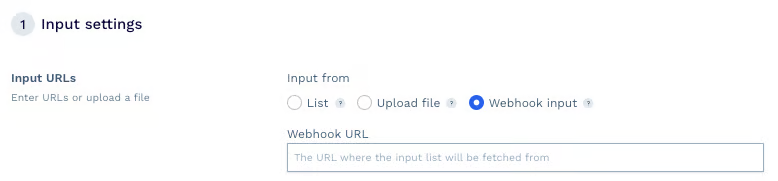
Webhook: Add a webhook URL where we poll the entries like URLs or search terms from. The file will be validated on the fly. This gives you a more flexible and dynamic way to update the pages and data you need.

Each term should appear on a new line, without commas.
Input for use-case specific project types:
Google
Search Results
Query string / keywords that a user wants to search for.
Maps
Query string / keywords that a user wants to search for.
Jobs
Query string / keywords that a user wants to search for.
News
Query string / keywords that a user wants to search for.
Shopping
Query string / keywords that a user wants to search for.
Amazon
Product page data
ASIN = Amazon Standard Identification Number. Please not that ASIN's are market specific (TLD). You can usually find the ASINs in the URL of an Amazon product (example: B07FTKQ97Q).
Search page results
Amazon Search query string.
Offers
ASIN = Amazon Standard Identification Number.
Walmart
Product page data
Walmart Product ID = You can find the product ID in the URL. Example: 5253396052 (/ip/5253396052).
Category Pages
Walmart category ID = You can find the walmart category ID in the URL. Example: 3944_1089430_37807 (/browse/3944_1089430_3780.
Search page results
Query string / keywords that a user wants to search for.
Reviews
Walmart Product ID = You can find the product ID in the URL. Example: 5253396052 (/ip/5253396052).
Ebay
Product page data
Ebay product ID = You can find the 12 digit ID in the URL. Example: 116506192782
(/itm/116506192782?).
Search page results
Query string / keywords that a user wants to search for.
Redfin
Single for Sale listings
URLs of the on sale listings.
Single for Rent listings
URLs of the for rent listings.
Listing search page
URLs of search page.
Agent search page
The URL has to be a Redfin Agent URL or a Redfin Partner Agent URL.
Parameters and filters
We support a list of parameters, that will improve the success of a job. Some parameters will increase the price for your job too. Be aware that not all parameters might be available with your plan! Read more about the credit costs here.
Activate premium residential and mobile IPs: Activate premium proxies. A simple request costs 10 API credits and 25 in combination with JavaScript rendering.
Activate advanced bypass mechanism: Activate advanced bypass for difficult-to-scrape domains. A request costs 30 API credits.
Disable follow redirects: Tells the API to not follow any possible redirects (enabled by default).
Activate JavaScript rendering: Activate if the targeted URLs require JS Rendering. We will fetch these pages using a headless browser.
Generate Screenshot: Enable to take screenshot of the target page. You can find the PNG in the
sa-screenshotresponse header.Activate retrying 404 responses: Activate to retry URLs if they responded with 404 error. Note: We advise you use that only if you are certain that the target website returns 'fake' 404s.
Parse results: Activate to receive your results as JSON for certain domains instead of plain HTML. Works with the following domains: Amazon, eBay, Google, Redfin and Walmart.
Country code: Activate country geo-targeting to use country specific proxies, for example US proxies. This parameter does not increase the cost.
Device type: Default is desktop. Choose 'Mobile' to enable Mobile UAs (User-Agent) with your requests and receive mobile results instead.
Max Cost: Enter a limit on the maximum API credits you'd like to spend per each individual scrape.
Last updated