> For the complete documentation index, see [llms.txt](https://docs.scraperapi.com/llms.txt). Markdown versions of documentation pages are available by appending `.md` to page URLs; this page is available as [Markdown](https://docs.scraperapi.com/data-pipeline/datapipeline-endpoints/how-to-use.md).
# How to use
To help you get started with the `DataPipeline API endpoints`, please review the following examples. These will guide you through the process of creating, managing and integrating your projects and jobs programmatically, ensuring a seamless access to this powerful feature.
* Choose the [endpoint](/data-pipeline/datapipeline-endpoints/endpoints-and-parameters.md#list-of-endpoints) for your desired action.
* Add the necessary [parameters](/data-pipeline/datapipeline-endpoints/endpoints-and-parameters.md#fields-parameters).
## Table of contents
### Create a New Project
{% hint style="danger" %} **Scheduling is enabled by default** **and configured to run the project a single time (just scrape once). To run the project on a schedule, add**** ****`scrapingInterval: {VALUE}`**** ****to your request. See available options** [**here**](/data-pipeline/datapipeline-endpoints/endpoints-and-parameters.md#fields-parameters)**.**
{% endhint %}
Example:
```shellscript
curl -X POST --data '{ "projectInput": {"type": "list", "list":
["https://www.amazon.com/AmazonBasics-3-Button-Wired-Computer-1-Pack/dp/B005EJH6RW/"] } }'
-H 'content-type: application/json'
'https://datapipeline.scraperapi.com/api/projects?api_key=xxxxxx'
```
Output:
```json
{
"id": 522,
"name": "Project created at 2024-05-10T16:04:28.263Z",
"schedulingEnabled": true,
"scrapingInterval": "weekly",
"createdAt": "2024-05-10T16:04:28.306Z",
"projectType": "urls",
"projectInput": {
"type": "list",
"list": [
"https://www.amazon.com/AmazonBasics-3-Button-Wired-Computer-1-Pack/dp/B005EJH6RW/"
]
},
"projectOutput": {
"type": "save"
},
"notificationConfig": {
"notifyOnSuccess": "never",
"notifyOnFailure": "with_every_run"
}
}
```
Except for `id` and the `createdAt` fields, everything can be specified during project creation.
### Specifying Parameters
This is what project creation looks like when additional parameters are specified
Example:
```shellscript
curl -X POST --data '{ "projectInput": {"type": "list", "list":
["https://www.amazon.com/AmazonBasics-3-Button-Wired-Computer-1-Pack/dp/B005EJH6RW/"] },
"apiParams": {"premium": true} }'
-H 'content-type: application/json'
'https://datapipeline.scraperapi.com/api/projects/?api_key=xxxxxx>'
```
Output:
```json
{
"id": 522,
"name": "Project created at 2024-05-10T16:04:28.263Z",
"schedulingEnabled": true,
"scrapingInterval": "weekly",
"createdAt": "2024-05-10T16:04:28.306Z",
"scheduledAt": "2024-05-12T19:00:00.211Z",
"projectType": "urls",
"apiParams": {
"premium": "true"
},
"projectInput": {
"type": "list",
"list": [
"https://www.amazon.com/AmazonBasics-3-Button-Wired-Computer-1-Pack/dp/B005EJH6RW/"
]
},
"projectOutput": {
"type": "save"
},
"notificationConfig": {
"notifyOnSuccess": "never",
"notifyOnFailure": "with_every_run"
}
}
```
### Updating Parameters Of An Existing Project
Example:
```shellscript
curl -X PATCH --data '{ "apiParams": {"premium": true} }'
-H 'content-type: application/json'
'https://datapipeline.scraperapi.com/api/projects/>/?api_key=xxxxxx'
```
Output:
```json
{
"id": 522,
"name": "Project created at 2024-05-10T16:04:28.263Z",
"schedulingEnabled": true,
"scrapingInterval": "weekly",
"createdAt": "2024-05-10T16:04:28.306Z",
"scheduledAt": "2024-05-12T11:12:17.211Z",
"projectType": "urls",
"apiParams": {
"premium": "true"
},
"projectInput": {
"type": "list",
"list": [
"https://www.amazon.com/AmazonBasics-3-Button-Wired-Computer-1-Pack/dp/B005EJH6RW/"
]
},
"projectOutput": {
"type": "save"
},
"notificationConfig": {
"notifyOnSuccess": "never",
"notifyOnFailure": "with_every_run"
}
}
```
### Specifying Project Type
Similarly to the DataPipeline GUI, you can specify a project type (e.g. Google Search) here as well. If not specified, `projectType` will be defaulted to URLs (for simple URL scraping).
Example:
```shellscript
curl -X POST --data '{ "name": "Google search project",
"projectInput": {"type": "list", "list": ["iPhone", "Android"] },
"projectType": "google_search"}'
-H 'content-type: application/json'
'https://datapipeline.scraperapi.com/api/projects?api_key=xxxxxx'
```
Output:
```json
{
"id": 525,
"name": "Google search project",
"schedulingEnabled": true,
"schedulingInterval": "weekly",
"createdAt": "2024-05-14T14:34:02.784Z",
"projectType": "google_search",
"projectInput": {
"type": "list",
"list": [
"iPhone",
"Android"
]
},
"notificationConfig": {
"notifyOnSuccess": "never",
"notifyOnFailure": "with_every_run"
}
}
```
### Specifying Project Input
Choose the source for providing lists of URLs, search terms, and other relevant data for your project:
-**A simple list** (this is the default)
-**Webhook Input** - With every run the system downloads the contents from the webhook, allowing you to update the URLs list, ASINs, etc. without interacting with ScraperAPI.
Example:
```bash
curl -v -X POST --data '{ "projectInput": {"type": "webhook_input", "url": "" } }'
-H 'content-type: application/json'
'https://datapipeline.scraperapi.com/api/projects?api_key=xxxxxx'
```
Output:
```json
{
"id": 524,
"name": "Project created at 2024-05-10T16:04:28.263Z",
"schedulingEnabled": true,
"scrapingInterval": "weekly",
"createdAt": "2024-06-26T12:42:31.654Z",
"scheduledAt": "2024-06-26T12:42:31.652Z",
"projectType": "urls",
"projectInput": {
"url": "https://webhook.site/d10de6ed-68fb-4874-9c0f-3c32bab2e1ef",
"type": "webhook_input"
},
"notificationConfig": {
"notifyOnSuccess": "never",
"notifyOnFailure": "with_every_run"
}
}
```
### Changing Output Format For SDE Project Types
The default output format is JSON, but you can opt for CSV if it better suits your needs for the **SDE** project types.
Example:
```bash
curl -v -X PATCH --data '{ "apiParams": {"outputFormat": "csv"} }'
-H 'content-type: application/json'
'https://datapipeline.scraperapi.com/api/projects//?api_key=xxxxxx'
```
Output:
```json
{
"id": 525,
"name": "Google search project",
"schedulingEnabled": true,
"schedulingInterval": "weekly",
"createdAt": "2024-06-26T10:26:40.840Z",
"projectType": "google_search",
"apiParams": {
"outputFormat": "csv"
},
"projectInput": {
"type": "list",
"list": [
"iPhone",
"Android"
]
},
"notificationConfig": {
"notifyOnSuccess": "never",
"notifyOnFailure": "with_every_run"
}
}
```
### Changing Scheduling Interval
Example:
```bash
curl -X PATCH --data '{ "scrapingInterval": "daily" }'
-H 'content-type: application/json'
'https://datapipeline.scraperapi.com/api/projects/?api_key=xxxxxx'
```
Output:
```json
{
"id": 522,
"name": "Project created at 2024-05-10T16:04:28.263Z",
"schedulingEnabled": true,
"scrapingInterval": "daily",
"createdAt": "2024-05-10T16:04:28.306Z",
"scheduledAt": "2024-05-10T19:00:00.211Z",
"projectType": "urls",
"projectInput": {
"type": "list",
"list": [
"https://www.amazon.com/AmazonBasics-3-Button-Wired-Computer-1-Pack/dp/B005EJH6RW/"
]
},
"projectOutput": {
"type": "save"
},
"notificationConfig": {
"notifyOnSuccess": "never",
"notifyOnFailure": "with_every_run"
}
}
```
### Creating a Project With a Custom Cron Scheduling
Cron is a time-based job scheduler. It allows users to schedule jobs to run periodically at fixed times, dates, or intervals. A cron expression consists of five fields that define when a job should execute:
* Minute (0-59)
* Hour (0-23)
* Day of the month (1-31)
* Month (1-12 or JAN-DEC)
* Day of the week (0-7 or SUN-SAT, where 0 and 7 represent Sunday)
For example, a cron expression "0 0 \* \* 1" means the job will run at midnight (00:00) every Monday (1 represents Monday in cron):
```bash
curl -X POST --data '{ "name": "Cron project",
"scheduingEnabled": true,
"projectInput": {"type": "list", "list":
["https://www.amazon.com/AmazonBasics-3-Button-Wired-Computer-1-Pack/dp/B005EJH6RW/"] },
"scrapingInterval": "0 0 * * 1" }'
-H 'content-type: application/json'
'https://datapipeline.scraperapi.com/api/projects?api_key=xxxxxx'
```
Output:
```json
{
"id": 522,
"name": "Project created at 2024-05-10T16:04:28.306Z",
"schedulingEnabled": true,
"scrapingInterval": "0 0 * * 1",
"createdAt": "2024-05-10T16:04:28.306Z",
"projectType": "urls",
"projectInput": {
"type": "list",
"list": [
"https://www.amazon.com/AmazonBasics-3-Button-Wired-Computer-1-Pack/dp/B005EJH6RW/"
]
},
"notificationConfig": {
"notifyOnSuccess": "never",
"notifyOnFailure": "with_every_run"
}
}
```
### Rescheduling The Project's Next Run Date
This works even with `schedulingEnabled` set to `false`, ensuring the project runs once.
```bash
curl -X PATCH --data '{ "scheduledAt": "2024-05-07T11:12:17.211Z" }'
-H 'content-type: application/json'
'https://datapipeline.scraperapi.com/api/projects/>?api_key=xxxxxx'
```
{% hint style="info" %}
If you want to schedule the project to run as soon as possibele you can use the **`now`** interval.
{% endhint %}
```bash
curl -v -X PATCH --data '{ "scheduledAt": "now" }'
-H 'content-type: application/json'
'https://datapipeline.scraperapi.com/api/projects/>?api_key=xxxxxx'
```
### Configuring Webhook Output
{% hint style="info" %}
If you are using webhook.site, it needs the content to be encoded as **multipart/form-data** so an extra parameter is used here.
{% endhint %}
#### Set the webhook output
Example:
```bash
curl -X POST --data '{ "projectInput": {"type": "list", "list":
["https://www.amazon.com/AmazonBasics-3-Button-Wired-Computer-1-Pack/dp/B005EJH6RW/"] },
"webhookOutput": {"url": "https://webhook.site/b58e4798-0bf8-44c8-ac2b-f416fffddd39",
"webhookEncoding": "multipart_form_data_encoding"} }'
-H 'content-type: application/json'
'https://datapipeline.scraperapi.com/api/projects/?api_key=xxxxxx'
```
Output:
```json
{
"id": 522,
"name": "Project created at 2024-05-10T16:04:28.263Z",
"schedulingEnabled": true,
"schedulingInterval": "weekly",
"createdAt": "2024-05-10T16:04:28.306Z",
"projectType": "urls",
"projectInput": {
"type": "list",
"list": [
"https://www.amazon.com/AmazonBasics-3-Button-Wired-Computer-1-Pack/dp/B005EJH6RW/"
]
},
"projectOutput": {
"type": "webhook"
},
"notificationConfig": {
"notifyOnSuccess": "never",
"notifyOnFailure": "with_every_run"
}
}
```
#### Unset the webhook output
```bash
curl -X PATCH --data '{"webhookOutput": null}'
-H 'content-type: application/json'
'https://datapipeline.scraperapi.com/api/projects/>/?api_key=xxxxxx'
```
### Configuring Notifications
Define when you would like to receive email notifications for completed jobs. This can be done at project level creation or eddited later on. Both `notifyOnSuccess` and `notifyOnFailure` have to be specified.
Example (**on project creation**):
```bash
curl -X POST --data '{ "name": "Google search project",
"projectInput": {"type": "list", "list": ["iPhone", "Android"] },
"projectType": "google_search",
"notificationConfig": {"notifyOnSuccess": "weekly", "notifyOnFailure": "weekly"}}'
-H 'Content-Type: application/json'
'https://datapipeline.scraperapi.com/api/projects/?api_key=xxxxxx'
```
Output:
```json
{
"id": 524,
"name": "Google search project",
"schedulingEnabled": true,
"scrapingInterval": "weekly",
"createdAt": "2024-05-10T21:04:28.306Z",
"scheduledAt": "2024-05-10T21:04:28.306Z",
"projectType": "google_search",
"projectInput": {
"type": "list",
"list": [
"iPhone",
"Android"
]
},
"notificationConfig": {
"notifyOnSuccess": "weekly",
"notifyOnFailure": "weekly"
}
}
```
Example (**updating existing project**):
```bash
curl -X PATCH --data '{ "name": "Google search project",
"projectInput": {"type": "list", "list": ["iPhone", "Android"] },
"projectType": "google_search",
"notificationConfig": {"notifyOnSuccess": "weekly", "notifyOnFailure": "weekly"}}'
-H 'Content-Type: application/json'
'https://datapipeline.scraperapi.com/api/projects/524/?api_key=xxxxxx'
```
Output:
```json
{
"id": 524,
"name": "Google search project",
"schedulingEnabled": true,
"scrapingInterval": "weekly",
"createdAt": "2024-05-10T21:04:28.306Z",
"scheduledAt": "2024-05-10T21:04:28.306Z",
"projectType": "google_search",
"projectInput": {
"type": "list",
"list": [
"iPhone",
"Android"
]
},
"notificationConfig": {
"notifyOnSuccess": "weekly",
"notifyOnFailure": "weekly"
}
}
```
### Check The List of Jobs For a Project
You can list project's jobs with this endpoint:
```shellscript
curl https://datapipeline.scraperapi.com/api/projects//jobs?api_key=xxxxxx
```
### Cancel a Job Within a Project
Canceling a job within a project allows you to manage projects effectively by halting specific jobs that are no longer needed.
Example:
```bash
curl -X DELETE https://datapipeline.scraperapi.com/api/projects/522/jobs/6f933838-ec57-43cd-8e49-d8652716ddf8?api_key=xxxxx
```
Once you delete the job, the system will respond back with `ok` if the command was successful
If we now lookup that same project, we'll see the job status is `cancelled`:
```json
{
"id": "6f933838-ec57-43cd-8e49-d8652716ddf8",
"projectId": 522,
"status": "cancelled",
"createdAt": "2024-05-10T16:04:28.306Z",
"finishedAt": "2024-05-10T20:04:28.306Z",
"successfulTasks": 0,
"failedTasks": 0,
"inProgressTasks": 0,
"inProgressTasksWithAttempts": 0,
"cancelledTasks": 0,
"credits": 0,
"resultUrl": "https://datapipeline.scraperapi.com/jobs/6f933838-ec57-43cd-8e49-d8652716ddf8/result",
"errorReportUrl": "https://datapipeline.scraperapi.com/jobs/6f933838-ec57-43cd-8e49-d8652716ddf8/errorreport"
}
```
### Archiving a Project
To archive an existing project, just send the following request:
Example:
```bash
curl -X DELETE https://datapipeline.scraperapi.com/api/projects/525?api_key=xxxxxxxx
```
When you try to look up that project now, the system will return `Project not found`
```bash
Project not found
```
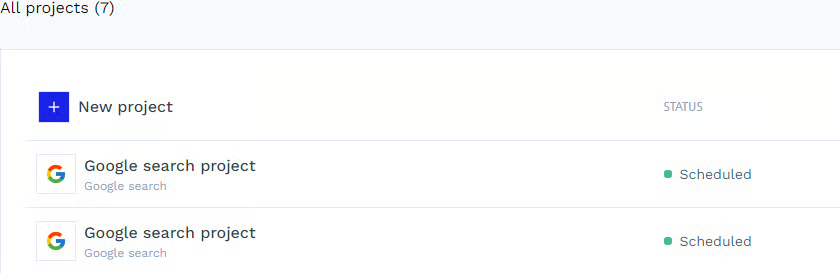
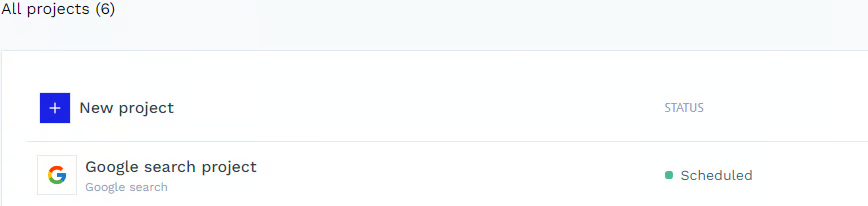
These changes are also visible on the Dashboard, under the DataPipeline Projects list.
Before (7 Projects in total):
After (6 Projects in total):
### Error Messages
```javascript
// Spelling mistakes in body:
"name": "BAD_REQUEST",
"message": "Invalid project configuration: /projectType: must be equal to one of the allowed values",
"status": 400,
"errors": []
```
```javascript
// Project does not exist:
Error
NOT_FOUND: Project 624 of user 231516 is not found
    at new Exception (/app/node_modules/@tsed/exceptions/lib/cjs/core/Exception.js:55:15)
    at new ClientException (/app/node_modules/@tsed/exceptions/lib/cjs/core/ClientException.js:8:9)
    at new NotFound (/app/node_modules/@tsed/exceptions/lib/cjs/clientErrors/NotFound.js:8:9)
    at HostedScraperExceptionFilter.catch (/app/build/filters/HostedScraperException.filter.js:16:19)
    at PlatformExceptions.catch (/app/node_modules/@tsed/platform-exceptions/lib/cjs/services/PlatformExceptions.js:35:48)
    at /app/node_modules/@tsed/platform-express/lib/cjs/components/PlatformExpress.js:74:56
    at Layer.handle_error (/app/node_modules/express/lib/router/layer.js:71:5)
    at trim_prefix (/app/node_modules/express/lib/router/index.js:326:13)
    at /app/node_modules/express/lib/router/index.js:286:9
    at Function.process_params (/app/node_modules/express/lib/router/index.js:346:12)
```
```javascript
// Job not found:
{
"name": "NOT_FOUND",
"message": "Resource \"/api/projects/524/jobs/a4ed0080-1083-4889-9ad0-adee0503e542\" not found",
"status": 404,
"errors": []
}
```
---
# Agent Instructions
This documentation is published with GitBook. GitBook is the documentation platform designed so that both humans and AI agents can read, navigate, and reason over technical content effectively. Learn more at gitbook.com.
## Querying This Documentation
If you need additional information that is not directly available in this page, you can query the documentation by asking a question.
Perform an HTTP GET request on the following URL with the `ask` and `goal` query parameters:
```
GET https://docs.scraperapi.com/data-pipeline/datapipeline-endpoints/how-to-use.md?ask=&goal=
```
`ask` is the immediate question: it should be specific, self-contained, and written in natural language.
`goal` is what the user is ultimately trying to achieve, the reason they need the answer. Sharing it helps GitBook give you a better, more relevant answer. A goal is most helpful when it describes the outcome the user wants rather than restating the question. For example, with `ask=how do I create an API token`, a goal like `automate deployments from our CI pipeline` lets GitBook tailor the answer to that use case.
The response will contain a direct answer to the question and relevant excerpts and sources from the documentation.
Use this mechanism when the answer is not explicitly present in the current page, you need clarification or additional context, or you want to retrieve related documentation sections.